
from组件
目录
- 一.生成页面可用的 HTML标签
- 二.对用户提交的数据进行校验
- 三. form 综合示例:
- 四. modelform(自动根据字段生成表单)
- 五.modelformset
1.form 所有内置字段

Field
    required=True,               是否允许为空
    widget=None,                 HTML插件
    label=None,                  用于生成Label标签或显示内容
    initial=None,                初始值
    help_text='',                帮助信息(在标签旁边显示)
    error_messages=None,         错误信息                   {'required': '不能为空', 'invalid': '格式错误'}
    validators=[],               自定义验证规则
    localize=False,              是否支持本地化
    disabled=False,              是否可以编辑
    label_suffix=None            Label内容后缀

CharField(Field)
    max_length=None,             最大长度
    min_length=None,             最小长度
    strip=True                   是否移除用户输入空白

IntegerField(Field)
    max_value=None,              最大值
    min_value=None,              最小值

FloatField(IntegerField)
    ...

DecimalField(IntegerField)
    max_value=None,              最大值
    min_value=None,              最小值
    max_digits=None,             总长度
    decimal_places=None,         小数位长度

BaseTemporalField(Field)
    input_formats=None          时间格式化

DateField(BaseTemporalField)    格式:2015-09-01
TimeField(BaseTemporalField)    格式:11:12
DateTimeField(BaseTemporalField)格式:2015-09-01 11:12

DurationField(Field)            时间间隔:%d %H:%M:%S.%f
    ...

RegexField(CharField)
    regex,                      自定制正则表达式
    max_length=None,            最大长度
    min_length=None,            最小长度
    error_message=None,         忽略,错误信息使用 error_messages={'invalid': '...'}

EmailField(CharField)
    ...

FileField(Field)
    allow_empty_file=False     是否允许空文件

ImageField(FileField)
    ...
    注:需要PIL模块,pip3 install Pillow
    以上两个字典使用时,需要注意两点:
        - form表单中 enctype="multipart/form-data"
        - view函数中 obj = MyForm(request.POST, request.FILES)

URLField(Field)
    ...

BooleanField(Field)
    ...

NullBooleanField(BooleanField)
    ...

ChoiceField(Field)
    ...
    choices=(),                选项,如:choices = ((0,'上海'),(1,'北京'),)
    required=True,             是否必填
    widget=None,               插件,默认select插件
    label=None,                Label内容
    initial=None,              初始值
    help_text='',              帮助提示

ModelChoiceField(ChoiceField)
    ...                        django.forms.models.ModelChoiceField
    queryset,                  # 查询数据库中的数据
    empty_label="---------",   # 默认空显示内容
    to_field_name=None,        # HTML中value的值对应的字段
    limit_choices_to=None      # ModelForm中对queryset二次筛选

ModelMultipleChoiceField(ModelChoiceField)
    ...                        django.forms.models.ModelMultipleChoiceField

TypedChoiceField(ChoiceField)
    coerce = lambda val: val   对选中的值进行一次转换
    empty_value= ''            空值的默认值

MultipleChoiceField(ChoiceField)
    ...

TypedMultipleChoiceField(MultipleChoiceField)
    coerce = lambda val: val   对选中的每一个值进行一次转换
    empty_value= ''            空值的默认值

ComboField(Field)
    fields=()                  使用多个验证,如下:即验证最大长度20,又验证邮箱格式
        fields.ComboField(fields=[fields.CharField(max_length=20), fields.EmailField(),])

MultiValueField(Field)
    PS: 抽象类,子类中可以实现聚合多个字典去匹配一个值,要配合MultiWidget使用

SplitDateTimeField(MultiValueField)
    input_date_formats=None,   格式列表:['%Y--%m--%d', '%m%d/%Y', '%m/%d/%y']
    input_time_formats=None    格式列表:['%H:%M:%S', '%H:%M:%S.%f', '%H:%M']

FilePathField(ChoiceField)     文件选项,目录下文件显示在页面中
    path,                      文件夹路径
    match=None,                正则匹配
    recursive=False,           递归下面的文件夹
    allow_files=True,          允许文件
    allow_folders=False,       允许文件夹
    required=True,
    widget=None,
    label=None,
    initial=None,
    help_text=''

GenericIPAddressField
    protocol='both',           both,ipv4,ipv6支持的IP格式
    unpack_ipv4=False          解析ipv4地址,如果是::ffff:192.0.2.1时候,可解析为192.0.2.1, PS:protocol必须为both才能启用

SlugField(CharField)           数字,字母,下划线,减号(连字符)
    ...

UUIDField(CharField)           uuid类型
复制代码

内置字段
2.form常用字段和插件
① initial (初始值 input框里面的初始值)
class LoginForm(forms.Form):
    username = forms.CharField(
        min_length=8,
        label="用户名",
        initial="张三"  # 设置默认值
    )
    pwd = forms.CharField(min_length=6, label="密码")
②error_messages (重写错误信息)
class LoginForm(forms.Form):
    username = forms.CharField(
        min_length=8,
        label="用户名",
        initial="张三",
        error_messages={
            "required": "不能为空",
            "invalid": "格式错误",
            "min_length": "用户名最短8位"
        }
    )
    pwd = forms.CharField(min_length=6, label="密码")
③ password
class LoginForm(forms.Form):
    ...
    pwd = forms.CharField(
        min_length=6,
        label="密码",
        widget=forms.widgets.PasswordInput(attrs={'class': 'c1'}, render_value=True)
    )
④ radioselect (单radio值为字符串)
class LoginForm(forms.Form):
    username = forms.CharField(  #其他选择框或者输入框,基本都是在这个CharField的基础上通过插件来搞的
        min_length=8,
        label="用户名",
        initial="张三",
        error_messages={
            "required": "不能为空",
            "invalid": "格式错误",
            "min_length": "用户名最短8位"
        }
    )
    pwd = forms.CharField(min_length=6, label="密码")
    gender = forms.fields.ChoiceField(
        choices=((1, "男"), (2, "女"), (3, "保密")),
        label="性别",
        initial=3,
        widget=forms.widgets.RadioSelect()
    )
⑤ 单选 select
class LoginForm(forms.Form):
    ...
    hobby = forms.fields.ChoiceField(
        choices=((1, "篮球"), (2, "足球"), (3, "双色球"), ),
        label="爱好",
        initial=3,
        widget=forms.widgets.Select()
    )
⑥多选select
class LoginForm(forms.Form):
    ...
    hobby = forms.fields.MultipleChoiceField(
        choices=((1, "篮球"), (2, "足球"), (3, "双色球"), ),
        label="爱好",
        initial=[1, 3],
        widget=forms.widgets.SelectMultiple()
    )
⑦ 单选 checkbox
class LoginForm(forms.Form):
    ...
    keep = forms.fields.ChoiceField(
        label="是否记住密码",
        initial="checked",
        widget=forms.widgets.CheckboxInput()
    )
⑧ 多选 checkbox
class LoginForm(forms.Form):
    ...
    hobby = forms.fields.MultipleChoiceField(
        choices=((1, "篮球"), (2, "足球"), (3, "双色球"),),
        label="爱好",
        initial=[1, 3],
        widget=forms.widgets.CheckboxSelectMultiple()
    )
⑨choice (字段注意事项)
方式一:
from django.forms import Form
from django.forms import widgets
from django.forms import fields

class MyForm(Form):

    user = fields.ChoiceField(
        # choices=((1, '上海'), (2, '北京'),),
        initial=2,
        widget=widgets.Select
    )

    def __init__(self, *args, **kwargs):
        super(MyForm,self).__init__(*args, **kwargs)
        # self.fields['user'].choices = ((1, '上海'), (2, '北京'),)
        # 或
        self.fields['user'].choices = models.Classes.objects.all().values_list('id','caption')
方式二:
from django import forms
from django.forms import fields
from django.forms import models as form_model

class FInfo(forms.Form):
    authors = form_model.ModelMultipleChoiceField(queryset=models.NNewType.objects.all())  # 多选
    # authors = form_model.ModelChoiceField(queryset=models.NNewType.objects.all())  # 单选
二.对用户提交的数据进行校验
1.RegexValidator 验证器
from django.forms import Form
from django.forms import widgets
from django.forms import fields
from django.core.validators import RegexValidator

class MyForm(Form):
    user = fields.CharField(
        validators=[RegexValidator(r'^[0-9]+$', '请输入数字'),     RegexValidator(r'^159[0-9]+$', '数字必须以159开头')],
    )
2.自定义验证函数
import re
from django.forms import Form
from django.forms import widgets
from django.forms import fields
from django.core.exceptions import ValidationError

# 自定义验证规则
def mobile_validate(value):
    mobile_re = re.compile(r'^(13[0-9]|15[012356789]|17[678]|18[0-9]|14[57])[0-9]{8}$')
    if not mobile_re.match(value):
        raise ValidationError('手机号码格式错误')  #自定义验证规则的时候,如果不符合你的规则,需要自己发起错误

class PublishForm(Form):

    title = fields.CharField(max_length=20,
           min_length=5,
           error_messages={'required': '标题不能为空',
                     'min_length': '标题最少为5个字符',
                      'max_length': '标题最多为20个字符'},
           widget=widgets.TextInput(attrs={'class': "form-control",
                      'placeholder': '标题5-20个字符'}))

    # 使用自定义验证规则
    phone = fields.CharField(validators=[mobile_validate, ],
          error_messages={'required': '手机不能为空'},
           widget=widgets.TextInput(attrs={'class': "form-control",
                     'placeholder': u'手机号码'}))

    email = fields.EmailField(required=False,
           error_messages={'required': u'邮箱不能为空','invalid': u'邮箱格式错误'},
            widget=widgets.TextInput(attrs={'class': "form-control", 'placeholder': u'邮箱'}))
3.钩子方法
① 局部钩子
我们在Fom类中定义 clean_字段名() 方法,就能够实现对特定字段进行校验。
class LoginForm(forms.Form):
    username = forms.CharField(
        min_length=8,
        label="用户名",
        initial="张三",
        error_messages={
            "required": "不能为空",
            "invalid": "格式错误",
            "min_length": "用户名最短8位"
        },
        widget=forms.widgets.TextInput(attrs={"class": "form-control"})
    )
    ...
    # 定义局部钩子,用来校验username字段,之前的校验股则还在,给你提供了一个添加一些校验功能的钩子
    def clean_username(self):
        value = self.cleaned_data.get("username")
        if "666" in value:
            raise ValidationError("光喊666是不行的")
        else:
            return value
②全局钩子 (如在 '确认密码' 中用到)
我们在Fom类中定义 clean() 方法,就能够实现对字段进行全局校验,字段全部验证完,
局部钩子也全部执行完之后,执行这个全局钩子校验。
class LoginForm(forms.Form):
    ...
    password = forms.CharField(
        min_length=6,
        label="密码",
        widget=forms.widgets.PasswordInput(attrs={'class': 'form-control'}, render_value=True)
    )
    re_password = forms.CharField(
        min_length=6,
        label="确认密码",
        widget=forms.widgets.PasswordInput(attrs={'class': 'form-control'}, render_value=True)
    )
    ...
    # 定义全局的钩子,用来校验密码和确认密码字段是否相同,执行全局钩子的时候,cleaned_data里面肯定是有了通过前面验证的所有数据
    def clean(self):
        password_value = self.cleaned_data.get('password')
        re_password_value = self.cleaned_data.get('re_password')
        if password_value == re_password_value:
            return self.cleaned_data #全局钩子要返回所有的数据
        else:
            self.add_error('re_password', '两次密码不一致') #在re_password这个字段的错误列表中加上一个错误,并且clean_data里面会自动清除这个re_password的值,所以打印clean_data的时候会看不到它
            raise ValidationError('两次密码不一致')
三. form 综合示例:
1. 使用form组件建立HTML标签,可在views.py文件中
也可在appo1 下建立一个.py文件(更整洁)

2.在views.py 文件中
from django.shortcuts import render
from app01 import models
# Create your views here.
from app01 import form_test      #引入form 表单建立验证的文件

def register(request):
    form_obj = form_test.MyForm()   #引入建立form表单的对象
    if request.method == "GET":
        return render(request,'register_page.html',{'form_obj':form_obj})
    else:
        #用户提交过来的数据
        # print(request.POST)
        form_obj = form_test.MyForm(request.POST)
        # print(form_obj.is_valid())
        # print(form_obj.cleaned_data)
        print('>>>>',form_obj.fields)
        if form_obj.is_valid():
            print(form_obj.cleaned_data) #获取验证通过的数据
        # else:
        #     print(form_obj.errors.as_data()) #拿错误信息
        # print(form_obj.errors.as_data())
        # print(form_obj)
        # username = request.POST.get('username')
        # password = request.POST.get('password')
        # print(username,password)
        # if username == ''
        # print(form_obj.cleaned_data)
        return render(request,'register_page.html',{'form_obj':form_obj})
3.在form_test.py 文件中
from django import forms
from django.forms import ValidationError
from django.core.validators import RegexValidator
from app01 import models
import re

def mobile_validate(value):
    mobile_re = re.compile(r'^1[0-9]*$')
    if not mobile_re.match(value):
        raise ValidationError('手机号码格式错误')
        #自定义验证规则的时候,如果不符合你的规则,需要自己发起错误
class MyForm(forms.Form):
    uname = forms.CharField(
        required=True,
        label='用户名:',
        # initial='张三',  #输入框中的默认值
        min_length=6,    #最小长度
        strip=True,      #去掉两侧空白
        max_length=8,     #最大长度
        # validators=[mobile_validate,],
        validators=[RegexValidator(r'^[0-9]+$', '请输入数字'), RegexValidator(r'^159[0-9]+$', '数字必须以159开头')],
        # disabled=True,
        error_messages={
            'required':'用户名不能为空',
            'min_length':'你太短了,',
            'max_length':'太长了',
        },
        # widget=forms.TextInput(attrs={'class':'form-control'}),
        help_text='请输入用户名,不能短于6个字符,不能超过8个字符!'
    )
    pword = forms.CharField(
        label='密码:',
        # required=False,
        # widget=forms.PasswordInput(attrs={'class':'form-control'}),
        widget=forms.PasswordInput(),
    )
    re_pword = forms.CharField(
        label='确认密码:',
        # required=False,
        # widget=forms.PasswordInput(attrs={'class':'form-control'}),
        widget=forms.PasswordInput(),
    )
    #局部钩子,在自定义的form类里面针对每个字段都可以写一些定制的规则,def clean_字段名(self):
    def clean_pword(self):
        data1 = self.cleaned_data.get('pword')
        if '666' in data1:
            raise ValidationError('你还不够6,包含敏感词汇')
        else:
            return data1
    # def clean_uname(self):
    #
    #     data1 = self.cleaned_data.get('uname')
    #     if '666' in data1:
    #         raise ValidationError('你还不够6,包含敏感词汇')
    #     else:
    #         return data1

        # data1 = self.cleaned_data.get('pword')
        # data2 = self.cleaned_data.get('re_pword')
        # if data1 == data2:

  #全局钩子
    def clean(self):
        p1 = self.cleaned_data.get('pword')
        p2 = self.cleaned_data.get('re_pword')
        if p1 == p2:
            return self.cleaned_data
        else:
            self.add_error('re_pword','和你上面输入的密码不同@@@')
            # raise ValidationError('两次输入的密码不同!!!')
    # sex = forms.CharField(
    #     label='请选择性别:',
    #     widget=forms.RadioSelect(
    #         choices=((1,'男'),(2,'女'),('3','二椅子')),
    #     )
    # )
    # sex = forms.ChoiceField(
    #
    #     choices=(('1', '男'), ('2', '女'), ('3', '二椅子')),
    #     # widget=forms.RadioSelect,
    #     # widget=forms.CheckboxSelectMultiple,
    #     # widget=forms.CheckboxSelectMultiple,
    #     widget=forms.SelectMultiple,
    #
    # )

    userinfo = forms.ModelMultipleChoiceField(
        label='请选择作者:',
        queryset=models.Author.objects.all(),
    )

    email = forms.EmailField()
4.在 .html 文件中
{% load static %}
<!DOCTYPE html>
<html lang="zh-CN">
<head>
    <meta charset="utf-8">
    <meta http-equiv="X-UA-Compatible" content="IE=edge">
    <meta name="viewport" content="width=device-width, initial-scale=1">
    <title>Bootstrap 101 Template</title>
    <link rel="stylesheet" href="{% static 'bootstrap/css/bootstrap.min.css' %}">

</head>
<body>

<form action="{% url 'register' %}" method="post" novalidate>  # novalidate : 自定义错误提示
    {% csrf_token %}
{#    {{ form_obj.as_p }}#}

{#    <p>#}
{#         所有字段错误汇总#}
{#        {{ form_obj.errors }}#}
{#    </p>#}

    <div>
        <div>
            {{ form_obj.uname.label }}    #引入  '用户民'
            {{ form_obj.uname }}       #引入输入框

            <span style="color: red;font-size: 12px;">
                {{ form_obj.uname.errors.0 }}   #错误提示
            </span>
        </div>
        <div>
            {{ form_obj.uname.help_text }}    #输入提示
        </div>
    </div>
    <p>
        {{ form_obj.pword.label }}
        {{ form_obj.pword }}
        <span style="color: red;font-size: 12px;">
            {{ form_obj.pword.errors.0 }}
        </span>
    </p>
    <p>
        {{ form_obj.re_pword.label }}      #确认密码
        {{ form_obj.re_pword }}
        <span style="color: red;font-size: 12px;">
            {{ form_obj.re_pword.errors.0 }}
        </span>
    </p>

    <p>
       ------ {{ form_obj.errors }}
    </p>
{#    <p>#}
{#        {{ form_obj.sex.label }}#}
{#        {{ form_obj.sex }}#}
{#        <span style="color: red;font-size: 12px;">#}
{#            {{ form_obj.sex.errors.0 }}#}
{#        </span>#}
{#    </p>#}
    <p>
        {{ form_obj.userinfo.label }}
        {{ form_obj.userinfo }}
        {{ form_obj.userinfo.errors.0 }}
    </p>
    <p>
        {{ form_obj.email.label }}
        {{ form_obj.email }}
        {{ form_obj.email.errors.0 }}
    </p>

    <p>
        <button>提交</button>
    </p>

</form>

</body>
</html>
四. modelform(自动根据字段生成表单)
1.常用属性
class XXXModelForm(ModelForm)
    a.  class Meta:
            model,                           # 对应Model的
            fields=None,                     # 字段
            exclude=None,                    # 排除字段
            labels=None,                     # 提示信息
            help_texts=None,                 # 帮助提示信息
            widgets=None,                    # 自定义插件
            error_messages=None,             # 自定义错误信息(整体错误信息from django.core.exceptions import NON_FIELD_ERRORS)
            field_classes=None               # 自定义字段类 (也可以自定义字段)
            localized_fields=('birth_date',) # 本地化,如:根据不同时区显示数据
            如:
                数据库中
                    2016-12-27 04:10:57
                setting中的配置
                    TIME_ZONE = 'Asia/Shanghai'
                    USE_TZ = True
                则显示:
                    2016-12-27 12:10:57
    b. 验证执行过程
        is_valid -> full_clean -> 钩子 -> 整体错误

    c. 字典字段验证
def clean_字段名(self): # 可以抛出异常 # from django.core.exceptions import ValidationError return "新值" d. 用于验证 model_form_obj = XXOOModelForm() model_form_obj.is_valid() model_form_obj.errors.as_json() model_form_obj.clean() model_form_obj.cleaned_data e. 用于创建 model_form_obj = XXOOModelForm(request.POST) #### 页面显示,并提交 ##### # 默认保存多对多 obj = form.save(commit=True) # 不做任何操作,内部定义 save_m2m(用于保存多对多) obj = form.save(commit=False) obj.save() # 保存单表信息 obj.save_m2m() # 保存关联多对多信息 f. 用于更新和初始化 obj = model.tb.objects.get(id=1) model_form_obj = XXOOModelForm(request.POST,instance=obj) ...2.示例
在项目中新建立forms.py 文件
from django import forms
# 注册的form
class RegForm(forms.ModelForm):
    password = forms.CharField(widget=forms.PasswordInput, label='密码', min_length=6)  # 重写默认字段
    re_password = forms.CharField(widget=forms.PasswordInput, label='确认密码', min_length=6)  # 新增字段

    class Meta:
        model = models.UserProfile  # 指定model
        fields = '__all__'  #所有字段 ['username','password']  # 指定字段
        exclude = ['is_active']

        labels = {
            'username': '用户名' #  两种设置label方式,另一种是设置  verbose_name=' '
     widgets = {          'username': forms.TextInput(attrs={'class': 'form-control', 'placeholder': '用户名'}),          # 'password': forms.PasswordInput(attrs={'class': 'form-control'})

              }      error_messages = {

          'min_length': '不能少于6位'      }

  def __init__(self, *args, **kwargs):      super().__init__(*args, **kwargs)      # 自定义操作      for field in self.fields.values():                   field.widget.attrs.update({'class': 'form-control'})

 def clean(self):   # 全局钩子      pwd = self.cleaned_data.get('password', '')      re_pwd = self.cleaned_data.get('re_password', '')

      if pwd == re_pwd:          # 密码加密          md5 = hashlib.md5()          md5.update(pwd.encode('utf-8'))          pwd = md5.hexdigest()

          self.cleaned_data['password'] = pwd          return self.cleaned_data      # 两次密码不一致      self.add_error('re_password', '两次密码不一致!!')      raise ValidationError('两次密码不一致')
在view.py中进行实例化(操作更简单)
from crm.froms import RegForm #引入文件
# 注册
def reg(request):
    # 判断请求方式
    if request.method == 'POST':
        form_obj = RegForm(request.POST)
        # 对数据进行校验
        if form_obj.is_valid():
            form_obj.save()
            return redirect(reverse('login'))

    else:
        form_obj = RegForm()  #实例化

    return render(request, 'reg.html', {'form_obj': form_obj})
1.对多个对象直接进行编辑和保存
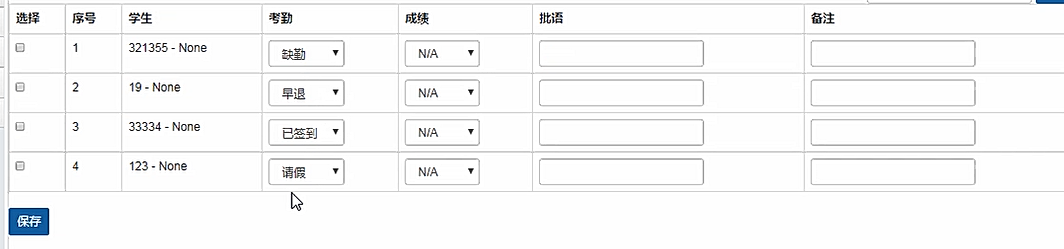
2.示例:
①在forms.py 文件中(与modelform相同)
from django.core.exceptions import ValidationError
# BootstropFormclass BSForm(forms.ModelForm): def __init__(self, *args, **kwargs): super().__init__(*args, **kwargs) # 自定义操作 for field in self.fields.values(): if not isinstance(field, forms.BooleanField): # field.widget.attrs['class'] = 'form-control' field.widget.attrs.update({'class': 'form-control'})
# 学习记录的formclass StudyRecordForm(BSForm):    class Meta:        model = models.StudyRecord        fields = "__all__"

    def clean_note(self):    #局部钩子        note = self.cleaned_data.get('note', '')        if not note:            note = ''        if '666' in note:            raise ValidationError('不能太6')

        return note
②在view.py 文件中
from crm.froms import StudyRecordForm
from django.forms import modelformset_factory
# 展示学习记录
def study_record_list(request, course_record_id):
    FormSet = modelformset_factory(models.StudyRecord, StudyRecordForm, extra=0)
                        #注意格式
    formset = FormSet(queryset=models.StudyRecord.objects.filter(course_record_id=course_record_id))
                        #注意格式
    if request.method == 'POST':
        formset = FormSet(request.POST)
        if formset.is_valid():
            formset.save()
            return redirect(reverse('study_record_list', args=(course_record_id,)))

    return render(request, 'teacher/study_record_list.html', {'formset': formset})
③.在 . html 文件中
{% extends 'layout.html' %}

{% block content %}
    {% load my_tags %}
    <div>

    </div>

    <form action="" method="get" class="form-inline pull-right">

        <input type="text" name="query" class="form-control">
        <button class="btn btn-sm btn-primary">搜索</button>

    </form>
    <form action="" method="post" class="form-inline">
        {% csrf_token %}
        {{ formset.management_form }}  #必带

        <table class="table table-bordered table-hover">

            <thead>
            <tr>
                <th>选择</th>
                <th>序号</th>
                <th>学生</th>
                <th>考勤</th>
                <th>成绩</th>
                <th>批语</th>
                <th>备注</th>
            </tr>
            </thead>
            <tbody>

            {% for form in formset %}

                <tr>
                    <td>
                        <input type="checkbox" name="ids" value="{{ course_record.pk }}">
                    </td>
                    {{ form.id }}    #必带
                    <td>{{ forloop.counter }}</td>
                    <td>{{ form.instance.student }}</td>
                    <td>{{ form.attendance }}</td>
                    <td>{{ form.score }}</td>
                    <td>{{ form.homework_note }}</td>
                    <td>{{ form.note }}</td>
                    <span style="display: none"> {{ form.student }} {{ form.course_record }} </span>
                                        #必带
                </tr>

            {% endfor %}

            </tbody>
        </table>
        <button class="btn btn-sm btn-primary">保存</button>
    </form>

{% endblock %}
from组件的更多相关文章
- ExtJS 4.2 评分组件
上一文章是扩展ExtJS自带的Date组件.在这里将创建一个评分组件. 目录 1. 介绍 2. 示例 3. 资源下载 1. 介绍 代码参考的是 Sencha Touch 2上的一个RatingStar ...
- react组件的生命周期
写在前面: 阅读了多遍文章之后,自己总结了一个.一遍加强记忆,和日后回顾. 一.实例化(初始化) var Button = React.createClass({ getInitialState: f ...
- react-router 组件式配置与对象式配置小区别
1. react-router 对象式配置 和 组件式配置 组件式配置(Redirect) ----对应---- 对象式配置(onEnter钩子) IndexRedirect -----对应-- ...
- Angular2入门系列教程3-多个组件,主从关系
上一篇 Angular2项目初体验-编写自己的第一个组件 好了,前面简单介绍了Angular2的基本开发,并且写了一个非常简单的组件,这篇文章我们将要学会编写多个组件并且有主从关系 现在,假设我们要做 ...
- Angular2入门系列教程2-项目初体验-编写自己的第一个组件
上一篇 使用Angular-cli搭建Angular2开发环境 Angular2采用组件的编写模式,或者说,Angular2必须使用组件编写,没有组件,你甚至不能将Angular2项目启动起来 紧接着 ...
- .NET Core 首例 Office 开源跨平台组件(NPOI Core)
前言 最近项目中,需要使用到 Excel 导出,找了一圈发现没有适用于 .NET Core的,不依赖Office和操作系统限制的 Office 组件,于是萌生了把 NPOI 适配并移植到 .NET C ...
- .NetCore中的日志(1)日志组件解析
.NetCore中的日志(1)日志组件解析 0x00 问题的产生 日志记录功能在开发中很常用,可以记录程序运行的细节,也可以记录用户的行为.在之前开发时我一般都是用自己写的小工具来记录日志,输出目标包 ...
- BootStrap_02之全局样式及组件
1.BootStrap指定的四种屏幕尺寸: ①超大PC屏幕--lg(large):w>=1200px: ②中等PC屏幕--md(medium):1200px>w>=992px: ③P ...
- ExtJS 4.2 组件介绍
目录 1. 介绍 1.1 说明 1.2 组件分类 1.3 组件名称 1.4 组件结构 2. 组件的创建方式 2.1 Ext.create()创建 2.2 xtype创建 1. 介绍 1.1 说明 Ex ...
- ExtJS 4.2 组件的查找方式
组件创建了,就有方法找到这些组件.在DOM.Jquery都有各自的方法查找元素/组件,ExtJS也有自己独特的方式查找组件.元素.本次从全局查找.容器内查找.form表单查找.通用组件等4个方面介绍组 ...
随机推荐
- springboot 热部署
1 pom文件添加 <dependency> <groupId>org.springframework.boot</groupId> <artifactId& ...
- servlet操作本地文件汇总: 判断文件是否存在;文件重命名;文件复制; 获取文件属性信息,转成Json对象; 获取指定类型的文件; 查找替换.txt中的文本
package servlet; import java.io.BufferedReader; import java.io.File; import java.io.FileInputStream; ...
- 初读"Thinking in Java"读书笔记之第三章 --- 操作符
更简单的打印语句 导入自己编写的静态类库,即可使用print();打印 使用Java操作符 操作符:+,-,*,/,=,==,!=,+=,?:,%等 几乎所有操作符都只能操作"基本类型&qu ...
- enquire.js-响应css媒体查询的轻量级javascript库
轻量,没有依赖. 安装: npm install enquire.js API: enquire.register(mediaQuery, handler). mediaQuery: 字符串,需要响应 ...
- Burpsuite安全测试测试指导
1 Burpsuite简介 Burpsuite是一款安全领域非常重要的Web扫描工具(或者说是平台),它用于攻击Web应用程序.在Burp Suite上集成了各种扫描工具插件,各个集成插件可以组 ...
- RPC 知识科普一下
RPC概念及分类 RPC全称为Remote Procedure Call,翻译过来为“远程过程调用”.目前,主流的平台中都支持各种远程调用技术,以满足分布式系统架构中不同的系统之间的远程通信和相互调用 ...
- clickhouse在Linux上的安装部署
$ sudo apt-get install clustershell #输入你的管理员密码 $ cd /etc/clustershell $ sudo gedit groups #在文件中添加如下内 ...
- SpringBoot项目如何打War包
首先,需要添加Tomcat启动依赖 <dependency> <groupId>org.springframework.boot</groupId> <art ...
- ARM内核单片机Bootloader中断向量重定位问题
Bootloader中断向量重定位问题 1.Bootloader程序在内核Cortex-M0+内核中运行时需要进行地址跳转执行应用程序主程序,此时就涉及到了中断向量重定位问题,以下截图为单片机启动文件 ...
- WebService中用CXF框架的wsdl部署生成客户端代码时,使用cmd命令口出现wsimport不是内部或外部命令的问题
网上有很多,都不好用,这个立竿见影的 set JAVA_HOME = *:\Program Files\Java\jdk1.8.0_181(此处为自己jdk的安装路径) set CLASSPATH = ...