
SpringBoot配置分析、获取到SpringBoot配置文件信息以及几种获取配置文件信息的方式
Spring入门篇:https://www.cnblogs.com/biehongli/p/10170241.html
SpringBoot的默认的配置文件application.properties配置文件。
1、第一种方式直接获取到配置文件里面的配置信息。 第二种方式是通过将已经注入到容器里面的bean,然后再注入Environment这个bean进行获取。具体操作如下所示:
 package com.bie.springboot;

 import org.springframework.beans.factory.annotation.Autowired;

 import org.springframework.beans.factory.annotation.Value;

 import org.springframework.core.env.Environment;

 import org.springframework.stereotype.Component;

 /**

  *

  * @Description TODO

  * @author biehl

  * @Date 2018年12月30日 上午10:52:09

  *     1、SpringBoot获取到配置文件配置信息的几种方式。

  *  2、注意配置文件application.properties配置文件默认是在src/main/resources目录下面,

  *      也可以在src/main/resources目录下面的config目录下面。

  *      即默认是在classpath根目录,或者classpath:/config目录。file:/,file:config/

  *  3、如何修改默认的配置文件名称application.propereties或者默认的目录位置?

  *      默认的配置文件名字可以使用--spring.config.name指定,只需要指定文件的名字,文件扩展名可以省略。

  *      默认的配置文件路径可以使用--spring.config.location来指定,配置文件需要指定全路径,包括目录和文件名字,还可以指定

  *          多个,多个用逗号隔开,文件的指定方式有两种。1:classpath: 2:file:

  *      第一种方式,运行的时候指定参数:--spring.config.name=app

  *              指定目录位置参数:--spring.config.location=classpath:conf/app.properties

  *

  *

  */

 @Component // 注册到Spring容器中进行管理操作

 public class UserConfig {

     // 第二种方式

     @Autowired // 注入到容器中

     private Environment environment;

     // 第三种方式

     @Value("${local.port}")

     private String localPort;

     // 以整数的形式获取到配置文件里面的配置信息

     @Value("${local.port}")

     private Integer localPort_2;

     // 以默认值的形式赋予值

     // @Value默认必须要有配置项,配置项可以为空,但是必须要有,如果没有配置项,则可以给默认值

     @Value("${tomcat.port:9090}")

     private Integer tomcatPort;

     /**

      * 获取到配置文件的配置

      */

     public void getIp() {

         System.out.println("local.ip = " + environment.getProperty("local.ip"));

     }

     /**

      * 以字符串String类型获取到配置文件里面的配置信息

      */

     public void getPort() {

         System.out.println("local.port = " + localPort);

     }

     /**

      * 以整数的形式获取到配置文件里面的配置信息

      */

     public void getPort_2() {

         System.out.println("local.port = " + environment.getProperty("local.port", Integer.class));

         System.out.println("local.port = " + localPort_2);

     }

     /**

      * 获取到配置文件里面引用配置文件里面的配置信息 配置文件里面变量的引用操作

      */

     public void getSpringBootName() {

         System.out.println("Spring is " + environment.getProperty("springBoot"));

         System.out.println("SpringBoot " + environment.getProperty("Application.springBoot"));

     }

     /**

      * 以默认值的形式赋予配置文件的值

      */

     public void getTomcatPort() {

         System.out.println("tomcat port is " + tomcatPort);

     }

 }
默认配置文件叫做application.properties配置文件,默认再src/main/resources目录下面。
 local.ip=127.0.0.1

 local.port=

 springBoot=springBoot

 Application.springBoot=this is ${springBoot}
然后可以使用运行类,将效果运行一下,运行类如下所示:
 package com.bie;

 import org.springframework.beans.BeansException;

 import org.springframework.boot.SpringApplication;

 import org.springframework.boot.autoconfigure.SpringBootApplication;

 import org.springframework.context.ConfigurableApplicationContext;

 import com.bie.springboot.DataSourceProperties;

 import com.bie.springboot.JdbcConfig;

 import com.bie.springboot.UserConfig;

 /**

  *

  * @Description TODO

  * @author biehl

  * @Date 2018年12月30日 上午10:44:35

  *

  */

 @SpringBootApplication

 public class Application {

     public static void main(String[] args) {

         System.out.println("===================================================");

         ConfigurableApplicationContext run = SpringApplication.run(Application.class, args);

         try {

             //1、第一种方式,获取application.properties配置文件的配置

             System.out.println(run.getEnvironment().getProperty("local.ip"));

         } catch (Exception e1) {

             e1.printStackTrace();

         }

         System.out.println("===================================================");

         try {

             //2、第二种方式,通过注入到Spring容器中的类进行获取到配置文件里面的配置

             run.getBean(UserConfig.class).getIp();

         } catch (BeansException e) {

             e.printStackTrace();

         }

         System.out.println("===================================================");

         try {

             //3、第三种方式,通过注入到Spring容器中的类进行获取到@Value注解来获取到配置文件里面的配置

             run.getBean(UserConfig.class).getPort();

         } catch (BeansException e) {

             e.printStackTrace();

         }

         System.out.println("===================================================");

         try {

             //4、可以以字符串类型或者整数类型获取到配置文件里面的配置信息

             run.getBean(UserConfig.class).getPort_2();

         } catch (Exception e) {

             e.printStackTrace();

         }

         System.out.println("===================================================");

         try {

             //5、配置文件里面变量的引用操作

             run.getBean(UserConfig.class).getSpringBootName();

         } catch (Exception e) {

             e.printStackTrace();

         }

         System.out.println("===================================================");

         try {

             //6、以默认值的形式获取到配置文件的信息

             run.getBean(UserConfig.class).getTomcatPort();

         } catch (Exception e) {

             e.printStackTrace();

         }

         System.out.println("===================================================");

         try {

             run.getBean(JdbcConfig.class).showJdbc();

         } catch (Exception e) {

             e.printStackTrace();

         }

         System.out.println("===================================================");

         try {

             run.getBean(DataSourceProperties.class).showJdbc();

         } catch (Exception e) {

             e.printStackTrace();

         }

         System.out.println("===================================================");

         //运行结束进行关闭操作

         run.close();

     }

 }
2、也可以通过多配置文件的方式获取到配置文件里面的配置信息,如下所示:
 package com.bie.springboot;

 import org.springframework.context.annotation.Configuration;

 import org.springframework.context.annotation.PropertySource;

 /**

  *

  * @Description TODO

  * @author biehl

  * @Date 2018年12月30日 上午11:58:34

  *

  *    1、将其他的配置文件进行加载操作。

  *        指定多个配置文件,这样可以获取到其他的配置文件的配置信息。

  *    2、加载外部的配置。

  *        PropertiesSource可以加载一个外部的配置,当然了,也可以注解多次。

  *

  */

 @Configuration

 @PropertySource("classpath:jdbc.properties") //指定多个配置文件,这样可以获取到其他的配置文件的配置信息

 @PropertySource("classpath:application.properties")

 public class JdbcFileConfig {

 }
其他的配置文件的配置信息如下所示:
 drivername=com.mysql.jdbc.Driver

 url=jdbc:mysql:///book

 user=root

 password=

 ds.drivername=com.mysql.jdbc.Driver

 ds.url=jdbc:mysql:///book

 ds.user=root

 ds.password=
然后加载配置文件里面的配置信息如下所示:
运行类,见上面,不重复写了都。
 package com.bie.springboot;

 import org.springframework.beans.factory.annotation.Value;

 import org.springframework.stereotype.Component;

 /**

  *

  * @Description TODO

  * @author biehl

  * @Date 2018年12月30日 上午11:55:49

  *

  *

  */

 @Component

 public class JdbcConfig {

     @Value("${drivername}")

     private String drivername;

     @Value("${url}")

     private String url;

     @Value("${user}")

     private String user;

     @Value("${password}")

     private String password;

     /**

      *

      */

     public void showJdbc() {

         System.out.println("drivername : " + drivername

                 + "url : " + url

                 + "user : " + user

                 + "password : " + password);

     }

 }
3、通过获取到配置文件里面的前缀的方式也可以获取到配置文件里面的配置信息:
配置的配置文件信息,和运行的主类,在上面已经贴过来,不再叙述。
 package com.bie.springboot;

 import org.springframework.boot.context.properties.ConfigurationProperties;

 import org.springframework.stereotype.Component;

 /**

  *

  * @Description TODO

  * @author biehl

  * @Date 2018年12月30日 下午2:15:39

  *

  */

 @Component

 @ConfigurationProperties(prefix="ds")

 public class DataSourceProperties {

     private String drivername;

     private String url;

     private String user;

     private String password;

     /**

      *

      */

     public void showJdbc() {

         System.out.println("drivername : " + drivername

                 + "url : " + url

                 + "user : " + user

                 + "password : " + password);

     }

     public String getDrivername() {

         return drivername;

     }

     public void setDrivername(String drivername) {

         this.drivername = drivername;

     }

     public String getUrl() {

         return url;

     }

     public void setUrl(String url) {

         this.url = url;

     }

     public String getUser() {

         return user;

     }

     public void setUser(String user) {

         this.user = user;

     }

     public String getPassword() {

         return password;

     }

     public void setPassword(String password) {

         this.password = password;

     }

 }
运行效果如下所示:
 ===================================================

   .   ____          _            __ _ _

  /\\ / ___'_ __ _ _(_)_ __  __ _ \ \ \ \

 ( ( )\___ | '_ | '_| | '_ \/ _` | \ \ \ \

  \\/  ___)| |_)| | | | | || (_| |  ) ) ) )

   '  |____| .__|_| |_|_| |_\__, | / / / /

  =========|_|==============|___/=/_/_/_/

  :: Spring Boot ::       (v1.5.10.RELEASE)

 -- ::10.116  INFO  --- [           main] com.bie.Application                      : Starting Application on DESKTOP-T450s with PID  (E:\eclipeswork\guoban\spring-boot-hello\target\classes started by Aiyufei in E:\eclipeswork\guoban\spring-boot-hello)

 -- ::10.121  INFO  --- [           main] com.bie.Application                      : No active profile set, falling back to default profiles: default

 -- ::10.229  INFO  --- [           main] ationConfigEmbeddedWebApplicationContext : Refreshing org.springframework.boot.context.embedded.AnnotationConfigEmbeddedWebApplicationContext@140e5a13: startup date [Sun Dec  :: CST ]; root of context hierarchy

 -- ::13.451  INFO  --- [           main] s.b.c.e.t.TomcatEmbeddedServletContainer : Tomcat initialized with port(s):  (http)

 -- ::13.465  INFO  --- [           main] o.apache.catalina.core.StandardService   : Starting service [Tomcat]

 -- ::13.467  INFO  --- [           main] org.apache.catalina.core.StandardEngine  : Starting Servlet Engine: Apache Tomcat/8.5.

 -- ::13.650  INFO  --- [ost-startStop-] o.a.c.c.C.[Tomcat].[localhost].[/]       : Initializing Spring embedded WebApplicationContext

 -- ::13.651  INFO  --- [ost-startStop-] o.s.web.context.ContextLoader            : Root WebApplicationContext: initialization completed in  ms

 -- ::14.199  INFO  --- [ost-startStop-] o.s.b.w.servlet.ServletRegistrationBean  : Mapping servlet: 'dispatcherServlet' to [/]

 -- ::14.205  INFO  --- [ost-startStop-] o.s.b.w.servlet.FilterRegistrationBean   : Mapping filter: 'characterEncodingFilter' to: [/*]

 2018-12-30 14:36:14.206  INFO 8284 --- [ost-startStop-1] o.s.b.w.servlet.FilterRegistrationBean   : Mapping filter: 'hiddenHttpMethodFilter' to: [/*]

 2018-12-30 14:36:14.207  INFO 8284 --- [ost-startStop-1] o.s.b.w.servlet.FilterRegistrationBean   : Mapping filter: 'httpPutFormContentFilter' to: [/*]

 2018-12-30 14:36:14.207  INFO 8284 --- [ost-startStop-1] o.s.b.w.servlet.FilterRegistrationBean   : Mapping filter: 'requestContextFilter' to: [/*]

 2018-12-30 14:36:15.579  INFO 8284 --- [           main] s.w.s.m.m.a.RequestMappingHandlerAdapter : Looking for @ControllerAdvice: org.springframework.boot.context.embedded.AnnotationConfigEmbeddedWebApplicationContext@140e5a13: startup date [Sun Dec 30 14:36:10 CST 2018]; root of context hierarchy

 2018-12-30 14:36:15.905  INFO 8284 --- [           main] s.w.s.m.m.a.RequestMappingHandlerMapping : Mapped "{[/hello]}" onto public java.util.Map<java.lang.String, java.lang.Object> com.bie.action.HelloWorld.helloWorld()

 2018-12-30 14:36:15.948  INFO 8284 --- [           main] s.w.s.m.m.a.RequestMappingHandlerMapping : Mapped "{[/error]}" onto public org.springframework.http.ResponseEntity<java.util.Map<java.lang.String, java.lang.Object>> org.springframework.boot.autoconfigure.web.BasicErrorController.error(javax.servlet.http.HttpServletRequest)

 2018-12-30 14:36:15.949  INFO 8284 --- [           main] s.w.s.m.m.a.RequestMappingHandlerMapping : Mapped "{[/error],produces=[text/html]}" onto public org.springframework.web.servlet.ModelAndView org.springframework.boot.autoconfigure.web.BasicErrorController.errorHtml(javax.servlet.http.HttpServletRequest,javax.servlet.http.HttpServletResponse)

 2018-12-30 14:36:16.253  INFO 8284 --- [           main] o.s.w.s.handler.SimpleUrlHandlerMapping  : Mapped URL path [/webjars/**] onto handler of type [class org.springframework.web.servlet.resource.ResourceHttpRequestHandler]

 2018-12-30 14:36:16.253  INFO 8284 --- [           main] o.s.w.s.handler.SimpleUrlHandlerMapping  : Mapped URL path [/**] onto handler of type [class org.springframework.web.servlet.resource.ResourceHttpRequestHandler]

 2018-12-30 14:36:16.404  INFO 8284 --- [           main] o.s.w.s.handler.SimpleUrlHandlerMapping  : Mapped URL path [/**/favicon.ico] onto handler of type [class org.springframework.web.servlet.resource.ResourceHttpRequestHandler]

 -- ::17.036  INFO  --- [           main] o.s.j.e.a.AnnotationMBeanExporter        : Registering beans for JMX exposure on startup

 -- ::17.383  INFO  --- [           main] s.b.c.e.t.TomcatEmbeddedServletContainer : Tomcat started on port(s):  (http)

 -- ::17.394  INFO  --- [           main] com.bie.Application                      : Started Application in 7.831 seconds (JVM running for 8.598)

 127.0.0.1

 ===================================================

 local.ip = 127.0.0.1

 ===================================================

 local.port =

 ===================================================

 local.port =

 local.port =

 ===================================================

 Spring is springBoot

 SpringBoot this is springBoot

 ===================================================

 tomcat port is

 ===================================================

 drivername : com.mysql.jdbc.Driverurl : jdbc:mysql:///bookuser : rootpassword : 123456

 ===================================================

 drivername : com.mysql.jdbc.Driverurl : jdbc:mysql:///bookuser : rootpassword : 123456

 ===================================================

 -- ::17.403  INFO  --- [           main] ationConfigEmbeddedWebApplicationContext : Closing org.springframework.boot.context.embedded.AnnotationConfigEmbeddedWebApplicationContext@140e5a13: startup date [Sun Dec  :: CST ]; root of context hierarchy

 -- ::17.405  INFO  --- [           main] o.s.j.e.a.AnnotationMBeanExporter        : Unregistering JMX-exposed beans on shutdown
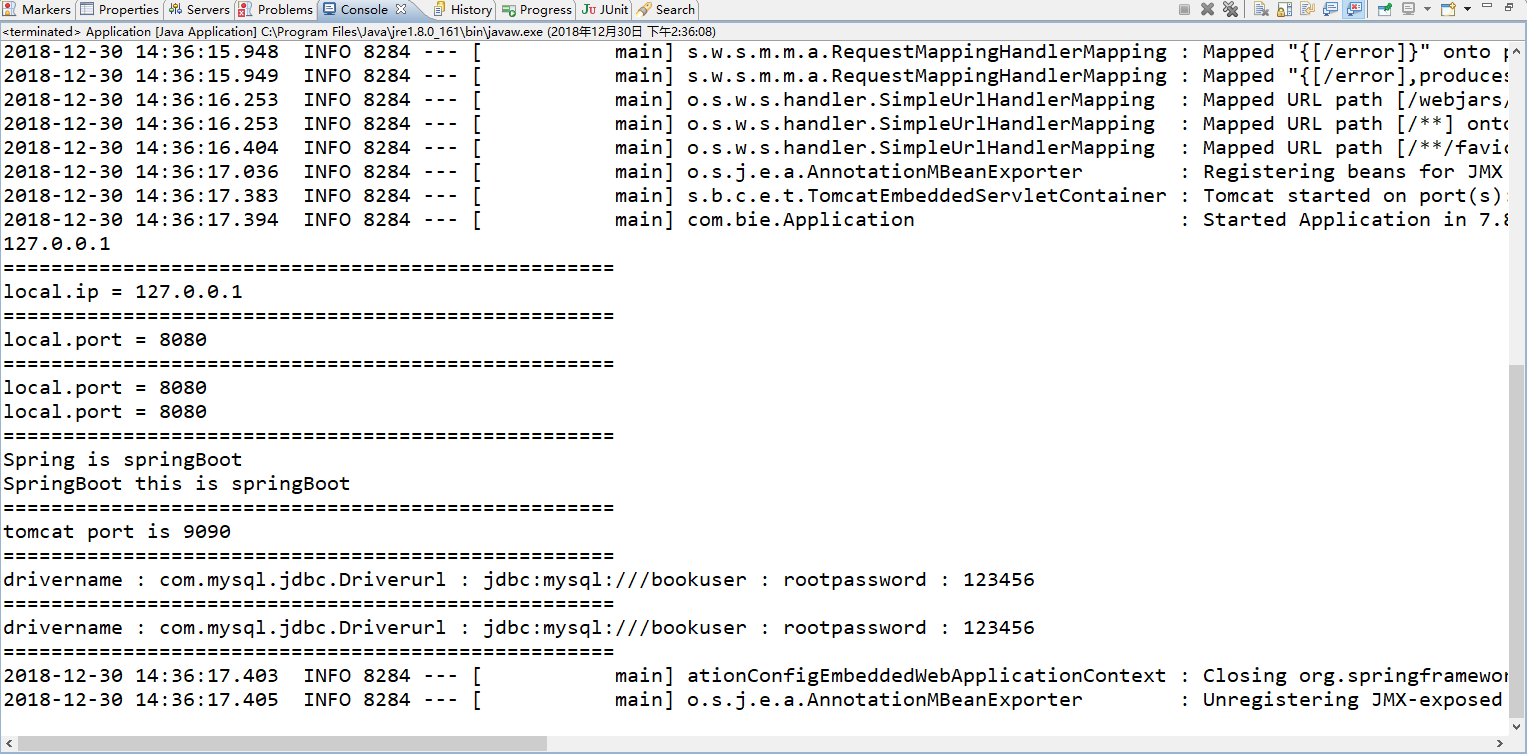
4、SpringBoot注入集合、数组的操作如下所示:
 package com.bie.springboot;

 import java.util.ArrayList;

 import java.util.Arrays;

 import java.util.List;

 import org.springframework.boot.context.properties.ConfigurationProperties;

 import org.springframework.stereotype.Component;

 /**

  *

  * @Description TODO

  * @author biehl

  * @Date 2018年12月30日 下午2:51:05

  * 1、注入集合

  *     支持获取数组,集合。配置方式为:name[index]=value

  */

 @Component

 @ConfigurationProperties(prefix = "ds")

 public class TomcatProperties {

     private List<String> hosts = new ArrayList<String>();

     private String[] ports;

     public List<String> getHosts() {

         return hosts;

     }

     public void setHosts(List<String> hosts) {

         this.hosts = hosts;

     }

     public String[] getPorts() {

         return ports;

     }

     public void setPorts(String[] ports) {

         this.ports = ports;

     }

     @Override

     public String toString() {

         return "TomcatProperties [hosts=" + hosts.toString() + ", ports=" + Arrays.toString(ports) + "]";

     }

 }
默认的配置文件application.properties的内容如下所示:
 ds.hosts[]=192.168.11.11

 ds.hosts[]=192.168.11.12

 ds.hosts[]=192.168.11.13

 #ds.hosts[]=192.168.11.14

 #ds.hosts[]=192.168.11.15

 ds.ports[]=

 ds.ports[]=

 ds.ports[]=
主类如下所示:
 package com.bie;

 import org.springframework.beans.BeansException;

 import org.springframework.boot.SpringApplication;

 import org.springframework.boot.autoconfigure.SpringBootApplication;

 import org.springframework.context.ConfigurableApplicationContext;

 import com.bie.springboot.DataSourceProperties;

 import com.bie.springboot.JdbcConfig;

 import com.bie.springboot.TomcatProperties;

 import com.bie.springboot.UserConfig;

 /**

  *

  * @Description TODO

  * @author biehl

  * @Date 2018年12月30日 上午10:44:35

  *

  */

 @SpringBootApplication

 public class Application {

     public static void main(String[] args) {

         ConfigurableApplicationContext run = SpringApplication.run(Application.class, args);

         System.out.println("===================================================");

         try {

             // 注入集合

             TomcatProperties bean = run.getBean(TomcatProperties.class);

             System.out.println(bean);

         } catch (Exception e) {

             e.printStackTrace();

         }

         System.out.println("===================================================");

         // 运行结束进行关闭操作

         run.close();

     }

 }
待续......
SpringBoot配置分析、获取到SpringBoot配置文件信息以及几种获取配置文件信息的方式的更多相关文章
- springBoot配置分析(属性和结构化)
使用idea自带插件创建项目 一直下一步到完成 application.properties local.ip.addr = 192.168.2.110 redis.host = 192.168.3. ...
- React中ref的三种用法 可以用来获取表单中的值 这一种类似document.getXXId的方式
import React, { Component } from "react" export default class MyInput extends Component { ...
- SpringBoot配置属性之NOSQL
SpringBoot配置属性系列 SpringBoot配置属性之MVC SpringBoot配置属性之Server SpringBoot配置属性之DataSource SpringBoot配置属性之N ...
- SpringBoot配置属性之Migration
SpringBoot配置属性系列 SpringBoot配置属性之MVC SpringBoot配置属性之Server SpringBoot配置属性之DataSource SpringBoot配置属性之N ...
- SpringBoot配置属性之Security
SpringBoot配置属性系列 SpringBoot配置属性之MVC SpringBoot配置属性之Server SpringBoot配置属性之DataSource SpringBoot配置属性之N ...
- SpringBoot配置属性之MVC
SpringBoot配置属性系列 SpringBoot配置属性之MVC SpringBoot配置属性之Server SpringBoot配置属性之DataSource SpringBoot配置属性之N ...
- SpringBoot 配置的加载
SpringBoot 配置的加载 SpringBoot配置及环境变量的加载提供许多便利的方式,接下来一起来学习一下吧! 本章内容的源码按实战过程采用小步提交,可以按提交的节点一步一步来学习,仓库地址: ...
- SpringBoot配置属性之Server
SpringBoot配置属性系列 SpringBoot配置属性之MVC SpringBoot配置属性之Server SpringBoot配置属性之DataSource SpringBoot配置属性之N ...
- SpringBoot配置属性转载地址
SpringBoot配置属性系列 SpringBoot配置属性之MVC SpringBoot配置属性之Server SpringBoot配置属性之DataSource SpringBoot配置属性之N ...
随机推荐
- iOS 后台调用apns推送
1.java调用apns推送 2.php 调用apns 推送,可借助终端
- saltstack运维软件
一.saltstack介绍 1.介绍 SaltStack管理工具允许管理员对多个操作系统创建一个一致的管理系统,包括VMware vSphere环境. SaltStack是一个服务器基础架构集中化管理 ...
- [BZOJ 4817] [SDOI 2017] 树点涂色
Description Bob有一棵 \(n\) 个点的有根树,其中 \(1\) 号点是根节点.Bob在每个点上涂了颜色,并且每个点上的颜色不同. 定义一条路径的权值是:这条路径上的点(包括起点和终点 ...
- Linux 播放网易云音乐(树莓派)
环境安装sudo apt-get install python-pipsudo apt-get insyall python-dev mpg123sudo pip install Netease-Mu ...
- zabbix存储history_text
有一个监控项存储一个目录的所有文件(递归)信息,字符数量比较大,history_str表的value的字段字符数限制为255长度,所以就想存储到history_text表中,在最新数据中一直显示不出新 ...
- rsync实时同步服务部署
部署rsync服务 一.需求:把客户端文件同步到服务端指定位置服务端:备份服务器为 172.16.3.164客户端:推送服务器为 172.16.3.94 二.基础知识: rsync 分为服务器端.客户 ...
- 解决CentOS出现"No package redis available"提示问题
[root@bogon src]# yum install redis Loaded plugins: fastestmirror, langpacks Repository base is list ...
- 使用mysqlbinlog对主库binlog进行同步
#!/bin/bash BASEDIR="/usr/local/mysql" BIN="$BASEDIR/bin" MYSQLBINLOG="$BIN ...
- Hadoop记录-hadoop jmx配置
1.hadoop-env.sh添加export HADOOP_JMX_OPTS="-Dcom.sun.management.jmxremote.authenticate=false -Dco ...
- MyBatis集成到Spring时配置MapperScannerConfigurer出错
问题描述 在web项目中同时集成了spring mvc和mybatis. 将jdbc配置参数独立在外部配置文件中,然后通过<context:property-placeholder>引入. ...