
Hbase的集群安装
hadoop集群的搭建
搭建真正的zookeeper集群
Hbase需要安装在成功部署的Hadoop平台,并且要求Hadoop已经正常启动。
同时,HBase需要集群部署,我们分别把HBase 部署到主机:guoyansi128 guoyansi129 guoyansi130
1.下载hbase-1.2.4-bin.tar.gz;并且上传到/usr/local/src中
2.解压缩并且把解压缩后的文件移动到上级目录
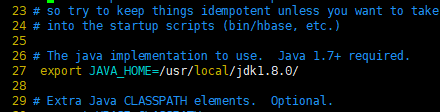
3.修改 /usr/lcoal/hbase-1.4.8/conf/hbase-env.sh文件
去掉exprot JAVA_HOME前面的#号,并且修改jdk安装目录
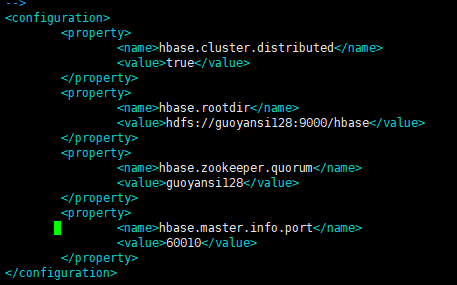
4.修改conf/hbasie-site.xml文件
<?xml version="1.0"?>

<?xml-stylesheet type="text/xsl" href="configuration.xsl"?>

<!--

/**

 *

 * Licensed to the Apache Software Foundation (ASF) under one

 * or more contributor license agreements.  See the NOTICE file

 * distributed with this work for additional information

 * regarding copyright ownership.  The ASF licenses this file

 * to you under the Apache License, Version 2.0 (the

 * "License"); you may not use this file except in compliance

 * with the License.  You may obtain a copy of the License at

 *

 *     http://www.apache.org/licenses/LICENSE-2.0

 *

 * Unless required by applicable law or agreed to in writing, software

 * distributed under the License is distributed on an "AS IS" BASIS,

 * WITHOUT WARRANTIES OR CONDITIONS OF ANY KIND, either express or implied.

 * See the License for the specific language governing permissions and

 * limitations under the License.

 */

-->

<configuration>

    <property>

        <name>hbase.cluster.distributed</name>

        <value>true</value>

    </property>

    <property>

        <name>hbase.rootdir</name>

        <value>hdfs://guoyansi128:9000/hbase</value>

    </property>

    <property>

        <name>hbase.zookeeper.quorum</name>

        <value>guoyansi128</value>

    </property>

    <property>

        <name>hbase.master.info.port</name>

        <value>60010</value>

    </property>

</configuration>
5.设置regionservers,该文件在conf下
regionservers文件类似Hadoop的slaves文件,启动HBase的时候,系统将根据该文件建立HBase集群。

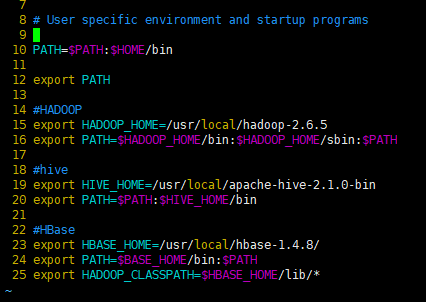
6.设置linux的环境变量文件
cd
ls -a
vim .bash_profile
#HBase

export HBASE_HOME=/usr/local/hbase-1.4.8/

export PATH=$BASE_HOME/bin:$PATH

export HADOOP_CLASSPATH=$HBASE_HOME/lib/*
7.启动HBase 进入/usr/local/Hbase-1.4.8/bin
./start-hbase.sh
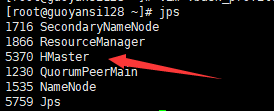
8.查看启动是否成功
jps
主节点显示的是HBase,从节点显示的是HRegionServer

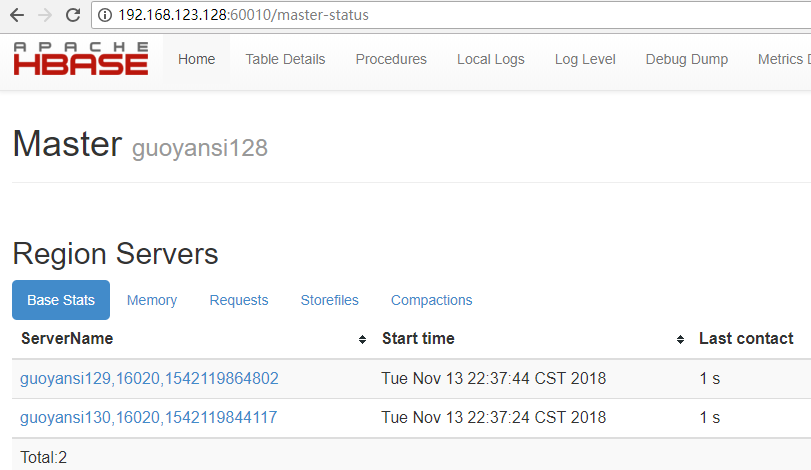
在浏览器上输入地址:192.168.123.128:60010是否能够正常显示:
HBase使用独立安装的zookeeper
1.修改conf/hbase-env.sh文件
HBASE_MANGES_ZK=false表示不启用自带的zookeeper。true表示使用hbase自带的zookeeper

2.将独立安装的zookeeper的配置文件复制到HBase的CLASSPATH
cp /usr/local/zookeeper/conf/zoo.cfg /usr/local/hbase-1.4.8/conf
Hbase的集群安装的更多相关文章
- Centos 下 Apache 原生 Hbase + Phoenix 集群安装(转载)
前置条件 各软件版本:hadoop-2.7.7.hbase-2.1.5 .jdk1.8.0_211.zookeeper-3.4.10.apache-phoenix-5.0.0-HBase-2.0-bi ...
- 吴超老师课程--HBASE的集群安装
1.hbase的机群搭建过程(在原来的hadoop上的hbase伪分布基础上进行搭建)1.1 集群结构,主节点(hmaster)是hadoop,从节点(region server)是hadoop1和h ...
- hbase单机环境的搭建和完全分布式Hbase集群安装配置
HBase 是一个开源的非关系(NoSQL)的可伸缩性分布式数据库.它是面向列的,并适合于存储超大型松散数据.HBase适合于实时,随机对Big数据进行读写操作的业务环境. @hbase单机环境的搭建 ...
- HBase集群安装部署
0x01 软件环境 OS: CentOS6.5 x64 java: jdk1.8.0_111 hadoop: hadoop-2.5.2 hbase: hbase-0.98.24 0x02 集群概况 I ...
- HBase体系架构和集群安装
大家好,今天分享的是HBase体系架构和HBase集群安装.承接上两篇文章<HBase简介>和<HBase数据模型>,点击回顾这2篇文章,有助于更好地理解本文. 一.HBase ...
- Hbase 集群安装(Hadoop 2.6.0 hbase0.99.2)
一:说明 该安装是在hadoop集群安装后进行,详情可见上一篇博客虚拟机centos7系统下安装hadoop ha和yarn ha(详细) .其中涉及五台机器,两台master(机器名:master, ...
- HBase 1.2.6 完全分布式集群安装部署详细过程
Apache HBase 是一个高可靠性.高性能.面向列.可伸缩的分布式存储系统,是NoSQL数据库,基于Google Bigtable思想的开源实现,可在廉价的PC Server上搭建大规模结构化存 ...
- CentOS6安装各种大数据软件 第六章:HBase分布式集群的配置
相关文章链接 CentOS6安装各种大数据软件 第一章:各个软件版本介绍 CentOS6安装各种大数据软件 第二章:Linux各个软件启动命令 CentOS6安装各种大数据软件 第三章:Linux基础 ...
- hbase和ZooKeeper集群安装配置
一:ZooKeeper集群安装配置 1:解压zookeeper-3.3.2.tar.gz并重命名为zookeeper. 2:进入~/zookeeper/conf目录: 拷贝zoo_sample.cfg ...
随机推荐
- ubuntu18.04LTS配置apache虚拟目录(基于端口)
假设在用户目录下要新建两个虚拟目录web1,web2,分别对应端口8081,8082 $ cd ~ #切换到用户目录 $ mkdir www #新建www文件夹,以后新建的虚拟目录都放在该文件夹下 $ ...
- Python学习之路基础篇--11-12Python基础,函数的装饰器
对于装饰器来说,就是在不改变函数的调用的情况下,对函数的前后增加了些许功能,这完全符合函数的 开放封闭 原则.装饰器的本质 其实就是一个闭包函数. 这是一个装饰器的步骤图 ret = func(*ar ...
- VMware Ubuntu安装过程
一.下载Ubuntu镜像文件 1.到官网下载:http://www.ubuntu.com 2.百度云(16.4.6): 链接:https://pan.baidu.com/s/14IlVP--D5mtZ ...
- 前端导出csv
前端导出csv export: function(data, name) { // csv文件的BOM头 \ufeff可以让excel等识别出csv文件的编码 var uri = 'data:text ...
- JVM垃圾收集器-Serial Old收集器,Parallel Old收集器
Serial Old收集器 Serial Old收集器是Serial收集器的老年代版本,它是一个单线程收集器,使用“标记-整理”算法.这个收集器的主要意义也是被Client模式下的虚拟机使用.在ser ...
- 使用日期操作类(Calendar)获得几秒、几分钟、几小时之前的时间
public String dealDate(String case_time){ // 日期操作类 Calendar calendar = Calendar.getInstance(); // 当前 ...
- 最基础的 swift 语言
import Foundation //打印函数 print("Hello, World!") //不用加分号, 字符串就是"", 不用加@ print(&qu ...
- visual stutio 20017
Visual Studio 2017入門: https://www.atmarkit.co.jp/ait/articles/1704/10/news026.html vb 手册: http://vb. ...
- xampp 丢失api-ms-win-crt-runtimel1-1-0.dll 解决方案
关于api-ms-win-crt-runtimel1-1-0.dll缺失的解决方案 原创 2016年02月29日 21:30:06 标签: 解决方案 / 补丁 / win7 / api-ms-win ...
- Ubuntu16.04中如何启用floodlight的一种方式
在 floodlight文件夹下输入 java -jar target/floodlight.jar 启动floodlight控制器,在浏览器窗口输入 http://localhost:8080/ui ...