
Linux(Ubuntu)使用日记------自定义命令的使用
Linux如何自定义自己的命令呢?修改 系统中的 ~/.bashrc 文件即可
在这个文件最后面使用alias命令重定义命令。
例如:
# novel-git begin

alias n.r='less -s ${novel_path}/reading/`ls novel/reading`'

alias n.g='${novel_path}/auto-git.sh'

alias n.n='vim ${novel_path}/note'

export novel_path=~/novel

# nove-git end
修改完成之后要使用命令 source ~/.bashrc 刷新
这个脚本是我的一个小说阅读器,左边阅读,右上笔记,右下使用git保存笔记到github
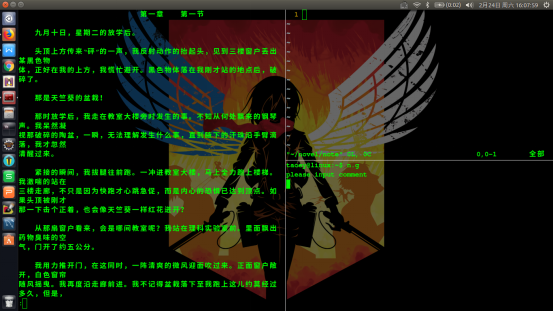
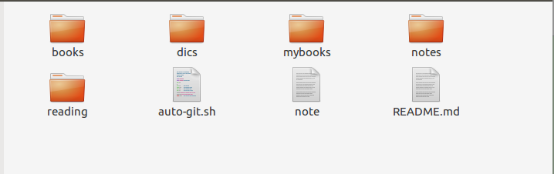
我的novel目录:
操作思路:
对于长的脚本,我们可以写一些脚本,放到特定的一个文件夹下,在bashrc文件中执行这个脚本,
对于短的命令,我们直接重命名即可。
附录
我的bashrc 文件
# ~/.bashrc: executed by bash() for non-login shells.

# see /usr/share/doc/bash/examples/startup-files (in the package bash-doc)

# for examples

# If not running interactively, don't do anything

case $- in

    *i*) ;;

      *) return;;

esac

# don't put duplicate lines or lines starting with space in the history.

# See bash() for more options

HISTCONTROL=ignoreboth

# append to the history file, don't overwrite it

shopt -s histappend

# for setting history length see HISTSIZE and HISTFILESIZE in bash()

HISTSIZE=

HISTFILESIZE=

# check the window size after each command and, if necessary,

# update the values of LINES and COLUMNS.

shopt -s checkwinsize

# If set, the pattern "**" used in a pathname expansion context will

# match all files and zero or more directories and subdirectories.

#shopt -s globstar

# make less more friendly for non-text input files, see lesspipe()

[ -x /usr/bin/lesspipe ] && eval "$(SHELL=/bin/sh lesspipe)"

# set variable identifying the chroot you work in (used in the prompt below)

if [ -z "${debian_chroot:-}" ] && [ -r /etc/debian_chroot ]; then

    debian_chroot=$(cat /etc/debian_chroot)

fi

# set a fancy prompt (non-color, unless we know we "want" color)

case "$TERM" in

    xterm-color|*-256color) color_prompt=yes;;

esac

# uncomment for a colored prompt, if the terminal has the capability; turned

# off by default to not distract the user: the focus in a terminal window

# should be on the output of commands, not on the prompt

#force_color_prompt=yes

if [ -n "$force_color_prompt" ]; then

    if [ -x /usr/bin/tput ] && tput setaf  >&/dev/null; then

# We have color support; assume it's compliant with Ecma-48

# (ISO/IEC-). (Lack of such support is extremely rare, and such

# a case would tend to support setf rather than setaf.)

color_prompt=yes

    else

color_prompt=

    fi

fi

if [ "$color_prompt" = yes ]; then

    PS1='${debian_chroot:+($debian_chroot)}\[\033[01;32m\]\u@\h\[\033[00m\]:\[\033[01;34m\]\w\[\033[00m\]\$ '

else

    PS1='${debian_chroot:+($debian_chroot)}\u@\h:\w\$ '

fi

unset color_prompt force_color_prompt

# If this is an xterm set the title to user@host:dir

case "$TERM" in

xterm*|rxvt*)

    PS1="\[\e]0;${debian_chroot:+($debian_chroot)}\u@\h: \w\a\]$PS1"

    ;;

*)

    ;;

esac

# enable color support of ls and also add handy aliases

if [ -x /usr/bin/dircolors ]; then

    test -r ~/.dircolors && eval "$(dircolors -b ~/.dircolors)" || eval "$(dircolors -b)"

    alias ls='ls --color=auto'

    #alias dir='dir --color=auto'

    #alias vdir='vdir --color=auto'

    alias grep='grep --color=auto'

    alias fgrep='fgrep --color=auto'

    alias egrep='egrep --color=auto'

fi

# colored GCC warnings and errors

#export GCC_COLORS='error=01;31:warning=01;35:note=01;36:caret=01;32:locus=01:quote=01'

# some more ls aliases

alias ll='ls -alF'

alias la='ls -A'

alias l='ls -CF'

# Add an "alert" alias for long running commands.  Use like so:

#   sleep ; alert

alias alert='notify-send --urgency=low -i "$([ $? = 0 ] && echo terminal || echo error)" "$(history|tail -n1|sed -e '\''s/^\s*[-]\+\s*//;s/[;&|]\s*alert$//'\'')"'

# Alias definitions.

# You may want to put all your additions into a separate file like

# ~/.bash_aliases, instead of adding them here directly.

# See /usr/share/doc/bash-doc/examples in the bash-doc package.

if [ -f ~/.bash_aliases ]; then

    . ~/.bash_aliases

fi

# enable programmable completion features (you don't need to enable

# this, if it's already enabled in /etc/bash.bashrc and /etc/profile

# sources /etc/bash.bashrc).

if ! shopt -oq posix; then

  if [ -f /usr/share/bash-completion/bash_completion ]; then

    . /usr/share/bash-completion/bash_completion

  elif [ -f /etc/bash_completion ]; then

    . /etc/bash_completion

  fi

fi

# novel-git begin

alias n.r='less -s ${novel_path}/reading/`ls novel/reading`'

alias n.g='${novel_path}/auto-git.sh'

alias n.n='vim ${novel_path}/note'

export novel_path=~/novel

# nove-git end
Linux(Ubuntu)使用日记------自定义命令的使用的更多相关文章
- Linux(Ubuntu)使用日记------markdown文档转化为word文档
Linux(Ubuntu)使用日记------markdown文档转化为word文档
- Linux(Ubuntu)使用日记------Mysql编码(utf-8)的设置
Mysq版本:5.7.21 操作系统:Linux(Ubuntu) 整个操作的基本思路如下(包括问题的解决思路,想要直接解决问题的可以先看最后的命令总结) 检查mysql编码 找到Mysql的配置文件 ...
- Linux Ubuntu 常见的压缩命令
小知识: Linux上常见的压缩命令就是gzip与bzip2,compress已经不再流行.gzip是有GNU计划所开发出来的压缩命令,该命令已经替换了compress命令.后来GNU又开发出bzip ...
- Linux(Ubuntu)使用日记(零)------使用Linux的理由
我为什么要使用Linux呢,也许在某些人看来或许是装B,但是我的原因有点复杂,简单做下总结(以事情的发展历程为顺序) 升级后开机慢关机慢,崩溃.最近刚刚升级了windows,自己原来的win10其实是 ...
- Linux(Ubuntu)使用日记------部署JavaWeb项目到服务器
0.前言 本博文内容是建立在你可以通过SSH连接到远程服务器的基础上的,如果你还没有用SSH连接到远程服务器,请参考此文(腾讯云服务器): http://www.cnblogs.com/hwtblog ...
- Linux(Ubuntu)使用日记------Mongodb的安装与使用
1.安装 Linux下安装mongodb还是比较容易的 直接使用apt-get安装即可,命令如下: sudo apt-get install mongodb 安装完成之后进行检验, “mongo sh ...
- Linux(Ubuntu)使用日记------ssh远程登录腾讯云
不知道是我自己电脑的问题还是其他的问题.总之在我的折腾之下算是用ssh连接上了我的腾讯云. 具体步骤: 1.生成密钥 ssh-keygen -t rsa 执行命令会出现这样,执行后让你输入东西的全部回 ...
- Linux(Ubuntu)使用日记(三)------git安装使用
1. 安装 首先,确认你的系统是否已安装git,可以通过git指令进行查看,如果没有,在命令行模式下输入sudo apt-get install git命令进行安装. 2. 配置 git confi ...
- Linux(Ubuntu)使用日记(四)------印象笔记相关使用
在Ubuntu系统下没有印象笔记官方的客户端,但是这并不能阻拦我们使用印象笔记. 我们一般的的使用习惯: 印象笔记客户端 印象笔记剪藏 Linux下也可以使用两个工具,剪藏的话安装比较简单,印象笔记客 ...
随机推荐
- 一对多Excel自定义函数:SVLOOKUP
语法规则 该函数的语法规则如下: SVLOOKUP(lookup_value,table_array,col_index_num,nth_appearance,unique_value) 参数 简单说 ...
- mac 安装protobuf,并编译为java,c++,python
1.下载地址:https://code.google.com/p/protobuf/downloads/list 另外,可以查看这个链接查看中文更多内容:http://www.cnblogs.com/ ...
- PM过程管理成熟度1级
之前,我已经从项目实现的角度.企业管理诉求两方面,分析了PM的核心能力架构,以及其在过程管理方面的能力等级.接下来,Fancier凡奉信息会站在PM能力成长的角度,横向与纵向阐述每一成熟度等级PM的过 ...
- 微信小程序发红包
背景: 近期一个朋友公司要做活动,活动放在小程序上.小程序开发倒是不难,不过要使用小程序给微信用户发红包,这个就有点麻烦 确定模式: 小程序目前没有发红包接口,要实现的话,只能是模拟红包,即小程序上做 ...
- Win10 - MySQL 5.7 忘记密码
Win10 - MySQL 5.7 忘记密码 # 关闭 mysql 服务 net stop mysql # 在命令行输入以下命令, 输入后新建一个 CMD 窗口 mysqld -nt --skip-g ...
- python--继承--方法的重写---和父类的扩展
1.方法的重写 父类的方法不能满足子类的需要,可以对方法重写 具体的实现方式,就相当于在子类中定义了一个和父类同名的方法并实现 重写之后只会对子类的方法调用,而不会调用父类封装的方法 2.对父类方法进 ...
- PyCharm使用小技巧
本文部分内容参考了明宇李前辈的博客,原文请阅读 Pycharm的配置(背景颜色,字体,解释器等): 鼠标滑轮控制字体大小 部分参考了墨颜前辈的博客,原文请阅读 用鼠标滑轮控制代码字体大小: 感谢各位前 ...
- springboot + mybatis +pageHelper分页排序
今天下午写查出来的数据的排序,原来的数据没有排序,现在把排序功能加上...原来用的,是xml中的sql动态传参 ,,1个小数没有弄出来,果断放弃... 网上百度一下,发现用pageHelper 可以 ...
- Python标准库之ConfigParser模块
配置文件的格式 a) 配置文件中包含一个或多个 section, 每个 section 有自己的 option: b) section 用 [sect_name] 表示,每个option是一个键值对, ...
- linux 下 命令行中运行 selenium chrome 问题
1.chrome 现在不允许使用root运行了. 2.无界面 chromedriver 调用chrome 会出错. <另外一定要匹配 chromedriver和chrome 的版本. 要不会出各 ...