
两个activity的3D翻转动画.md
一.业务需求
这里在公司项目设计时,用到了一个小的需求,就是点击一个按钮然后整个activity的页面进行3d翻转;
二.设计思路
由于是2个activity的之间的翻转动画,就意味着前90度是A页面进行翻转翻转结束后B页面从90到0度完成整个翻转过程;再从B翻转到A也是同样,B先翻转90度然后A再从90度翻转到0度,这样就完成了一个衔接;
那么这里就需要一个3D的翻转类,
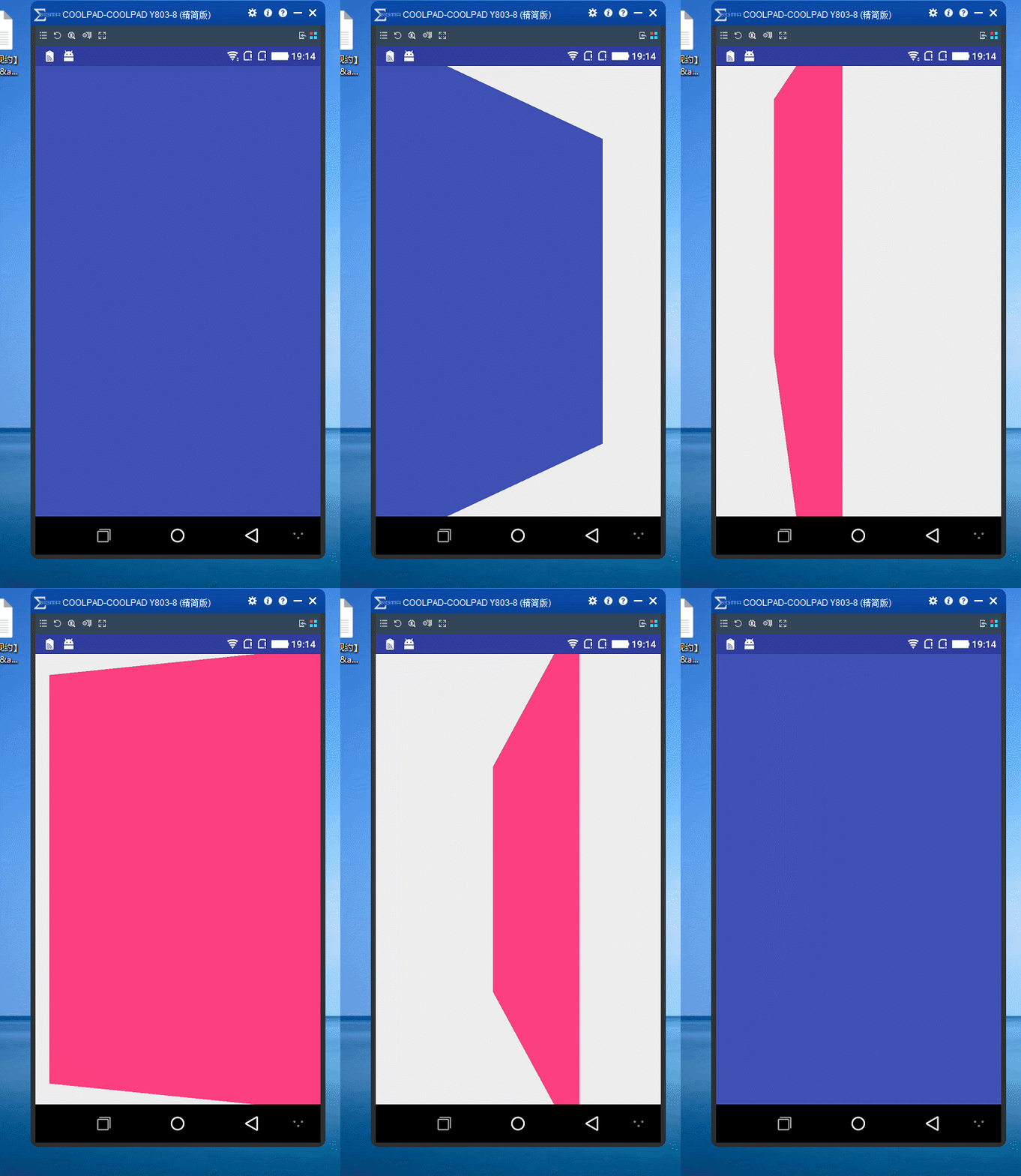
三.代码实现
import android.view.animation.Animation;

import android.view.animation.Transformation;

import android.graphics.Camera;

import android.graphics.Matrix;

/**

 * An animation that rotates the view on the Y axis between two specified angles.

 * This animation also adds a translation on the Z axis (depth) to improve the effect.

 */

public class Rotate3dAnimation extends Animation {

    private final float mFromDegrees;

    private final float mToDegrees;

    private final float mCenterX;

    private final float mCenterY;

    private final float mDepthZ;

    private final boolean mReverse;

    private Camera mCamera;

    /**

     * Creates a new 3D rotation on the Y axis. The rotation is defined by its

     * start angle and its end angle. Both angles are in degrees. The rotation

     * is performed around a center point on the 2D space, definied by a pair

     * of X and Y coordinates, called centerX and centerY. When the animation

     * starts, a translation on the Z axis (depth) is performed. The length

     * of the translation can be specified, as well as whether the translation

     * should be reversed in time.

     *

     * @param fromDegrees the start angle of the 3D rotation

     * @param toDegrees the end angle of the 3D rotation

     * @param centerX the X center of the 3D rotation

     * @param centerY the Y center of the 3D rotation

     * @param reverse true if the translation should be reversed, false otherwise

     */

    public Rotate3dAnimation(float fromDegrees, float toDegrees,

                             float centerX, float centerY, float depthZ, boolean reverse) {

        mFromDegrees = fromDegrees;

        mToDegrees = toDegrees;

        mCenterX = centerX;

        mCenterY = centerY;

        mDepthZ = depthZ;

        mReverse = reverse;

    }

    @Override

    public void initialize(int width, int height, int parentWidth, int parentHeight) {

        super.initialize(width, height, parentWidth, parentHeight);

        mCamera = new Camera();

    }

    @Override

    protected void applyTransformation(float interpolatedTime, Transformation t) {

        final float fromDegrees = mFromDegrees;

        float degrees = fromDegrees + ((mToDegrees - fromDegrees) * interpolatedTime);

        final float centerX = mCenterX;

        final float centerY = mCenterY;

        final Camera camera = mCamera;

        final Matrix matrix = t.getMatrix();

        camera.save();

        if (mReverse) {

            camera.translate(0.0f, 0.0f, mDepthZ * interpolatedTime);

        } else {

            camera.translate(0.0f, 0.0f, mDepthZ * (1.0f - interpolatedTime));

        }

        camera.rotateY(degrees);

        camera.getMatrix(matrix);

        camera.restore();

        matrix.preTranslate(-centerX, -centerY);

        matrix.postTranslate(centerX, centerY);

    }

}

import android.app.Activity;

import android.util.Log;

import android.view.ViewGroup;

import android.view.animation.AccelerateInterpolator;

public class RotationHelper {

    DisplayNextView displayNext;

    public RotationHelper(Activity con,int order){

        displayNext = new DisplayNextView(con, order);

    }

    // 逆时针旋转90

    public void applyFirstRotation(ViewGroup layout,float start, float end) {

        // Find the center of the container

        final float centerX = layout.getWidth() / 2.0f;

        final float centerY = layout.getHeight() / 2.0f;

        Log.i("centerX =" + centerX, "centerX");

        Log.i("centerY =" + centerY, "centerY");

        // Create a new 3D rotation with the supplied parameter

        // The animation listener is used to trigger the next animation

        final Rotate3dAnimation rotation = new Rotate3dAnimation(start, end,

                centerX, centerY, 310.0f, true);

        rotation.setDuration(700);

        rotation.setFillAfter(true);

        rotation.setInterpolator(new AccelerateInterpolator());

        rotation.setAnimationListener(displayNext);

        layout.startAnimation(rotation);

    }

    public void applyLastRotation(ViewGroup layout,float start, float end) {

        // Find the center of the container

        final float centerX = layout.getWidth() / 2.0f;

        final float centerY = layout.getHeight() / 2.0f;

        Log.i("centerX =" + centerX, "centerX");

        Log.i("centerY =" + centerY, "centerY");

        // Create a new 3D rotation with the supplied parameter

        // The animation listener is used to trigger the next animation

        final Rotate3dAnimation rotation = new Rotate3dAnimation(start, end,

                160, 192, 310.0f, false);

        rotation.setDuration(700);

        rotation.setFillAfter(true);

        rotation.setInterpolator(new AccelerateInterpolator());

        layout.startAnimation(rotation);

    }

}

import android.app.Activity;

import android.view.animation.Animation;

public class DisplayNextView implements Animation.AnimationListener {

    Object obj;

    // 动画监听器的构造函数

    Activity ac;

    int order;

    public DisplayNextView(Activity ac, int order) {

        this.ac = ac;

        this.order = order;

    }

    public void onAnimationStart(Animation animation) {

    }

    public void onAnimationEnd(Animation animation) {

        doSomethingOnEnd(order);

    }

    public void onAnimationRepeat(Animation animation) {

    }

    private final class SwapViews implements Runnable {

        public void run() {

            switch (order) {

                case Constants.KEY_FIRST_INVERSE:

                    ((TranslateLayout) ac).jumpToSecond();

                    break;

                case Constants.KEY_SECOND_CLOCKWISE:

                    ((Second) ac).jumpToFirst();

                    break;

            }

        }

    }

    //动画完成的监听

    public void doSomethingOnEnd(int _order) {

        switch (_order) {

            case Constants.KEY_FIRST_INVERSE:

                ((TranslateLayout) ac).layout1.post(new SwapViews());

                break;

            case Constants.KEY_SECOND_CLOCKWISE:

                ((Second) ac).layout2.post(new SwapViews());

                break;

        }

    }

}

public class Constants {//相关常量

    public final static int KEY_FIRST_INVERSE = 1;

    public final static int KEY_FIRST_CLOCKWISE = 2;

    public final static int KEY_SECOND_INVERSE = 3;

    public final static int KEY_SECOND_CLOCKWISE = 4;

}

//第一个页面

public class TranslateLayout extends Activity implements OnClickListener {

    RelativeLayout layout1;

    String tag="";

    /** Called when the activity is first created. */

    @Override

    public void onCreate(Bundle savedInstanceState) {

        super.onCreate(savedInstanceState);

        setContentView(R.layout.first);

        ImageView first_btn = (ImageView) findViewById(R.id.first_btn);

        first_btn.setOnClickListener(this);

        layout1 = (RelativeLayout) findViewById(R.id.layout1);

        showView();

    }

    public void showView() {

        /* 取得Intent中的Bundle对象 */

        Bundle bundle = this.getIntent().getExtras();

        if (bundle != null) {

            /* 取得Bundle对象中的数据 */

            tag = bundle.getString("second","");

            Log.d("first_tag",tag);

            if (tag.equals("Second")) {

                rotateHelper = new RotationHelper(this,

                        Constants.KEY_FIRST_CLOCKWISE);

                rotateHelper.applyLastRotation(layout1, -90, 0);

            }

        }

    }

    RotationHelper rotateHelper;

    @Override

    public void onClick(View v) {

        // TODO Auto-generated method stub

        rotateHelper = new RotationHelper(this, Constants.KEY_FIRST_INVERSE);

        rotateHelper.applyFirstRotation(layout1, 0, -90);

    }

    @Override

    protected void onPause() {

        overridePendingTransition(0, 0);

        super.onPause();

    }

    public void jumpToSecond() {

        Intent in = new Intent();

        in.setClass(this, Second.class);

        // new一个Bundle对象,并将要传递的数据传入

        Bundle bundle = new Bundle();

        bundle.putString("front", "First");

        /* 将Bundle对象assign给Intent */

        in.putExtras(bundle);

        // 如果已经打开过的实例,将不会重新打开新的Activity

        startActivity(in);

        //关闭掉动画

        overridePendingTransition(0, 0);

    }

}

/**

 * Created by cxf on 2017/9/13.

 *

 * @title

 * @describe

 * @email chenxianfu_it@163.com

 */

//第二个页面

public class Second extends Activity implements OnClickListener {

    String tag = "";

    RotationHelper rotateHelper;

    RelativeLayout layout2;

    /** Called when the activity is first created. */

    @Override

    public void onCreate(Bundle savedInstanceState) {

        super.onCreate(savedInstanceState);

        setContentView(R.layout.second);

        layout2 = (RelativeLayout) findViewById(R.id.layout2);

        showView();

        setListener();

    }

    public void setListener() {

        ImageView second_btn = (ImageView) findViewById(R.id.second_btn);

        second_btn.setOnClickListener(this);

    }

    @Override

    public void onClick(View v) {

        // TODO Auto-generated method stub

        rotateHelper = new RotationHelper(this,

                Constants.KEY_SECOND_CLOCKWISE);

        rotateHelper.applyFirstRotation(layout2, 0, 90);

    }

    public void showView() {

        /* 取得Intent中的Bundle对象 */

        Bundle bundle = this.getIntent().getExtras();

        if (bundle != null) {

            /* 取得Bundle对象中的数据 */

            tag = bundle.getString("front");

        }

        System.out.println("bundle =" + tag);

        if (tag.equals("First")) {

            rotateHelper = new RotationHelper(this, Constants.KEY_SECOND_INVERSE);

            rotateHelper.applyLastRotation(layout2, 90, 0);

        }

    }

    @Override

    protected void onDestroy() {

        overridePendingTransition(0, 0);

        super.onDestroy();

    }

    public void jumpToFirst() {

        Intent in = new Intent();

        in.setClass(this, TranslateLayout.class);

        Bundle bundle = new Bundle();

        bundle.putString("second", "Second");

        in.putExtras(bundle);

        startActivity(in);

        overridePendingTransition(0, 0);

        finish();

    }

}
两个activity的3D翻转动画.md的更多相关文章
- CSS3和js炫酷点击按钮3D翻转动画特效
简要教程 flipside是一款使用CSS3和js制作的炫酷点击按钮无缝过渡到确认面板的过渡动画特效.该点击按钮特效在按钮不同方向的边部点击时,产生的过渡动画特效是不一样的. 在线预览 源码下载 ...
- 【译】仿Taasky的3D翻转菜单动画实现
最终效果 最终效果 开始 首先下载并打开一个事先搭好架子的Demo,然后来分析一下.这个Demo包含一个主页和详情页,其中MenuViewController继承自UITableViewControl ...
- 纯CSS 3D翻转一个面(翻转导航菜单 立方体)
在做练习的时候学到css的翻转导航菜单,原代码有点让人头疼,通过对其css的参数一点点研究了其实现过程. 这里推荐大家研究这个3D翻转动画的代码. 我的github:swarz,欢迎给老弟我++星星 ...
- WPF实现3D翻转的动画效果
1.前端代码实现 1.1 原理见代码注析 <Grid MouseDown="Grid_MouseDown"> <Viewport3D> <Viewpo ...
- 《转载》两个activity界面间跳转切换动画效果
1overridePendingTransition Activity的切换动画指的是从一个activity跳转到另外一个activity时的动画. 它包括两个部分:一部分是第一个activity退出 ...
- CSS3之图片3D翻转效果(网页效果--每日一更)
今天,带来的是纯CSS3的效果--图片3D翻转. 请看效果:亲,请点击这里 这个效果主要还是运用了CSS3的transform变形属性,与上个效果不同的是,这次并不是动画,所以没有采用animatio ...
- 使用CSS3 BACKFACE-VISIBILITY属性制作翻转动画效果
摘要: 通过backface-visibility:hidden;属性,我们可以使一个元素在翻转之后消失,这是可以使用另一个元素放在它的背面,从而制作出一种元素翻转之后出现另一个元素的效果. ... ...
- CSS图片翻转动画技术详解
因为不断有人问我,现在我补充一下:IE是支持这种技术的!尽管会很麻烦.需要做的是旋转front和back元素,而不是旋转整个容器元素.如果你使用的是最新版的IE,可以忽略这一节.IE10+是支持的,I ...
- CSS3图片翻转动画技术详解
CSS动画非常的有趣:这种技术的美就在于,通过使用很多简单的属性,你能创建出漂亮的消隐效果.其中代表性的一种就是CSS图片翻转效果,能让你看到一张卡片的正反两面上的内容.本文就是要用最简单的方法向大家 ...
随机推荐
- 内部办公网与IDC机房的GRE隧道配置实践
背景 公司内网与机房服务器为了实现用内网IP通信的功能,故使用了linux的IP gre隧道的方式.使得公司内部可以直接通过路由直连的方式访问机房服务器. 拓扑图如下: 注:拓扑中的外网IP为虚构的I ...
- java之内存分布图
前言 不关我们是创建基本数据类型的变量还是引用数据类型的变量,jvm都会通过内存分布去编译和运行程序. 内存一般分为栈区.堆区.方法区(方法区里面包含常量池) 栈区一般存放变量(局部变量).方法的参数 ...
- 听翁恺老师mooc笔记(7)--字符串1
C语言中字符串的定义 如果定义一个字符数组word,并使用大括号对其初始化,如下图所示: 但是这个不是C语言的字符串,只是字符数组,不是字符串,因为不能使用字符串的方式进行计算.那么C语言的字符串长什 ...
- 1013团队alpha冲刺日志集合帖
alpha冲刺day1 alpha冲刺day2 alpha冲刺day3 alpha冲刺day4 alpha冲刺day5 alpha冲刺day6 alpha冲刺day7 alpha冲刺day8 alph ...
- fflush(stdin)与fflush(stdout)
1.fflush(stdin): 作用:清理标准输入流,把多余的未被保存的数据丢掉.. 如: int main() { int num; char str[10]; cin>>num; c ...
- 第八条:覆盖equals时请遵守通用约定
==是物理相等 equals是逻辑相等 因为每个类的实例对象本质上都是唯一的 ,利用物理相等(==)是指一个实例只能相等于它自己. 利用逻辑相等是(equals)指 一个实例是否和另一个实例的某些关键 ...
- UDP协议实现客户服务器数据交互
UDP协议实现客户服务器数据交互 按照往常一样将今天自己写的题目答案写在了博客上习题:客户端循环发送消息给服务端,服务端循环接收,并打印出来,直到收到Bye就退出程序. package network ...
- Linux入门:vi 和 vim
vi编辑器是所有Unix及Linux系统下标准的编辑器,它的强大不逊色于任何最新的文本编辑器. 本文介绍了vi (vim)的基本使用方法,但对于普通用户来说基本上够了! 转自:http://www.l ...
- 新概念英语(1-125)Tea for two
Does Susan have tea by herself?A:Can't you come in and have tea now,Peter? Not yet.B:I must water th ...
- docker实践
我的docker 学习笔记2 ps axf docker run -d cyf:sshd /usr/sbin -D docker ps docker-enter.sh 686 ps axf ...