
两个activity的3D翻转动画.md
一.业务需求
这里在公司项目设计时,用到了一个小的需求,就是点击一个按钮然后整个activity的页面进行3d翻转;
二.设计思路
由于是2个activity的之间的翻转动画,就意味着前90度是A页面进行翻转翻转结束后B页面从90到0度完成整个翻转过程;再从B翻转到A也是同样,B先翻转90度然后A再从90度翻转到0度,这样就完成了一个衔接;
那么这里就需要一个3D的翻转类,
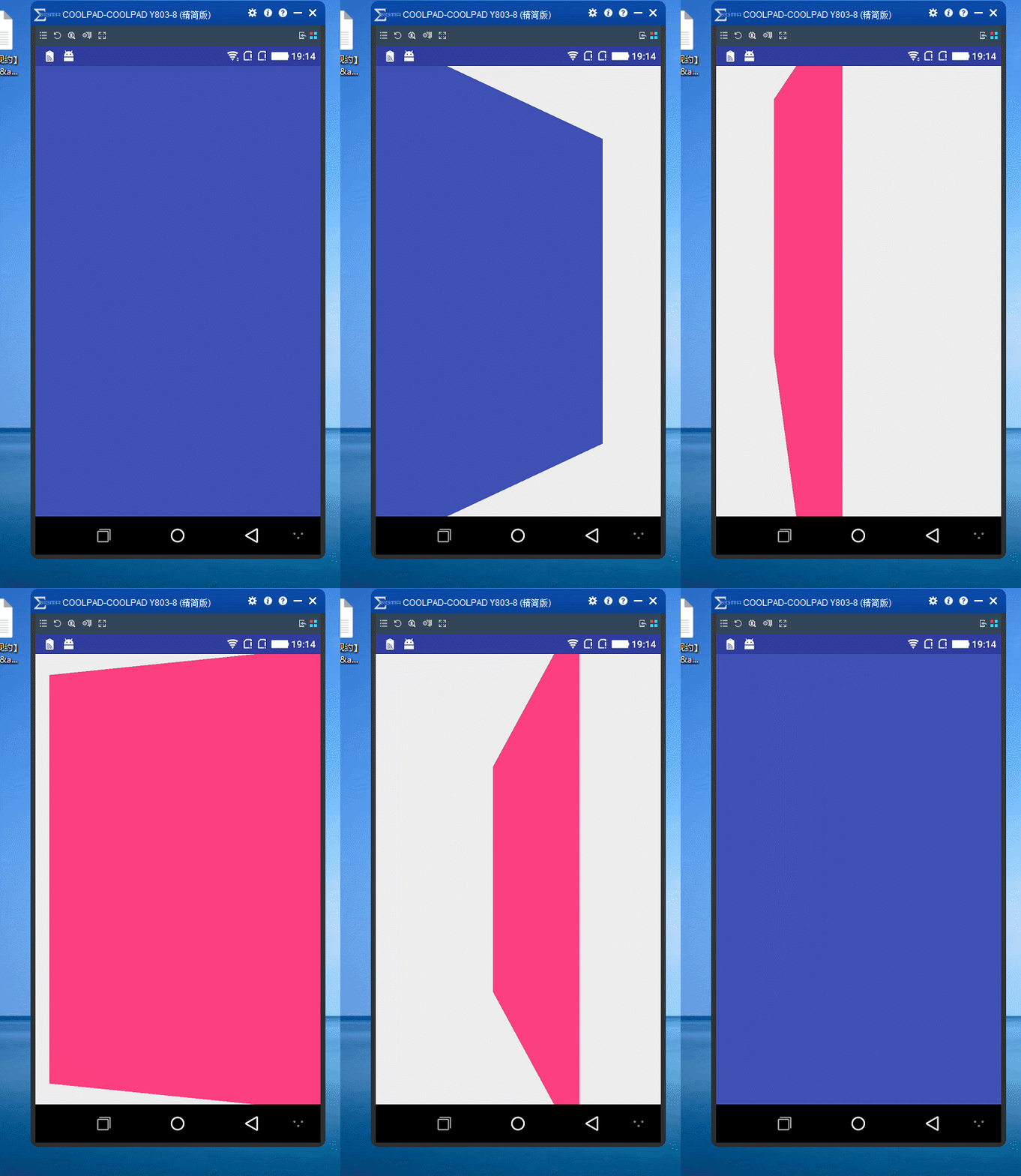
三.代码实现
import android.view.animation.Animation;

import android.view.animation.Transformation;

import android.graphics.Camera;

import android.graphics.Matrix;

/**

 * An animation that rotates the view on the Y axis between two specified angles.

 * This animation also adds a translation on the Z axis (depth) to improve the effect.

 */

public class Rotate3dAnimation extends Animation {

    private final float mFromDegrees;

    private final float mToDegrees;

    private final float mCenterX;

    private final float mCenterY;

    private final float mDepthZ;

    private final boolean mReverse;

    private Camera mCamera;

    /**

     * Creates a new 3D rotation on the Y axis. The rotation is defined by its

     * start angle and its end angle. Both angles are in degrees. The rotation

     * is performed around a center point on the 2D space, definied by a pair

     * of X and Y coordinates, called centerX and centerY. When the animation

     * starts, a translation on the Z axis (depth) is performed. The length

     * of the translation can be specified, as well as whether the translation

     * should be reversed in time.

     *

     * @param fromDegrees the start angle of the 3D rotation

     * @param toDegrees the end angle of the 3D rotation

     * @param centerX the X center of the 3D rotation

     * @param centerY the Y center of the 3D rotation

     * @param reverse true if the translation should be reversed, false otherwise

     */

    public Rotate3dAnimation(float fromDegrees, float toDegrees,

                             float centerX, float centerY, float depthZ, boolean reverse) {

        mFromDegrees = fromDegrees;

        mToDegrees = toDegrees;

        mCenterX = centerX;

        mCenterY = centerY;

        mDepthZ = depthZ;

        mReverse = reverse;

    }

    @Override

    public void initialize(int width, int height, int parentWidth, int parentHeight) {

        super.initialize(width, height, parentWidth, parentHeight);

        mCamera = new Camera();

    }

    @Override

    protected void applyTransformation(float interpolatedTime, Transformation t) {

        final float fromDegrees = mFromDegrees;

        float degrees = fromDegrees + ((mToDegrees - fromDegrees) * interpolatedTime);

        final float centerX = mCenterX;

        final float centerY = mCenterY;

        final Camera camera = mCamera;

        final Matrix matrix = t.getMatrix();

        camera.save();

        if (mReverse) {

            camera.translate(0.0f, 0.0f, mDepthZ * interpolatedTime);

        } else {

            camera.translate(0.0f, 0.0f, mDepthZ * (1.0f - interpolatedTime));

        }

        camera.rotateY(degrees);

        camera.getMatrix(matrix);

        camera.restore();

        matrix.preTranslate(-centerX, -centerY);

        matrix.postTranslate(centerX, centerY);

    }

}

import android.app.Activity;

import android.util.Log;

import android.view.ViewGroup;

import android.view.animation.AccelerateInterpolator;

public class RotationHelper {

    DisplayNextView displayNext;

    public RotationHelper(Activity con,int order){

        displayNext = new DisplayNextView(con, order);

    }

    // 逆时针旋转90

    public void applyFirstRotation(ViewGroup layout,float start, float end) {

        // Find the center of the container

        final float centerX = layout.getWidth() / 2.0f;

        final float centerY = layout.getHeight() / 2.0f;

        Log.i("centerX =" + centerX, "centerX");

        Log.i("centerY =" + centerY, "centerY");

        // Create a new 3D rotation with the supplied parameter

        // The animation listener is used to trigger the next animation

        final Rotate3dAnimation rotation = new Rotate3dAnimation(start, end,

                centerX, centerY, 310.0f, true);

        rotation.setDuration(700);

        rotation.setFillAfter(true);

        rotation.setInterpolator(new AccelerateInterpolator());

        rotation.setAnimationListener(displayNext);

        layout.startAnimation(rotation);

    }

    public void applyLastRotation(ViewGroup layout,float start, float end) {

        // Find the center of the container

        final float centerX = layout.getWidth() / 2.0f;

        final float centerY = layout.getHeight() / 2.0f;

        Log.i("centerX =" + centerX, "centerX");

        Log.i("centerY =" + centerY, "centerY");

        // Create a new 3D rotation with the supplied parameter

        // The animation listener is used to trigger the next animation

        final Rotate3dAnimation rotation = new Rotate3dAnimation(start, end,

                160, 192, 310.0f, false);

        rotation.setDuration(700);

        rotation.setFillAfter(true);

        rotation.setInterpolator(new AccelerateInterpolator());

        layout.startAnimation(rotation);

    }

}

import android.app.Activity;

import android.view.animation.Animation;

public class DisplayNextView implements Animation.AnimationListener {

    Object obj;

    // 动画监听器的构造函数

    Activity ac;

    int order;

    public DisplayNextView(Activity ac, int order) {

        this.ac = ac;

        this.order = order;

    }

    public void onAnimationStart(Animation animation) {

    }

    public void onAnimationEnd(Animation animation) {

        doSomethingOnEnd(order);

    }

    public void onAnimationRepeat(Animation animation) {

    }

    private final class SwapViews implements Runnable {

        public void run() {

            switch (order) {

                case Constants.KEY_FIRST_INVERSE:

                    ((TranslateLayout) ac).jumpToSecond();

                    break;

                case Constants.KEY_SECOND_CLOCKWISE:

                    ((Second) ac).jumpToFirst();

                    break;

            }

        }

    }

    //动画完成的监听

    public void doSomethingOnEnd(int _order) {

        switch (_order) {

            case Constants.KEY_FIRST_INVERSE:

                ((TranslateLayout) ac).layout1.post(new SwapViews());

                break;

            case Constants.KEY_SECOND_CLOCKWISE:

                ((Second) ac).layout2.post(new SwapViews());

                break;

        }

    }

}

public class Constants {//相关常量

    public final static int KEY_FIRST_INVERSE = 1;

    public final static int KEY_FIRST_CLOCKWISE = 2;

    public final static int KEY_SECOND_INVERSE = 3;

    public final static int KEY_SECOND_CLOCKWISE = 4;

}

//第一个页面

public class TranslateLayout extends Activity implements OnClickListener {

    RelativeLayout layout1;

    String tag="";

    /** Called when the activity is first created. */

    @Override

    public void onCreate(Bundle savedInstanceState) {

        super.onCreate(savedInstanceState);

        setContentView(R.layout.first);

        ImageView first_btn = (ImageView) findViewById(R.id.first_btn);

        first_btn.setOnClickListener(this);

        layout1 = (RelativeLayout) findViewById(R.id.layout1);

        showView();

    }

    public void showView() {

        /* 取得Intent中的Bundle对象 */

        Bundle bundle = this.getIntent().getExtras();

        if (bundle != null) {

            /* 取得Bundle对象中的数据 */

            tag = bundle.getString("second","");

            Log.d("first_tag",tag);

            if (tag.equals("Second")) {

                rotateHelper = new RotationHelper(this,

                        Constants.KEY_FIRST_CLOCKWISE);

                rotateHelper.applyLastRotation(layout1, -90, 0);

            }

        }

    }

    RotationHelper rotateHelper;

    @Override

    public void onClick(View v) {

        // TODO Auto-generated method stub

        rotateHelper = new RotationHelper(this, Constants.KEY_FIRST_INVERSE);

        rotateHelper.applyFirstRotation(layout1, 0, -90);

    }

    @Override

    protected void onPause() {

        overridePendingTransition(0, 0);

        super.onPause();

    }

    public void jumpToSecond() {

        Intent in = new Intent();

        in.setClass(this, Second.class);

        // new一个Bundle对象,并将要传递的数据传入

        Bundle bundle = new Bundle();

        bundle.putString("front", "First");

        /* 将Bundle对象assign给Intent */

        in.putExtras(bundle);

        // 如果已经打开过的实例,将不会重新打开新的Activity

        startActivity(in);

        //关闭掉动画

        overridePendingTransition(0, 0);

    }

}

/**

 * Created by cxf on 2017/9/13.

 *

 * @title

 * @describe

 * @email chenxianfu_it@163.com

 */

//第二个页面

public class Second extends Activity implements OnClickListener {

    String tag = "";

    RotationHelper rotateHelper;

    RelativeLayout layout2;

    /** Called when the activity is first created. */

    @Override

    public void onCreate(Bundle savedInstanceState) {

        super.onCreate(savedInstanceState);

        setContentView(R.layout.second);

        layout2 = (RelativeLayout) findViewById(R.id.layout2);

        showView();

        setListener();

    }

    public void setListener() {

        ImageView second_btn = (ImageView) findViewById(R.id.second_btn);

        second_btn.setOnClickListener(this);

    }

    @Override

    public void onClick(View v) {

        // TODO Auto-generated method stub

        rotateHelper = new RotationHelper(this,

                Constants.KEY_SECOND_CLOCKWISE);

        rotateHelper.applyFirstRotation(layout2, 0, 90);

    }

    public void showView() {

        /* 取得Intent中的Bundle对象 */

        Bundle bundle = this.getIntent().getExtras();

        if (bundle != null) {

            /* 取得Bundle对象中的数据 */

            tag = bundle.getString("front");

        }

        System.out.println("bundle =" + tag);

        if (tag.equals("First")) {

            rotateHelper = new RotationHelper(this, Constants.KEY_SECOND_INVERSE);

            rotateHelper.applyLastRotation(layout2, 90, 0);

        }

    }

    @Override

    protected void onDestroy() {

        overridePendingTransition(0, 0);

        super.onDestroy();

    }

    public void jumpToFirst() {

        Intent in = new Intent();

        in.setClass(this, TranslateLayout.class);

        Bundle bundle = new Bundle();

        bundle.putString("second", "Second");

        in.putExtras(bundle);

        startActivity(in);

        overridePendingTransition(0, 0);

        finish();

    }

}
两个activity的3D翻转动画.md的更多相关文章
- CSS3和js炫酷点击按钮3D翻转动画特效
简要教程 flipside是一款使用CSS3和js制作的炫酷点击按钮无缝过渡到确认面板的过渡动画特效.该点击按钮特效在按钮不同方向的边部点击时,产生的过渡动画特效是不一样的. 在线预览 源码下载 ...
- 【译】仿Taasky的3D翻转菜单动画实现
最终效果 最终效果 开始 首先下载并打开一个事先搭好架子的Demo,然后来分析一下.这个Demo包含一个主页和详情页,其中MenuViewController继承自UITableViewControl ...
- 纯CSS 3D翻转一个面(翻转导航菜单 立方体)
在做练习的时候学到css的翻转导航菜单,原代码有点让人头疼,通过对其css的参数一点点研究了其实现过程. 这里推荐大家研究这个3D翻转动画的代码. 我的github:swarz,欢迎给老弟我++星星 ...
- WPF实现3D翻转的动画效果
1.前端代码实现 1.1 原理见代码注析 <Grid MouseDown="Grid_MouseDown"> <Viewport3D> <Viewpo ...
- 《转载》两个activity界面间跳转切换动画效果
1overridePendingTransition Activity的切换动画指的是从一个activity跳转到另外一个activity时的动画. 它包括两个部分:一部分是第一个activity退出 ...
- CSS3之图片3D翻转效果(网页效果--每日一更)
今天,带来的是纯CSS3的效果--图片3D翻转. 请看效果:亲,请点击这里 这个效果主要还是运用了CSS3的transform变形属性,与上个效果不同的是,这次并不是动画,所以没有采用animatio ...
- 使用CSS3 BACKFACE-VISIBILITY属性制作翻转动画效果
摘要: 通过backface-visibility:hidden;属性,我们可以使一个元素在翻转之后消失,这是可以使用另一个元素放在它的背面,从而制作出一种元素翻转之后出现另一个元素的效果. ... ...
- CSS图片翻转动画技术详解
因为不断有人问我,现在我补充一下:IE是支持这种技术的!尽管会很麻烦.需要做的是旋转front和back元素,而不是旋转整个容器元素.如果你使用的是最新版的IE,可以忽略这一节.IE10+是支持的,I ...
- CSS3图片翻转动画技术详解
CSS动画非常的有趣:这种技术的美就在于,通过使用很多简单的属性,你能创建出漂亮的消隐效果.其中代表性的一种就是CSS图片翻转效果,能让你看到一张卡片的正反两面上的内容.本文就是要用最简单的方法向大家 ...
随机推荐
- Java中的懒汉式单例与饿汉式单例实例详解
懒汉式单例:线程非安全,当被调用的时候才创建实例,效率较高 public class LazySingleton { private static LazySingleton lazySingleto ...
- Jmeter----基本介绍(1)
1.Jmeter 基本介绍 简单的说,就是Jmeter能做 功能测试 和 性能测试 .它能够对HTTP和FTP服务器进行压力和性能测试, 也可以对任何数据库进行同样的测试,还能以多种形式展现测试结果. ...
- 大数据 --> 安装Hadoop-单机模式(1)
安装Hadoop-单机模式(1) 一.在Ubuntu下创建hadoop组和hadoop用户 1)创建hadoop用户组 sudo addgroup hadoop //添加用户组 2)创建hadoop用 ...
- Spring Framework 简介
Spring Framework 依赖注入.事务管理.Web应用程序.数据访问.消息传递.测试和更多的核心支持. Tips: Spring 官网:https://spring.io/ spring f ...
- drbd(四):drbd多节点(drbd9)
1.drbd多节点简介 在drbd9以前,drbd一直只能配置两个节点,要么是primary/secondary,要么是primary/primary.虽然在这些版本上也能配置第三个节点实现三路节点的 ...
- EM算法的直观描述
解决含有隐变量的问题有三种方法,其中第三种方法就是通常所说的em算法.下面以统计学习方法中给出的三硬币问题为例来分别描述这三种方法.(a,b,c三硬币抛出来为正的概率分别为pai,p,q,每轮抛硬币先 ...
- C语言第六次博客作业--数据类型
一.PTA实验作业 题目1:区位码输入法 1. 本题PTA提交列表 2. 设计思路 (1)定义整型变量code放区位码,areacode放区码,digitcode放位码,one放个位数,two放十位数 ...
- Ubuntu登陆密码忘记
在VMware中安装了Ubuntu 10.04,经过了一段时间,再次登录的时候居然进不去了, 一开始不知道怎样在虚拟机中进入到Grub启动界面,网上搜索了一番,按照以下步骤重新为用户设定了新密码. 重 ...
- 玩转Leveldb原理及源码--拙见1
可以说是不知天高地厚.. 可以说是班门弄斧.. 但是,我今天还就这样走了,我喜欢!!!!!! 注:后续文章,限于篇幅,不懂名词都有 紫色+下划线 超链接,有兴趣,可以查阅: 网上关于Leveldb 的 ...
- JavaScript 相关知识
一.数组 var a = [1,2,3,4]; console.log(a.length); a.push(5); console.log(a); // [1, 2, 3, 4, 5] var r ...