
Android 简单统计文本文件字符数、单词数、行数Demo
做的demo是统计文本文件的字符数、单词数、行数的,首先呢,我们必须要有一个文本文件。所以我们要么创建一个文本文件,并保存,然后再解析;要么就提前把文本文件先放到模拟器上,然后检索到文本名再进行解析。我感觉第二种方法不可行,因为要测试时,肯定要多次测试,每次还要找到文件再修改文件内容,过于麻烦。所以我用的第一种方法,文件内容更改后直接保存即可。
首先是 页面布局:
<LinearLayout
    xmlns:android="http://schemas.android.com/apk/res/android"
    xmlns:app="http://schemas.android.com/apk/res-auto"
    xmlns:tools="http://schemas.android.com/tools"
    android:layout_width="match_parent"
    android:layout_height="match_parent"
    android:orientation="vertical"
    tools:context="com.example.demo.MainActivity">

    <TextView
        android:layout_width="wrap_content"
        android:layout_height="wrap_content"
        android:text="文件名称:"
        android:textSize="15dp"/>
    <EditText
        android:layout_width="match_parent"
        android:layout_height="wrap_content"
        android:id="@+id/et_name"/>
    <TextView
        android:layout_width="wrap_content"
        android:layout_height="wrap_content"
        android:text="文件内容:"
        android:textSize="15dp"/>

    <!--android:inputType="textMultiLine" 设置EditText可以多行输入,没有这句话也能正常运行-->
    <EditText
        android:inputType="textMultiLine"
        android:layout_width="match_parent"
        android:layout_height="wrap_content"
        android:id="@+id/et_content"/>
    <LinearLayout
        android:layout_width="wrap_content"
        android:layout_height="wrap_content"
        android:orientation="horizontal">
        <Button
            android:layout_width="wrap_content"
            android:layout_height="wrap_content"
            android:id="@+id/btn_write"
            android:text="保存"/>
        <Button
            android:layout_width="wrap_content"
            android:layout_height="wrap_content"
            android:id="@+id/btn_analysis"
            android:text="解析"/>
    </LinearLayout>
    <TextView
        android:layout_width="match_parent"
        android:layout_height="wrap_content"
        android:id="@+id/tv_read"
        android:textSize="20dp"/>
</LinearLayout>
我是用手Android手机模拟程序的,文件保存到SD卡中,有兴趣的同学可以试试其他方法,所以我们还要在AndroidManifest.xml里加入以下权限:
    <!-- SD卡中创建和删除文件的权限 -->

    <uses-permission android:name="android.permission.MOUNT_UNMOUNT_FILESYSTEMS" />

    <!-- 向SD卡写入数据的权限 -->

    <uses-permission android:name="android.permission.WRITE_EXTERNAL_STORAGE" />

    <!-- 从SD读取数据权限 -->

    <uses-permission android:name="android.permission.READ_EXTERNAL_STORAGE" />
Java代码:
保存文件部分:
要判断SD卡是否存在,是否具有读写权限,获得SD卡存储目录,保存文件,内容。
//创建文件,保存输入内容。

    private void write() {

        String filename=et_name.getText().toString();

        String filecontent=et_content.getText().toString();

        try {

            if (Environment.getExternalStorageState().equals

                    (Environment.MEDIA_MOUNTED)) {//表明对象是否存在并具有读、写权限

                //返回 File ,获取外部存储目录即 SDCard

                File sdCardDir = Environment.getExternalStorageDirectory();

                FileOutputStream fos = new FileOutputStream(sdCardDir.getCanonicalPath()

                        + "/"+filename+".txt");//getCanonicalPath()返回的是规范化的绝对路径

                fos.write(filecontent.getBytes("UTF-8"));

                fos.close();//关闭输出流

                Toast.makeText(this, "数据保存到"+filename+".txt"+"文件中了", Toast.LENGTH_SHORT).show();

            }else {

                Toast.makeText(this, "未找到SD卡", Toast.LENGTH_SHORT).show();

            }

        }catch(Exception e){

            e.printStackTrace();

        }

    }
解析部分:
同样要先判断SD卡是否存在,是否具有读写权限,再判断是否存在该文件,按行读取文件并解析,自加得出结果。
//解析字符数,单词数,行数,空格数

    private void analysis() {

        String str="";

        int words = 0;//单词数

        int chars = 0;//字符数

        int lines = 0;//行数

        int spaces=0;//空格数

        int marks=0;//标点符号数

        int character=0;//字母数

        String filename=et_name.getText().toString();

        FileInputStream fis=null;

        BufferedReader br=null;

        try {

            //判断SD卡是否存在,并且是否具有读写权限

            if (Environment.getExternalStorageState().equals(Environment.MEDIA_MOUNTED)) {

                File file = new File(Environment.getExternalStorageDirectory().getCanonicalPath() + "/"+filename+".txt");

                if (file.exists()){//判断文件是否存在

                    //打开文件输入流

                    fis=new FileInputStream(file);

                    //字符流写入了缓冲区

                    br=new BufferedReader(new InputStreamReader(fis));

                    while((str=br.readLine())!=null){//readLine()每次读取一行,转化为字符串,br.readLine()为null时,不执行

                        char[] b=str.toCharArray();//将字符串对象中的字符转换为一个字符数组

                        for (int i = 0; i < str.length(); i++) {

                            if (b[i]==' '){//如果字符数组中包含空格,spaces自加1

                                spaces++;//空格数

                            }else if (b[i]==','||b[i]=='.'){

                                marks++;

                            }

                        }

                        //单词数,split()方法,返回是一个数组,根据(空格,标点符号)分割成字符串数组,数组长度就是单词长度。

                        words+=str.split("[ \\.,]").length;//使用正则表达式实现多个分隔符进行分隔的效果。

                        chars+=str.length();//字符串的长度,即字符数,包括英文字母数+空格数+标点数

                        lines++;//行数(由于每次读取一行,行数自加即可)

                    }

                    character=chars-(spaces+marks);//字母数=字符数-空格数-标点数

                    //关闭文件

                    br.close();

                    tv_read.setText("单词数:"+words+",字符数:"+chars+",行数:"+lines+",字母数:"+character+",空格数:"+spaces+",标点符号数:"+marks);

                }

                else {

                    Toast.makeText(this, "不存在该文件", Toast.LENGTH_SHORT).show();

                }

            }

        } catch (Exception e) {

            e.printStackTrace();

        }

    }
最后看看运算结果:

全文代码:
public class MainActivity extends AppCompatActivity implements View.OnClickListener {

    private EditText et_name;

    private EditText et_content;

    private Button btn_write;

    private Button btn_analysis;

    private TextView tv_read;

    @Override

    protected void onCreate(Bundle savedInstanceState) {

        super.onCreate(savedInstanceState);

        setContentView(R.layout.activity_main);

        //初始化控件

        initView();

    }

    private void initView() {

        et_name = (EditText) findViewById(R.id.et_name);

        et_content = (EditText) findViewById(R.id.et_content);

        btn_write = (Button) findViewById(R.id.btn_write);

        btn_analysis = (Button) findViewById(R.id.btn_analysis);

        tv_read = (TextView) findViewById(R.id.tv_read);

        btn_write.setOnClickListener(this);

        btn_analysis.setOnClickListener(this);

    }

    //点击事件

    @Override

    public void onClick(View v) {

        switch (v.getId()) {

            case R.id.btn_write:

                write();

                btn_analysis.setClickable(true);

                break;

            case R.id.btn_analysis:

                analysis();

                break;

        }

    }

    //创建文件,保存输入内容。

    private void write() {

        String filename=et_name.getText().toString();

        String filecontent=et_content.getText().toString();

        try {

            if (Environment.getExternalStorageState().equals

                    (Environment.MEDIA_MOUNTED)) {//表明对象是否存在并具有读、写权限

                //返回 File ,获取外部存储目录即 SDCard

                File sdCardDir = Environment.getExternalStorageDirectory();

                FileOutputStream fos = new FileOutputStream(sdCardDir.getCanonicalPath()

                        + "/"+filename+".txt");//getCanonicalPath()返回的是规范化的绝对路径

                fos.write(filecontent.getBytes("UTF-8"));

                fos.close();//关闭输出流

                Toast.makeText(this, "数据保存到"+filename+".txt"+"文件中了", Toast.LENGTH_SHORT).show();

            }else {

                Toast.makeText(this, "未找到SD卡", Toast.LENGTH_SHORT).show();

            }

        }catch(Exception e){

            e.printStackTrace();

        }

    }

    //解析字符数,单词数,行数,空格数

    private void analysis() {

        String str="";

        int words = 0;//单词数

        int chars = 0;//字符数

        int lines = 0;//行数

        int spaces=0;//空格数

        int marks=0;//标点符号数

        int character=0;//字母数

        String filename=et_name.getText().toString();

        FileInputStream fis=null;

        BufferedReader br=null;

        try {

            //判断SD卡是否存在,并且是否具有读写权限

            if (Environment.getExternalStorageState().equals(Environment.MEDIA_MOUNTED)) {

                File file = new File(Environment.getExternalStorageDirectory().getCanonicalPath() + "/"+filename+".txt");

                if (file.exists()){//判断文件是否存在

                    //打开文件输入流

                    fis=new FileInputStream(file);

                    //字符流写入了缓冲区

                    br=new BufferedReader(new InputStreamReader(fis));

                    while((str=br.readLine())!=null){//readLine()每次读取一行,转化为字符串,br.readLine()为null时,不执行

                        char[] b=str.toCharArray();//将字符串对象中的字符转换为一个字符数组

                        for (int i = 0; i < str.length(); i++) {

                            if (b[i]==' '){//如果字符数组中包含空格,spaces自加1

                                spaces++;//空格数

                            }else if (b[i]==','||b[i]=='.'){

                                marks++;

                            }

                        }

                        //单词数,split()方法,返回是一个数组,根据(空格,标点符号)分割成字符串数组,数组长度就是单词长度。

                        words+=str.split("[ \\.,]").length;//使用正则表达式实现多个分隔符进行分隔的效果。

                        chars+=str.length();//字符串的长度,即字符数,包括英文字母数+空格数+标点数

                        lines++;//行数(由于每次读取一行,行数自加即可)

                    }

                    character=chars-(spaces+marks);//字母数=字符数-空格数-标点数

                    //关闭文件

                    br.close();

                    tv_read.setText("单词数:"+words+",字符数:"+chars+",行数:"+lines+",字母数:"+character+",空格数:"+spaces+",标点符号数:"+marks);

                }

                else {

                    Toast.makeText(this, "不存在该文件", Toast.LENGTH_SHORT).show();

                }

            }

        } catch (Exception e) {

            e.printStackTrace();

        }

    }

}
知识浅薄,如有错误,还望指出。
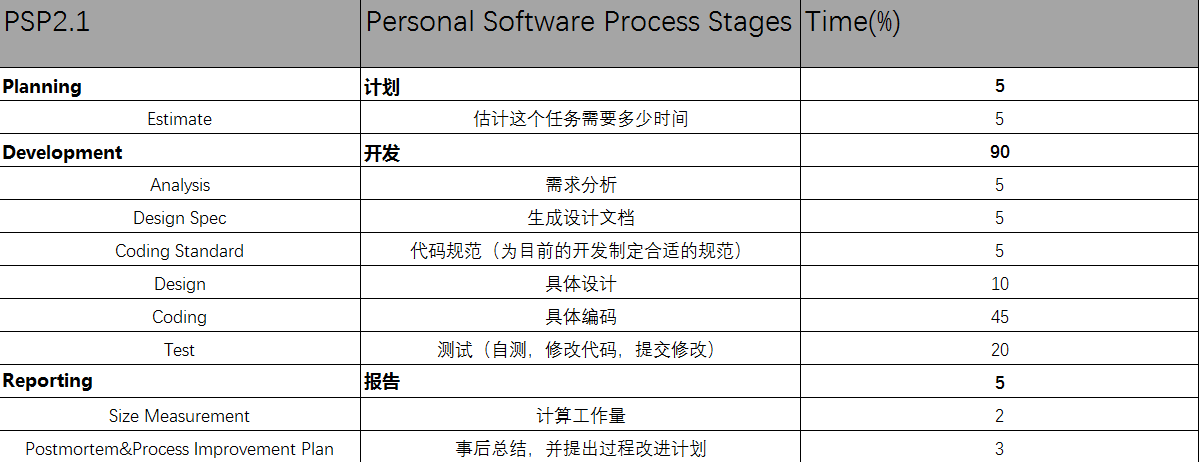
个人项目耗时记录
Android 简单统计文本文件字符数、单词数、行数Demo的更多相关文章
- 统计文件夹下java代码行数的小程序--主要是学习任务队列的思想
首先感谢czbk的老师,录制的视频,让我们有这么好的学习资料.……—— 统计文件夹java文件的行数,首先想到的肯定是用递归的方法,因为文件夹下面可能包含文件夹,用递归的方法,代码容易写.(这和写简单 ...
- 使用Eclipse可以方便的统计工程或文件的代码行数,
使用Eclipse可以方便的统计工程或文件的代码行数,方法如下: 1.点击要统计的项目或许文件夹,在菜单栏点击Search,然后点击File... 2.选中正则表达式(Regular expressi ...
- iOS 统计Xcode整个工程的代码行数
小技巧5-iOS 统计Xcode整个工程的代码行数 1.打开终端 2.cd 空格 将工程的文件夹拖到终端上,回车,此时进入到工程的路径 此时已经进入到工程文件夹下 3.运行指令 a. find . - ...
- 单表行数超过 500 万行或者单表容量超过 2GB,才推荐进行分库分表。
https://github.com/alibaba/p3c/blob/master/阿里巴巴Java开发手册(详尽版).pdf 单表行数超过 500 万行或者单表容量超过 2GB,才推荐进行分库分表 ...
- 【原】Mac下统计任意文件夹中代码行数的工
[链接][原]Mac下统计任意文件夹中代码行数的工http://www.cnblogs.com/wengzilin/p/4580646.html
- 统计sql server 2012表的行数
--功能:统计sql server 2012表的行数 SELECT a.name, a.object_id, b.rows, b.index_id FROM sys.tables AS a INNER ...
- python 脚本(获取指定文件夹、指定文件格式、的代码行数、注释行数)
1.代码的运行结果: 获取 指定文件夹下.指定文件格式 文件的: 总代码行数.总注释行数(需指定注释格式).总空行数: #coding: utf-8 import os, re # 代码所在目录 FI ...
- c - 统计字符串"字母,空格,数字,其他字符"的个数和行数.
#include <stdio.h> #include <ctype.h> using namespace std; /* 题目:输入一行字符,分别统计出其中英文字母.空格.数 ...
- C++统计代码注释行数 & 有效代码行数 & 代码注释公共行 & 函数个数
问题来源,在14年的暑假的一次小项目当中遇到了一个这样的问题,要求统计C++代码的注释行数,有效代码行数,代码注释公共行数,以及函数个数. 下面稍微解释一下问题, 1)注释行数:指有注释的行,包括有代 ...
随机推荐
- EIGRP 基础实验
一.环境准备 1. 软件:GNS3 2. 路由:c7200 二.实验操作 实验要求: 1.掌握EIGRP 的基本配置 2.掌握EIGRP 的通配符掩配置方法 3.掌握EIGRP 的自动汇总特性,理解E ...
- 简易版本vue的实现
用了Vue也有两年时间了,一直以来都是只知其然,不知其所以然,为了能更好的使用Vue不被Vue所奴役,学习一下Vue底层的基本原理. Vue官网有一段这样的介绍:当你把一个普通的JavaScript对 ...
- Java笔记(day12)
包: 对类文件进行分类管理:给类提供多层命名(名称)空间:写在程序文件的第一行:类名的全称是 包名.类名包也是一种封装形式: package protected必须是成为其子类,才能继承import导 ...
- css,解决文字与图片对齐的问题
测试代码: <!DOCTYPE html> <html lang="en"> <head> <meta charset="UTF ...
- 【表格】大于号转义符&gt;---小于号转义符&lt;
关于来源:百度及个人经验. 常用的都是个人尝试过或个人常用的,其它的都是从百度来的.使用前建议写个HTML的Demo试试看 ^_^ 比心 < < < 小于号 > > &g ...
- 基于ArcGISServer进行分页矢量查询的方案进阶
文章版权由作者李晓晖和博客园共有,若转载请于明显处标明出处:http://www.cnblogs.com/naaoveGIS/ 1. 背景 在空间查询中,我们对查询结果要求以分页形式进行展示.G ...
- SuperMap iObject入门开发系列之二地下三维管线系统介绍
本文是一位好友“托马斯”授权给我来发表的,介绍都是他的研究成果,在此,非常感谢. 上次对超图平台组件式开发进行介绍,这次介绍的是基于这个框架开发的地下三维管线系统.地下管线涉及给水.雨水.污水.燃气. ...
- 迷茫<第四篇:这两年>
时间匆匆而过,不知不觉已经是到北京的第二个年头,又到年末,2017年接近了尾声,提前预祝各位看官元旦节快乐! 今年3月份跳槽了一次,4月份以高级开发工程师职位进来现在的公司一直工作到现在,没有以前那么 ...
- Oracle设置主键自增
oracle没有mysql那样可以有自增主键,需要自己通过创建序列才能实现自增 /*创建自增序列*/ CREATE SEQUENCE CMB_CHINA_CITYS_ID MINVALUE --最小值 ...
- vue2.0 日历日程表 ,可进行二次开发.
由于工作业务需求,要写一个日程表,日程表写之前 要先生成日历,废话不多说,直接 上代码: <!DOCTYPE html> <html lang="zh-CN"&g ...