
Android 简单统计文本文件字符数、单词数、行数Demo
做的demo是统计文本文件的字符数、单词数、行数的,首先呢,我们必须要有一个文本文件。所以我们要么创建一个文本文件,并保存,然后再解析;要么就提前把文本文件先放到模拟器上,然后检索到文本名再进行解析。我感觉第二种方法不可行,因为要测试时,肯定要多次测试,每次还要找到文件再修改文件内容,过于麻烦。所以我用的第一种方法,文件内容更改后直接保存即可。
首先是 页面布局:
<LinearLayout
    xmlns:android="http://schemas.android.com/apk/res/android"
    xmlns:app="http://schemas.android.com/apk/res-auto"
    xmlns:tools="http://schemas.android.com/tools"
    android:layout_width="match_parent"
    android:layout_height="match_parent"
    android:orientation="vertical"
    tools:context="com.example.demo.MainActivity">

    <TextView
        android:layout_width="wrap_content"
        android:layout_height="wrap_content"
        android:text="文件名称:"
        android:textSize="15dp"/>
    <EditText
        android:layout_width="match_parent"
        android:layout_height="wrap_content"
        android:id="@+id/et_name"/>
    <TextView
        android:layout_width="wrap_content"
        android:layout_height="wrap_content"
        android:text="文件内容:"
        android:textSize="15dp"/>

    <!--android:inputType="textMultiLine" 设置EditText可以多行输入,没有这句话也能正常运行-->
    <EditText
        android:inputType="textMultiLine"
        android:layout_width="match_parent"
        android:layout_height="wrap_content"
        android:id="@+id/et_content"/>
    <LinearLayout
        android:layout_width="wrap_content"
        android:layout_height="wrap_content"
        android:orientation="horizontal">
        <Button
            android:layout_width="wrap_content"
            android:layout_height="wrap_content"
            android:id="@+id/btn_write"
            android:text="保存"/>
        <Button
            android:layout_width="wrap_content"
            android:layout_height="wrap_content"
            android:id="@+id/btn_analysis"
            android:text="解析"/>
    </LinearLayout>
    <TextView
        android:layout_width="match_parent"
        android:layout_height="wrap_content"
        android:id="@+id/tv_read"
        android:textSize="20dp"/>
</LinearLayout>
我是用手Android手机模拟程序的,文件保存到SD卡中,有兴趣的同学可以试试其他方法,所以我们还要在AndroidManifest.xml里加入以下权限:
    <!-- SD卡中创建和删除文件的权限 -->

    <uses-permission android:name="android.permission.MOUNT_UNMOUNT_FILESYSTEMS" />

    <!-- 向SD卡写入数据的权限 -->

    <uses-permission android:name="android.permission.WRITE_EXTERNAL_STORAGE" />

    <!-- 从SD读取数据权限 -->

    <uses-permission android:name="android.permission.READ_EXTERNAL_STORAGE" />
Java代码:
保存文件部分:
要判断SD卡是否存在,是否具有读写权限,获得SD卡存储目录,保存文件,内容。
//创建文件,保存输入内容。

    private void write() {

        String filename=et_name.getText().toString();

        String filecontent=et_content.getText().toString();

        try {

            if (Environment.getExternalStorageState().equals

                    (Environment.MEDIA_MOUNTED)) {//表明对象是否存在并具有读、写权限

                //返回 File ,获取外部存储目录即 SDCard

                File sdCardDir = Environment.getExternalStorageDirectory();

                FileOutputStream fos = new FileOutputStream(sdCardDir.getCanonicalPath()

                        + "/"+filename+".txt");//getCanonicalPath()返回的是规范化的绝对路径

                fos.write(filecontent.getBytes("UTF-8"));

                fos.close();//关闭输出流

                Toast.makeText(this, "数据保存到"+filename+".txt"+"文件中了", Toast.LENGTH_SHORT).show();

            }else {

                Toast.makeText(this, "未找到SD卡", Toast.LENGTH_SHORT).show();

            }

        }catch(Exception e){

            e.printStackTrace();

        }

    }
解析部分:
同样要先判断SD卡是否存在,是否具有读写权限,再判断是否存在该文件,按行读取文件并解析,自加得出结果。
//解析字符数,单词数,行数,空格数

    private void analysis() {

        String str="";

        int words = 0;//单词数

        int chars = 0;//字符数

        int lines = 0;//行数

        int spaces=0;//空格数

        int marks=0;//标点符号数

        int character=0;//字母数

        String filename=et_name.getText().toString();

        FileInputStream fis=null;

        BufferedReader br=null;

        try {

            //判断SD卡是否存在,并且是否具有读写权限

            if (Environment.getExternalStorageState().equals(Environment.MEDIA_MOUNTED)) {

                File file = new File(Environment.getExternalStorageDirectory().getCanonicalPath() + "/"+filename+".txt");

                if (file.exists()){//判断文件是否存在

                    //打开文件输入流

                    fis=new FileInputStream(file);

                    //字符流写入了缓冲区

                    br=new BufferedReader(new InputStreamReader(fis));

                    while((str=br.readLine())!=null){//readLine()每次读取一行,转化为字符串,br.readLine()为null时,不执行

                        char[] b=str.toCharArray();//将字符串对象中的字符转换为一个字符数组

                        for (int i = 0; i < str.length(); i++) {

                            if (b[i]==' '){//如果字符数组中包含空格,spaces自加1

                                spaces++;//空格数

                            }else if (b[i]==','||b[i]=='.'){

                                marks++;

                            }

                        }

                        //单词数,split()方法,返回是一个数组,根据(空格,标点符号)分割成字符串数组,数组长度就是单词长度。

                        words+=str.split("[ \\.,]").length;//使用正则表达式实现多个分隔符进行分隔的效果。

                        chars+=str.length();//字符串的长度,即字符数,包括英文字母数+空格数+标点数

                        lines++;//行数(由于每次读取一行,行数自加即可)

                    }

                    character=chars-(spaces+marks);//字母数=字符数-空格数-标点数

                    //关闭文件

                    br.close();

                    tv_read.setText("单词数:"+words+",字符数:"+chars+",行数:"+lines+",字母数:"+character+",空格数:"+spaces+",标点符号数:"+marks);

                }

                else {

                    Toast.makeText(this, "不存在该文件", Toast.LENGTH_SHORT).show();

                }

            }

        } catch (Exception e) {

            e.printStackTrace();

        }

    }
最后看看运算结果:

全文代码:
public class MainActivity extends AppCompatActivity implements View.OnClickListener {

    private EditText et_name;

    private EditText et_content;

    private Button btn_write;

    private Button btn_analysis;

    private TextView tv_read;

    @Override

    protected void onCreate(Bundle savedInstanceState) {

        super.onCreate(savedInstanceState);

        setContentView(R.layout.activity_main);

        //初始化控件

        initView();

    }

    private void initView() {

        et_name = (EditText) findViewById(R.id.et_name);

        et_content = (EditText) findViewById(R.id.et_content);

        btn_write = (Button) findViewById(R.id.btn_write);

        btn_analysis = (Button) findViewById(R.id.btn_analysis);

        tv_read = (TextView) findViewById(R.id.tv_read);

        btn_write.setOnClickListener(this);

        btn_analysis.setOnClickListener(this);

    }

    //点击事件

    @Override

    public void onClick(View v) {

        switch (v.getId()) {

            case R.id.btn_write:

                write();

                btn_analysis.setClickable(true);

                break;

            case R.id.btn_analysis:

                analysis();

                break;

        }

    }

    //创建文件,保存输入内容。

    private void write() {

        String filename=et_name.getText().toString();

        String filecontent=et_content.getText().toString();

        try {

            if (Environment.getExternalStorageState().equals

                    (Environment.MEDIA_MOUNTED)) {//表明对象是否存在并具有读、写权限

                //返回 File ,获取外部存储目录即 SDCard

                File sdCardDir = Environment.getExternalStorageDirectory();

                FileOutputStream fos = new FileOutputStream(sdCardDir.getCanonicalPath()

                        + "/"+filename+".txt");//getCanonicalPath()返回的是规范化的绝对路径

                fos.write(filecontent.getBytes("UTF-8"));

                fos.close();//关闭输出流

                Toast.makeText(this, "数据保存到"+filename+".txt"+"文件中了", Toast.LENGTH_SHORT).show();

            }else {

                Toast.makeText(this, "未找到SD卡", Toast.LENGTH_SHORT).show();

            }

        }catch(Exception e){

            e.printStackTrace();

        }

    }

    //解析字符数,单词数,行数,空格数

    private void analysis() {

        String str="";

        int words = 0;//单词数

        int chars = 0;//字符数

        int lines = 0;//行数

        int spaces=0;//空格数

        int marks=0;//标点符号数

        int character=0;//字母数

        String filename=et_name.getText().toString();

        FileInputStream fis=null;

        BufferedReader br=null;

        try {

            //判断SD卡是否存在,并且是否具有读写权限

            if (Environment.getExternalStorageState().equals(Environment.MEDIA_MOUNTED)) {

                File file = new File(Environment.getExternalStorageDirectory().getCanonicalPath() + "/"+filename+".txt");

                if (file.exists()){//判断文件是否存在

                    //打开文件输入流

                    fis=new FileInputStream(file);

                    //字符流写入了缓冲区

                    br=new BufferedReader(new InputStreamReader(fis));

                    while((str=br.readLine())!=null){//readLine()每次读取一行,转化为字符串,br.readLine()为null时,不执行

                        char[] b=str.toCharArray();//将字符串对象中的字符转换为一个字符数组

                        for (int i = 0; i < str.length(); i++) {

                            if (b[i]==' '){//如果字符数组中包含空格,spaces自加1

                                spaces++;//空格数

                            }else if (b[i]==','||b[i]=='.'){

                                marks++;

                            }

                        }

                        //单词数,split()方法,返回是一个数组,根据(空格,标点符号)分割成字符串数组,数组长度就是单词长度。

                        words+=str.split("[ \\.,]").length;//使用正则表达式实现多个分隔符进行分隔的效果。

                        chars+=str.length();//字符串的长度,即字符数,包括英文字母数+空格数+标点数

                        lines++;//行数(由于每次读取一行,行数自加即可)

                    }

                    character=chars-(spaces+marks);//字母数=字符数-空格数-标点数

                    //关闭文件

                    br.close();

                    tv_read.setText("单词数:"+words+",字符数:"+chars+",行数:"+lines+",字母数:"+character+",空格数:"+spaces+",标点符号数:"+marks);

                }

                else {

                    Toast.makeText(this, "不存在该文件", Toast.LENGTH_SHORT).show();

                }

            }

        } catch (Exception e) {

            e.printStackTrace();

        }

    }

}
知识浅薄,如有错误,还望指出。
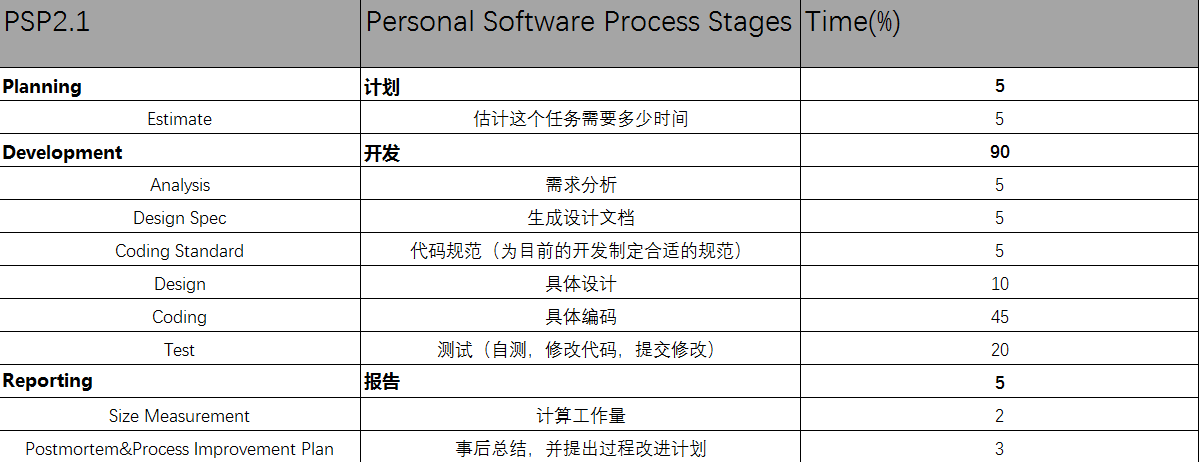
个人项目耗时记录
Android 简单统计文本文件字符数、单词数、行数Demo的更多相关文章
- 统计文件夹下java代码行数的小程序--主要是学习任务队列的思想
首先感谢czbk的老师,录制的视频,让我们有这么好的学习资料.……—— 统计文件夹java文件的行数,首先想到的肯定是用递归的方法,因为文件夹下面可能包含文件夹,用递归的方法,代码容易写.(这和写简单 ...
- 使用Eclipse可以方便的统计工程或文件的代码行数,
使用Eclipse可以方便的统计工程或文件的代码行数,方法如下: 1.点击要统计的项目或许文件夹,在菜单栏点击Search,然后点击File... 2.选中正则表达式(Regular expressi ...
- iOS 统计Xcode整个工程的代码行数
小技巧5-iOS 统计Xcode整个工程的代码行数 1.打开终端 2.cd 空格 将工程的文件夹拖到终端上,回车,此时进入到工程的路径 此时已经进入到工程文件夹下 3.运行指令 a. find . - ...
- 单表行数超过 500 万行或者单表容量超过 2GB,才推荐进行分库分表。
https://github.com/alibaba/p3c/blob/master/阿里巴巴Java开发手册(详尽版).pdf 单表行数超过 500 万行或者单表容量超过 2GB,才推荐进行分库分表 ...
- 【原】Mac下统计任意文件夹中代码行数的工
[链接][原]Mac下统计任意文件夹中代码行数的工http://www.cnblogs.com/wengzilin/p/4580646.html
- 统计sql server 2012表的行数
--功能:统计sql server 2012表的行数 SELECT a.name, a.object_id, b.rows, b.index_id FROM sys.tables AS a INNER ...
- python 脚本(获取指定文件夹、指定文件格式、的代码行数、注释行数)
1.代码的运行结果: 获取 指定文件夹下.指定文件格式 文件的: 总代码行数.总注释行数(需指定注释格式).总空行数: #coding: utf-8 import os, re # 代码所在目录 FI ...
- c - 统计字符串"字母,空格,数字,其他字符"的个数和行数.
#include <stdio.h> #include <ctype.h> using namespace std; /* 题目:输入一行字符,分别统计出其中英文字母.空格.数 ...
- C++统计代码注释行数 & 有效代码行数 & 代码注释公共行 & 函数个数
问题来源,在14年的暑假的一次小项目当中遇到了一个这样的问题,要求统计C++代码的注释行数,有效代码行数,代码注释公共行数,以及函数个数. 下面稍微解释一下问题, 1)注释行数:指有注释的行,包括有代 ...
随机推荐
- 微信公众号开发C#系列-11、生成带参数二维码应用场景
1.概述 我们在微信公众号开发C#系列-7.消息管理-接收事件推送章节有对扫描带参数二维码事件的处理做了讲解.本篇主要讲解通过微信公众号开发平台提供的接口生成带参数的二维码及应用场景. 微信公众号平台 ...
- DSAPI多功能.NET函数库组件
DSAPI.dll不定期更新,增加功能,故无法每次都发到网上,如果需要获得最新版DSAPI.dll的,请到QQ群:419130936群共享里下载. 简介 dsapi.dll是一款基于.net平 ...
- 史诗级Java资源大全中文版
本文来自GitHub 上 Awesome - java 系列的资源整理.awesome-java 就是 akullpp 发起维护的 Java 资源列表,内容包括:构建工具.数据库.框架.模板.安全.代 ...
- 设计模式之组合模式——Java语言描述
组合模式又叫做部分整体模式,适用于把一组相似的对象当作一个单一的对象.组合模式依据树形结构来组合对象,用来表示部分以及整体层次 介绍 意图 将对象组合成树形结构以表示"部分-整体" ...
- 'module' object has no attribute 'Thread'解决方法及模块加载顺序
源码片段: class myThread(threading.Thread): def __init__(self, threadID, name, counter): threading.Threa ...
- LeetCode算法题-Rotated Digits(Java实现)
这是悦乐书的第316次更新,第337篇原创 01 看题和准备 今天介绍的是LeetCode算法题中Easy级别的第185题(顺位题号是788).如果一个数字经过180度旋转后,变成了一个与原数字不同的 ...
- AI应用开发实战 - 手写算式计算器
扩展手写数字识别应用 识别并计算简单手写数学表达式 主要知识点 了解MNIST数据集 了解如何扩展数据集 实现手写算式计算器 简介 本文将介绍一例支持识别手写数学表达式并对其进行计算的人工智能应用的开 ...
- 在 ASP.NET Core 中集成 Skywalking APM
前言 大家好,今天给大家介绍一下如何在 ASP.NET Core 项目中集成 Skywalking,Skywalking 是 Apache 基金会下面的一个开源 APM 项目,有些同学可能会 APM ...
- ASP.NET Core 共享第三方依赖库部署的正常打开方式
曾经: 写了一篇: ASP.Net Core on Linux (CentOS7) 共享第三方依赖库部署 当第二次想做相同的事,却遇上了Bug,于是有了第二篇: ASP.NET Core 共享第三方依 ...
- jersey在 spring boot 添加 packages 扫描路径支持
最近公司内部系统要做数据对接,故使用 jersey 来做 restful webservice 接口设计.由于 spring boot 已经集成 jersey,估计直接导入 spring-boot-s ...