
ng-book札记——依赖注入
依赖注入是一种使程序的一部分能够访问另一部分的系统,并且可以通过配置控制其行为。
“注入”可以理解为是“new”操作符的一种替代,不再需要使用编程语言所提供的"new"操作符,依赖注入系统管理对象的生成。
依赖注入的最大好处是组件不再需要知道如何建立依赖项。它们只需要知道如何与依赖项交互。
在Angular的依赖注入系统中,不用直接导入并创建类的实例,而是使用Angular注册依赖,然后描述如何注入依赖,最后注入依赖。
依赖注入组件
为了注册一个依赖项,需要使用依赖标记(token)与之绑定。比如,注册一个API的URL,可以使用字符串API_URL作为其标记;如果是注册一个类,可以用类本身作为标记。
Angular中的依赖注入系统分为三部分:
- 提供者(Provider)(也被作为一个绑定)映射一个标记到一系列的依赖项,其告知Angular如何创建一个对象并给予一个标记。
- 注入器(Injector)持有一系列绑定,并负责解析依赖项,且在创建对象的时候注入它们。
- 依赖项(Dependency)是所注入的对象。
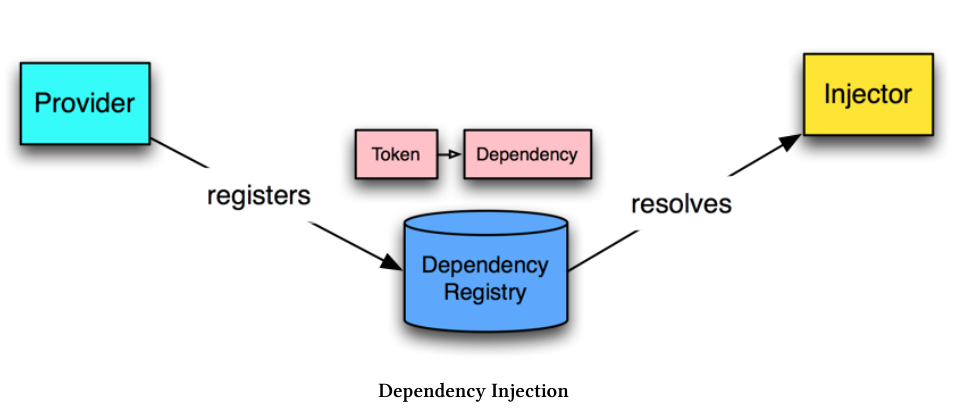
依赖注入方式
手动方式
通过ReflectiveInjector的resolveAndCreate方法解析并创建对象,这种方式不常用。
import { Injectable } from '@angular/core';

@Injectable()

export class UserService {

  user: any;

  setUser(newUser) {

    this.user = newUser;

  }

  getUser(): any {

    return this.user;

  }

}
import {

  Component,

  ReflectiveInjector

} from '@angular/core';

import { UserService } from '../services/user.service';

@Component({

  selector: 'app-injector-demo',

  templateUrl: './user-demo.component.html',

  styleUrls: ['./user-demo.component.css']

})

export class UserDemoInjectorComponent {

  userName: string;

  userService: UserService;

  constructor() {

    // Create an _injector_ and ask for it to resolve and create a UserService

    const injector: any = ReflectiveInjector.resolveAndCreate([UserService]);

    // use the injector to **get the instance** of the UserService

    this.userService = injector.get(UserService);

  }

  signIn(): void {

    // when we sign in, set the user

    // this mimics filling out a login form

    this.userService.setUser({

      name: 'Nate Murray'

    });

    // now **read** the user name from the service

    this.userName = this.userService.getUser().name;

    console.log('User name is: ', this.userName);

  }

}
* 注意UserService类上的@Injectable()装饰器,这说明了这个类是可以作为注入对象的。
NgModule方式
使用NgModule注册将要用到的依赖项(在providers中),并用装饰器(一般是构造器)指定哪些是正在使用的。
import { NgModule } from '@angular/core';

import { CommonModule } from '@angular/common';

// imported here

import { UserService } from '../services/user.service';

@NgModule({

  imports: [

    CommonModule

  ],

  providers: [

    UserService // <-- added right here

  ],

  declarations: []

})

export class UserDemoModule { }
import { Component, OnInit } from '@angular/core';

import { UserService } from '../services/user.service';

@Component({

  selector: 'app-user-demo',

  templateUrl: './user-demo.component.html',

  styleUrls: ['./user-demo.component.css']

})

export class UserDemoComponent {

  userName: string;

  // removed `userService` because of constructor shorthand below

  // Angular will inject the singleton instance of `UserService` here.

  // We set it as a property with `private`.

  constructor(private userService: UserService) {

    // empty because we don't have to do anything else!

  }

  // below is the same...

  signIn(): void {

    // when we sign in, set the user

    // this mimics filling out a login form

    this.userService.setUser({

      name: 'Nate Murray'

    });

    // now **read** the user name from the service

    this.userName = this.userService.getUser().name;

    console.log('User name is: ', this.userName);

  }

}
Providers
类标记
providers: [ UserService ]是以下方式的的简写:
providers: [

  { provide: UserService, useClass: UserService }

]
provide是标记,useClass是所依赖的对象。两者为映射关系。
值标记
providers: [

  { provide: 'API_URL', useValue: 'http://my.api.com/v1' }

]
使用时需要加上@Inject:
import { Inject } from '@angular/core';

export class AnalyticsDemoComponent {

  constructor(@Inject('API_URL') apiUrl: string) {

    // works! do something w/ apiUrl

  }

}
工厂方式
绑定依赖项时还可以通过工厂方式实现更复杂的绑定逻辑,并且这种方式下可以传入必要参数以创建所需的对象。
import { NgModule } from '@angular/core';

import { CommonModule } from '@angular/common';

import {

  Metric,

  AnalyticsImplementation

} from './analytics-demo.interface';

import { AnalyticsService } from '../services/analytics.service';

// added this ->

import {

  HttpModule,

  Http

} from '@angular/http';

@NgModule({

  imports: [

    CommonModule,

    HttpModule, // <-- added

  ],

  providers: [

    // add our API_URL provider

    { provide: 'API_URL', useValue: 'http://devserver.com' },

    {

      provide: AnalyticsService,

      // add our `deps` to specify the factory depencies

      deps: [ Http, 'API_URL' ],

      // notice we've added arguments here

      // the order matches the deps order

      useFactory(http: Http, apiUrl: string) {

        // create an implementation that will log the event

        const loggingImplementation: AnalyticsImplementation = {

          recordEvent: (metric: Metric): void => {

            console.log('The metric is:', metric);

            console.log('Sending to: ', apiUrl);

            // ... You'd send the metric using http here ...

          }

        };

        // create our new `AnalyticsService` with the implementation

        return new AnalyticsService(loggingImplementation);

      }

    },

  ],

  declarations: [ ]

})

export class AnalyticsDemoModule { }
ng-book札记——依赖注入的更多相关文章
- ng 依赖注入
将依赖的对象注入到当前对象,直接去使用依赖的对象即可. 降低耦合度.提高开发速度.. 文件压缩:yui-compressor有两种方案:①CLI(command line interface)java ...
- ng依赖注入
依赖注入 1.注入器在组件的构造函数中写服务constructor(private httpreq:HttpService) { } 2.提供器 providers: [HttpService],
- angular路由 模块 依赖注入
1.模块 var helloModule=angular.module('helloAngular',[]); helloModule.controller('helloNgCrtl',['$scop ...
- AngularJS学习笔记之依赖注入
最近在看AngularJS权威指南,由于各种各样的原因(主要是因为我没有money,好讨厌的有木有......),于是我选择了网上下载电子版的(因为它不要钱,哈哈...),字体也蛮清晰的,总体效果还不 ...
- 4.了解AngularJS模块和依赖注入
1.模块和依赖注入概述 1.了解模块 AngularJS模块是一种容器,把代码隔离并组织成简洁,整齐,可复用的块. 模块本身不提供直接的功能:包含其他提供功能的对象的实例:控制器,过滤器,服务,动画 ...
- AngularJS——依赖注入
依赖注入 依赖注入(DI)是一个经典的设计模式, 主要是用来处理组件如何获得依赖的问题.关于DI,推荐阅读Martin Flower的文章(http://martinfowler.com/art ...
- AngularJS学习--- AngularJS中XHR(AJAX)和依赖注入(DI) step5
前言:本文接前一篇文章,主要介绍什么是XHR,AJAX,DI,angularjs中如何使用XHR和DI. 1.切换工具目录 git checkout -f step- #切换分支 npm start ...
- angular2 学习笔记 ( DI 依赖注入 )
refer : http://blog.thoughtram.io/angular/2016/09/15/angular-2-final-is-out.html ( search Dependency ...
- (五)Angularjs - 依赖注入
如何找到API? AngularJS提供了一些功能的封装,但是当你试图通过全局对象angular去 访问这些功能时,却发现与以往遇到的库大不相同. 比如,AngularJS暴露了一个全局对象:angu ...
随机推荐
- 理解JavaScript中的call和apply方法
call方法 总的来说call()有这几种作用:1.可以借用另一个对象的方法.2.改变this的指向(重要).3.将arguments数组化.下面详细介绍这三种作用: 1.可以借用另一个对象的方法:当 ...
- 02、NetCore2.0优化之Nuget包
02.NetCore2.0优化之Nuget包 在NetCore2.0中的包是如何管理的?如何存储的?微软做了哪些优化工作? -------------------------------------- ...
- monogodb3.4安装修改,权限设置
下载地址:https://www.mongodb.com/download-center#community 这里的方法只对应3.4,别的有没有效果请自行判断. 下载后按默认下一步. 默认安装地址 ...
- 使用开源数据库客户端DBeaver连接DB2数据库
下载安装 首先进入 官网 选择对应的版本进行安装. 下载下来后,一直惦记next即可完成安装(期间包括选择文件安装路径等操作,可按需修改). 连接db2 打开DBeaver,新建连接-->DBe ...
- js中的递归总结
主要从"变量+函数"和"函数+变量"两个方面说明解释. function fun() { // 自己调用自己,称为递归调用 fun(); console.log ...
- java中String类学习笔记
1.String的两种实例化方式 String str="hello";//直接赋值的方式: String str=new String("hello");// ...
- python包安装和使用机制
python语言的魅力之一就是大量的外置数据包,能够帮助使用者节省很多时间,提高效率.模块下载和引用是最常见的操作,现在解析内部的原理和背后发生的故事,做到心里有数. 导航: 基本定义 模块使用 模块 ...
- Spring Cloud Eureka 自我保护机制
Eureka Server 在运行期间会去统计心跳失败比例在 15 分钟之内是否低于 85%,如果低于 85%,Eureka Server 会将这些实例保护起来,让这些实例不会过期,但是在保护期内如果 ...
- 初学servlet之@WebServlet传参
package app01a;import java.io.IOException;import java.io.PrintWriter;import javax.servlet.ServletCon ...
- Struts2--struts.xml详解
通常,struts.xml文件都会继承一个struts-default.xml文件通过一些基本的拦截器来提供一些基本的配置设置之类的. 配置例: <?xml version="1.0& ...