
c#批量抓取免费代理并验证有效性
之前看到某公司的官网的文章的浏览量刷新一次网页就会增加一次,给人的感觉不太好,一个公司的官网给人如此直白的漏洞,我批量发起请求的时候发现页面打开都报错,100多人的公司的官网文章刷新一次你给我看这个,这公司以前来过我们学校宣传招人+在园子里搜招聘的时候发现居然以前招xamarin,挺好奇的,所以就关注过。好吧不说这些了,只是扯扯蛋而已,回归主题,我想说的是csdn的文章可以通过设置代理ip刷新文章的浏览量,所以首先要做的就是这篇文章的主题“使用c#验证代理ip有效性”。
当然代理IP来源肯定是免费,所以嘛效率一般,从一些免费的代理ip的网页抓取的代理IP并不一定都是有用的,所以需要我们对我们抓取的代理ip进行验证,代理ip的有效时间也是有限,从10几秒到1个小时不限,大多数时间非常短,所以比如说,我们1分钟需要100个代理ip,那就1分钟获取一次,每次获取100个(这里是理想状态下的,抓取的代理ip都是有效的),原则上来说抓取下来后应该立即马上被使用。
当然这篇文章比较基础,一直觉得爬虫比较有趣,其实我在爬虫方面也是个小白,只是做一个简单的记录,如果有什么错误的地方,希望能提出建议。针对下面几个问题,我们就可以完成如何验证代理IP有效性的检测了。
1.从哪些网页上可以抓取免费的代理IP?
百度一下“免费代理ip”挺多的。
2.代理IP稳定吗?有什么作用?
这种免费的代理ip时效性和有效性都不强,上面这三个免费的代理网站,时效性大概在十几秒到1个小时不等,一般需要自己处理验证后使用,提高命中率。可适用于隐藏网页IP(有些网站还不准使用代理ip,比如豆瓣,其实挺尴尬的,内容这么贵吗),一般常用于空间留言、刷网站流量、网赚任务、批量注册账号等,只要没有其他限制,需要频繁更换ip都可以使用。
3.ping通IP就是有效的吗?如何验证代理是否有效
好吧,这有点废话,进行端口测试才是最有效的,能ping通并不代表代理有效,不能平通也不一定代理不可用。可以使用HttpWebRequest,也可以使用Scoket,当然HttpWebRequest比Socket连接代理ip、port要慢。
4.一次提取多少代理合适?
代理ip时效性不强、并且有效性也不高,所以只能从一些代理ip的网站上批量定时去获取,有的代理在一分钟内使用是有限制的,所以说限制比较多。
5.http代理和https代理有什么区别?
需要访问https的网站就需要使用https代理了,比如百度,需要访问http的代理,可以使用http。这个并不是100%的。
检测代理ip有效性步骤如下:
1.使用HttpWebRequest、HttpWebResponse请求代理ip的网页,获取包含代理的网页内容
2.使用HtmlAgilityPack或者正则表达式对抓取的内容进行截取,保存到代理集合
3.拿到代理集合,多线程发起http请求,比如访问百度,是否成功,成功则存到Redis里面。
效果图如下:
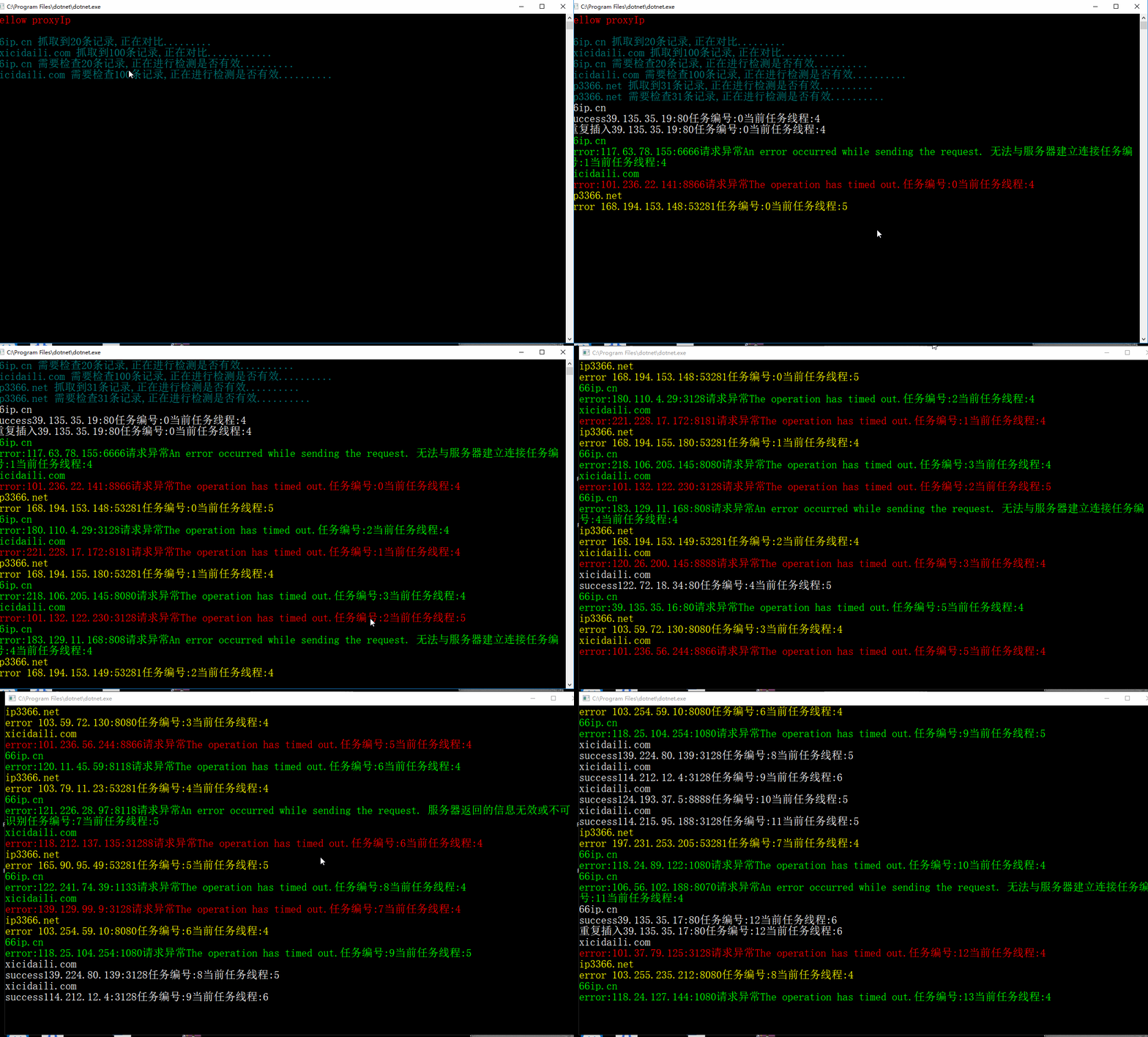
使用HttpWebRequest发起请求
Request.cs如下,主要就是两个方法,一个方法是验证代理ip是否有效,设置HttpWebRequest的Proxy属性,请求百度,看到有些文章大多数会获取响应的内容,如果内容符合请求的网址则证明代理哟有效,实际上根据HttpStatusCode 200就可以判断是否验证有效。
【注意】建的是控制台程序,使用了异步,所以还是建.net core吧,c#语言的版本7.1。C#如何在控制台程序中使用异步
  public class Request

     {

         /// <summary>

         /// 验证代理ip有效性

         /// </summary>

         /// <param name="proxyIp">代理IP</param>

         /// <param name="proxyPort">代理IP 端口</param>

         /// <param name="timeout">详情超时</param>

         /// <param name="url">请求的地址</param>

         /// <param name="success">成功的回调</param>

         /// <param name="fail">失败的回调</param>

         /// <returns></returns>

         public static async System.Threading.Tasks.Task getAsync(string proxyIp,int  proxyPort, int  timeout,string url, Action success, Action<string> fail)

         {

             System.GC.Collect();

             HttpWebRequest request = null;

             HttpWebResponse response = null;

             try

             {

                 request = (HttpWebRequest)WebRequest.Create(url);

                 //HttpWebRequest request = HttpWebRequest.CreateHttp(url);

                 request.Timeout =timeout;

                 request.KeepAlive = false;

                 request.Proxy = new WebProxy(proxyIp,proxyPort);

                 response =  await  request.GetResponseAsync() as HttpWebResponse;

                 if (response.StatusCode == HttpStatusCode.OK)

                 {

                     success();

                 }

                 else

                 {

                     fail(response.StatusCode+":"+response.StatusDescription);

                 }

             }

             catch (Exception ex)

             {

                 fail("请求异常"+ex.Message.ToString());

             }

             finally

             {

                 if (request != null)

                 {

                     request.Abort();

                     request = null;

                 }

                 if (response != null)

                 {

                     response.Close();

                 }

             }

         }

         /// <summary>

         ///  发起http请求

         /// </summary>

         /// <param name="url"></param>

         /// <param name="success">成功的回调</param>

         /// <param name="fail">失败的回调</param>

         public static void get(string url,Action<string> success,Action<string> fail)

         {

             StreamReader reader = null;

             Stream stream = null;

             WebRequest request = null;

             HttpWebResponse response = null;

             try

             {

                 request = WebRequest.Create(url);

                 request.Timeout = ;

                 response = (HttpWebResponse)request.GetResponse();

                 if (response.StatusCode == HttpStatusCode.OK)

                 {

                     stream = response.GetResponseStream();

                     reader = new StreamReader(stream);

                     string result = reader.ReadToEnd();

                     success(result);

                 }

                 else

                 {

                     fail(response.StatusCode+":"+response.StatusDescription);

                 }

             }

             catch (Exception ex)

             {

                 fail(ex.ToString());

             }

             finally

             {

                 if (reader != null)

                     reader.Close();

                 if (stream != null)

                     stream.Close();

                 if(response!=null)

                     response.Close();

                 if(request!=null)

                     request.Abort();

             }

         }

     }
抓取免费代理,并检查是否有效
ProxyIpHelper.cs 中主要有四个方法,检查ip是否可用CheckProxyIpAsync、抓取xicidaili.com的代理GetXicidailiProxy、抓取ip3366.net的代理GetIp3366Proxy、抓取66ip.cn的代理GetIp3366Proxy。如果想多抓取几个网站可以多写几个。
 public class ProxyIpHelper

    {

        private static string address_xicidaili = "http://www.xicidaili.com/wn/{0}";

        private static string address_66ip = "http://www.66ip.cn/nmtq.php?getnum=20&isp=0&anonymoustype=0&start=&ports=&export=&ipaddress=&area=1&proxytype=1&api=66ip";

        private static string address_ip3366 = "http://www.ip3366.net/?stype=1&page={0}";

        /// <summary>

        /// 检查代理IP是否可用

        /// </summary>

        /// <param name="ipAddress">ip</param>

        /// <param name="success">成功的回调</param>

        /// <param name="fail">失败的回调</param>

        /// <returns></returns>

        public  static async Task CheckProxyIpAsync(string ipAddress, Action success, Action<string> fail)

        {

            int index = ipAddress.IndexOf(":");

            string proxyIp = ipAddress.Substring(, index);

            int proxyPort = int.Parse(ipAddress.Substring(index + ));

            await Request.getAsync(proxyIp, proxyPort, , "https://www.baidu.com/", () =>

            {

                success();

            }, (error) =>

            {

                fail(error);

            });

        }

        /// <summary>

        /// 从xicidaili.com网页上去获取代理IP,可以分页

        /// </summary>

        /// <param name="page"></param>

        /// <returns></returns>

        public static List<string> GetXicidailiProxy(int page)

        {

            List<string> list = new List<string>();

            for (int p = ; p <= page; p++)

            {

                string url = string.Format(address_xicidaili, p);

               Request.get(url,(docText)=> {

                   if (!string.IsNullOrWhiteSpace(docText))

                   {

                       HtmlDocument doc = new HtmlDocument();

                       doc.LoadHtml(docText);

                       var trNodes = doc.DocumentNode.SelectNodes("//table[@id='ip_list']")[].SelectNodes("./tr");

                       if (trNodes != null && trNodes.Count > )

                       {

                           for (int i = ; i < trNodes.Count; i++)

                           {

                               var tds = trNodes[i].SelectNodes("./td");

                               string ipAddress = tds[].InnerText + ":" + int.Parse(tds[].InnerText); ;

                               list.Add(ipAddress);

                           }

                       }

                   }

               },(error)=> {

                   Console.WriteLine(error);

               });

            }

            return list;

         }

        /// <summary>

        /// 从ip3366.net网页上去获取代理IP,可以分页

        /// </summary>

        /// <param name="page"></param>

        /// <returns></returns>

        public static List<string> GetIp3366Proxy(int page)

        {

            List<string> list = new List<string>();

            for (int p = ; p <= page; p++)

            {

                string url = string.Format(address_ip3366, p);

                Request.get(url, (docText) => {

                    if (!string.IsNullOrWhiteSpace(docText))

                    {

                        HtmlDocument doc = new HtmlDocument();

                        doc.LoadHtml(docText);

                        var trNodes1 = doc.DocumentNode.SelectNodes("//table")[];

                        var trNodes2 = doc.DocumentNode.SelectNodes("//table")[].SelectSingleNode("//tbody");

                        var trNodes = doc.DocumentNode.SelectNodes("//table")[].SelectSingleNode("//tbody").SelectNodes("./tr");

                        if (trNodes != null && trNodes.Count > )

                        {

                            for (int i = ; i < trNodes.Count; i++)

                            {

                                var tds = trNodes[i].SelectNodes("./td");

                                if (tds[].InnerHtml == "HTTPS")

                                {

                                    string ipAddress = tds[].InnerText + ":" + int.Parse(tds[].InnerText); ;

                                    list.Add(ipAddress);

                                }

                            }

                        }

                    }

                }, (error) => {

                    Console.WriteLine(error);

                });

            }

            return list;

         }

        /// <summary>

        /// 从66ip.cn中去获取,不需要分页

        /// </summary>

        /// <returns></returns>

        public static List<string> Get66ipProxy()

        {

            List<string> list = new List<string>();

            Request.get(address_66ip,

            (docText)=> {

                int count = ;

                if (string.IsNullOrWhiteSpace(docText) == false)

                {

                    string regex = "\\d{1,3}\\.\\d{1,3}\\.\\d{1,3}\\.\\d{1,3}\\:\\d{1,5}";

                    Match mstr = Regex.Match(docText, regex);

                    while (mstr.Success && count < )

                    {

                        string tempIp = mstr.Groups[].Value;

                        list.Add(tempIp);

                        mstr = mstr.NextMatch();

                        count++;

                    }

                }

            },

            (error)=> {

                Console.WriteLine(error);

            });

            return list;

        }

    }
使用Timer定时抓取,并检查,成功则保存到redis
c#有三种定时器,这里定时器是使用System.Threading命名空间, 这个Timer会开启新的线程,抓取三个网页定义了三个Timer对象。每一次抓取都会保存上一次抓取的集合,检查前,会进行对比,取出新的集合也就是没有重复的那部分。有效性的ip比较低,这里没有做统计,如果代码再优化一下,可以做一下统计,看看程序的主入口吧,最终的实现如下:
class Program
{
static bool timer_ip3366_isCompleted = true;
static bool timer_xicidaili_isCompleted = true;
static bool timer_66ip_isCompleted = true;
static Timer timer_ip3366, timer_xicidaili, timer_66ip;
private static List<string> lastListip3366,lastList66ip,lastListxicidaili;//保存上一次抓取的代理,与下一次进行对比,取新的集合进行检查筛选
static async Task Main(string[] args)
{
System.Net.ServicePointManager.DefaultConnectionLimit = ;
Console.WriteLine("hellow proxyIp");
Console.ReadLine();
lastList66ip = new List<string>();
lastListip3366 = new List<string>();
lastListxicidaili = new List<string>();
timer_ip3366 = new Timer(async (state) =>
{
await TimerIp3366Async();
}, "processing timer_ip3366 event", ,*);
timer_xicidaili = new Timer(async (state) =>
{
await TimerXicidailiAsync();
}, "processing timer_xicidaili event", , * );
timer_66ip = new Timer(async (state) =>
{
await Timer66ipAsync();
}, "processing timer_66ip event", , *); Console.ReadLine();
} private static async Task Timer66ipAsync()
{
if (timer_66ip_isCompleted)
{
timer_66ip_isCompleted = false;
List<string> checkList = new List<string>();
var listProxyIp = ProxyIpHelper.Get66ipProxy(); if (listProxyIp.Count > )
{
Console.ForegroundColor = ConsoleColor.DarkCyan;
Console.WriteLine("66ip.cn 抓取到" + listProxyIp.Count + "条记录,正在对比.........");
listProxyIp.ForEach(f =>
{
if (!lastList66ip.Contains(f))
{
checkList.Add(f);
}
});
lastList66ip = listProxyIp;
if (checkList.Count > )
{
Console.ForegroundColor = ConsoleColor.DarkCyan;
Console.WriteLine("66ip.cn 需要检查" + checkList.Count + "条记录,正在进行检测是否有效..........");
for (int i = ; i < checkList.Count; i++)
{
string ipAddress = checkList[i];
await ProxyIpHelper.CheckProxyIpAsync(ipAddress, () =>
{
bool insertSuccess = RedisHelper.InsertSet(ipAddress);
Console.ForegroundColor = ConsoleColor.White;
Console.WriteLine("66ip.cn");
if (insertSuccess)
{
Console.WriteLine("success" + ipAddress + "任务编号:" + i + "当前任务线程:" + Thread.CurrentThread.ManagedThreadId);
}
Console.WriteLine("重复插入" + ipAddress + "任务编号:" + i + "当前任务线程:" + Thread.CurrentThread.ManagedThreadId);
}, (error) =>
{
Console.ForegroundColor = ConsoleColor.Green;
Console.WriteLine("66ip.cn");
Console.WriteLine("error:" + ipAddress + error + "任务编号:" + i + "当前任务线程:" + Thread.CurrentThread.ManagedThreadId);
});
}
timer_66ip_isCompleted = true;
Console.ForegroundColor = ConsoleColor.DarkCyan;
Console.WriteLine("66ip.cn" + checkList.Count + "条记录,已经检测完成,正在进行下一次检查");
}
else
{
timer_66ip_isCompleted = true;
Console.ForegroundColor = ConsoleColor.DarkCyan;
Console.WriteLine("66ip.cn没有需要检查的代理ip");
}
}
else
{
timer_66ip_isCompleted = true;
Console.ForegroundColor = ConsoleColor.DarkCyan;
Console.WriteLine("66ip.cn没有获取到代理ip");
}
}
} private static async Task TimerXicidailiAsync()
{
if (timer_xicidaili_isCompleted)
{
//取出需要检查的ip地址,第一次100条则checklist就是100条记录,
//第二次的100条中只有10是和上一次的不重复,则第二次只需要检查这10条记录
timer_xicidaili_isCompleted = false;
List<string> checkList = new List<string>();
var listProxyIp = ProxyIpHelper.GetXicidailiProxy();
if (listProxyIp.Count > )
{
Console.WriteLine("xicidaili.com 抓取到" + listProxyIp.Count + "条记录,正在对比............");
listProxyIp.ForEach(f =>
{
if (!lastListxicidaili.Contains(f))
{
checkList.Add(f);
}
});
lastListxicidaili = listProxyIp;
if (checkList.Count > )
{
Console.ForegroundColor = ConsoleColor.DarkCyan;
Console.WriteLine("xicidaili.com 需要检查" + checkList.Count + "条记录,正在进行检测是否有效..........");
for (int i = ; i < checkList.Count; i++)
{
string ipAddress = checkList[i];
await ProxyIpHelper.CheckProxyIpAsync(ipAddress, () =>
{
bool insertSuccess = RedisHelper.InsertSet(ipAddress);
Console.ForegroundColor = ConsoleColor.White;
Console.WriteLine("xicidaili.com");
if (insertSuccess)
{
Console.WriteLine("success" + ipAddress + "任务编号:" + i + "当前任务线程:" + Thread.CurrentThread.ManagedThreadId);
}
else
Console.WriteLine("重复插入" + ipAddress + "任务编号:" + i + "当前任务线程:" + Thread.CurrentThread.ManagedThreadId);
}, (error) =>
{
Console.WriteLine("xicidaili.com");
Console.ForegroundColor = ConsoleColor.Red;
Console.WriteLine("error:" + ipAddress + error + "任务编号:" + i + "当前任务线程:" + Thread.CurrentThread.ManagedThreadId);
});
}
timer_xicidaili_isCompleted = true;
Console.ForegroundColor = ConsoleColor.DarkCyan;
Console.WriteLine("xicidaili.com" + checkList.Count + "条记录,已经检测完成,正在进行下一次检查");
}
else
{
timer_xicidaili_isCompleted = true;
Console.ForegroundColor = ConsoleColor.DarkCyan;
Console.WriteLine("xicidaili.com没有需要检查的代理ip");
}
}
else
{
timer_xicidaili_isCompleted = true;
Console.ForegroundColor = ConsoleColor.DarkCyan;
Console.WriteLine("xicidaili.com没有获取到代理ip");
}
}
}
private static async Task TimerIp3366Async()
{
if (timer_ip3366_isCompleted)
{
timer_ip3366_isCompleted = false;
List<string> checkList = new List<string>();
var listProxyIp = ProxyIpHelper.GetIp3366Proxy();
if (listProxyIp.Count > )
{
Console.ForegroundColor = ConsoleColor.DarkCyan;
Console.WriteLine("ip3366.net 抓取到" + listProxyIp.Count + "条记录,正在进行检测是否有效..........");
listProxyIp.ForEach(f =>
{
if (!lastListip3366.Contains(f))
{
checkList.Add(f);
}
});
lastListip3366 = listProxyIp;
if (checkList.Count != )
{
Console.ForegroundColor = ConsoleColor.DarkCyan;
Console.WriteLine("ip3366.net 需要检查" + checkList.Count + "条记录,正在进行检测是否有效..........");
for (int i = ; i < checkList.Count; i++)
{
string ipAddress = checkList[i];
await ProxyIpHelper.CheckProxyIpAsync(ipAddress, () =>
{
bool insertSuccess = RedisHelper.InsertSet(ipAddress);
Console.ForegroundColor = ConsoleColor.White;
Console.WriteLine("ip3366.net");
if (insertSuccess)
{
Console.WriteLine("success" + ipAddress + "任务编号:" + i + "当前任务线程:" + Thread.CurrentThread.ManagedThreadId);
}
else
{
Console.ForegroundColor = ConsoleColor.Red;
Console.WriteLine("重复插入" + ipAddress + "任务编号:" + i + "当前任务线程:" + Thread.CurrentThread.ManagedThreadId);
}
}, (error) =>
{
Console.ForegroundColor = ConsoleColor.Yellow;
Console.WriteLine("ip3366.net");
Console.WriteLine("error " + ipAddress + "任务编号:" + i + "当前任务线程:" + Thread.CurrentThread.ManagedThreadId);
});
}
timer_ip3366_isCompleted = true;
Console.WriteLine("ip3366.net" + checkList.Count + "条记录,已经检测完成,正在进行下一次检查");
}
else
{
timer_ip3366_isCompleted = true;
Console.ForegroundColor = ConsoleColor.DarkCyan;
Console.WriteLine("ip3366.net没有需要检查的代理ip");
}
}
else
{
timer_ip3366_isCompleted = true;
Console.ForegroundColor = ConsoleColor.DarkCyan;
Console.WriteLine("ip3366.net没有获取到代理ip");
} }
}
}
Redis第三库使用的stackoverflow的 StackExchange.Redis,代理ip不能重复储存,所以采用的数据结构是Set。存的值非常简单就一个ip加上port,也可以存入更多相关信息,感觉没必要。即使有这些其他的信息,也很难发挥作用。RedisHelper.cs如下
  public class RedisHelper

     {

         private static readonly object Locker = new object();

         private static ConnectionMultiplexer _redis;

         private const string CONNECTTIONSTRING = "127.0.0.1:6379,DefaultDatabase=3";

         public const string REDIS_SET_KET_SUCCESS = "set_success_ip";

         private static ConnectionMultiplexer Manager

         {

             get

             {

                 if (_redis == null)

                 {

                     lock (Locker)

                     {

                         if (_redis != null) return _redis;

                         _redis = GetManager();

                         return _redis;

                     }

                 }

                 return _redis;

             }

         }

         private static ConnectionMultiplexer GetManager(string connectionString = null)

         {

             if (string.IsNullOrEmpty(connectionString))

             {

                 connectionString = CONNECTTIONSTRING;

             }

             return ConnectionMultiplexer.Connect(connectionString);

         }

         public static  bool InsertSet(string value)

         {

             var db = Manager.GetDatabase();

             return db.SetAdd(REDIS_SET_KET_SUCCESS,value);

         }

     }
总结
明天补上刷新网页浏览量的文章吧,代码还不够好,ip的有效性还不高,对多线程的使用还不是很熟练
7月6号的补充:完成csdn刷文章的浏览量了:C#使用代理Ip刷新csdn文章浏览量
c#批量抓取免费代理并验证有效性的更多相关文章
- C#多线程爬虫抓取免费代理IP
这里用到一个HTML解析辅助类:HtmlAgilityPack,如果没有网上找一个增加到库里,这个插件有很多版本,如果你开发环境是使用VS2005就2.0的类库,VS2010就使用4.0,以此类推.. ...
- python爬虫批量抓取ip代理
使用爬虫抓取数据时,经常要用到多个ip代理,防止单个ip访问太过频繁被封禁.ip代理可以从这个网站获取:http://www.xicidaili.com/nn/.因此写一个python程序来获取ip代 ...
- vb.net 多线程爬虫抓取免费代理IP
Class Program Public Shared masterPorxyList As List(Of proxy) = New List(Of proxy)() Public Class pr ...
- 【转】Python 代码批量抓取免费高清图片!
import requests from bs4 import BeautifulSoup import random import time from fake_useragent import U ...
- 使用HtmlAgilityPack批量抓取网页数据
原文:使用HtmlAgilityPack批量抓取网页数据 相关软件点击下载登录的处理.因为有些网页数据需要登陆后才能提取.这里要使用ieHTTPHeaders来提取登录时的提交信息.抓取网页 Htm ...
- day36 08-Hibernate抓取策略:批量抓取
package cn.itcast.test; import java.util.List; import org.hibernate.Hibernate; import org.hibernate. ...
- Python3利用BeautifulSoup4批量抓取站点图片的代码
边学边写代码,记录下来.这段代码用于批量抓取主站下所有子网页中符合特定尺寸要求的的图片文件,支持中断. 原理很简单:使用BeautifulSoup4分析网页,获取网页<a/>和<im ...
- Web自动化框架LazyUI使用手册(4)--控件抓取工具Elements Extractor详解(批量抓取)
概述 前面的一篇博文详细介绍了单个控件抓取的设计思路&逻辑以及使用方法,本文将详述批量控件抓取功能. 批量抓取:打开一个web页面,遍历页面上所有能被抓取的元素,获得每个元素的iframe.和 ...
- 如何上传Packages到PyPI并批量抓取
1.如何上传包到PyPI ? 更新中... 2.批量抓取simple网站第三方模块 https://pypi.python.org/simple/ 3. 第三方模块的安装和使用 python set ...
随机推荐
- 让 Homebrew 走代理更新 + brew 管理 node 版本
0.前言 环境:MacOS 背景:整理下今天所做的配置. 1. 让 Homebrew 走代理更新 brew update 就卡住了,即使开了 shadowsocks 也不行.因为 shadowsock ...
- Http 状态码(status code)常用总结
本来计划写一篇浏览器错误码使用的详细总结,近来想了想,第一这不是很深入的知识点.主要还是一种规定:第二对常用的几种的一个使用场景已经有所了解了,所以今天就写一个简单的汇总,并黏贴常用几个错误码的介绍在 ...
- Python函数化编程整理
1.映射函数 items=[1,2,3,4,5] def inc(x): return x+1 list(map(inc,items)) [2, 3, 4, 5, 6] >>> a ...
- 服务治理利器Hystrix-理论篇
引言 现在的大中型应用,很多都在朝着服务化.分布式的方向发展.这有多方面的考虑,比如说,方便治理.便于扩展.服务隔离等等.不过在带来如此多利好的同时,不可避免的也会带来麻烦,比如系统架构复杂.服务依赖 ...
- MySQL远程链接
当把本地数据库作为服务器的时候,如果你发现client无法链接到你的数据库服务器,那么有可能是: 1. 当前account没有远程链接权限,如何开通? GRANT ALL PRIVILEGES ON ...
- SQL Server性能优化(8)堆表结构介绍
一.表结构综述 下图是SQL Server中表的组织形式(其中分区1.分区2是为了便于管理,把表进行分区,放到不同的硬盘数据文件里.默认情况下,表只有一个分区.).表在硬盘上的存放形式,有堆和B树两种 ...
- pycharm中from xx import xx报错:Unresolved reference
出现问题:无法引用到相关的类,但是这些类确实都在工程中 分析原因:import不成功是路径没对应上,pycharm默认该项目的根目录为source目录 解决方案: 将对应的项目searchTest,选 ...
- linux中普通的文件查看操作(cat、more、less、head、tail)
cat:基本是最常用的查看文件内容的linux命令. more 也是用来查看一个文件的内容.当文件内容太多,一屏幕不能占下,而你用cat肯定是看不前面的内容的,那么使用more就可以解决这个问题了.当 ...
- 使用非阻塞ServerSocketChannel、SocketChannel代替ServerSocket和Socket
http://blog.csdn.net/timliang18601860/article/details/7104485
- 二十二、Hadoop学记笔记————Kafka 基础实战 :消费者和生产者实例
kafka的客户端也支持其他语言,这里主要介绍python和java的实现,这两门语言比较主流和热门 图中有四个分区,每个图形对应一个consumer,任意一对一即可 获取topic的分区数,每个分区 ...