
python opencv3 检测人
git:https://github.com/linyi0604/Computer-Vision
 # coding:utf-8

 import cv2

 # 检测i方框 包含o方框

 def is_inside(o, i):

     ox, oy, ow, oh = o

     ix, iy, iw, ih = i

     return ox > ix and ox + ow < ix + iw and oy + oh < iy + ih

 # 将人外面的方框画出来

 def draw_person(image, person):

     x, y, w, h = person

     cv2.rectangle(image, (x, y), (x+w, y+h), (0, 255, 255), 2)

 # 读入图片

 img = cv2.imread("../data/people2.jpg")

 # 获取hog检测器对象

 hog = cv2.HOGDescriptor()

 # 设置检测人的默认检测器

 hog.setSVMDetector(cv2.HOGDescriptor_getDefaultPeopleDetector())

 # 在图片中检测人,

 # 返回found列表 每个元素是一个(x, y, w, h)的矩形,w是每一个矩形的置信度

 found, w = hog.detectMultiScale(img)

 found_filtered = []

 # 如果方框有包含,只留下内部的小方块

 for ri, r in enumerate(found):

     for qi, q in enumerate(found):

         if ri != qi and is_inside(r, q):

             break

         else:

             found_filtered.append(r)

 # 将每一个方块画出来

 for person in found_filtered:

     draw_person(img, person)

 cv2.imshow("person detection", img)

 cv2.waitKey()

 cv2.destroyAllWindows()
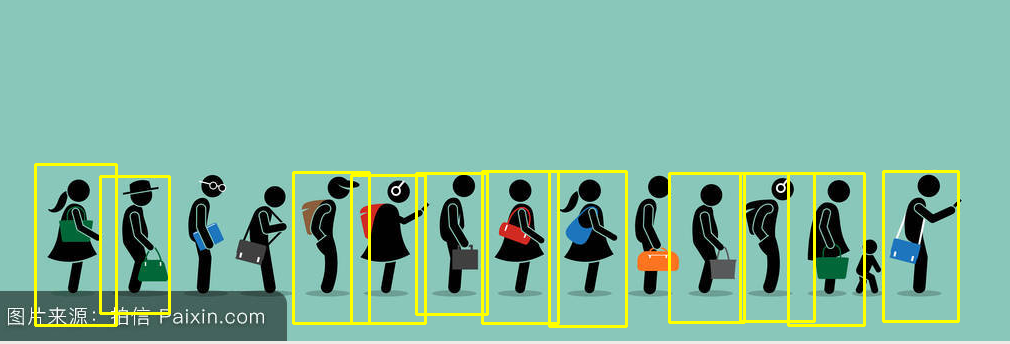
python opencv3 检测人的更多相关文章
- Python智能检测编码并转码
#安装包工具 $pip3 install chardet #直接打开文件,中文显示乱码 >>> import chardet >>> f = open('test. ...
- Python IAQ中文版 - Python中少有人回答的问题
Python中少有人回答的问题 The Python IAQ: Infrequently Answered Questions 1 Q: 什么是"少有人回答的问题(Infrequently ...
- python opencv3 cornerHarris 角点检测
git:https://github.com/linyi0604/Computer-Vision 角点也是处在一个无论框框往哪边移动 框框内像素值都会变化很大的情况而定下来的点 如果框框水平方向上移动 ...
- python opencv3 摄像头人脸检测
git:https://github.com/linyi0604/Computer-Vision # coding:utf8 import cv2 def detect(): # 创建人脸检测的对象 ...
- python opencv3 静态图片检测人脸
git:https://github.com/linyi0604/Computer-Vision # coding:utf-8 import cv2 filename = "../data/ ...
- python opencv3 圆检测
git:https://github.com/linyi0604/Computer-Vision # coding:utf8 import cv2 import numpy as np img_ori ...
- python opencv3 直线检测
git:https://github.com/linyi0604/Computer-Vision # coding:utf8 import cv2 import numpy as np # 读入图像 ...
- python opencv3 grabcut前景检测
git:https://github.com/linyi0604/Computer-Vision import numpy as np import cv2 import matplotlib.pyp ...
- python opencv3 轮廓检测
git:https://github.com/linyi0604/Computer-Vision # coding:utf8 import cv2 import numpy as np # 创建一个2 ...
随机推荐
- log4net记录系统错误日志到文本文件用法详解(最新)
此配置文件可以直接拿来用,配置文件上面有详细用法说明,里面也有详细注释说明.此配置文件涵盖按照日期记录和按照文件大小(建议)的实例. 又包括:按照Fatal.Info.Error.Debug.Warn ...
- 【多视图几何】TUM 课程 第6章 多视图重建
课程的 YouTube 地址为:https://www.youtube.com/playlist?list=PLTBdjV_4f-EJn6udZ34tht9EVIW7lbeo4 .视频评论区可以找到课 ...
- Linux内核Ramdisk(initrd)机制【转】
转自:http://www.cnblogs.com/armlinux/archive/2011/03/30/2396827.html 摘要:对于Linux用户来说,Ramdisk并不陌生,可是为什么需 ...
- 使用dork脚本来查询Google
使用dork脚本来查询Google 了解Google Hacking数据库的第一步是了解所有典型的Google运算,就像机器级编程工程师必须了解计算机操作代码一样. 这些Google运算是Google ...
- mysql备份参数--master-data和--dump-slave的介绍
[mysql@db2 ~]$ mysqldump -A --master-data=2 > master2.sql[mysql@db2 ~]$ mysqldump -A --master-dat ...
- 2018ICPC南京网络赛
2018ICPC南京网络赛 A. An Olympian Math Problem 题目描述:求\(\sum_{i=1}^{n} i\times i! \%n\) solution \[(n-1) \ ...
- 从Runoob的Django教程学到的
Windows 10家庭中文版,Python 3.6.4,Django 2.0.3 这个月开始学习Django,从网上找到了RUNOOB.COM网站找到了一份Django教程,在“认真”学习之后,初步 ...
- 国内能用的NTP服务器及和标准源的偏差值
中国境内可以使用的NTP服务器的IP地址,和泰福特服务器的时间偏差值,泰福特时钟服务器实时连接天线,测试前已经连接天线超过72小时 time-a.nist.gov 129.6.15.28 NIST, ...
- java 多线程总结篇3之——生命周期和线程同步
一.生命周期 线程的生命周期全在一张图中,理解此图是基本: 线程状态图 一.新建和就绪状态 当程序使用new关键字创建了一个线程之后,该线程就处于新建状态,此时它和其他的Java对象一样,仅仅由Jav ...
- (四)HttpClient 使用代理 IP
第一节: HttpClient 使用代理 IP 在爬取网页的时候,有的目标站点有反爬虫机制,对于频繁访问站点以及规则性访问站点的行为,会采集屏蔽IP措施. 这时候,代理IP就派上用场了. 关于代理IP ...