
smtp发送html报告与日志附件图片png
1.非ssl发送:
授权码机制,开启smtp,获取授权码以qq邮箱为例:

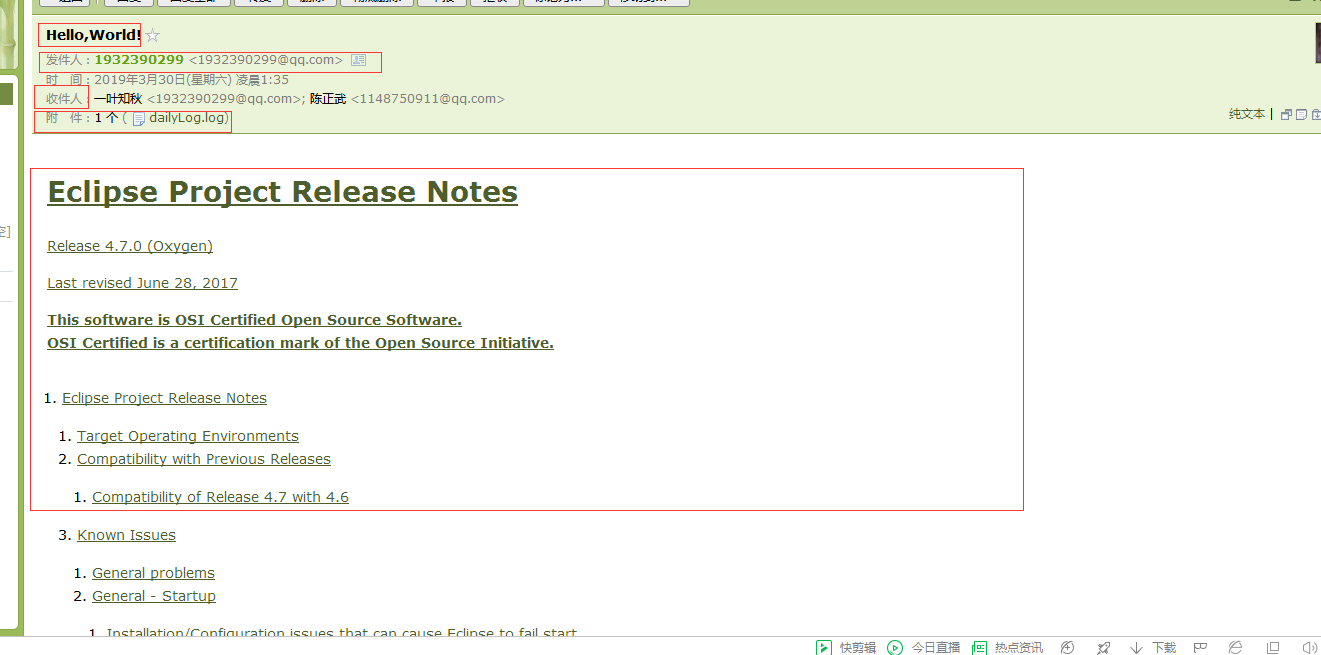
附件展示:

#!/usr/bin/python3

import os

import smtplib

from email.mime.text import MIMEText

from email.mime.multipart import MIMEMultipart

from email.header import Header

from email.mime.image import MIMEImage

def main():

    sender='1932390299@qq.com'

    receiverList=['1932390299@qq.com']

    user='1932390299@qq.com'

    emailPwd='gyuagsqxsnonhbhd' #用需开通授权码

    smtpServer='smtp.qq.com'

    commonPort=25

    emailTitle='Hello,World!'

    htmlPath=r'F:/eclipse/readme/readme_eclipse.html'

    attachPathList=[r'C:\Users\Administrator\PycharmProjects\Supro\src\logs\Info\20190330.log',r'C:\Users\Administrator\PycharmProjects\Supro\src\logs\Info\testpc.png']

    emailChanel(sender,receiverList,user,emailPwd,smtpServer,commonPort,emailTitle,htmlPath,attachPathList)

def emailChanel(sender,receiverList,user,emailPwd,smtpServer,commonPort,emailTitle,htmlPath=None,attachPathList=None):

    multiPart=MIMEMultipart()

    multiPart['From']=sender

    multiPart['To']=','.join(receiverList)

    subject=emailTitle

    multiPart['Subject']=Header(subject,"utf-8")

    if os.path.isfile(htmlPath):

        if os.path.exists(htmlPath):

            pass

        else:

            raise IOError("htmlPath not exist")

    else:

        raise IOError("html path is not file..")

    emailBody=MIMEText(_text=open(htmlPath,'rb').read(),_subtype='html',_charset="utf-8")

    multiPart.attach(emailBody)

    if isinstance(attachPathList,list):

            for attachPath in attachPathList:

                if os.path.exists(attachPath):

                    pass

                else:

                    raise  IOError("attachPath not exist")

    else:

        raise TypeError("expected type is list,but get {}".format(type(attachPathList).__name__))

    for attachPath in attachPathList:

        if os.path.splitext(attachPath)[-1]==".log":

            attach=MIMEText(open(attachPath, 'rb').read(), 'base64', 'utf-8')

            attach["Content-Type"] = 'application/octet-stream'

            attach["Content-Disposition"] = 'attachment; filename="dailyLog.log"' # filename not strict

            multiPart.attach(attach)

        if os.path.splitext(attachPath)[-1]==".png":

            fp = open(attachPath, 'rb')

            msgImage = MIMEImage(fp.read(),_subtype='octet-stream')

            fp.close()

            msgImage.add_header('Content-Disposition', 'attachment', filename="attach.png")

            multiPart.attach(msgImage)

    smtp=smtplib.SMTP(timeout=30)

    try:

        smtp.connect(host=smtpServer,port=commonPort)

        smtp.login(user,emailPwd)

        smtp.sendmail(sender,receiverList,multiPart.as_string())

    except smtplib.SMTPException as e:

        print("send fail",e)

    else:

        print("success")

    finally:

        try:

            smtp.quit()

        except smtplib.SMTPException:

            print("quit fail")

        else:

            print("quit success")

if __name__ == '__main__':

    main()
smtp发送html报告与日志附件图片png的更多相关文章
- jenkins+ant+jmeter html报告文件作为附件发送(ant-jmeter支持javamail)
前言:由于ant-jmeter目前的版本不支持javamail,也就是说发送邮件时只能借助jenkins自带的发送邮件插件来发送报告. 但是jenkins发送邮件支持发送邮件内容(且有价值.有营养的内 ...
- centos7安装Logwatch配合msmtp邮件客户端发送服务器监控分析日志
########################### #DATE 2016-07-29 # #Authur by Denilas Yeung ...
- .Net Mail SMTP 发送网络邮件
刚刚迈入"开发"的行列 一直有一个想法 我什么时候能给我庞大的用户信息数据库给每一位用户邮箱发送推荐信息呢? 刚迈入"编程两个月的时间" 我采用 SMTP 发送 ...
- SMTP邮件传输协议发送邮件和附件
在以前接触的项目中,一直都是在做网站时用到了发送mail 的功能,在asp 和.net 中都有相关的发送mail 的类, 实现起来非常简单.最近这段时间因工作需要在C++ 中使用发送mail 的功能, ...
- SMTP邮件传输协议发送邮件和附件(转)
1. SMTP 常用命令简介 1). SMTP 常用命令 HELO/EHLO 向服务器标识用户身份 MAIL 初始化邮件传输 mail from: RCPT 标识单个的邮件接收人:常在MAIL ...
- python实现邮件发送完整代码(带附件发送方式)
实例一:利用SMTP与EMAIL实现邮件发送,带附件(完整代码) __author__ = 'Administrator'#coding=gb2312 from email.Header import ...
- 在Delphi中使用indy SMTP发送gmail邮件[转]
在Delphi中使用indy SMTP发送gmail邮件[转] 2012-01-01 22:44:30| 分类: Delphi | 标签: |举报 |字号大中小 订阅 在Delphi中发送 ...
- 个性化设置phpMyAdmin,去掉“以树形显示数据库”,禁用“发送错误报告”
个性化设置phpMyAdmin 在使用phpMyAdmin 3.5.8.2时,发现: 如果数据库有相同的前缀,左边数据库导航会把前缀合并,即所谓的“以树形显示数据库”,真的有点不习惯,如下图所示: 不 ...
- [原]Jenkins(八)---jenkins构建项目报错时发送错误报告邮件
/** * lihaibo * 文章内容都是根据自己工作情况实践得出. * 版权声明:本博客欢迎转发,但请保留原作者信息! http://www.cnblogs.com/horizonli/p/533 ...
随机推荐
- js-权威指南学习笔记5
第六章 对象 1.对象的方法通常是继承的属性.这种原型式继承是JS的核心特征. 2.除了名字和值之外,每个属性还有一些与之相关的值,称为属性特性——可写/可枚举/可配置.数据属性的四个特性——值.可写 ...
- Python爬虫学习记录【内附代码、详细步骤】
引言: 昨天在网易云课堂自学了<Python网络爬虫实战>,视频链接 老师讲的很清晰,跟着实践一遍就能掌握爬虫基础了,强烈推荐! 另外,在网上看到一位学友整理的课程记录,非常详细,可以优先 ...
- cookie封装函数与使用方法(转)
函数封装: var Cookie = function(name, value, options) { // 如果第二个参数存在 if (typeof value != 'undefined') { ...
- Eclipse 导入 Android studio Exception Ljava/lang/UnsatisfiedLinkEror
android studio compile fileTree(dir: 'libs', include: ['*.jar']) 没有加载so文件 main 下加入 jniLibs---so文件即可 ...
- C语言各类型大小,结构体大小 sizeof(struct A)
C语言类型大小总览 编译器pack指令 #pragma pack(n)——定义n字节对齐 C++固有类型的对齐取编译器对齐与自身大小中较小的一个 32位C++默认8字节对齐.gcc编译器默认4字节对齐 ...
- 2018-10-15 00:41:45 c language
2018-10-15 00:41:45 c language C语言输入法的选择 全角和半角的区别主要在于除汉字以外的其它字符,比如标点符号.英文字母.阿拉伯数字等,全角字符和半角字符所占用的位置的 ...
- java基础(三) 加强型for循环与Iterator
引言 从JDK1.5起,增加了加强型的for循环语法,也被称为 "for-Each 循环".加强型循环在操作数组与集合方面增加了很大的方便性.那么,加强型for循环是怎么解析的 ...
- 创建完美SDK的10个技巧
[编者按]本文作者为 Gal Lavinsky,文中将列出10个零基础小技巧,帮你创建完美的Java SDK.文章系国内 ITOM 管理平台 OneAPM 编译呈现.以下为正文. 本文起源于笔者朋友的 ...
- JSP中forEach和forTokens循环的用法
<%@page import="java.util.*"%> <%@ page language="java" contentType=&qu ...
- 企业级实时数据文件同步服务_【all】
全网数据定时备份方案[cron + rsync] [更多参考]全网数据定时备份方案[cron + rsync] 全网数据实时备份方案[inotify,sersync] [更多参考]全网数据实时备份方案 ...