
[Openwrt 扩展下篇] Openwrt搭建私有云Owncloud 9
网上很多资料讲用Linux打造owncloud构建私有云 ,花了些时间研究了下,我将之前的需求打造成了Openwrt下的Owncloud 9。其实网上还有Seafile。大家对比来看下知乎的评论,其实主要是自己用不必要那么挑剔。
https://www.zhihu.com/question/23929945
软件版本:
Nginx 1.4.7
PHP 5.6.17
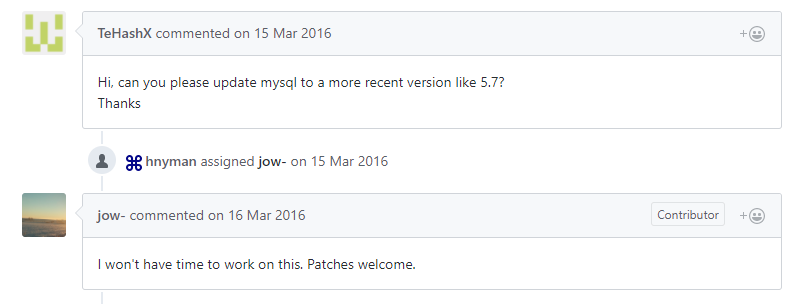
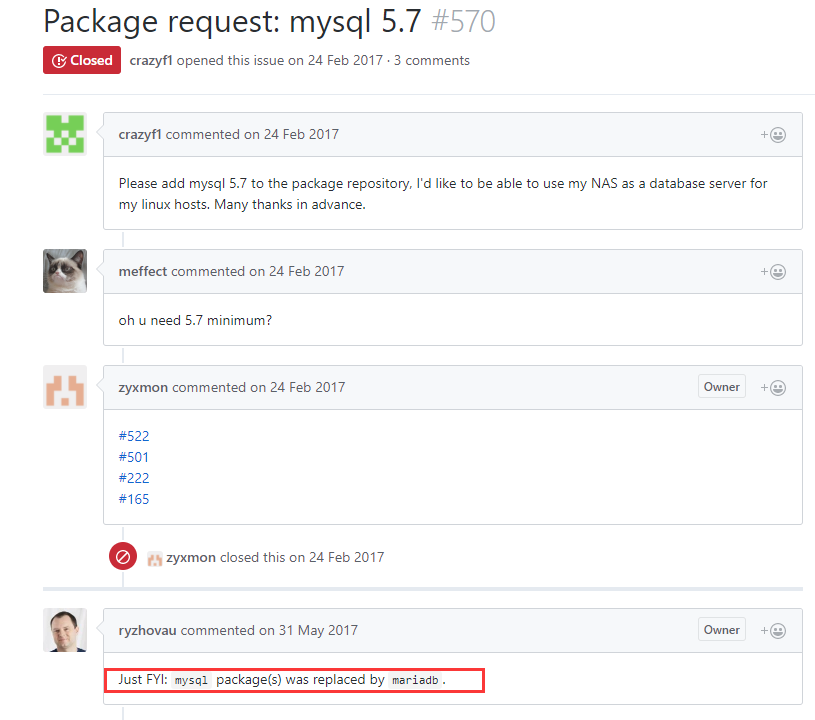
Sqlite3 自带数据库 ,这里要说下openwrt下的mysql不能使用,版本5.1.X,而且Owncloud 7以上版本Mysql应该是至少要5.7.X,老外也没想管Mysql的版本,说了句没空~~~
可能在Openwrt的世界里Mysql太小众了把。MariaDB 据说这个编译的数据库也能用https://github.com/patrikx3/lede-mariadb,有兴趣的朋友也可以在参考资料试试MariaDB,
不过对我来讲,我不熟悉就没有用,研究还的要时间的,不如弄个Linux了呢。
本着测试的想法,毕竟我想测试好aria2和Owncloud以后买个阿里云或者腾讯云,这样子配置会高很多带宽也会相对充裕些。
上干货我们开始配置把,
这里推荐大家看下这俩文档,是Openwrt添加Nginx,PHP,和Mysql的,当然Mysql不能用,Pass把
http://www.cnblogs.com/double-win/p/3866189.html
http://www.cnblogs.com/double-win/p/3885741.html
基础环境搭建好了就到官网下载 就可以了,
https://owncloud.org/download/
一切准备完后记得测试PHP+Nginx然后我们开始.............
PHP配置
root@Sean_OpenWrt:/etc/config# cat /etc/php.ini
[PHP] zend.ze1_compatibility_mode = Off ; Language Options engine = On
;short_open_tag = Off
precision = 12
y2k_compliance = On
output_buffering = Off
;output_handler =
zlib.output_compression = Off
;zlib.output_compression_level = -1
;zlib.output_handler =
implicit_flush = Off
unserialize_callback_func =
serialize_precision = 100 ;open_basedir =
disable_functions =
disable_classes = ; Colors for Syntax Highlighting mode. Anything that's acceptable in
; <span style="color: ???????"> would work.
;highlight.string = #DD0000
;highlight.comment = #FF9900
;highlight.keyword = #
;highlight.bg = #FFFFFF
;highlight.default = #0000BB
;highlight.html = # ;ignore_user_abort = On
;realpath_cache_size = 16k
;realpath_cache_ttl = 120 ; Miscellaneous expose_php = On ; Resource Limits max_execution_time = 30 ; Maximum execution time of each script, in seconds.
max_input_time = 60 ; Maximum amount of time each script may spend parsing request data.
;max_input_nesting_level = 64
memory_limit = 8M ; Maximum amount of memory a script may consume. ; Error handling and logging ; Error Level Constants:
; E_ALL - All errors and warnings (includes E_STRICT as of PHP 6.0.0)
; E_ERROR - fatal run-time errors
; E_RECOVERABLE_ERROR - almost fatal run-time errors
; E_WARNING - run-time warnings (non-fatal errors)
; E_PARSE - compile-time parse errors
; E_NOTICE - run-time notices (these are warnings which often result
; from a bug in your code, but it's possible that it was
; intentional (e.g., using an uninitialized variable and
; relying on the fact it's automatically initialized to an
; empty string)
; E_STRICT - run-time notices, enable to have PHP suggest changes
; to your code which will ensure the best interoperability
; and forward compatibility of your code
; E_CORE_ERROR - fatal errors that occur during PHP's initial startup
; E_CORE_WARNING - warnings (non-fatal errors) that occur during PHP's
; initial startup
; E_COMPILE_ERROR - fatal compile-time errors
; E_COMPILE_WARNING - compile-time warnings (non-fatal errors)
; E_USER_ERROR - user-generated error message
; E_USER_WARNING - user-generated warning message
; E_USER_NOTICE - user-generated notice message
; E_DEPRECATED - warn about code that will not work in future versions
; of PHP
; E_USER_DEPRECATED - user-generated deprecation warnings
;
; Common Values:
; E_ALL & ~E_NOTICE (Show all errors, except for notices and coding standards warnings.)
; E_ALL & ~E_NOTICE | E_STRICT (Show all errors, except for notices)
; E_COMPILE_ERROR|E_RECOVERABLE_ERROR|E_ERROR|E_CORE_ERROR (Show only errors)
; E_ALL | E_STRICT (Show all errors, warnings and notices including coding standards.)
; Default Value: E_ALL & ~E_NOTICE
error_reporting = E_ALL & ~E_NOTICE & ~E_STRICT display_errors = On
display_startup_errors = Off
log_errors = Off
log_errors_max_len = 1024
ignore_repeated_errors = Off
ignore_repeated_source = Off
report_memleaks = On
;report_zend_debug = 0
track_errors = Off
;html_errors = Off
;docref_root = "/phpmanual/"
;docref_ext = .html
;error_prepend_string = "<font color=#ff0000>"
;error_append_string = "</font>"
; Log errors to specified file.
;error_log = /var/log/php_errors.log
; Log errors to syslog.
;error_log = syslog ; Data Handling ;arg_separator.output = "&"
;arg_separator.input = ";&"
variables_order = "EGPCS"
request_order = "GP"
register_globals = Off
register_long_arrays = Off
register_argc_argv = On
auto_globals_jit = On
post_max_size = 8M
;magic_quotes_gpc = Off
magic_quotes_runtime = Off
magic_quotes_sybase = Off
auto_prepend_file =
auto_append_file =
default_mimetype = "text/html"
;default_charset = "iso-8859-1"
;always_populate_raw_post_data = On ; Paths and Directories ; UNIX: "/path1:/path2"
;include_path = ".:/php/includes"
user_dir =
extension_dir = "/usr/lib/php"
enable_dl = On
;cgi.force_redirect = 1
;cgi.nph = 1
;cgi.redirect_status_env = ;
cgi.fix_pathinfo=1
;fastcgi.impersonate = 1;
;fastcgi.logging = 0
;cgi.rfc2616_headers = 0 ; File Uploads file_uploads = On
upload_tmp_dir = "/tmp"
upload_max_filesize = 2M
max_file_uploads = 20 ; Fopen wrappers allow_url_fopen = On
allow_url_include = Off
;from="john@doe.com"
;user_agent="PHP"
default_socket_timeout = 60
;auto_detect_line_endings = Off ; Dynamic Extensions ;extension=ctype.so
;extension=curl.so
;extension=dom.so
;extension=exif.so
;extension=ftp.so
;extension=gd.so
;extension=gmp.so
;extension=hash.so
;extension=iconv.so
;extension=json.so
;extension=ldap.so
;extension=mbstring.so
;extension=mcrypt.so
;extension=mysql.so
;extension=openssl.so
;extension=pcre.so
;extension=pdo.so
;extension=pdo-mysql.so
;extension=pdo-pgsql.so
;extension=pdo_sqlite.so
;extension=pgsql.so
;extension=session.so
;extension=soap.so
;extension=sockets.so
;extension=sqlite.so
;extension=sqlite3.so
;extension=tokenizer.so
;extension=xml.so
;extension=xmlreader.so
;extension=xmlwriter.so ; Module Settings [APC]
apc.enabled = 1
apc.shm_segments = 1 ;The number of shared memory segments to allocate for the compiler cache.
apc.shm_size = 4M ;The size of each shared memory segment. [Date]
;date.timezone = Asia/Chongqing
;date.default_latitude = 31.7667
;date.default_longitude = 35.2333
;date.sunrise_zenith = 90.583333
;date.sunset_zenith = 90.583333 [filter]
;filter.default = unsafe_raw
;filter.default_flags = [iconv]
;iconv.input_encoding = ISO-8859-1
;iconv.internal_encoding = ISO-8859-1
;iconv.output_encoding = ISO-8859-1 [sqlite]
;sqlite.assoc_case = 0 [sqlite3]
;sqlite3.extension_dir = [Pdo_mysql]
pdo_mysql.cache_size = 2000
pdo_mysql.default_socket= [MySQL]
mysql.allow_local_infile = On
mysql.allow_persistent = On
mysql.cache_size = 2000
mysql.max_persistent = -1
mysql.max_links = -1
mysql.default_port =
mysql.default_socket = /tmp/mysqld.sock
mysql.default_host =
mysql.default_user =
mysql.default_password =
mysql.connect_timeout = 60
mysql.trace_mode = Off [PostgresSQL]
pgsql.allow_persistent = On
pgsql.auto_reset_persistent = Off
pgsql.max_persistent = -1
pgsql.max_links = -1
pgsql.ignore_notice = 0
pgsql.log_notice = 0 [Session]
session.save_handler = files
session.save_path = "/tmp"
session.use_cookies = 1
;session.cookie_secure =
session.use_only_cookies = 1
session.name = PHPSESSID
session.auto_start = 0
session.cookie_lifetime = 0
session.cookie_path = /
session.cookie_domain =
session.cookie_httponly =
session.serialize_handler = php
session.gc_probability = 1
session.gc_divisor = 100
session.gc_maxlifetime = 1440
session.bug_compat_42 = On
session.bug_compat_warn = On
session.referer_check =
session.entropy_length = 0
;session.entropy_file = /dev/urandom
session.entropy_file =
;session.entropy_length = 16
session.cache_limiter = nocache
session.cache_expire = 180
session.use_trans_sid = 0
session.hash_function = 0
session.hash_bits_per_character = 4
url_rewriter.tags = "a=href,area=href,frame=src,input=src,form=,fieldset=" [mbstring]
;mbstring.language = Japanese
;mbstring.internal_encoding = EUC-JP
;mbstring.http_input = auto
;mbstring.http_output = SJIS
;mbstring.encoding_translation = Off
;mbstring.detect_order = auto
;mbstring.substitute_character = none;
;mbstring.func_overload = 0
;mbstring.strict_detection = Off
;mbstring.http_output_conv_mimetype=
;mbstring.script_encoding= [gd]
;gd.jpeg_ignore_warning = 0 [exif]
;exif.encode_unicode = ISO-8859-15
;exif.decode_unicode_motorola = UCS-2BE
;exif.decode_unicode_intel = UCS-2LE
;exif.encode_jis =
;exif.decode_jis_motorola = JIS
;exif.decode_jis_intel = JIS [soap]
soap.wsdl_cache_enabled=1
soap.wsdl_cache_dir="/tmp"
soap.wsdl_cache_ttl=86400
soap.wsdl_cache_limit = 5 [sysvshm]
;sysvshm.init_mem = 10000 [ldap]
ldap.max_links = -1 [mcrypt]
;mcrypt.algorithms_dir=
;mcrypt.modes_dir= [opcache]
;opcache.memory_consumption=8 ; 8M is the allowed minimum
;opcache.interned_strings_buffer=1
opcache.max_accelerated_files=200 ; 200 is the allowed minimum
;opcache.revalidate_freq=60
;opcache.fast_shutdown=1
opcache.enable_cli=1
opcache.enable=1
;opcache.log_verbosity_level=4
Nginx配置(官网推荐的Owncloud无SSL配置以及做的基本Nginx优化)
root@Sean_OpenWrt:/etc/config# cat /etc/nginx/nginx.conf

user www www;

worker_processes  1;

error_log   /mnt/sda2/nginx/logs/error.log;

#error_log  /mnt/sda2/nginx/logs/error.log  notice;

#error_log  /mnt/sda2/nginx/logs/error.log  info;

pid         /mnt/sda2/nginx/logs/nginx.pid;

events {

    worker_connections  10240;

}

http {

    include       mime.types;

    default_type  application/octet-stream;

    log_format  main  '$remote_addr - $remote_user [$time_local] "$request" '

                     '$status $body_bytes_sent "$http_referer" '

                      '"$http_user_agent" "$http_x_forwarded_for"';

    access_log   /mnt/sda2/nginx/logs/access.log  main;

    sendfile        on;

    keepalive_timeout  65;

    large_client_header_buffers 4 32k;

    client_max_body_size 8m;

    tcp_nopush     on;

    tcp_nodelay        off;

    client_body_timeout 10;

    client_header_timeout 10;

    output_buffers 1 32k;

    postpone_output 1460;

    open_file_cache max=1000 inactive=20s;

    open_file_cache_valid    30s;

    open_file_cache_min_uses 2;

    open_file_cache_errors   on;

    fastcgi_connect_timeout 300;

    fastcgi_send_timeout 300;

    fastcgi_read_timeout 300;

    fastcgi_buffer_size 32k;

    fastcgi_buffers 4 32k;

    fastcgi_busy_buffers_size 32k;

    fastcgi_temp_file_write_size 32k;

    gzip on;

    gzip_buffers     4 16k;

    gzip_http_version 1.0;

    gzip_comp_level 2;

    gzip_types       text/plain application/x-javascript text/css application/xml;

    gzip_proxied        expired no-cache no-store private auth;

    #proxy_cache_path  /var/lib/nginx/cache  levels=1:2   keys_zone=staticfilecache:80m inactive=1d  max_size=2500m;

    proxy_temp_path /var/lib/nginx/proxy;

    proxy_connect_timeout 300;

    proxy_read_timeout 120;

    proxy_send_timeout 120;

    proxy_buffer_size  16k;

    proxy_buffers      4 16k;

  server {

        listen       7777;

        server_name  66.66.66.60;

        access_log  /mnt/sda2/nginx/logs/host.access.log  main;

        root   /mnt/sda2/nginx;

        index  index.html index.htm;

        client_max_body_size 10G;

        fastcgi_buffers 64 4K;

        rewrite ^/caldav(.*)$ /remote.php/caldav$1 redirect;

        rewrite ^/carddav(.*)$ /remote.php/carddav$1 redirect;

        rewrite ^/webdav(.*)$ /remote.php/webdav$1 redirect;

        location = /robots.txt {

                allow all;

                log_not_found off;

                access_log off;

                }

        location ~ ^/(?:\.htaccess|data|config|db_structure\.xml|README){

                deny all;

        }

        location / {

                rewrite ^/.well-known/host-meta /public.php?service=host-meta last;

                rewrite ^/.well-known/host-meta.json /public.php?service=host-meta-json last;

                rewrite ^/.well-known/carddav /remote.php/carddav/ redirect;

                rewrite ^/.well-known/caldav /remote.php/caldav/ redirect;

                rewrite ^(/core/doc/[^\/]+/)$ $1/index.html;

                try_files $uri $uri/ /index.php;

                }

        location ~ \.php(?:$|/) {

                fastcgi_split_path_info ^(.+\.php)(/.+)$;

                fastcgi_pass   127.0.0.1:9000;

                fastcgi_index  index.php;

                fastcgi_param  SCRIPT_FILENAME   /mnt/sda2/nginx/$fastcgi_script_name;

                fastcgi_param PATH_INFO $1;

                include fastcgi_params;

        }

        location ~* \.(?:jpg|jpeg|gif|bmp|ico|png|css|js|swf)$ {

                expires 30d;

                access_log off;

        }

    }

}
因为万恶的Openwrt没有语言环境的所谓BUG, 网上的很多人要修改util.php ,可能比较小众资料不多,且多是爱好者在问答,大家可能没找到这个路径,其实5以上版本的路径换了,grep一下报错就可以找到。
设置语言为 en_US.UTF-8/fr_FR.UTF-8/es_ES.UTF-8/de_DE.UTF-8/ru_RU.UTF-8/pt_BR.UTF-8/it_IT.UTF-8/ja_JP.UTF-8/zh_CN.UTF-8 失败

Please install one of these locales on your system and restart your webserver.
相对路径为:
lib\private\legacy\util.php
注释掉这里

   //if (!OC_Util::isSetLocaleWorking()) {

        //    $errors[] = array(

        //        'error' => $l->t('Setting locale to %s failed',

        //            array('en_US.UTF-8/fr_FR.UTF-8/es_ES.UTF-8/de_DE.UTF-8/ru_RU.UTF-8/'

        //                . 'pt_BR.UTF-8/it_IT.UTF-8/ja_JP.UTF-8/zh_CN.UTF-8')),

        //        'hint' => $l->t('Please install one of these locales on your system and restart your webserver.')

        //    );

        //
配置Owncloud
这里还应该改一下config/config.php
<?php

$CONFIG = array (

  'instanceid' => 'ocx8is0pm6p9',

  'default_language' => 'zh',

);

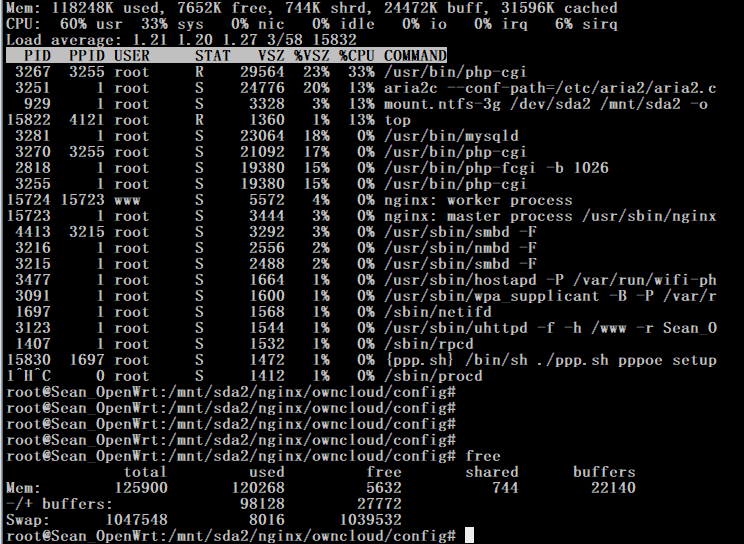
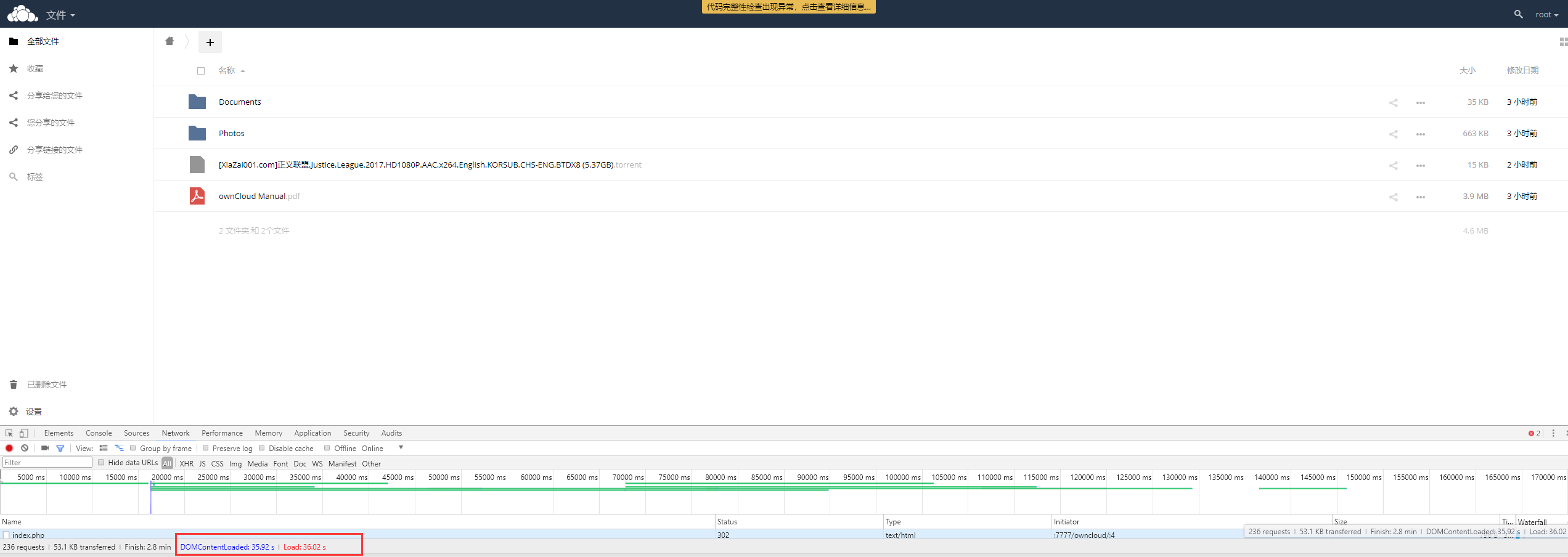
数据库选择Sqlite,如果你是Linux 并且你的Mysql是5.7+的版本或者能用的MariaDB,,那么....我想说我好羡慕你... 因为装完后我就很郁闷了....因为这个数据库和系统本身的硬件不能撑起来,所以访问速度极其慢,我也没太关注就是搭建了个壳子,如果有大神知道如何优化请留言给我。
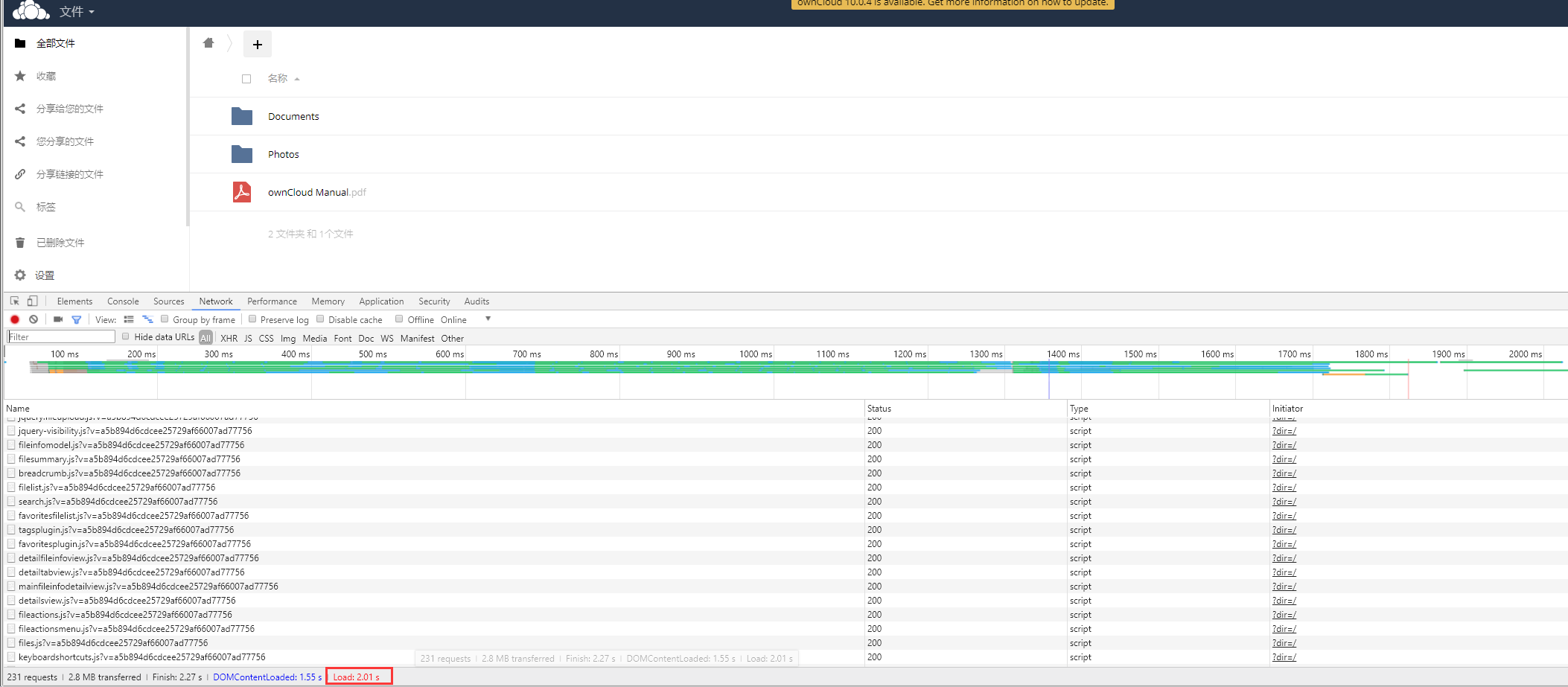
系统资源占用:
Load了36秒...而且由于注释了php代码出现了这个黄色的一大坨....表示强迫症不能忍,果断要换成VPS的...

虽然结果不是很理想,但是过程还是很开心的,毕竟一个路由也不能当服务器用....
下面的参考资料大家可以找到各种版本的Owncloud,老外对Openwrt下的Mysql的态度....唉赶紧尝试一次高版本的Mysql吧.....大家有机会还是弄个vps吧....或者弄个高性能的....
或者类似这位一样的的外加一层设备https://www.jianshu.com/p/92e2be4ca2f8
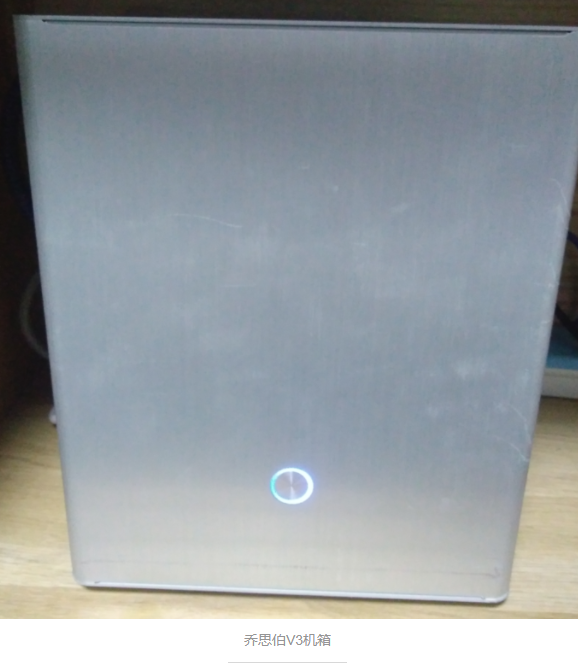
总的来讲不建议用路由刷Openwrt上Owncloud,或者其他云Server,资源占用较大,也可能我配置的默认SQL问题或者还有哪里没有优化到,anyway....如有大神,请留言给我。
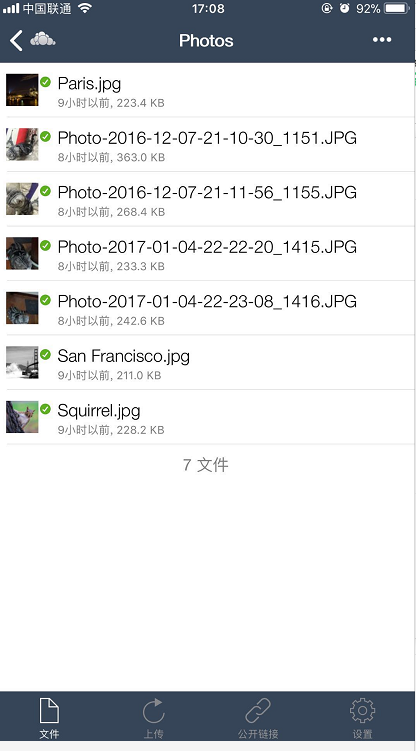
VPS上效果展示,LNMP环境速度还算可以,然后我花了6RMB买了个官网客户端,感觉然并卵....可能还没仔细研究,抽空吧.....Python学习进度都落后了~~~~~~~~~~~~
传送:
[Openwrt 扩展上篇]USB挂载&U盘启动&Samba共享
参考资料
http://pkgs.fedoraproject.org/repo/pkgs/owncloud/
https://forum.owncloud.org/viewtopic.php?f=26&t=21219
https://github.com/openwrt/packages/issues/2506
https://github.com/Entware-ng/Entware-ng/issues/570
https://wiki.openwrt.org/doc/howto/owncloud
http://blog.csdn.net/hun_ying/article/details/48340765
[Openwrt 扩展下篇] Openwrt搭建私有云Owncloud 9的更多相关文章
- 自行搭建私有云ownCloud,启用SSL,其他配置
ownCloud简介 ownCloud(官网)是一款开源的私有云框架,可以通过它实现个人网盘的功能,如果拥有一个性能不错的VPS,那么就可以摆脱奇慢无比的百度云等网盘啦!我花了大约一天的时间总算搭好了 ...
- 自行搭建私有云kodexplorer
kodexplorer是一款开源的私有云框架,可以通过它实现个人网盘的功能,如果拥有一个性能不错的VPS,那么就可以摆脱奇慢无比的百度云等网盘啦!最近百度网盘还发出申明,说要限制使用空间.用别人的东西 ...
- window搭建私有云,只要几分钟
本文介绍如何在window搭建私有云网盘. 工具/原料:一台window系统电脑或者window服务器(vps),Xampp 安装包,可道云kodexplorer安装包 第一步,xampp安装 1.官 ...
- centos7 上搭建私有云
OwnCloud环境搭建 一. 环境搭建 1. 环境需求 服务器操作系统:Centos7.0 外网服务器操作系统:Centos7.0 Php版本号:5.4.16 Mysql版本号:5.5.52 Apa ...
- 优秀个人免费私有云OwnCloud 8.0终于发布 - 亮眼新功能初探简介
OwnCloud是一个基于Linux的私有云开源项目,用户可以免费使用它来搭建自己的私有云来进行文件和多媒体等的分享. 本人有幸在大概一年多前因为项目需要而接触和使用到OwnCloud,但不幸的是当时 ...
- 腾讯云linux+kodexplorer可道云搭建私有云盘
kodexplorer可道云介绍KodExplorer可道云,原名芒果云,是基于Web技术的私有云和在线文件管理系统.致力于为用户提供安全可控.可靠易用.高扩展性的私有云解决方案.用户只需通过简单环境 ...
- nextcloud搭建私有云盘
一.基础环境准备 1.安装一台centos7的linux服务器. # 系统初始化 # 如果时区不对,请修改时区 #mv /etc/localtime /etc/localtime_bak #ln -s ...
- 使用 seafile搭建私有云盘
一.系统环境 系统:CentOS7-1708IP地址:192.168.159.33 二.安装seafile [root@seafile ~]# yum -y install epel-release[ ...
- 在CentOS8下利用seafile软件搭建私有云
一.安装前准备工作 1. 安装EPEL源 EPEL (Extra Packages for Enterprise Linux)是基于Fedora的一个项目,为“红帽系”的操作系统提供额外的软件包,适用 ...
随机推荐
- 数组 javaScript权威指南笔记
创建数组 var a=[1,2,3,4] var arr=new Array() var arr=new Array(10);//创建长度为10的数组 var arr=new Array(1,2, ...
- p2 碰撞
P2可以实现物体碰撞模拟,同时在碰撞过程中派发一些事件实现碰撞检测,将碰撞信息及时反馈,以添加相应的特效. P2中,当两个刚体的最小包围盒AABB发生重叠,碰撞就开始了:然后刚体的形状发生重叠,同时P ...
- 内存映像分析工具Eclipse Memory Analyzer
1. Eclipse Memory Analyzer安装 Help ->Eclipse Marketplace,搜索Memory,点击install,->confirm->同意证书内 ...
- jmeter发送json数据,报405、400错误解决方案
1.405错误解决方案:添加HTTP信息头管理器(错误因数:发送格式未设置) 2.400错误解决方案:json文本格式有误(注意:换行.空格等)解决方案:对照json文本数据(错误因数:发送的json ...
- mysql内外连接
更新于2017-12-13,在今天的一个面试里面被问到了left/right outer join,回答上来了.但又问了一下inner join ,一下子记不清inner jion是个什么东西了.这次 ...
- BZOJ 2732: [HNOI2012]射箭
2732: [HNOI2012]射箭 Time Limit: 10 Sec Memory Limit: 128 MBSubmit: 2532 Solved: 849[Submit][Status] ...
- BZOJ2276 [Poi2011]Temperature 【单调队列】
题目链接 BZOJ2276 题解 一开始看错题,以为求的是可以不连续的,想出一个奇怪的线段树,发现空间根本开不下?? 题目要我们求连续的最长可能不下降区间 对于区间\([l,r]\)如果合法,当且仅当 ...
- .NET MVC 获取 当前请求的 控制器/视图/区域 的名字
.NET MVC 在action中或过滤器中或视图中,分别如何获取 当前请求的 控制器/视图/区域 的名字 1)过滤器中的: public class CMSAttribute : Filter ...
- CentOS-5的yum源无法使用问题
CentOS-5的yum源无法使用问题 [root@37wan ~]# yum -y install gcc Loaded plugins: fastestmirror Determining fas ...
- faster rcnn算法及源码及论文解析相关博客
1. 通过代码理解faster-RCNN中的RPN http://blog.csdn.net/happyflyy/article/details/54917514 2. faster rcnn详解 R ...