
CentOs7.2编译安装Nginx服务器
1. 安装nginx依赖
首先安装nginx的依赖
yum install gcc gcc-c++ openssl openssl-devel cyrus-sasl-md5
2,创建nginx用户
如果没有nginx,启动nginx时会报错
[root@localhost nginx-1.11.]# /usr/local/nginx/sbin/nginx

nginx: [emerg] getpwnam("nginx") failed
groupadd nginx
useradd -s /sbin/nologin -g nigix -M nginx
3,下载最新版nginx安装包
wget -C http://nginx.org/download/nginx-1.12.0.tar.gz
4,解压
tar zxvf nginx-1.12..tar.gz
5,进入nginx目录
cd nginx-1.12.
6,编译设置
./configure --user=nginx --group=nginx --prefix=/usr/local/nginx --with-http_stub_status_module --with-http_ssl_module --with-http_gzip_static_module
因此要顺利的通过nginx编译安装必须安装的依赖关系有:
yum install gc gcc gcc-c++ pcre-devel zlib-devel openssl-devel如果有错误提示:./configure: error: C compiler cc is not found
解决方法:
yum install gcc gcc-c++如果有错误提示:./configure: error: the HTTP rewrite module requires the PCRE library.
You can either disable the module by using –without-http_rewrite_module
option, or install the PCRE library into the system, or build the PCRE library
statically from the source with nginx by using –with-pcre=<path> option.
解决方法:
yum install pcre-devel如果有错误提示:./configure: error: SSL modules require the OpenSSL library.
You can either do not enable the modules, or install the OpenSSL library
into the system, or build the OpenSSL library statically from the source
with nginx by using –with-openssl=<path> option.
解决方法:
yum install openssl-devel
7,编译&安装
make & make install
8,nginx直接启动方法
/usr/local/nginx/sbin/nginx
9,现在我们将nginx加入到环境变量中
vi /etc/profile
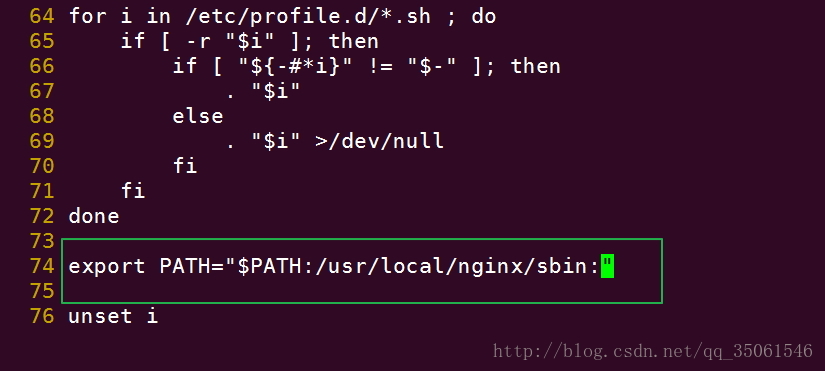
随后我们更新环境变量 并使用命令再次重启nginx
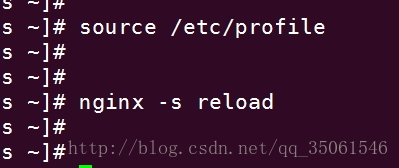
写在结尾:可能会出现没有pid文件的情况
[emerg]: getpwnam(“nginx”) failed
|
1
2
|
[root@localhost nginx-1.11.2]# /usr/local/nginx/sbin/nginxnginx: [emerg] getpwnam("nginx") failed |
CentOs7.2编译安装Nginx服务器的更多相关文章
- Windows 编译安装 nginx 服务器 + rtmp 模块
有关博客: <Windows 编译安装 nginx 服务器 + rtmp 模块>.<Ubuntu 编译安装 nginx>.<Arm-Linux 移植 Nginx> ...
- linux软件管理之------编译安装nginx服务器并手动编写自动化运行脚本
红帽系列的 linux软件管理分为三类:1. rpm 安装软件.2. yum 安装软件.3. 源码包编译安装.前面两种会在相关专题给出详细讲解.源码包的编译安装是非常关键的,我们知道linux的相关版 ...
- CentOS7.6编译安装nginx
配置阿里云yum源 cp /etc/yum.repos.d/CentOS-Base.repo /etc/yum.repos.d/CentOS-Base.repo.bak wget -O /etc/yu ...
- centos7下快速安装Nginx服务器
1.添加源 默认情况Centos7中无Nginx的源,最近发现Nginx官网提供了Centos的源地址.因此可以如下执行命令添加源: sudo rpm -Uvh http://nginx.org/pa ...
- CentOS7.3编译安装Nginx设置开机启动
起因 最近想玩nginx了,本来用yum -y install nginx安装也启动好了,但是买了本<Nginx高性能Web服务器详解>,我咋能辜负我的书费呢?于是我就直接ps -ef | ...
- 在centos7上编译安装nginx
题前,先放一个有图有真相的博客链接:https://www.cnblogs.com/zhang-shijie/p/5294162.html 虽然别人说的很详细,但还是记录一下 1.VMWare Wor ...
- CentOS7.x编译安装nginx,实现HTTP2
网站使用HTTP2有助于网站加速及更安全,要配置HTTP2必须满足两个条件:①openssl的版本必须在1.0.2e及以上.②nginx的版本必须在1.9.5以上 一.准备工作 配置HTTP2之前需 ...
- Ubuntu 编译安装 nginx
有关博客: <Windows 编译安装 nginx 服务器 + rtmp 模块>.<Ubuntu 编译安装 nginx>.<Arm-Linux 移植 Nginx> ...
- Centos7 编译安装 Nginx PHP Mariadb Memcached 扩展 ZendOpcache扩展 (实测 笔记 Centos 7.3 + Mariadb 10.1.20 + Nginx 1.10.2 + PHP 7.1.0 + Laravel 5.3 )
环境: 系统硬件:vmware vsphere (CPU:2*4核,内存2G,双网卡) 系统版本:CentOS-7-x86_64-Minimal-1611.iso 安装步骤: 1.准备 1.0 查看硬 ...
随机推荐
- ADO----nDSN
//////////////链接数据库 非DSN模式///////////////////////////// //CString strOpen="DSN=DBAddressBook ...
- solr+tomcat整合
一.solr安装 http://archive.apache.org/dist/lucene/solr/ 这个地址有各个版本的 这次我使用的是5.5.4版本和tomcat8 版本5.5.4已经内置了j ...
- JAVA编写简单的日历,输入日期即可查看日历
利用LocalDate输入年月日找出当月日历 直接上代码 import java.time.LocalDate; import java.util.Scanner; public class Cale ...
- hdu 1401
Solitaire Time Limit: 2000/1000 MS (Java/Others) Memory Limit: 65536/32768 K (Java/Others)Total S ...
- python 软件管理规范
一.背景 软件开发是一个系统工程,当然编码实现是其中尤其重要的一个环节,关乎到功能需求的实现好坏.这个环节中除了编码这一硬功之外,与之相关的编码风格这一柔道,虽然没有直接决定功能的实现与否,但却在很大 ...
- ASP.NET Core 2 学习笔记(十)视图
ASP.NET Core MVC中的Views是负责网页显示,将数据一并渲染至UI包含HTML.CSS等.并能痛过Razor语法在*.cshtml中写渲染画面的程序逻辑.本篇将介绍ASP.NET Co ...
- vscode 支持es6语法
在首选项中 设置: "jshint.enable": false, 在根目录中建立eslintrc.yml parser: babel-eslint parserOptions: ...
- vue2.0 element-ui中input的@keyup.native.enter='onQuery'回车查询刷新整个表单的解决办法
项目中用的element-ui是v1.4.3版本 实现的功能是在input中输入查询的名称,按下键盘回车键,可以查询表格中数据 问题是,我输入名称,按下回车,会整个表单刷新,搜索条件也被清空:代码如下 ...
- 转:php中判断某个IP地址是否存在范围内
原文:php中判断某个IP地址是否存在范围内 //案例:判断192.168.1.127是否在 (192.168.1.1--192.168.1.255)的范围里面 $ip_start = get_ipl ...
- JS实现点击参数面板按钮显示或隐藏数据
当报表中列出数据太多时,想通过显示按钮隐藏明细数据只显示统计数据.如下图示例,那么该如何实现呢?本文以FineReport为例,来讲述JS如何实现点击参数面板按钮显示或隐藏数据. 打开报表 在参数面板 ...