
[转帖] sqlserver CAL 授权模式下 只能够有20个core的使用问题
http://www.cnblogs.com/diabloxl/p/3623640.html?utm_source=tuicool&utm_medium=referral
公司这边性能组老师进行性能测试 发现智能用到20个core
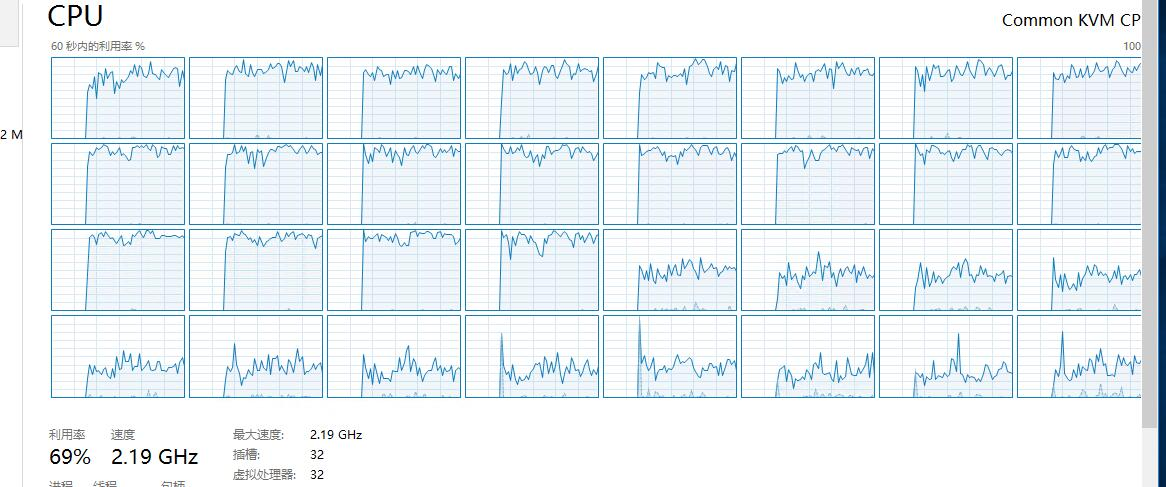
同事排查到了问题原因, 正好博客园里面有一个blog 详细描写了 这个区别.
转帖一下, 感谢原作者. 后续再仔细看看这一块.
问题描述:生产环境一个数据库从SQLSERVER 2008 R2升级到SQLSERVER 2012 ,同时更换硬件,但迁移后发现性能明显下降,应用写入、读取性能下降的比较厉害;
向微软寻求帮助后得出答案,原来这与SQLSERVER的安装介质有关。
大致意思是说由于NUMA架构可以自行管理内存池,在安装了CAL的EE后,由于限制只能使用20个cores,同样内存则只能管理到20个cores涉及到的NUMA的对应的内存空间(具体算法为 限制内存=当前物理内存/NUMA数量*(总核数/20)),如果限制SQL Server的最大使用内存超过前面说的限制内存,则当使用内存大于限制内存需要再向操作系统再申请空间时,则会产生跨NUMA处理的情况,导致大量消耗系统资源,引起性能下降;
http://blogs.msdn.com/b/saponsqlserver/archive/2012/06/15/sql-server-2012-enterprise-editions.aspx
这是我在网上找到的解释,摘录其中几段(本人E文水平有限,翻译不当之处敬请见谅)
关于SQLSERVER EE的安装介质(EE为Enterprise Editions简拼,企业版)
- SQL Server EE is no longer being offered under the Server + CAL (Client Access License) licensing model. For customers with Software Assurance on existing SQL EE Server licenses (or access to them under their current Enterprise Agreements during term) a version of Enterprise Edition was created to enable them to upgrade to SQL Server 2012. This version has technical restrictions limiting an instance to using only 20 processor cores (40 CPU threads with Hyperthreading).. Customers must still have the proper version of the CAL and additional physical and virtual use right restrictions of this SKU (Stock Keeping Unit) apply. Please refer to the three documents listed above for additional details.
- An Enterprise Edition which is licensed per core and which does not have limits on the # of cores usable on a server (within the absolute limits supported). This Enterprise Edition does reflect the new licensing model for SQL Server Enterprise Edition.
上面说到 即便是SQLSERVER EE,由于授权方式的差异导致对processor cores的限制
For customers with Software Assurance on existing SQL EE Server licenses
An Enterprise Edition which is licensed per core and which does not have limits on the # of cores usable on a server
通过以下方式可以检查当前运行的SQL EE信息
1、sp_readerrorlog ,第一行显示SQLSERVER 版本信息如下
2012-05-08 16:04:54.56 Server Microsoft SQL Server 2012 - 11.0.2100.60 (X64)
Feb 10 2012 19:39:15
Copyright (c) Microsoft Corporation
Enterprise Edition (64-bit)on Windows NT 6.1 <X64> (Build 7601: Service Pack 1)
2、select serverproperty('Edition') ,显示版本信息如下
Enterprise Edition (64-bit)
如何判断当前的SQL EE是基于per CAL还是per core的呢?如果显示的信息如上所示,那就是基于per CAL的,文中再次强调此模式下受限于20 cores;
Answer is: It is the CAL licensed one and with that the Enterprise Edition which is limited to 20 cores!!!
而如果显示的信息如下所示,那就是基于per core的 则没有限制;
The per-core licensed Enterprise Edition will show like this:
2012-05-18 23:57:29.77 Server Microsoft SQL Server 2012 - 11.0.2100.60 (X64)
Feb 10 2012 19:39:15
Copyright (c) Microsoft Corporation
Enterprise Edition: Core-based Licensing (64-bit) on Windows NT 6.1 <X64> (Build 7601: Service Pack 1)
Executing:
select serverproperty('Edition')
which then could show this result:
Enterprise Edition: Core-based Licensing (64-bit)
关于20 cores的限制问题,需要区分CPU是否支持超线程而言
Other indications that there might be a limitation to 20 cores could be identified as well at the beginning of the SQL Server 2012 errorlog where we can find a message like:
SQL Server detected 4 sockets with 6 cores per socket and 6 logical processors per socket, 24 total logical processors; using 20 logical processors based on SQL Server licensing.
In the case above, we are looking at a server with the last generation of Intel processors which did not have Hyperthreading yet. Or in more modern Intel Servers with Hyperthreading it would look like:
SQL Server detected 4 sockets with 8 cores per socket and 16 logical processors per socket, 64 total logical processors; using 40 logical processors based on SQL Server licensing.
上文中的描述,根据SQL Server 2012 errorlog中的内容,我们可以看到
如果SQL Server 检测到 4个插槽,每个插槽有6个核,且有6个逻辑处理器(单线程),则总共为24个逻辑处理器,受限于SQL Server licenseing,只能使用20个逻辑处理器;
对于超线程CPU:
如果SQL Server 检测到 4个插槽,每个插槽有8个核,且有16个逻辑处理器(单线程),则总共为64个逻辑处理器,受限于SQL Server licenseing,只能使用40个逻辑处理器;
Another possibility of discovery is through the Microsoft MAP toolkit. Where to get it and how to use it is excellently described in this document: http://download.microsoft.com/download/F/F/2/FF29F6CC-9C5E-4E6D-85C6-F8078B014E9F/Determining_SQL_Server_2012_Core_Licensing_Requirements_at_SA_Renewal_Apr2012.pdf
另外一种可能的发现是通过Microsoft MAP toolkit,可以在以下这个文档中得到更准确的描述;
---------------------------华丽丽的分割线---------------------------------------
How is the throttle of 20 cores enforced for the CAL license-based Enterprise Edition?
The limitation or the cap is enforced by the # of SQL Server schedulers. Usually SQL Server creates one scheduler thread for every logical CPU on a server. Each of those scheduler threads is administrating a pool of worker threads which execute requests or are in different other states. A scheduler only can have one thread running at maximum. If a scheduler thread over all of the time has one of worker threads running, it can leverage at maximum one logical CPU and not a bit more. If there are (as in the second situation above) only 40 schedulers active to schedule worker threads, the maximum number of CPU power we can use at any given time is 40 logical CPUs.
Querying sys.dm_os_schedulers with this query:
select * from sys.dm_os_schedulers
we will realize that the all the schedulers are ‘Visible’ for all the logical CPUs, but only 40 of them will be ‘Online’, whereas the others are ‘Offline’
If you disable Hyperthreading, the number of schedulers being Online will decline to 20, since one single core is now represented by one CPU thread only compared to two with Hyperthreading enabled. In cases where there are many more CPU threads or logical CPUs than the limit of the Server+CAL licensed SQL Server 2012 Enterprise Edition, one certainly can use affinity mask settings to chose the CPUs SQL Server shall use.
通过sys.dm_os_schedulers这个DMV可以查询到SQL Server调度线程的情况;
如何在EE的两个不同的产品间变更?在下面的链接中可以找到答案
http://msdn.microsoft.com/zh-cn/library/ms143393.aspx

[转帖] sqlserver CAL 授权模式下 只能够有20个core的使用问题的更多相关文章
- 浅析SqlServer简单参数化模式下对sql语句自动参数化处理以及执行计划重用
我们知道,SqlServer执行sql语句的时候,有一步是对sql进行编译以生成执行计划, 在生成执行计划之前会去缓存中查找执行计划 如果执行计划缓存中有对应的执行计划缓存,那么SqlServer就会 ...
- 弹出层在兼容模式和IE8模式下显示不正常
弹出层在火狐.谷歌.360极速模式.IE6下都能100%面积正常显示,但在IE8和360的兼容模式下只显示弹出层下半部分或右半部分的内容,在主页面加上: <meta http-equiv=&qu ...
- Spring Security OAuth2 微服务认证中心自定义授权模式扩展以及常见登录认证场景下的应用实战
一. 前言 [APP 移动端]Spring Security OAuth2 手机短信验证码模式 [微信小程序]Spring Security OAuth2 微信授权模式 [管理系统]Spring Se ...
- spring-oauth-server实践:授权方式四:client_credentials 模式下有效期内重复申请 access_token ?
spring-oauth-server入门(1-12)授权方式四:client_credentials 模式下有效期内重复申请 access_token ? 一.失效重建邏輯 二.如果沒有失效,不会重 ...
- spring-oauth-server实践:使用授权方式四:client_credentials 模式下access_token做业务!!!
spring-oauth-server入门(1-10)使用授权方式四:client_credentials 模式下access_token做业务!!! 准备工作 授权方式四::客户端方式: 服务网关地 ...
- 无法序列化会话状态。在“StateServer”或“SQLServer”模式下,ASP.NET 将序列化会话状态对象,因此不允许使用无法序列化的对象或 MarshalByRef 对象。如果自定义会话状态存储在“Custom”模式下执行了类似的序列化,则适用同样的限制。
将项目部署到服务器后发现有如下问题,查了网上好多说是需要被序列化的类没有写上[Serializable]标志,所以把全部需要序列化的列都写上了标志发现还是不是,最后查到了发现网上说的并不太准确,而是需 ...
- 关于:“无法序列化会话状态。在“StateServer”或“SQLServer”模式下,...的问题
关于:“无法序列化会话状态.在“StateServer”或“SQLServer”模式下,...的问题 错误描述: 无法序列化会话状态.在“StateServer”或“SQLServer”模式下,ASP ...
- c语言: 错误:只允许在 C99 模式下使用‘for’循环初始化声明 用gcc编译出现
在gcc编译中如果使用 for(int i=0;i<n;++i){}会提示错误 错误:只允许在 C99 模式下使用'for'循环初始化声明 用gcc编译出现 就是说你的你的c编译器不是c99标准 ...
- 【.NET Core项目实战-统一认证平台】第十一章 授权篇-密码授权模式
[.NET Core项目实战-统一认证平台]开篇及目录索引 上篇文章介绍了基于Ids4客户端授权的原理及如何实现自定义的客户端授权,并配合网关实现了统一的授权异常返回值和权限配置等相关功能,本篇将介绍 ...
随机推荐
- 【转载】COM 组件设计与应用(十七)——持续性
原文:http://vckbase.com/index.php/wv/1264.html 一.前言 我们写程序,经常需要实现这样的需求: 例一.程序运行产生一个窗口,用户关闭的时候需要记录窗口的位置, ...
- [洛谷P2057][bzoj1934]善意的投票(最大流)
题目描述 幼儿园里有n个小朋友打算通过投票来决定睡不睡午觉.对他们来说,这个问题并不是很重要,于是他们决定发扬谦让精神.虽然每个人都有自己的主见,但是为了照顾一下自己朋友的想法,他们也可以投和自己本来 ...
- 安装QConf 报错及解决方案
1:提示找不到gdbm.h头文件 /alidata/QConf/agent/qconf_dump.cc:1:18: fatal error: gdbm.h: No such file or direc ...
- Security Permissions Caching
Security Permissions Caching Security permission caching is implemented in Security Adapters - class ...
- Charles 抓包使用教程
将 Charles 设置成系统代理 Charles 主界面介绍 过滤网络请求 截取 iPhone 上的网络封包 截取 Https 通讯信息 模拟慢速网络 修改网络请求内容 给服务器做压力测试 修改服务 ...
- 【Shader】这是一篇记录随笔,我要开始学Shader了!
背景: 前天学校有场招聘会,转了一圈只看到一家和unity有关的公司,还是做VR游戏的,然后HR也很好说话.和我说话的HR正好是做UnityVR方面的,聊了会受益匪浅,自己就像是找到了方向似的,突然很 ...
- tomcat启动项目的时候不报错而且启动的很快
最后发现是tomcat部署项目的时候,并没有将一部分文件复制到tomcat的目录下 方法 将没有添加的目录 Finish
- mysql删除表中的记录
大家都知道,在MySQL中删除一个表中的记录有两种方法,一种是DELETE FROM TABLENAME WHERE... , 还有一种是TRUNCATE TABLE TABLENAME. DELET ...
- Aria2 Linux 完整安装及使用教程
Aria2 嘛,主要是用来离线下载,功能强大,支持 http/https 直链.ftp.电驴.磁力链接等等,且可以跨平台使用,配合网页端操作,简直是一代下载神器. 安装 Debian/Ubuntu: ...
- 【Unity】 Cursor学习
CursorLockMode.None 光标行为未修改,第一人称视角下鼠标可以突破窗口. CursorLockMode.Locked 光标锁定到游戏窗口的中心,与全屏与否无关,同时隐藏光标(这一点在3 ...