
【HTML&CSS】搜狐页面代码编写
<!DOCTYPE html>

<!--[if lt IE 7]>      <html class="no-js lt-ie9 lt-ie8 lt-ie7"> <![endif]-->

<!--[if IE 7]>         <html class="no-js lt-ie9 lt-ie8"> <![endif]-->

<!--[if IE 8]>         <html class="no-js lt-ie9"> <![endif]-->

<!--[if gt IE 8]><!-->

<html class="no-js">

<!--<![endif]-->

<head>

    <meta charset="utf-8">

    <meta http-equiv="X-UA-Compatible" content="IE=edge">

    <title>搜狐首页</title>

    <meta name="description" content="">

    <meta name="viewport" content="width=device-width, initial-scale=1">

    <link rel="Shortcut Icon" href="./META-INF/images/souhulogo.png" />

    <link rel="stylesheet" href="./sohu.css">

</head>

<body>

    <div class="top">

        <div class="logo">

            <div class="logoimg">

                图标

            </div>

            <div class="dapp">

                下载app

            </div>

        </div>

    </div>

    <div class="mast">

        <!-- 第一部分 -->

        <div class="sousuo">

            <div class="sousuo1">

                搜索1

            </div>

            <div class="sousuo2">

                搜索2

            </div>

        </div>

        <!-- 第二部分 -->

        <div class="toutiaolianjie">

            头条链接

        </div>

        <!-- 第三部分 -->

        <div class="guanggaolan">

            <div class="guanggaolan1">

                广告1

            </div>

            <div class="guanggaolan2">

                广告2

            </div>

        </div>

        <!-- 第四部分 -->

        <div class="xinwen">

            <!-- 第四部分第一列  图片新闻-->

            <div class="imgxinwen">

                <div class="bigimg">

                    大图新闻

                </div>

                <!-- 小图新闻 -->

                <div class="smallimg">

                    <table class="smallimgtable">

                        <tr>

                            <td>

                                <div class="smallimgall smallimg1">

                                    小图标题新闻1

                                </div>

                            </td>

                            <td>

                                <div class="smallimgall smallimg2">

                                    小图标题新闻2

                                </div>

                            </td>

                        </tr>

                        <tr>

                            <td>

                                <div class="smallimgall smallimg3">

                                    小图标题新闻3

                                </div>

                            </td>

                            <td>

                                <div class="smallimgall smallimg4">

                                    小图标题新闻4

                                </div>

                            </td>

                        </tr>

                    </table>

                </div>

                <!--  视频标题栏 -->

                <div class="shipinbiaoti">

                    视频标题栏

                </div>

                <!--  视频 -->

                <div class="shipin1">

                    大视频

                </div>

                <div class="leftnews1">

                    文字新闻

                </div>

                <div class="shipin2">

                    视频2

                </div>

                <div class="leftnews2">

                    文字新闻2

                </div>

            </div>

            <!-- 第四部分第二列  中间部分文字新闻-->

            <div class="textxinwen">

                <div class="textnewsall textnews1">

                    新闻标题8条

                </div>

                <div class="textnewsall textnews2">

                    新闻标题6条

                </div>

                <div class="textnewsall textnews3">

                    新闻标题6条

                </div>

                <div class="textnewsall textnews4">

                    新闻标题6条

                </div>

                <div class="textnewsall textnews5">

                    新闻标题6条

                </div>

                <div class="textnewsall textnews6">

                    新闻标题1条

                </div>

            </div>

            <!-- 第四部分第三列 右侧内容标题-->

            <div class="biaotilan">

                <div class="right1">

                    换一换广告

                </div>

                <div class="right2">

                    图片广告

                </div>

                <div class="right3">

                    24小时热文

                </div>

            </div>

        </div>

    </div>

    <!-- 第五部分 -->

    <script src="" async defer></script>

</body>

</html>
 看完一整本书,结果写不出什么东西,按书上教程来,基本能把例子完成个七七八八,可是用padding还是margin完全整不清……,而且只要结构一复杂,元素就各种不受控制。
没办法 找来韩顺平老师的视频(没错,就是在网上不知道怎么搞来的)
看完老师讲完整个html&CSS部分2,终于把这个内容吃透了。
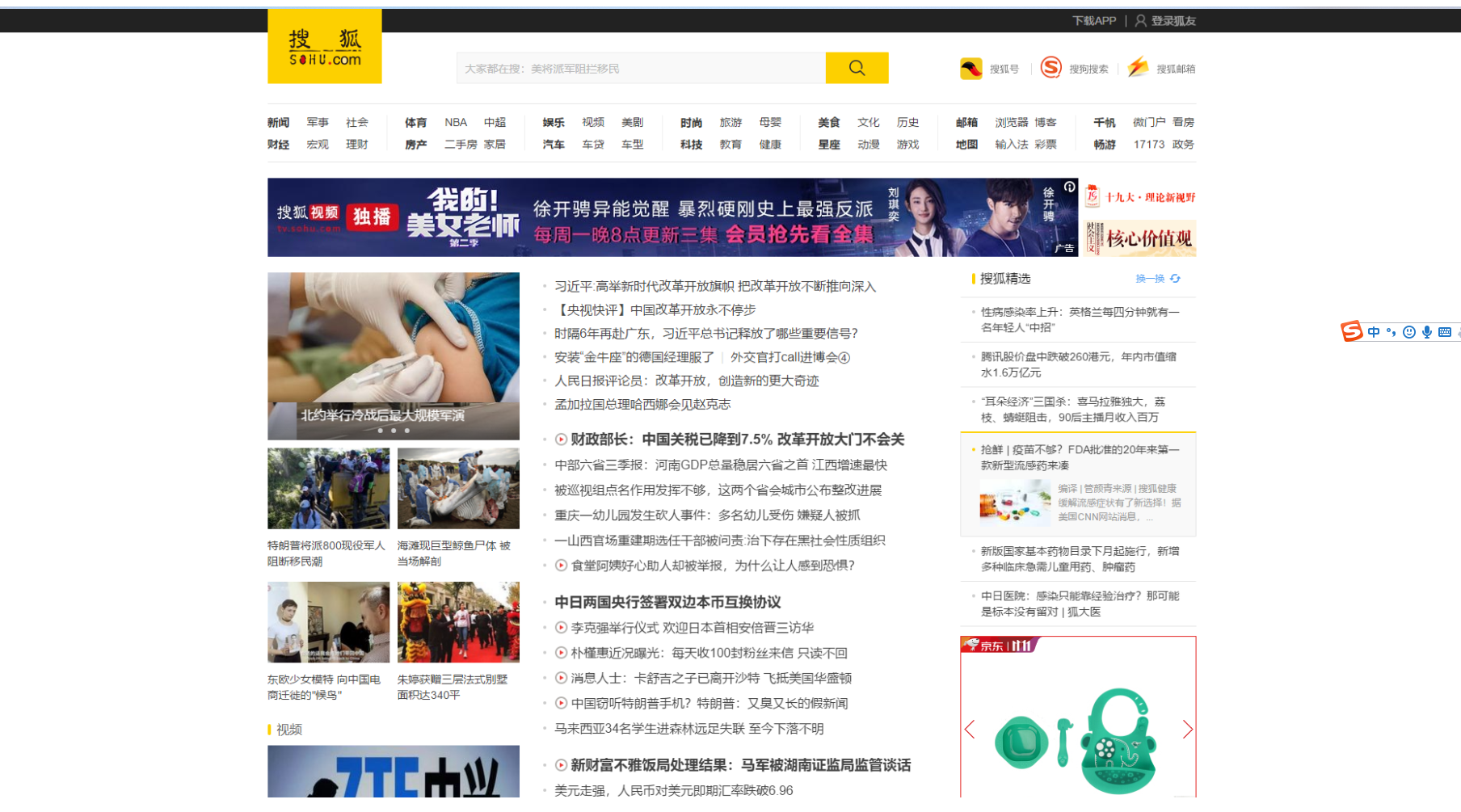
韩顺平老师讲课最后一个用例就是还原搜狐门户网站的首页HTML和css部分,虽然视频中他的是n年前的网站页面,蛋根本不妨碍我完成完成现在版本的搜狐页面 。
第一次看完视频,写的乱七八糟,很多东西摆不到应有的地方,没办法,在浏览器按f12键,查看人家的源代码,发现很多东西用了ul和li的组合插入文字,图片,而是原来HTML和css组合也没这么难,大神的代码实现也是很平凡很淡。
很多收获记手机上,回头整理发这里。
我做出来的效果图是这样的:
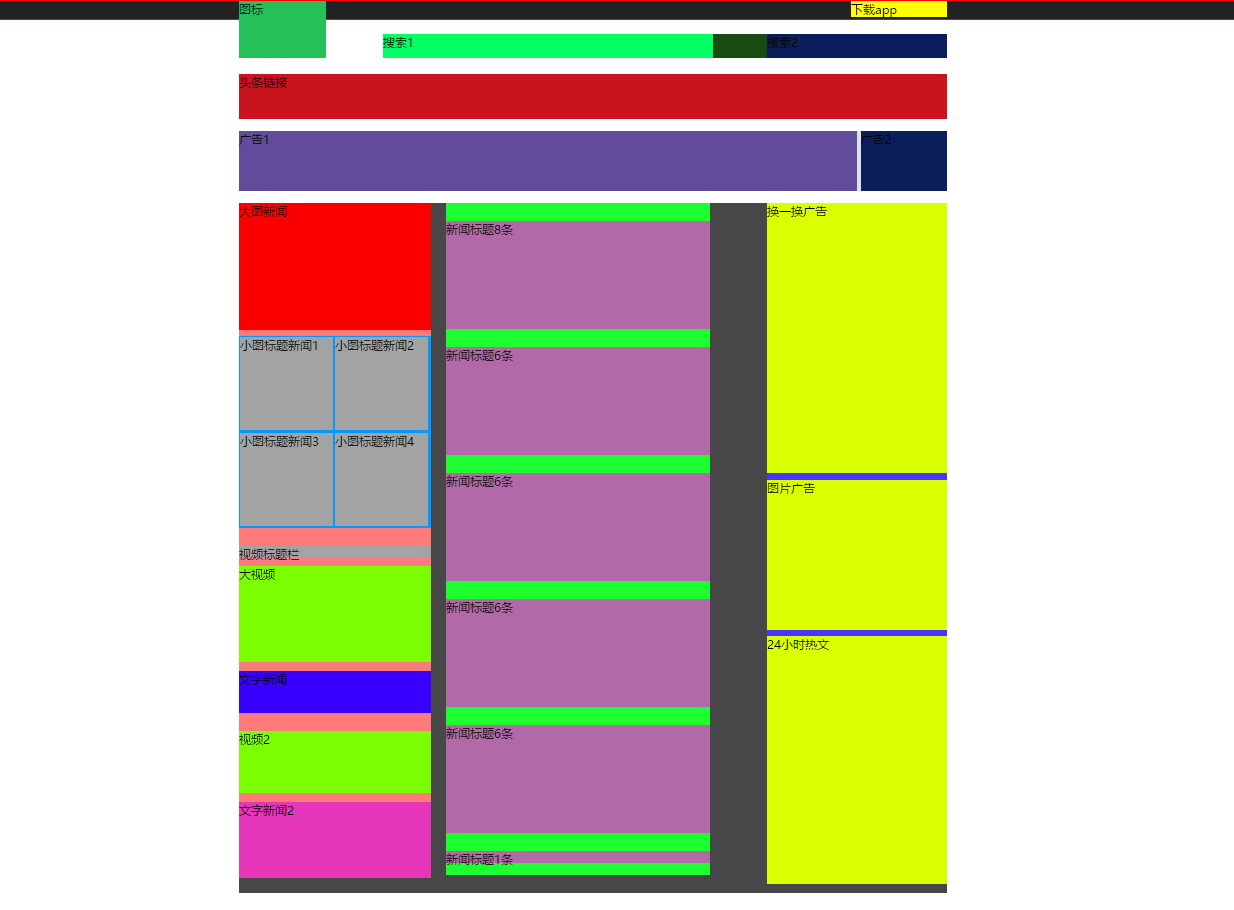
代码如下:
<!DOCTYPE html>

<!--[if lt IE 7]>      <html class="no-js lt-ie9 lt-ie8 lt-ie7"> <![endif]-->

<!--[if IE 7]>         <html class="no-js lt-ie9 lt-ie8"> <![endif]-->

<!--[if IE 8]>         <html class="no-js lt-ie9"> <![endif]-->

<!--[if gt IE 8]><!-->

<html class="no-js">

<!--<![endif]-->

<head>

    <meta charset="utf-8">

    <meta http-equiv="X-UA-Compatible" content="IE=edge">

    <title>搜狐首页</title>

    <meta name="description" content="">

    <meta name="viewport" content="width=device-width, initial-scale=1">

    <link rel="Shortcut Icon" href="./META-INF/images/souhulogo.png" />

    <link rel="stylesheet" href="./sohu.css">

</head>

<body>

    <div class="top">

        <div class="logo">

            <div class="logoimg">

                图标

            </div>

            <div class="dapp">

                下载app

            </div>

        </div>

    </div>

    <div class="mast">

        <!-- 第一部分 -->

        <div class="sousuo">

            <div class="sousuo1">

                搜索1

            </div>

            <div class="sousuo2">

                搜索2

            </div>

        </div>

        <!-- 第二部分 -->

        <div class="toutiaolianjie">

            头条链接

        </div>

        <!-- 第三部分 -->

        <div class="guanggaolan">

            <div class="guanggaolan1">

                广告1

            </div>

            <div class="guanggaolan2">

                广告2

            </div>

        </div>

        <!-- 第四部分 -->

        <div class="xinwen">

            <!-- 第四部分第一列  图片新闻-->

            <div class="imgxinwen">

                <div class="bigimg">

                    大图新闻

                </div>

                <!-- 小图新闻 -->

                <div class="smallimg">

                    <table class="smallimgtable">

                        <tr>

                            <td>

                                <div class="smallimgall smallimg1">

                                    小图标题新闻1

                                </div>

                            </td>

                            <td>

                                <div class="smallimgall smallimg2">

                                    小图标题新闻2

                                </div>

                            </td>

                        </tr>

                        <tr>

                            <td>

                                <div class="smallimgall smallimg3">

                                    小图标题新闻3

                                </div>

                            </td>

                            <td>

                                <div class="smallimgall smallimg4">

                                    小图标题新闻4

                                </div>

                            </td>

                        </tr>

                    </table>

                </div>

                <!--  视频标题栏 -->

                <div class="shipinbiaoti">

                    视频标题栏

                </div>

                <!--  视频 -->

                <div class="shipin1">

                    大视频

                </div>

                <div class="leftnews1">

                    文字新闻

                </div>

                <div class="shipin2">

                    视频2

                </div>

                <div class="leftnews2">

                    文字新闻2

                </div>

            </div>

            <!-- 第四部分第二列  中间部分文字新闻-->

            <div class="textxinwen">

                <div class="textnewsall textnews1">

                    新闻标题8条

                </div>

                <div class="textnewsall textnews2">

                    新闻标题6条

                </div>

                <div class="textnewsall textnews3">

                    新闻标题6条

                </div>

                <div class="textnewsall textnews4">

                    新闻标题6条

                </div>

                <div class="textnewsall textnews5">

                    新闻标题6条

                </div>

                <div class="textnewsall textnews6">

                    新闻标题1条

                </div>

            </div>

            <!-- 第四部分第三列 右侧内容标题-->

            <div class="biaotilan">

                <div class="right1">

                    换一换广告

                </div>

                <div class="right2">

                    图片广告

                </div>

                <div class="right3">

                    24小时热文

                </div>

            </div>

        </div>

    </div>

    <!-- 第五部分 -->

    <script src="" async defer></script>

</body>

</html>
css(html文件和css文件放同一个目录层下):
body {

  margin: 0 auto;

  border: 1px solid red;

}

.mast {

  margin: 0 auto;

  width: 1180px;

  background-color: rgb(88, 88, 88);

}

.top {

  background-color: #222222;

  height: 30px;

}

.logo {

  width: 1180px;

  margin: 0 auto;

  background-color: yellow;

}

/* 从这里开始一律采用左/右浮动 */

.logoimg {

  float: left;

  width: 145px;

  height: 95px;

  background-color: #25c058;

}

.dapp {

  float: right;

  width: 160px;

  background-color: yellow;

}

.sousuo{

    float: right;

    width: 940px;

    height: 40px;

    background-color: #174b12;

    margin-top: 25px;

}

.sousuo1{

    float: left;

    width: 550px;

    height: 40px;

    background-color: rgb(0, 255, 98);

}

.sousuo2{

    float: right;

    width: 300px;

    height: 40px;

    background-color: rgb(10, 30, 92);

}

.toutiaolianjie{

    float: left;

    width: 1180px;

    height: 75px;

    background-color: #c9141d;

    margin-top: 26px;

}

.guanggaolan{

    float: left;

    width: 1180px;

    height: 100px;

    background-color: #DEE1EA;

    margin-top: 20px;

}

.guanggaolan1{

    float: left;

    width: 1030px;

    height: 100px;

    background-color: rgb(99, 75, 155);

}

.guanggaolan2{

    float: right;

    width: 144px;

    height: 100px;

    background-color: rgb(10, 30, 92);

}

.xinwen{

    float: left;

    width: 1180px;

    height: 1150px;

    background-color: rgb(71, 71, 71);

    margin-top: 20px;

}

.imgxinwen{

    float: left;

    width: 320px;

    height: 1120px;

    background-color: rgb(255, 123, 123);

}

.bigimg{

    float: left;

    width: 320px;

    height: 213px;

    background-color: rgb(251, 0, 0);

}

.smallimg{

    float: left;

    width: 320px;

    height: 320px;

    background-color: rgb(251, 0, 0);

    margin-top: 10px;

}

.smallimgtable{

    float: left;

    width: 320px;

    height: 320px;

    background-color: rgb(0, 153, 255);

}

.smallimgall{

    float: left;

    width: 155px;

    height: 155px;

    background-color: rgb(163, 163, 163);

}

.shipinbiaoti{

    float: left;

    width: 320px;

    height: 20px;

    background-color: rgb(163, 163, 163);

    margin-top: 30px;

}

.shipin1{

    float: left;

    width: 320px;

    height: 160px;

    background-color: rgb(123, 255, 0);

    margin-top: 12px;

}

.leftnews1{

    float: left;

    width: 320px;

    height: 70px;

    background-color: rgb(55, 0, 255);

    margin-top: 15px;

}

.shipin2{

    float: left;

    width: 320px;

    height: 104px;

    background-color: rgb(123, 255, 0);

    margin-top: 30px;

}

.leftnews2{

    float: left;

    width: 320px;

    height: 127px;

    background-color: rgb(230, 54, 186);

    margin-top: 15px;

}

.textxinwen{

    float: left;

    width: 440px;

    height: 1120px;

    background-color: rgb(30, 255, 49);

    margin-left: 25px;

}

.textnewsall{

    float: left;

    background-color: rgb(0, 202, 185);

}

.textnews1{

    float: left;

    width: 440px;

    height: 225px;

    background-color: rgb(0, 202, 185);

}

.textnews1,.textnews2,.textnews3,.textnews4,.textnews5{

    float: left;

    width: 440px;

    height: 180px;

    background-color: rgb(177, 106, 167);

    margin-top: 30px;

}

.textnews6{

    float: left;

    width: 440px;

    height: 20px;

    background-color: rgb(177, 106, 167);

    margin-top: 30px;

}

.biaotilan{

    float: right;

    width: 300px;

    height: 1120px;

    background-color: rgb(72, 52, 255);

}

.right1{

    float: left;

    width: 300px;

    height: 450px;

    background-color: rgb(217, 255, 0);

}

.right2{

    float: left;

    width: 300px;

    height: 250px;

    background-color: rgb(217, 255, 0);

    margin-top: 12px;

}

.right3{

    float: left;

    width: 300px;

    height: 414px;

    background-color: rgb(217, 255, 0);

    margin-top: 10px;

}
脑袋要炸了,继续完善!
【HTML&CSS】搜狐页面代码编写的更多相关文章
- js、css动态压缩页面代码
1.js.css动态压缩页面代码 <%@ Page Language="C#" AutoEventWireup="true" CodeFile=" ...
- html/css基础篇——html代码编写过程中的几个警惕点
本文想说的警惕点与浏览器兼容无关,主要是几个本人在项目中遇到的几个小问题的总结,问题虽小,但是却有时很困扰人,在此记录一下,如果后期有此类问题会持续添加到这里. 1.内联标签之间的空格 正常情况下书写 ...
- html页面 代码 编写的 一些 基本素养 约定 知识点
hmtl代码书写也要养成一段一段的 区块代码, 每个区块代码 进行 html的 功能注释 自由文字的获得: (lorem ipsum: 乱数假文, 哑元文字) lorem ipsum: lipsum等 ...
- jquery仿搜狐投票动画代码
体验效果:http://hovertree.com/texiao/jquery/21/ 这是一款基于jquery实现的仿搜狐投票动画特效源码,运行该源码可见VS图标首先出现在中间位置,紧接着随着投票比 ...
- 这些HTML、CSS知识点,面试和平时开发都需要 No10-No11(知识点:表格操作、代码编写规则)
系列知识点汇总 1.基础篇 这些HTML.CSS知识点,面试和平时开发都需要 No1-No4(知识点:HTML.CSS.盒子模型.内容布局) 这些HTML.CSS知识点,面试和平时开发都需要 No5- ...
- (转)Asp.net页面生命周期详解任我行(1)-小试牛刀,编写页面代码
原文地址:http://www.cnblogs.com/xuyubing/archive/2013/10/01/3348344.html 前言 很久很久以前,还是我在学校的时候,我就看了传智里面视频, ...
- Asp.net页面生命周期详解任我行(1)-小试牛刀,编写页面代码
前言 很久很久以前,还是我在学校的时候,我就看了传智里面视频,学习了一下Asp.net页面生命周期,当时看的时候,因为内功不够深厚,看起来很吃力,现在回头温习了一下,还是有点收获的,于是想用博客记录一 ...
- 如何查看一个网页特定效果的js代码(动画效果可js和css)(页面可以看到js的源代码)
如何查看一个网页特定效果的js代码(动画效果可js和css)(页面可以看到js的源代码) 一.总结 1.动画效果可能是 CSS 实现的,也可能是 JS 实现的. 2.直接Chrome的F12调试即可, ...
- 搜狐云景paas平台实践之路
前言: 搜狐云景作为搜狐的paas平台,在2014年5月22日的云计算大会上正式发布了公测.初测,注册用户必须先申请邀请码参与公测会赠送用户100元电子券,经过实名认证之后会再赠送100电子券,目测可 ...
随机推荐
- Vue+Flask看这篇就够了
一.项目目录结构 使用Vue+Flask搭建前后端分离的基础平台. my_project/ app/ //vue目录 static/ models/ remplates/ 404.html index ...
- GDAL VS2010 win7(64位)安装、使用说明(图文解析)
一.电脑配置及安装版本 Win 7(64位机) Visual Studio 2010 GDAL 1.9.2(我也尝试了最新版GDAL1.11.0,应该同样可以用的,只是在重新配置时又选用了老一点的版本 ...
- Netty核心概念(6)之Handler
1.前言 本节介绍Netty中第三个重要的概念——Handler,这个在前两节都提到了,尤其是Channel和Handler联系紧密.handler本身的设计非常简单,但是所起到的作用却很大,Nett ...
- php如何使用rabbitmq实现发布消息和消费消息(tp框架)(第一篇)
1,默认已经安装好了rabbitmq: 参考 http://www.cnblogs.com/spicy/p/7017603.html 2,安装rabbitmq客户端: 方法1: pecl 扩展安装 ...
- 2013-12-LINUX 常用命令
查看iptables状态: service iptables status 查询LINUX开机时间多久 1. cat /proc/uptime输出: 105040.44 105024.75 秒 2. ...
- Tomcat 基本配置
1.配置虚拟目录映射 推荐在 /conf/Catalina/localhost 下新建rand.xml方式建立虚拟目录 其中rand将会被当作映射对象,即外部访问路径. 例子:blog.xml < ...
- C# base和this ---转载 小昊
new关键字引起了大家的不少关注,尤其感谢 Anders Liu的补充,让我感觉博客园赋予的交流平台真的无所不在.所以,我们就有必要继续这个话题,把我认为最值得关注的关键字开展下去,本文的重点是访问关 ...
- LDAP落地实战(一):OpenLDAP部署及管理维护
公司内部会有许多第三方系统或服务,例如Svn,Git,VPN,Jira,Jenkins等等,每个系统都需要维护一份账号密码以支持用户认证,当然公司也会有许多的主机或服务器,需要开放登录权限给用户登录使 ...
- Go语言学习笔记九: 指针
Go语言学习笔记九: 指针 指针的概念是当时学C语言时了解的.Go语言的指针感觉与C语言的没啥不同. 指针定义与使用 指针变量是保存内存地址的变量.其他变量保存的是数值,而指针变量保存的是内存地址.这 ...
- php的一个验证邮箱的正则表达式
/([a-z0-9]*[-_\.]*[a-z0-9]+)*[-_\.]*@([a-z0-9]*[-_]?[a-z0-9]+)+[\.]([a-z0-9]{2,3}|[a-z0-9]*[-_]?[a-z ...