
iOS:UIView视图与组件控件
创建一个仿射矩阵
- CGAffineTransformMake 直接赋值来创建
- CGAffineTransformMakeRotation 设置角度来生成矩阵
- 结果就是
- CGAffineTransformMakeScale 设置缩放,及改变a、d的值
- CGAffineTransformMakeTranslation 设置偏移
改变已经存在的放射矩阵
- CGAffineTransformTranslate 原始的基础上加上偏移
- CGAffineTransformScale加上缩放
- CGAffineTransformRotate加上旋转
- CGAffineTransformInvert 反向的仿射矩阵比如(x,y)通过矩阵t得到了(x',y')那么通过这个函数生成的t'作用与(x',y')就能得到原始的(x,y)
- CGAffineTransformConcat 通过两个已经存在的放射矩阵生成一个新的矩阵t' = t1 * t2
应用仿射矩阵
- CGPointApplyAffineTransform 得到新的点
- CGSizeApplyAffineTransform 得到新的size
- CGRectApplyAffineTransform 得到新的rect
视图view的组件形变控件transform的类型为CGAffineTransform结构体,就是一个矩阵(可以伸缩、平移、旋转等)
struct CGAffineTransform {
CGFloat a, b, c, d;
CGFloat tx, ty;
};
UIButton *btn = [[UIButton alloc] initWithFrame:rect];
–快速初始化
UIButton *btn = [UIButton buttonWithType:UIButtonTypeRoundedRect];
作品:boxMan
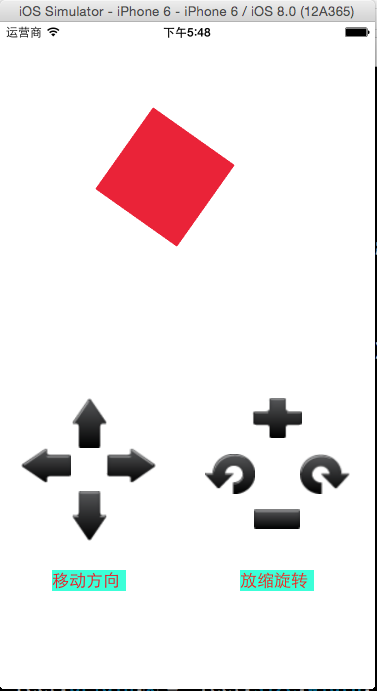
 #import "ViewController.h"

 typedef enum

 {

     buttonTypeLeft=,

     buttonTypeRight,

     buttonTypeUp,

     buttonTypeDown,

     buttonTypeRotateL,

     buttonTypeRotateR,

     buttonTypeScaleUp,

     buttonTypeScaleDown,

 }buttonType;

 @interface ViewController ()

 @property (weak, nonatomic) IBOutlet UIView *viewMan;

 @end

 @implementation ViewController

 //移动方向

 - (IBAction)buttonDirectionClicked:(UIButton *)sender

 {

     //父视图的长度和高度

     NSInteger screenWidth = self.view.frame.size.width;

     NSInteger screenHeight = self.view.frame.size.height;

     //子视图

     CGRect rect = self.viewMan.frame;

     //每次移动距离

     NSInteger offset = ;

     //父控件通过tag标识获取视图中子控件(组件)

     switch (sender.tag)

     {

         case buttonTypeDown:

             rect.origin.y += offset;

             if(rect.origin.y >= screenHeight)

             {

                 rect.origin.y = -rect.size.height;

             }

             break;

         case buttonTypeUp:

             rect.origin.y -= offset;

             if(rect.origin.y <= -rect.size.height)

             {

                 rect.origin.y = screenHeight;

             }

             break;

         case buttonTypeLeft:

             rect.origin.x -= offset;

             if(rect.origin.x <= -rect.size.width)

             {

                 rect.origin.x = screenWidth;

             }

             break;

         case buttonTypeRight:

             rect.origin.x += offset;

             if(rect.origin.x >= screenWidth)

             {

                 rect.origin.x = -rect.size.width;

             }

             break;

     }

     self.viewMan.frame = rect;

 }

 //旋转

 - (IBAction)buttonRotateClicked:(UIButton *)sender

 {

     //子视图这个控件的坐标矩阵

     CGAffineTransform form =  self.viewMan.transform;

     switch (sender.tag) {

         case buttonTypeRotateL:

             form = CGAffineTransformRotate(form, -M_2_PI/);

             break;

         case buttonTypeRotateR:

             form = CGAffineTransformRotate(form, M_2_PI/);

             break;

     }

     self.viewMan.transform = form;

 }

 //放缩

 - (IBAction)buttonScaleClicked:(UIButton *)sender

 {

     //子视图这个控件的坐标矩阵

     CGAffineTransform form = self.viewMan.transform;

     CGFloat scaleFator = 0.0f;

     switch (sender.tag) {

         case buttonTypeScaleUp:

             scaleFator = 1.2;

             break;

         case buttonTypeScaleDown:

             scaleFator = 0.8;

             break;

     }

     form = CGAffineTransformScale(form, scaleFator, scaleFator);

     self.viewMan.transform = form;

 }

 - (void)viewDidLoad {

     [super viewDidLoad];

     // Do any additional setup after loading the view, typically from a nib.

 }

 - (void)didReceiveMemoryWarning {

     [super didReceiveMemoryWarning];

     // Dispose of any resources that can be recreated.

 }

 @end
iOS:UIView视图与组件控件的更多相关文章
- IOS 设置视图半透明子控件不透明
代码处理: UIColor *color = [[UIColor blackColor] colorWithAlphaComponent:0.6]; self.view.backgroundColor ...
- iOS开发UI篇—UIScrollView控件介绍
iOS开发UI篇—UIScrollView控件介绍 一.知识点简单介绍 1.UIScrollView控件是什么? (1)移动设备的屏幕⼤大⼩小是极其有限的,因此直接展⽰示在⽤用户眼前的内容也相当有限 ...
- iOS开发UI篇—UITableview控件基本使用
iOS开发UI篇—UITableview控件基本使用 一.一个简单的英雄展示程序 NJHero.h文件代码(字典转模型) #import <Foundation/Foundation.h> ...
- ios开发中关闭textview控件的虚拟键盘
在ios开发中,textfield控件在点击的时候出现虚拟键盘,关掉虚拟键盘可以通过虚拟键盘中的done button和点击view中的任意地方来关闭虚拟键盘. 1.第一种方法是textfield控件 ...
- iOS开发UI篇—UIScrollView控件实现图片缩放功能
iOS开发UI篇—UIScrollView控件实现图片缩放功能 一.缩放 1.简单说明: 有些时候,我们可能要对某些内容进行手势缩放,如下图所示 UIScrollView不仅能滚动显示大量内容,还能对 ...
- iOS开发UI篇—UITableview控件简单介绍
iOS开发UI篇—UITableview控件简单介绍 一.基本介绍 在众多移动应⽤用中,能看到各式各样的表格数据 . 在iOS中,要实现表格数据展示,最常用的做法就是使用UITableView,UIT ...
- Android各组件/控件间通信利器之EventBus
实际项目开发过程中,经常遇到如下场景:不同的应用程序组件的控件间具有一定的相互关联性,其中用户对后者进行的某种操作会引起前者的相应改变.举一个具体的场景:以糗事百科为例,在糗事列表页和详情页页,对于每 ...
- iOS开发UI篇—UITableview控件使用小结
iOS开发UI篇—UITableview控件使用小结 一.UITableview的使用步骤 UITableview的使用就只有简单的三个步骤: 1.告诉一共有多少组数据 方法:- (NSInteger ...
- iOS开发UI篇—UIScrollView控件实现图片轮播
iOS开发UI篇—UIScrollView控件实现图片轮播 一.实现效果 实现图片的自动轮播 二.实现代码 storyboard中布局 代码: #import "YYV ...
随机推荐
- http常见请求头与响应头
1.HTTP常见的请求头 If-Modified-Since:把浏览器端缓存页面的最后修改时间发送到服务器去,服务器会把这个时间与服务器上实际文件的最后修改时间进行对比.如果时间一致,那么返回304, ...
- QT学习笔记7:C++函数默认参数
C++中允许为函数提供默认参数,又名缺省参数. 使用默认参数时的注意事项: ① 有函数声明(原型)时,默认参数可以放在函数声明或者定义中,但只能放在二者之一.建议放在函数声明中. double sqr ...
- 2017-2018-1 JAVA实验站 第八周作业
2017-2018-1 JAVA实验站 第八周作业 详情请见团队博客
- bzoj 4092 DP
简化题意: 给定两个集合A,B,A集合有一个权值,并且对应一个B集合的子集,求A的一个子集,满足权值和最小且对应的子集的并集是B集合. 感觉像网络流,但因为每个B中的元素对应一个A中的元素就行了,是o ...
- gearman学习笔记
<?php 搭建描述: . 在实际使用时应该是运行gearmand -d 的 server 一台. [要装gearmand,运行gearmand] . 处理worker的机器若干[要装gearm ...
- VC 调用 Python
//file:py.h BOOL InitPython(); BOOL ClosePython(); ======================== //file:py.cpp #include & ...
- python开发_imghdr_图像格式支持
在python中,imghdr模块对图像格式提供了支持 该模块主要是处理识别图像的格式 imghdr模块提供的函数如下: imghdr.what(filename, h=None) Tests the ...
- HDU 5715 XOR 游戏 二分+字典树
XOR 游戏 题目连接: http://acm.hdu.edu.cn/showproblem.php?pid=5715 Description 众所周知,度度熊喜欢XOR运算(XOR百科). 今天,它 ...
- ZOJ 3622 Magic Number 打表找规律
A - Magic Number Time Limit:2000MS Memory Limit:32768KB 64bit IO Format:%lld & %llu Subm ...
- [Visual Studio] VS2012调试时很慢的解决方案
1.转自http://guooge.com/archives/408.html VS2010调试极慢获取出现死机,因为启动了IntelliTrace Visual Studio 2010 Ulti ...