
Dubbo的配置及启动
Tomcat+Dubbo安装
1.将tomcat的webapps目录下的所有文件清空,讲Dubbo管理控制台的程序dubbo-admin-2.5.3.war放
到webapps中,并且解压命名为ROOT。
unzip dubbo.war -d ROOT
2.配置dubbo.properties
将以下地址改为你Zookeeper注册的地址。前提:已经安装过Zookeeper。
dubbo.registry.address=zookeeper://192.168.137.128:2181
3.启动tomcat
浏览:http://192.168.137.128:8080/出现以下界面
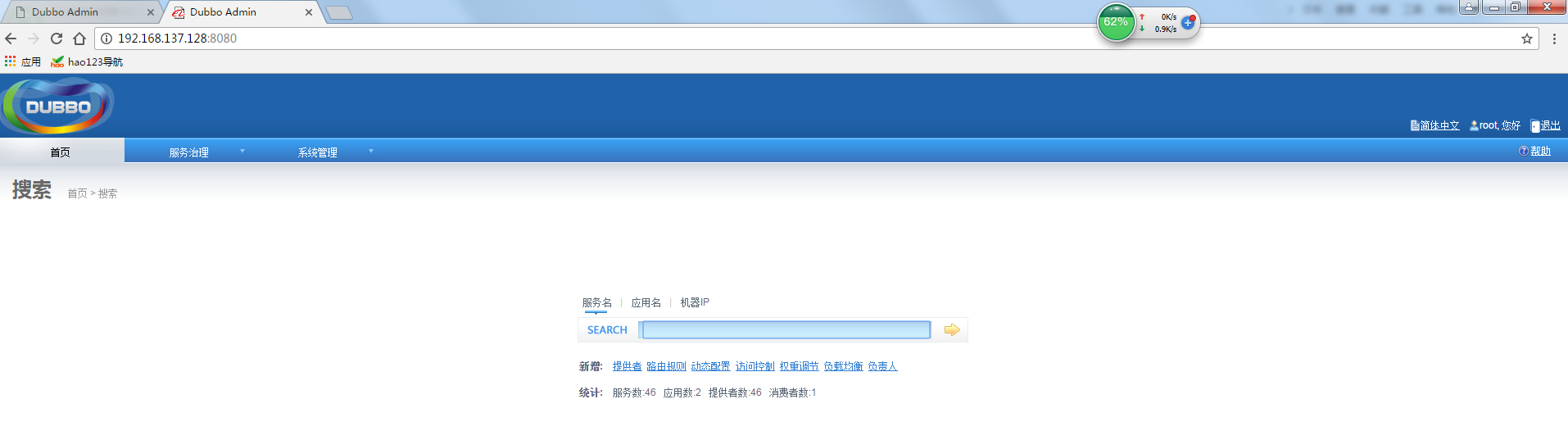
PS:JDK最好使用1.7版本,因为dubbo使用的Spring版为2.X 具体原因也说不清楚,我最早部署时也是使用JDK1.8 启动tomcat时报错:
RROR context.ContextLoader - Context initialization failed org.springframework.beans.factory.BeanCreationException: Error creating bean with name 'uriBrokerService': Cannot create inner bean '(inner bean)' of type [com.alibaba.citrus.service.uribroker.impl.URIBrokerServiceImpl$URIBrokerInfo] while setting bean property 'brokers' with key [0]; nested excepti on is org.springframework.beans.factory.BeanCreationException: Error creating bean with name '(inner bean)#25': Cannot create inner bean 'server' of type [com.alibaba.citrus.service.uribroker.uri.GenericURIBroker] while setting constructor argument; nested exception is org.springframework.beans.fact ory.BeanCreationException: Error creating bean with name 'server': Error setting property values; nested exception is org.springframework.beans.NotWritablePropertyException: Invalid property 'URIType' of bean class [com.alibaba.citrus.service.uribroker.uri.GenericURIBroker]: Bean property 'URIType' is not writable or has an invalid setter method. Does the parameter type of the setter match the return type of the getter?解决方案可以参考:https://github.com/alibaba/dubbo/issues/50
为了省事我是将JDK降到1.7 。
dubbo官网com.alibaba.dubbo.container.Main 启动服务配置
相应的配置已经配置好了,接下来介绍使用dubbo官网com.alibaba.dubbo.container.Main 启动服务实现优雅关机
pop.xml打包配置
<build>

		<finalName>pay-service-bank</finalName> <!--包名称 -->

		<resources>

			<resource>

				<targetPath>${project.build.directory}/classes</targetPath>

				<directory>src/main/resources</directory>

				<filtering>true</filtering>

				<includes><!-- 配置文件信息 -->

					<include>**/*.xml</include>

					<include>**/*.properties</include>

				</includes>

			</resource>

			<resource>

				<targetPath>${project.build.directory}/classes/META-INF/spring</targetPath>

				<directory>src/main/resources/spring</directory>

				<filtering>true</filtering>

				<includes>

					<include>spring-context.xml</include>

				</includes>

			</resource>

		</resources>

		<pluginManagement>

			<plugins>

				<plugin>

					<groupId>org.eclipse.m2e</groupId>

					<artifactId>lifecycle-mapping</artifactId>

					<version>1.0.0</version>

					<configuration>

						<lifecycleMappingMetadata>

							<pluginExecutions>

								<pluginExecution>

									<pluginExecutionFilter>

										<groupId>org.apache.maven.plugins</groupId>

										<artifactId>maven-dependency-plugin</artifactId>

										<versionRange>[2.0,)</versionRange>

										<goals>

											<goal>copy-dependencies</goal>

										</goals>

									</pluginExecutionFilter>

									<action>

										<ignore />

									</action>

								</pluginExecution>

							</pluginExecutions>

						</lifecycleMappingMetadata>

					</configuration>

				</plugin>

			</plugins>

		</pluginManagement>

		<plugins>

			<!-- 打包jar文件时,配置manifest文件,加入lib包的jar依赖 -->

			<plugin>

				<groupId>org.apache.maven.plugins</groupId>

				<artifactId>maven-jar-plugin</artifactId>

				<configuration>

					<classesDirectory>target/classes/</classesDirectory>

					<archive>

						<manifest>

							<mainClass>com.alibaba.dubbo.container.Main</mainClass>

							<!-- 打包时 MANIFEST.MF文件不记录的时间戳版本 -->

							<useUniqueVersions>false</useUniqueVersions>

							<addClasspath>true</addClasspath>

							<classpathPrefix>lib/</classpathPrefix>

						</manifest>

						<manifestEntries>

							<Class-Path>.</Class-Path>

						</manifestEntries>

					</archive>

				</configuration>

			</plugin>

			<plugin>

				<groupId>org.apache.maven.plugins</groupId>

				<artifactId>maven-dependency-plugin</artifactId>

				<executions>

					<execution>

						<id>copy-dependencies</id>

						<phase>package</phase>

						<goals>

							<goal>copy-dependencies</goal>

						</goals>

						<configuration>

							<type>jar</type>

							<includeTypes>jar</includeTypes>

							<outputDirectory>

								${project.build.directory}/lib

							</outputDirectory>

						</configuration>

					</execution>

				</executions>

			</plugin>

		</plugins>

	</build>
ps :spring-context.xml文件中对其他xml的引入地址要写成:
<import resource="classpath:spring/spring-mybatis.xml" />
<import resource="classpath:spring/applicationContext.xml" />
原因是我们在打包配置时将spring-context.xml文件复制到META-INF/spring下,如果还是使用相对地址配置就出错了找不到文件
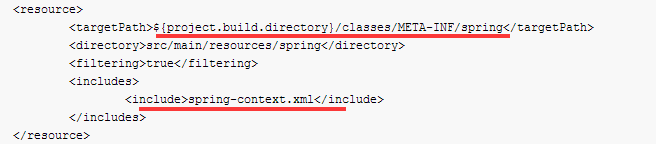
OK打包部署。
自定义Dubbo服务端维护的shell脚本
#! /bin/bash

usage(){

   echo "----------USAGE:--------------------"

   echo "provider  start"

   echo "provider  stop"

   echo "provider  start  xx"

   echo "provider  stop   xx"

   echo "-------------------------------------"

}

stopAll(){

    procids=`ps -fe|grep jar |grep -v grep |grep -v tomcat| awk '{print $2}'`

    if [ -z "$procids" ]; then

        echo  tip:  no process  found

    else

        for procid in $procids

          do

               kill $procid

          done

    fi

}

startAll(){

    echo '....'

    jars=`ls *.jar`

    if [ -z "$jars" ]; then

        echo top:  no jar found,please check if you are in correct directory...

    else

        for jarName in $jars

        do

            #logName=`echo ${jarName/jar/log}`

            logName='all.log'

            nohup java $JAVA_OPTS -jar $jarName >>$logName 2>1 &

        done

    fi;

}

cmd=$1

module=$2

JAVA_OPTS="-server -Xms4096m  -Xmx4096m  -verbose:gc  -XX:+PrintGCDetails  -XX:PermSize=256M -XX:MaxPermSize=512m"

if [ $# -gt 2 ] || [ $# -lt 1 ];  then

   usage;

elif [ $cmd != 'start' ] &&  [ $cmd != 'stop' ]; then

   usage;

else

   case $cmd  in

          'start')

                                if [ $#  -eq 1 ] ; then

                                       echo start all provider ............

                                       procids=`ps -fe|grep jar |grep -v grep |grep -v tomcat| awk '{print $2}'`

                                       if [ -z "$procids" ]; then

                                             echo ''

                                       else

                                              stopAll

                                       fi;

                                       startAll

                                else

                                       echo start $module  ........

                                       echo

                                       if [ -n $module".jar" ];  then

                                                procid=`ps -fe|grep $module".jar" |grep -v grep | awk '{print $2}'`

                                                echo $procid

                                                if [ -z "$procid" ]; then

                                                    #nohup java -jar $module".jar" >$module".log" &

                                                    nohup java $JAVA_OPTS -jar $module".jar" >>all.log 2>1 &

                                                else

                                                    echo  tip:     $module".jar"  has started already.  don not  start again!

                                                fi

                                       else

                                                echo $module".jar not exists"

                                       fi

                                       echo

                                fi

                                ;;

           'stop')

                                if [ $#  -eq 1 ] ; then

                                       echo stop all provider ............

                                       stopAll

                                else

                                       echo stop  $module  ........

                                       echo

                                       procid=`ps -fe|grep $module".jar" |grep -v grep | awk '{print $2}'`

                                       if [ -z "$procid" ]; then

                                                echo   tip:   java $module".jar"  process not exists;

                                       else

                                                kill $procid

                                       fi

                                       echo

                                fi

                                ;;

   esac

fi
ps:Dubbo是通过JDK的ShutdownHook来完成优雅停机的,所以如果用户使用"kill -9 PID"等强制关闭指令,是不会执行优雅停机的,只有通过"kill PID"时,才会执行。
Maven内置变量说明:
- ${basedir} 项目根目录
- ${project.build.directory} 构建目录,缺省为target
- ${project.build.outputDirectory} 构建过程输出目录,缺省为target/classes
- ${project.build.finalName} 产出物名称,缺省为${project.artifactId}-${project.version}
- ${project.packaging} 打包类型,缺省为jar
- ${project.xxx} 当前pom文件的任意节点的内容
Dubbo的配置及启动的更多相关文章
- DUBBO安装配置注意事项
DUBBO安装配置注意事项 参考URL:http://blog.csdn.net/lichunan/article/details/40349645 ====== 管理端: 记得更改TOMCAT的端口 ...
- Dubbo的配置及使用
1. Dubbo是什么? Dubbo是一个分布式服务框架,致力于提供高性能和透明化的RPC远程服务调用方案,以及SOA服务治理方案.简单的说,dubbo就是个服务框架,如果没有分布式的需求,其实是不需 ...
- DUBBO高级配置:多注册中心配置
有时候我们需要的服务不在同一个 zookeeper 注册中心上,此时我们需要在 DUBBO 配置文件中配置多个注册中心. 下面我们在之前创建项目的基础上在 provider 模块中增加一个 IBook ...
- dubbo高级配置学习
启动时检查 可以通过check="false"关闭检查,比如,测试时,有些服务不关心,或者出现了循环依赖,必须有一方先启动. 关闭某个服务的启动时检查:(没有提供者时报错) < ...
- dubbo系列五、dubbo核心配置
一.配置文件 1.生产者配置provider.xml <?xml version="1.0" encoding="UTF-8"?> <bean ...
- dubbo高级配置学习(上)
启动时检查 Dubbo缺省会在启动时检查依赖的服务是否可用,不可用时会抛出异常,阻止Spring初始化完成,以便上线时,能及早发现问题,默认check=true. 如果你的Spring容器是懒加载的, ...
- 【基础配置】Dubbo的配置及使用
1. Dubbo是什么? Dubbo是一个分布式服务框架,致力于提供高性能和透明化的RPC远程服务调用方案,以及SOA服务治理方案.简单的说,dubbo就是个服务框架,如果没有分布式的需求,其实是不需 ...
- dubbo属性配置
一.覆盖策略 JVM启动-D参数优先,这样可以使用户在部署和启动时进行参数重写,比如在启动时需改变协议的端口.XML次之,如果在XML中有配置,则dubbo.properties中的相应配置项无效.P ...
- dubbo简单配置与使用
dubbo简介 随着互联网的发展,网站应用的规模不断扩大,常规的垂直应用架构已无法应对,分布式服务架构以及流动计算架构势在必行,亟需一个治理系统确保架构有条不紊的演进. 单一应用架构 当网站流量很小时 ...
随机推荐
- Linux的内存管理机制
原文作者:技术成就梦想 链接:http://ixdba.blog.51cto.com/2895551/541355 一 物理内存和虚拟内存 我们知道,直接从物理内存读写数据要比从硬盘 ...
- 记一次 Docker swarm - overlay network access error
背景 之前使用Docker swam 在不同的服务器 (docker host) 上面创建了service,他们之间的container通过overlay的网络通信. 昨天由于公司网络维护,其中一台服 ...
- java传递是引用的拷贝,既不是引用本身,更不是对象
java传递是引用的拷贝,既不是引用本身,更不是对象 2008-09-16 04:27:56| 分类: Java SE|举报|字号 订阅 下载LOFTER客户端 1. 简单类型是按值 ...
- OD 实验(九) - 对一个程序的破解
程序: 运行程序 点击 About 这是要注册的 点击 Register 输入邮箱和注册码,点击 Register Now 逆向: 用 OD 打开程序 右键 -> 查找 -> 所有参考文本 ...
- 浅析ECMP等价路由
1.ECMP简介 Equal-CostMultipathRouting,等价多路径.即存在多条到达同一个目的地址的相同开销的路径.当设备支持等价路由时,发往该目的 IP 或者目的网段的三层转发流量就可 ...
- Vue语法
第一个Vue示例: <!DOCTYPE html> <html lang="en"> <head> <meta charset=" ...
- 在C#中控制ListBox某一行的字体颜色
例1 private void Form1_Load(object sender, EventArgs e) { listBox1.Items.Add("红色"); listBox ...
- **python中的类和他的成员
面向对象是一种编程方式,此编程方式的实现基于对 类 和 对象 的使用. Python从设计之初就已经是一门面向对象的语言,正因为如此,在Python中创建一个类和对象是很容易的. 在这里,为文章中使用 ...
- Unity 单例
1. 继承于MonoBehaviour(不随着场景切换而销毁) 基类代码: using System.Collections; using System.Collections.Generic; us ...
- hadoop学习记录1 初始hadoop
起因 因为工作需要用到,所以需要学习hadoop,所以记录这篇文章,主要分享自己快速搭建hadoop环境与运行一个demo 搭建环境 网上搭建hadoop环境的例子我看蛮多的.但是我看都比较复杂,要求 ...