
11.Curator扩展库
1.curator-x-discovery介绍
base path|_______ service A name|__________ instance 1 id --> (serialized ServiceInstance)|__________ instance 2 id --> (serialized ServiceInstance)|__________ ...|_______ service B name|__________ instance 1 id --> (serialized ServiceInstance)|__________ instance 2 id --> (serialized ServiceInstance)|__________ ...|_______ ...

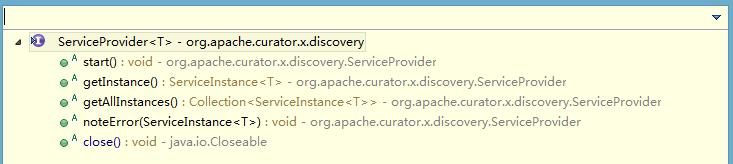
/*** Return an instance for a single use. <b>IMPORTANT: </b> users* should not hold on to the instance returned. They should always get a fresh instance.** @return the instance to use* @throws Exception any errors*/public ServiceInstance<T> getInstance() throws Exception;/*** Return the current available set of instances <b>IMPORTANT: </b> users* should not hold on to the instance returned. They should always get a fresh list.** @return all known instances* @throws Exception any errors*/public Collection<ServiceInstance<T>> getAllInstances() throws Exception;
2.低级别的API介绍
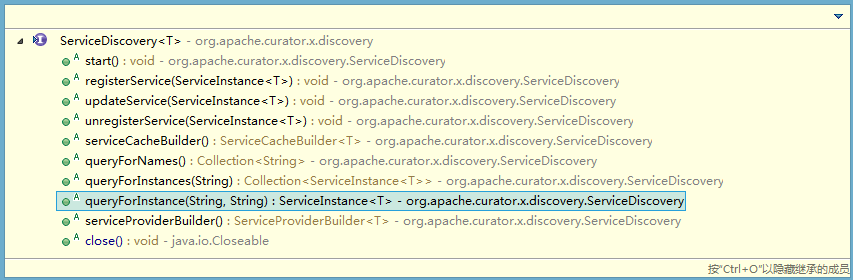
/*** Register/re-register a service 注册服务** @param service service to add* @throws Exception errors*/public void registerService(ServiceInstance<T> service) throws Exception;/*** Unregister/remove a service instance 取消注册服务** @param service the service* @throws Exception errors*/public void unregisterService(ServiceInstance<T> service) throws Exception;
/*** Return the names of all known services** @return list of service names* @throws Exception errors*/public Collection<String> queryForNames() throws Exception;/*** Return all known instances for the given service** @param name name of the service* @return list of instances (or an empty list)* @throws Exception errors*/public Collection<ServiceInstance<T>> queryForInstances(String name) throws Exception;/*** Return a service instance POJO** @param name name of the service* @param id ID of the instance* @return the instance or <code>null</code> if not found* @throws Exception errors*/public ServiceInstance<T> queryForInstance(String name, String id) throws Exception;
/*** Return the current list of instances. NOTE: there is no guarantee of freshness. This is* merely the last known list of instances. However, the list is updated via a ZooKeeper watcher* so it should be fresh within a window of a second or two.** @return the list*/public List<ServiceInstance<T>> getInstances();
/*** Listener for changes to a service cache*/public interface ServiceCacheListener extends ConnectionStateListener{/*** Called when the cache has changed (instances added/deleted, etc.)*/public void cacheChanged();}
3.curator-x-discovery使用实例
@JsonRootName("details")public class InstanceDetails{/** 服务说明信息 */private String description;public InstanceDetails(String description){this.description = description;}public void setDescription(String description){this.description = description;}public String getDescription(){return description;}@Overridepublic String toString(){return "InstanceDetails [description=" + description + "]";}}
public class ExampleServer implements Closeable{private final ServiceDiscovery<InstanceDetails> serviceDiscovery;//发现服务的实例类private final ServiceInstance<InstanceDetails> thisInstance;//服务注册信息实例public ExampleServer(CuratorFramework client, String path, String serviceName, String description) throws Exception{UriSpec uriSpec = new UriSpec("{scheme}://foo.com:{port}");thisInstance = ServiceInstance.<InstanceDetails>builder().name(serviceName).payload(new InstanceDetails(description)).port(12345).uriSpec(uriSpec).build();JsonInstanceSerializer<InstanceDetails> serializer = new JsonInstanceSerializer<InstanceDetails>(InstanceDetails.class);serviceDiscovery = ServiceDiscoveryBuilder.builder(InstanceDetails.class).client(client).basePath(path).serializer(serializer).thisInstance(thisInstance).build();}public ServiceInstance<InstanceDetails> getThisInstance(){return thisInstance;}public void start() throws Exception{serviceDiscovery.start();}@Overridepublic void close() throws IOException{CloseableUtils.closeQuietly(serviceDiscovery);}}
public class DiscoveryExample{public static void main(String[] args) throws Exception{String basePath = "/discoverys";BufferedReader in = new BufferedReader(new InputStreamReader(System.in));CuratorFramework client = CuratorFrameworkFactory.newClient("127.0.0.1:2181", new RetryNTimes(10, 5000));client.start();ExampleServer exampleServer = new ExampleServer(client, basePath, "serviceName01", "服务说明");exampleServer.start();getAllService();System.out.println("服务已启动!输入回车关闭服务:");in.readLine();exampleServer.close();getAllService();System.out.println("服务已关闭!输入回车关闭连接:");in.readLine();client.close();System.out.println("连接已关闭!");System.out.println("OK!");}//遍历所有服务实例private static void getAllService() throws Exception{CuratorFramework client = CuratorFrameworkFactory.newClient("127.0.0.1:2181", new RetryNTimes(10, 5000));client.start();JsonInstanceSerializer<InstanceDetails> serializer = new JsonInstanceSerializer<InstanceDetails>(InstanceDetails.class);ServiceDiscovery<InstanceDetails> serviceDiscovery = ServiceDiscoveryBuilder.builder(InstanceDetails.class).client(client).basePath("/discoverys").serializer(serializer).build();serviceDiscovery.start();Collection<String> serviceNames = serviceDiscovery.queryForNames();// 获取所有的服务名称for(String serviceName : serviceNames){// 获取所有相同服务名称的所有服务实例Collection<ServiceInstance<InstanceDetails>> instances = serviceDiscovery.queryForInstances(serviceName);System.out.println(serviceName);for (ServiceInstance<InstanceDetails> instance : instances){System.out.println("\t" + instance);}}serviceDiscovery.close();client.close();}}
serviceName01ServiceInstance{name='serviceName01', id='bb766181-4e7a-423a-974a-8ac840a9ea08', address='192.168.4.232', port=12345, sslPort=null, payload=InstanceDetails [description=服务说明], ...}ServiceInstance{name='serviceName01', id='298c5dc6-c431-41cb-8e74-6abbefecd2ee', address='192.168.4.232', port=12345, sslPort=null, payload=InstanceDetails [description=服务说明], ...}服务已启动!输入回车关闭服务:serviceName01ServiceInstance{name='serviceName01', id='298c5dc6-c431-41cb-8e74-6abbefecd2ee', address='192.168.4.232', port=12345, sslPort=null, payload=InstanceDetails [description=服务说明], ...}服务已关闭!输入回车关闭连接:连接已关闭!OK!
base path|_______ service A name|__________ instance 1 id --> (serialized ServiceInstance)|__________ instance 2 id --> (serialized ServiceInstance)|__________ ...|_______ service B name|__________ instance 1 id --> (serialized ServiceInstance)|__________ instance 2 id --> (serialized ServiceInstance)|__________ ...|_______ ...
4.其他扩展介绍
-------------------------------------------------------------------------------------------------------------------------------
11.Curator扩展库的更多相关文章
- PHP mysqli 扩展库(面向对象/数据库操作封装/事务控制/预编译)
1.和mysql扩展库的区别: (1 安全性.稳定性更高 (2 提供了面向对象和面向过程两种风格 2.php.ini 中的 extension=php_mysqli.dll 解除封印 3.面 ...
- PHP基础Mysql扩展库
mysql扩展库操作步骤如下: 1.连接数据库 2.选择数据库 3.设置操作编码 4.发送指令sql,并返回结果集 ddl:数据定义语句 dml:数据操作语句 dql:数据查询 ...
- centos下不重装php——给PHP添加新扩展库
装完php.发现需要一些新扩展库比如常见的mysqli之类的.在不重装php安装新扩展,以一个不常用的库xsl为例. 环境:centos6.8,php5.3.29 ,osx10.11.6 我的php相 ...
- php mysqli扩展库之预处理操作
分享下php使用mysqli扩展库进行预处理操作的二个例子,有意研究mysqli用法的朋友,可以参考学习下,一定会有所帮助的. 例1.使用mysqli扩展库的预处理技术 mysqli stmt 向数据 ...
- 树莓派安装opencv3及其扩展库
https://www.cnblogs.com/Pyrokine/p/8921285.html 目标编译针对python的opencv以及扩展库 环境树莓派4和3B+都可以python3.7.3 py ...
- Layman 使用ffmpeg-php扩展库实现视频截图(默认图)
这几天做项目,其中一个需求是用户上传视频文件到服务器,然后服务器自动截取该视频的一帧作为该视频对应的缩略图,服务器端语言采用php编写,找了半天资料,发现ffmpeg-php可以满足该需求,所以下面简 ...
- PHP的SPL扩展库(一)数据结构
SPL 库也叫做 PHP 标准库,主要就是用于解决典型问题的一组接口或类的集合.这些典型问题包括什么呢?比如我们今天要讲的数据结构,还有一些设计模式的实现,就像我们之前讲过的观察者模式相关的接口在 S ...
- Z.ExtensionMethods 一个强大的开源扩展库
今天有意的在博客园里面搜索了一下 Z.ExtensionMethods 这个扩展类库,确发现只搜到跟这个真正相关的才两篇博文而已,我都点进去看了一下,也都只是提到而已,没有专门介绍,才引起我写这篇文档 ...
- PHP使用mysqli扩展库实现增删改查(面向对象版)
mysqli扩展库是mysql扩展库的改进版本,在mysql扩展库的基础上提高了稳定性和效率,mysqli扩展库有两套东西,一套就是面向过程的mysqli另一套是面向对象的mysqli.操作方式大体和 ...
随机推荐
- RPC服务框架dubbo(一):简介和原理解析
前置概念 在学习dubbo前,需要先了解SOA和RPC这两个概念. SOA 1.英文名称(Service Oriented Ambiguity) 2.中文名称:面向服务架构 2.1 有一个专门提供服务 ...
- atitit。win7 win8 win9 win10 win11 新特性总结与战略规划
atitit.win7 win8 win9 win10 win11 新特性总结与战略规划 1. win7 1 1.1. 发布时间 2009年10月22日 1 1.2. 稳定性大幅提升,很少蓝屏死机 ...
- 编译器DIY——读文件
编译器的前端词法分析:将源文件解析成一个个的单词流.为语法分析做准备. 在词法分析阶段,我们要做的就是将词分出来,而且确定单词的类型,一般的程序设计语言的单词符号能够份为下面5种: 1.keyword ...
- python 将base64字符串还原成图片保存
import os,base64 strs='''/9j/4AAQSkZJRgABAQAAAQABAAD/2wBDAAoHBwgHBgoICAgLCgoLDhgQDg0NDh0VFhEYIx8lJCI ...
- hadoop三大组件的简单图解
如有不对,欢迎大家指正
- 基于jQuery select下拉框美化插件
分享一款基于jQuery select下拉框美化插件.该插件适用浏览器:IE8.360.FireFox.Chrome.Safari.Opera.傲游.搜狗.世界之窗.效果图如下: 在线预览 源码下 ...
- linux内核对中断的处理方式
中断取代了轮询的通知方式,DMA取代了轮询的读写数据方式. 分类软件指令造成的中断(又叫异常,同步中断). svc, und, abt硬件通过中断请求信号造成的中断(异步中断). irq,fi ...
- RabbitMQ之路由(Routing)【译】
在上一节中,我们创建了一个简单的日志系统,可以广播消息到很多接收者. 这一节,我们将在上一节的基础上加一个功能--订阅部分消息.例如,我们只将严重错误信息写入到日志文件保存在磁盘上,同时我们能将所有的 ...
- mvc 返回list数据 页面 mode
<%@ Page Language="C#" Inherits="System.Web.Mvc.ViewPage<IEnumerable<实体命名空间& ...
- Nginx配置proxy_pass转发的/路径
请求原地址 :http://servername/static_js/test.html location ^~ /static_js/ { proxy_cache js_cache; proxy_s ...