
PaintView 绘图控件解析
博客地址:博客园,版权所有,转载须联系作者。
GitHub地址:JustWeTools
最近做了个绘图的控件,实现了一些有趣的功能。
先上效果图:

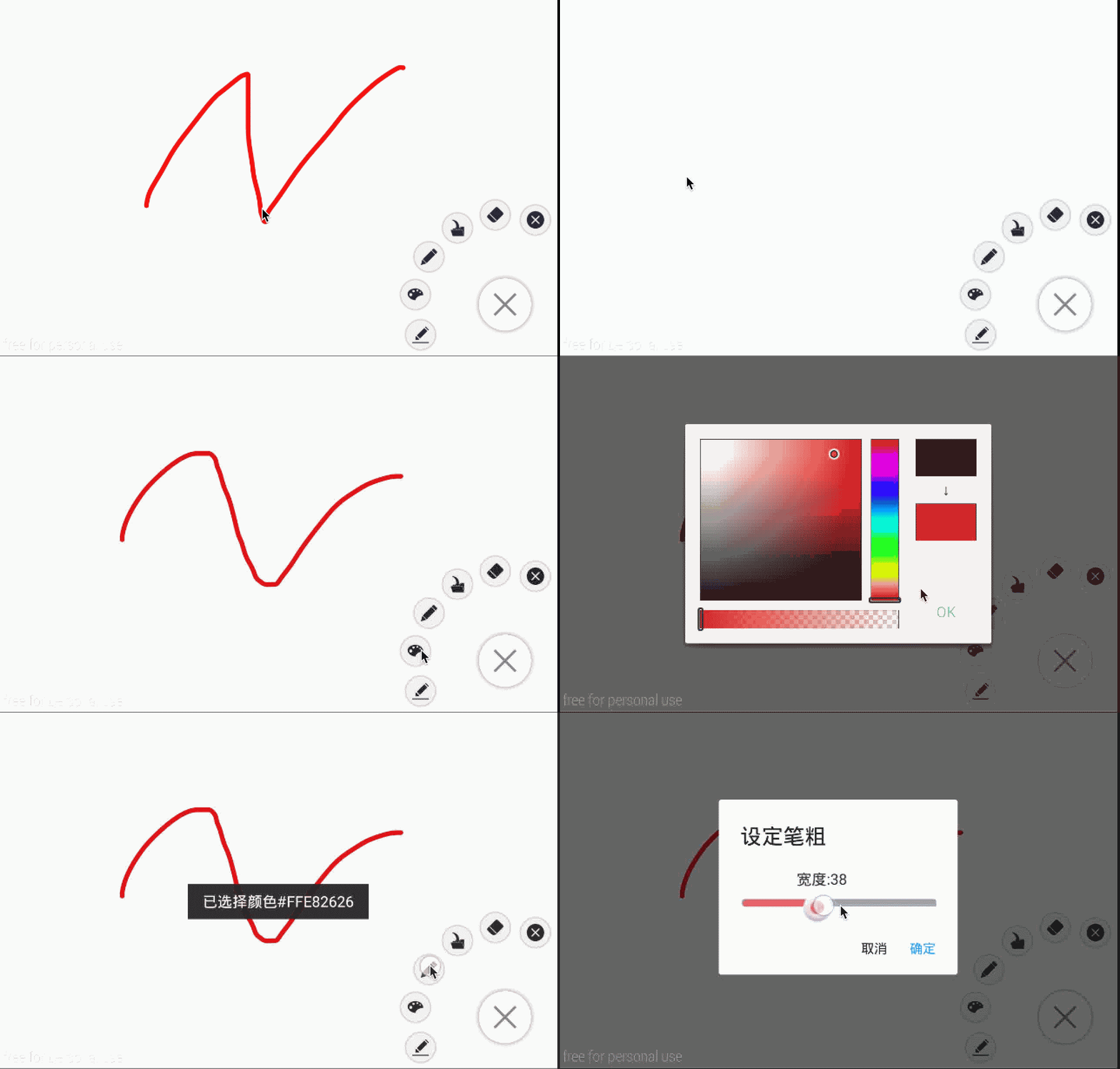
PaintView画图工具:
1.可直接使用设定按钮来实现已拥有的方法,且拓展性强
2.基础功能:更换颜色、更换橡皮、以及更换橡皮和笔的粗细、清屏、倒入图片
3.特殊功能:保存画笔轨迹帧动画、帧动画导入导出、ReDo和UnDo
GitHub地址:JustWeTools
如何使用该控件可以在GitHub的README中找到,此处不再赘述。
原理分析:
1.绘图控件继承于View,使用canvas做画板,在canvas上设置一个空白的Bitmap作为画布,以保存画下的轨迹。
        mPaint = new Paint();

        mEraserPaint = new Paint();

        Init_Paint(UserInfo.PaintColor,UserInfo.PaintWidth);

        Init_Eraser(UserInfo.EraserWidth);

        WindowManager manager = (WindowManager)context.getSystemService(Context.WINDOW_SERVICE);

        width = manager.getDefaultDisplay().getWidth();

        height = manager.getDefaultDisplay().getHeight();

        mBitmap = Bitmap.createBitmap(width, height, Bitmap.Config.ARGB_8888);

        mCanvas = new Canvas(mBitmap);

        mPath = new Path();

        mBitmapPaint = new Paint(Paint.DITHER_FLAG);
mPaint作为画笔, mEraserPaint 作为橡皮,使用两个在onDraw的刷新的时候就会容易一点,接着获取了屏幕的宽和高,使之为Bitmap的宽和高。 新建canvas,路径Path,
和往bitmap上画的画笔mBitmapPaint。
2.橡皮和铅笔的配置:
     // init paint

     private void Init_Paint(int color ,int width){

         mPaint.setAntiAlias(true);

         mPaint.setDither(true);

         mPaint.setColor(color);

         mPaint.setStyle(Paint.Style.STROKE);

         mPaint.setStrokeJoin(Paint.Join.ROUND);

         mPaint.setStrokeCap(Paint.Cap.ROUND);

         mPaint.setStrokeWidth(width);

     }

     // init eraser

     private void Init_Eraser(int width){

         mEraserPaint.setAntiAlias(true);

         mEraserPaint.setDither(true);

         mEraserPaint.setColor(0xFF000000);

         mEraserPaint.setStrokeWidth(width);

         mEraserPaint.setStyle(Paint.Style.STROKE);

         mEraserPaint.setStrokeJoin(Paint.Join.ROUND);

         mEraserPaint.setStrokeCap(Paint.Cap.SQUARE);

         // The most important

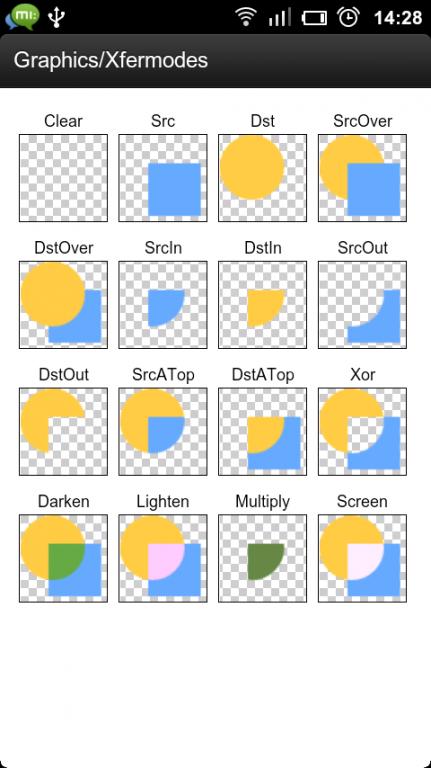
         mEraserPaint.setXfermode(new PorterDuffXfermode(PorterDuff.Mode.DST_OUT));

     }
铅笔的属性不用说,查看一下源码就知道了,橡皮的颜色随便设置应该都可以, 重点在最后一句。
mEraserPaint.setXfermode(new PorterDuffXfermode(PorterDuff.Mode.DST_OUT));
意思是设定了层叠的方式,当橡皮擦上去的时候,即新加上的一层(橡皮)和原有层有重叠部分时,取原有层去掉重叠部分的剩余部分,这也就达到了橡皮的功能。
3.PaintView重点在于对于按下、移动、抬起的监听:
     private void Touch_Down(float x, float y) {

         mPath.reset();

         mPath.moveTo(x, y);

         mX = x;

         mY = y;

          if(IsRecordPath) {

              listener.AddNodeToPath(x, y, MotionEvent.ACTION_DOWN, IsPaint);

          }

     }

     private void Touch_Move(float x, float y) {

         float dx = Math.abs(x - mX);

         float dy = Math.abs(y - mY);

         if (dx >= TOUCH_TOLERANCE || dy >= TOUCH_TOLERANCE) {

             mPath.quadTo(mX, mY, (x + mX) / 2, (y + mY) / 2);

             mX = x;

             mY = y;

             if(IsRecordPath) {

                 listener.AddNodeToPath(x, y, MotionEvent.ACTION_MOVE, IsPaint);

             }

         }

     }

     private void Touch_Up(Paint paint){

         mPath.lineTo(mX, mY);

         mCanvas.drawPath(mPath, paint);

         mPath.reset();

         if(IsRecordPath) {

             listener.AddNodeToPath(mX, mY, MotionEvent.ACTION_UP, IsPaint);

         }

     }
    @Override

    public boolean onTouchEvent(MotionEvent event) {

        float x = event.getX();

        float y = event.getY();

        switch (event.getAction()) {

            case MotionEvent.ACTION_DOWN:

                Touch_Down(x, y);

                invalidate();

                break;

            case MotionEvent.ACTION_MOVE:

                Touch_Move(x, y);

                invalidate();

                break;

            case MotionEvent.ACTION_UP:

                if(IsPaint){

                    Touch_Up(mPaint);

                }else {

                    Touch_Up(mEraserPaint);

                }

                invalidate();

                break;

        }

        return true;

    }
Down的时候移动点过去,Move的时候利用塞贝尔曲线将至连成一条线,Up的时候降至画在mCanvas上,并将path重置,并且每一次操作完都调用invalidate();以实现刷新。
另外clean方法:
     public void clean() {

         mBitmap = Bitmap.createBitmap(width, height, Bitmap.Config.ARGB_8888);

         mCanvas.setBitmap(mBitmap);

         try {

             Message msg = new Message();

             msg.obj = PaintView.this;

             msg.what = INDIVIDE;

             handler.sendMessage(msg);

             Thread.sleep(0);

         } catch (InterruptedException e) {

             // TODO Auto-generated catch block

             e.printStackTrace();

         }

     }

     private Handler handler=new Handler(){

         @Override

         public void handleMessage(Message msg) {

             switch (msg.what){

                 case INDIVIDE:

                     ((View) msg.obj).invalidate();

                     break;

                 case CHOOSEPATH:

                     JsonToPathNode(msg.obj.toString());

                     break;

             }

             super.handleMessage(msg);

         }

     };
clean方法就是重设Bitmap并且刷新界面,达到清空的效果。
还有一些set的方法:
     public void setColor(int color) {

         showCustomToast("已选择颜色" + colorToHexString(color));

         mPaint.setColor(color);

     }

     public void setPenWidth(int width) {

         showCustomToast("设定笔粗为:" + width);

         mPaint.setStrokeWidth(width);

     }

     public void setIsPaint(boolean isPaint) {

         IsPaint = isPaint;

     }

     public void setOnPathListener(OnPathListener listener) {

         this.listener = listener;

     }

     public void setmEraserPaint(int width){

         showCustomToast("设定橡皮粗为:"+width);

         mEraserPaint.setStrokeWidth(width);

     }

     public void setIsRecordPath(boolean isRecordPath,PathNode pathNode) {

         this.pathNode = pathNode;

         IsRecordPath = isRecordPath;

     }

     public void setIsRecordPath(boolean isRecordPath) {

         IsRecordPath = isRecordPath;

     }

     public boolean isShowing() {

         return IsShowing;

     }

     private static String colorToHexString(int color) {

         return String.format("#%06X", 0xFFFFFFFF & color);

     }

     // switch eraser/paint

     public void Eraser(){

         showCustomToast("切换为橡皮");

         IsPaint = false;

         Init_Eraser(UserInfo.EraserWidth);

     }

     public void Paint(){

         showCustomToast("切换为铅笔");

         IsPaint = true;

         Init_Paint(UserInfo.PaintColor, UserInfo.PaintWidth);

     }

     public Paint getmEraserPaint() {

         return mEraserPaint;

     }

     public Paint getmPaint() {

         return mPaint;

     }
这些都不是很主要的东西。
4.设定图片:
     /**

      *  @author lfk_dsk@hotmail.com

      *  @param uri get the uri of a picture

      * */

     public void setmBitmap(Uri uri){

         Log.e("图片路径", String.valueOf(uri));

         ContentResolver cr = context.getContentResolver();

         try {

             mBitmapBackGround = BitmapFactory.decodeStream(cr.openInputStream(uri));

 //            RectF rectF = new RectF(0,0,width,height);

             mCanvas.drawBitmap(mBitmapBackGround, 0, 0, mBitmapPaint);

         } catch (FileNotFoundException e) {

             e.printStackTrace();

         }

         invalidate();

     }

     /**

      *  @author lfk_dsk@hotmail.com

      *  @param file Pictures' file

      * */

     public void BitmapToPicture(File file){

         FileOutputStream fileOutputStream = null;

         try {

             SimpleDateFormat formatter = new SimpleDateFormat("yyyy-MM-dd-HH-mm-ss");

             Date now = new Date();

             File tempfile = new File(file+"/"+formatter.format(now)+".jpg");

             fileOutputStream = new FileOutputStream(tempfile);

             mBitmap.compress(Bitmap.CompressFormat.JPEG, 100, fileOutputStream);

             showCustomToast(tempfile.getName() + "已保存");

         } catch (FileNotFoundException e) {

             e.printStackTrace();

         }

     }
加入图片和将之保存为图片。
5.重点:纪录帧动画
其实说是帧动画,我其实是把每个onTouchEvent的动作的坐标、笔的颜色、等等记录了下来,再清空了在子线程重绘以实现第一幅效果图里点击一键重绘的效果,
但从原理上说仍可归于逐帧动画。
首先设置一个Linstener监听存储。
package com.lfk.drawapictiure;

/**

 * Created by liufengkai on 15/8/26.

 */

public interface OnPathListener {

    void AddNodeToPath(float x, float y ,int event,boolean Ispaint);

}
再在监听里进行存储:
         paintView.setOnPathListener(new OnPathListener() {

             @Override

             public void AddNodeToPath(float x, float y, int event, boolean IsPaint) {

                 PathNode.Node tempnode = pathNode.new Node();

                 tempnode.x = x;

                 tempnode.y = y;

                 if (IsPaint) {

                     tempnode.PenColor = UserInfo.PaintColor;

                     tempnode.PenWidth = UserInfo.PaintWidth;

                 } else {

                     tempnode.EraserWidth = UserInfo.EraserWidth;

                 }

                 tempnode.IsPaint = IsPaint;

                 Log.e(tempnode.PenColor + ":" + tempnode.PenWidth + ":" + tempnode.EraserWidth, tempnode.IsPaint + "");

                 tempnode.TouchEvent = event;

                 tempnode.time = System.currentTimeMillis();

                 pathNode.AddNode(tempnode);

             }

         });
其中PathNode是一个application类,用于存储存下来的arraylist:
 package com.lfk.drawapictiure;

 import android.app.Application;

 import java.util.ArrayList;

 /**

  * Created by liufengkai on 15/8/25.

  */

 public class PathNode extends Application{

     public class Node{

         public Node() {}

         public float x;

         public float y;

         public int PenColor;

         public int TouchEvent;

         public int PenWidth;

         public boolean IsPaint;

         public long time;

         public int EraserWidth;

     }

     private ArrayList<Node> PathList;

     public ArrayList<Node> getPathList() {

         return PathList;

     }

     public void AddNode(Node node){

         PathList.add(node);

     }

     public Node NewAnode(){

         return new Node();

     }

     public void ClearList(){

         PathList.clear();

     }

     @Override

     public void onCreate() {

         super.onCreate();

         PathList = new ArrayList<Node>();

     }

     public void setPathList(ArrayList<Node> pathList) {

         PathList = pathList;

     }

     public Node getTheLastNote(){

         return PathList.get(PathList.size()-1);

     }

     public void deleteTheLastNote(){

         PathList.remove(PathList.size()-1);

     }

     public PathNode() {

         PathList = new ArrayList<Node>();

     }

 }
存入之后,再放到子线程里面逐帧的载入播放:
 class PreviewThread implements Runnable{

         private long time;

         private ArrayList<PathNode.Node> nodes;

         private View view;

         public PreviewThread(View view, ArrayList<PathNode.Node> arrayList) {

             this.view = view;

             this.nodes = arrayList;

         }

         public void run() {

             time = 0;

             IsShowing = true;

             clean();

             for(int i = 0 ;i < nodes.size();i++) {

                 PathNode.Node node=nodes.get(i);

                 Log.e(node.PenColor+":"+node.PenWidth+":"+node.EraserWidth,node.IsPaint+"");

                 float x = node.x;

                 float y = node.y;

                 if(i<nodes.size()-1) {

                     time=nodes.get(i+1).time-node.time;

                 }

                 IsPaint = node.IsPaint;

                 if(node.IsPaint){

                     UserInfo.PaintColor = node.PenColor;

                     UserInfo.PaintWidth = node.PenWidth;

                     Init_Paint(node.PenColor,node.PenWidth);

                 }else {

                     UserInfo.EraserWidth = node.EraserWidth;

                     Init_Eraser(node.EraserWidth);

                 }

                 switch (node.TouchEvent) {

                     case MotionEvent.ACTION_DOWN:

                         Touch_Down(x,y);

                         break;

                     case MotionEvent.ACTION_MOVE:

                         Touch_Move(x,y);

                         break;

                     case MotionEvent.ACTION_UP:

                         if(node.IsPaint){

                             Touch_Up(mPaint);

                         }else {

                             Touch_Up(mEraserPaint);

                         }

                         break;

                 }

                     Message msg=new Message();

                     msg.obj = view;

                     msg.what = INDIVIDE;

                     handler.sendMessage(msg);

                 if(!ReDoOrUnDoFlag) {

                     try {

                         Thread.sleep(time);

                     } catch (InterruptedException e) {

                         e.printStackTrace();

                     }

                 }

             }

             ReDoOrUnDoFlag = false;

             IsShowing = false;

             IsRecordPath = true;

         }

     }
     public void preview(ArrayList<PathNode.Node> arrayList) {

         IsRecordPath = false;

         PreviewThread previewThread = new PreviewThread(this, arrayList);

         Thread thread = new Thread(previewThread);

         thread.start();

     }
这是播放的帧动画,接下来说保存帧动画,我将之输出成json并输出到文件中去。
     public void PathNodeToJson(PathNode pathNode,File file){

         ArrayList<PathNode.Node> arrayList = pathNode.getPathList();

         String json = "[";

         for(int i = 0;i < arrayList.size();i++){

             PathNode.Node node = arrayList.get(i);

             json += "{"+"\""+"x"+"\""+":"+px2dip(node.x)+"," +

                     "\""+"y"+"\""+":"+px2dip(node.y)+","+

                     "\""+"PenColor"+"\""+":"+node.PenColor+","+

                     "\""+"PenWidth"+"\""+":"+node.PenWidth+","+

                     "\""+"EraserWidth"+"\""+":"+node.EraserWidth+","+

                     "\""+"TouchEvent"+"\""+":"+node.TouchEvent+","+

                     "\""+"IsPaint"+"\""+":"+"\""+node.IsPaint+"\""+","+

                     "\""+"time"+"\""+":"+node.time+

                     "},";

         }

         json = json.substring(0,json.length()-1);

         json += "]";

         try {

             json = enCrypto(json, "lfk_dsk@hotmail.com");

         } catch (InvalidKeySpecException e) {

             e.printStackTrace();

         } catch (InvalidKeyException e) {

             e.printStackTrace();

         } catch (NoSuchPaddingException e) {

             e.printStackTrace();

         } catch (IllegalBlockSizeException e) {

             e.printStackTrace();

         } catch (BadPaddingException e) {

             e.printStackTrace();

         }

         SimpleDateFormat formatter = new SimpleDateFormat("yyyy-MM-dd-HH-mm-ss");

         Date now = new Date();

         File tempfile = new File(file+"/"+formatter.format(now)+".lfk");

         try {

             FileOutputStream fileOutputStream = new FileOutputStream(tempfile);

             byte[] bytes = json.getBytes();

             fileOutputStream.write(bytes);

             fileOutputStream.close();

             showCustomToast(tempfile.getName() + "已保存");

         } catch (FileNotFoundException e) {

             e.printStackTrace();

         } catch (IOException e) {

             e.printStackTrace();

         }
另外还可将文件从json中提取出来:
     private void JsonToPathNode(String file){

         String res = "";

         ArrayList<PathNode.Node> arrayList = new ArrayList<>();

         try {

             Log.e("绝对路径1",file);

             FileInputStream in = new FileInputStream(file);

             ByteArrayOutputStream bufferOut = new ByteArrayOutputStream();

             byte[] buffer = new byte[1024];

             for(int i = in.read(buffer, 0, buffer.length); i > 0 ; i = in.read(buffer, 0, buffer.length)) {

                 bufferOut.write(buffer, 0, i);

             }

             res = new String(bufferOut.toByteArray(), Charset.forName("utf-8"));

             Log.e("字符串文件",res);

         } catch (FileNotFoundException e) {

             e.printStackTrace();

         } catch (IOException e) {

             e.printStackTrace();

         }

         try {

             res = deCrypto(res, "lfk_dsk@hotmail.com");

         } catch (InvalidKeyException e) {

             e.printStackTrace();

         } catch (InvalidKeySpecException e) {

             e.printStackTrace();

         } catch (NoSuchPaddingException e) {

             e.printStackTrace();

         } catch (IllegalBlockSizeException e) {

             e.printStackTrace();

         } catch (BadPaddingException e) {

             e.printStackTrace();

         }

         try {

             JSONArray jsonArray = new JSONArray(res);

             for(int i = 0;i < jsonArray.length();i++){

                 JSONObject jsonObject = new JSONObject(jsonArray.getString(i));

                 PathNode.Node node = new PathNode().NewAnode();

                 node.x = dip2px(jsonObject.getInt("x"));

                 node.y = dip2px(jsonObject.getInt("y"));

                 node.TouchEvent = jsonObject.getInt("TouchEvent");

                 node.PenWidth = jsonObject.getInt("PenWidth");

                 node.PenColor = jsonObject.getInt("PenColor");

                 node.EraserWidth = jsonObject.getInt("EraserWidth");

                 node.IsPaint = jsonObject.getBoolean("IsPaint");

                 node.time = jsonObject.getLong("time");

                 arrayList.add(node);

             }

         } catch (JSONException e) {

             e.printStackTrace();

         }

         pathNode.setPathList(arrayList);

     }
另外如果不想让别人看出输出的是json的话可以使用des加密算法:
         /**

          * 加密(使用DES算法)

          *

          * @param txt

          *            需要加密的文本

          * @param key

          *            密钥

          * @return 成功加密的文本

          * @throws InvalidKeySpecException

          * @throws InvalidKeyException

          * @throws NoSuchPaddingException

          * @throws IllegalBlockSizeException

          * @throws BadPaddingException

          */

     private static String enCrypto(String txt, String key)

                 throws InvalidKeySpecException, InvalidKeyException,

                 NoSuchPaddingException, IllegalBlockSizeException,

                 BadPaddingException {

         StringBuffer sb = new StringBuffer();

         DESKeySpec desKeySpec = new DESKeySpec(key.getBytes());

         SecretKeyFactory skeyFactory = null;

         Cipher cipher = null;

         try {

             skeyFactory = SecretKeyFactory.getInstance("DES");

             cipher = Cipher.getInstance("DES");

         } catch (NoSuchAlgorithmException e) {

             e.printStackTrace();

         }

         SecretKey deskey = skeyFactory != null ? skeyFactory.generateSecret(desKeySpec) : null;

         if (cipher != null) {

             cipher.init(Cipher.ENCRYPT_MODE, deskey);

         }

         byte[] cipherText = cipher != null ? cipher.doFinal(txt.getBytes()) : new byte[0];

         for (int n = 0; n < cipherText.length; n++) {

             String stmp = (java.lang.Integer.toHexString(cipherText[n] & 0XFF));

             if (stmp.length() == 1) {

                 sb.append("0" + stmp);

             } else {

                 sb.append(stmp);

             }

         }

         return sb.toString().toUpperCase();

     }

         /**

          * 解密(使用DES算法)

          *

          * @param txt

          *            需要解密的文本

          * @param key

          *            密钥

          * @return 成功解密的文本

          * @throws InvalidKeyException

          * @throws InvalidKeySpecException

          * @throws NoSuchPaddingException

          * @throws IllegalBlockSizeException

          * @throws BadPaddingException

          */

     private static String deCrypto(String txt, String key)

                 throws InvalidKeyException, InvalidKeySpecException,

                 NoSuchPaddingException, IllegalBlockSizeException,

                 BadPaddingException {

         DESKeySpec desKeySpec = new DESKeySpec(key.getBytes());

         SecretKeyFactory skeyFactory = null;

         Cipher cipher = null;

         try {

             skeyFactory = SecretKeyFactory.getInstance("DES");

             cipher = Cipher.getInstance("DES");

         } catch (NoSuchAlgorithmException e) {

             e.printStackTrace();

         }

         SecretKey deskey = skeyFactory != null ? skeyFactory.generateSecret(desKeySpec) : null;

         if (cipher != null) {

             cipher.init(Cipher.DECRYPT_MODE, deskey);

         }

         byte[] btxts = new byte[txt.length() / 2];

         for (int i = 0, count = txt.length(); i < count; i += 2) {

             btxts[i / 2] = (byte) Integer.parseInt(txt.substring(i, i + 2), 16);

         }

         return (new String(cipher.doFinal(btxts)));

     }
6.Redo 和 Undo:
绘图时撤销和前进的功能也是十分有用的。
    public void ReDoORUndo(boolean flag){

        if(!IsShowing) {

            ReDoOrUnDoFlag = true;

            try {

                if (flag) {

                    ReDoNodes.add(pathNode.getTheLastNote());

                    pathNode.deleteTheLastNote();

                    preview(pathNode.getPathList());

                } else {

                    pathNode.AddNode(ReDoNodes.get(ReDoNodes.size() - 1));

                    ReDoNodes.remove(ReDoNodes.size() - 1);

                    preview(pathNode.getPathList());

                }

            } catch (ArrayIndexOutOfBoundsException e) {

                e.printStackTrace();

                showCustomToast("无法操作=-=");

            }

        }

    }
其实就是把PathNode的尾节点转移到一个新的链表中,根据需要再处理,然后调用重绘,区别是中间不加sleep的线程休眠,这样看上去不会有重绘的过程,只会一闪就少了一节。
把它绑定在音量键上就能轻松使用两个音量键来调节Redo OR Undo。
博客地址:博客园,版权所有,转载须联系作者。
GitHub地址:JustWeTools
如果觉得对您有帮助请点赞。
PaintView 绘图控件解析的更多相关文章
- 怎样在VS2013/MFC中使用TeeChart绘图控件
TeeChart作为一款强大好用的绘图控件,通过它可以绘制出各式各样的图表,包括2D的,还有3D的,绘制的图表美观实用,这里主要讲述如何在VS2013/MFC中使用TeeChart控件,顺便说一下在V ...
- qt超强精美绘图控件 - QCustomPlot一览 及 安装使用教程
1.概述 QCustomPlot 是一个超强超小巧的qt绘图类,非常漂亮,非常易用,只需要加入一个qcustomplot.h和qcustomplot.cpp文件即可使用,远比qwt方便和漂亮,可以自己 ...
- 【Android开发日记】之入门篇(十三)——Android的控件解析
Android的控件都派生自android.view.View类,在android.widget包中定义了大量的系统控件供开发者使用,开发者也可以从View类及其子类中,派生出自定义的控件. 一.An ...
- TeeChart绘图控件 - 之三 - 提高绘图的效率 .
TeeChart是个很强大的控件,其绘图能力之强,其他控件难以比拟,但是有个问题就是他的绘图速度,其实TeeChart绘图速度还是很快的,只是大家一直都没正确运用其功能所以导致绘图速度慢的假象. 下面 ...
- VS2010 使用TeeChart绘图控件 - 之二 - 绘制图形(折线图,柱状图)
1.前期准备 具体可见VS2010 使用TeeChart绘图控件 - 之一 控件和类的导入 1. 1 添加TeeChart控件,给控件添加变量m_TeeChart 添加TeeChart控件,右击控件, ...
- VS2010 使用TeeChart绘图控件 - 之一 - 控件和类的导入
vs2010的用法和vc6有很大的不同,特别是在一些函数调用那里,当然.控件导入也是很不一样的 安装好控件后就可以在工程里加入teechart控件了 加入方法有如下几种: 1.添加Teechart控件 ...
- WPF 在绘图控件(Shape)中添加文字 [2018.7.15]
原文:WPF 在绘图控件(Shape)中添加文字 [2018.7.15] Q:使用Shape的子类Ellipse画一个圆,如何在圆中添加文字? A:Shape类中不包含Text属性.可使用Shape类 ...
- paper 139:qt超强绘图控件qwt - 安装及配置
qwt是一个基于LGPL版权协议的开源项目, 可生成各种统计图.它为具有技术专业背景的程序提供GUI组件和一组实用类,其目标是以基于2D方式的窗体部件来显示数据, 数据源以数值,数组或一组浮点数等方式 ...
- TimeSeriesEditor时间序列编辑软件之实战ReoGrid表格控件和Zedgraph绘图控件
最近用ReoGrid表格控件和Zedgraph绘图控件写了一个TimeSeriesEditor时间序列编辑软件,如下图. 目的就是体验一下这两个空间的用法,感觉还是挺好用的, 关于软件的使用说明可以访 ...
随机推荐
- CSS中!important的作用
提升指定样式规则的应用优先权. IE6及以下浏览器有个比较显式的支持问题存在,!important在同一条规则集里不生效.请看下述代码: 示例代码: div { color: #f00 !import ...
- mongodb 查询的用法
想要在C#中使用MongoDB,首先得要有个MongoDB支持的C#版的驱动.C#版的驱动貌似有很多种,如官方提供的samus. 实现思路大都类似.这里我们用官方提供的mongo-csharp-dri ...
- SharePoint Error - The current user is not an SharePoint Server farm administrator
错误截图 错误日志 位置:C:\Program Files\Common Files\microsoft shared\Web Server Extensions\15\LOGS 主要错误 The c ...
- go语言和资料
C/C++编程相关的复杂性,特别是大一点的工程的维护,如果人员较多,规范等都是较大的负担,最近正在关注go这么语言, 准备对于并发和系统级的开发引入. Go官网 http://golang.org h ...
- JSON数据解析 基础知识及链接收集
JSON数据解析学习 JSON介绍 JSON(JavaScript Object Notation)是一种轻量级的数据交换格式. JSON 是存储和交换文本信息的语法.类似 XML.但是JSON 比 ...
- Java中“==”与equals方法的区别
1. 用“==”比较两个变量,如果两个变量是基本类型变量,且都是数值类,则值相等就返回true 如果两个变量是引用型变量,则两个对象的地址一样,即指向同一个对象,则返回true 2.equals:St ...
- WIFI热点
1.wifi热点是指把手机的接收GPRS.3G或4G信号转化为wifi信号再发出去,这样手机就成了一个WIFI热点. 2.手机必须有无线AP功能,才能当做热点.有些系统自带建热点这个功能比如IOS(比 ...
- 如何把自己的MaC本变成一台服务器
Mac本Xcode10.9以后都默认安装阿帕奇服务器的,所以我们只需要找到他进行配置就可以了 下面看具体操作命令 vim编辑器命令 1.打开apache服务器,sudo apachectl start ...
- AFNetworking 3.0.4 的使用
本文永久链接:http://www.cnblogs.com/qianLL/p/5342593.html pod 'AFNetworking', '~>3.0.4' <-------第 ...
- windows svn 上传后 自动部署 到web目录下
第一步 把web目录设置为工作目录 "D:\Program Files (x86)\VisualSVN Server\bin\svn.exe" upgrade "D:\y ...