
Java 集合系列03之 ArrayList详细介绍(源码解析)和使用示例
概要
上一章,我们学习了Collection的架构。这一章开始,我们对Collection的具体实现类进行讲解;首先,讲解List,而List中ArrayList又最为常用。因此,本章我们讲解ArrayList。先对ArrayList有个整体认识,再学习它的源码,最后再通过例子来学习如何使用它。内容包括:
第1部分 ArrayList简介
第2部分 ArrayList数据结构
第3部分 ArrayList源码解析(基于JDK1.6.0_45)
第4部分 ArrayList遍历方式
第5部分 toArray()异常
第6部分 ArrayList示例
转载请注明出处:http://www.cnblogs.com/skywang12345/p/3308556.html
第1部分 ArrayList介绍
ArrayList简介
ArrayList 是一个数组队列,相当于 动态数组。与Java中的数组相比,它的容量能动态增长。它继承于AbstractList,实现了List, RandomAccess, Cloneable, java.io.Serializable这些接口。
ArrayList 继承了AbstractList,实现了List。它是一个数组队列,提供了相关的添加、删除、修改、遍历等功能。
ArrayList 实现了RandmoAccess接口,即提供了随机访问功能。RandmoAccess是java中用来被List实现,为List提供快速访问功能的。在ArrayList中,我们即可以通过元素的序号快速获取元素对象;这就是快速随机访问。稍后,我们会比较List的“快速随机访问”和“通过Iterator迭代器访问”的效率。
ArrayList 实现了Cloneable接口,即覆盖了函数clone(),能被克隆。
ArrayList 实现java.io.Serializable接口,这意味着ArrayList支持序列化,能通过序列化去传输。
和Vector不同,ArrayList中的操作不是线程安全的!所以,建议在单线程中才使用ArrayList,而在多线程中可以选择Vector或者CopyOnWriteArrayList。
ArrayList构造函数
// 默认构造函数

ArrayList()

// capacity是ArrayList的默认容量大小。当由于增加数据导致容量不足时,容量会添加上一次容量大小的一半。

ArrayList(int capacity)

// 创建一个包含collection的ArrayList

ArrayList(Collection<? extends E> collection)
ArrayList的API
// Collection中定义的API

boolean             add(E object)

boolean             addAll(Collection<? extends E> collection)

void                clear()

boolean             contains(Object object)

boolean             containsAll(Collection<?> collection)

boolean             equals(Object object)

int                 hashCode()

boolean             isEmpty()

Iterator<E>         iterator()

boolean             remove(Object object)

boolean             removeAll(Collection<?> collection)

boolean             retainAll(Collection<?> collection)

int                 size()

<T> T[]             toArray(T[] array)

Object[]            toArray()

// AbstractCollection中定义的API

void                add(int location, E object)

boolean             addAll(int location, Collection<? extends E> collection)

E                   get(int location)

int                 indexOf(Object object)

int                 lastIndexOf(Object object)

ListIterator<E>     listIterator(int location)

ListIterator<E>     listIterator()

E                   remove(int location)

E                   set(int location, E object)

List<E>             subList(int start, int end)

// ArrayList新增的API

Object               clone()

void                 ensureCapacity(int minimumCapacity)

void                 trimToSize()

void                 removeRange(int fromIndex, int toIndex)
第2部分 ArrayList数据结构
ArrayList的继承关系
java.lang.Object

   ↳     java.util.AbstractCollection<E>

         ↳     java.util.AbstractList<E>

               ↳     java.util.ArrayList<E>

public class ArrayList<E> extends AbstractList<E>

        implements List<E>, RandomAccess, Cloneable, java.io.Serializable {}
ArrayList与Collection关系如下图:
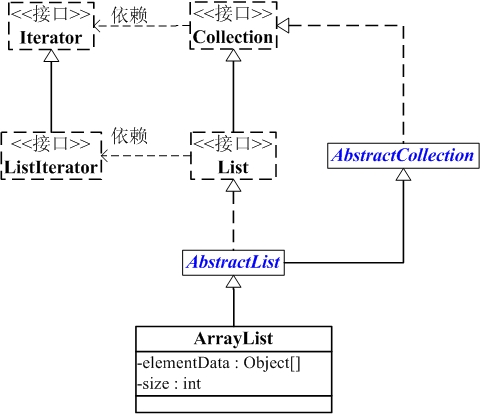
ArrayList包含了两个重要的对象:elementData 和 size。
(01) elementData 是"Object[]类型的数组",它保存了添加到ArrayList中的元素。实际上,elementData是个动态数组,我们能通过构造函数 ArrayList(int initialCapacity)来执行它的初始容量为initialCapacity;如果通过不含参数的构造函数ArrayList()来创建ArrayList,则elementData的容量默认是10。elementData数组的大小会根据ArrayList容量的增长而动态的增长,具体的增长方式,请参考源码分析中的ensureCapacity()函数。
(02) size 则是动态数组的实际大小。
第3部分 ArrayList源码解析(基于JDK1.6.0_45)
为了更了解ArrayList的原理,下面对ArrayList源码代码作出分析。ArrayList是通过数组实现的,源码比较容易理解。
 package java.util;

 public class ArrayList<E> extends AbstractList<E>

         implements List<E>, RandomAccess, Cloneable, java.io.Serializable

 {

     // 序列版本号

     private static final long serialVersionUID = 8683452581122892189L;

     // 保存ArrayList中数据的数组

     private transient Object[] elementData;

     // ArrayList中实际数据的数量

     private int size;

     // ArrayList带容量大小的构造函数。

     public ArrayList(int initialCapacity) {

         super();

         if (initialCapacity < 0)

             throw new IllegalArgumentException("Illegal Capacity: "+

                                                initialCapacity);

         // 新建一个数组

         this.elementData = new Object[initialCapacity];

     }

     // ArrayList构造函数。默认容量是10。

     public ArrayList() {

         this(10);

     }

     // 创建一个包含collection的ArrayList

     public ArrayList(Collection<? extends E> c) {

         elementData = c.toArray();

         size = elementData.length;

         // c.toArray might (incorrectly) not return Object[] (see 6260652)

         if (elementData.getClass() != Object[].class)

             elementData = Arrays.copyOf(elementData, size, Object[].class);

     }

     // 将当前容量值设为 =实际元素个数

     public void trimToSize() {

         modCount++;

         int oldCapacity = elementData.length;

         if (size < oldCapacity) {

             elementData = Arrays.copyOf(elementData, size);

         }

     }

     // 确定ArrarList的容量。

     // 若ArrayList的容量不足以容纳当前的全部元素,设置 新的容量=“(原始容量x3)/2 + 1”

     public void ensureCapacity(int minCapacity) {

         // 将“修改统计数”+1

         modCount++;

         int oldCapacity = elementData.length;

         // 若当前容量不足以容纳当前的元素个数,设置 新的容量=“(原始容量x3)/2 + 1”

         if (minCapacity > oldCapacity) {

             Object oldData[] = elementData;

             int newCapacity = (oldCapacity * 3)/2 + 1;

             if (newCapacity < minCapacity)

                 newCapacity = minCapacity;

             elementData = Arrays.copyOf(elementData, newCapacity);

         }

     }

     // 添加元素e

     public boolean add(E e) {

         // 确定ArrayList的容量大小

         ensureCapacity(size + 1);  // Increments modCount!!

         // 添加e到ArrayList中

         elementData[size++] = e;

         return true;

     }

     // 返回ArrayList的实际大小

     public int size() {

         return size;

     }

     // 返回ArrayList是否包含Object(o)

     public boolean contains(Object o) {

         return indexOf(o) >= 0;

     }

     // 返回ArrayList是否为空

     public boolean isEmpty() {

         return size == 0;

     }

     // 正向查找,返回元素的索引值

     public int indexOf(Object o) {

         if (o == null) {

             for (int i = 0; i < size; i++)

             if (elementData[i]==null)

                 return i;

             } else {

                 for (int i = 0; i < size; i++)

                 if (o.equals(elementData[i]))

                     return i;

             }

             return -1;

         }

         // 反向查找,返回元素的索引值

         public int lastIndexOf(Object o) {

         if (o == null) {

             for (int i = size-1; i >= 0; i--)

             if (elementData[i]==null)

                 return i;

         } else {

             for (int i = size-1; i >= 0; i--)

             if (o.equals(elementData[i]))

                 return i;

         }

         return -1;

     }

     // 反向查找(从数组末尾向开始查找),返回元素(o)的索引值

     public int lastIndexOf(Object o) {

         if (o == null) {

             for (int i = size-1; i >= 0; i--)

             if (elementData[i]==null)

                 return i;

         } else {

             for (int i = size-1; i >= 0; i--)

             if (o.equals(elementData[i]))

                 return i;

         }

         return -1;

     }

     // 返回ArrayList的Object数组

     public Object[] toArray() {

         return Arrays.copyOf(elementData, size);

     }

     // 返回ArrayList的模板数组。所谓模板数组,即可以将T设为任意的数据类型

     public <T> T[] toArray(T[] a) {

         // 若数组a的大小 < ArrayList的元素个数;

         // 则新建一个T[]数组,数组大小是“ArrayList的元素个数”,并将“ArrayList”全部拷贝到新数组中

         if (a.length < size)

             return (T[]) Arrays.copyOf(elementData, size, a.getClass());

         // 若数组a的大小 >= ArrayList的元素个数;

         // 则将ArrayList的全部元素都拷贝到数组a中。

         System.arraycopy(elementData, 0, a, 0, size);

         if (a.length > size)

             a[size] = null;

         return a;

     }

     // 获取index位置的元素值

     public E get(int index) {

         RangeCheck(index);

         return (E) elementData[index];

     }

     // 设置index位置的值为element

     public E set(int index, E element) {

         RangeCheck(index);

         E oldValue = (E) elementData[index];

         elementData[index] = element;

         return oldValue;

     }

     // 将e添加到ArrayList中

     public boolean add(E e) {

         ensureCapacity(size + 1);  // Increments modCount!!

         elementData[size++] = e;

         return true;

     }

     // 将e添加到ArrayList的指定位置

     public void add(int index, E element) {

         if (index > size || index < 0)

             throw new IndexOutOfBoundsException(

             "Index: "+index+", Size: "+size);

         ensureCapacity(size+1);  // Increments modCount!!

         System.arraycopy(elementData, index, elementData, index + 1,

              size - index);

         elementData[index] = element;

         size++;

     }

     // 删除ArrayList指定位置的元素

     public E remove(int index) {

         RangeCheck(index);

         modCount++;

         E oldValue = (E) elementData[index];

         int numMoved = size - index - 1;

         if (numMoved > 0)

             System.arraycopy(elementData, index+1, elementData, index,

                  numMoved);

         elementData[--size] = null; // Let gc do its work

         return oldValue;

     }

     // 删除ArrayList的指定元素

     public boolean remove(Object o) {

         if (o == null) {

                 for (int index = 0; index < size; index++)

             if (elementData[index] == null) {

                 fastRemove(index);

                 return true;

             }

         } else {

             for (int index = 0; index < size; index++)

             if (o.equals(elementData[index])) {

                 fastRemove(index);

                 return true;

             }

         }

         return false;

     }

     // 快速删除第index个元素

     private void fastRemove(int index) {

         modCount++;

         int numMoved = size - index - 1;

         // 从"index+1"开始,用后面的元素替换前面的元素。

         if (numMoved > 0)

             System.arraycopy(elementData, index+1, elementData, index,

                              numMoved);

         // 将最后一个元素设为null

         elementData[--size] = null; // Let gc do its work

     }

     // 删除元素

     public boolean remove(Object o) {

         if (o == null) {

             for (int index = 0; index < size; index++)

             if (elementData[index] == null) {

                 fastRemove(index);

             return true;

             }

         } else {

             // 便利ArrayList,找到“元素o”,则删除,并返回true。

             for (int index = 0; index < size; index++)

             if (o.equals(elementData[index])) {

                 fastRemove(index);

             return true;

             }

         }

         return false;

     }

     // 清空ArrayList,将全部的元素设为null

     public void clear() {

         modCount++;

         for (int i = 0; i < size; i++)

             elementData[i] = null;

         size = 0;

     }

     // 将集合c追加到ArrayList中

     public boolean addAll(Collection<? extends E> c) {

         Object[] a = c.toArray();

         int numNew = a.length;

         ensureCapacity(size + numNew);  // Increments modCount

         System.arraycopy(a, 0, elementData, size, numNew);

         size += numNew;

         return numNew != 0;

     }

     // 从index位置开始,将集合c添加到ArrayList

     public boolean addAll(int index, Collection<? extends E> c) {

         if (index > size || index < 0)

             throw new IndexOutOfBoundsException(

             "Index: " + index + ", Size: " + size);

         Object[] a = c.toArray();

         int numNew = a.length;

         ensureCapacity(size + numNew);  // Increments modCount

         int numMoved = size - index;

         if (numMoved > 0)

             System.arraycopy(elementData, index, elementData, index + numNew,

                  numMoved);

         System.arraycopy(a, 0, elementData, index, numNew);

         size += numNew;

         return numNew != 0;

     }

     // 删除fromIndex到toIndex之间的全部元素。

     protected void removeRange(int fromIndex, int toIndex) {

     modCount++;

     int numMoved = size - toIndex;

         System.arraycopy(elementData, toIndex, elementData, fromIndex,

                          numMoved);

     // Let gc do its work

     int newSize = size - (toIndex-fromIndex);

     while (size != newSize)

         elementData[--size] = null;

     }

     private void RangeCheck(int index) {

     if (index >= size)

         throw new IndexOutOfBoundsException(

         "Index: "+index+", Size: "+size);

     }

     // 克隆函数

     public Object clone() {

         try {

             ArrayList<E> v = (ArrayList<E>) super.clone();

             // 将当前ArrayList的全部元素拷贝到v中

             v.elementData = Arrays.copyOf(elementData, size);

             v.modCount = 0;

             return v;

         } catch (CloneNotSupportedException e) {

             // this shouldn't happen, since we are Cloneable

             throw new InternalError();

         }

     }

     // java.io.Serializable的写入函数

     // 将ArrayList的“容量,所有的元素值”都写入到输出流中

     private void writeObject(java.io.ObjectOutputStream s)

         throws java.io.IOException{

     // Write out element count, and any hidden stuff

     int expectedModCount = modCount;

     s.defaultWriteObject();

         // 写入“数组的容量”

         s.writeInt(elementData.length);

     // 写入“数组的每一个元素”

     for (int i=0; i<size; i++)

             s.writeObject(elementData[i]);

     if (modCount != expectedModCount) {

             throw new ConcurrentModificationException();

         }

     }

     // java.io.Serializable的读取函数:根据写入方式读出

     // 先将ArrayList的“容量”读出,然后将“所有的元素值”读出

     private void readObject(java.io.ObjectInputStream s)

         throws java.io.IOException, ClassNotFoundException {

         // Read in size, and any hidden stuff

         s.defaultReadObject();

         // 从输入流中读取ArrayList的“容量”

         int arrayLength = s.readInt();

         Object[] a = elementData = new Object[arrayLength];

         // 从输入流中将“所有的元素值”读出

         for (int i=0; i<size; i++)

             a[i] = s.readObject();

     }

 }
总结:
(01) ArrayList 实际上是通过一个数组去保存数据的。当我们构造ArrayList时;若使用默认构造函数,则ArrayList的默认容量大小是10。
(02) 当ArrayList容量不足以容纳全部元素时,ArrayList会重新设置容量:新的容量=“(原始容量x3)/2 + 1”。
(03) ArrayList的克隆函数,即是将全部元素克隆到一个数组中。
(04) ArrayList实现java.io.Serializable的方式。当写入到输出流时,先写入“容量”,再依次写入“每一个元素”;当读出输入流时,先读取“容量”,再依次读取“每一个元素”。
第4部分 ArrayList遍历方式
ArrayList支持3种遍历方式
(01) 第一种,通过迭代器遍历。即通过Iterator去遍历。
Integer value = null;

Iterator iter = list.iterator();

while (iter.hasNext()) {

    value = (Integer)iter.next();

}
(02) 第二种,随机访问,通过索引值去遍历。
由于ArrayList实现了RandomAccess接口,它支持通过索引值去随机访问元素。
Integer value = null;

int size = list.size();

for (int i=0; i<size; i++) {

    value = (Integer)list.get(i);

}
(03) 第三种,for循环遍历。如下:
Integer value = null;

for (Integer integ:list) {

    value = integ;

}
下面通过一个实例,比较这3种方式的效率,实例代码(ArrayListRandomAccessTest.java)如下:
 import java.util.*;

 import java.util.concurrent.*;

 /*

  * @desc ArrayList遍历方式和效率的测试程序。

  *

  * @author skywang

  */

 public class ArrayListRandomAccessTest {

     public static void main(String[] args) {

         List list = new ArrayList();

         for (int i=0; i<100000; i++)

             list.add(i);

         //isRandomAccessSupported(list);

         iteratorThroughRandomAccess(list) ;

         iteratorThroughIterator(list) ;

         iteratorThroughFor2(list) ;

     }

     private static void isRandomAccessSupported(List list) {

         if (list instanceof RandomAccess) {

             System.out.println("RandomAccess implemented!");

         } else {

             System.out.println("RandomAccess not implemented!");

         }

     }

     public static void iteratorThroughRandomAccess(List list) {

         long startTime;

         long endTime;

         startTime = System.currentTimeMillis();

         for (int i=0; i<list.size(); i++) {

             list.get(i);

         }

         endTime = System.currentTimeMillis();

         long interval = endTime - startTime;

         System.out.println("iteratorThroughRandomAccess:" + interval+" ms");

     }

     public static void iteratorThroughIterator(List list) {

         long startTime;

         long endTime;

         startTime = System.currentTimeMillis();

         for(Iterator iter = list.iterator(); iter.hasNext(); ) {

             iter.next();

         }

         endTime = System.currentTimeMillis();

         long interval = endTime - startTime;

         System.out.println("iteratorThroughIterator:" + interval+" ms");

     }

     public static void iteratorThroughFor2(List list) {

         long startTime;

         long endTime;

         startTime = System.currentTimeMillis();

         for(Object obj:list)

             ;

         endTime = System.currentTimeMillis();

         long interval = endTime - startTime;

         System.out.println("iteratorThroughFor2:" + interval+" ms");

     }

 }
运行结果:
iteratorThroughRandomAccess:3 ms
iteratorThroughIterator:8 ms
iteratorThroughFor2:5 ms
由此可见,遍历ArrayList时,使用随机访问(即,通过索引序号访问)效率最高,而使用迭代器的效率最低!
第5部分 toArray()异常
当我们调用ArrayList中的 toArray(),可能遇到过抛出“java.lang.ClassCastException”异常的情况。下面我们说说这是怎么回事。
ArrayList提供了2个toArray()函数:
Object[] toArray()

<T> T[] toArray(T[] contents)
调用 toArray() 函数会抛出“java.lang.ClassCastException”异常,但是调用 toArray(T[] contents) 能正常返回 T[]。
toArray() 会抛出异常是因为 toArray() 返回的是 Object[] 数组,将 Object[] 转换为其它类型(如如,将Object[]转换为的Integer[])则会抛出“java.lang.ClassCastException”异常,因为Java不支持向下转型。具体的可以参考前面ArrayList.java的源码介绍部分的toArray()。
解决该问题的办法是调用 <T> T[] toArray(T[] contents) , 而不是 Object[] toArray()。
调用 toArray(T[] contents) 返回T[]的可以通过以下几种方式实现。
// toArray(T[] contents)调用方式一

public static Integer[] vectorToArray1(ArrayList<Integer> v) {

    Integer[] newText = new Integer[v.size()];

    v.toArray(newText);

    return newText;

}

// toArray(T[] contents)调用方式二。最常用!

public static Integer[] vectorToArray2(ArrayList<Integer> v) {

    Integer[] newText = (Integer[])v.toArray(new Integer[0]);

    return newText;

}

// toArray(T[] contents)调用方式三

public static Integer[] vectorToArray3(ArrayList<Integer> v) {

    Integer[] newText = new Integer[v.size()];

    Integer[] newStrings = (Integer[])v.toArray(newText);

    return newStrings;

}
第6部分 ArrayList示例
本文通过一个实例(ArrayListTest.java),介绍 ArrayList 中常用API的用法。
 import java.util.*;

 /*

  * @desc ArrayList常用API的测试程序

  * @author skywang

  * @email kuiwu-wang@163.com

  */

 public class ArrayListTest {

     public static void main(String[] args) {

         // 创建ArrayList

         ArrayList list = new ArrayList();

         // 将“”

         list.add("1");

         list.add("2");

         list.add("3");

         list.add("4");

         // 将下面的元素添加到第1个位置

         list.add(0, "5");

         // 获取第1个元素

         System.out.println("the first element is: "+ list.get(0));

         // 删除“3”

         list.remove("3");

         // 获取ArrayList的大小

         System.out.println("Arraylist size=: "+ list.size());

         // 判断list中是否包含"3"

         System.out.println("ArrayList contains 3 is: "+ list.contains(3));

         // 设置第2个元素为10

         list.set(1, "10");

         // 通过Iterator遍历ArrayList

         for(Iterator iter = list.iterator(); iter.hasNext(); ) {

             System.out.println("next is: "+ iter.next());

         }

         // 将ArrayList转换为数组

         String[] arr = (String[])list.toArray(new String[0]);

         for (String str:arr)

             System.out.println("str: "+ str);

         // 清空ArrayList

         list.clear();

         // 判断ArrayList是否为空

         System.out.println("ArrayList is empty: "+ list.isEmpty());

     }

 }
运行结果:
the first element is: 5

Arraylist size=: 4

ArrayList contains 3 is: false

next is: 5

next is: 10

next is: 2

next is: 4

str: 5

str: 10

str: 2

str: 4

ArrayList is empty: true
Java 集合系列03之 ArrayList详细介绍(源码解析)和使用示例的更多相关文章
- 【转】Java 集合系列03之 ArrayList详细介绍(源码解析)和使用示例
原文网址:http://www.cnblogs.com/skywang12345/p/3308556.html 上一章,我们学习了Collection的架构.这一章开始,我们对Collection的具 ...
- Java 集合系列05之 LinkedList详细介绍(源码解析)和使用示例
概要 前面,我们已经学习了ArrayList,并了解了fail-fast机制.这一章我们接着学习List的实现类——LinkedList.和学习ArrayList一样,接下来呢,我们先对Linked ...
- Java 集合系列10之 HashMap详细介绍(源码解析)和使用示例
概要 这一章,我们对HashMap进行学习.我们先对HashMap有个整体认识,然后再学习它的源码,最后再通过实例来学会使用HashMap.内容包括:第1部分 HashMap介绍第2部分 HashMa ...
- Java 集合系列11之 Hashtable详细介绍(源码解析)和使用示例
概要 前一章,我们学习了HashMap.这一章,我们对Hashtable进行学习.我们先对Hashtable有个整体认识,然后再学习它的源码,最后再通过实例来学会使用Hashtable.第1部分 Ha ...
- 【转】Java 集合系列11之 Hashtable详细介绍(源码解析)和使用示例
概要 前一章,我们学习了HashMap.这一章,我们对Hashtable进行学习.我们先对Hashtable有个整体认识,然后再学习它的源码,最后再通过实例来学会使用Hashtable.第1部分 Ha ...
- Java 集合系列07之 Stack详细介绍(源码解析)和使用示例
概要 学完Vector了之后,接下来我们开始学习Stack.Stack很简单,它继承于Vector.学习方式还是和之前一样,先对Stack有个整体认识,然后再学习它的源码:最后再通过实例来学会使用它. ...
- 【转】 Java 集合系列07之 Stack详细介绍(源码解析)和使用示例
概要 学完Vector了之后,接下来我们开始学习Stack.Stack很简单,它继承于Vector.学习方式还是和之前一样,先对Stack有个整体认识,然后再学习它的源码:最后再通过实例来学会使用它. ...
- Java 集合系列13之 WeakHashMap详细介绍(源码解析)和使用示例
概要 这一章,我们对WeakHashMap进行学习.我们先对WeakHashMap有个整体认识,然后再学习它的源码,最后再通过实例来学会使用WeakHashMap.第1部分 WeakHashMap介绍 ...
- Java 集合系列06之 Vector详细介绍(源码解析)和使用示例
概要 学完ArrayList和LinkedList之后,我们接着学习Vector.学习方式还是和之前一样,先对Vector有个整体认识,然后再学习它的源码:最后再通过实例来学会使用它.第1部分 Vec ...
随机推荐
- 优化MySchool数据库(二)
优化School数据库(TSQL建库建表建约束) 使用T_sql代码建库.建表.建约束: 建库: Create database HotelManagerSystem on ( ---- 数据文件-- ...
- TCP连接状态与2MSL等待时间
1 连接状态图 2 建立连接:三次握手,不使用DNS和使用DNS 3 关闭连接-四次握手 连接双方任何一方调用close()后,连接的两个传输方向都关闭,不能再发送数据了.如果一方调用shutdown ...
- Java中并发问题整理
1. java中有几种方法可以实现一个线程? 使用Runnable,Callable,Thread或者线程池 2. 如何停止一个正在运行的线程? 可以使用正在运行的线程,支持线程中断,通常是定义一个v ...
- 从多个XML文档中读取数据用于显示webapi帮助文档
前言: 你先得知道HelpPageConfig文件,不知道说明你现在不需要这个,所以下文就不用看了,等知道了再看也不急.当然如果你很知道这个,下文也不用看了,因为你会了. 方法一: new XmlDo ...
- mac 远程连接服务器
很多刚用mac的同学 可能会纠结,连接远程服务器咋整? 有没有类型windows上的securecrt 其实,完全可以不用: mac自带的终端就可以搞定:终端terminal 如何连接远程服务器? s ...
- PHP代码规范
PHP编码规范 1. 标识符命名规范 标识符的命名力求做到统一.达意和简洁. 1.1 统一 统一是指,对于同一个概念,在程序中用同一种表示方法,比如对于供应商,既可以用supplier,也可以用pro ...
- Composer管理PHP包
安装 Composer包含两大逻辑部分:一个是用来存储包,另一个是命令行应用程序,帮助你发现.下载.更新和分享代码. $ cd/path/to/my/project $ curl -s http:// ...
- Docker是什么
Docker是什么 相信我们很多人都使用多VM(Virtual Machine),也就是虚拟机,简单的来说Docker就是类是于VM的容器,但Docker要轻量得多,VM(Virtual Machin ...
- 烂泥:学习Nagios(二):Nagios配置
本文由秀依林枫提供友情赞助,首发于烂泥行天下 nagios安装完毕后,我们现在就来配置nagios.有关nagios的安装,可以参考<烂泥:学习Nagios(一):Nagios安装>这篇文 ...
- vs2008环境nmake编译 apache 2.2.29 openssl 1.0.1g mod_ssl 不知道如何生成“"..\..\srclib\openssl\inc32\openssl\store.h"”
问题: vs2008环境nmake编译 apache 2.2.29 openssl 1.0.1g mod_ssl 不知道如何生成“"..\..\srclib\openssl\inc32\op ...