
使用jQuery Mobile的注意事项(译)
翻译编辑自:http://www.appnovation.com/blog/7-things-know-about-jquery-mobile-working-it
一、Android和IOS的内置键盘(Native keyboard)是不一样的
对手机的内置键盘的操作是比较复杂和富有争议的,不同的手机可能需要不同的css。Android使用的是第三方的键盘插件(3rd party keyboards ),如 Google Keyboard 和 SwiftKey。
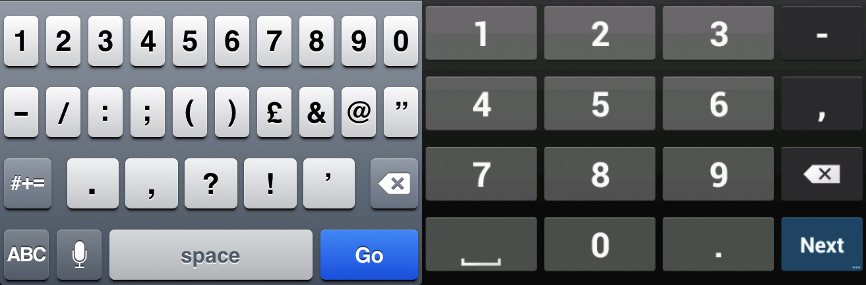
可设置input的type属性来决定内置键盘是显示数字键盘还是显示字母键盘(参考link):
- Email:<input type="email" name="email">
- URL: <input type="url" name="url">
- telephone: <input type="tel" name="tel">
- number:<input type="number" name="number">
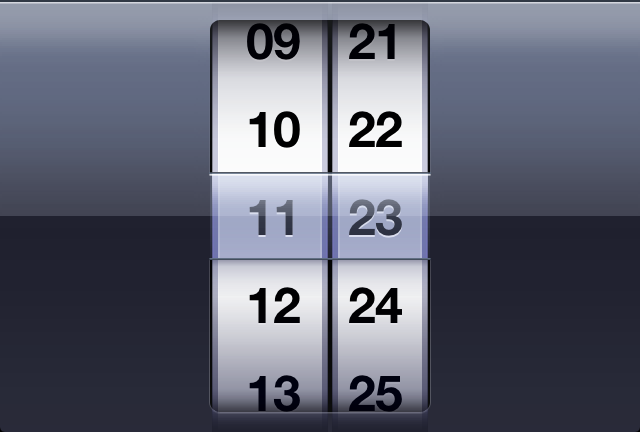
- Date:<input type="date" name="date">(chrome)

- Time:<input type="time" name="time">
需要说明的是:
- android不支持input的type属性,而IOS支持
- android的内置数字键盘没有小数点按钮
- 浏览器对date/time的支持很有限,Opera支持以上所有的属性,chrome支持date,safari支持date但不支持calender
二、page events的顺序
如从A页面转到B页面(Navigate from A to B)
- page B---pagebeforecreate
- page B---pagecreate
- page B---pageinit
- page A---pagebeforehide
- page B---pagebeforeshow
- page A---pageremove
- page A---pagehide
- page B---pageshow
三、jQuery Mobile transitions
jQuery Mobile的页面转换常会出现(Flickering/Blinking)闪烁问题,为此可以在viewport meta tag中关闭(disabling)jQuery Mobile的页面转换。
- Android 2.3不支持CSS3 transition
- "pop" 转换效果在跳转前会将背景变成白色,导致出现“闪烁”效果(解决方法:将pop转换效果变为旧jQuery Mobile效果的插件,参见here)
四、 Fixed Header and Footer
jQuery Mobile内置有固定位置的header和footer,但一些低版本的Android和IOS不支持,需要另外修正
1)加data-tap-toggle="false"到header和footer
2) 如IOS 6, 7 ,8的hack如下
if (iOS()) {

    $(document).on('blur', 'input:not(:submit), select, textarea', function () {

        var paddingBottom = parseFloat($(".ui-mobile-viewport, .ui-page-active").css("padding-bottom"));

        $(".ui-mobile-viewport, .ui-page-active").css("padding-bottom", (paddingBottom + 1) + "px");

        window.setTimeout(function () {

            $(".ui-mobile-viewport, .ui-page-active").css("padding-bottom", paddingBottom + "px");

        }, 0);

    });

}

var iOS() = function () {

    var userAgent = window.navigator.userAgent.toLowerCase();

    return (/iphone|ipad|ipod/).test(userAgent);

}
3)或参见:JQueryMobile - fixed footer not fixed after input focus
$('div:jqmData(role="page")').on('pageinit',function(){

    $(document)

        .on('focus','input, select, textarea', function(){

            $('[data-role="footer"][data-position="fixed"]').hide();

        })

        .on('blur','input, select, textarea',function(){

            $('[data-role="footer"][data-position="fixed"]').show();

        });

});
有时候当toolbar滚动过快的时候会导致不平滑问题。
五、更多的Javascript的Events
- tap:Triggers after a quick, complete touch event.
- taphold:Triggers after a held complete touch event (close to one second).
- swipe: Triggers when a horizontal drag of 30px or more (and less than 20px vertically) occurs within 1 second duration.
- swipeleft: Triggers when a swipe event occurred moving in the left direction.
- swiperight: Triggers when a swipe event occurred moving in the right direction.
- orientationchange: Triggers when a device orientation changes (by turning it vertically or horizontally). When bound to this event, your callback function can leverage a second argument, which contains an orientation property equal to either "portrait" or "landscape." These values are also added as classes to the HTML element, allowing you to leverage them in your CSS selectors. Note that we currently bind to the resize event when orientationChange is not natively supported.
- scrollstart:Triggers when a scroll begins. Note that iOS devices freeze DOM manipulation during scroll, queuing them to apply when the scroll finishes. We're currently investigating ways to allow DOM manipulations to apply before a scroll starts.
- scrollstop:Triggers when a scroll finishes.
参考: http://forum.jquery.com/topic/mobile-events-documentation
使用jQuery Mobile的注意事项(译)的更多相关文章
- html5文章 -- 使用 jQuery Mobile 与 HTML5 开发 Web App ——开发原则 | Kayo's Melody
最近专注研究 jQuery Mobile —— 一款很方便就可以把 Web App 包装成适合 Android 与 iPhone 等触屏移动设备的 Javascript 库,结合 jQuery Mob ...
- Android+Jquery Mobile学习系列(4)-页面跳转及参数传递
关于页面转场,这个必须得专门列出来说明一下,因为Jquery Mobile与普通的Web发开有一些区别,这个对于新手如果不了解的话,就会钻到死胡同.撸主前段时间就是很急躁地上手开发程序,结果在页面转场 ...
- jQuery Mobile里xxx怎么用呀? (事件篇)
jQuery Mobile里$(document).ready()怎么用呀? 相关链接: http://stackoverflow.com/questions/14468659/jquery-mobi ...
- 自学JQuery Mobile的几个例子
JQuery Mobile是一个用于构建移动Web应用程序的框架,适用于主流的移动设备(智能手机.平板电脑),该框架利用了HTML5和CSS3技术减少了额外的脚本文件的编写.具体JQuery Mobi ...
- Android+Jquery Mobile学习系列(6)-个人信息设置
本节开始,进行代码的实战练习.我的这个App是管理保险客户信息的,数据采用Sqlite存储在本地手机上,第一次使用需要先登记自己的个人信息,这个功能非常简单,也无关紧要,我是拿这个练手,方便做后面复杂 ...
- Android+Jquery Mobile学习系列(4)-页面转场及参数传递
关于页面转场,这个必须得专门列出来说明一下,因为Jquery Mobile与普通的Web发开有一些区别,这个对于新手如果不了解的话,就会钻到死胡同.撸主前段时间就是很急躁地上手开发程序,结果在页面转场 ...
- Android+Jquery Mobile学习系列(2)-HTML5/Jquery Mobile基础
本章介绍两个关键字[HTML5]和[Jquery Mobile],简单说这两者的关系是:HTML5作为主体,Jquery Mobile在HTML5的基础上对其进行了优化.装饰. HTML5 HTML5 ...
- jQuery Mobile入门
转:http://www.cnblogs.com/linjiqin/archive/2011/07/17/2108896.html 简介:jQuery Mobile框架可以轻松的帮助我们实现非常好看的 ...
- 解决Jquery mobile点击较长文本body的时候Header和footer会渐入渐出的问题
在做一个Phonegap+Jqm工程的时候,出现了如题的问题,相信很多人都遇到过Jquerymobile点击body时候header和footer会闪烁的显示和隐藏问题,fixed却并不能真 ...
随机推荐
- JavaScript模块化开发整理
在网上已经有很多关于模块化开发的文章了,这里还是按照自己的理解来整理一下. 随着项目文件的越来越大和需求的越来越贴近现实(我发现现在客户不如:一个领导说我要审批你们报上来的资料,系统发布以后用的还不错 ...
- [原创]java WEB学习笔记93:Hibernate学习之路---Hibernate 缓存介绍,缓存级别,使用二级缓存的情况,二级缓存的架构集合缓存,二级缓存的并发策略,实现步骤,集合缓存,查询缓存,时间戳缓存
本博客的目的:①总结自己的学习过程,相当于学习笔记 ②将自己的经验分享给大家,相互学习,互相交流,不可商用 内容难免出现问题,欢迎指正,交流,探讨,可以留言,也可以通过以下方式联系. 本人互联网技术爱 ...
- 怎么理解Android版本兼容???
程序中设置了minSdkVersion和targetSdkVersion如下: <uses-sdk android:minSdkVersion="8" android:tar ...
- HDU 1258 Sum It Up
Sum It Up Time Limit: 2000/1000 MS (Java/Others) Memory Limit: 65536/32768 K (Java/Others)Total S ...
- js 格式化数字保留2位小数
function toDecimal2(x) { var f = parseFloat(x); if (isNaN(f)) { return false; } var f = Math.round(x ...
- 【001:ubuntu下搭建ESP8266开发环境--编辑 编译 下载】
系统环境:ubuntu 16.04 TLS 64BIT 编辑器: Eclipse CDT 版本 编译器:xtensa-lx106-elf 交叉编译工具链 下载工具:esptool.py pyseria ...
- Frost R&D
Trees Procedural Math Model in Houdini,render with Mantra. Shader use SurfaceModel With Other Attrib ...
- if 语句运用
运用if语句完成对年.月.日的判断. Console.WriteLine("其输入年份:"); int a = int.Parse(Console.ReadLine()); Con ...
- Auty自动化测试框架第六篇——垃圾代码回收、添加suite支持
[本文出自天外归云的博客园] 垃圾代码回收 添加脚本恢复机制,因为框架会自动生成一些代码,如果代码生成后出现问题导致代码没有正常删除掉,则会造成代码垃圾,在auty目录添加recovery.py文件: ...
- [问题2015S10] 复旦高等代数 II(14级)每周一题(第十一教学周)
[问题2015S10] 设 \(A\) 为 \(n\) 阶实方阵, 证明: 存在 \(n\) 阶非异实对称阵 \(R\), 使得 \(A'=R^{-1}AR\), 即 \(A\) 可通过非异实对称阵 ...