
Ubuntu 之 Personal Package Archive (PPA)
How do I use software from a PPA?
To start installing and using software from a Personal Package Archive, you first need to tell Ubuntu where to find the PPA.
Important: The contents of Personal Package Archives are not checked or monitored. You install software from them at your own risk.
If you're using the most recent version of Ubuntu (or any version from Ubuntu 9.10 onwards), you can add a PPA to your system with a single line in your terminal.
Step 1: On the PPA's overview page, look for the heading that reads Adding this PPA to your system. Make a note of the PPA's location, which looks like:
ppa:gwibber-daily/ppa
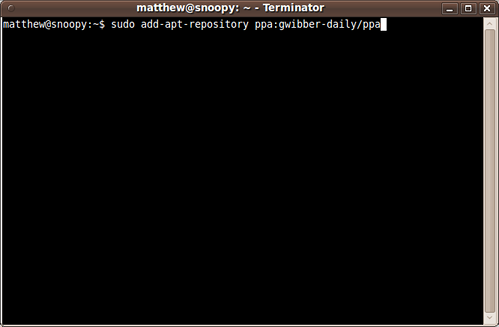
Step 2: Open a terminal and enter:
sudo add-apt-repository ppa:user/ppa-name
Replace ppa:user/ppa-name with the PPA's location that you noted above.
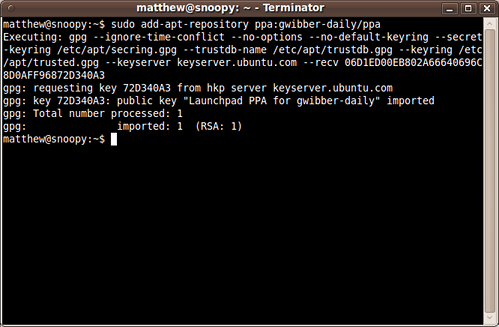
Your system will now fetch the PPA's key. This enables your Ubuntu system to verify that the packages in the PPA have not been interfered with since they were built.
Step 3: Now, as a one-off, you should tell your system to pull down the latest list of software from each archive it knows about, including the PPA you just added:
sudo apt-get update
Now you're ready to start installing software from the PPA!
Read more about Personal Package Archives in our help wiki.
Ubuntu 之 Personal Package Archive (PPA)的更多相关文章
- Linux之Ubuntu添加/移除个人软件包存档的源[PPA,Personal Package Archives]
现在很多第三方软件还需要添加PPA软件源到Ubuntu系统当中,但是添加了PPA之后,软件可以直接在软件中心进行安装并会自动提示升级,这就是Ubuntu带来的方便,现在我们就来看看如何添加PPA软件源 ...
- PPA(Personal Package Archives)简介、兴起、使用
1.简介 PPA是Personal Package Archives,个人软件包文档,是默认情况下并未被包含在Ubuntu中的软件的一个集合.通常这些存储库的侧重点是单个的程序,不过他们也可以包含更多 ...
- 在Ubuntu中添加和删除PPA的软件源
PPA,英文全称为 Personal Package Archives,即个人软件包档案.是 Ubuntu Launchpad 网站提供的一项源服务,允许个人用户上传软件源代码,通过 Launchpa ...
- Ubuntu系统apt添加第三方PPA源
一.前言 1.1目的 在使用Ubuntu时往往apt源会自带很多常用软件,但是大部分都是比较老的版本,本文主要是为了实现以下两个目的: 通过添加第三方的PPA源解决软件版本过低或者没有安装包的情况: ...
- [ubuntu]E: The package firmware-upgrade needs to be reinstalled, but I can't find an archive for it.
解决办法把firmware-upgrade卸载 sudo dpkg --remove --force-all firmware-upgrade 然后 sudo apt-get update 即可
- ubuntu - 14.04,常用PPA源(第三方提供的deb格式安装文件)!!
说明: 1,下面所有PPA源的执行命令,均为在shell中执行的命令,需要依次执行! 2,下面所有测试方法,均为在shell中执行的命令!! PPA源: 一,Oracle JDK:Oracle公司提供 ...
- Ubuntu 出现apt-get: Package has no installation candidate问题
今天在安装软件的时候出现了Package has no installation candidate的问题,如: # apt-get install <packagename> Read ...
- ubuntu 软件包(package)更换源(source)为阿里云镜像 update&upgrade
在ubuntu下用apt-get install安装软件时,发现package list中没有所需的软件, 估计可能是package list太旧了,于是需要apt-get update & ...
- ubuntu如何添加新的PPA
首先要知道PPA源地址,比如: ppa:gwibber-daily/ppa 然后用apt-get指令添加: sudo add-apt-repository ppa:gwibber-daily/ppa ...
随机推荐
- 深入理解计算机系统(2.2)---布尔代数以及C语言上的位运算
布尔代数上的位运算 布尔代数是一个数学知识体系,它在0和1的二进制值上演化而来的. 我们不需要去彻底的了解这个知识体系,但是里面定义了几种二进制的运算,却是我们在平时的编程过程当中也会遇到的.这四种运 ...
- Markdown会干掉Html吗?
Markdown会干掉Html吗? 很明显,MarkDown正在已一种比病毒还快的速度传播着,量子的机器人语言也是深受其启发,当然了,在这个东西没搞出来之前,MarkDown就能干很多事情,比如在线编 ...
- SQL2008R2 不支持用该后端版本设计数据库关系图或表
向下不兼容. 要么安装SQL2012,要么把SQL2012数据库通过脚本转成2008
- JavaScript返回上一级,并重新加载页面
window.location.href = document.referrer;
- MVC中使用Ajax提交数据 Jquery Ajax方法传值到action
Jquery Ajax方法传值到action <script type="text/javascript"> $(document).ready(function(){ ...
- BroadcastReceiver之发送自定义无序广播
首先,发送一个自定义广播:(用sendBroadcast(intent)发送一条无序广播) public void click(View v){ Intent intent = new Intent( ...
- IOS_SearchBar搜索栏及关键字高亮
搜索框的效果演示: 这个就是所谓的搜索框了,那么接下来我们看看如何使用代码来实现这个功能. 我所使用的数据是英雄联盟的英雄名单,是一个JSON数据的txt文件, JSON数据的处理代码如下所示: ? ...
- 用Intent实现activity的跳转
新建一个FirstAvtivity.java package com.zhuguangwei; import android.app.Activity;import android.content.I ...
- parse date receiving from mvc jsonresult
if we received data like this: ,"Date":"\/Date(1410969600000)\/", we can parse i ...
- 1103简单SQL 行转列思路
转自http://www.cnblogs.com/lhj588/p/3315876.html -- 经典行列转化DROP TABLE IF EXISTS TabName;CREATE TABLE Ta ...