
iOS设计模式 - 适配器
iOS设计模式 - 适配器
效果

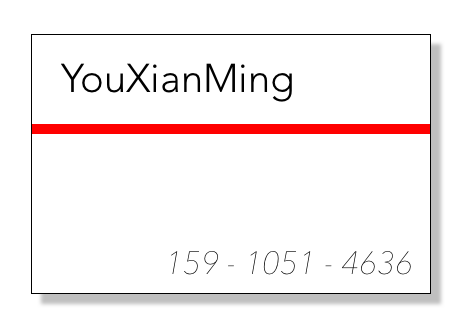
说明
1. 为了让客户端尽可能的通用,我们使用适配器模式来隔离客户端与外部参数的联系,只让客户端与适配器通信.
2. 本教程实现了适配器模式的类适配器与对象适配器两种模式,各有优缺点.
3. 如果对面向对象基本原理以及设计模式基本原理不熟悉,本教程会变得难以理解.
源码
https://github.com/YouXianMing/iOS-Design-Patterns
//

//  BusinessCardView.h

//  Adapter

//

//  Created by YouXianMing on 15/7/25.

//  Copyright (c) 2015年 YouXianMing. All rights reserved.

//

#import <UIKit/UIKit.h>

#import "BusinessCardAdapterProtocol.h"

#define  BUSINESS_FRAME  CGRectMake(0, 0, 200, 130)

@interface BusinessCardView : UIView

/**

 *  名字

 */

@property (nonatomic, strong) NSString *name;

/**

 *  线条颜色

 */

@property (nonatomic, strong) UIColor  *lineColor;

/**

 *  电话号码

 */

@property (nonatomic, strong) NSString *phoneNumber;

/**

 *  加载数据(实现了BusinessCardAdapterProtocol协议的数据)

 *

 *  @param data 实现了BusinessCardAdapterProtocol协议的数据

 */

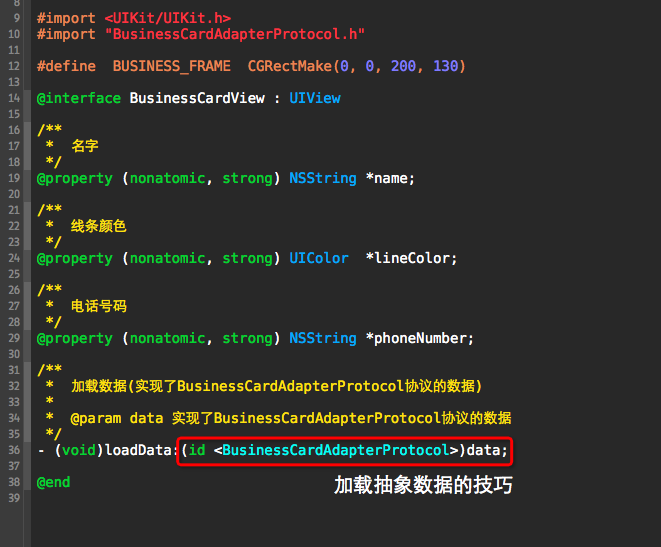
- (void)loadData:(id <BusinessCardAdapterProtocol>)data;

@end
//

//  BusinessCardView.m

//  Adapter

//

//  Created by YouXianMing on 15/7/25.

//  Copyright (c) 2015年 YouXianMing. All rights reserved.

//

#import "BusinessCardView.h"

@interface BusinessCardView ()

@property (nonatomic, strong) UILabel  *nameLabel;

@property (nonatomic, strong) UIView   *lineView;

@property (nonatomic, strong) UILabel  *phoneNumberLabel;

@end

@implementation BusinessCardView

#pragma mark - 初始化

- (instancetype)initWithFrame:(CGRect)frame {

    self = [super initWithFrame:frame];

    if (self) {

        [self setup];

    }

    return self;

}

- (void)setup {

    self.backgroundColor     = [UIColor whiteColor];

    self.layer.borderWidth   = 0.5f;

    self.layer.shadowOpacity = 0.5f;

    self.layer.shadowOffset  = CGSizeMake(, );

    self.layer.shadowRadius  = .f;

    self.layer.shadowColor   = [UIColor grayColor].CGColor;

    self.nameLabel      = [[UILabel alloc] initWithFrame:CGRectMake(, , , )];

    self.nameLabel.font = [UIFont fontWithName:@"Avenir-Light" size:.f];

    [self addSubview:self.nameLabel];

    self.lineView                 = [[UIView alloc] initWithFrame:CGRectMake(, , , )];

    [self addSubview:self.lineView];

    self.phoneNumberLabel               = [[UILabel alloc] initWithFrame:CGRectMake(, , , )];

    self.phoneNumberLabel.textAlignment = NSTextAlignmentRight;

    self.phoneNumberLabel.font          = [UIFont fontWithName:@"AvenirNext-UltraLightItalic" size:.f];

    [self addSubview:self.phoneNumberLabel];

}

- (void)loadData:(id <BusinessCardAdapterProtocol>)data {

    self.name        = [data name];

    self.lineColor   = [data lineColor];

    self.phoneNumber = [data phoneNumber];

}

#pragma mark - 重写setter,getter方法

@synthesize name        = _name;

@synthesize lineColor   = _lineColor;

@synthesize phoneNumber = _phoneNumber;

- (void)setName:(NSString *)name {

    _name           = name;

    _nameLabel.text = name;

}

- (NSString *)name {

    return _name;

}

- (void)setLineColor:(UIColor *)lineColor {

    _lineColor                = lineColor;

    _lineView.backgroundColor = _lineColor;

}

- (UIColor *)lineColor {

    return _lineColor;

}

- (void)setPhoneNumber:(NSString *)phoneNumber {

    _phoneNumber           = phoneNumber;

    _phoneNumberLabel.text = phoneNumber;

}

- (NSString *)phoneNumber {

    return _phoneNumber;

}

@end
//

//  BusinessCardAdapter.h

//  NormalProblem

//

//  Created by YouXianMing on 15/7/25.

//  Copyright (c) 2015年 YouXianMing. All rights reserved.

//

#import <Foundation/Foundation.h>

#import <UIKit/UIKit.h>

#import "BusinessCardAdapterProtocol.h"

@interface BusinessCardAdapter : NSObject <BusinessCardAdapterProtocol>

/**

 *  输入对象

 */

@property (nonatomic, weak) id data;

/**

 *  与输入对象建立联系

 *

 *  @param data 输入的对象

 *

 *  @return 实例对象

 */

- (instancetype)initWithData:(id)data;

@end
//

//  BusinessCardAdapter.m

//  NormalProblem

//

//  Created by YouXianMing on 15/7/25.

//  Copyright (c) 2015年 YouXianMing. All rights reserved.

//

#import "BusinessCardAdapter.h"

@implementation BusinessCardAdapter

- (instancetype)initWithData:(id)data {

    self = [super init];

    if (self) {

        self.data = data;

    }

    return self;

}

- (NSString *)name {

    return nil;

}

- (UIColor *)lineColor {

    return nil;

}

- (NSString *)phoneNumber {

    return nil;

}

@end
//

//  BusinessCardAdapterProtocol.h

//  NormalProblem

//

//  Created by YouXianMing on 15/7/25.

//  Copyright (c) 2015年 YouXianMing. All rights reserved.

//

#import <Foundation/Foundation.h>

@protocol BusinessCardAdapterProtocol <NSObject>

- (NSString *)name;

- (UIColor *)lineColor;

- (NSString *)phoneNumber;

@end
分析
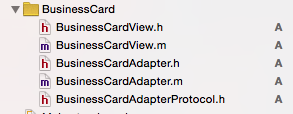
这是基于BusinessCardView构建出来的必不可少的抽象适配器以及一个协议,通过继承抽象适配器来实现具体的适配器,协议是用来统一接口.
对象适配器与类适配器.

客户端(BusinessCardView)只与适配器进行通信,它不关心数据源 NormalModel 与 SpecialModel 的业务逻辑
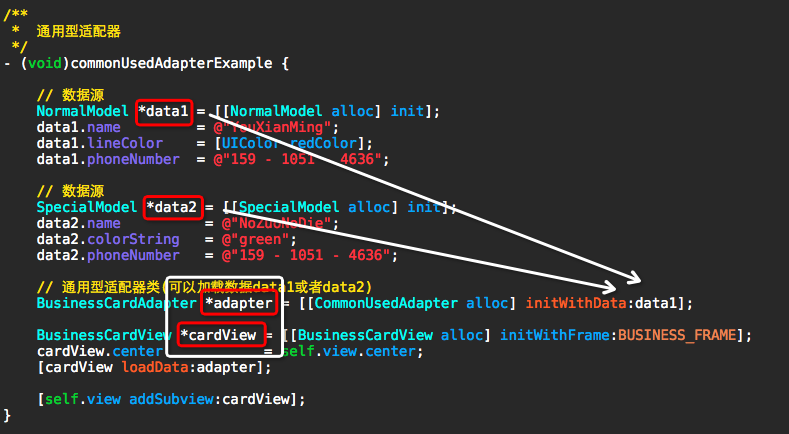
此处的抽象是核心所在
iOS设计模式 - 适配器的更多相关文章
- IOS设计模式之一(MVC模式,单例模式)
iOS 设计模式-你可能已经听说过这个词,但是你真正理解它意味着什么吗?虽然大多数的开发者可能都会认为设计模式是非常重要的,然而关于设计模式这一主题的文章却不多,并且有时候我们开发者在写代码的时候也不 ...
- iOS书摘之Objective-C编程之道 iOS设计模式解析
来自<Objective-C编程之道iOS设计模式解析>一书的摘要总结 一.Prototype 原型模式 定义:使用原型实例指定创建对象的种类,并通过复制这个原型创建新的对象.(<设 ...
- iOS 设计模式
很赞的总结 iOS Design Patterns 中文版 IOS设计模式之一(MVC模式,单例模式) IOS设计模式之二(门面模式,装饰器模式) IOS设计模式之三(适配器模式,观察者模式) IOS ...
- iOS 设计模式之工厂模式
iOS 设计模式之工厂模式 分类: 设计模式2014-02-10 18:05 11020人阅读 评论(2) 收藏 举报 ios设计模式 工厂模式我的理解是:他就是为了创建对象的 创建对象的时候,我们一 ...
- iOS设计模式之生成器
iOS设计模式之生成器 1.生成器模式的定义 (1): 将一个复杂的对象的构件与它的表示分离,使得相同的构建过程能够创建不同的表示 (2): 生成器模式除了客户之外还包括一个Director(指导者) ...
- IOS设计模式之三:MVC模式
IOS设计模式之三:MVC模式 模型-视图-控制器 这个模式其实应该叫做MCV,用控制器把model与view隔开才对,也就是model与view互相不知道对方的存在,没有任何瓜葛,他们就像一个团 ...
- iOS设计模式 - 享元
iOS设计模式 - 享元 原理图 说明 享元模式使用共享物件,用来尽可能减少内存使用量以及分享资讯给尽可能多的相似物件:它适合用于只是因重复而导致使用无法令人接受的大量内存的大量物件.通常物件中的部分 ...
- iOS设计模式 - 责任链
iOS设计模式 - 责任链 原理图 说明 在责任链模式里,很多对象由每一个对象对其下家的引用而连接起来形成一条链.请求在这个链上传递,直到链上的某一个对象决定处理此请求.发出这个请求的客户端并不知道链 ...
- iOS设计模式 - 模板
iOS设计模式 - 模板 原理图 说明 定义一个操作中的算法的骨架,而将步骤延迟到子类中.模板方法使得子类可以不改变一个算法的结构即可重定义算法的某些特定步骤. 源码 https://github.c ...
随机推荐
- hibernate关联关系的crud2
hibernate关联关系的CRUD操作,解释都在注释里了,讲了fetchType.cascade. User类: package com.oracle.hibernate; import javax ...
- ubuntu 16.04通过源码方式安装nginx
1.下载nginx源码包 wget http://nginx.org/download/nginx-1.11.12.tar.gz 2.解压该tar包 tar zxvf nginx-1.11.12.t ...
- WPF获取程序版本号(Version)的方法
1.第一种:通过System来获取 public static Version GetEdition() { return System.Reflection.Assembly.GetExecutin ...
- C#的可空类型与不可空类型
null:为空,表示产量没有指向任何对象, 如:string = null; int a = null;//是错的 但可以这样,在类型后面加一个问号. int? a = null;//这就是正确的,是 ...
- Java时间的使用
JAVA处理日期时间常用方法: 1.java.util.Calendar Calendar 类是一个抽象类,它为特定瞬间与一组诸如 YEAR.MONTH.DAY_OF_MONTH.HOUR 等 日历字 ...
- 使用Microsoft Azure云平台中的Service Bus 中继 Intanet环境下的WCF服务。
之前写的一篇文章:) 看起来好亲切. http://www.cnblogs.com/developersupport/archive/2013/05/23/WCF-ON-IIS-Azure-Servi ...
- 第十一章、认识与学习 BASH
第十一章.认识与学习 BASH 1. 认识 BASH 这个 Shell 1.1 硬件.核心与 Shell 1.2 为何要学文字接口的 shell 1.3 系统的合法 shell 与 /etc/shel ...
- 周记7——ios中picker滑动穿透bug
Bug描述:使用mint-ui的picker组件时,datepicker和picker在ios的webview(bug是在Hybrid App发现的)中会出现滑动穿透的现象,导致弹层后面的页面也会滚动 ...
- Android中数据的保存
1. 概述 在Android中有以下几种保存数据方式: 1). 使用sharedPreference去保存:只有应用程序自己可以访问 2). 保存在应用程序私有的文件夹下:只有应用程序自己可以访问 3 ...
- SQL Serever学习16——索引,触发器,数据库维护
sqlserver2014数据库应用技术 <清华大学出版社> 索引 这是一个很重要的概念,我们知道数据在计算机中其实是分页存储的,就像是单词存在字典中一样 数据库索引可以帮助我们快速定位数 ...