
样式styles和主题theme
参考资料:http://blog.csdn.net/sshhbb/article/details/7219838/
/values/styles.xml
<resources>

    <!-- Base application theme. -->

    <style name="AppTheme" parent="Theme.AppCompat.Light.DarkActionBar">     //这个是主题,继承与DarkActionBar

        <!-- Customize your theme here. -->

        <item name="colorPrimary">@color/colorPrimary</item>

        <item name="colorPrimaryDark">@color/colorPrimaryDark</item>

        <item name="colorAccent">@color/colorAccent</item>

    </style>

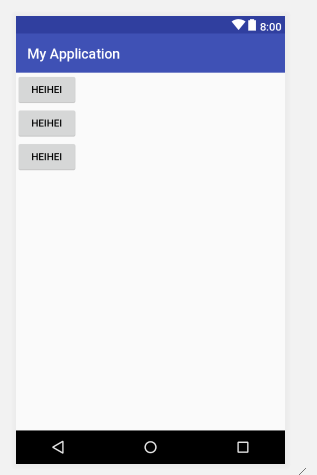
    <style name="buttonstyle">   //这个为自己添加的

        <item name="android:layout_width">wrap_content</item>

        <item name="android:layout_height">wrap_content</item>

        <item name="android:text">heihei</item>

    </style>

</resources>
/layout/Activity_main.xml
<LinearLayout xmlns:android="http://schemas.android.com/apk/res/android"

    xmlns:app="http://schemas.android.com/apk/res-auto"

    xmlns:tools="http://schemas.android.com/tools"

    android:layout_width="match_parent"

    android:layout_height="match_parent"

    android:orientation="vertical"

    tools:context="sample.android_serialport_api.myapplication.MainActivity">

  ...

    <Button

        style="@style/buttonstyle"   //在这里使用的style

        android:id="@+id/butto6"/>

    <Button

        style="@style/buttonstyle"

        android:id="@+id/butto7"/>

    <Button

        style="@style/buttonstyle"

        android:id="@+id/butto8"/>

</LinearLayout>
manifest.xml
<?xml version="1.0" encoding="utf-8"?>

<manifest xmlns:android="http://schemas.android.com/apk/res/android"

    package="sample.android_serialport_api.myapplication">

    <application

        android:allowBackup="true"

        android:icon="@mipmap/ic_launcher"

        android:label="@string/app_name"

        android:roundIcon="@mipmap/ic_launcher_round"

        android:supportsRtl="true"

        android:theme="@style/AppTheme">     //在这里使用的主题

        <activity android:name=".MainActivity">

            <intent-filter>

                <action android:name="android.intent.action.MAIN" />

                <category android:name="android.intent.category.LAUNCHER" />

            </intent-filter>

        </activity>

    </application>

</manifest>
样式styles和主题theme的更多相关文章
- 第十四章:样式(Style)和主题(Theme)
简介 Android的样式(Style)和主题(Theme)文件就好比WEB开发中的CSS一样,可以实现UI界面的风格统一管理,这和Windows平台的XAML格式(Silverlight.WPF)类 ...
- Android 自定义属性(attrs)、样式(Style)、主题(Theme)
Android 自定义属性(attrs).样式(Style).主题(Theme) https://www.cnblogs.com/dandre/p/4507024.html https://blog. ...
- Android 样式 (style) 和主题(theme)
转载:https://gold.xitu.io/post/58441c48c59e0d0056a30bc2 样式和主题 样式是指为 View 或窗口指定外观和格式的属性集合.样式可以指定高度.填充.字 ...
- Android样式(style)和主题(theme)
样式和主题 样式是指为 View 或窗口指定外观和格式的属性集合.样式可以指定高度.填充.字体颜色.字号.背景色等许多属性. 样式是在与指定布局的 XML 不同的 XML 资源中进行定义. Andro ...
- 20.(转)Android的样式(Style)和主题(Theme)
Android上的Style分为了两个方面: 1,Theme是针对窗体级别的,改变窗体样式: 2,Style是针对窗体元素级别的,改变指定控件或者Layout的样式. Android系统的themes ...
- android的样式(style)与主题(theme)
Android上的Style分为了两个方面: 1,Theme是针对窗体级别的,改变窗体样式: 2,Style是针对窗体元素级别的,改变指定控件或者Layout的样式. Android系统的themes ...
- 安卓样式Style和主题Theme
1. 区别 不过style是针对view来说的,比如TextView和EditText这些:而Theme必须针对整个activity或者整个application 2. 样式 创建一个样式,根元素 & ...
- Android下Notification,样式style,主题theme的功能实现
一:Notification 1.NotificationManager nm = (NotificationManager) getSystemService(NOTIFICATION_SERVIC ...
- 总结一下Android中主题(Theme)的正确玩法
在AndroidManifest.xml文件中有<application android:theme="@style/AppTheme">,其中的@style/AppT ...
随机推荐
- 7-Linq查询语言
本篇博客对应视频讲解 回顾 上一期我们讲解了字符编码相关的内容,大家应该去理解字符和字节之间的关系.并学习使用Encoding类进行编码之间的转换. 今天给大家讲的内容十分的重要,也是C#等语言比其他 ...
- iOS 错误:… is being deallocated while key value observing are still registered with it
这个错误从字面上来看就是有一个实例由于被observing而无法被释放. 具体原因可能是该对象添加了一个oberver.所以释放的时候要先取消observer. 具体方法是在 dealloc 方法中: ...
- 【Oracle 12c】最新CUUG OCP-071考试题库(59题)
59.(16-8)choose two: Which two statements are true regarding the USING and ON clauses in table joins ...
- 【ocp-12c】最新Oracle OCP-071考试题库(45题)
45.(9-16)choose the best answer: View the Exhibit and examine the data in the EMPLOYEES table. You w ...
- [ActionScript 3.0] 记录几个ByteArray 十六进制 String等相互转换的方法
/** * 通过hax数据返回ByteArray * @param hax 格式 "AA5A000100FF" */ private function getHax(hax:Str ...
- angular核心原理解析1:angular自启动过程
angularJS的源代码整体上来说是一个自执行函数,在angularJS加载完成后,就会自动执行了. angular源代码中: angular = window.angular || (window ...
- mxonline实战5,用户注册的验证码
github对应地址:验证码好麻烦 一. 安装 配置 1. pip install django-simple-captcha 2. add captcha to the INSTAL ...
- HTML02--引用样式、表格、列表、div布局
接上一篇“HTML01随笔” 1.使用样式: 内联样式:标签中使用style属性 内部样式:<head>使用<style type="text/css" ...
- 腾讯云服务器安装宝塔面板快速配置LNMP/LAMP网站系统
我们在选择购买腾讯云服务器之后,有部分用户肯定是用来建站用途的.毕竟云服务器的性能和功能比虚拟主机优秀很多.腾讯云服务器拥有香港.北京.广州.上海.美国等多个机房,可以安装Linux和Windows系 ...
- 【初探】java性能火焰图的生成
前言 开始之前,你需要准备的环境: Linux系统机器或者虚拟机一台,里面需要安装的软件:git.jdk.perl. 简单介绍: java性能分析火焰图的所做的事情就是能够分析出java程序运行期间存 ...