
在Swift中使用AutoLayout-VFL(AutoLayout-VFL笔记)
1.背景
iOS开发这几年, UI布局工具从frame到Masonry到SnapKit, sb和xib的AutoLayout也用过, 但是代码版本的AutoLayout倒是没用过, 最近一年, 频频发现一些三方UI组件布局的bug, 作为三方组件不可能去依赖另一个三方的kayout仓库, 所以只能通过代码的AutoLayout来解决. 好吧, 最近我忍不了了, 于是乎就开始学习代码版本的AutoLayout.
学习目标: 不追求用的多么熟练, 至少要会用, 能够看懂别人的布局代码是怎么回事, 能够找别人布局代码的问题出在哪里.
2.入门
首先需要知道, 在cocoa touch中, 有三种布局方式: Manual layout,Autoresizing,Autolayout, 这里要讲解的是第三个AutoLayout. 要想使用代码布局AutoLayout, 首先需要设置translatesAutoresizingMaskIntoConstraints=false, 原因见API注释:
/* By default, the autoresizing mask on a view gives rise to constraints that fully determine

     the view's position. This allows the auto layout system to track the frames of views whose

     layout is controlled manually (through -setFrame:, for example).

     When you elect to position the view using auto layout by adding your own constraints,

     you must set this property to NO. IB will do this for you.

     */

    @available(iOS 6.0, *)

    open var translatesAutoresizingMaskIntoConstraints: Bool // Default YES
如果不这样设置, 则在运行时候会得到如下的警告(没有编译警告):

3.第一种AutoLayout的实现方法
API中NSLayoutConstraint.init的方法如下定义如下所示:
/*

//NSLayoutConstraint初始化方法在API中的定义:

/* Create constraints explicitly.  Constraints are of the form "view1.attr1 = view2.attr2 * multiplier + constant"

     If your equation does not have a second view and attribute, use nil and NSLayoutAttributeNotAnAttribute.

     */

    public convenience init(item view1: Any, attribute attr1: NSLayoutAttribute, relatedBy relation: NSLayoutRelation, toItem view2: Any?, attribute attr2: NSLayoutAttribute, multiplier: CGFloat, constant c: CGFloat)

item:            指定约束左边的视图view1

attribute:      指定view1的属性attr1,具体见上述枚举值。

relatedBy:     指定左右两边的视图的关系relation,具体见上述枚举值。

toItem:         指定约束右边的视图view2 (可以设置为nil,则attribute=.attribute)

attribute:      指定view2的属性attr2,具体见上述枚举值。

multiplier:     指定一个与view2属性相乘的乘数multiplier

constant:      指定一个与view2属性相加的浮点数constant

*/

public enum NSLayoutRelation : Int {

    case lessThanOrEqual

    case equal

    case greaterThanOrEqual

}

public enum NSLayoutAttribute : Int {

    case left            //左边

    case right

    case top            //顶部

    case bottom

    case leading       //前面

    case trailing        //后面

    case width

    case height

    case centerX

    case centerY

    case lastBaseline

    @available(iOS 8.0, *)

    case firstBaseline

    @available(iOS 8.0, *)

    case leftMargin

    @available(iOS 8.0, *)

    case rightMargin

    @available(iOS 8.0, *)

    case topMargin

    @available(iOS 8.0, *)

    case bottomMargin

    @available(iOS 8.0, *)

    case leadingMargin

    @available(iOS 8.0, *)

    case trailingMargin

    @available(iOS 8.0, *)

    case centerXWithinMargins

    @available(iOS 8.0, *)

    case centerYWithinMargins

    case notAnAttribute

}
left和leading的不同之处, 详见stackoverflow: Difference between NSLayoutAttributeLeft vs NSLayoutAttributeLeading
**一个简单的,设置view约束的示例: **
let leftLayout = NSLayoutConstraint(item: blueView,

                                    attribute: .left,

                                    relatedBy: .equal,

                                    toItem: view,

                                    attribute: .left,

                                    multiplier: 1,

                                    constant: 20)

let topLayout = NSLayoutConstraint(item: blueView,

                                   attribute: .top,

                                   relatedBy: .equal,

                                   toItem: redView,

                                   attribute: .bottom,

                                   multiplier: 1,

                                   constant: 30)

let heightLayout = NSLayoutConstraint(item: blueView,

                                      attribute: .height,

                                      relatedBy: .equal,

                                      toItem: nil,

                                      attribute: .notAnAttribute,

                                      multiplier: 1,

                                      constant: 100)

let rightLayout = NSLayoutConstraint(item: blueView,

                                     attribute: .right,

                                     relatedBy: .equal,

                                     toItem: view,

                                     attribute: .right,

                                     multiplier: 1,

                                     constant: -10)

view.addConstraints([leftLayout, topLayout, heightLayout, rightLayout])
毋庸置疑, NSLayoutConstraint非常强大, 但是代码量也同样非常大, 简单一个view的约束就要写将近30行代码. 其实cocoa touch团队已经想到了这点, 他们为我们提供了另一种更简单的方法, 那就是VFL !
4.第二种实现AutoLayout的方法: VFL(Visual Format Language)
VFL是苹果公司为了简化autolayout的编码而推出的抽象语言。
4.1 了解VFL
VFL(Visual Format Language): “可视化格式语言”, 苹果公司为了简化autolayout的编码而推出的抽象语言.
基本语法表
| 功能 | 表达式 |
|---|---|
| 水平方向 | H: |
| 垂直方向 | V: |
| Views | [view] |
| 关系 | >=,==,<= |
| SuperView | | |
| 空间,间隙 - | - |
| 优先级 | @value |
举几个列子:
例子1: H:|-20-[view1(50)]-11-[view2]-20-|
设置水平方向的布局, view1距离superView左边20个单位, view1的宽度是50, view1的右边是view2, view1和view2的距离是11个单位长度, view2距离superView右边20个单位长度.
列子2:H:[wideView(>=60@700)]
wideView宽度大于等于60point,该约束条件优先级为700(优先级最大值为1000,优先级越高的约束条件越先被满足)
`例子3:V:|-20-[redBox(50)]-20-[yellowBox(==redBox)]``
垂直方向上, redBox距离上面20个单位, redBox的高度是50个单位, redBox右边20个单位之外是yellowBox, yellowBox的高度和redBox的高度相等.
4.2 代码示例
NSLayoutConstraint.constraints在API中的定义如下所示,
/* Create an array of constraints using an ASCII art-like visual format string.

     */

    open class func constraints(withVisualFormat format: String, options opts: NSLayoutFormatOptions = [], metrics: [String : Any]?, views: [String : Any]) -> [NSLayoutConstraint]

    /* This macro is a helper for making view dictionaries for +constraintsWithVisualFormat:options:metrics:views:.

     NSDictionaryOfVariableBindings(v1, v2, v3) is equivalent to [NSDictionary dictionaryWithObjectsAndKeys:v1, @"v1", v2, @"v2", v3, @"v3", nil];

     */

format:VFL语句

opts:约束类型

metrics:VFL语句中用到的具体数值

views:VFL语句中用到的控件

创建一个字典(内部包含VFL语句中用到的控件)的快捷宏定义

NSDictionaryOfVariableBindings(...)
如下是设置redView和greenView的一个代码示例, VFL支持同时设置多个view的约束, 也支持设置相对约束.
let redView = UIView()

redView.backgroundColor = UIColor.red

redView.translatesAutoresizingMaskIntoConstraints = false

let blueView = UIView()

blueView.backgroundColor = UIColor.blue

blueView.translatesAutoresizingMaskIntoConstraints = false

view.addSubview(redView)

view.addSubview(blueView)

 //设置redView的constraints

view.addConstraints(NSLayoutConstraint.constraints(withVisualFormat: "H:|-10-[view(200)]",

                                                   options: NSLayoutFormatOptions(),

                                                   metrics: nil,

                                                   views: ["view": redView]))

view.addConstraints(NSLayoutConstraint.constraints(withVisualFormat: "V:|-20-[view(200)]",

                                                   options: NSLayoutFormatOptions(),

                                                   metrics: nil,

                                                   views: ["view": redView]))

//设置blueView的约束, 此时blueView的约束是相对于redView来设置

//实际上, 可以同时设置redView和blueView的约束, 这里拆开是为了测试VFL支持相对约束

let hMetrics = ["middleSpace": 10, "rightSpace": 20]

let hViews = ["redView": redView, "blueView": blueView]

let hVFL = "H:[redView]-middleSpace-[blueView]-rightSpace-|"

view.addConstraints(NSLayoutConstraint.constraints(withVisualFormat: hVFL,

                                                   options: NSLayoutFormatOptions()

                                                   metrics: hMetrics,

                                                   views: hViews))

let vMetrics = ["topSpace": 10, "height": 80]

let vViews = hViews

let vVFL = "V:[redView]-topSpace-[blueView(height)]"

view.addConstraints(NSLayoutConstraint.constraints(withVisualFormat: vVFL,

                                                   options: NSLayoutFormatOptions()

                                                   metrics: vMetrics,

                                                   views: vViews))
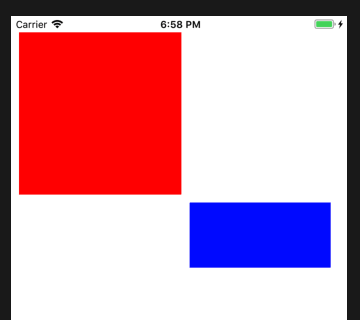
4.3 使用规则(来自网络)
|: 表示父视图

-:表示距离

V: :表示垂直

H: :表示水平

= :表示视图间距、宽度和高度必须大于或等于某个值

<= :表示视图间距、宽度和高度必须小宇或等于某个值

== :表示视图间距、宽度或者高度必须等于某个值

@ :>=、<=、== 限制 最大为 1000

|-[view]-|: 视图处在父视图的左右边缘内

|-[view] : 视图处在父视图的左边缘

|[view] : 视图和父视图左边对齐

-[view]- : 设置视图的宽度高度

|-30.0-[view]-30.0-|: 表示离父视图 左右间距 30

[view(200.0)] : 表示视图宽度为 200.0

|-[view(view1)]-[view1]-| :表示视图宽度一样,并且在父视图左右边缘内

V:|-[view(50.0)] : 视图高度为 50

V:|-(==padding)-[imageView]->=0-[button]-(==padding)-| : 表示离父视图的距离

为Padding,这两个视图间距必须大于或等于0并且距离底部父视图为 padding。

[wideView(>=60@700)] :视图的宽度为至少为60 不能超过 700

如果没有声明方向默认为 水平 V:
转载请注明出处!
在Swift中使用AutoLayout-VFL(AutoLayout-VFL笔记)的更多相关文章
- Swift中的Masonry第三方库——SnapKit
在OC开发时我常用一个名叫Masonry的第三方Autolayout库,在转Swift后发现虽然Swift可以混编OC,但总感觉有些麻烦,在Github上发现了这个叫做SnapKit的第三方库,发现使 ...
- Swift中NSDictionaryOfVariableBindings的替代方案
有日子没写东西了,抽点时间练练笔头子,业精于勤荒于嬉~ 近期从OC转到了Swift2,因为Swift一直没有正经学正经用,所以对这门语言的理解基本算是个球...不得不感慨苹果的动作之快.Swift还没 ...
- swift 中关于open ,public ,fileprivate,private ,internal,修饰的说明
关于 swift 中的open ,public ,fileprivate,private, internal的区别 以下按照修饰关键字的访问约束范围 从约束的限定范围大到小的排序进行说明 open,p ...
- 阿里巴巴最新开源项目 - [HandyJSON] 在Swift中优雅地处理JSON
项目名称:HandyJSON 项目地址:https://github.com/alibaba/handyjson 背景 JSON是移动端开发常用的应用层数据交换协议.最常见的场景便是,客户端向服务端发 ...
- Swift中的可选链与内存管理(干货系列)
干货之前:补充一下可选链(optional chain) class A { var p: B? } class B { var p: C? } class C { func cm() -> S ...
- 在Swift中实现单例方法
在写Swift的单例方法之前可以温习一下Objective-C中单例的写法: + (instancetype)sharedSingleton{ static id instance; static d ...
- [翻译]理解Swift中的Optional
原文出处:Understanding Optionals in Swift 苹果新的Swift编程语言带来了一些新的技巧,能使软件开发比以往更方便.更安全.然而,一个很有力的特性Optional,在你 ...
- 窥探Swift之使用Web浏览器编译Swift代码以及Swift中的泛型
有的小伙伴会问:博主,没有Mac怎么学Swift语言呢,我想学Swift,但前提得买个Mac.非也,非也.如果你想了解或者初步学习Swift语言的话,你可以登录这个网站:http://swiftstu ...
- swift 中指针的使用UnsafeMutablePointer
在swift中已经弱化了指针的使用,可以这么使用 let s: NSRange = NSMakeRange(, ) let at = UnsafeMutablePointer<NSRange&g ...
随机推荐
- CSS选择器:#id和.class中间有空格和无空格的区别
相信大家都知道 .class1 .class2 和 .class1.class2 是两种不同的选择规则,但具体怎样不同呢? 首先中间有空格的情况:是选择到.class1类下的.class2类子节点,即 ...
- 转:使用VS Code断点调试PHP
使用VS Code断点调试PHP vs code 使用一款杰出的轻量级代码编辑器,其中的插件工具不胜枚举而且还在不断增加.使用 vs code 调试 PHP 代码更是方便简洁,下面我们来一起看一下. ...
- 【MFC】CHtmlView或WebBrowser禁止脚本错误提示
错误展示: 解决办法: 1.CHtmlView类或子类 CHtmlView::SetSilent(TRUE); 2.IWebBrowser2控件 IWebBrowser2::put_Silent(TR ...
- QT5.9 新特性与版本回顾
原文链接: http://blog.qt.io/blog/2017/05/31/qt-5-9-released 翻译内容如下,采用的是第三方某在线翻译软件,所以有些地方不是太精确,纵然大吉做了一定的调 ...
- 路飞学城知识点4之Django contenttypes 应用
Django contenttypes 应用 contenttypes 是Django内置的一个应用,可以追踪项目中所有app和model的对应关系,并记录在ContentType表中. 每当我们创建 ...
- 常用sql commands以及mysql问题解决日志
mysql workbench常用命令快捷键 ctrl+T ->创建新的sql query tab ctrl+shift+enter->执行当前的sql命令 https://dev.mys ...
- [翻译] LazyFadeInView 渐入显示text文本
LazyFadeInView 渐入显示text文本 https://github.com/itouch2/LazyFadeInView LazyFadeInView is a cool way to ...
- php自动载方法有两种.
但有一问题没有解决, 就是在include前判断文件是否存在的问题. 1 2 3 4 5 6 7 8 9 10 11 12 13 set_include_path('aa' . PATH_SEPARA ...
- LNMP-day2-进阶
部署LNMP环境 http://www.cnblogs.com/wazy/p/8386493.html 安装部署wordpress #下载wordpress [root@locahost downlo ...
- kafka部分重要参数配置-broker端参数
broker端参数主要在config/server.properties目录下设置: 启动命令:nohup ./kafka-server-start.sh -daemon ../config/serv ...