
39XML文档类
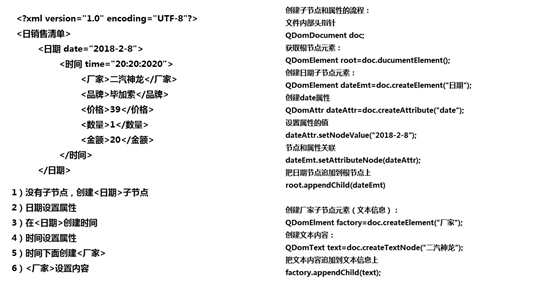
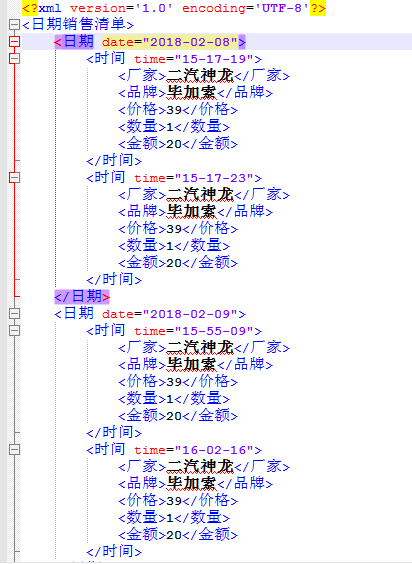
Xml源代码
domxml.h
#ifndef DOMXML_H
#define DOMXML_H
#include <QString>
#include <QStringList>
#include <QDomDocument> //文件
#include <QDomProcessingInstruction> //头部
#include <QDomElement> //元素
#include <QDomText>
class DomXML
{
public:
DomXML();
//创建空的XML
static void CreateXML(QString strFilePath);
//搭建XML结构
static void AppendXML(QString strFilePath,QStringList list);
//写XML
static void WriteXML(QDomDocument &doc,QDomElement &root,QStringList list);
//写XML
static void ReadXML(QString strFilePath,
QStringList &fList,
QStringList &bList,
QStringList &pList,
QStringList &nList,
QStringList &tList
);
};
#endif // DOMXML_H
domxml.cpp
#include "domxml.h"
#include <QFile>
#include <QTextStream>
#include <QDateTime>
#include <QDebug>
#define cout qDebug()<<"["<<__FILE__<<":"<<__LINE__<<"]"
DomXML::DomXML()
{
}
//创建空的xml文件
void DomXML::CreateXML(QString strFilePath)
{
//打开文件
QFile file(strFilePath);
if(file.exists())
{
cout<<"FilePath exists";
return ;
}
else
{
bool bIsOk=file.open(QIODevice::WriteOnly);
if(bIsOk)
{//打开文件成功
//创建xml文档对象
QDomDocument doc;
//创建xml头部格式<?xml version="1.0" encoding="UTF-8"?>
QDomProcessingInstruction ins;
ins=doc.createProcessingInstruction("xml","version=\"1.0\" encoding=\"UTF-8\"");
//追加元素
doc.appendChild(ins);
//根节点元素
QDomElement root=doc.createElement("日期销售清单");
doc.appendChild(root);
//保存
QTextStream stream(&file);//文本流关联文件
doc.save(stream,4); //4代表缩进4个字符
}
else
{//文件打开失败
cout<<"open file error";
return ;
}
}
file.close();
}
//搭建XML格式
void DomXML::AppendXML(QString strFilePath,QStringList list)
{
//打开文件
QFile file(strFilePath);
bool bIsOk=file.open(QIODevice::ReadOnly);
if(bIsOk)
{
//file和xml文档对象关联
QDomDocument doc;
bIsOk=doc.setContent(&file);
if(bIsOk)
{//关联成功
file.close();
//根节点元元素
QDomElement root=doc.documentElement();
//获取当地时间
QDateTime date=QDateTime::currentDateTime();
QString strDate=date.toString("yyyy-MM-dd");//2018-2-8
//qDebug()<<strDate;
//判断根节点下有没有子节点
if(root.hasChildNodes())
{
//查找最后一个子节点
QDomElement lastEmt=root.lastChildElement();
//日期相同,同一天不创建新节点
if(lastEmt.attribute("date")==strDate)
{//相同直接写入
WriteXML(doc,lastEmt,list);
}
else
{//不相同创建新节点
//创建日期子节点元素
QDomElement dateEmt=doc.createElement("日期");
//创建date属性
QDomAttr dateAttr=doc.createAttribute("date");
//设置属性的值
dateAttr.setNodeValue(strDate);
//节点和属性关联
dateEmt.setAttributeNode(dateAttr);
//把日期节点追加到根节点
root.appendChild(dateEmt);
WriteXML(doc,dateEmt,list);
}
}
else
{//没有子节点
//创建日期子节点元素
QDomElement dateEmt=doc.createElement("日期");
//创建date属性
QDomAttr dateAttr=doc.createAttribute("date");
//设置属性的值
dateAttr.setNodeValue(strDate);
//节点和属性关联
dateEmt.setAttributeNode(dateAttr);
//把日期节点追加到根节点
root.appendChild(dateEmt);
WriteXML(doc,dateEmt,list);
}
bIsOk=file.open(QIODevice::WriteOnly);
if(bIsOk)
{
//保存
QTextStream stream(&file);//文本流关联文件
doc.save(stream,4); //4代表缩进4个字符
}
file.close();
}
else
{
cout<<"setContent error";
return ;
}
}
else
{
cout<<"open file error";
return ;
}
}
//写XML
void DomXML::WriteXML(QDomDocument &doc,QDomElement &root,QStringList list)
{
//获取当地时间
QDateTime time=QDateTime::currentDateTime();
QString strTime=time.toString("hh-mm-ss");//20:20:20
//创建时间节点元素
QDomElement timeEmt=doc.createElement("时间");
//创建元素属性
QDomAttr timeAttr=doc.createAttribute("time");
//设置属性的值
timeAttr.setNodeValue(strTime);
//时间节点与属性相关联
timeEmt.setAttributeNode(timeAttr);
//将时间节点追加到日期节点后
root.appendChild(timeEmt);
QDomElement factory=doc.createElement("厂家");
QDomElement brand=doc.createElement("品牌");
QDomElement price=doc.createElement("价格");
QDomElement num=doc.createElement("数量");
QDomElement total=doc.createElement("金额");
//设置文本内容并追加到前节点元素
QDomText text=doc.createTextNode(list.at(0));
factory.appendChild(text);
text=doc.createTextNode(list.at(1));
brand.appendChild(text);
text=doc.createTextNode(list.at(2));
price.appendChild(text);
text=doc.createTextNode(list.at(3));
num.appendChild(text);
text=doc.createTextNode(list.at(4));
total.appendChild(text);
//将厂家、价格等节点追加到哦时间节点
timeEmt.appendChild(factory);
timeEmt.appendChild(brand);
timeEmt.appendChild(price);
timeEmt.appendChild(num);
timeEmt.appendChild(total);
}
//读XML
void DomXML::ReadXML(QString strFilePath,QStringList &fList,QStringList &bList,QStringList &pList,QStringList &nList,QStringList &tList)
{
QFile file(strFilePath);
bool bIsOk=file.open(QIODevice::ReadOnly);
QDateTime date=QDateTime::currentDateTime();
QString strDate=date.toString("yyyy-MM-dd");
if(bIsOk)
{
QDomDocument doc;
bIsOk=doc.setContent(&file);
if(bIsOk)
{
QDomElement root=doc.documentElement();
//是否有子节点
if(root.hasChildNodes())
{
QDomElement lastEmt=root.lastChildElement();
if(lastEmt.attribute("date")==strDate)
{//找到当天日期下所有时间子节点
QDomNodeList list=lastEmt.childNodes();
for(int i=0;i<list.size();++i)
{
QDomNodeList subList=list.at(i).toElement().childNodes();
//厂家
QString factory=subList.at(0).toElement().text();
fList.append(factory);
//品牌
QString brand=subList.at(1).toElement().text();
bList.append(brand);
//价格
QString price=subList.at(2).toElement().text();
pList.append(price);
//数量
QString num=subList.at(3).toElement().text();
nList.append(num);
//金额
QString total=subList.at(4).toElement().text();
tList.append(total);
}
}
else
{
qDebug()<<"没有当天日期";
return ;
}
}
}
}
else
{
cout<<"open file error";
}
}
测试调用部分
mainwindow.cpp
#include "mainwindow.h"
#include "ui_mainwindow.h"
#include <QStringList>
#include <QDebug>
MainWindow::MainWindow(QWidget *parent) :
QMainWindow(parent),
ui(new Ui::MainWindow)
{
ui->setupUi(this);
QStringList list;
list<<"二汽神龙"<<"毕加索"<<"39"<<"1"<<"20";
DomXML::CreateXML("../demo.xml");
DomXML::AppendXML("../demo.xml",list);
QStringList fList;
QStringList bList;
QStringList pList;
QStringList nList;
QStringList tList;
DomXML::ReadXML("../demo.xml",fList,bList,pList,nList,tList);
for(int i=0;i<fList.size();++i)
{
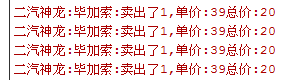
QString str=QString("%1:%2:卖出了%3,单价:%4总价:%5")
.arg(fList.at(i))
.arg(bList.at(i))
.arg(nList.at(i))
.arg(pList.at(i))
.arg(tList.at(i));
qDebug()<<str.toUtf8().data();
}
}
MainWindow::~MainWindow()
{
delete ui;
}
39XML文档类的更多相关文章
- C++MFC编程笔记day05 文档类-单文档和多文档应用程序
文档类 1 相关类 CDocument类-父类是CCmdTarget类,所以,文档类也能够处理菜单等 命令消息. 作用保存和管理数据. 注意事项:怎样解决断言错 ...
- as3 文档类引用
/**文档类引用**/ public static var main:CoverMain; public function CoverMain() { main=this; }
- VS2010 MFC中 在FormView派生类里获取文档类指针的方法
经过苦苦调试,今晚终于解决了一个大问题. 我想要实现的是:在一个FormView的派生类里获取到文档类的指针. 但是出现问题:试了很多办法,始终无法获取到. 终于,此问题在我不懈地调试加尝试下解决了. ...
- 如何通过AS3加载外部SWF文件,调用外部文件文档类的方法?
一个Flash中通过AS3代码的Loader对象加载另一个SWF文件,并访问其中的文档类中的方法. 简单示例: 主文件:Main.fla, Main.as 被调用的文件:called.swf, Cal ...
- MFC框架类、文档类、视图类相互访问的方法
1.获取应用程序指针 CMyApp* pApp=(CMyApp*)AfxGetApp(); 2.获取主框架指针 CWinApp 中的公有成员变量 m_pMainWnd 就是主框架的指针 CMainFr ...
- C#通过调用WinApi打印PDF文档类,服务器PDF打印、IIS PDF打印
其他网站下载来的类,可以用于Winform.Asp.Net,用于服务器端PDF或其他文件打印. 直接上代码: using System; using System.Collections.Generi ...
- Swagger-UI 基于REST的API测试/文档类插件
现在多数的项目开发中,网站和移动端都需要进行数据交互和对接,这少不了使用REST编写API接口这种场景.例如我目前的工作,移动端交由了另一团队开发,不同开发小组之间就需要以规范和文档作为标准和协作基础 ...
- ES系列四、ES6.3常用api之文档类api
1.Index API: 创建并建立索引 PUT twitter/tweet/ { "user" : "kimchy", "post_date&quo ...
- VC2010 MFC文档类菜单快捷键无法加载问题
问题1. 在菜单中项中输入&Run\tF5, 运行显示Run,而不是Run F5. 问题2.在Accelerator中绑定了快捷键,但运行程序不起作用. 以上2中问题在VC++2008和VC+ ...
随机推荐
- ajax异步加载回跳定位
1)首先,问题是这样的:page1在一个滚动到页面底部加载更新的函数(功能),当页面滚动了第二页(或更多页)时,点击链接跳转到了其他页面(page2),在page2有返回按钮,当从page2返回pag ...
- linux 统计命令执行后的行数或者统计目录下文件数目
ls |wc 是统计你这个目录下的文件数目.ls |wc -l是输出第一个结果即31即文件的数目.
- 查询软件和硬件列表清单[将文章里代码另存为 list.vbs,双击运行就会出现一个html页面]
'==========================================================================' Name: 查询软件和硬件列表清单' 不支持W ...
- 如何在HTML中播放flash
随着html的风靡,改变了之前前端的许多条条框框,而video的出现使flash仿佛都要退出历史的舞台了,但是h5也会出现以下局限性,比如说,在一些不支持h5的浏览器上,此处省略一万只草泥马..... ...
- linux配置免密登录
例如: $ ssh -i ~/ec2.pem ubuntu@12.34.56.78 首先确定你可以以密码的形式连接远程服务器,也可以创建一个非超级管理员用户,并增加 sudo 权限. $ sudo s ...
- LNMP一键安装包phpMyAdmin无法正常登录,提示:您的Session已过期,请再次登录。
找到文件: /usr/local/php/etc/php.ini 搜索: session.auto_start = 0 修改为 session.auto_start = 1 保存即可!
- Ubuntu adb devices :???????????? no permissions (verify udev rules) 解决方法
Ubuntu adb devices :???????????? no permissions (verify udev rules) 解决方法http://www.cnblogs.com/cat-l ...
- MACOS配置VIM成简单IDE傻瓜式操作
零.参考文献: https://www.jianshu.com/p/f0513d18742a 一.安照我的配置:保存文件 " Configuration file for vim " ...
- C++ 初始化函数的实现
http://www.cppblog.com/xlshcn/archive/2007/11/21/37088.aspx
- angular -- 自定义指令和模板
angular 可以自定义一些指令,来简化我们前端的工作量. 第一种:简单指令示例: <h3>自定义指令</h3> <sheng></sheng> &l ...