
39XML文档类
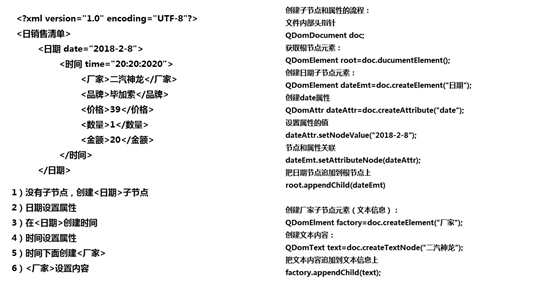
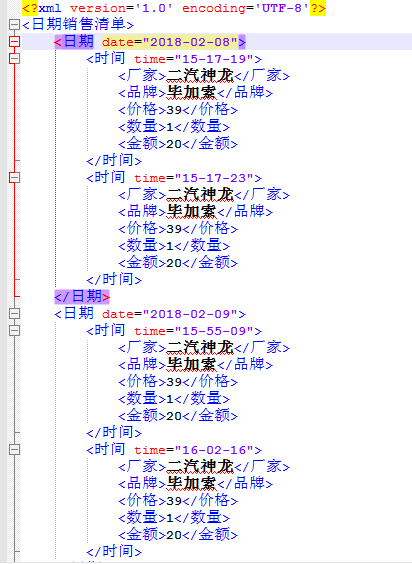
Xml源代码
domxml.h
#ifndef DOMXML_H
#define DOMXML_H
#include <QString>
#include <QStringList>
#include <QDomDocument> //文件
#include <QDomProcessingInstruction> //头部
#include <QDomElement> //元素
#include <QDomText>
class DomXML
{
public:
DomXML();
//创建空的XML
static void CreateXML(QString strFilePath);
//搭建XML结构
static void AppendXML(QString strFilePath,QStringList list);
//写XML
static void WriteXML(QDomDocument &doc,QDomElement &root,QStringList list);
//写XML
static void ReadXML(QString strFilePath,
QStringList &fList,
QStringList &bList,
QStringList &pList,
QStringList &nList,
QStringList &tList
);
};
#endif // DOMXML_H
domxml.cpp
#include "domxml.h"
#include <QFile>
#include <QTextStream>
#include <QDateTime>
#include <QDebug>
#define cout qDebug()<<"["<<__FILE__<<":"<<__LINE__<<"]"
DomXML::DomXML()
{
}
//创建空的xml文件
void DomXML::CreateXML(QString strFilePath)
{
//打开文件
QFile file(strFilePath);
if(file.exists())
{
cout<<"FilePath exists";
return ;
}
else
{
bool bIsOk=file.open(QIODevice::WriteOnly);
if(bIsOk)
{//打开文件成功
//创建xml文档对象
QDomDocument doc;
//创建xml头部格式<?xml version="1.0" encoding="UTF-8"?>
QDomProcessingInstruction ins;
ins=doc.createProcessingInstruction("xml","version=\"1.0\" encoding=\"UTF-8\"");
//追加元素
doc.appendChild(ins);
//根节点元素
QDomElement root=doc.createElement("日期销售清单");
doc.appendChild(root);
//保存
QTextStream stream(&file);//文本流关联文件
doc.save(stream,4); //4代表缩进4个字符
}
else
{//文件打开失败
cout<<"open file error";
return ;
}
}
file.close();
}
//搭建XML格式
void DomXML::AppendXML(QString strFilePath,QStringList list)
{
//打开文件
QFile file(strFilePath);
bool bIsOk=file.open(QIODevice::ReadOnly);
if(bIsOk)
{
//file和xml文档对象关联
QDomDocument doc;
bIsOk=doc.setContent(&file);
if(bIsOk)
{//关联成功
file.close();
//根节点元元素
QDomElement root=doc.documentElement();
//获取当地时间
QDateTime date=QDateTime::currentDateTime();
QString strDate=date.toString("yyyy-MM-dd");//2018-2-8
//qDebug()<<strDate;
//判断根节点下有没有子节点
if(root.hasChildNodes())
{
//查找最后一个子节点
QDomElement lastEmt=root.lastChildElement();
//日期相同,同一天不创建新节点
if(lastEmt.attribute("date")==strDate)
{//相同直接写入
WriteXML(doc,lastEmt,list);
}
else
{//不相同创建新节点
//创建日期子节点元素
QDomElement dateEmt=doc.createElement("日期");
//创建date属性
QDomAttr dateAttr=doc.createAttribute("date");
//设置属性的值
dateAttr.setNodeValue(strDate);
//节点和属性关联
dateEmt.setAttributeNode(dateAttr);
//把日期节点追加到根节点
root.appendChild(dateEmt);
WriteXML(doc,dateEmt,list);
}
}
else
{//没有子节点
//创建日期子节点元素
QDomElement dateEmt=doc.createElement("日期");
//创建date属性
QDomAttr dateAttr=doc.createAttribute("date");
//设置属性的值
dateAttr.setNodeValue(strDate);
//节点和属性关联
dateEmt.setAttributeNode(dateAttr);
//把日期节点追加到根节点
root.appendChild(dateEmt);
WriteXML(doc,dateEmt,list);
}
bIsOk=file.open(QIODevice::WriteOnly);
if(bIsOk)
{
//保存
QTextStream stream(&file);//文本流关联文件
doc.save(stream,4); //4代表缩进4个字符
}
file.close();
}
else
{
cout<<"setContent error";
return ;
}
}
else
{
cout<<"open file error";
return ;
}
}
//写XML
void DomXML::WriteXML(QDomDocument &doc,QDomElement &root,QStringList list)
{
//获取当地时间
QDateTime time=QDateTime::currentDateTime();
QString strTime=time.toString("hh-mm-ss");//20:20:20
//创建时间节点元素
QDomElement timeEmt=doc.createElement("时间");
//创建元素属性
QDomAttr timeAttr=doc.createAttribute("time");
//设置属性的值
timeAttr.setNodeValue(strTime);
//时间节点与属性相关联
timeEmt.setAttributeNode(timeAttr);
//将时间节点追加到日期节点后
root.appendChild(timeEmt);
QDomElement factory=doc.createElement("厂家");
QDomElement brand=doc.createElement("品牌");
QDomElement price=doc.createElement("价格");
QDomElement num=doc.createElement("数量");
QDomElement total=doc.createElement("金额");
//设置文本内容并追加到前节点元素
QDomText text=doc.createTextNode(list.at(0));
factory.appendChild(text);
text=doc.createTextNode(list.at(1));
brand.appendChild(text);
text=doc.createTextNode(list.at(2));
price.appendChild(text);
text=doc.createTextNode(list.at(3));
num.appendChild(text);
text=doc.createTextNode(list.at(4));
total.appendChild(text);
//将厂家、价格等节点追加到哦时间节点
timeEmt.appendChild(factory);
timeEmt.appendChild(brand);
timeEmt.appendChild(price);
timeEmt.appendChild(num);
timeEmt.appendChild(total);
}
//读XML
void DomXML::ReadXML(QString strFilePath,QStringList &fList,QStringList &bList,QStringList &pList,QStringList &nList,QStringList &tList)
{
QFile file(strFilePath);
bool bIsOk=file.open(QIODevice::ReadOnly);
QDateTime date=QDateTime::currentDateTime();
QString strDate=date.toString("yyyy-MM-dd");
if(bIsOk)
{
QDomDocument doc;
bIsOk=doc.setContent(&file);
if(bIsOk)
{
QDomElement root=doc.documentElement();
//是否有子节点
if(root.hasChildNodes())
{
QDomElement lastEmt=root.lastChildElement();
if(lastEmt.attribute("date")==strDate)
{//找到当天日期下所有时间子节点
QDomNodeList list=lastEmt.childNodes();
for(int i=0;i<list.size();++i)
{
QDomNodeList subList=list.at(i).toElement().childNodes();
//厂家
QString factory=subList.at(0).toElement().text();
fList.append(factory);
//品牌
QString brand=subList.at(1).toElement().text();
bList.append(brand);
//价格
QString price=subList.at(2).toElement().text();
pList.append(price);
//数量
QString num=subList.at(3).toElement().text();
nList.append(num);
//金额
QString total=subList.at(4).toElement().text();
tList.append(total);
}
}
else
{
qDebug()<<"没有当天日期";
return ;
}
}
}
}
else
{
cout<<"open file error";
}
}
测试调用部分
mainwindow.cpp
#include "mainwindow.h"
#include "ui_mainwindow.h"
#include <QStringList>
#include <QDebug>
MainWindow::MainWindow(QWidget *parent) :
QMainWindow(parent),
ui(new Ui::MainWindow)
{
ui->setupUi(this);
QStringList list;
list<<"二汽神龙"<<"毕加索"<<"39"<<"1"<<"20";
DomXML::CreateXML("../demo.xml");
DomXML::AppendXML("../demo.xml",list);
QStringList fList;
QStringList bList;
QStringList pList;
QStringList nList;
QStringList tList;
DomXML::ReadXML("../demo.xml",fList,bList,pList,nList,tList);
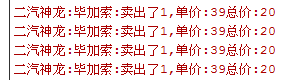
for(int i=0;i<fList.size();++i)
{
QString str=QString("%1:%2:卖出了%3,单价:%4总价:%5")
.arg(fList.at(i))
.arg(bList.at(i))
.arg(nList.at(i))
.arg(pList.at(i))
.arg(tList.at(i));
qDebug()<<str.toUtf8().data();
}
}
MainWindow::~MainWindow()
{
delete ui;
}
39XML文档类的更多相关文章
- C++MFC编程笔记day05 文档类-单文档和多文档应用程序
文档类 1 相关类 CDocument类-父类是CCmdTarget类,所以,文档类也能够处理菜单等 命令消息. 作用保存和管理数据. 注意事项:怎样解决断言错 ...
- as3 文档类引用
/**文档类引用**/ public static var main:CoverMain; public function CoverMain() { main=this; }
- VS2010 MFC中 在FormView派生类里获取文档类指针的方法
经过苦苦调试,今晚终于解决了一个大问题. 我想要实现的是:在一个FormView的派生类里获取到文档类的指针. 但是出现问题:试了很多办法,始终无法获取到. 终于,此问题在我不懈地调试加尝试下解决了. ...
- 如何通过AS3加载外部SWF文件,调用外部文件文档类的方法?
一个Flash中通过AS3代码的Loader对象加载另一个SWF文件,并访问其中的文档类中的方法. 简单示例: 主文件:Main.fla, Main.as 被调用的文件:called.swf, Cal ...
- MFC框架类、文档类、视图类相互访问的方法
1.获取应用程序指针 CMyApp* pApp=(CMyApp*)AfxGetApp(); 2.获取主框架指针 CWinApp 中的公有成员变量 m_pMainWnd 就是主框架的指针 CMainFr ...
- C#通过调用WinApi打印PDF文档类,服务器PDF打印、IIS PDF打印
其他网站下载来的类,可以用于Winform.Asp.Net,用于服务器端PDF或其他文件打印. 直接上代码: using System; using System.Collections.Generi ...
- Swagger-UI 基于REST的API测试/文档类插件
现在多数的项目开发中,网站和移动端都需要进行数据交互和对接,这少不了使用REST编写API接口这种场景.例如我目前的工作,移动端交由了另一团队开发,不同开发小组之间就需要以规范和文档作为标准和协作基础 ...
- ES系列四、ES6.3常用api之文档类api
1.Index API: 创建并建立索引 PUT twitter/tweet/ { "user" : "kimchy", "post_date&quo ...
- VC2010 MFC文档类菜单快捷键无法加载问题
问题1. 在菜单中项中输入&Run\tF5, 运行显示Run,而不是Run F5. 问题2.在Accelerator中绑定了快捷键,但运行程序不起作用. 以上2中问题在VC++2008和VC+ ...
随机推荐
- Android开发相关
在用红米4X进行真机调试的时候,出现此问题,问题描述如下: DELETE_FAILED_INTERNAL_ERROR Error while Installing APK 一直调试不成功,百度了下,因 ...
- 微信jssdk批量添加卡券接口(踩坑经验)
1)首先是官方接口文档: 1.批量添加卡券接口:https://mp.weixin.qq.com/wiki?action=doc&id=mp1421141115&t=0.0861973 ...
- linux--解决oracle sqlplus 中上下左右backspace不能用
1. 解决不能backspace 方法1: stty erase ^h 在oracle用户下:在用户环境配置文件.bash_profile中加入如下语句 stty erase ^h 方法2:在sec ...
- 使用keytool生成密钥对
1.首先要用KeyTool工具来生成私匙库:(-alias别名 –validity 3650表示10年有效) keytool -genkey -alias privatekey -keystore p ...
- Linux wc 命令
wc命令可以用来统计文件的行数 .单词数 .字符数,用法如下: [root@localhost ~]$ wc 1.txt # 统计文件的行数.单词数.字符数 2 4 24 1.txt [root@lo ...
- jsonObject的一些方法
1.从前端传过来的数字,默认是Integer类型不能直接用Long接收 错误写法: 报错:Exception in thread "main" java.lang.ClassCas ...
- php面向对象基础概念(封装)
封装性是面象对象编程中的三大特性之一,封装性就是把对象的属性和服务结合成一个独立的相同单位,并尽可能隐蔽对象的内部细节,包含两个含义: 1. 把对象的全部属性和全部服务结合在一起,形成一个不可分割的独 ...
- EUI组件之Button
一.Button的常规使用 用到的按钮素材,分别为按钮的正常.按下.禁用图片 拖动一个Button到exml,并设置正常.按下.禁用.标签等属性 点击效果 其他: 1. 按钮的标签字体颜色大小怎么改变 ...
- 重新来认识你的老朋友Spring框架
欢迎查看Java开发之上帝之眼系列教程,如果您正在为Java后端庞大的体系所困扰,如果您正在为各种繁出不穷的技术和各种框架所迷茫,那么本系列文章将带您窥探Java庞大的体系.本系列教程希望您能站在上帝 ...
- ASP.NET的页面执行过程
对于ASP.NET来说,用户访问的页面,都由服务器IIS处理,具体的处理过程如下图: 对于用户模块还是有很多的东西没有写,未完待续...