
Bootstrap-CL:进度条
| ylbtech-Bootstrap-CL:进度条 |
| 1.返回顶部 |
Bootstrap 进度条
本章将讲解 Bootstrap 进度条。在本教程中,您将看到如何使用 Bootstrap 创建加载、重定向或动作状态的进度条。
Bootstrap 进度条使用 CSS3 过渡和动画来获得该效果。Internet Explorer 9 及之前的版本和旧版的 Firefox 不支持该特性,Opera 12 不支持动画。
默认的进度条
创建一个基本的进度条的步骤如下:
- 添加一个带有 class .progress 的 <div>。
- 接着,在上面的 <div> 内,添加一个带有 class .progress-bar 的空的 <div>。
- 添加一个带有百分比表示的宽度的 style 属性,例如 style="width: 60%"; 表示进度条在 60% 的位置。
让我们看看下面的实例:
实例
<div class="progress">

    <div class="progress-bar" role="progressbar" aria-valuenow="60"

        aria-valuemin="0" aria-valuemax="100" style="width: 40%;">

        <span class="sr-only">40% 完成</span>

    </div>

</div>
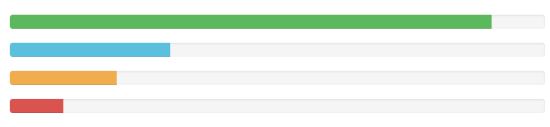
结果如下所示:

交替的进度条
创建不同样式的进度条的步骤如下:
- 添加一个带有 class .progress 的 <div>。
- 接着,在上面的 <div> 内,添加一个带有 class .progress-bar 和 class progress-bar-* 的空的 <div>。其中,* 可以是 success、info、warning、danger。
- 添加一个带有百分比表示的宽度的 style 属性,例如 style="60%"; 表示进度条在 60% 的位置。
让我们看看下面的实例:
实例
<div class="progress">

    <div class="progress-bar progress-bar-success" role="progressbar"

         aria-valuenow="60" aria-valuemin="0" aria-valuemax="100"

         style="width: 90%;">

        <span class="sr-only">90% 完成(成功)</span>

    </div>

</div>

<div class="progress">

    <div class="progress-bar progress-bar-info" role="progressbar"

         aria-valuenow="60" aria-valuemin="0" aria-valuemax="100"

         style="width: 30%;">

        <span class="sr-only">30% 完成(信息)</span>

    </div>

</div>

<div class="progress">

    <div class="progress-bar progress-bar-warning" role="progressbar"

         aria-valuenow="60" aria-valuemin="0" aria-valuemax="100"

         style="width: 20%;">

        <span class="sr-only">20% 完成(警告)</span>

    </div>

</div>

<div class="progress">

    <div class="progress-bar progress-bar-danger" role="progressbar"

         aria-valuenow="60" aria-valuemin="0" aria-valuemax="100"

         style="width: 10%;">

        <span class="sr-only">10% 完成(危险)</span>

    </div>

</div>
结果如下所示:
条纹的进度条
创建一个条纹的进度条的步骤如下:
- 添加一个带有 class .progress 和 .progress-striped 的 <div>。
- 接着,在上面的 <div> 内,添加一个带有 class .progress-bar 和 class progress-bar-* 的空的 <div>。其中,* 可以是 success、info、warning、danger。
- 添加一个带有百分比表示的宽度的 style 属性,例如 style="60%"; 表示进度条在 60% 的位置。
让我们看看下面的实例:
实例
<div class="progress progress-striped">

    <div class="progress-bar progress-bar-success" role="progressbar"

         aria-valuenow="60" aria-valuemin="0" aria-valuemax="100"

         style="width: 90%;">

        <span class="sr-only">90% 完成(成功)</span>

    </div>

</div>

<div class="progress progress-striped">

    <div class="progress-bar progress-bar-info" role="progressbar"

         aria-valuenow="60" aria-valuemin="0" aria-valuemax="100"

         style="width: 30%;">

        <span class="sr-only">30% 完成(信息)</span>

    </div>

</div>

<div class="progress progress-striped">

    <div class="progress-bar progress-bar-warning" role="progressbar"

         aria-valuenow="60" aria-valuemin="0" aria-valuemax="100"

         style="width: 20%;">

        <span class="sr-only">20% 完成(警告)</span>

    </div>

</div>

<div class="progress progress-striped">

    <div class="progress-bar progress-bar-danger" role="progressbar"

         aria-valuenow="60" aria-valuemin="0" aria-valuemax="100"

         style="width: 10%;">

        <span class="sr-only">10% 完成(危险)</span>

    </div>

</div>
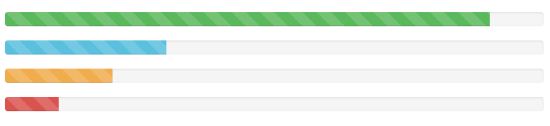
结果如下所示:
动画的进度条
创建一个动画的进度条的步骤如下:
- 添加一个带有 class .progress 和 .progress-striped 的 <div>。同时添加 class .active。
- 接着,在上面的 <div> 内,添加一个带有 class .progress-bar 的空的 <div>。
- 添加一个带有百分比表示的宽度的 style 属性,例如 style="60%"; 表示进度条在 60% 的位置。
这将会使条纹具有从右向左的运动感。
让我们看看下面的实例:
实例
<div class="progress progress-striped active">

    <div class="progress-bar progress-bar-success" role="progressbar"

         aria-valuenow="60" aria-valuemin="0" aria-valuemax="100"

         style="width: 40%;">

        <span class="sr-only">40% 完成</span>

    </div>

</div>
结果如下所示:

堆叠的进度条
您甚至可以堆叠多个进度条。把多个进度条放在相同的 .progress 中即可实现堆叠,如下面的实例所示:
实例
<div class="progress">

    <div class="progress-bar progress-bar-success" role="progressbar"

         aria-valuenow="60" aria-valuemin="0" aria-valuemax="100"

         style="width: 40%;">

        <span class="sr-only">40% 完成</span>

    </div>

    <div class="progress-bar progress-bar-info" role="progressbar"

         aria-valuenow="60" aria-valuemin="0" aria-valuemax="100"

         style="width: 30%;">

        <span class="sr-only">30% 完成(信息)</span>

    </div>

    <div class="progress-bar progress-bar-warning" role="progressbar"

         aria-valuenow="60" aria-valuemin="0" aria-valuemax="100"

         style="width: 20%;">

        <span class="sr-only">20% 完成(警告)</span>

    </div>

</div>
结果如下所示:

| 2.返回顶部 |
| 3.返回顶部 |
| 4.返回顶部 |
| 5.返回顶部 |
| 11.返回顶部 |
 |
作者:ylbtech 出处:http://ylbtech.cnblogs.com/ 本文版权归作者和博客园共有,欢迎转载,但未经作者同意必须保留此段声明,且在文章页面明显位置给出原文连接,否则保留追究法律责任的权利。 |
Bootstrap-CL:进度条的更多相关文章
- Bootstrap 各种进度条详解
一:默认的进度条 创建一个基本的进度条的步骤如下: 添加一个带有 class .progress 的 <div>. 接着,在上面的 <div> 内,添加一个带有 class . ...
- Bootstrap各种进度条的实例讲解
本章将讲解 Bootstrap 进度条.在本教程中,您将看到如何使用bootstrap教程.重定向或动作状态的进度条. Bootstrap 进度条使用 CSS3 过渡和动画来获得该效果.Interne ...
- Bootstrap(10) 进度条媒体对象和 Well 组件
一.Well 组件这个组件可以实现简单的嵌入效果. <!-- //嵌入效果 --> <div class="well">Bootstrap</div& ...
- Bootstrap学习 进度条
本文将介绍Bootstrap进度条,在本文中你将看到如何使用Bootstrap创建加载,重定向或动作状态的进度条 bootstrap进度条使用CSS3过渡和动画来获得该效果.Internet Expl ...
- bootstrap组件---进度条
<div class="progress"> <div class="progress-bar progress-bar-success" r ...
- bootstrap.css 进度条没有动画效果
操作系统设置会影响浏览器的行为 Win+R 输入 sysdm.cpl ,3 打开 性能 的 设置 确保 窗口内动画控件和元素 被勾选
- Bootstrap <基础二十六>进度条
Bootstrap 进度条.在本教程中,你将看到如何使用 Bootstrap 创建加载.重定向或动作状态的进度条. Bootstrap 进度条使用 CSS3 过渡和动画来获得该效果.Internet ...
- 利用Bootstrap简单实现一个文件上传进度条
© 版权声明:本文为博主原创文章,转载请注明出处 说明: 1. 使用commons-fileupload.jar实现文件上传及进度监听 2. 使用bootstrap的进度条进行页面显示 3. 因为进度 ...
- bootstrap与jQuery结合的动态进度条
此款进度条实现的功能: 1.利用了bootstrap的进度条组件. a.在最外层的<div>中加入class .progress,在里层<div>加入class .progre ...
- css3飞机起飞进度条
效果:http://hovertree.com/texiao/css3/27/ 源码下载:http://hovertree.com/h/bjaf/pgwql1x2.htm 本效果使用Font Awes ...
随机推荐
- Python学习札记(二十五) 函数式编程6 匿名函数
参考:匿名函数 NOTE 1.Python对匿名函数提供了有限的支持. eg. #!/usr/bin/env python3 def main(): lis = list(map(lambda x: ...
- LA 6891 Money Transfers(最短路)
https://vjudge.net/problem/UVALive-6891 题意: 给定一个加权无向图,还有起点和终点,现在有个SWERC公司,拥有图中的m个顶点,现在可以使图中的每一条边都加上k ...
- HDU 1317 XYZZY(floyd+bellman_ford判环)
http://acm.hdu.edu.cn/showproblem.php?pid=1317 题意: 给出一个有向图,每到达一个点,都会加上或减去一些能量,我们要做的就是判断从1出发是否能到达n.初始 ...
- BZOJ 3572 【HNOI2014】 世界树
题目链接:世界树 首先看到\(\sum m_i\le 3\times 10^5\)这个条件,显然这道题就需要用虚树了. 在我们构建出虚树之后,就可以用两遍\(dfs\)来求出离每个点最近的议事处了.然 ...
- shell 判断字符串长度是否为0
test.sh #!/bin/bash echo "enter the string:" read filename if test -z $filename ; then ech ...
- CSS 再学习,基础篇
语法 h1 {color:red; font-size:14px;} 共享声明 h1,h2,h3,h4,h5,h6 { color: green; } 继承 通过 CSS 继承,子元素将继承最高级元素 ...
- linux 前端部署
linux.conf user root; worker_processes ; #error_log logs/error.log; #error_log logs/error.log notice ...
- Java Spring-注解进行属性注入
2017-11-06 21:19:43 一.Spring的注解装配BeanSpring2.5 引入使用注解去定义Bean @Component 描述Spring框架中Bean Spring的框架中提供 ...
- Java例子
1. 本章学习总结 今天主要学习了三个知识点 封装 继承 多态 2. 书面作业 Q1. java HelloWorld命令中,HelloWorld这个参数是什么含义? 今天学了一个重要的命令javac ...
- es6 中的generator函数控制流程
Generator函数跟普通函数的写法有非常大的区别: 一是,function关键字与函数名之间有一个星号: 二是,函数体内部使用yield语句,定义不同的内部状态(yield在英语里的意思就是“产出 ...