
Logistic回归 逻辑回归 练习——以2018建模校赛为数据源
把上次建模校赛一个根据三围将女性分为四类(苹果型、梨形、报纸型、沙漏)的问题用逻辑回归实现了,包括从excel读取数据等一系列操作。
Excel的格式如下:假设有r列,则前r-1列为数据,最后一列为类别,类别需要从1开始,1~k类,

如上表所示,前10列是身高、胸围、臀围等数据(以及胸围和腰围、胸围和臀围的比值),最后一列1表示属于苹果型。
import tensorflow as tf

import os

import numpy

import xlrd

XDATA = 0

YDATA = 0

one_hot_size = 0

M = 0

def readData():

    global XDATA, YDATA, one_hot_size, M

    workbook = xlrd.open_workbook('divdata.xlsx')

    booksheet = workbook.sheet_by_index(0)

    col = booksheet.ncols

    row = booksheet.nrows

    M = row

    tempcol = []

    for i in range(col - 1):

        tempcol = tempcol + booksheet.col_values(i)

    XDATA = numpy.array(tempcol).reshape(col - 1, row).T

    one_hot_size = int(max(booksheet.col_values(col - 1)))

    YDATA = numpy.zeros([row, one_hot_size])

    for i in range(row):

        YDATA[i, int(booksheet.cell_value(i, col - 1) - 1)] = 1

def getData(batch_size):

    ran = numpy.random.randint(0, M - 1, [batch_size])

    # print(ran)

    return XDATA[ran], YDATA[ran]

readData()

checkpoint_dir = 'modelsave/'

learning_rate = 0.0005

save_step = 100

total_step = 1000

batch_size = 1000

config = tf.ConfigProto()

config.gpu_options.allow_growth = True

x = tf.placeholder(tf.float32, [None, 10], name='x')

y_data = tf.placeholder(tf.float32, [None, 4], name='data')

# y = tf.Variable(tf.zeros(4,1), dtype=tf.float32,name='y')

# w = tf.Variable(tf.zeros([10, 4], dtype=tf.float32))

w = tf.Variable(numpy.zeros([10, 4]),dtype=tf.float32)

# b = tf.Variable(tf.zeros([1, 4], dtype=tf.float32))

b = tf.Variable(numpy.zeros([1,4]),dtype=tf.float32)

y = tf.nn.softmax(tf.matmul(x, w) + b)

loss = tf.reduce_mean(-tf.reduce_sum(y_data * tf.log(y), reduction_indices=1))  # 损失函数

optimizer = tf.train.GradientDescentOptimizer(learning_rate)  # 选择梯度下降的方法

train_op = optimizer.minimize(loss)  # 迭代的目标:最小化损失函数

sess = tf.InteractiveSession(config=config)  # 设置按需使用GPU

saver = tf.train.Saver()  # 用来存储训练结果

if not os.path.exists(checkpoint_dir):

    os.mkdir(checkpoint_dir)

#############################

# 读取并初始化:

ckpt = tf.train.get_checkpoint_state(checkpoint_dir)

if ckpt and ckpt.model_checkpoint_path:

    saver.restore(sess, ckpt.model_checkpoint_path)

else:

    sess.run(tf.global_variables_initializer())

##############################

print(sess.run(b))

for i in range(total_step):

    batch = getData(batch_size)

    # print(batch[0])

    # print(batch[1])

    sess.run(train_op, feed_dict={x: batch[0], y_data: batch[1]})

    if (i + 1) % save_step == 0:

        print(i + 1, sess.run(w), sess.run(b))

        saver.save(sess, checkpoint_dir + 'model.ckpt', global_step=i + 1)  # 储存

writer = tf.summary.FileWriter('./my_graph', sess.graph)  # tensorboard使用

writer.close()

sess.close()

# 查看tensorboard的代码 在命令行输入:

# tensorboard --logdir=C:\Users\Rear82\PycharmProjects\MM_School_2018\my_graph
训练完成之后,使用以下代码读取并测试模拟:
import tensorflow as tf

import os

import numpy

checkpoint_dir = 'modelsave/'

config = tf.ConfigProto()

config.gpu_options.allow_growth = True

x = tf.placeholder(tf.float32, [None, 10], name='x')

w = tf.Variable(numpy.zeros([10, 4]),dtype=tf.float32)

b = tf.Variable(numpy.zeros([1,4]),dtype=tf.float32)

y = tf.nn.softmax(tf.matmul(x, w) + b)

sess = tf.InteractiveSession(config=config)  # 设置按需使用GPU

saver = tf.train.Saver()  # 用来存储训练结果

if not os.path.exists(checkpoint_dir):

    os.mkdir(checkpoint_dir)

#############################

# 读取并初始化:

ckpt = tf.train.get_checkpoint_state(checkpoint_dir)

if ckpt and ckpt.model_checkpoint_path:

    saver.restore(sess, ckpt.model_checkpoint_path)

else:

    print("Can't find trained nn.")

##############################

jdata = [[167,86,72,71.5,76.5,90.5,119.4444444,120.2797203,112.4183007,95.02762431]]

print(jdata)

print(sess.run(y,feed_dict={x:jdata}))

sess.close()
训练了3000次后:
w:
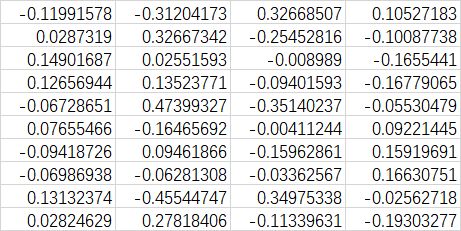
b:

Logistic回归 逻辑回归 练习——以2018建模校赛为数据源的更多相关文章
- Coursera DeepLearning.ai Logistic Regression逻辑回归总结
既<Machine Learning>课程后,Andrew Ng又推出了新一系列的课程<DeepLearning.ai>,注册了一下可以试听7天.之后每个月要$49,想想还是有 ...
- Logistic Regression逻辑回归
参考自: http://blog.sina.com.cn/s/blog_74cf26810100ypzf.html http://blog.sina.com.cn/s/blog_64ecfc2f010 ...
- Logistic Regression(逻辑回归)(二)—深入理解
(整理自AndrewNG的课件,转载请注明.整理者:华科小涛@http://www.cnblogs.com/hust-ghtao/) 上一篇讲解了Logistic Regression的基础知识,感觉 ...
- Logistic Regression(逻辑回归)
分类是机器学习的一个基本问题, 基本原则就是将某个待分类的事情根据其不同特征划分为两类. Email: 垃圾邮件/正常邮件 肿瘤: 良性/恶性 蔬菜: 有机/普通 对于分类问题, 其结果 y∈{0,1 ...
- 机器学习简要笔记(五)——Logistic Regression(逻辑回归)
1.Logistic回归的本质 逻辑回归是假设数据服从伯努利分布,通过极大似然函数的方法,运用梯度上升/下降法来求解参数,从而实现数据的二分类. 1.1.逻辑回归的基本假设 ①伯努利分布:以抛硬币为例 ...
- Deep Learning 学习笔记(4):Logistic Regression 逻辑回归
逻辑回归主要用于解决分类问题,在现实中有更多的运用, 正常邮件or垃圾邮件 车or行人 涨价or不涨价 用我们EE的例子就是: 高电平or低电平 同时逻辑回归也是后面神经网络到深度学习的基础. (原来 ...
- 【原】Coursera—Andrew Ng机器学习—Week 3 习题—Logistic Regression 逻辑回归
课上习题 [1]线性回归 Answer: D A 特征缩放不起作用,B for all 不对,C zero error不对 [2]概率 Answer:A [3]预测图形 Answer:A 5 - x1 ...
- HDU 6312 - Game - [博弈][杭电2018多校赛2]
题目链接:http://acm.hdu.edu.cn/showproblem.php?pid=6312 Problem Description Alice and Bob are playing a ...
- HDU 6318 - Swaps and Inversions - [离散化+树状数组求逆序数][杭电2018多校赛2]
题目连接:http://acm.hdu.edu.cn/showproblem.php?pid=6318 Problem Description Long long ago, there was an ...
随机推荐
- 轻量ORM-SqlRepoEx (十五)最佳实践之数据映射(Map)
简介:SqlRepoEx是 .Net平台下兼容.NET Standard 2.0人一个轻型的ORM.解决了Lambda转Sql语句这一难题,SqlRepoEx使用的是Lambda表达式,所以,对c#程 ...
- CentOS7安装Oracle11g R2
文章摘抄自:一支小白,博客地址:http://www.cnblogs.com/startnow/p/7580865.html Centos7安装Oracle 11gR2 =========== ...
- XML中需要转义的字符
有的数据库表的字段名,对于某些数据库来讲,是属于关键字或者保留字来处理识别的,那么这个时候,需要对这样的字段名进行转义处理,一般在执行sql 语句脚本的情况,处理办法是在这个字段名外加上双引号就可以识 ...
- 关于xib控件变成框框An internal error occurred
前段时间在进行系统适配的时候,由于在两个不同版本的Xcode之间进行了代码运行调试,导致回到老版本继续开发时xib里面所有的控件全部变成了蓝色的框框...真是哔了狗了 报错信息: an interna ...
- windows下开启 PHP扩展Redis
Redis是一个key-value存储系统.和Memcached类似,它支持存储的value类型相对更多,包括string(字符串).list(链表).set(集合).zset(sorted set ...
- hadoop docker集群搭建
获取镜像 #本机内 docker pull ubuntu:16.04 编排镜像 启动一个容器 #本机内 docker run -i -t --name master ubuntu:16.04 在容器内 ...
- django无法加载样式
如果运行的环境是win10,那么首先应该考虑是否是如下问题 win10中Django后台admin无法加载CSS等样式 解决: 修改win10的注册表:[win+R输入Regedit] 因为你安装的某 ...
- 在.net core中使用Thrift
Thrift应用比较广泛,这里不介绍Thrift的基本概念和使用.Thrift对.net支持的很好,但自从.net core诞生引来,我曾多次关注Thrift的官方网站,看看对.net core是否提 ...
- 20155235 2016-2017-2《Java程序设计》课程总结
每周作业链接汇总 预备作业一:学期前作业 预备作业二:技能获取与C语言学习情况 预备作业三:安装虚拟机与Linux的学习 第一周作业:20155235 2006-2007-2 <Java程序设计 ...
- 20155315 2016-2017-2 实验二《Java面向对象程序设计》实验报告
实验内容 1.初步掌握单元测试和TDD 2.理解并掌握面向对象三要素:封装.继承.多态 3.初步掌握UML建模 4.熟悉S.O.L.I.D原则 5.了解设计模式 实验知识点 1.参考Intellj I ...