
[udemy]WebDevelopment_CSS
Your First CSS(Cascading Style Sheets)
Cascading means it always takes selector that is at the end 即后面的可以覆盖前面的。 比如
在以下css文件中定义了两次 <p></p> 的颜色,最终它会呈现green。
 h2{

     color: red;

 }

 p{

     color: pink;

 }

 p{

     color: green;

 }
syntactic rule is very straightforward:
Selector{

    Property: value;

}
How to comment:
command + /
比如我们很喜欢某个网站的feature
we can right click
do'inspect'

我想<h2>Home</h2>变成红色,怎么办
 <!DOCTYPE html>

 <html>

 <head>

     <title>CSS learning</title>

 </head>

 <body>

     <header>

         <ul>

             <li>Home</li>

             <li><a href="about.html">About</a></li>

             <li><a href="login.html">login</a></li>

         </ul>

     </header>

     <section>

         <h2>Home</h2>

         <p>Lollll</p>

     </section>

 </body>

 </html>
新一个css文件
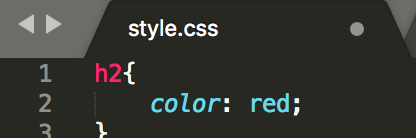
但是refresh之后,为何index.html的h2没变色?
Obviously
How does index.html know style.css exist ?
We need to link each other
So we add link in the <head></head>
 <!DOCTYPE html>

 <html>

 <head>

     <title>CSS learning</title>

     <link rel="stylesheet" type="text/css" href="style.css">

 </head>

 <body>

     <header>

         <ul>

             <li>Home</li>

             <li><a href="about.html">About</a></li>

             <li><a href="login.html">login</a></li>

         </ul>

     </header>

     <section>

         <h2>Home</h2>

         <p>Lollll</p>

     </section>

 </body>

 </html>
And make sure these two files in the same folder
we can create multiply style sheets 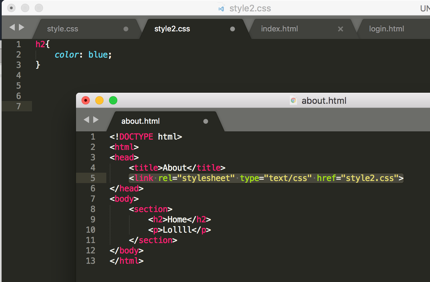
Beside <1>creating style.css file, we can also <2>'inline style' which is by specifying within the element
 <!DOCTYPE html>

 <html>

 <head>

     <title>CSS learning</title>

     <link rel="stylesheet" type="text/css" href="style.css">

 </head>

 <body>

     <header style="background-color: yellow">

         <ul>

             <li>Home</li>

             <li><a href="about.html">About</a></li>

             <li><a href="login.html">login</a></li>

         </ul>

     </header>

     <section>

         <h2>Home</h2>

         <p>Lollll</p>

     </section>

 </body>

 </html>
<3> using 'style' tags inside of <head></head>
 <!DOCTYPE html>

 <html>

 <head>

     <title>CSS learning</title>

     <link rel="stylesheet" type="text/css" href="style.css">

     <style >

         li{

             background-color: purple;

         }

     </style>

 </head>

 <body>

     <header style="background-color: yellow">

         <ul>

             <li>Home</li>

             <li><a href="about.html">About</a></li>

             <li><a href="login.html">login</a></li>

         </ul>

     </header>

     <section>

         <h2>Home</h2>

         <p>Lollll</p>

     </section>

 </body>

 </html>
CSS Properties
recommend website for CSS Properties : CSS Tricks
make your text in the center
text-align: center;
define the border
border: 5px solid purple;
add background image
/*本地图片*/

body{

    background-image: url(backgroundimage.jpg);

}
/*网上图片*/

body{

    background-image: url(www.unsplash.com/image2);

}
make background image fits the screen
body{

    background-image: url(www.unsplash.com/image2);

    background-size: cover;

}
add cursor(光标)
p{

    color: pink;

    cursor: pointer;

}
display in line
li{

    list-style: none;

    display: inline-block;

}
find the specific color: paletton.com
choose hex or RGB whichever way
h2{

    color: #AA9739;

    text-align: center;

    border: 5px solid rgb(170, 151, 57);

}
Cascading Style Sheets at the most basic level it indicates that the order of CSS rules matter.
.class
we can give any value we want, whatever we want to call it
<p class="webtext">Lollll</p>
.webtext{

    border:  5px dashed purple;

}
#id
similar to .class except that you can use only once
    <div id="div1">

            <p class="webtext">Lollll</p>

            <p>Lollll</p>

            <p>Lollll</p>

        </div>
#id{

    background: blue;

}
element
p{

    color: green;

}
element, element
h2, p {

    color: #AA9739;

    text-align: center;

    border: 5px solid rgb(170, 151, 57);

}
element element
I want you to select all 'p' s inside 'h2'
<h2>Home<p>Jennifer's home</p></h2>
h2  p {

    color: #AA9739;

    text-align: center;

    border: 5px solid rgb(170, 151, 57);

}
element > element
I want to select all 'p's that have a parent of 'h2'
h2 > p {

    color: #AA9739;

    text-align: center;

    border: 5px solid rgb(170, 151, 57);

}
element + element
I want to select any 'p' that is exactly after an 'h2' element
h2 + p {

    color: #AA9739;

    text-align: center;

    border: 5px solid rgb(170, 151, 57);

}
:hover
nothing happens but when I hover my mouse, it changes the style to what we just wrote down
h2 + p: hover{

    color: #AA9739;

    text-align: center;

    border: 5px solid rgb(170, 151, 57);

}
:last-child
only the last child of each webtext changes
.webtext:last-child{

    border:  5px dashed purple;

}
:first-child
same as last-child
!important (not recommended)
overrides any of the css rules and say, hey I don't care what anybody else says , 'p' should always be pink
p{

    color: pink !important;

    cursor: pointer;

}

p{

    color: green;

}
add underline to text
p{

    text-decoration: underline;

}
change text to uppercase
p{

    text-transform: uppercase;

}
make space between text
p{

    line-height: 20px;

}
change font style
font-family: "Times New Roman", Georgia; means if former one doesn't exist, pick the latter one
Use Google Fonts, we can add some specific fonts in own website
当然,这样会减慢你的网页反应速度
因为你的字体需要通过Google的链接响应
p{

    line-height: 20px;

    font-style: italic;

    font-weight: bold;

    font-size: 80%;

    font-family: "Times New Roman", Georgia;

}
add image
<img src="https://previews.123rf.com/images/tharun15/tharun151606/tharun15160600056/58764289-a-circular-geometric-design-for-summer-solstice-day-in-june-on-a-white-background.jpg" width="50px" height="40">
critical render path
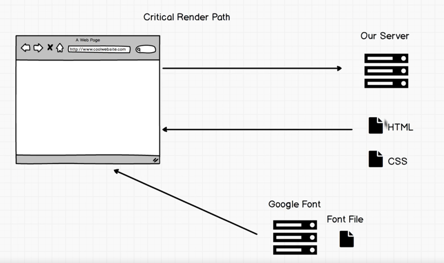
For now, sever is our computer
we request html
and the browser check I need css file
grab css file
hold on, the browser check I need font file
after that, it could render the page(display)
So you won't be able to render a web page until you receive css file and
sometimes font files you also have to wait for the font file to render the page
So if want your website faster, use your own font files and don't make css file too big
So you can enter you css code into minify CSS https://www.cleancss.com/css-minify/ to make it seem smaller
Flexbox
Flex 是 Flexible Box 的缩写,意为"弹性布局",用来为盒状模型提供最大的灵活性。
https://css-tricks.com/snippets/css/a-guide-to-flexbox/
http://flexboxfroggy.com/
<!DOCTYPE html>

<html>

<head>

    <title>CSS</title>

    <link rel="stylesheet" type="text/css" href="style.css">

</head>

<body>

    <h1>Life in the wild</h1>

    <div class="container">

        <img src="https://static.pexels.com/photos/52500/horse-herd-fog-nature-52500.jpeg">

        <img src="https://static.pexels.com/photos/66898/elephant-cub-tsavo-kenya-66898.jpeg">

        <img src="https://static.pexels.com/photos/213399/pexels-photo-213399.jpeg">

        <img src="https://static.pexels.com/photos/158471/ibis-bird-red-animals-158471.jpeg

">

        <img src="https://static.pexels.com/photos/133459/pexels-photo-133459.jpeg">

        <img src="https://static.pexels.com/photos/50988/ape-berber-monkeys-mammal-affchen-50988.jpeg">

    </div>

</body>

</html>
.container{

    display: flex;

    flex-wrap: wrap;

    justify-content: center;

}

h1{

    font-family: fantasy;

    font-size: 3em;

    border-bottom: 2px solid pink;

    border-right: 2px solid pink;

    width: 400px;

    text-align: center;

}

img{

    width: 450px;

    height: 300px;

    margin: 10px;

}
Exercise
 <!DOCTYPE html>

 <html>

 <head>

     <title>RoboPage</title>

     <link rel="stylesheet" type="text/css" href="style.css">

     <link href="https://fonts.googleapis.com/css?family=Roboto" rel="stylesheet">

 </head>

 <body>

     <h1>Robot Friend</h1>

     <div class="robots">

         <div class="android">

             <div class="head">

                 <div class="eyes">

                     <div class="left_eye"></div>

                     <div class="right_eye"></div>

                 </div>

             </div>

             <div class="upper_body">

                 <div class="left_arm"></div>

                 <div class="torso"></div>

                 <div class="right_arm"></div>

             </div>

             <div class="lower_body">

                 <div class="left_leg"></div>

                 <div class="right_leg"></div>

             </div>

         </div>

     </div>

 </body>

 </html>
 h1 {

     text-align: center;

     font-family: 'Roboto', sans-serif;

 }

 .robots {

     flex-wrap: wrap;

     display: flex;

     justify-content: center;

 }

 .head,

 .left_arm,

 .torso,

 .right_arm,

 .left_leg,

 .right_leg {

      background-color: #5f93e8;

 }

 .head {

     width: 200px;

     margin: 0 auto;

     height: 150px;

     border-radius: 200px 200px 0 0;

     margin-bottom: 10px;

 }

 .eyes {

     display: flex

 }

 .head:hover {

     width: 300px;

     transition: 1s ease-in-out;

 }

 .upper_body {

     width: 300px;

     height: 150px;

     display: flex;

 }

 .left_arm, .right_arm {

     width: 40px;

     height: 125px;

     border-radius: 100px;

 }

 .left_arm {

     margin-right: 10px;

 }

 .right_arm {

     margin-left: 10px;

 }

 .torso {

     width: 200px;

     height: 200px;

     border-radius: 0 0 50px 50px;

 }

 .lower_body {

     width: 200px;

     height: 200px;

     /* This is another useful property. Hmm what do you think it does?*/

     margin: 0 auto;

     display: flex;

 }

 .left_leg, .right_leg {

     width: 40px;

     height: 120px;

     border-radius: 0 0 100px 100px;

 }

 .left_leg {

     margin-left: 45px;

 }

 .left_leg:hover {

     -webkit-transform: rotate(20deg);

     -moz-transform: rotate(20deg);

     -o-transform: rotate(20deg);

     -ms-transform: rotate(20deg);

     transform: rotate(20deg);

 }

 .right_leg {

     margin-left: 30px;

 }

 .left_eye, .right_eye {

     width: 20px;

     height: 20px;

     border-radius: 15px;

     background-color: white;

 }

 .left_eye {

     /* These properties are new and you haven't encountered

     in this course. Check out CSS Tricks to see what it does! */

     position: relative;

     top: 100px;

     left: 40px;

 }

 .right_eye {

     position: relative;

     top: 100px;

     left: 120px;

 }
Responsive UI
should be a priority when building websites

It would show you what your website will look like on iPhone
Reponsive means your website, on no matter what platform, looks good, no cut-offs
[udemy]WebDevelopment_CSS的更多相关文章
- Udemy上免费的angualr2视频教程分享
福利大分享 本文作者:苏生米沿 本文地址:http://blog.csdn.net/sushengmiyan/article/details/52592518 一晚上听了10几节课程,整体感觉很不错的 ...
- [Udemy] Recommender Systems and Deep Learning in Python
1. Welcome 主要讲四部分内容: non-personized systems popularity: 基于流行度或者最大利益化的推荐. 缺点也明显:你可能在特殊地方有些特殊需求, 或者你本来 ...
- Udemy - Angular 2 - The Complete Guide 笔记
1. install > npm install -g angular-cli 2. create app > ng new first-app 3. build app > cd ...
- [udemy]WebDevelopment_HTML5
Build Your First Website 装一个subline text HTML default rule tags with opening and closing <!DOCTY ...
- [udemy]WebDevelopment_History of The Web
WWW vs Internet For the begining, Internet was there. it was for the academics among universities Th ...
- [udemy]WebDevelopment_How the Internet Works
Browsing the web Enter google.com, who is this google.com This question gets asked all the way down ...
- [udemy]WebDevelopment_Bootstrap,Templates
Bootstrap Introduction Bootstrap 相对于CSS, JS 就像PPT模板相对于PPT 说白了就是前人已经做好了(pre-build)很多模板,你可以直接拿来主义 Boot ...
- [Udemy] ES 7 and Elastic Stack - part 3
Section 7: Analyzing Log Data with the Elastic Stack
- [Udemy] ES 7 and Elastic Stack - part 2
Section 3: Searching with Elasticsearch query with json 分页返回 Sort full text 的内容不能用来sort, 比如movie的 ti ...
随机推荐
- tf.device()指定tensorflow运行的GPU或CPU设备
在tensorflow中,我们可以使用 tf.device() 指定模型运行的具体设备,可以指定运行在GPU还是CUP上,以及哪块GPU上. 设置使用GPU 使用 tf.device('/gpu:1' ...
- Codeforces 106A:Card Game
题目链接http://codeforces.com/contest/106/problem/A 题意:一套牌有S.H.D.C四种花色,按等级分成6.7.8.9.T.J.Q.K.A.每次选出一个花色作为 ...
- DesignPattern(五)行为型模式(上)
行为型模式 行为型模式是对在不同对象之间划分责任和算法的抽象化.行为模式不仅仅关于类和对象,还关于它们之间的相互作用.行为型模式又分为类的行为模式和对象的行为模式两种. 类的行为模式——使用继承关系在 ...
- fusionjs uber开源的通用web插件化开发框架
fusionjs uber开源的web 插件化开发框架 核心特性: 基于插件的开发,依赖注入开发 开箱即用的服务器端渲染,构建结果拆分,模块热加载 Tree-shaking 支持 集成的插件 redu ...
- 在 Windows 下安装 Oracle 11g XE (Express Edition)
Oracle 11g XE 是 Oracle 数据库的免费版本,支持标准版的大部分功能,11g XE 提供 Windows 和 Linux 版本. 做为免费的 Oracle 数据库版本,XE 的限制是 ...
- Hadoop NameNode 高可用 (High Availability) 实现解析[转]
NameNode 高可用整体架构概述 在 Hadoop 1.0 时代,Hadoop 的两大核心组件 HDFS NameNode 和 JobTracker 都存在着单点问题,这其中以 NameNode ...
- 深入理解java虚拟机,并发方面
1 1,java线程模型,和内存模型像似,但没有很强硬的关联 2,工作内存和主内存的交互操作,lock,unlock,read,load,use,assign,store,write 2,volati ...
- 智能家居入门DIY——【三、GP2Y10之颗粒物传感器】
这个传感器接线算比较简单的,程序也不麻烦.不过这东西是颗粒物传感器吧,不是神马PM2.5(总悬浮颗粒物),不是神马PM10(可吸入颗粒物).插个螺丝刀进去度数也是变的,不是说的很清楚原理是反光嘛……… ...
- mac下搭建appium记录
要安装的东西: jdk(要配置环境) , sdk(要配置环境) ,node(要配置环境), python(要配置环境) ,appium(要配置环境),appium-python-client ,xco ...
- laravel下载文件
public function jobDownload(){ $realPath = public_path('download/job/postForm.xls'); $filename = '应聘 ...