
分布式日志收集框架Flume
分布式日志收集框架Flume
1.业务现状分析
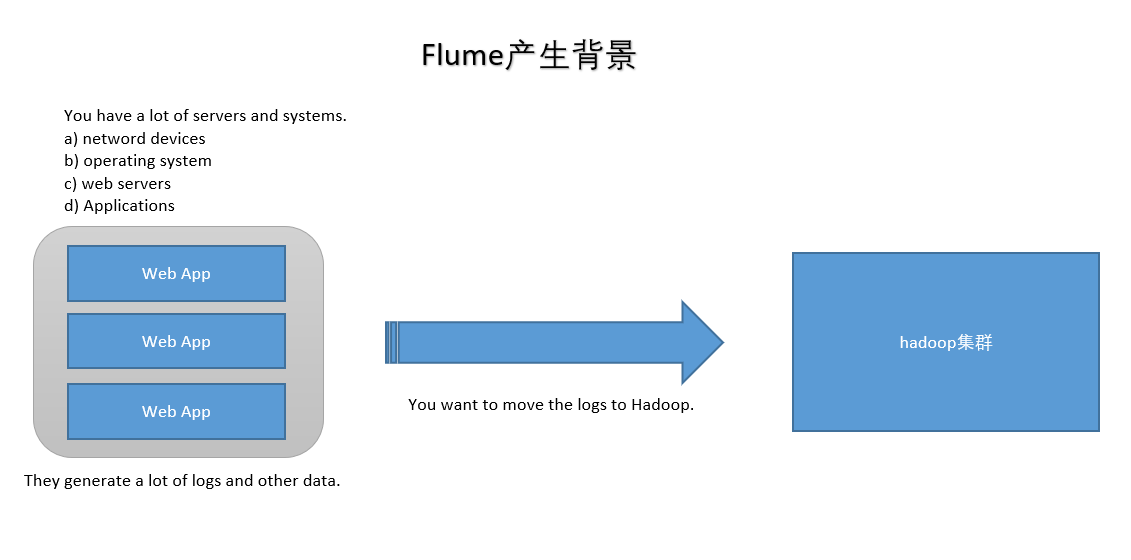
WebServer/ApplicationServer分散在各个机器上
想在大数据平台Hadoop进行统计分析
日志如何收集到Hadoop平台上
解决方案及存在的问题
如何解决我们的数据从其他的server上移动到Hadoop之上?
- shell: cp --> Hadoop集群的机器上,hdfs dfs -put ....(有很多问题不好解决,容错、负载均衡、时效性、压缩)
- Flume,从 A --> B 移动日志
2.Flume概述
- Flume官网:http://flume.apache.org/
Flume is a distributed, reliable, and available service for efficiently collecting, aggregating, and moving large amounts of log data.
Flume是由Apache基金会提供的一个分布式、高可靠、高可用的服务,用于分布式的海量日志的高效收集、聚合、移动系统。
Flume设计目标
- 可靠性:高科要
- 扩展性:模块可扩展
- 管理性:agent管理
界同类产品对比
- Flume: Cloudera/Apache, Java语言开发。
- Logstash: ELK(ElasticsSearch, Logstash, Kibana)
- Scribe: Facebook, 使用C/C++开发, 负载均衡不是很好, 已经不维护了。
- Chukwa: Yahoo/Apache, 使用Java语言开发, 负载均衡不是很好, 已经不维护了。
- Fluentd: 和Flume类似, Ruby开发。
Flume发展史
- Cloudera公司提出0.9.2,叫Flume-OG
- 2011年Flume-728编号,重要里程碑(Flume-NG),贡献给Apache社区
- 2012年7月 1.0版本
- 2015年5月 1.6版本
- ~ 1.7版本
3.Flume架构及核心组件
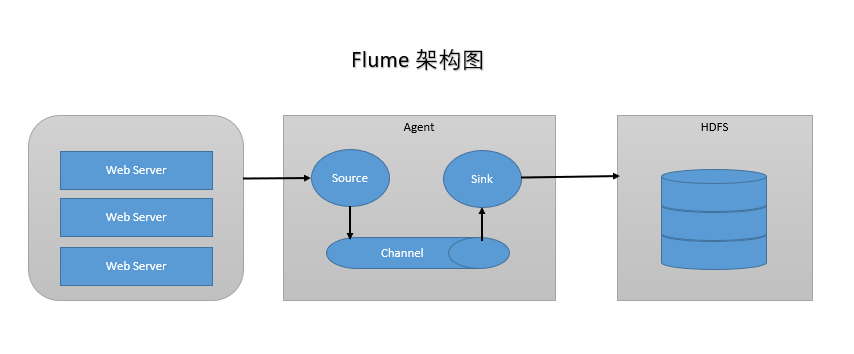
Flume有三大组件
- Source: 收集,指定数据源从哪里来(Avro, Thrift, Spooling, Kafka, Exec)
- Channel: 聚集,把数据先存在(Memory, File, Kafka等用的比较多)
- Sink: 把数据写到某个地方去(HDFS, Hive, Logger, Avro, Thrift, File, ES, HBase, Kafka等)
4.Flume环境部署
- 前置条件
- Java Runtime Environment - Java 1.8 or later(安装Java)
- Memory - Sufficient memory for configurations used by sources, channels or sinks(足够内存)
- Disk Space - Sufficient disk space for configurations used by channels or sinks(足够空间)
- Directory Permissions - Read/Write permissions for directories used by agent(读写权限)
- 1.安装JDK(下载,解压,安装,配置环境变量)
- 2.安装Flume(下载,加压,安装,配置环境变量,检测:flume-ng version)
5.Flume实战
需求1:从指定网络端口采集数据输出到控制台
- flume-conf.properties
- A) 配置Source
- B) 配置Channel
- C) 配置Sink
- D) 把以上三个组件串起来
# example.conf: A single-node Flume configuration

# a1: agent名称

# r1:source的名称

# k1:sink的名称

# c1:channel的名称

# Name the components on this agent

a1.sources = r1

a1.sinks = k1

a1.channels = c1

# Describe/configure the source

a1.sources.r1.type = netcat

a1.sources.r1.bind = localhost

a1.sources.r1.port = 44444

# Describe the sink

a1.sinks.k1.type = logger

# Use a channel which buffers events in memory

a1.channels.c1.type = memory

a1.channels.c1.capacity = 1000

a1.channels.c1.transactionCapacity = 100

# Bind the source and sink to the channel

a1.sources.r1.channels = c1

a1.sinks.k1.channel = c1
- 启动Agent
flume-ng agent \

--name $agent_name \

--conf conf \

--conf-file conf/flume-conf.properties \

-Dflume.root.logger=INFO,console

flume-ng agent \

--name a1 \

--conf $FLUME_HOME/conf \

--conf-file $FLUME_HOME/conf/example.conf \

-Dflume.root.logger=INFO,console
- flume-conf.properties
需求2:监控一个文件实时采集新增的数据输出到控制台
- 1.Agent选型:exec source + memory channel + logger sink
- 2.配置文件
# exec-memory-logger.conf: A single-node Flume configuration

# a1: agent名称

# r1:source的名称

# k1:sink的名称

# c1:channel的名称

# Name the components on this agent

a1.sources = r1

a1.sinks = k1

a1.channels = c1

# Describe/configure the source

a1.sources.r1.type = exec

a1.sources.r1.command = tail -F /home/k.o/data/data.log

a1.sources.r1.shell = /bin/sh -c

# Describe the sink

a1.sinks.k1.type = logger

# Use a channel which buffers events in memory

a1.channels.c1.type = memory

a1.channels.c1.capacity = 1000

a1.channels.c1.transactionCapacity = 100

# Bind the source and sink to the channel

a1.sources.r1.channels = c1

a1.sinks.k1.channel = c1
- 启动Agent
flume-ng agent \

--name $agent_name \

--conf conf \

--conf-file conf/flume-conf.properties \

-Dflume.root.logger=INFO,console

flume-ng agent \

--name a1 \

--conf $FLUME_HOME/conf \

--conf-file $FLUME_HOME/conf/exec-memory-logger.conf \

-Dflume.root.logger=INFO,console
需求3:将A服务器上的日志实时采集到B服务器
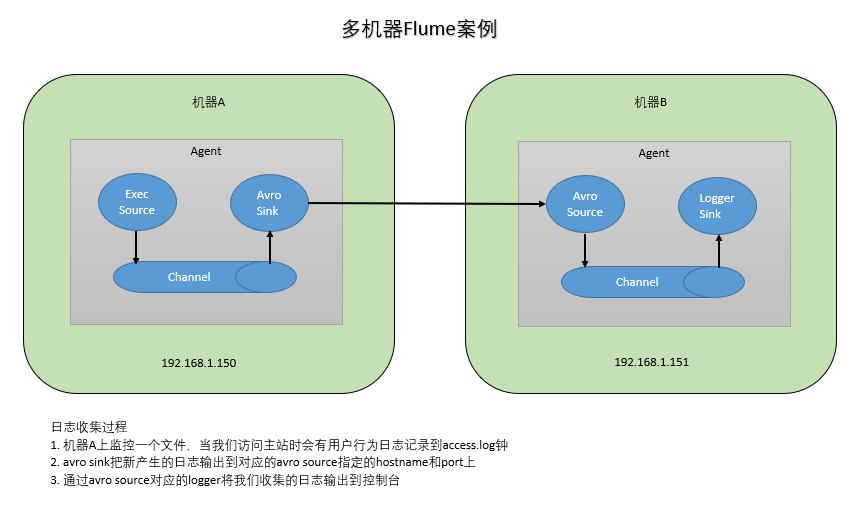
- 技术选型:
1.exec source + memory channel + avro sink
2.arro source + memory channel + logger sink
# exec-memory-avro.conf: A single-node Flume configuration

# exec-memory-avro: agent名称

# exec-source:source的名称

# avro-sink:sink的名称

# memory-channel:channel的名称

# Name the components on this agent

exec-memory-avro.sources = exec-source

exec-memory-avro.sinks = avro-sink

exec-memory-avro.channels = memory-channel

# Describe/configure the source

exec-memory-avro.sources.exec-source.type = exec

exec-memory-avro.sources.exec-source.command = tail -F /home/k.o/data/data.log

exec-memory-avro.sources.exec-source.shell = /bin/sh -c

# Describe the sink

exec-memory-avro.sinks.avro-sink.type = avro

exec-memory-avro.sinks.avro-sink.hostname = localhost

exec-memory-avro.sinks.avro-sink.port = 44444

# Use a channel which buffers events in memory

exec-memory-avro.channels.memory-channel.type = memory

exec-memory-avro.channels.memory-channel.capacity = 1000

exec-memory-avro.channels.memory-channel.transactionCapacity = 100

# Bind the source and sink to the channel

exec-memory-avro.sources.exec-source.channels = memory-channel

exec-memory-avro.sinks.avro-sink.channel = memory-channel
# avro-memory-logger.conf: A single-node Flume configuration

# avro-memory-logger: agent名称

# exec-source:source的名称

# logger-sink:sink的名称

# memory-channel:channel的名称

# Name the components on this agent

avro-memory-logger.sources = avro-source

avro-memory-logger.sinks = logger-sink

avro-memory-logger.channels = memory-channel

# Describe/configure the source

avro-memory-logger.sources.avro-source.type = avro

avro-memory-logger.sources.avro-source.bind = localhost

avro-memory-logger.sources.avro-source.port = 44444

# Describe the sink

avro-memory-logger.sinks.logger-sink.type = logger

# Use a channel which buffers events in memory

avro-memory-logger.channels.memory-channel.type = memory

avro-memory-logger.channels.memory-channel.capacity = 1000

avro-memory-logger.channels.memory-channel.transactionCapacity = 100

# Bind the source and sink to the channel

avro-memory-logger.sources.avro-source.channels = memory-channel

avro-memory-logger.sinks.logger-sink.channel = memory-channel
- 启动Agent
# 先启动 avro-memory-logger

flume-ng agent \

--name avro-memory-logger \

--conf $FLUME_HOME/conf \

--conf-file $FLUME_HOME/conf/avro-memory-logger.conf \

-Dflume.root.logger=INFO,console

# 再启动 exec-memory-avro

flume-ng agent \

--name exec-memory-avro \

--conf $FLUME_HOME/conf \

--conf-file $FLUME_HOME/conf/exec-memory-avro.conf \

-Dflume.root.logger=INFO,console
- 日志收集过程
- 机器A上监控一个文件,当我们访问主站时会有用户行为日志记录到access.log钟
- avro sink把新产生的日志输出到对应的avro source指定的hostname和port上
- 通过avro source对应的logger将我们收集的日志输出到控制台
分布式日志收集框架Flume的更多相关文章
- 学习笔记:分布式日志收集框架Flume
业务现状分析 WebServer/ApplicationServer分散在各个机器上,想在大数据平台hadoop上进行统计分析,就需要先把日志收集到hadoop平台上. 思考:如何解决我们的数据从其他 ...
- 在.NET Core中使用Exceptionless分布式日志收集框架
一.Exceptionless简介 Exceptionless 是一个开源的实时的日志收集框架,它可以应用在基于 ASP.NET,ASP.NET Core,Web Api,Web Forms,WPF, ...
- 分布式日志收集系统 —— Flume
一.Flume简介 Apache Flume 是一个分布式,高可用的数据收集系统.它可以从不同的数据源收集数据,经过聚合后发送到存储系统中,通常用于日志数据的收集.Flume 分为 NG 和 OG ( ...
- 日志收集框架flume的安装及简单使用
flume介绍 Flume是一个分布式.可靠.和高可用的海量日志采集.聚合和传输的系统. Flume可以采集文件,socket数据包等各种形式源数据,又可以将采集到的数据输出到HDFS.hbase.h ...
- 分布式日志收集之Logstash 笔记(一)
(一)logstash是什么? logstash是一种分布式日志收集框架,开发语言是JRuby,当然是为了与Java平台对接,不过与Ruby语法兼容良好,非常简洁强大,经常与ElasticSearch ...
- 分布式日志收集收集系统:Flume(转)
Flume是一个分布式.可靠.和高可用的海量日志采集.聚合和传输的系统.支持在系统中定制各类数据发送方,用于收集数据:同时,Flume提供对数据进行简单处理,并写到各种数据接受方(可定制)的能力.Fl ...
- 分布式日志收集系统Apache Flume的设计详细介绍
问题导读: 1.Flume传输的数据的基本单位是是什么? 2.Event是什么,流向是怎么样的? 3.Source:完成对日志数据的收集,分成什么打入Channel中? 4.Channel的作用是什么 ...
- asp.Net Core免费开源分布式异常日志收集框架Exceptionless安装配置以及简单使用图文教程
最近在学习张善友老师的NanoFabric 框架的时了解到Exceptionless : https://exceptionless.com/ !因此学习了一下这个开源框架!下面对Exceptionl ...
- C#实现多级子目录Zip压缩解压实例 NET4.6下的UTC时间转换 [译]ASP.NET Core Web API 中使用Oracle数据库和Dapper看这篇就够了 asp.Net Core免费开源分布式异常日志收集框架Exceptionless安装配置以及简单使用图文教程 asp.net core异步进行新增操作并且需要判断某些字段是否重复的三种解决方案 .NET Core开发日志
C#实现多级子目录Zip压缩解压实例 参考 https://blog.csdn.net/lki_suidongdong/article/details/20942977 重点: 实现多级子目录的压缩, ...
随机推荐
- eclipse 乱码问题总结
Eclipse 的控制台必须用GBK编码.所以条件1和条件4必须同时满足否则运行的还是乱码.才能保证不是乱码. 条件1,Window | Preferences | Workspace | T ...
- Azure Linux 虚拟机常见导致无法远程的操作
对Azure虚拟机的一些操作可能会导致无法远程连接,本文罗列了以下导致不能远程连接的场景: 场景1 - 在虚拟机配置IP地址或MAC地址 场景2 - 错误地修改服务的配置文件 场景3 - 误设置防火墙 ...
- 用CALayer实现下载进度条控件
用CALayer实现下载进度条 效果: 源码: // // ViewController.m // ProgressView // // Created by YouXianMing on 14/11 ...
- Exchange2016 & Skype for business 集成之一配置合作伙伴应用程序
准备条件 为Skype for Business Server和Exchange Server之间建立服务器到服务器的身份验证,您必须做两件事:1)您必须为每台服务器分配合适的证书(详细参考文档htt ...
- 类库文件引用web服务报错解决方法-在 ServiceModel 客户端配置部分中,找不到引用协定的默认终结点元素
由于需求,需要改造原有应用,因原有应用是写在console下面的,现在需要开放至web下, 想到BIZ层应用代码都是一样的,又不想在web下在添加引用,而重复写代码,故将原有的console下的服务和 ...
- [日常]蒟蒻的高一生活 Week 1~3
博主在三周前成功晋级为高中生OwO终于不再是假的HZOIer感受一波HZ的真正生活...(然而实际上级部不少监督一直没启动23333) (然而三周过去好多事情都忘了QAQ瞎写好了(逃)) Week 1 ...
- 如何用iOS工程生成iOS模拟器包
1. 在终端上运行下面的命令来查找你的机器上可用的SDK的版本 xcodebuild -showsdks 2. 创建模拟器包: xcodebuild -workspace ** -scheme ** ...
- 2、Node.js 第一个应用
内容:三种变量申明方式,Node.js应用组成,第一个应用创建+代码 ################################################################# ...
- SQL简单基础(1)
对于SQL不再做过多的介绍,毕竟作为一个初学者对于SQL(结构化查询语言)也好,关系型数据库也好理解都并不是很深,只知道一些基本的概念. 本系列旨在介绍一些简单开发中用得上的SQL语句以及其使用方法, ...
- caanimationgroup与CATransaction的区别
动画的组合: caanimationgroup:同一个layer: CATransaction:不同layer: In Core Animation, transactions are a way t ...