
IntelliJ IDEA 2017版 spring-boot-devtools实现热部署
1、配置pom.xml文档
 <?xml version="1.0" encoding="UTF-8"?>

 <project xmlns="http://maven.apache.org/POM/4.0.0" xmlns:xsi="http://www.w3.org/2001/XMLSchema-instance"

     xsi:schemaLocation="http://maven.apache.org/POM/4.0.0 http://maven.apache.org/xsd/maven-4.0.0.xsd">

     <modelVersion>4.0.0</modelVersion>

     <groupId>com.easytest</groupId>

     <artifactId>rebushu</artifactId>

     <version>0.0.1-SNAPSHOT</version>

     <packaging>jar</packaging>

     <name>rebushu</name>

     <url>http://maven.apache.org</url>

     <description>Demo project for Spring Boot</description>

     <parent>

         <groupId>org.springframework.boot</groupId>

         <artifactId>spring-boot-starter-parent</artifactId>

         <version>1.5.9.RELEASE</version>

         <relativePath/> <!-- lookup parent from repository -->

     </parent>

     <properties>

         <project.build.sourceEncoding>UTF-8</project.build.sourceEncoding>

         <project.reporting.outputEncoding>UTF-8</project.reporting.outputEncoding>

         <java.version>1.8</java.version>

     </properties>

     <dependencies>

         <dependency>

             <groupId>org.springframework.boot</groupId>

             <artifactId>spring-boot-starter-web</artifactId>

         </dependency>

         <dependency>

             <groupId>org.springframework.boot</groupId>

             <artifactId>spring-boot-starter-test</artifactId>

             <scope>test</scope>

         </dependency>

         <dependency>

             <groupId>com.alibaba</groupId>

             <artifactId>fastjson</artifactId>

             <version>1.2.15</version>

         </dependency>

         <!-- spring boot devtools 依赖包. -->

         <dependency>

             <groupId>org.springframework.boot</groupId>

             <artifactId>spring-boot-devtools</artifactId>

             <optional>true</optional>

             <scope>true</scope>

         </dependency>

     </dependencies>

     <!--构建节点-->

     <build>

         <plugins>

             <plugin>

                 <groupId>org.springframework.boot</groupId>

                 <artifactId>spring-boot-maven-plugin</artifactId>

                 <configuration>

                     <!--fork :  如果没有该项配置,肯呢个devtools不会起作用,即应用不会restart -->

                     <fork>true</fork>

                 </configuration>

             </plugin>

         </plugins>

     </build>

 </project>
2、书写测试代码pojo(实体类)
 package com.easytest;

 import com.alibaba.fastjson.annotation.JSONField;

 import java.util.Date;

 /**

  * Created by liuya on 2018-01-17.

  */

 public class UserPoJo

 {

     private int userId;

     private String userName;

     @JSONField(format="yyyy-MM-dd HH:mm:ss")

     private Date createTime;

     public Date getCreateTime() {

         return createTime;

     }

     public void setCreateTime(Date createTime) {

         this.createTime = createTime;

     }

     public int getUserId() {

         return userId;

     }

     public void setUserId(int userId) {

         this.userId = userId;

     }

     public String getUserName() {

         return userName;

     }

     public void setUserName(String userName) {

         this.userName = userName;

     }

     @Override

     public String toString() {

         return "UserPoJo{" +

                 "userId=" + userId +

                 ", userName='" + userName + '\'' +

                 ", createTime=" + createTime +

                 '}';

     }

 }
3、书写测试服务器
 package com.easytest;

 import com.alibaba.fastjson.serializer.SerializerFeature;

 import com.alibaba.fastjson.support.config.FastJsonConfig;

 import com.alibaba.fastjson.support.spring.FastJsonHttpMessageConverter;

 import org.springframework.boot.SpringApplication;

 import org.springframework.boot.autoconfigure.SpringBootApplication;

 import org.springframework.http.MediaType;

 import org.springframework.http.converter.HttpMessageConverter;

 import org.springframework.web.servlet.config.annotation.WebMvcConfigurerAdapter;

 import java.util.ArrayList;

 import java.util.List;

 @SpringBootApplication

 public class RebushuApplication extends WebMvcConfigurerAdapter {

     /**

      //     * 在这里我们使用 @Bean注入 fastJsonHttpMessageConvert

      //     * @return

      //     */

     @Override

     public void configureMessageConverters(List<HttpMessageConverter<?>> converters) {

         // 1、需要先定义一个 convert 转换消息的对象;

         FastJsonHttpMessageConverter fastConverter = new FastJsonHttpMessageConverter();

         //2、添加fastJson 的配置信息,比如:是否要格式化返回的json数据;

         FastJsonConfig fastJsonConfig = new FastJsonConfig();

         fastJsonConfig.setSerializerFeatures(SerializerFeature.PrettyFormat);

         //处理中文乱码

         List<MediaType> fastMediaTypes = new ArrayList<>();

         fastMediaTypes.add(MediaType.APPLICATION_JSON_UTF8);

         fastConverter.setSupportedMediaTypes(fastMediaTypes);

         //3、在convert中添加配置信息.

         fastConverter.setFastJsonConfig(fastJsonConfig);

         HttpMessageConverter<?> converter = fastConverter;

         converters.add(fastConverter);

     }

     public static void main(String[] args) {

         SpringApplication.run(RebushuApplication.class, args);

     }

 }
4、书写controller代码
 package com.easytest;

 import org.springframework.web.bind.annotation.RequestMapping;

 import org.springframework.web.bind.annotation.RestController;

 import java.util.Date;

 /**

  * Created by liuya on 2018-01-16.

  *

  *  测试用的一个helloworld例子

  */

 @RestController

 public class ControllerJson {

     @RequestMapping("user2")

     public UserPoJo hello(){

         //实体类赋值

         UserPoJo userPoJo  = new UserPoJo();

         userPoJo.setUserId(111);

         userPoJo.setUserName("王小二");

         userPoJo.setCreateTime(new Date());

         //返回实体类

         return userPoJo;

     }

 }
5、编译器配置
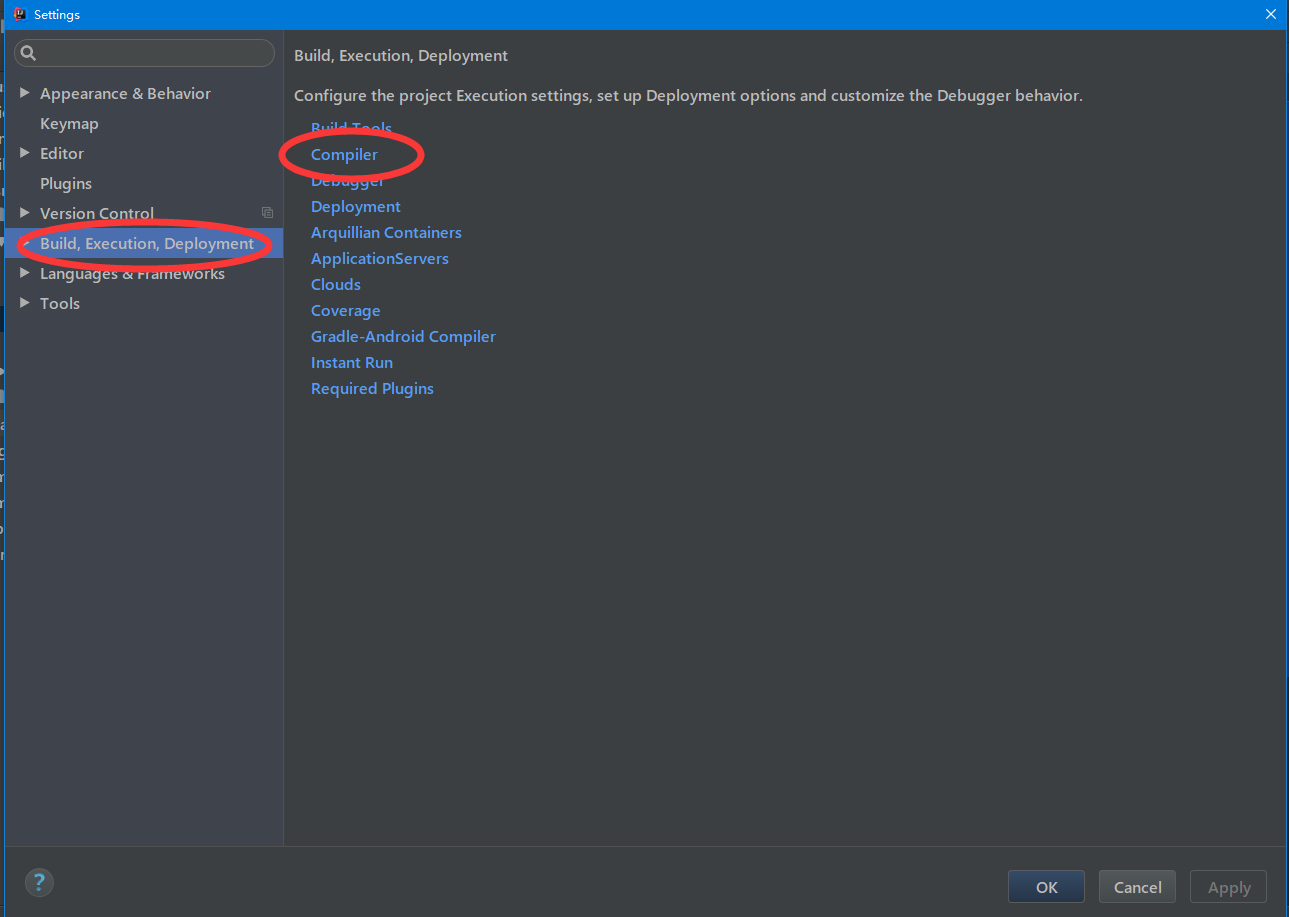
(1)开启idea自动make功能
File--->setting--->如图:
(2)点击Compiler进入界面如图:(选择make project automatically)
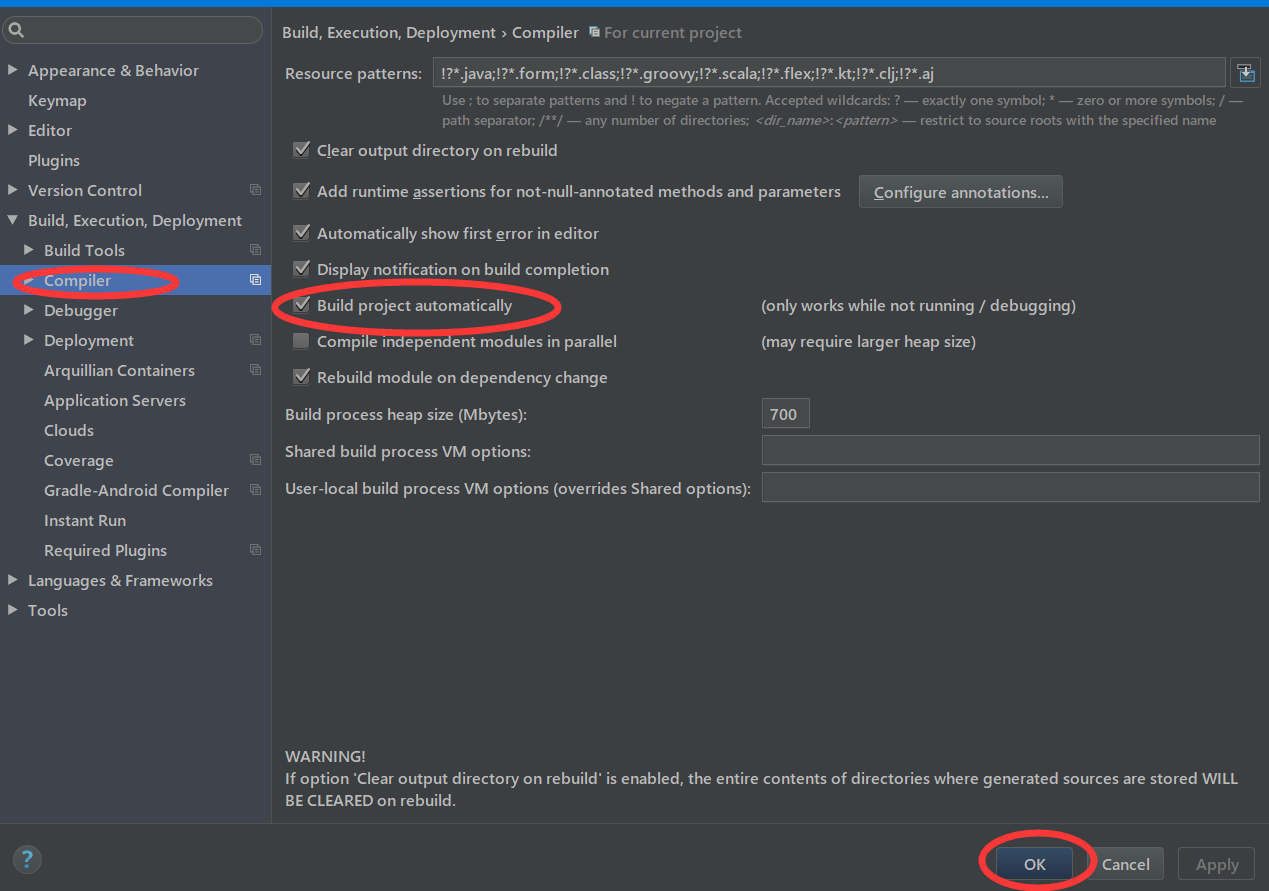
(3)CTRL + SHIFT + A ----->查找Registry --->勾选compiler.automake.allow.when.app.running项目(详见:http://www.cnblogs.com/liuyangfirst/p/8317419.html)
6、maven启动,在编译器右侧栏点开右侧栏

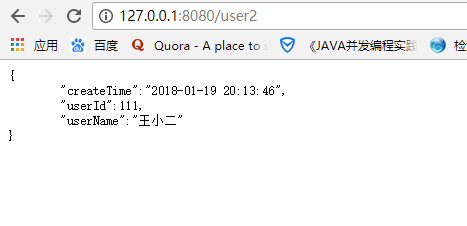
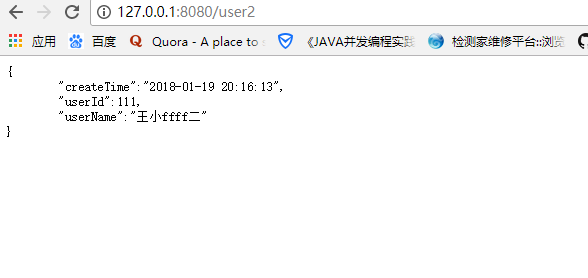
7、访问网页测试一下是否联通
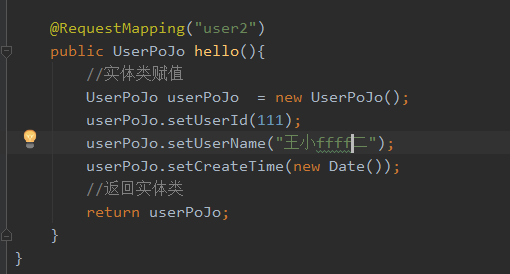
8、controller中加如下内容,然后F5刷新界面,如图就是成功实现热部署
IntelliJ IDEA 2017版 spring-boot-devtools实现热部署的更多相关文章
- IntelliJ IDEA Spring boot devtools 实现热部署
一.spring-boot-devtools是一个为开发者服务的一个模块,其中最重要的功能就是自动部署新代码. 二.原理 使用了两个ClassLoader,一个ClassLoader用来加载那些不会变 ...
- Spring Boot入门系列(十五)Spring Boot 开发环境热部署
在实际的项目开发过中,当我们修改了某个java类文件时,需要手动重新编译.然后重新启动程序的,整个过程比较麻烦,特别是项目启动慢的时候,更是影响开发效率.其实Spring Boot的项目碰到这种情况, ...
- Spring Boot 应用的热部署配置
前言 所谓热部署,简单来说,就是代码修改后不需重启项目就可自动加载出新的内容. 注意:热部署在 debug 调试模式下才生效! IDEA 配置 在 IDE(IDEA)中开启相关项目自动构建选项 开启编 ...
- Spring Boot 2.0 热部署指南
Spring Boot 2.0 支持热部署,实现方法很简单 Spring Boot 2.0 有几种热重载的选项. 推荐的方法是使用spring-boot-devtools 因为它提供了额外的开发时间功 ...
- Spring Boot 五种热部署方式
[推荐]2019 Java 开发者跳槽指南.pdf(吐血整理)>>> 1.模板热部署 在SpringBoot中,模板引擎的页面默认是开启缓存的,如果修改了页面的内容,则刷新页面是得不 ...
- Spring Boot 五种热部署方式,极速开发就是生产力!
1.模板热部署 在 Spring Boot 中,模板引擎的页面默认是开启缓存的,如果修改了页面的内容,则刷新页面是得不到修改后的页面的,因此我们可以在application.properties中关闭 ...
- IntelliJ IDEA 2017版 spring-boot2.0.4+mybatis 自动部署的细节问题
一.加载pom依赖包 <!--spring-boot开发热部署--> <dependency> <groupId>org.springframework.boot& ...
- spring boot 中的热部署
<plugin> <groupId>org.springframework.boot</groupId> <artifactId>sprin ...
- spring boot入门学习---热部署
1.maven文件 2.application.properties文件配置
- Spring Boot学习笔记-配置devtools实现热部署
写在前面 Spring为开发者提供了一个名为spring-boot-devtools的模块来使Spring Boot应用支持热部署,提高开发者的开发效率,无需手动重启Spring Boot应用. de ...
随机推荐
- ballerina 学习二十一 http2
ballerina 支持http2 协议,包含server push http2 协议 参考代码 import ballerina/http; import ballerina/log;endpoin ...
- nexus yum 私服集成
nexus 集成了 yum 私服使用起来还是比较简单的 配置 yum proxy 实际使用我们可能需要配置centos 以及epel 的源 centos可以用http://mirror.cento ...
- 关于AM335X移植SDIO WIFI的简易教程(转)
最近应一个朋友邀请,帮他移植了SDIO WIFI到3.2版本内核.因为之前已经成功移植了3.14内核,所以整个过程花了一个下午就完成了.话不多说,先交待一下平台: CPU:TI AM3352 600M ...
- FFMPEG结构体分析:AVCodecContext(转)
注:写了一系列的结构体的分析的文章,在这里列一个列表: FFMPEG结构体分析:AVFrameFFMPEG结构体分析:AVFormatContextFFMPEG结构体分析:AVCodecContext ...
- PLSQL在64位 win7/WIN8上运行(绿色版plsql、无需安装oracle客户端)
一.准备需要的文件: 1.plsql文件绿色压缩包 2.oracle客户端文件绿色压缩包 二.设置PLSQL 运行plsql,不登陆进入plsql点“工具”-“首选项” 按照如图设置“ oracle主 ...
- charles2 重写
重写 重写功能可以重写对应的内容,主要对某些匹配请求的header.host.URL.path.query param.body.response等参数删除.修改.增加. 和断点相比,适合做长期和批量 ...
- Esxi5-管理平台vcenter5.0_数据库迁移流程
migrating-vcenter-database-express-to-sql-2008-r2 一. 准备环境. ESXi5.0主机 IP:192.168.1.158 ...
- 处理DateTime.Now不经过ToString()转换的格式(带有AM、PM)问题
问题是这样的: DateTime.Now不经过ToString()转换,网站部署到测试服务器(国内)得到的时间格式是:2018/8/17 16:26:09,而部署到国外服务器得到的时间格式是:17/8 ...
- nodejs+express+ejs+mongoose实例
nodejs+express+ejs+mongoose实例 nodejs学得异常痛苦,在这里将学的东西做一番整理,算是自我安慰吧.根据网上todo示例,用express和mongoose重写了部分代码 ...
- pythonNetday06
进程 Process(target,name,args,kwargs) p.pid : 创建的新的进程的PID号 p.is_alive() 判断进程是否处于alive状态 p.daemon = Tru ...