
SpringBoot整合富文本编辑器(UEditor)
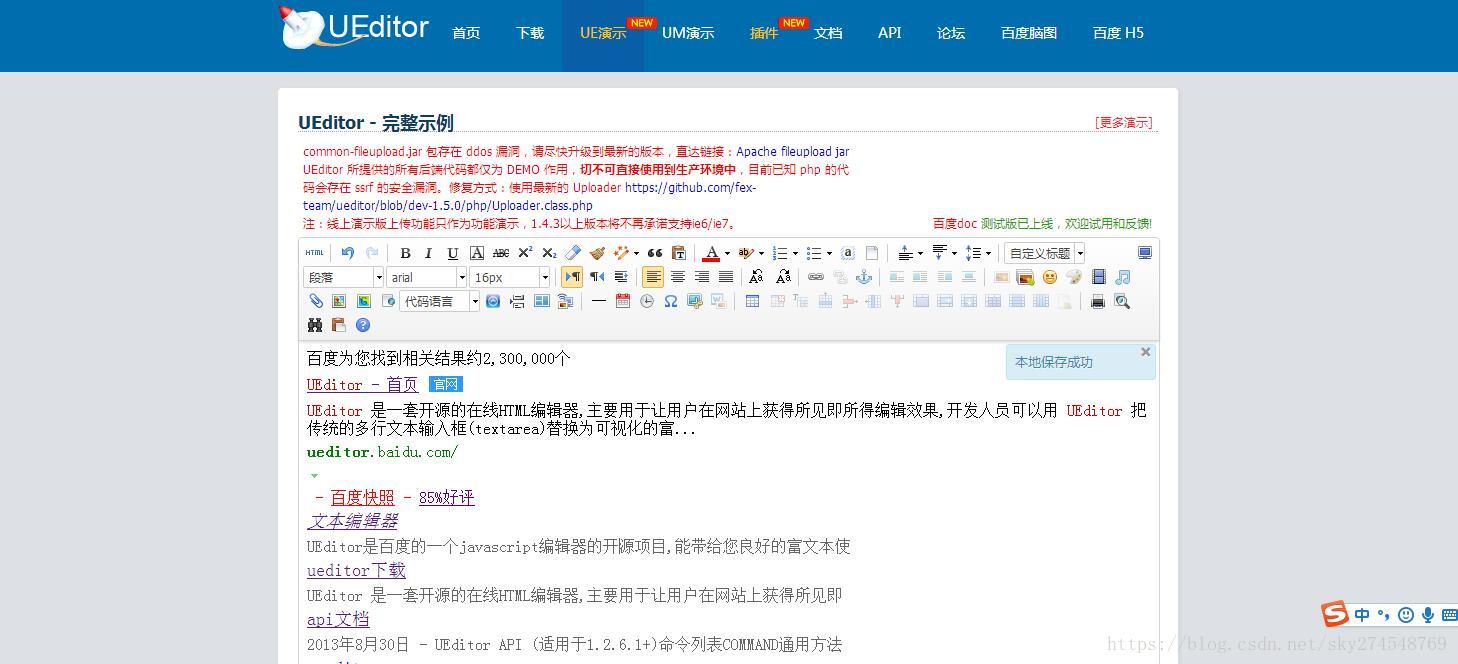
UEditro是一款比较好用的富文本编辑器,所谓的富文本编辑器就是和服务器交互的数据不是普通的字符串文件,而是一些内容包含比较广的字符串,一般是指的html页面,目前比较好用的是百度的UEditor,到官方网站下载:
http://ueditor.baidu.com/website/download.html
1、首先在项目下新建ueditor文件夹,吧下载的ueditor文件里面的内容全部拷贝进去;
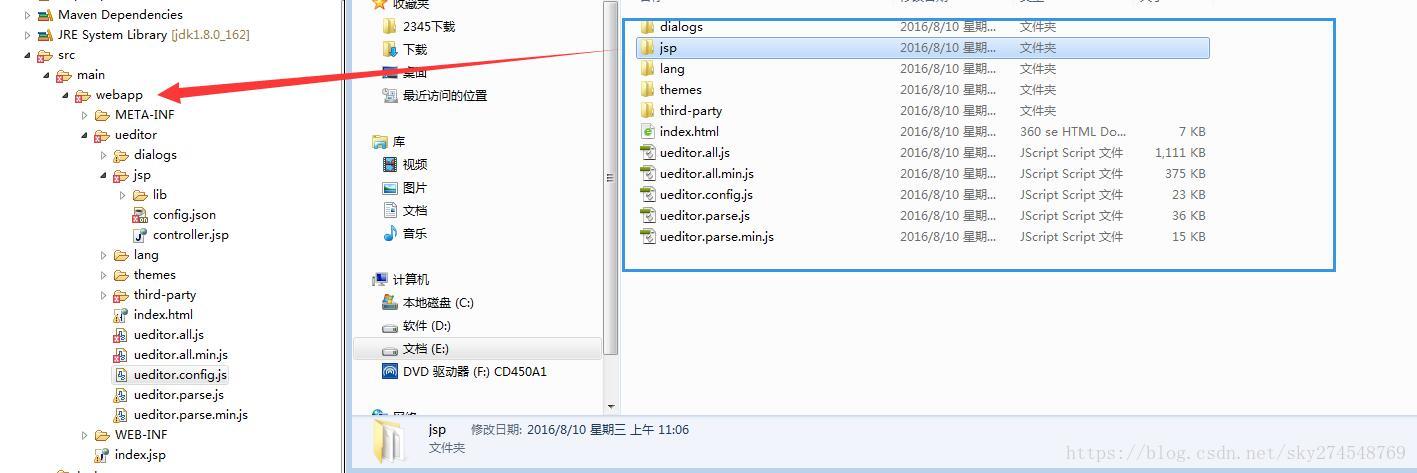
2、在我们需要使用富文本编辑器的页面里面引入ueditor:
<%@ page language="java" import="java.util.*" pageEncoding="UTF-8"%>

<%

String path = request.getContextPath();

String basePath = request.getScheme()+"://"+request.getServerName()+":"+request.getServerPort()+path+"/";

%>

<!DOCTYPE HTML PUBLIC "-//W3C//DTD HTML 4.01 Transitional//EN">

<html>

  <head>

    <base href="<%=basePath%>">

    <title>My JSP 'index.jsp' starting page</title>

    <meta http-equiv="pragma" content="no-cache">

    <meta http-equiv="cache-control" content="no-cache">

    <meta http-equiv="expires" content="0">

    <meta http-equiv="keywords" content="keyword1,keyword2,keyword3">

    <meta http-equiv="description" content="This is my page">

    <script src="<%=path %>/ueditor/ueditor.config.js"></script>

    <script src="<%=path %>/ueditor/ueditor.all.min.js"></script>

    <script src="<%=path %>/ueditor/lang/zh-cn/zh-cn.js"></script>

        <script type="text/javascript">

           var editor = UE.getEditor('container');

           alert(editor);

        </script>

  </head>

  <body>

     <textarea id="container" name="content" type="text/plain">这里写你的初始化内容</textarea>

  </body>

</html>
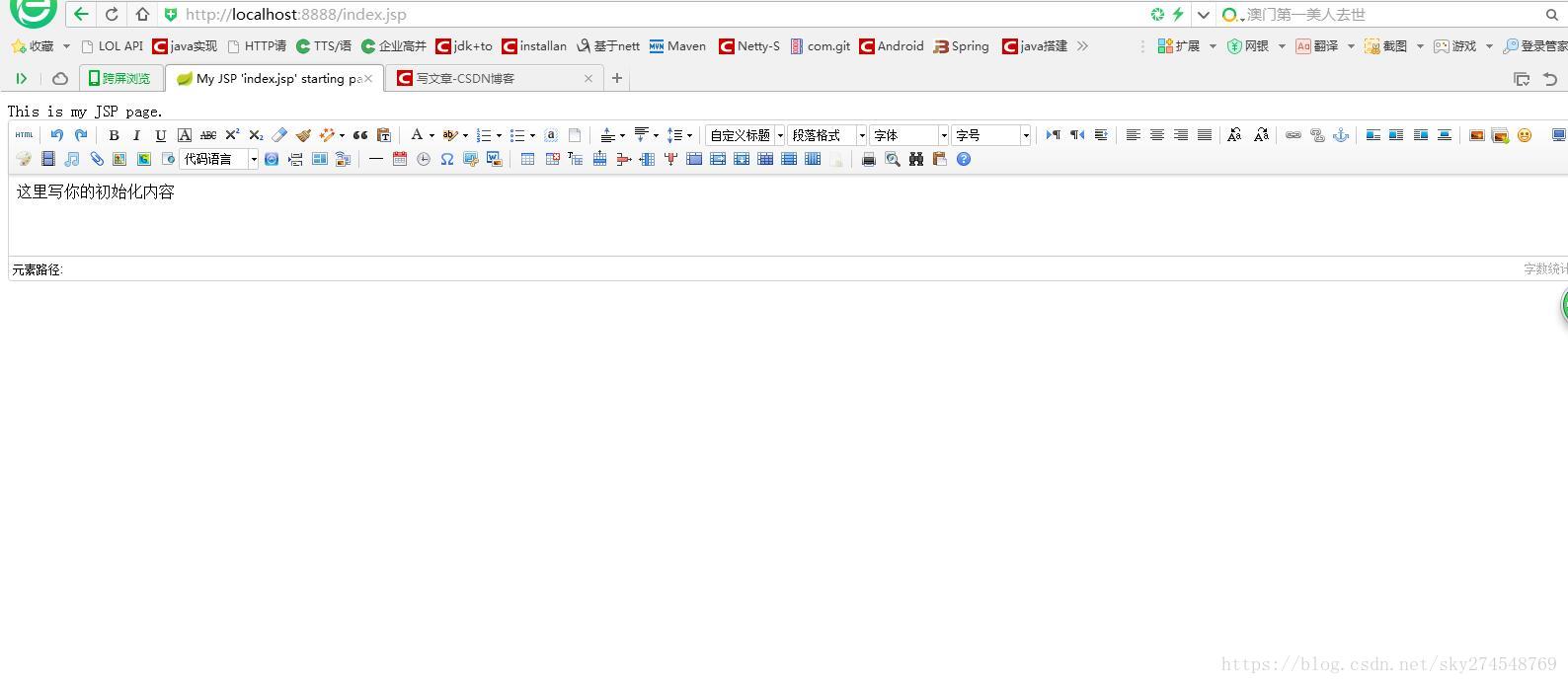
启动程序,访问效果如下:
在index.jsp增加如下代码,将数据提交到服务器:
<%@ page language="java" import="java.util.*" pageEncoding="UTF-8"%>

<%

String path = request.getContextPath();

String basePath = request.getScheme()+"://"+request.getServerName()+":"+request.getServerPort()+path+"/";

%>

<!DOCTYPE HTML PUBLIC "-//W3C//DTD HTML 4.01 Transitional//EN">

<html>

  <head>

    <base href="<%=basePath%>">

    <title>My JSP 'index.jsp' starting page</title>

    <meta http-equiv="pragma" content="no-cache">

    <meta http-equiv="cache-control" content="no-cache">

    <meta http-equiv="expires" content="0">

    <meta http-equiv="keywords" content="keyword1,keyword2,keyword3">

    <meta http-equiv="description" content="This is my page">

    <script src="<%=path %>/ueditor/ueditor.config.js"></script>

    <script src="<%=path %>/ueditor/ueditor.all.min.js"></script>

    <script src="<%=path %>/ueditor/lang/zh-cn/zh-cn.js"></script>

        <script type="text/javascript">

           var editor = UE.getEditor('container');

           function postDate() {

           }

        </script>

  </head>

  <body>

    <form action="<%=path %>/news/addNews.do" method="post">

     <textarea id="container" name="content" type="text/plain">这里写你的初始化内容</textarea>

     <button id="btn" onclick="postDate()">提交</button>

    </form>

  </body>

</html>
controller写法:
package com.xingxue.controller;

import org.springframework.stereotype.Controller;

import org.springframework.web.bind.annotation.RequestMapping;

@Controller

@RequestMapping("/news")

public class NewsController {

    @RequestMapping("/addNews.do")

    public String addNews(String content) {

        System.out.println(content);

        return "ok";

    }

}
测试结果
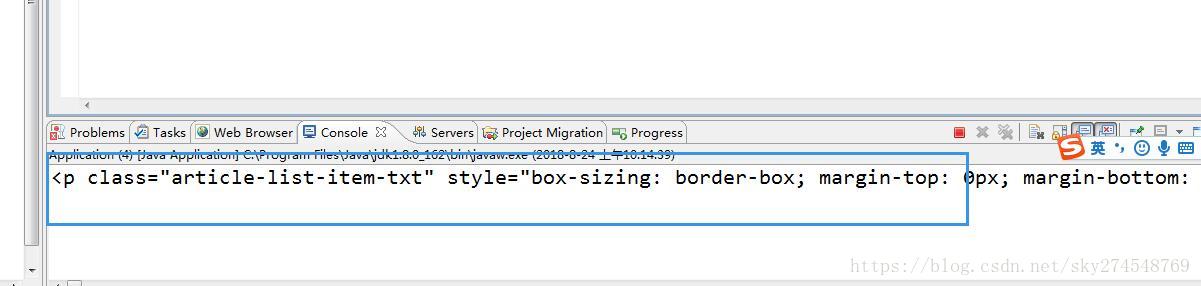
此时,我们服务器已经能收到数据,就可以存入数据库,或者生产静态html文件,
4、解决图片问题:
先编写好接收图片的controller
package com.xingxue.controller;

import java.io.File;

import java.io.FileOutputStream;

import java.io.OutputStream;

import java.util.HashMap;

import java.util.Map;

import java.util.Random;

import javax.servlet.http.HttpServletRequest;

import javax.servlet.http.HttpServletResponse;

import org.springframework.stereotype.Controller;

import org.springframework.util.FileCopyUtils;

import org.springframework.web.bind.annotation.RequestMapping;

import org.springframework.web.bind.annotation.ResponseBody;

import org.springframework.web.multipart.MultipartFile;

import org.springframework.stereotype.Controller;

import org.springframework.web.bind.annotation.RequestMapping;

import org.springframework.web.multipart.MultipartFile;

@Controller

@RequestMapping("/news")

public class NewsController {

    @RequestMapping("/addNews.do")

    public String addNews(String content) {

        System.out.println(content);

        return "ok";

    }

    @RequestMapping("/upload.do")

    @ResponseBody

    public Map<String, Object> images (MultipartFile upfile, HttpServletRequest request, HttpServletResponse response){

        Map<String, Object> params = new HashMap<String, Object>();

        System.out.println("1111111111111");

        try{

            String basePath = "e:/img";  //与properties文件中lyz.uploading.url相同,未读取到文件数据时为basePath赋默认值

            String  visitUrl = "/upload/"; //与properties文件中lyz.visit.url相同,未读取到文件数据时为visitUrl赋默认值

             String ext = "abc" + upfile.getOriginalFilename();

             String fileName = String.valueOf(System.currentTimeMillis()).concat("_").concat(""+new Random().nextInt(6)).concat(".").concat(ext);

             StringBuilder sb = new StringBuilder();

             //拼接保存路径

             sb.append(basePath).append("/").append(fileName);

             visitUrl = visitUrl.concat(fileName);

             File f = new File(sb.toString());

             if(!f.exists()){

                 f.getParentFile().mkdirs();

             }

             OutputStream out = new FileOutputStream(f);

             FileCopyUtils.copy(upfile.getInputStream(), out);

             params.put("state", "SUCCESS");

             params.put("url", visitUrl);

             params.put("size", upfile.getSize());

             params.put("original", fileName);

             params.put("type", upfile.getContentType());

        } catch (Exception e){

             params.put("state", "ERROR");

        }

         return params;

    }

}
该接收图片有几个细节:
第一: MultipartFile upfile 参数名必须和我们ueditro配置文件名字一样:
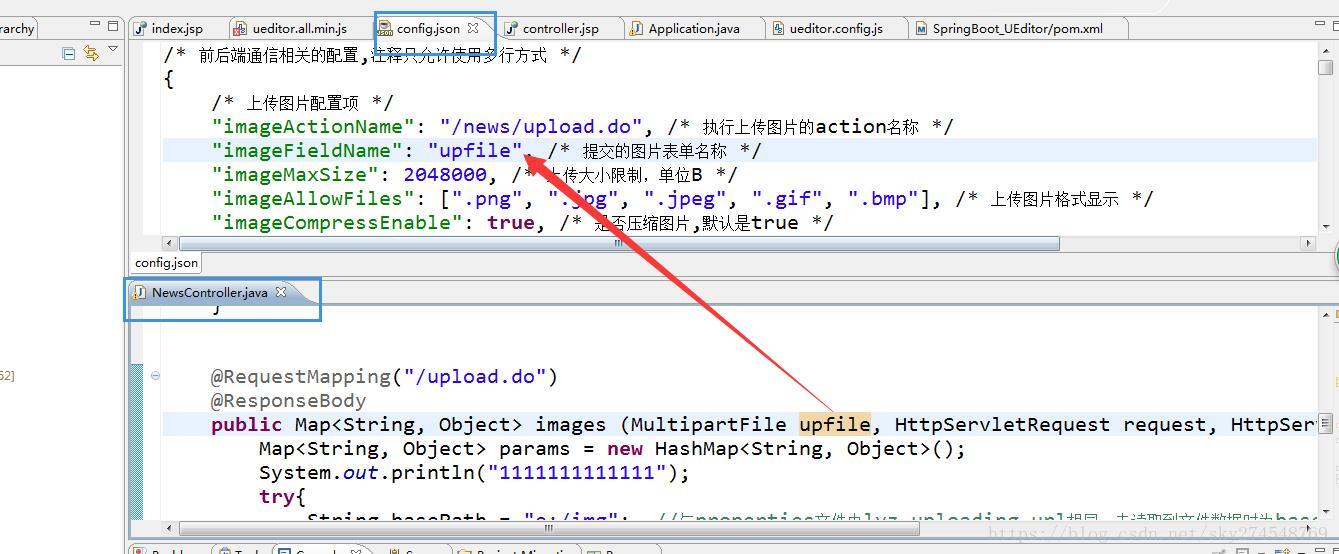
返回数据类型不能错误:
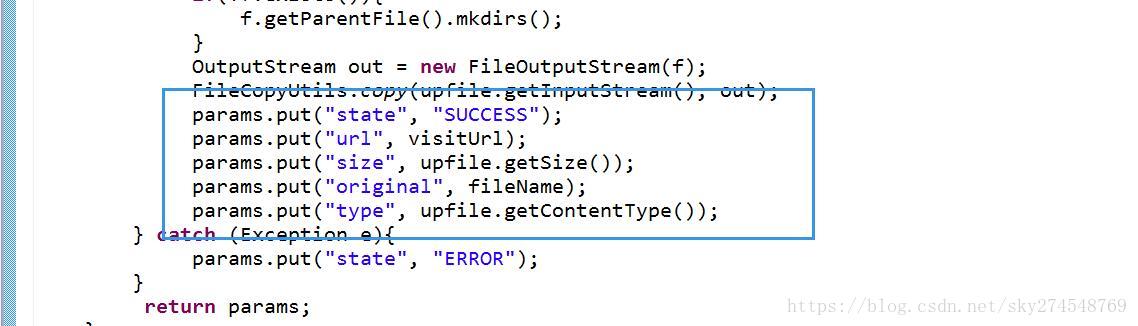
state:上传图片的状态
url:访问图片的路径
ueditro配置文件修改:
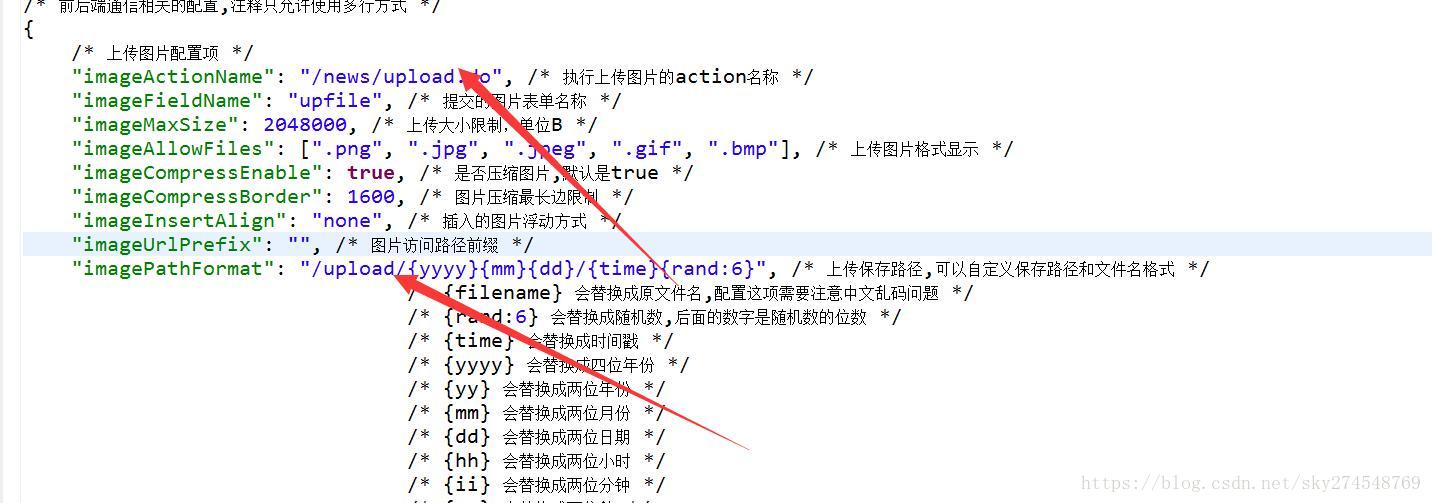
更改jspdiamante:
<%@ page language="java" import="java.util.*" pageEncoding="UTF-8"%>

<%

String path = request.getContextPath();

String basePath = request.getScheme()+"://"+request.getServerName()+":"+request.getServerPort()+path+"/";

%>

<!DOCTYPE HTML PUBLIC "-//W3C//DTD HTML 4.01 Transitional//EN">

<html>

  <head>

    <base href="<%=basePath%>">

    <title>My JSP 'index.jsp' starting page</title>

    <meta http-equiv="pragma" content="no-cache">

    <meta http-equiv="cache-control" content="no-cache">

    <meta http-equiv="expires" content="0">

    <meta http-equiv="keywords" content="keyword1,keyword2,keyword3">

    <meta http-equiv="description" content="This is my page">

    <script src="<%=path %>/ueditor/ueditor.config.js"></script>

    <script src="<%=path %>/ueditor/ueditor.all.min.js"></script>

    <script src="<%=path %>/ueditor/lang/zh-cn/zh-cn.js"></script>

        <script type="text/javascript">

           var editor = UE.getEditor('container');

           UE.Editor.prototype._bkGetActionUrl = UE.Editor.prototype.getActionUrl;

            UE.Editor.prototype.getActionUrl = function(action){

                if(action == '/news/upload.do'){

                    return '/news/upload.do';

                }else{

                    return this._bkGetActionUrl.call(this, action);

                }

            }

        </script>

  </head>

  <body>

    <form action="<%=path %>/news/addNews.do" method="post">

     <textarea id="container" name="content" type="text/plain">这里写你的初始化内容</textarea>

     <button id="btn" onclick="postDate()">提交</button>

    </form>

  </body>

</html>
注意:
return ‘/news/upload.do’; //ssm要带项目名, springboot不需要带项目名
测试效果:
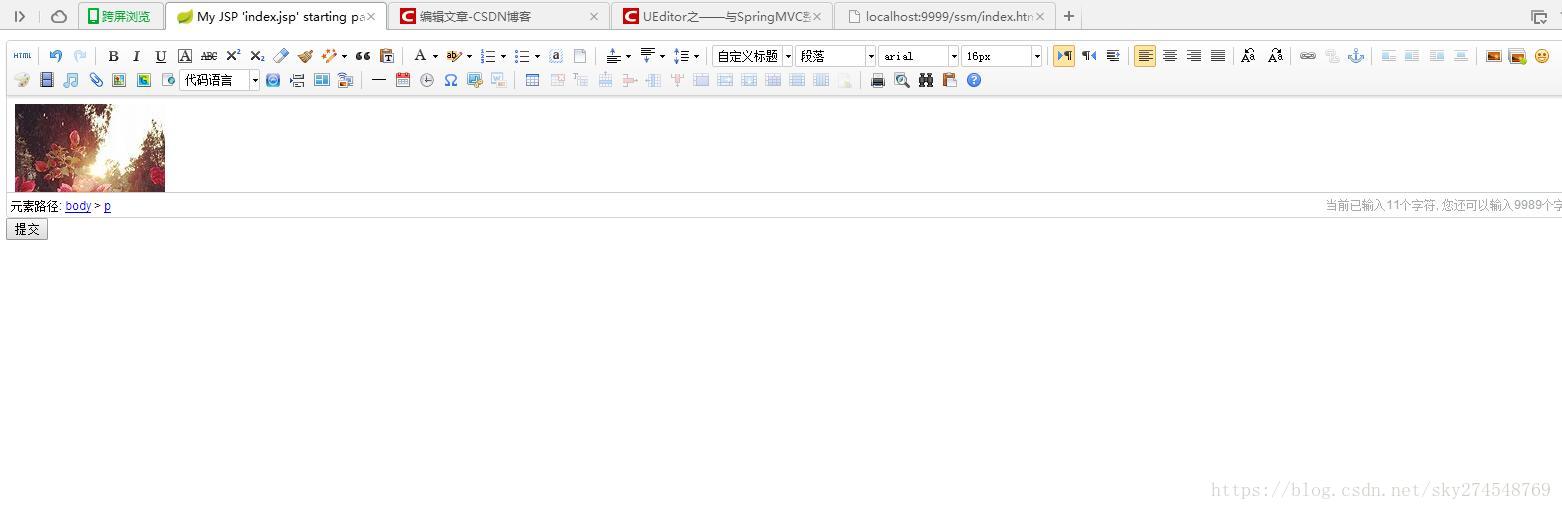
注意:图片的路径我们可以用一个虚拟的图片服务器来模拟,需要修改controller的代码
package com.xingxue.controller;

import java.io.File;

import java.io.FileOutputStream;

import java.io.OutputStream;

import java.util.HashMap;

import java.util.Map;

import java.util.Random;

import javax.servlet.http.HttpServletRequest;

import javax.servlet.http.HttpServletResponse;

import org.springframework.stereotype.Controller;

import org.springframework.util.FileCopyUtils;

import org.springframework.web.bind.annotation.RequestMapping;

import org.springframework.web.bind.annotation.ResponseBody;

import org.springframework.web.multipart.MultipartFile;

import org.springframework.stereotype.Controller;

import org.springframework.web.bind.annotation.RequestMapping;

import org.springframework.web.multipart.MultipartFile;

@Controller

@RequestMapping("/news")

public class NewsController {

    @RequestMapping("/addNews.do")

    public String addNews(String content) {

        System.out.println(content);

        return "ok";

    }

    @RequestMapping("/upload.do")

    @ResponseBody

    public Map<String, Object> images (MultipartFile upfile, HttpServletRequest request, HttpServletResponse response){

        Map<String, Object> params = new HashMap<String, Object>();

        System.out.println("1111111111111");

        try{

            String basePath = "e:/img";  //与properties文件中lyz.uploading.url相同,未读取到文件数据时为basePath赋默认值

             String ext = "abc" + upfile.getOriginalFilename();

             String fileName = String.valueOf(System.currentTimeMillis()).concat("_").concat(""+new Random().nextInt(6)).concat(".").concat(ext);

             StringBuilder sb = new StringBuilder();

             //拼接保存路径

             sb.append(basePath).append("/").append(fileName);

             //写到e盘

             File f = new File(sb.toString());

             if(!f.exists()){

                 f.getParentFile().mkdirs();

             }

             OutputStream out = new FileOutputStream(f);

             FileCopyUtils.copy(upfile.getInputStream(), out);

             //虚拟图片服务器

             String  visitUrl = "http://localhost:9999/ssm/";

             visitUrl = visitUrl.concat(fileName);

             f = new File("D:/server/project/ssm/" + fileName);

              out = new FileOutputStream(f);

             FileCopyUtils.copy(upfile.getInputStream(), out);

             params.put("state", "SUCCESS");

             params.put("url", visitUrl);

             params.put("size", upfile.getSize());

             params.put("original", fileName);

             params.put("type", upfile.getContentType());

        } catch (Exception e){

            e.printStackTrace();

             params.put("state", "ERROR");

        }

         return params;

    }

}
SpringBoot整合富文本编辑器(UEditor)的更多相关文章
- springboot+layui 整合百度富文本编辑器ueditor入门使用教程(踩过的坑)
springboot+layui 整合百度富文本编辑器ueditor入门使用教程(踩过的坑) 写在前面: 富文本编辑器,Multi-function Text Editor, 简称 MTE, 是一 ...
- Spring+SpringMVC+MyBatis+easyUI整合优化篇(六)easyUI与富文本编辑器UEditor整合
日常啰嗦 本来这一篇和接下来的几篇是打算讲一下JDBC和数据库优化的,但是最近很多朋友加我好友也讨论了一些问题,我发现大家似乎都是拿这个项目作为练手项目,作为脚手架来用的,因此呢,改变了一下思路,JD ...
- easyUI整合富文本编辑器KindEditor详细教程(附源码)
原因 在今年4月份的时候写过一篇关于easyui整合UEditor的文章Spring+SpringMVC+MyBatis+easyUI整合优化篇(六)easyUI与富文本编辑器UEditor整合,从那 ...
- 百度Web富文本编辑器ueditor在ASP.NET MVC3项目中的使用说明
====================================================================== [百度Web富文本编辑器ueditor在ASP.NET M ...
- 百度富文本编辑器UEditor安装配置全过程
网站开发时富文本编辑器是必不可少的,他可以让用户自行编辑内容的样式然后上传到后台!下面我们来介绍如何安装使用百度富文本编辑器 一.下载并且设置百度富文本编辑器的样式 你可以去百度UEditor ...
- 百度富文本编辑器ueditor使用总结
最近做的项目用到了ueditor这个东东,但是他的一些配置文档对初次使用者来说很难以理解,故作此总结 相关详细操作链接地址: http://blog.csdn.net/wusuopubupt/arti ...
- 富文本编辑器UEditor自定义工具栏(二、插入图片、音频、视频个性化功能按钮和弹层及自定义分页符)
导读:本篇将简单探讨插入图片.音频.视频的功能按钮实现方式 传送门:富文本编辑器UEditor自定义工具栏(一.基础配置与字体.背景色.行间距.超链接实现) 一.效果图 1.UEditor自定义工具栏 ...
- 富文本编辑器UEditor自定义工具栏(三、自定义工具栏功能按钮图标及工具栏样式简单修改)
导读 富文本编辑器UEditor提供丰富了定制配置项,如果想设置个性化的工具栏按钮图标有无办法呢?答案是肯定的!前两篇博文简要介绍了通过将原工具栏隐藏,在自定义的外部按钮上,调用UEditor各命令实 ...
- vue+富文本编辑器UEditor
vue+富文本编辑器UEditor 昨天的需求是把textarea换成富文本编辑器的形式, 网上找了几种富文本编辑器ueditor.tinymce等, 觉得ueditor实现双向绑定还挺有意思, 分享 ...
- 关于富文本编辑器ueditor(jsp版)上传文件到阿里云OSS的简单实例,适合新手
关于富文本编辑器ueditor(jsp版)上传文件到阿里云OSS的简单实例,适合新手 本人菜鸟一枚,最近公司有需求要用到富文本编辑器,我选择的是百度的ueditor富文本编辑器,闲话不多说,进入正 ...
随机推荐
- 如何实现LLM的通用function-calling能力?
众所周知,LLM的函数function-calling能力很强悍,解决了大模型与实际业务系统的交互问题.其本质就是函数调用. 从openai官网摘图: 简而言之: LLM起到决策的作用,告知业务系统应 ...
- Pytorch 手写数字识别 深度学习基础分享
本篇是一次内部分享,给项目开发的同事分享什么是深度学习.用最简单的手写数字识别做例子,讲解了大概的原理. 手写数字识别 展示首先数字识别项目的使用.项目实现过程: 训练出模型 准备html手写板 fl ...
- ChatGPT生成测试用例的最佳实践(三)
还记得在第1章,我们利用ChatGPT生成的业务用例吗?这种业务用例生成方式其实和场景法用例设计十分相似,我们是不是也可以直接将业务用例输入ChatGPT,让它输出测试用例呢?笔者输入相关提示词让其补 ...
- 好消息,在 Visual Studio 中可以免费使用 GitHub Copilot 了!
前言 今天大姚给大家分享一个好消息,GitHub Copilot 可以免费使用了!在此之前若开发者要使用 GitHub Copilot 需要付费订阅,每月订阅费用起步价为 10 美元,而经过验证的学生 ...
- 【MyBatis】学习笔记05:获取参数值的两种方式
[Mybatis]学习笔记01:连接数据库,实现增删改 [Mybatis]学习笔记02:实现简单的查 [MyBatis]学习笔记03:配置文件进一步解读(非常重要) [MyBatis]学习笔记04:配 ...
- FFmpeg命令行示例
1 提取视频流/音频流 // 分离视频流和音频流 ffmpeg -i input_file -vcodec copy -an output_file_video ffmpeg -i input_fil ...
- 主动式AI(代理式)与生成式AI的关键差异与影响
大型语言模型(LLMs)如GPT可以生成文本.回答问题并协助完成许多任务.然而,它们是被动的,这意味着它们仅根据已学到的模式对接收到的输入作出响应.LLMs无法自行决策:除此之外,它们无法规划或适应变 ...
- 史上最通俗Netty入门长文:基本介绍、环境搭建、动手实战
原作者江成军,原题"还在被Java NIO虐?该试试Netty了",收录时有修订和改动. 1.阅读对象 本文适合对Netty一无所知的Java NIO网络编程新手阅读,为了做到这一 ...
- MSM8953/SDM450 去PMI的USB3.0 TYPE-C Micro USB OTG功能适配
提前说明一下有哪些"坑". 1.PM8953 GPIO_8的TZ权限 2.PM8953 GPIO_8寄存器的写入保护 3.去掉高通默认的ID检测 4.增加dwc3的ID检测 5.增 ...
- 展锐SE8451E 开启硬件流控
Dear Customer: 如电话沟通,若将uart0配置成3M波特率,需进行如下更改: 1.时钟源更改为96M/sprdroid10_trunk_19c_rls1/bsp/kernel/ker ...