
VS2019+ Intel Fortran (oneAPI)+HDF5库的安装+测试
最近需要读取hdf5文件(*.h5),处于对速度的追求,兼具VS调试程序的需要,使用Fortran+HDF5进行读写。
注意: 此处为动态库连接方式,静态库类似,差异主要为头文件有所差异。
参考网址:
- 使用Fortran+HDF扩展进行HDF文件读写 | Herrera Space
- visual studio - HDF5: Build Fortran libraries (Windows) - Stack Overflow
- HDF库使用环境搭建_xuyong7的博客-CSDN博客
- HDF5-Fortran: Visual Studio 2019 + Intel Fortran + Win10 x64 - HDF5 - HDF Forum
- IVF读取hdf5格式的数据-编程工具交流-专业Fortran论坛 -
环境:
Windows10 64位(似乎没有32位Win10了吧)
Visual Studio 2019 Community Edition
Intel oneAPI 2021
安装步骤:
1. 安装HDF5 Windows预编译包
从https://www.hdfgroup.org/downloads/hdf5/下载 hdf5-1.12.2-Std-win10_64-vs16.zip和hdf5plugin-1.12.2-win10_64-vs16.zip,这两个文件(需要注册帐号)。解压后安装
2. 新建一个空的Fortran 控制台解决方案
3. 在打开的解决,进行如下配置:
1) 由于安装的是64位的库,需要把活动窗口调整到64位。
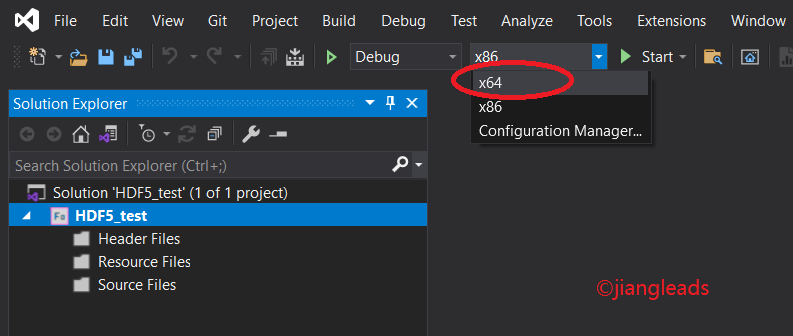
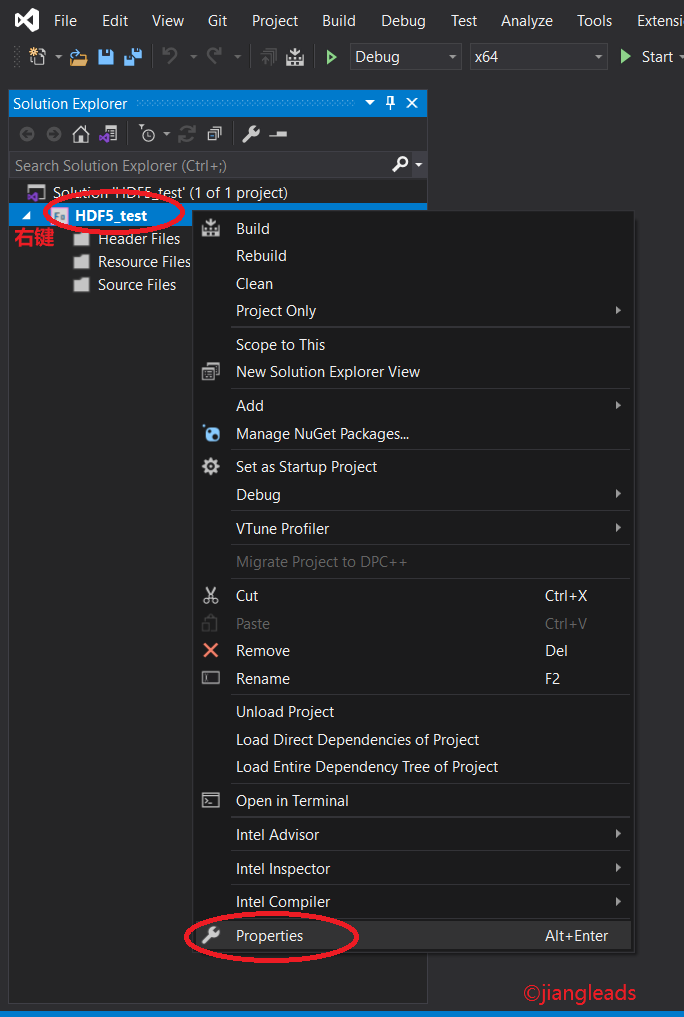
2)在解决方案管理器,在所选的项目处右键,打开属性(Property)窗口,进行如下配置:
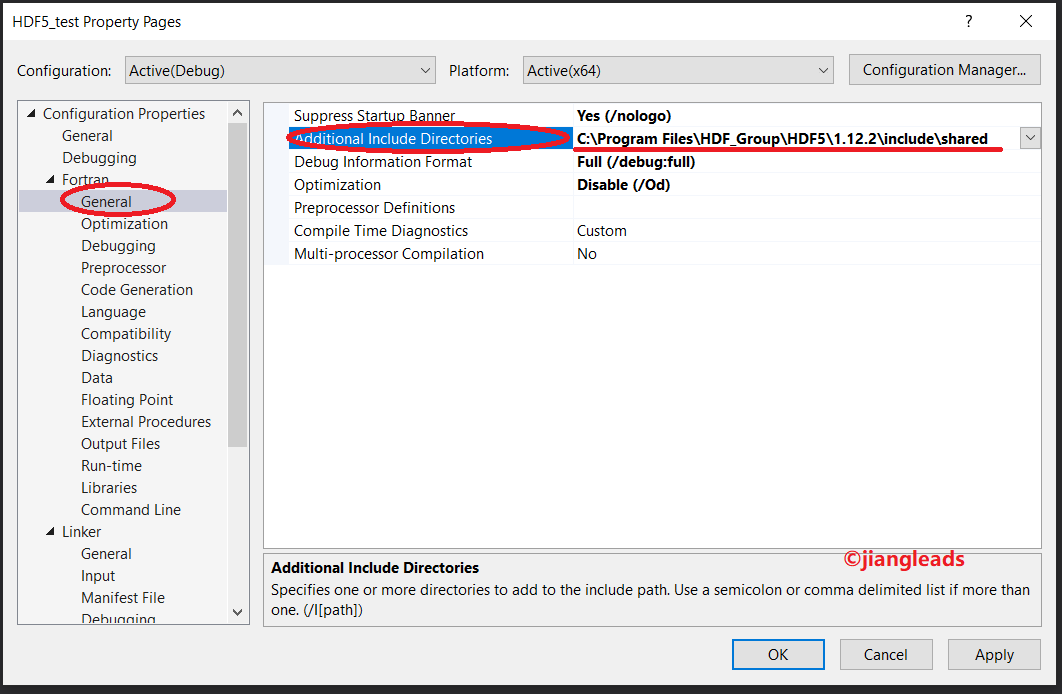
在属性窗口,点"Generial" => "Additional Include Directories",将HDF5动态库的include目录加入到其中 C:\Program Files\HDF_Group\HDF5\1.12.2\include\shared
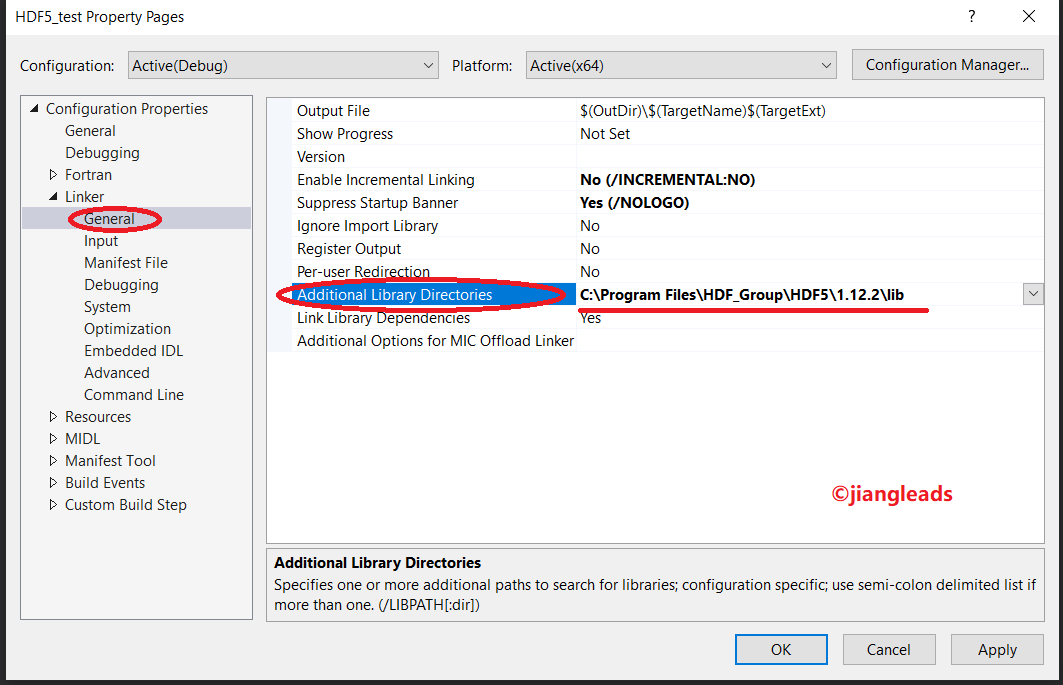
点"Linker"=>"General"=>Additioal Library Directories",将HDF5的库路径目录加入到其中 C:\Program Files\HDF_Group\HDF5\1.12.2\lib
点"Linker"=>"Input"=>Additioal Dependencies",将HDF5的动态库名称加入到其中
hdf_fortran.lib
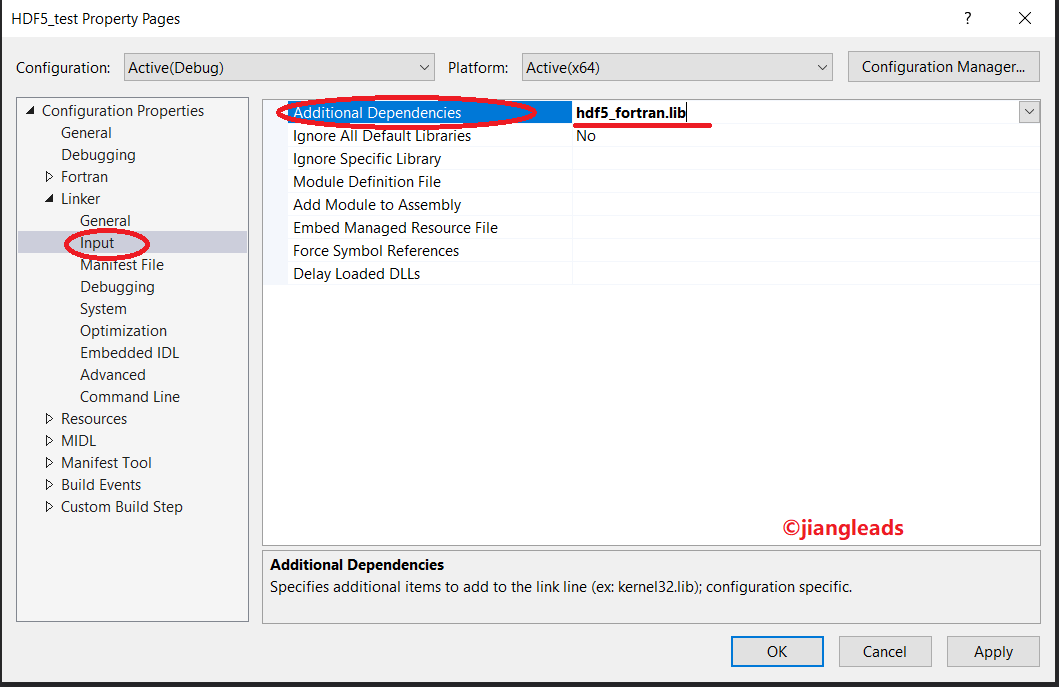
3)创建源代码,将测试代码复制其中


! ************************************************************

!

!  This example shows how to read and write data to a

!  dataset.  The program first writes integers to a dataset

!  with dataspace dimensions of DIM0xDIM1, then closes the

!  file.  Next, it reopens the file, reads back the data, and

!  outputs it to the screen.

!

!  This file is intended for use with HDF5 Library verion 1.8

!

! ************************************************************

PROGRAM main

  USE HDF5

  IMPLICIT NONE

  CHARACTER(LEN=14), PARAMETER :: filename = "h5ex_d_rdwr.h5"

  CHARACTER(LEN=3) , PARAMETER :: dataset = "DS1"

  INTEGER          , PARAMETER :: dim0     = 4

  INTEGER          , PARAMETER :: dim1     = 7

  INTEGER :: hdferr

  INTEGER(HID_T) :: file, space, dset ! handles

  INTEGER(HSIZE_T), DIMENSION(1:2)           :: dims = (/dim0, dim1/) ! size read/write buffer

  INTEGER         , DIMENSION(1:dim0,1:dim1) :: wdata, &  ! Write buffer

                                                rdata     ! Read buffer

  INTEGER :: i, j

  !

  ! Initialize FORTRAN interface.

  !

  CALL h5open_f(hdferr)

  !

  ! Initialize data.

  !

  DO i = 1, dim0

     DO j = 1, dim1

        wdata(i,j) = (i-1)*(j-1)-(j-1)

     ENDDO

  ENDDO

  !

  ! Create a new file using the default properties.

  !

  CALL h5fcreate_f(filename, H5F_ACC_TRUNC_F, file, hdferr)

  !

  ! Create dataspace.  Setting size to be the current size.

  !

  CALL h5screate_simple_f(2, dims, space, hdferr)

  !

  ! Create the dataset.  We will use all default properties for this

  ! example.

  !

  CALL h5dcreate_f(file, dataset, H5T_STD_I32LE, space, dset, hdferr)

  !

  ! Write the data to the dataset.

  !

  CALL h5dwrite_f(dset, H5T_NATIVE_INTEGER, wdata, dims, hdferr)

  !

  ! Close and release resources.

  !

  CALL h5dclose_f(dset , hdferr)

  CALL h5sclose_f(space, hdferr)

  CALL h5fclose_f(file , hdferr)

  !

  ! Now we begin the read section of this example.

  !

  !

  ! Open file and dataset using the default properties.

  !

  CALL h5fopen_f(filename, H5F_ACC_RDONLY_F, file, hdferr)

  CALL h5dopen_f (file, dataset, dset, hdferr)

  !

  ! Read the data using the default properties.

  !

  CALL h5dread_f(dset, H5T_NATIVE_INTEGER, rdata, dims, hdferr)

  !

  ! Output the data to the screen.

  !

  WRITE(*, '(/,A,":")') dataset

  DO i=1, dim0

     WRITE(*,'(" [")', ADVANCE='NO')

     WRITE(*,'(80i3)', ADVANCE='NO') rdata(i,:)

     WRITE(*,'(" ]")')

  ENDDO

  WRITE(*, '(/)')

  !

  ! Close and release resources.

  !

  CALL h5dclose_f(dset , hdferr)

  CALL h5fclose_f(file , hdferr)

END PROGRAM main
h5ex_d_rdwr.f90
4)编译,链接,运行。
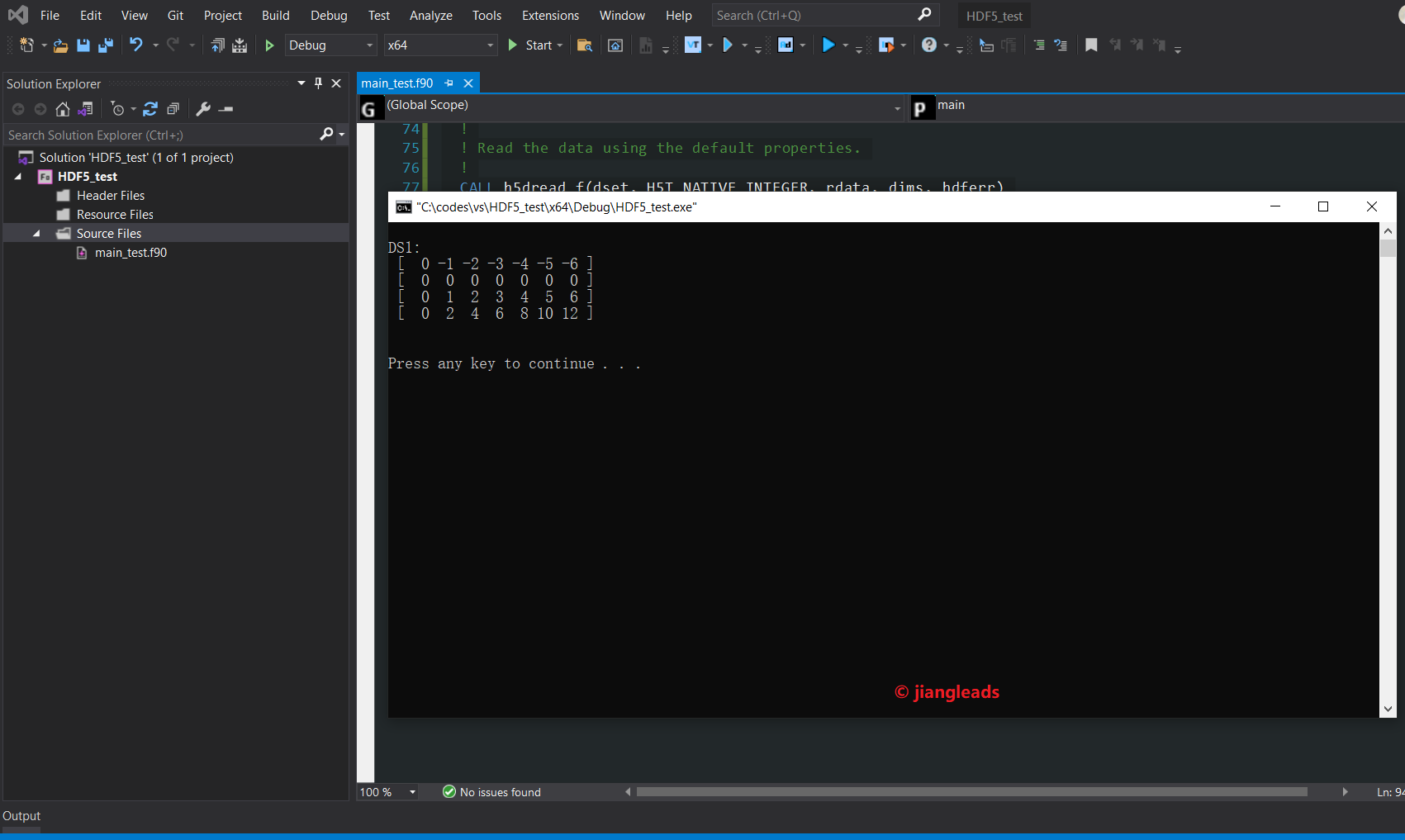
注:安装文件中说动态链接库需要设置H5_BUILT_AS_DYNAMIC_LIB编译选项,我未加入这个选项也能运行。
如果需要设置此选项,可能是在"Properties“ => "Fortran"=>"General"=> “Preprocessor Definitions”这里,把H5_BUILT_AS_DYNAMIC_LIB粘贴进去(不确定是否正确)
附上相关说明(位于C:\Program Files\HDF_Group\HDF5\1.12.2\USING_HDF5_VS.txt)
***********************************************************************

*  HDF5 Build and Install Suggestions for Windows and Visual Studio   *

*                         (Full Version)                              *

***********************************************************************

These suggestions are for Visual Studio users.

Instructions for building and testing HDF5 applications using CMake can

be found in the USING_HDF5_CMake.txt file found in this folder.

NOTE: Building applications with the dynamic/shared hdf5 libraries requires

      that the "H5_BUILT_AS_DYNAMIC_LIB" compile definition be used.

The following two sections are helpful if you do not use CMake to build

your applications.

==============================================================================================

Using Visual Studio 2010 and above with HDF5 Libraries built with Visual Studio 2010 and above

==============================================================================================

   1. Set up path for external libraries and headers

      The path settings will need to be in the project property sheets per project.

      Go to "Project" and select "Properties", find "Configuration Properties",

      and then "VC++ Directories".

      1.1 If you are building on 64-bit Windows, find the "Platform" dropdown

          and select "x64".

      1.2 Add the header path to the "Include Directories" setting.

      1.3 Add the library path to the "Library Directories" setting.

      1.4 Select Linker->Input and beginning with the

          "Additional Dependencies" line, enter the library names. The

          external libraries should be listed first, followed by the HDF5

          library, and then optionally the HDF5 High Level, Fortran or C++

          libraries. For example, to compile a C++ application, enter:

          szip.lib zlib.lib hdf5.lib hdf5_cpp.lib

==========================================================================

Using Visual Studio 2008 with HDF5 Libraries built with Visual Studio 2008

==========================================================================

   2. Set up the path for external libraries and headers

      Invoke Microsoft Visual Studio and go to "Tools" and select "Options",

      find "Projects", and then "VC++ Directories".

      2.1 If you are building on 64-bit Windows, find the "Platform" dropdown

          and select "x64".

      2.2 Find the box "Show directories for", choose "Include files", add the

          header path (i.e. c:\Program Files\HDF_Group\HDF5\1.12.x\include)

          to the included directories.

      2.3 Find the box "Show directories for", choose "Library files", add the

          library path (i.e. c:\Program Files\HDF_Group\HDF5\1.12.x\lib)

          to the library directories.

      2.4 If using Fortran libraries, you will also need to setup the path

          for the Intel Fortran compiler.

      2.5 Select Project->Properties->Linker->Input and beginning with the

          "Additional Dependencies" line, enter the library names. The

          external libraries should be listed first, followed by the HDF5

          library, and then optionally the HDF5 High Level, Fortran or C++

          libraries. For example, to compile a C++ application, enter:

          szip.lib zlib.lib hdf5.lib hdf5_cpp.lib

========================================================================

3. Helpful Pointers

========================================================================

    3.1 FAQ

    Many other common questions and hints are located online and being updated

    in the HDF Knowledge Base, please see:

       https://portal.hdfgroup.org/display/knowledge/HDF+Knowledge+Base

************************************************************************

 Please send email to help@hdfgroup.org for further assistance.
USING_HDF5_VS.txt
VS2019+ Intel Fortran (oneAPI)+HDF5库的安装+测试的更多相关文章
- Ubuntu验证查看库的安装情况
以下是ubuntu系统安装完成一些库后,验证查看各个库的安装情况. 1. CUDA8.0 yuanlibin@yuanlibin:~$ nvcc -V nvcc: NVIDIA (R) Cuda co ...
- 支持MPI的hdf5库的编译
作者:朱金灿 来源:http://blog.csdn.net/clever101 因为最近要研究并行I/O,据说hdf5文件格式可以支持并行I/O,深度学习框架Caffe用的是hdf格式,所以决定把h ...
- c++ 库 boost安装
http://blog.chinaunix.net/uid-12226757-id-3427282.html ubuntu apt-get install libboost-dev 全部: apt-g ...
- Python3 常用爬虫库的安装
Python3 常用爬虫库的安装 1 简介 Windows下安装Python3常用的爬虫库:requests.selenium.beautifulsoup4.pyquery.pymysql.pymon ...
- dev c++ Boost库的安装
dev c++ 的boost库的安装步骤 然后点击“check for updates”按钮 最后点击“Download selected”按钮,下载完成后安装.... 给dev添加boost库文件, ...
- 机器学习库shark安装
经过两天的折腾,一个对c++和机器学习库的安装都一知半解的人终于在反复安装中,成功的将shark库安装好了,小小纪念一下,多亏了卡门的热心帮忙. shark的安装主要分为以下几个部分: (1)下载 s ...
- Robot Framework中经常用的第三方库的安装方法
pip升级:python -m pip install --upgrade pip 一.安装robotframework-selenium2library,相当于python中的selenium ...
- Python库的安装方法
Python库的安装方法 Python的解释器CPython是开源的,我们可以下载查看其源代码,同时,Python语言的各种库也都是开源的.利用Python语言编程,可用的库有很多,在Python官方 ...
- Python学习笔记011_模块_标准库_第三方库的安装
容器 -> 数据的封装 函数 -> 语句的封装 类 -> 方法和属性的封装 模块 -> 模块就是程序 , 保存每个.py文件 # 创建了一个hello.py的文件,它的内容如下 ...
- gd库的安装
gd库简介 主要用途编辑 在网站上GD库通常用来生成缩略图,或者用来对图片加水印,或者用来生成汉字验证码,或者对网站数据生成报表等.在PHP处理图像,可使用GD库,而GD库开始时是支持GIF的,但由于 ...
随机推荐
- 常用的"小脚本"-json数据处理
小背景: 我们公司项目中的小脚本是一些工具类,比如常用的是MapUtil工具类的一些方法 写公司的MapUtil工具类的方法要注意,方法名的命名,因为方法名,在公司的项目的某个业务流程有对方法名的进行 ...
- Solon2 的应用生命周期
Solon 框架的应用生命周期包括:一个初始化函数时机点 + 六个事件时机点 + 两个插件生命时机点 + 两个容器生命时机点(v2.2.0 版本的状态): 提醒: 启动过程完成后,项目才能正常运行(启 ...
- vue学习笔记:环境搭建
一.安装node.js node.js的官方地址为:https://nodejs.org/en/download/ 下载好安装包点击安装,基本就是下一步.下一步.... 安装完成后可以通过以下两种方式 ...
- No.2.4
Flex布局 主轴方向:(使用flex-direction改变元素排列方向) 思考:Flex布局模型中,弹性盒子默认沿着哪个方向排列? 水平方向 思考:如何实现内容垂直排列? 修改主轴的方向 主轴默认 ...
- P1886 滑动窗口 /【模板】单调队列
滑动窗口 /[模板]单调队列 题目描述 有一个长为 \(n\) 的序列 \(a\),以及一个大小为 \(k\) 的窗口.现在这个从左边开始向右滑动,每次滑动一个单位,求出每次滑动后窗口中的最大值和最小 ...
- C++实现链队列相关操作代码
#include<iostream>#include<cstdlib>using namespace std;#define MAXSIZE 100#define OK 1#d ...
- 代码随想录训练营day 3|59.螺旋矩阵II 加 数组总结篇
59.螺旋矩阵II 题目链接:59.螺旋矩阵II 题目描述:给定一个正整数 n,生成一个包含 1 到 n^2 所有元素,且元素按顺时针顺序螺旋排列的正方形矩阵. 示例: 输入: 3 输出: [ [ 1 ...
- torrent种子
- 安装kvm后,在windows主机启动virt-manger后报错(no polkit agent available to authenticate action org.libvirt.unix.manage)
解决方法如下: 1. 增加libvirtd用户组 groupadd libvirtd 2.在你使用的普通用户界面执行 sudo usermod -a -G libvirtd $USER 3.设置启动 ...
- Hive基本概念
Hive Hive的相关概念 Hive的架构图 用户接口:包括 CLI.JDBC/ODBC.WebGUI.其中,CLI(command line interface)为shell命令行:Hive中的T ...