
SpringMvc请求流程源码解析
SpringMvc请求流程图
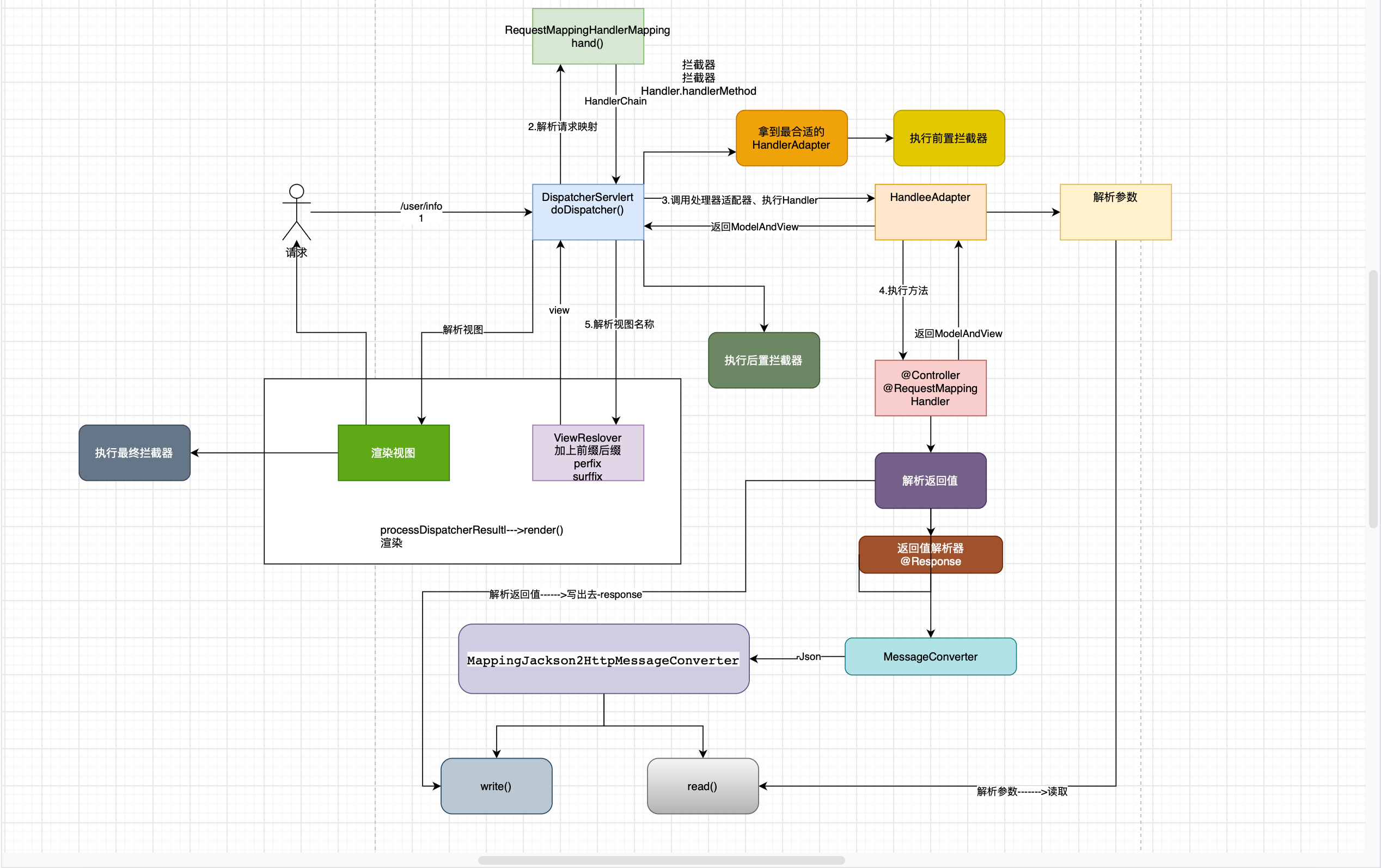
请求流程粗讲解
当用户发送请求之后,SpringMvc的DispatcherServlet就会收到请求,首先会进去父类的FrameworkServlet#service()
然后进入HttpServlet#service()
方法,作用就是判断是什么请求类型的,例如:GET、POST等。这个地方大致过一遍就行,主要是还是 org.springframework.web.servlet.DispatcherServlet#doService
这个方法回去调用org.springframework.web.servlet.DispatcherServlet#doDispatch
这才是请求开始的重点方法、对应上图中的请求--->这里便开始了请求的处理。
org.springframework.web.servlet.DispatcherServlet#doDispatch这个方法中的内容:
- 会进行映射,也就是常说的找到
Handler,在此步骤中拿到请求地址 例如:/user/info
对应方法:org.springframework.web.servlet.DispatcherServlet#getHandler - 选择合适的
HandlerAdapter映射适配器 - 执行前置拦截器
org.springframework.web.servlet.HandlerInterceptor#preHandle - 调用处理适配器执行
Handler - 执行后置处理器 ,对应方法:
org.springframework.web.servlet.HandlerInterceptor#postHandle - 解析返回值
- 执行最终的处理器,也就是视图返回之后的处理器
org.springframework.web.servlet.HandlerInterceptor#afterCompletion
方法细讲
doDispatcher --> 核心
org.springframework.web.servlet.DispatcherServlet#doDispatch
在这个方法中会进行上诉所有方法的调用,不作过多的解释方法添加了中文注释,下面看看这个方法的源码:
	protected void doDispatch(HttpServletRequest request, HttpServletResponse response) throws Exception {

		HttpServletRequest processedRequest = request;

		HandlerExecutionChain mappedHandler = null;

		boolean multipartRequestParsed = false;

		WebAsyncManager asyncManager = WebAsyncUtils.getAsyncManager(request);

		try {

			ModelAndView mv = null;

			Exception dispatchException = null;

			try {

				processedRequest = checkMultipart(request);

				multipartRequestParsed = (processedRequest != request);

				// Determine handler for the current request.

				// 进行映射

				mappedHandler = getHandler(processedRequest);

				if (mappedHandler == null) {

					noHandlerFound(processedRequest, response);

					return;

				}

				// Determine handler adapter for the current request.

				// HandlerAdapter  选择处理器适配器;找到最合适的 HandlerAdapter	// 默认返回的是 RequestMappingHandlerAdapter

				HandlerAdapter ha = getHandlerAdapter(mappedHandler.getHandler());

				// Process last-modified header, if supported by the handler.

				String method = request.getMethod();

				boolean isGet = HttpMethod.GET.matches(method);

				if (isGet || HttpMethod.HEAD.matches(method)) {

					long lastModified = ha.getLastModified(request, mappedHandler.getHandler());

					if (new ServletWebRequest(request, response).checkNotModified(lastModified) && isGet) {

						return;

					}

				}

				// 前置拦截器

				if (!mappedHandler.applyPreHandle(processedRequest, response)) {

					// 返回false后就不再进行处理了

					return;

				}

				// Actually invoke the handler.

                // 调用HandlerAdapter 的 handle 方法,对请求进行处理

				mv = ha.handle(processedRequest, response, mappedHandler.getHandler());

				if (asyncManager.isConcurrentHandlingStarted()) {

					return;

				}

				// 如果么没有mv,会给一个默认是 mv

				applyDefaultViewName(processedRequest, mv);

				mappedHandler.applyPostHandle(processedRequest, response, mv);

			}

			catch (Exception ex) {

				dispatchException = ex;

			}

			catch (Throwable err) {

				// As of 4.3, we're processing Errors thrown from handler methods as well,

				// making them available for @ExceptionHandler methods and other scenarios.

				dispatchException = new NestedServletException("Handler dispatch failed", err);

			}

			processDispatchResult(processedRequest, response, mappedHandler, mv, dispatchException);

		}

		catch (Exception ex) {

			triggerAfterCompletion(processedRequest, response, mappedHandler, ex);

		}

		catch (Throwable err) {

			triggerAfterCompletion(processedRequest, response, mappedHandler,

					new NestedServletException("Handler processing failed", err));

		}

		finally {

			if (asyncManager.isConcurrentHandlingStarted()) {

				// Instead of postHandle and afterCompletion

				if (mappedHandler != null) {

					mappedHandler.applyAfterConcurrentHandlingStarted(processedRequest, response);

				}

			}

			else {

				// Clean up any resources used by a multipart request.

				if (multipartRequestParsed) {

					cleanupMultipart(processedRequest);

				}

			}

		}
找到Handler#getHandler
org.springframework.web.servlet.DispatcherServlet#getHandler
该方法就是在 doDispatcher()中进行调用的,也就是对应流程中的 第一步:进行映射找到合适的Handler
看到这个方法的注释就是去找到最合适的Handler,需要方式就是去遍历所有的Handler找到一个合适的就直接返回,这个方法里面就会处理并且找到请求的地址
例如:http://127.0.0.1/request/mapping 就会把 /request/mapping给拿出来
方法调用链doDisptcher()->getHandler()->getHandlerInternal()->initLookupPath 会解析出请求路径
调用栈如下:


接下来进入 getHandler(processedRequest);方法,传入的参数其实就是 request: HttpServletRequest
getHandler(request)
org.springframework.web.servlet.DispatcherServlet#getHandler
再次方法中会对请求进行处理,并找到合适的 Handler并返回,方法源码如下:
	@Nullable

	protected HandlerExecutionChain getHandler(HttpServletRequest request) throws Exception {

		if (this.handlerMappings != null) {

			/**

			 * 拿到所有的处理器映射器(handlerMappings)---容器初始化阶段拿到所有实现了HandlerMapping接口的Bean

			 * @see DispatcherServlet#initHandlerMappings

			 * 测试发现:不同的handlerMapping可以有相同的path,谁先解析就用谁

			 */

			for (HandlerMapping mapping : this.handlerMappings) {

				HandlerExecutionChain handler = mapping.getHandler(request);

				if (handler != null) {

					return handler;

				}

			}

		}

		return null;

	}
再次方法中会调用mapping.getHandler(request),this.handlerMappings
就是对请求进行处理的处理起,此处测试接口上写得就是 @RequestMapping对应的处理器就是 RequestMappingHandlerMapping
,测试发现:找到一个合适处理器就会直接进行返回,意思就是可能不会遍历完所有的处理器,就算后面又能够适配的,但是如果开始又可以处理的就直接返回了: 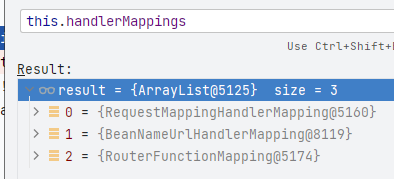
mapping.getHandler(request)
这个方法没什么好讲的,感兴趣的可以自己去debug看看,这里讲重要的东西,多个HandlerMethod同时匹配怎么选择的问题,按照spring
惯用肯定是会返回最合适的一个,就如同推断构造方法进行分值计算一样,下次有空再跟大家分享,推断构造方法。
这里Debug发现mapping就是RequestMappingHandlerMapping
,并且直接匹配进行返回了,这里回去匹配路径,可能会匹配到多个路径,这里就回去选择对应的处理的HandlerMethod
,在org.springframework.web.servlet.handler.AbstractHandlerMethodMapping#lookupHandlerMethod
这个方法里面,会经过方法getHandlerInternal()
getHandlerInternal()
	protected HandlerMethod getHandlerInternal(HttpServletRequest request) throws Exception {

		// 拿到请求地址,通过 UrlPathHelper 解析的

		String lookupPath = initLookupPath(request);

		this.mappingRegistry.acquireReadLock();

		try {

			// 通过lookupPath解析最终的handler----HandlerMethod对象

			HandlerMethod handlerMethod = lookupHandlerMethod(lookupPath, request);

			return (handlerMethod != null ? handlerMethod.createWithResolvedBean() : null);

		}

		finally {

			this.mappingRegistry.releaseReadLock();

		}

	}
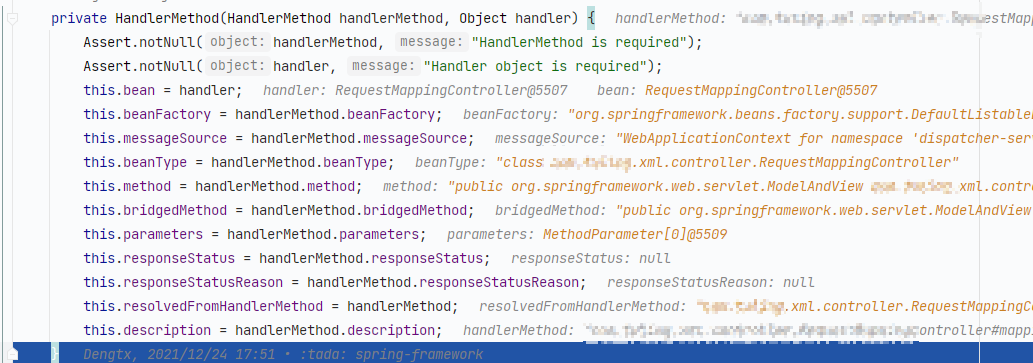
这个方法中就会去拿到对应的方法路径,并且调用lookupHandlerMethod(lookupPath, request);会返回唯一的HandlerMethod进行进一步封装
记住return的代码,这里如果找到的 handlerMethod有值就会去调用createWithResolvedBean(),getBean()
去获取对应的处理Bean,最后将处理方法以及对应的Handler封装到 HandlerMethod中。如何所示:
	public HandlerMethod createWithResolvedBean() {

		Object handler = this.bean;

		if (this.bean instanceof String beanName) {

			Assert.state(this.beanFactory != null, "Cannot resolve bean name without BeanFactory");

			handler = this.beanFactory.getBean(beanName);

		}

		return new HandlerMethod(this, handler);

	}
lookupHandlerMethod
	protected HandlerMethod lookupHandlerMethod(String lookupPath, HttpServletRequest request) throws Exception {

		List<Match> matches = new ArrayList<>();

		// 根据uri从mappingRegistry.pathLookup获取 RequestMappingInfo

		// pathLookup<path,RequestMappingInfo>会在初始化阶段解析好

		List<T> directPathMatches = this.mappingRegistry.getMappingsByDirectPath(lookupPath);

		if (directPathMatches != null) {

			// 如果根据path能直接匹配的RequestMappingInfo 则用该mapping进行匹配其他条件(method、header等)

			addMatchingMappings(directPathMatches, matches, request);

		}

		if (matches.isEmpty()) {

			// 如果无path匹配,用所有的 RequestMappingInfo 通过AntPathMatcher匹配

			addMatchingMappings(this.mappingRegistry.getRegistrations().keySet(), matches, request);

		}

		if (!matches.isEmpty()) {

			// 选择第一个为最匹配的

			Match bestMatch = matches.get(0);

			/*

				如果匹配到过个

				@RequestMapping(value="/mappin?")

				@RequestMapping(value="/mappin*")

				@RequestMapping(value="/{xxxx}")

				@RequestMapping(value="/**")

			 */

			if (matches.size() > 1) {

				// 创建 MatchComparator 匹配器

				Comparator<Match> comparator = new MatchComparator(getMappingComparator(request));

				/** 根据精准度排序  大概是这样的: ? > * > {} > **   具体可以去看:

				 * @see org.springframework.util.AntPathMatcher.AntPatternComparator#compare(java.lang.String, java.lang.String)*/

				matches.sort(comparator);

				// 排完序之后拿到优先等级最高的,也就是第一个

				bestMatch = matches.get(0);

				if (logger.isTraceEnabled()) {

					logger.trace(matches.size() + " matching mappings: " + matches);

				}

				// 是否配置CORS, 并且是否匹配

				if (CorsUtils.isPreFlightRequest(request)) {

					for (Match match : matches) {

						if (match.hasCorsConfig()) {

							return PREFLIGHT_AMBIGUOUS_MATCH;

						}

					}

				}

				else {

					// 获得第二匹配的。如果和第一个一样,则抛出异常

					Match secondBestMatch = matches.get(1);

					if (comparator.compare(bestMatch, secondBestMatch) == 0) {

						Method m1 = bestMatch.getHandlerMethod().getMethod();

						Method m2 = secondBestMatch.getHandlerMethod().getMethod();

						String uri = request.getRequestURI();

						throw new IllegalStateException(

								"Ambiguous handler methods mapped for '" + uri + "': {" + m1 + ", " + m2 + "}");

					}

				}

			}

			// 将最匹配的设置到 request 中

			request.setAttribute(BEST_MATCHING_HANDLER_ATTRIBUTE, bestMatch.getHandlerMethod());

			handleMatch(bestMatch.mapping, lookupPath, request);

			// 返回最匹配的

			return bestMatch.getHandlerMethod();

		}

		else {

			// return null

			return handleNoMatch(this.mappingRegistry.getRegistrations().keySet(), lookupPath, request);

		}

	}
在源码注释中已经表示了匹配多个的情况是怎么区分的,匹配多个的情况并且想要整长执行必须是使用通配符的方式(? > * > {} > **)
,如果出现两个相同的路径,mvc则会抛出异常,讲到这里差不多第一个步骤就结束了,找到了合适的 handlerMethod
并且将HandlerMethod存储在了request中;
- 存储:
request.setAttribute(BEST_MATCHING_HANDLER_ATTRIBUTE, bestMatch.getHandlerMethod()); - 存储的key:
String BEST_MATCHING_HANDLER_ATTRIBUTE = HandlerMapping.class.getName() + ".bestMatchingHandler"; - key=
org.springframework.web.servlet.HandlerMapping.bestMatchingHandler
找到之后就会返回对应的Handler,就是能够处理这个请求的那个 Bean,也是就是我们程序员些的 Controller
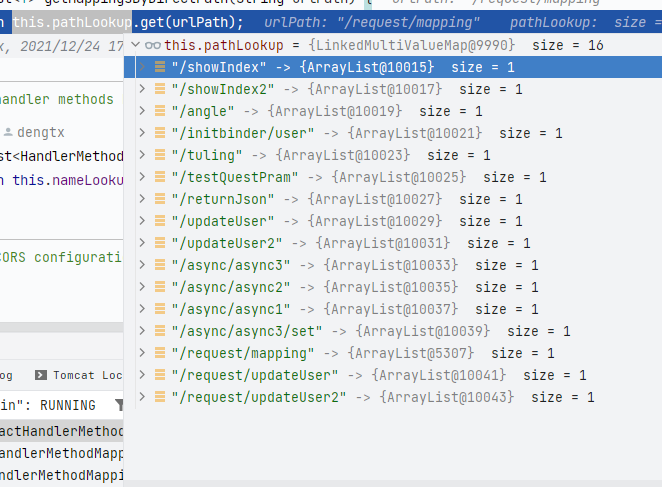
这里寻找HandlerMethod会直接使用解析出来的路径去pathLookup中去拿。pathLookup
是一个map,在springmvc启动的时候就会解析我们定义的@RequestMapping中的值,并作为key存储在pathLookup
中;下一次讲springmvc启动流程的时候在解释
public List<T> getMappingsByDirectPath(String urlPath){

        return this.pathLookup.get(urlPath);

        }
找到HandlerAdapter#getHandlerAdapter
org.springframework.web.servlet.DispatcherServlet#getHandlerAdapter
这个点对应请求流程图中的第二步,找到合适的HandlerAdapter,我们看一下具体是怎么找的
getHandlerAdapter
这里传进来的就是 在第一步中找到的:HandlerMethod,这里和寻找Handler
一个套路的,找到合适的直接返回,不会再去走下面的 HandlerAdapter
	protected HandlerAdapter getHandlerAdapter(Object handler) throws ServletException {

		if (this.handlerAdapters != null) {

			for (HandlerAdapter adapter : this.handlerAdapters) {

				if (adapter.supports(handler)) {

					return adapter;

				}

			}

		}

		throw new ServletException("No adapter for handler [" + handler +

				"]: The DispatcherServlet configuration needs to include a HandlerAdapter that supports this handler");

	}
adapter.supports(handler)
看一下个方法,其实也没什么,只是判断当前的HandlerAdapter是否支持处理 handlerMethod
	public final boolean supports(Object handler) {

		return (handler instanceof HandlerMethod && supportsInternal((HandlerMethod) handler));

	}
supportsInternal((HandlerMethod) handler) 这个方法在 RequestMappingHandlerAdapter类中默认返回 true
执行前置拦截器
org.springframework.web.servlet.HandlerExecutionChain#applyPreHandle
	boolean applyPreHandle(HttpServletRequest request, HttpServletResponse response) throws Exception {

		for (int i = 0; i < this.interceptorList.size(); i++) {

			HandlerInterceptor interceptor = this.interceptorList.get(i);

			if (!interceptor.preHandle(request, response, this.handler)) {

				triggerAfterCompletion(request, response, null);

				return false;

			}

            // 存储执行到了哪些拦截器,如果出现了前置拦截器返回false的情况,那么最终拦截器也只执行到i下标的那一个

			this.interceptorIndex = i;

		}

		return true;

	}
这个没啥好讲的,大家看一下这个源码,意思就是遍历扫描的时候拿到的所有的拦截器(实现了 HandlerIntercepter接口的)
,拿出来全部调用其preHandle 方法
注意:如果前置拦截器返回了false
那么意思就代表此请求被拦截掉了,要去执行最终拦截器,这个点放到流程最后讲。也就是调用拦截器的afterCompletion方法
执行Handler--会去执行真正的方法
org.springframework.web.servlet.HandlerAdapter#handle
handle()->handleInternal,最红会执行到下面的handleInternal方法
org.springframework.web.servlet.mvc.method.annotation.RequestMappingHandlerAdapter#handleInternal
方法执行栈:
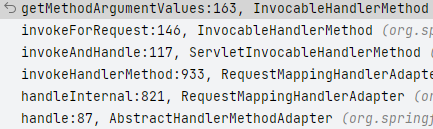
方法执行链:
- handle: 执行
controller方法的的进入点 - getMethodArgumentValue:解析方法入参,解析完就回去真正的执行
HandlerMethod
protected ModelAndView handleInternal(HttpServletRequest request,

        HttpServletResponse response,HandlerMethod handlerMethod)throws Exception{

        ModelAndView mav;

        // 检查当前请求的method是否为支持的method(默认为null,可以通过继承AbstractController设置supportedMethod)

        // 检查当前请求是够必须 session(默认为false,可以通过继承AbstractController 设置requireSession)

        checkRequest(request);

        /**

         * 判断当前是否需要支持在同一个session中只能线性地处理请求

         * 因为锁是通过 synchronized 是 JVM 进程级,所以在分布式环境下,

         * 无法达到同步相同 Session 的功能。默认情况下,synchronizeOnSession 为 false

         */

        // Execute invokeHandlerMethod in synchronized block if required.

        if(this.synchronizeOnSession){

        // 获取当前请求的 Session 对象

        HttpSession session=request.getSession(false);

        if(session!=null){

        // 为当前session 生成唯一的一个可以用于锁定的key

        Object mutex=WebUtils.getSessionMutex(session);

synchronized (mutex){

        // 对HandlerMethod进行参数等的适配处理,并调用目标handler

        mav=invokeHandlerMethod(request,response,handlerMethod);

        }

        }else{

        // 如果当前不存在session,则直接对HandlerMethod进行适配

        // No HttpSession available -> no mutex necessary

        mav=invokeHandlerMethod(request,response,handlerMethod);

        }

        }

        else{

        // No synchronization on session demanded at all...

        // *如果当前不需要对session进行同步处理,则直接对HandlerMethod进行适配

        mav=invokeHandlerMethod(request,response,handlerMethod);

        }

        //判断当前请求头中是否包含Cache-Control请求头,如果不包含,则对当前response进行处理

        if(!response.containsHeader(HEADER_CACHE_CONTROL)){

        if(getSessionAttributesHandler(handlerMethod).hasSessionAttributes()){

        applyCacheSeconds(response,this.cacheSecondsForSessionAttributeHandlers);

        }

        else{

        prepareResponse(response);

        }

        }

        return mav;

        }
在这个方法中我们主要看invokeHandlerMethod()方法,从方法名称就能看出是去执行开始选出来的handlerMethod
方法,也就是我们自己写的controller的方法,下面看一下该方法的源码,方法有中文注释,推荐自己debug看一遍
invokHandlerMethod
@Nullable

protected ModelAndView invokeHandlerMethod(HttpServletRequest request,

        HttpServletResponse response,HandlerMethod handlerMethod)throws Exception{

        // 将request response 包装成 ServletWebRequest

        ServletWebRequest webRequest=new ServletWebRequest(request,response);

        try{

        // 获取容器中全局配置的InitBinder和当前HandlerMethod所对应的Controller中

        // 配置的InitBinder,用于进行参数的绑定

        WebDataBinderFactory binderFactory=getDataBinderFactory(handlerMethod);

        // 获取容器中全局配置的ModelAttribute和当前HandlerMethod所对应的Controller 中配置的ModelAttribute,

        // 这些配置的方法将会在目标方法调用之前进行调用

        ModelFactory modelFactory=getModelFactory(handlerMethod,binderFactory);

        // 封装HandlerMethod,会在调用前进行参数解析,调用后对返回值进行处理

        ServletInvocableHandlerMethod invocableMethod=createInvocableHandlerMethod(handlerMethod);

        if(this.argumentResolvers!=null){

        // 让invocableMethod 有解析参数的能力

        invocableMethod.setHandlerMethodArgumentResolvers(this.argumentResolvers);

        }

        if(this.returnValueHandlers!=null){

        // 让 invocableMethod 有处理返回值的能力

        invocableMethod.setHandlerMethodReturnValueHandlers(this.returnValueHandlers);

        }

        // 让invocableMethod拥有InitBinder解析能力

        invocableMethod.setDataBinderFactory(binderFactory);

        // 设置ParameterNameDiscoverer,该对象将按照一定的规则获取当前参数的名称

        invocableMethod.setParameterNameDiscoverer(this.parameterNameDiscoverer);

        // ModelAndView处理容器

        ModelAndViewContainer mavContainer=new ModelAndViewContainer();

        // 将request的Attribute复制一份到ModelMap

        mavContainer.addAllAttributes(RequestContextUtils.getInputFlashMap(request));

        // *调用我们标注了@ModelAttribute的方法,主要是为我们的目标方法预加载

        modelFactory.initModel(webRequest,mavContainer,invocableMethod);

        // 重定向的时候,忽略model中的数据 默认false

        mavContainer.setIgnoreDefaultModelOnRedirect(this.ignoreDefaultModelOnRedirect);

        // 获取当前的AsyncWebRequest,这里AsyncWebRequest的主要作用是用于判断目标

        // handler的返回值是否为WebAsyncTask或DeferredResult,如果是这两种中的一种,

        // 则说明当前请求的处理应该是异步的。所谓的异步,指的是当前请求会将Controller中

        // 封装的业务逻辑放到一个线程池中进行调用,待该调用有返回结果之后再返回到response中。

        // 这种处理的优点在于用于请求分发的线程能够解放出来,从而处理更多的请求,提高吞吐。

        // 只有待目标任务完成之后才会回来将该异步任务的结果返回。

        AsyncWebRequest asyncWebRequest=WebAsyncUtils.createAsyncWebRequest(request,response);

        asyncWebRequest.setTimeout(this.asyncRequestTimeout);

        // 封装异步任务的线程池、request、interceptors到WebAsyncManager中

        WebAsyncManager asyncManager=WebAsyncUtils.getAsyncManager(request);

        asyncManager.setTaskExecutor(this.taskExecutor);

        asyncManager.setAsyncWebRequest(asyncWebRequest);

        asyncManager.registerCallableInterceptors(this.callableInterceptors);

        asyncManager.registerDeferredResultInterceptors(this.deferredResultInterceptors);

        // 这里就是用于判断当前请求是否有异步任务结果的,如果存在,则对异步任务结果进行封装

        if(asyncManager.hasConcurrentResult()){

        Object result=asyncManager.getConcurrentResult();

        mavContainer=(ModelAndViewContainer)asyncManager.getConcurrentResultContext()[0];

        asyncManager.clearConcurrentResult();

        LogFormatUtils.traceDebug(logger,traceOn->{

        String formatted=LogFormatUtils.formatValue(result,!traceOn);

        return"Resume with async result ["+formatted+"]";

        });

        invocableMethod=invocableMethod.wrapConcurrentResult(result);

        }

        // *对请求参数进行处理,调用目标HandlerMethod,并且将返回值封装为一个ModelAndView对象     很重要

        invocableMethod.invokeAndHandle(webRequest,mavContainer);

        if(asyncManager.isConcurrentHandlingStarted()){

        return null;

        }

        // 对封装的ModelAndView进行处理,主要是判断当前请求是否进行了重定向,如果进行了重定向,

        // 还会判断是否需要将FlashAttributes封装到新的请求中

        return getModelAndView(mavContainer,modelFactory,webRequest);

        }

        finally{

        webRequest.requestCompleted();

        }

        }
上述方法重要点就在 invocableMethod.invokeAndHandle(webRequest, mavContainer);,这里就回去执行方法并且处理返回的对象
invokeAndHandle
public void invokeAndHandle(ServletWebRequest webRequest,ModelAndViewContainer mavContainer,

        Object...providedArgs)throws Exception{

        /* 真正的调用目标方法。很重要、很重要*/

        Object returnValue=invokeForRequest(webRequest,mavContainer,providedArgs);

        // 设置相关的返回状态

        setResponseStatus(webRequest);

        // 如果请求完成,则设置requestHandler 属性

        if(returnValue==null){

        if(isRequestNotModified(webRequest)||getResponseStatus()!=null||mavContainer.isRequestHandled()){

        disableContentCachingIfNecessary(webRequest);

        mavContainer.setRequestHandled(true);

        return;

        }

        }

        // 如果请求失败但是有错误原因,也会设置 requestHandler 属性

        else if(StringUtils.hasText(getResponseStatusReason())){

        mavContainer.setRequestHandled(true);

        return;

        }

        mavContainer.setRequestHandled(false);

        Assert.state(this.returnValueHandlers!=null,"No return value handlers");

        try{

        // 遍历当前容器中所有ReturnValueHandler,判断哪种handler支持当前返回值的处理,

        // 如果支持,则使用该handler处理该返回值

        this.returnValueHandlers.handleReturnValue(

        returnValue,getReturnValueType(returnValue),mavContainer,webRequest);

        }

        catch(Exception ex){

        if(logger.isTraceEnabled()){

        logger.trace(formatErrorForReturnValue(returnValue),ex);

        }

        throw ex;

        }

        }
在invokeForRequest方法中有一个很重要的方法 getMethodArgumentValues
getMethodArgumentValues
protected Object[]getMethodArgumentValues(NativeWebRequest request,@Nullable ModelAndViewContainer mavContainer,

        Object...providedArgs)throws Exception{

        // 获取目标方法参数的描述数组对象

        MethodParameter[]parameters=getMethodParameters();

        if(ObjectUtils.isEmpty(parameters)){

        return EMPTY_ARGS;

        }

        //用来初始化我们对应参数名称的参数值得数组

        Object[]args=new Object[parameters.length];

        // 循环拿到参数名数组

        for(int i=0;i<parameters.length;i++){

        MethodParameter parameter=parameters[i];

        //为我们得MethodParameter设置参数名称探测器对象

        parameter.initParameterNameDiscovery(this.parameterNameDiscoverer);

        args[i]=findProvidedArgument(parameter,providedArgs);

        if(args[i]!=null){

        continue;

        }

        // * 获取所有的参数解析器,然后筛选出合适的解析器

        if(!this.resolvers.supportsParameter(parameter)){

        throw new IllegalStateException(formatArgumentError(parameter,"No suitable resolver"));

        }

        try{

        // 通过上面筛选的 参数解析器来解析我们的参数

        args[i]=this.resolvers.resolveArgument(parameter,mavContainer,request,this.dataBinderFactory);

        }catch(Exception ex){

        // Leave stack trace for later, exception may actually be resolved and handled...

        if(logger.isDebugEnabled()){

        String exMsg=ex.getMessage();

        if(exMsg!=null&&!exMsg.contains(parameter.getExecutable().toGenericString())){

        logger.debug(formatArgumentError(parameter,exMsg));

        }

        }

        throw ex;

        }

        }

        return args;

        }
解析完方法后就会去调用doInvokle执行Controller的方法。
注意:在invokAndHandle中有处理返回值的方法调用,也就是下面这个
// 遍历当前容器中所有ReturnValueHandler,判断哪种handler支持当前返回值的处理,

      // 如果支持,则使用该handler处理该返回值

      this.returnValueHandlers.handleReturnValue(

            returnValue, getReturnValueType(returnValue), mavContainer, webRequest);
handleReturnValue
public void handleReturnValue(@Nullable Object returnValue,MethodParameter returnType,

        ModelAndViewContainer mavContainer,NativeWebRequest webRequest)throws Exception{

        // 根据返回的类型选择返回值解析器

        HandlerMethodReturnValueHandler handler=selectHandler(returnValue,returnType);

        if(handler==null){

        throw new IllegalArgumentException("Unknown return value type: "+returnType.getParameterType().getName());

        }

        handler.handleReturnValue(returnValue,returnType,mavContainer,webRequest);

        }
这个selectHandler选择返回值解析器和之前的是一个套路,找到了直接返回解析器,然后调用解析器的HandleReturnValue
进行处理,这里是返回的ModelAndVierw也就是jsp,对应的处理器就是ModelAndViewMethodValueHandler,如果是Json
那么对应的是ReqeustResponseBodyMethodProcessor


这里ModelAndView的返回类型的处理,方法在下面一个类中,自己也能够看懂,讲到这里返回值返回ModelAndView就结束了。下面就是查找视图以及渲染视图
org.springframework.web.servlet.mvc.method.annotation.ModelAndViewMethodReturnValueHandler#handleReturnValue
查找视图
org.springframework.web.servlet.DispatcherServlet#processDispatchResult
在此方法中进行处理,根据方法名processDispatchResult得知,处理转发结果
private void processDispatchResult(HttpServletRequest request,HttpServletResponse response,

@Nullable HandlerExecutionChain mappedHandler,@Nullable ModelAndView mv,

@Nullable Exception exception)throws Exception{

        boolean errorView=false;

        // 异常视图

        if(exception!=null){

        if(exception instanceof ModelAndViewDefiningException){

        logger.debug("ModelAndViewDefiningException encountered",exception);

        mv=((ModelAndViewDefiningException)exception).getModelAndView();

        }

        else{

        Object handler=(mappedHandler!=null?mappedHandler.getHandler():null);

        mv=processHandlerException(request,response,handler,exception);

        errorView=(mv!=null);

        }

        }

        // Did the handler return a view to render?

        if(mv!=null&&!mv.wasCleared()){

        // 解析、渲染视图

        render(mv,request,response);

        if(errorView){

        WebUtils.clearErrorRequestAttributes(request);

        }

        }

        else{

        if(logger.isTraceEnabled()){

        logger.trace("No view rendering, null ModelAndView returned.");

        }

        }

        if(WebAsyncUtils.getAsyncManager(request).isConcurrentHandlingStarted()){

        // Concurrent handling started during a forward

        return;

        }

        if(mappedHandler!=null){

        // Exception (if any) is already handled.. 拦截器:AfterCompletion

        mappedHandler.triggerAfterCompletion(request,response,null);

        }

        }
此方法中的重要点render(),mappedHandler.triggerAfterCompletion(request, response, null);,可以看到如果出现了异常,会进入异常视图
rendee:视图进行渲染triggerAfterCompletion: 执行最终拦截器afterCompletion
方法的调用,这里是请求成功没有被拦截,所以直接调用所有的拦截器的afterCompletion方法
render视图查找
protected void render(ModelAndView mv,HttpServletRequest request,HttpServletResponse response)throws Exception{

        // Determine locale for request and apply it to the response.

        Locale locale=

        (this.localeResolver!=null?this.localeResolver.resolveLocale(request):request.getLocale());

        response.setLocale(locale);

        View view;

        String viewName=mv.getViewName();

        if(viewName!=null){

        // 解析视图名称

        // We need to resolve the view name.

        view=resolveViewName(viewName,mv.getModelInternal(),locale,request);

        if(view==null){

        throw new ServletException("Could not resolve view with name '"+mv.getViewName()+

        "' in servlet with name '"+getServletName()+"'");

        }

        }

        else{

        // No need to lookup: the ModelAndView object contains the actual View object.

        view=mv.getView();

        if(view==null){

        throw new ServletException("ModelAndView ["+mv+"] neither contains a view name nor a "+

        "View object in servlet with name '"+getServletName()+"'");

        }

        }

        ...省略 log 代码...

        try{

        if(mv.getStatus()!=null){

        request.setAttribute(View.RESPONSE_STATUS_ATTRIBUTE,mv.getStatus());

        response.setStatus(mv.getStatus().value());

        }

        view.render(mv.getModelInternal(),request,response);

        }

        catch(Exception ex){

        ...省略 log 代码...

        throw ex;

        }

        }
可以看到上面的源码中有一个解析视图名称的代码,其实就是前缀+viewName+后缀,但是:
这里获取选择对应的视图解析器,和上面的选择套路一样,此处还解析了反正值得前缀以及看是redirect还是forward
,根据这个前缀的不同创建不同的视图解析器
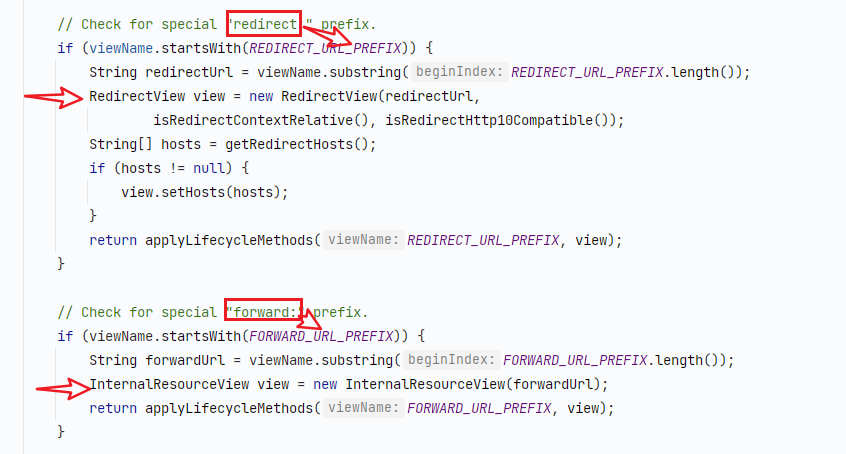
此处使用的是InternalResourceViewResolver,

视图渲染
view.render(mv.getModelInternal(), request, response);
最终会走到
org.springframework.web.servlet.view.InternalResourceView#renderMergedOutputModel
protected void renderMergedOutputModel(

        Map<String, Object> model,HttpServletRequest request,HttpServletResponse response)throws Exception{

        // Expose the model object as request attributes.

        // 将model设置到request 的Attribute 中

        exposeModelAsRequestAttributes(model,request);

        // Expose helpers as request attributes, if any.

        // 设置国际化资源

        exposeHelpers(request);

        // Determine the path for the request dispatcher.

        // 防止死循环,就是请求路径和转发路径一致

        String dispatcherPath=prepareForRendering(request,response);

        // Obtain a RequestDispatcher for the target resource (typically a JSP).

        // 通过 request 拿到 RequestDispatcher;request.getRequestDispacther("/test.jsp")

        RequestDispatcher rd=getRequestDispatcher(request,dispatcherPath);

        if(rd==null){

        throw new ServletException("Could not get RequestDispatcher for ["+getUrl()+

        "]: Check that the corresponding file exists within your web application archive!");

        }

        // If already included or response already committed, perform include, else forward.

        if(useInclude(request,response)){

        response.setContentType(getContentType());

        if(logger.isDebugEnabled()){

        logger.debug("Including ["+getUrl()+"]");

        }

        rd.include(request,response);

        }

        else{

        // Note: The forwarded resource is supposed to determine the content type itself.

        if(logger.isDebugEnabled()){

        logger.debug("Forwarding to ["+getUrl()+"]");

        }

        // RequestDispatcher.forward直接转发

        rd.forward(request,response);

        }

        }
最后是直接走的Servlet
的转发,至此响应客户端完成,还得注意方法中进行了一次判断,防止请求死循环的。就是判断请求路径与转发路径是否一直,如果一致的情况下就会造成请求死循环,例如:请求路径:/user/info
、转发路径:/user/info,这种情况下就会造成死循环。
最终处理器
org.springframework.web.servlet.HandlerExecutionChain#triggerAfterCompletion
最后进入doDispatcher中的 tiggerAfterCompletion
方法,这个请求是成功的所以所有的拦截器都需要执行最终拦截,不同于前置拦截器preHandle拦截的时候

这里会去直接循环调用拦截器的afterCompletion方法
void triggerAfterCompletion(HttpServletRequest request,HttpServletResponse response,@Nullable Exception ex){

        for(int i=this.interceptorIndex;i>=0;i--){

        HandlerInterceptor interceptor=this.interceptorList.get(i);

        try{

        interceptor.afterCompletion(request,response,this.handler,ex);

        }

        catch(Throwable ex2){

        logger.error("HandlerInterceptor.afterCompletion threw exception",ex2);

        }

        }

        }
至此请求结束。
如文中又错误请指出或者联系我:tianxiang.deng@foxmail.com
SpringMvc请求流程源码解析的更多相关文章
- SpringMVC请求流程源码分析
一.SpringMVC使用 1.工程创建 创建maven工程. 添加java.resources目录. 引入Spring-webmvc 依赖. <dependency> <group ...
- java架构之路-(SpringMVC篇)SpringMVC主要流程源码解析(上)源码执行流程
做过web项目的小伙伴,对于SpringMVC,Struts2都是在熟悉不过了,再就是我们比较古老的servlet,我们先来复习一下我们的servlet生命周期. servlet生命周期 1)初始化阶 ...
- java架构之路-(SpringMVC篇)SpringMVC主要流程源码解析(下)注解配置,统一错误处理和拦截器
我们上次大致说完了执行流程,也只是说了大致的过程,还有中间会出错的情况我们来处理一下. 统一异常处理 比如我们的运行时异常的500错误.我们来自定义一个类 package com.springmvcb ...
- Spring IOC容器启动流程源码解析(四)——初始化单实例bean阶段
目录 1. 引言 2. 初始化bean的入口 3 尝试从当前容器及其父容器的缓存中获取bean 3.1 获取真正的beanName 3.2 尝试从当前容器的缓存中获取bean 3.3 从父容器中查找b ...
- SpringMVC请求处理流程源码
我们首先引用<Spring in Action>上的一张图来了解Spring MVC 的核心组件和大致处理流程: 从上图中看到①.DispatcherServlet 是SpringMVC ...
- 自定义控件(View的绘制流程源码解析)
参考声明:这里的一些流程图援引自http://a.codekk.com/detail/Android/lightSky/%E5%85%AC%E5%85%B1%E6%8A%80%E6%9C%AF%E7% ...
- Redis运行流程源码解析--转载
http://blog.nosqlfan.com/html/4007.html http://www.searchdatabase.com.cn/showcontent_62166.htm 导读:本文 ...
- CBV请求流程源码分析
一.CBV流程解析 urls.py urlpatterns = [ url(r'^admin/', admin.site.urls), url(r'^book/', views.BookView.as ...
- SpringMVC启动流程源码解密
我们知道,SpringMVC最后是通过Tomcat来进行部署的.当在Servlet中进行进行应用部署时,主要步骤为(引用来自http://download.oracle.com/otn-pub/jcp ...
随机推荐
- call apply bind的作用及区别? 应用场景?
call.apply.bind方法的作用和区别: 这三个方法的作用都是改变函数的执行上下文,换句话说就是改变函数体内部的this指向,以此来扩充函数依赖的作用域 1.call 作用:用于改变方法内部的 ...
- WTM框架使用技巧之:CI/CD(持续集成/持续部署)
1. 什么是WTM框架? 一个快速.灵活.社区活跃.最最最最高效的.netcore 后台管理系统.详见 https://wtmdoc.walkingtec.cn/ 欢迎大家付费支持WTMPlus,反哺 ...
- 【机器学习】数据准备--python爬虫
前言 我们在学习机器学习相关内容时,一般是不需要我们自己去爬取数据的,因为很多的算法学习很友好的帮助我们打包好了相关数据,但是这并不代表我们不需要进行学习和了解相关知识.在这里我们了解三种数据的爬取: ...
- tableSizeFor
HashMap tableSizeFor() /** Returns a power of two size for the given target capacity. 1.(不考虑大于最大容量的情 ...
- UiPath循环活动Do While的介绍和使用
一.Do While的介绍 先执行循环体, 再判断条件是否满足, 如果满足, 则再次执行循环体, 直到判断条件不满足, 则跳出循环 二.Do While在UiPath中的使用 1. 打开设计器,在设计 ...
- arcgis创建postgre企业级数据库
什么是企业级地理数据库? 企业级地理数据库(ArcSD Enterprise,sde)是和 arcGIS 套件集成程度最高的地理数据库:创建时需要用到安装 arcGIS Server 时的 [ecp ...
- 基于Vue3SSR渲染作品H5页
回顾 多项目之间的关系 业务组件sqxy-components为何要单独抽离出来? 整体思路 根据 id uuid来获取思路 判断 status(未发布,强制下线) 作品数据+leogo-cpmpon ...
- 扩展-PageHelper分页插件
1.PageHelper 分页插件简介 1) PageHelper是MyBatis中非常方便的第三方分页插件 2) 官方文档: https://github.com/pagehelper/Mybati ...
- mesi--cpu内存一致性协议
目录 cpu缓存一致性问题 mesi协议 mesi协议4种状态,及状态转换 模拟工具演示 cpu缓存一致性问题 一个服务器中有多个核,每个核中有多个cpu,每个cpu有多个线程.缓存最少分为3级,1级 ...
- 全面吃透JAVA Stream流操作,让代码更加的优雅
全面吃透JAVA Stream流操作,让代码更加的优雅 在JAVA中,涉及到对数组.Collection等集合类中的元素进行操作的时候,通常会通过循环的方式进行逐个处理,或者使用Stream的方式进行 ...