
[转载] MATLAB | RGB image representation
转载自https://www.geeksforgeeks.org/matlab-rgb-image-representation/
MATLAB | RGB image representation
An RGB image can be viewed as three different images(a red scale image, a green scale image and a blue scale image) stacked on top of each other, and when fed into the red, green and blue inputs of a colour monitor, it produces a colour image on the screen.
An RGB image is sometimes referred to as a true colour image as the precision with which a real-life image can be replicated has led to the nickname “true colour image.”
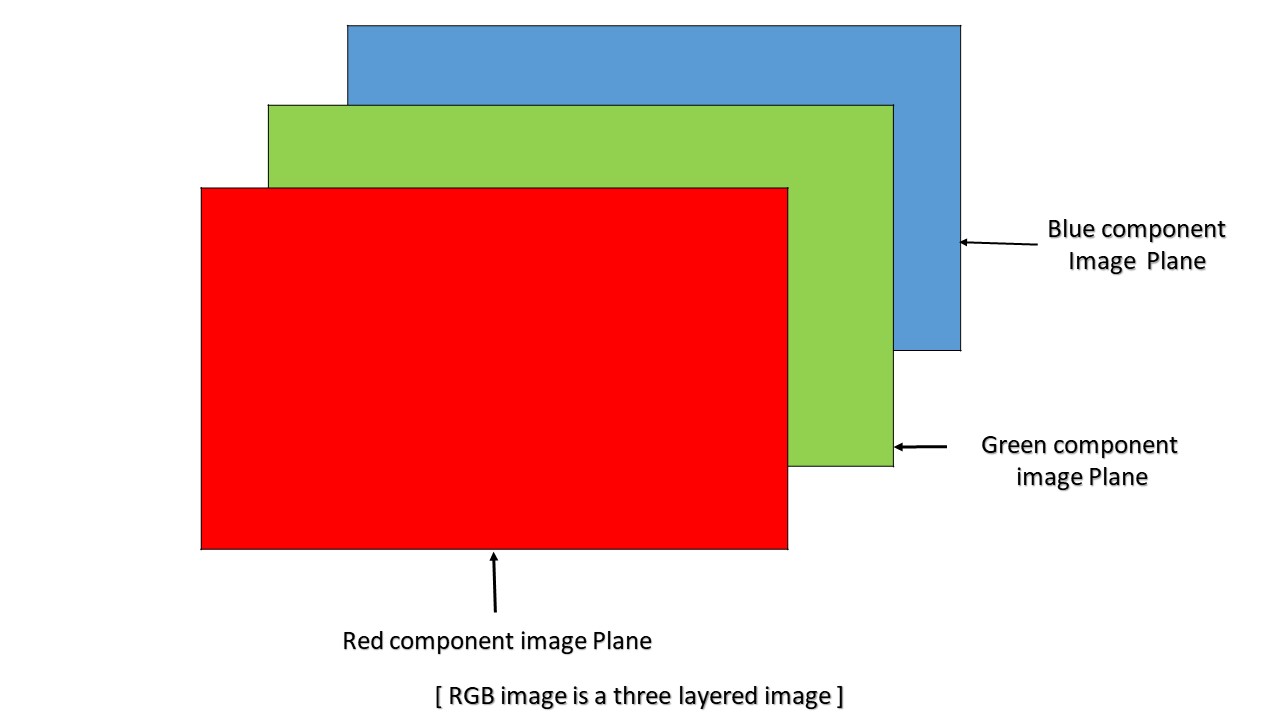
In MATLAB, an RGB image is basically a M*N*3 array of colour pixel, where each colour pixel is associated with three values which correspond to red, blue and green colour component of RGB image at a specified spatial location.
So, the colour of any pixel is determined by the combination of the red, green, and blue intensities stored in each colour plane at the pixel’s location.
Here each colour plane is a M*N array.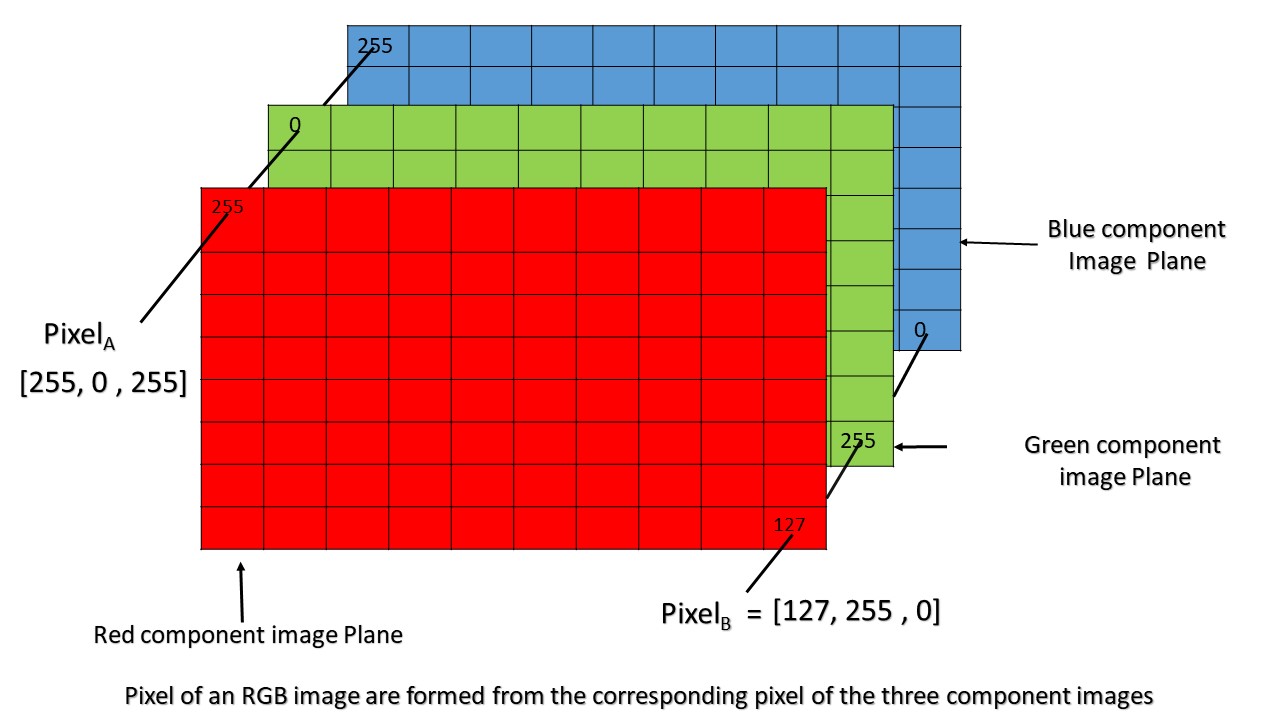
As can be seen in the above image, Pixel(A) has value (255, 0, 255) and is determined by the combination of intensities stored in the red colour plane, green colour plane and blue colour plane respectively.
Similarly, pixel(B) has value (127, 255, 0) and is determined in the same manner as pixel(A).
Colour planes of RGB image:
Consider an RGB image array ‘I’ then,
I(:, :, 1) represents the Red colour plane of the RGB image
I(:, :, 2) represents the Green colour plane of the RGB image
I(:, :, 3) represents the Blue colour plane of the RGB image
RGB image array range:
In MATLAB, an RGB image array can be of class ‘double’, ‘uint8’, or ‘uint16’ datatype. The datatype class of colour component determines the range of values.
For example,
if an RGB image is of class ‘double’ then each colour component is a value between 0 and 1.
Similarly, if an RGB image is of class ‘uint8’, the range of values that each colour component can have is [0 – 255] and [0 – 65535 ] if the RGB image is of class ‘uint16’.
Bit depth:
The number of bits used to store a pixel value of component image determines the bit depth of an RGB image. For example, if each colour component image is an 8-bit image, the RGB image will be said to have 24 bit deep.
Possible number of colours in RGB image:
Let an RGB image is of class ‘uint8’, i.e the range of values a colour component plane can have is [0 – 255 ] ( a total of 256 shades of that colour).
So, each individual colour plane of An RGB image is capable of showing 256 shade of that colour.
So total number of combination of colour that can be represented in an RGB image is 256 X 256 X 256 = 16777216, approximately 16 million.
[转载] MATLAB | RGB image representation的更多相关文章
- [转载]Matlab之静态文本多行输出
转载文章,原文链接:Matlab中的静态文本框中显示多行内容 有时候,我们在GUI中利用静态文本框显示程序的结果,但是结果很长,一行未必可以显示的开,而静态文本框不像edit或listbox那样通过滚 ...
- [转载]Matlab中fft与fftshift命令的小结与分析
http://blog.sina.com.cn/s/blog_68f3a4510100qvp1.html 注:转载请注明出处——by author. 我们知道Fourier分析是信号处理里很重要的技术 ...
- [转载]Matlab生成Word报告
最近在进行一批来料的检验测试,一个个手动填写报告存图片太慢了,就有了种想要使用Matlab在分析完后数据可以自动生成PDF报告的想法,于是就去网上搜索了相关的资料,发现Matlab中文论坛上有xiez ...
- [转载]MATLAB中FFT的使用方法
http://blog.163.com/fei_lai_feng/blog/static/9289962200971751114547/ 说明:以下资源来源于<数字信号处理的MATLAB实现&g ...
- [转载]Matlab中插值函数汇总和使用说明
http://blog.sciencenet.cn/blog-457143-679275.html MATLAB中的插值函数为interp1,其调用格式为: yi= interp1(x,y,xi,' ...
- [转载] MATLAB快捷键
原文地址,点此查看 一.常用对象操作 除了一般windows窗口的常用功能键外. 1.!dir 可以查看当前工作目录的文件. !dir& 可以在dos状态下查看. 2.who 可以查看当前 ...
- [转载]matlab图像处理为什么要归一化和如何归一化
matlab图像处理为什么要归一化和如何归一化,一.为什么归一化1. 基本上归一化思想是利用图像的不变矩寻找一组参数使其能够消除其他变换函数对图像变换的影响.也就是转换成唯一的标准形式以抵抗仿射变 ...
- 006——转载-MATLAB数字与字符之间的转换
(一)参考文献:https://jingyan.baidu.com/article/5bbb5a1bd8dcb113eba1799d.html (二)数字转换成字符串 第一步在我们的电脑上打开matl ...
- [转载]matlab视频读取函数VideoReader
看到以前matlab中读取视频多 使用mmreader等(参考<matlab读取/播放视频的函数>),而现在matlab有一个专门的视频读取类VideoReader完成视频读取的功能. 相 ...
- 转载 matlab矩阵数组常用操作
一. length 返回矩阵最长维的的长度 ndims 返回维数 numel 返回矩阵元素个数size ...
随机推荐
- 安卓逆向 创建自己一个SO库
要求 1.能调用java中的方法 2.有返回值 如何完成一个SO ? public native String getText(); //第一肯定是得创建一个方法 cmd指令自动生成对应接口 生成完后 ...
- 大规模 IoT 边缘容器集群管理的几种架构-4-Kubeedge
前文回顾 大规模 IoT 边缘容器集群管理的几种架构-0-边缘容器及架构简介 大规模 IoT 边缘容器集群管理的几种架构-1-Rancher+K3s 大规模 IoT 边缘容器集群管理的几种架构-2-H ...
- appium连接手机 adb调试 app自动化
一. 工具准备 jdk,java环境必备. android sdk,要使用内置的Android debug bridge,简称adb,调试手机用. appium,提供自动化服务,app自动化的核心库. ...
- nodejs 接收参数,js前端传参方法
nodejs // 接口:查询检测结果 req.query接收 router.get('/getDetectionResult', (req, res) => { console.log(req ...
- Solon2 与 Spring Boot 的区别
1.与 Springboot 的常用注解比较 Solon 2.2.0 Springboot 2.7.8 说明 @Inject * @Autowired 注入Bean(by type) @Inject( ...
- java环境变量(Windows 11)
1.下载JDK,之后安装 建议安装java8或者java11,稳定,大家都在用 下载网址:https://www.oracle.com/java/technologies/downloads/#jav ...
- unity通过隐藏layer隐藏组件
设置组件layer 修改组件layer为需要隐藏的layer 隐藏组件 修改layer为隐藏状态 CenterCam.GetComponent<Camera>().cullingMask ...
- No.2.3
PC端网页和移动端网页的有什么不同? PC屏幕大,网页固定版心 手机屏幕小,网页宽度多数为100% 如何在电脑里面写代码边调试移动端网页效果? 谷歌模拟器 了解屏幕尺寸概念 屏幕尺寸:指的是屏幕对角线 ...
- Linux修改开机图形/etc/motd
修改 /etc/motd vim /etc/motd 植入图形 .--, .--, ( ( \.---./ ) ) '.__/o o\__.' {= ^ =} > - < / \ // \ ...
- 面向对象程序设计第二次blog
一.前言 第四次题目集总结-- 题量:较多 难度:较高 知识点: 获取输入字符串的特定字符类型 获取并储存.计算 循环.选择.字符串.数组的使用 继承 类的设计 总结:题目比较难,题量较少,需要用到正 ...