
Spring集成web环境(手动实现)
1.创建UserDao接口及其实现类UserDaoImpl(接口代码省略)
public class UserDaoImpl implements UserDao {

    @Override

    public void save() {

        System.out.println("save running....");

    }

}
2.创建UserService及其实现类UserDaoImpl(接口代码省略)
public class UserServiceImpl implements UserService {

    private UserDao userDao;

    public void setUserDao(UserDao userDao) {

        this.userDao = userDao;

    }

    @Override

    public void save1() {

        userDao.save();

    }

}
3.将UserDaoImpl及其UserServiceImpl注入到spring容器当中
<?xml version="1.0" encoding="UTF-8"?>

<beans xmlns="http://www.springframework.org/schema/beans"

       xmlns:xsi="http://www.w3.org/2001/XMLSchema-instance"

       xsi:schemaLocation="http://www.springframework.org/schema/beans http://www.springframework.org/schema/beans/spring-beans.xsd">

<!--    配置Dao-->

    <bean id="userDao" class="com.hao.dao.impl.UserDaoImpl"/>

<!--    配置Service-->

    <bean id="userService" class="com.hao.service.impl.UserServiceImpl">

        <property name="userDao" ref="userDao"/>

    </bean>

</beans>
4.编写UserServlet
public class UserServlet extends HttpServlet {

    protected void doPost(HttpServletRequest request, HttpServletResponse response) {

        ApplicationContext context=new ClassPathXmlApplicationContext("applicationContext.xml");

        UserService service = context.getBean(UserService.class);

        service.save1();

    }

    protected void doGet(HttpServletRequest request, HttpServletResponse response) throws ServletException, IOException {

        this.doPost(request,response);

    }

}
5.配置web.xml
<?xml version="1.0" encoding="UTF-8"?>

<web-app xmlns:xsi="http://www.w3.org/2001/XMLSchema-instance"

         xmlns="http://java.sun.com/xml/ns/javaee"

         xsi:schemaLocation="http://java.sun.com/xml/ns/javaee http://java.sun.com/xml/ns/javaee/web-app_3_0.xsd"

         id="WebApp_ID" version="3.0">

    <servlet>

        <servlet-name>UserServlet</servlet-name>

        <servlet-class>com.hao.web.UserServlet</servlet-class>

    </servlet>

    <servlet-mapping>

        <servlet-name>UserServlet</servlet-name>

        <url-pattern>/</url-pattern>

    </servlet-mapping>

</web-app>
6.启动tomcat服务器,在浏览器访问userServlet

我们思考这一段代码
public class UserServlet extends HttpServlet {

    protected void doPost(HttpServletRequest request, HttpServletResponse response) {

        ApplicationContext context=new ClassPathXmlApplicationContext("applicationContext.xml");

        UserService service = context.getBean(UserService.class);

        service.save1();

    }
当我们每次访问userServlet时,是不是都会创建一个spring容器,这样是不是造成了很大地问题,还有一个问题就是我们在用户访问userServlet时才创建spring容器,是不是会造成效率底下地问题,所以引入了监听器的概念,我们使用了范围最大的ServletContextListener监听器(用来监听ServletContext,ServletContext对象在服务器启动时就会创建,在初始化方法时就创建spring容器,提供访问效率;
创建普通类,让它实现ServletContextListener接口
public class ContextLoaderListener implements ServletContextListener {

    @Override

    public void contextInitialized(ServletContextEvent servletContextEvent) {

        ApplicationContext context=new ClassPathXmlApplicationContext("applicationContext.xml");

        //将spring应用上下文对象存储到ServletContext域中

        ServletContext servletContext = servletContextEvent.getServletContext();

        servletContext.setAttribute("app",context);

        System.out.println("spring容器创建完毕!");

    }

    @Override

    public void contextDestroyed(ServletContextEvent servletContextEvent) {

    }

}
在web.xml中配置监听器
 <listener>

        <listener-class>com.hao.listener.ContextLoaderListener</listener-class>

    </listener>
修改UserServlet类里面的代码
public class UserServlet extends HttpServlet {

    protected void doPost(HttpServletRequest request, HttpServletResponse response) {

        ServletContext servletContext = this.getServletContext();

        ApplicationContext app = (ApplicationContext) servletContext.getAttribute("app");

        UserService userService = app.getBean(UserService.class);

        userService.save1();

    }

    protected void doGet(HttpServletRequest request, HttpServletResponse response) throws ServletException, IOException {

        this.doPost(request,response);

    }

}
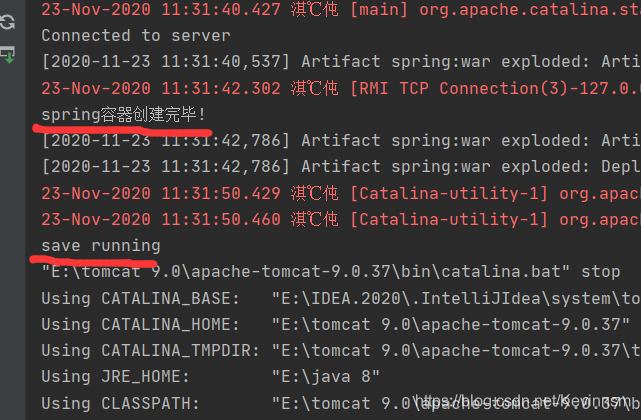
然后启动服务器,访问userServlet(spring容器的创建在服务器启动时就会创建
结果:
Spring集成web环境(手动实现)的更多相关文章
- Spring集成web环境(使用封装好的工具)
接上文spring集成web环境(手动实现) ##########代码接上文############# spring提供了一个监听器ContextLoaderListener对上述功能的封装,该监听器 ...
- Spring与Web环境集成
1. Spring与Web环境集成 1.1 ApplicationContext应用上下文获取方式 应用上下文对象是通过new ClasspathXmlApplicationContext(sprin ...
- Spring(五)Spring与Web环境集成
MVC 是 Model.View 和 Controller 的缩写,分别代表 Web 应用程序中的 3 种职责. 模型:用于存储数据以及处理用户请求的业务逻辑. 视图:向控制器提交数据,显示模型中的数 ...
- Shiro集成web环境[Springboot]-基础使用
Shiro集成web环境[Springboot] 1.shiro官网查找依赖的jar,其中shiro-ehcache做授权缓存时使用,另外还需要导入ehcache的jar包 <dependenc ...
- Shiro集成web环境[Springboot]-认证与授权
Shiro集成web环境[Springboot]--认证与授权 在登录页面提交登陆数据后,发起请求也被ShiroFilter拦截,状态码为302 <form action="${pag ...
- spring集成环境下的axis webservice的发布,调试
在spring集成的环境下,无论你是ssh集成,还是ssi集成的情况下,发布webservice往往在调用的时候会出错. 特别是,如果你是这个方式: 将webservice打aar包,放到tomcat ...
- Web环境中Spring的启动过程
1.spring不但可以在JavaSE环境中应用,在Web环境中也可以广泛应用,Spring在web环境中应用时,需要在应用的web.xml文件中添加如下的配置: …… <context-par ...
- Spring-IOC 在非 web 环境下优雅关闭容器
当我们设计一个程序时,依赖了Spring容器,然而并不需要spring的web环境时(Spring web环境已经提供了优雅关闭),即程序启动只需要启动Spring ApplicationContex ...
- Shiro在Web环境下集成Spring的大致工作流程
1,Shiro提供了对Web环境的支持,其通过一个 ShiroFilter 入口来拦截需要安全控制的URL,然后进行相应的控制. ①配置的 ShiroFilter 实现类为:org.spri ...
随机推荐
- XSHELL的坑
今天使用XSHELL连接虚拟机上的CENTOS7 ,刚开始还可以正常连接,后来再就连接不上. 检查了半天SSH服务都检查过了运行正常, 重启,检查配置文件. 都OK没问题就是连接不上,折腾半天还是不行 ...
- 完全激活win server 2012的方法(亲测可行!)
1.从微软官网下载评估版. 2.运行->CMD(最好以管理员身份运行)->输入"DISM /online /Get-CurrentEdition"(最好直接复制粘贴,然 ...
- LGP3244题解
考虑正常 DAG 的有向生成树的方案数. 很明显发现,每个节点只需要挑一个父亲即可.方案数为 \(\prod_{i=2}^nd[i]\). 再考虑加上新边后新增的 DAG 数量. 将点分为两类.假设这 ...
- TypeScript-axios模块进行封装的操作与一些想法
所谓封装与模块化,对我这种初学者来说,个人理解就是解耦,比如说,当我们前端一个项目使用了现在流行的模块,但是没有对其进行封装处理,包括一些相同的代码逻辑,把他们分散在各个组件当中,这样一来整个项目对于 ...
- 阿里一面,说说你对Mysql死锁的理解
又到了金三银四的时候,大家都按耐不住内心的躁动,我在这里给大家分享下之前面试中遇到的一个知识点(死锁问题),如有不足,欢迎大佬们指点指点. 1.什么是死锁? 死锁指的是在两个或两个以上不同的进程或线程 ...
- Spring IOC---Bug处理
1. org.junit.platform.commons.JUnitException: TestEngine with ID 'junit jupiter' failed to discover ...
- python3鸡兔同笼问题
# 假设兔子有x只 for x in range(1,31): y = 30 - x if 4*x + 2*y == 90: print('兔子有%d只,鸡有%d只'%(x, y))
- surface重装系统后,屏幕亮度不能调节,显示适配器出现黄色三角、windows hello不能正常使用
surface重装系统后,屏幕亮度不能调节,显示适配器出现黄色三角,windows hello不能正常使用,解决方法是安装驱动精灵,更新硬件驱动重启即可解决
- .Net Core EF的使用步骤
EF Core--Code First (代码优先) 第一步 安装 NuGet包 Microsoft.EntityFrameworkCore Microsoft.EntityFrameworkCore ...
- phptorm 集成git和gitlab和一些命令
mac: 2.phpstorm->csv->create git... 3.命令:ssh-keygen -t rsa -C"your_email@youremail.com&qu ...