
使用net core 6 c# 的 NPOI 包,读取excel..xlsx单元格内的图片,并存储到指定服务器
这个是记录,单元格的图片。
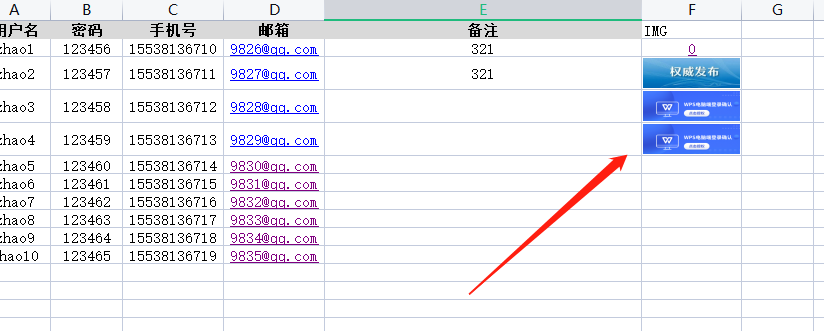
直接上代码,直接新建一个 net core api 解决方案,引用一下nuget包。本地创建一个 .xlsx 格式的excel文件
using ICSharpCode.SharpZipLib.Zip;
using Microsoft.AspNetCore.Mvc;
using NPOI.HSSF.UserModel;
using NPOI.SS.UserModel;
using NPOI.XSSF.UserModel;
using System.Data;
using System.Xml; namespace ExcelOption.Controllers
{
[ApiController]
[Route("[controller]")]
public class ImportExcelController : ControllerBase
{ private readonly Microsoft.AspNetCore.Hosting.IHostingEnvironment _hostingEnvironment; public ImportExcelController(Microsoft.AspNetCore.Hosting.IHostingEnvironment hostingEnvironment)
{
_hostingEnvironment = hostingEnvironment;
} [HttpGet(Name = "dele")]
public bool dele()
{
string zipFileName = "filezip" + ".zip";
string xlsxFileName = "filexlsx" + ".xlsx";
var mapPath = _hostingEnvironment.ContentRootPath;
//业务逻辑处理完了就把原来的文件和解压的文件夹删除
Directory.Delete(mapPath + @"\" + "filezip", true);
System.IO.File.Delete(mapPath + @"\" + xlsxFileName);
//File.Delete(mapPath + "\\" + xlsxFileName);
System.IO.File.Delete(mapPath + @"\" + zipFileName); return true;
} [HttpPost(Name = "ImportExcel_Img")]
public bool ImportExcel_Img(IFormFileCollection files)
{ if (files.Count > 0)
{
var file = files[0];
//读取导入的文件类型
var fileExt = file.FileName.Substring(file.FileName.LastIndexOf('.')).ToLower();
if (!fileExt.Equals(".xlsx"))
{
//提示文件类型不正确
return false;
}
//转换保存zip
string zipFileName = "filezip" + ".zip";
string xlsxFileName = "filexlsx" + ".xlsx";
var mapPath = _hostingEnvironment.ContentRootPath;
//保存xlsx到服务器
using (var stream = new FileStream(mapPath + xlsxFileName, FileMode.OpenOrCreate, FileAccess.ReadWrite))
{
file.CopyToAsync(stream);
} //保存zip到服务器
using (var stream = new FileStream(mapPath + zipFileName, FileMode.OpenOrCreate, FileAccess.ReadWrite))
{
file.CopyToAsync(stream);
}
var dt = ExcelHelper.ExcelToDataTable(mapPath + xlsxFileName);
//解压,如果解压成功则根据xml处理 (应为方便我就放在ExcelHelper里面了)
if (UnZipFile(mapPath + zipFileName, out string path))
{
//excel 图片信息
List<o_ExcelImgModel> o_ExcelImgModelList = new List<o_ExcelImgModel>();
//图片路径文件夹
var mediaFolderPath = path + @"xl\media";
//判断是否存在此文件夹如果有则处理(如果没有图片他是不会有这个文件夹的)
if (System.IO.Directory.Exists(mediaFolderPath))
{
//解压成功获取xml 节点做处理
var exclNode = GetXmlExclNodeList(path);
var pictNode = GetXmlPictNodeList(path); //获取图片信息与地址
foreach (var nl in exclNode)
{
XmlElement sondNode = (XmlElement)nl;
XmlNodeList descendDodeList = sondNode.ChildNodes;
XmlNodeList picNodeList = descendDodeList[0].ChildNodes; XmlNodeList nvPicPrNodeList = picNodeList[0].ChildNodes;
XmlElement cNvPrElement = (XmlElement)nvPicPrNodeList.Item(0);
string name = cNvPrElement.GetAttribute("name").ToString(); XmlNodeList blipFillNodeList = picNodeList[1].ChildNodes;
XmlElement picElement = (XmlElement)blipFillNodeList.Item(0);
string id = picElement.GetAttribute("r:embed").ToString(); foreach (XmlNode xn in pictNode)
{
XmlElement xe = (XmlElement)xn;
if (xe.GetAttribute("Id").ToString() == id)
{
var pathOfPicture = xe.GetAttribute("Target").ToString().Replace("..", "").Replace("/", @"\");
pathOfPicture = path + @"xl\" + pathOfPicture;
o_ExcelImgModelList.Add(new o_ExcelImgModel()
{
ID = id,
Name = name,
PathOfPicture = pathOfPicture
});
break;
}
}
}
//图片对应dt的哪一列,存到dt然后再循环dt去处理(这个是小编的思维,如果有更好的做法可以随缘发挥)
foreach (var item in o_ExcelImgModelList)
{
//item.PathOfPicture 图片路径取到了,此时你可以存储了
}
}
//现在dt某一列存放了图片的绝对路径就可以通过table去处理了
//循环表插入数据及上传
foreach (DataRow item in dt.Rows)
{
//此时你excel转换的 dataTable表的图片字段的 值是:"_xlfn.DISPIMG(\"ID_CD49305586E940EF8F78CD3B54A4BCD3\",1)"
item["用户名"].ToString(); //"zhao1" //var kkl= item["IMG"].ToString(); // "_xlfn.DISPIMG(\"ID_CD49305586E940EF8F78CD3B54A4BCD3\",1)"
var breakApart = item["IMG"].ToString().Split('\\', '"')[1];
var imgPath= o_ExcelImgModelList.FirstOrDefault(x => x.Name == breakApart); //获取图片然后做上传逻辑,这个自己实现我就不多讲了
}
}
else
{
//解压时报直接返回,这个返回啥类型或者啥数据自己定义就好我这边demo 随缘来个bool意思下
return false;
}
//业务逻辑处理完了就把原来的文件和解压的文件夹删除
Directory.Delete(mapPath + "\\" + "filezip", true);
System.IO.File.Delete(mapPath + "\\" + xlsxFileName);
//File.Delete(mapPath + "\\" + xlsxFileName);
System.IO.File.Delete(mapPath + "\\" + zipFileName);
}
return true;
}
public static string MidStrEx(string sourse, string startstr, string endstr)
{
string result = string.Empty;
int startindex, endindex;
try
{
startindex = sourse.IndexOf(startstr);
if (startindex == -1)
return result;
string tmpstr = sourse.Substring(startindex + startstr.Length);
endindex = tmpstr.IndexOf(endstr);
if (endindex == -1)
return result;
result = tmpstr.Remove(endindex);
}
catch (Exception ex)
{
Console.Write("MidStrEx Err:" + ex.Message);
}
return result;
}
/// <summary>
/// Xml图片表格位置及路径ID
/// </summary>
private const string _XmlExcel = @"xl\cellimages.xml";
/// <summary>
/// Xml图片路径
/// </summary>
private const string _XmlPict = @"xl\_rels\cellimages.xml.rels"; /// <summary>
/// 获取图片路径 Xml节点
/// </summary>
/// <param name="path">解压后的文件夹路径</param>
/// <returns></returns>
private XmlNodeList GetXmlPictNodeList(string path)
{
XmlDocument doc = new XmlDocument();
doc.Load(path + _XmlPict);
XmlNode root = doc.DocumentElement;
return root.ChildNodes;
} /// <summary>
/// 获取图片表格位置及路径ID Xml节点
/// </summary>
/// <param name="path">解压后的文件夹路径</param>
/// <returns></returns>
private XmlNodeList GetXmlExclNodeList(string path)
{
XmlDocument doc = new XmlDocument();
doc.Load(path + _XmlExcel);
XmlNode root = doc.DocumentElement;
return root.ChildNodes;
}
/// <summary>
/// 解压文件
/// </summary>
/// <param name="zipFilePath">压缩文件路径</param>
/// <param name="path">返回压缩文件夹路径</param>
/// <param name="unZipDir">解压文件存放路径,为空时默认与压缩文件同一级目录下,跟压缩文件同名的文件夹</param>
/// <returns></returns>
private bool UnZipFile(string zipFilePath, out string path, string unZipDir = null)
{
if (zipFilePath == string.Empty)
{
path = null;
return false;
} if (!System.IO.File.Exists(zipFilePath))
{
path = null;
return false;
}
//解压文件夹为空时默认与压缩文件同一级目录下,跟压缩文件同名的文件夹
if (string.IsNullOrWhiteSpace(unZipDir))
unZipDir = zipFilePath.Replace(Path.GetFileName(zipFilePath), Path.GetFileNameWithoutExtension(zipFilePath)); if (!unZipDir.EndsWith("\\"))
unZipDir += "\\"; if (!Directory.Exists(unZipDir))
Directory.CreateDirectory(unZipDir);
try
{
using (ZipInputStream s = new ZipInputStream(System.IO.File.OpenRead(zipFilePath)))
{ ZipEntry theEntry;
while ((theEntry = s.GetNextEntry()) != null)
{
string directoryName = Path.GetDirectoryName(theEntry.Name);
string fileName = Path.GetFileName(theEntry.Name);
if (directoryName.Length > 0)
{
Directory.CreateDirectory(unZipDir + directoryName);
}
if (!directoryName.EndsWith("\\"))
directoryName += "\\";
if (fileName != String.Empty)
{
using (FileStream streamWriter = System.IO.File.Create(unZipDir + theEntry.Name))
{ int size = 2048;
byte[] data = new byte[2048];
while (true)
{
size = s.Read(data, 0, data.Length);
if (size > 0)
{
streamWriter.Write(data, 0, size);
}
else
{
break;
}
}
}
}
}
}
}
catch
{
path = null;
return false;
}
path = unZipDir;
return true;
}
}
/// <summary>
/// excel 图片信息
/// </summary>
public class o_ExcelImgModel
{
/// <summary>
/// ID
/// </summary>
public string ID { get; set; }
/// <summary>
/// 上传图片生成的id
/// </summary>
public string Name { get; set; }
/// <summary>
/// 图片文件绝对路径
/// </summary>
public string PathOfPicture { get; set; }
}
public class ExcelHelper
{
private static IWorkbook workbook = null;
private static FileStream fs = null;
/// <summary>
/// 将excel中的数据导入到DataTable中
/// </summary>
/// <param name="fileName">excel文件路径</param>
/// <param name="sheetName">excel工作薄sheet的名称</param>
/// <param name="isFirstRowColumn">第一行是否是DataTable的列名</param>
/// <returns>返回的DataTable</returns>
public static DataTable ExcelToDataTable(string fileName, string sheetName = null, bool isFirstRowColumn = true)
{
ISheet sheet = null;
DataTable data = new DataTable();
int startRow = 0;
try
{
fs = new FileStream(fileName, FileMode.Open, FileAccess.Read);
if (fileName.IndexOf(".xlsx") > 0) // 2007版本
workbook = new XSSFWorkbook(fs);
else if (fileName.IndexOf(".xls") > 0) // 2003版本
workbook = new HSSFWorkbook(fs); if (sheetName != null)
{
sheet = workbook.GetSheet(sheetName);
if (sheet == null) //如果没有找到指定的sheetName对应的sheet,则尝试获取第一个sheet
{
sheet = workbook.GetSheetAt(0);
}
}
else
{
sheet = workbook.GetSheetAt(0);
}
if (sheet != null)
{
IRow firstRow = sheet.GetRow(0);
int cellCount = firstRow.LastCellNum; //一行最后一个cell的编号 即总的列数 if (isFirstRowColumn)
{
for (int i = firstRow.FirstCellNum; i < cellCount; ++i)
{
ICell cell = firstRow.GetCell(i);
if (cell != null)
{
string cellValue = cell.StringCellValue;
if (cellValue != null)
{
DataColumn column = new DataColumn(cellValue);
data.Columns.Add(column);
}
}
}
startRow = sheet.FirstRowNum + 1;
}
else
{
for (int i = firstRow.FirstCellNum; i < cellCount; i++)
{
DataColumn column = new DataColumn(i.ToString());
data.Columns.Add(column);
}
startRow = sheet.FirstRowNum;
} //最后一列的标号
int rowCount = sheet.LastRowNum;
for (int i = startRow; i <= rowCount; ++i)
{
IRow row = sheet.GetRow(i);
if (row == null) continue; //没有数据的行默认是null DataRow dataRow = data.NewRow();
for (int j = row.FirstCellNum; j < cellCount; ++j)
{
if (row.GetCell(j) != null) //同理,没有数据的单元格都默认是null
dataRow[j] = row.GetCell(j).ToString();
}
data.Rows.Add(dataRow);
}
} return data;
}
catch (Exception ex)
{
Console.WriteLine("Exception: " + ex.Message);
return null;
}
}
}
}
简单记录一下,有问题的,可以留言,看到就回复
使用net core 6 c# 的 NPOI 包,读取excel..xlsx单元格内的图片,并存储到指定服务器的更多相关文章
- NPOI 在指定单元格导入导出图片
NPOI 在指定单元格导入导出图片 Intro 我维护了一个 NPOI 的扩展,主要用来导入导出 Excel 数据,最近有网友提出了导入 Excel 的时候解析图片的需求,于是就有了本文的探索 导入E ...
- C#调用NPOI组件读取excel表格数据转为datatable写入word表格中并向word中插入图片/文字/书签 获得书签列表
调用word的com组件将400条数据导入word表格中耗时10分钟简直不能忍受,使用NPOI组件耗时4秒钟.但是NPOI中替换书签内容的功能不知道是不支持还是没找到. 辅助类 Excel表格数据与D ...
- NPOI之Excel——合并单元格、设置样式、输入公式
首先建立一个空白的工作簿用作测试,并在其中建立空白工作表,在表中建立空白行,在行中建立单元格,并填入内容: //建立空白工作簿 IWorkbook workbook = new HSSFWorkboo ...
- 使用NPOI插件读取excel模版修改数据后保存到新目录新文件中
添加引用: using System.IO; using NPOI.XSSF.UserModel; using NPOI.SS.UserModel; using NPOI.HSSF.UserModel ...
- NPOI之Excel——设置单元格背景色
NPOI Excel 单元格颜色对照表,在引用了 NPOI.dll 后可通过 ICellStyle 接口的 FillForegroundColor 属性实现 Excel 单元格的背景色设置,FillP ...
- NPOI之Excel——合并单元格、设置样式、输入公式、设置筛选等
首先建立一个空白的工作簿用作测试,并在其中建立空白工作表,在表中建立空白行,在行中建立单元格,并填入内容: //建立空白工作簿 IWorkbook workbook = new HSSFWorkboo ...
- NPOI 生成Excel (单元格合并、设置单元格样式:字段,颜色、设置单元格为下拉框并限制输入值、设置单元格只能输入数字等)
NPIO源码地址:https://github.com/tonyqus/npoi NPIO使用参考:源码中的 NPOITest项目 下面代码包括: 1.包含多个Sheet的Excel 2.单元格合并 ...
- 工作总结 1 sql写法 insert into select from 2 vs中 obj文件和bin文件 3 npoi 模板copy CopySheet 最好先全部Copy完后 再根据生成sheet写数据 4 sheet.CopyRow(rowsindex, rowsindex + x); 5 npoi 复制模板如果出现单元格显示问题
我们可以从一个表中复制所有的列插入到另一个已存在的表中: INSERT INTO table2SELECT * FROM table1; 或者我们可以只复制希望的列插入到另一个已存在的表中: INSE ...
- npoi导出excel合并单元格
需要引用NPOI.dll程序集和Ionic.Zip.dll程序集 string[] headerRowName = { "序号", "地市", "镇街 ...
随机推荐
- Java-GUI编程之ImageIO的使用
在实际生活中,很多软件都支持打开本地磁盘已经存在的图片,然后进行编辑,编辑完毕后,再重新保存到本地磁盘.如果使用AWT要完成这样的功能,那么需要使用到ImageIO这个类,可以操作本地磁盘的图片文件. ...
- android软件简约记账app开发day02-收入支出明细页面绘制
android软件简约记账app开发day02-收入支出明细页面绘制 效果图 列表界面绘制 新建layout文件-item_mainlv.xml大体使用绝对布局,嵌套相对布局,嵌套文本内容实现 < ...
- 2021.11.10 P5231 [JSOI2012]玄武密码(AC自动机)
2021.11.10 P5231 [JSOI2012]玄武密码(AC自动机) https://www.luogu.com.cn/problem/P5231 题意: 给出字符串S和若干T,求S与每个T的 ...
- redis:缓存穿透、缓存击穿、缓存雪崩
缓存穿透的解决方案(空标记) 缓存穿透是指,在数据存储系统中不存在的记录,不会被存储到缓存中.这种记录每次的查询流量都会穿透到数据存储层.在高流量的场景下,不断查询空结果会大量消耗数据查询服务的资源, ...
- 你不知道的Python容器
你不知道的Python容器 你不知道的Python容器 散列表 ChainMap MappingProxyType 线性表 堆 参考资料 昨天阅读了<Python Tricks: The Boo ...
- 聊聊如何在华为云IoT平台进行产品开发
摘要:华为云物联网平台承载着南北向数据互通的功能职责. 本文分享自华为云社区<如何基于华为云IoT物联网平台进行产品开发>,作者: Super.雯 . 华为云物联网平台承载着南北向数据互通 ...
- sa-token server认证逻辑
sa-token client登录逻辑
- Linux发行版--发行版之间的关系--哲学思想--目录的命名规则及用途
作业2 点此链接查看centos7安装 点此链接查看Ubuntu安装 点此链接查看作业3.5 点此链接查看作业7.8.9 作业1.4.6 Linux发行版--发行版之间的关系 1.Linux是什么 L ...
- zipper题解
-请奆佬们洁身自好,好好打代码从我做起 - 题目大意: 给三个字符串,判断C字符串是否由A B字符串顺序组成, 题意分析: 很容易想到的是,A的长度加上B的长度为C的长度 其实进一步想,这 提供了一个 ...
- 论文解读(ClusterSCL)《ClusterSCL: Cluster-Aware Supervised Contrastive Learning on Graphs》
论文信息 论文标题:ClusterSCL: Cluster-Aware Supervised Contrastive Learning on Graphs论文作者:Yanling Wang, Jing ...