
springboot2.0国际化
springboot2.0配合thymeleaf实现页面国际化
1. 引入thymeleaf
<?xml version="1.0" encoding="UTF-8"?>

<project xmlns="http://maven.apache.org/POM/4.0.0" xmlns:xsi="http://www.w3.org/2001/XMLSchema-instance"

         xsi:schemaLocation="http://maven.apache.org/POM/4.0.0 https://maven.apache.org/xsd/maven-4.0.0.xsd">

    <modelVersion>4.0.0</modelVersion>

    <parent>

        <groupId>org.springframework.boot</groupId>

        <artifactId>spring-boot-starter-parent</artifactId>

        <version>2.2.1.RELEASE</version>

        <relativePath/> <!-- lookup parent from repository -->

    </parent>

    <groupId>cn.jfjb</groupId>

    <artifactId>crud</artifactId>

    <version>0.0.1-SNAPSHOT</version>

    <name>crud</name>

    <description>Demo project for Spring Boot</description>

    <properties>

        <java.version>1.8</java.version>

    </properties>

    <dependencies>

        <dependency>

            <groupId>org.springframework.boot</groupId>

            <artifactId>spring-boot-starter-web</artifactId>

        </dependency>

        <dependency>

            <groupId>org.springframework.boot</groupId>

            <artifactId>spring-boot-starter-thymeleaf</artifactId>

        </dependency>

        <dependency>

            <groupId>org.springframework.boot</groupId>

            <artifactId>spring-boot-starter-test</artifactId>

            <scope>test</scope>

            <exclusions>

                <exclusion>

                    <groupId>org.junit.vintage</groupId>

                    <artifactId>junit-vintage-engine</artifactId>

                </exclusion>

            </exclusions>

        </dependency>

    </dependencies>

    <build>

        <plugins>

            <plugin>

                <groupId>org.springframework.boot</groupId>

                <artifactId>spring-boot-maven-plugin</artifactId>

            </plugin>

        </plugins>

    </build>

</project>
2. 新建一个“i18n”的包,用来存放国际化配置
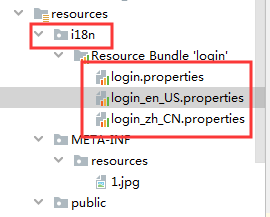
写入如下内容

3. application.yml中添加配置参数
spring:

  messages:

    basename: i18n.login
4. 编写控制器页面
package cn.jfjb.crud.controller;

import org.springframework.stereotype.Controller;

import org.springframework.web.bind.annotation.RequestMapping;

/**

 * @author john

 * @date 2019/11/22 - 19:38

 */

@Controller

@RequestMapping({"/"})

public class HelloController {

    @RequestMapping({"/"})

    public String hello12() {

        return "index";

    }

}
5. 编写模板页面
<!DOCTYPE html>

<html lang="en" xmlns:th="http://www.thymeleaf.org">

<head>

    <meta charset="UTF-8">

    <title>Title</title>

</head>

<body>

<h1 th:text="#{login.name}"></h1>

<h1 th:text="#{login.password}"></h1>

</body>

</html>
使用th标签之前需要在页面加上xmlns,加上这个之后会有提示!
<html lang="en" xmlns:th="http://www.thymeleaf.org">
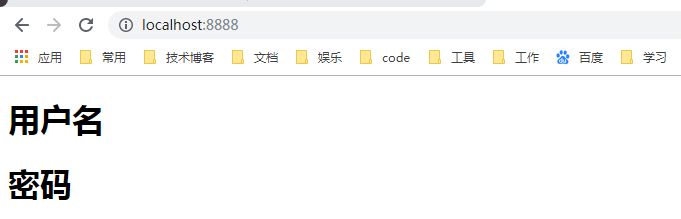
然后切换浏览器上面的语言然后刷新页面就会变化
如果出现乱码,需要设置idea的编码
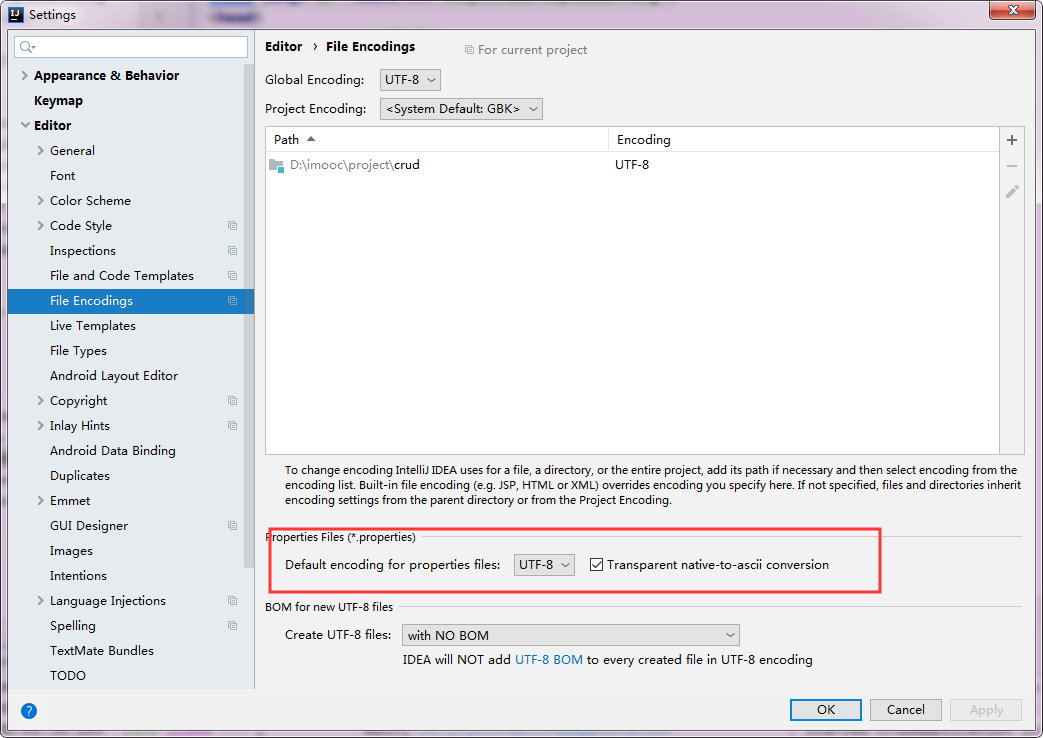
测试
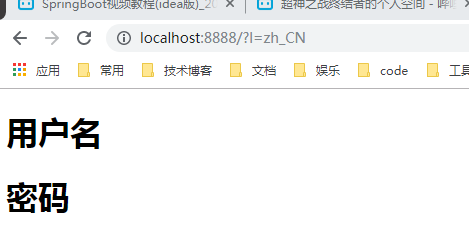
配置使其可以当请求参数中携带语言参数时自动切换语言
1. 编写自定义的LocalResolver
package cn.jfjb.crud.component;

import org.springframework.util.StringUtils;

import org.springframework.web.servlet.LocaleResolver;

import javax.servlet.http.HttpServletRequest;

import javax.servlet.http.HttpServletResponse;

import java.util.Locale;

/**

 * @author john

 * @date 2019/11/23 - 21:08

 */

public class MyLocalResolver implements LocaleResolver {

    @Override

    public Locale resolveLocale(HttpServletRequest req) {

        // 获取l后面的参数

        String l = req.getParameter("l");

        Locale locale = Locale.getDefault();

        //没有l使用默认配置,有l使用自定义配置

        if (!StringUtils.isEmpty(l)) {

            String[] split = l.split("_");

            // 第一个是语言代码  第二个是国家代码

            locale = new Locale(split[0], split[1]);

        }

        return locale;

    }

    @Override

    public void setLocale(HttpServletRequest httpServletRequest, HttpServletResponse httpServletResponse, Locale locale) {

    }

}
2. 把配置加入到SpringBoot的容器中
package cn.jfjb.crud.config;

import cn.jfjb.crud.component.MyLocalResolver;

import org.springframework.context.annotation.Bean;

import org.springframework.context.annotation.Configuration;

import org.springframework.web.servlet.LocaleResolver;

import org.springframework.web.servlet.config.annotation.WebMvcConfigurer;

/**

 * @author john

 * @date 2019/11/23 - 18:01

 */

@Configuration

public class MyMvcConfig implements WebMvcConfigurer {

    @Bean

    public LocaleResolver localeResolver() {

        return new MyLocalResolver();

    }

}
测试


参考
springboot2.0国际化的更多相关文章
- spring-boot-2.0.3源码篇 - 国际化
前言 针对spring boot,网上已有很多优质的系列教程,我就不再班门弄斧了(实际上是担心没别人写的好,哈哈哈!).但是还是想蹭蹭spring boot的热度,即使不考虑微服务,spring bo ...
- spring-boot-2.0.3应用篇 - shiro集成
前言 上一篇:spring-boot-2.0.3源码篇 - 国际化,讲了如何实现国际化,实际上我工作用的模版引擎是freemaker,而不是thymeleaf,不过原理都是相通的. 接着上一篇,这一篇 ...
- spring-boot-2.0.3启动源码篇 - 阶段总结
前言 开心一刻 朋友喜欢去按摩,第一次推门进来的是一个学生美眉,感觉还不错:后来经常去,有时是护士,有时是空姐,有时候是教师.昨天晚上推门进去的是一个女警察,长得贼好看,身材也很好,朋友嗷的一声就扑上 ...
- (六)SpringBoot2.0基础篇- Redis整合(JedisCluster集群连接)
一.环境 Redis:4.0.9 SpringBoot:2.0.1 Redis安装:Linux(Redhat)安装Redis 二.SpringBoot整合Redis 1.项目基本搭建: 我们基于(五) ...
- Springboot2.0(Spring5.0)中个性化配置项目上的细节差异
在一般的项目中,如果Spring Boot提供的Sping MVC不符合要求,则可以通过一个配置类(@Configuration)加上@EnableWebMvc注解来实现完全自己控制的MVC配置.但此 ...
- springboot2.0.3源码篇 - 自动配置的实现,发现也不是那么复杂
前言 开心一刻 女儿: “妈妈,你这么漂亮,当年怎么嫁给了爸爸呢?” 妈妈: “当年你爸不是穷嘛!‘ 女儿: “穷你还嫁给他!” 妈妈: “那时候刚刚毕业参加工作,领导对我说,他是我的扶贫对象,我年轻 ...
- spring-boot-2.0.3源码篇 - pageHelper分页,绝对有值得你看的地方
前言 开心一刻 说实话,作为一个宅男,每次被淘宝上的雄性店主追着喊亲,亲,亲,这感觉真是恶心透顶,好像被强吻一样.........更烦的是我每次为了省钱,还得用个女号,跟那些店主说:“哥哥包邮嘛么叽. ...
- SpringBoot2.0之四 简单整合MyBatis
从最开始的SSH(Struts+Spring+Hibernate),到后来的SMM(SpringMVC+Spring+MyBatis),到目前的S(SpringBoot),随着框架的不断更新换代,也为 ...
- springBoot2.0+redis+fastJson+自定义注解实现方法上添加过期时间
springBoot2.0集成redis实例 一.首先引入项目依赖的maven jar包,主要包括 spring-boot-starter-data-redis包,这个再springBoot2.0之前 ...
随机推荐
- luoguP2285 [HNOI2004]打鼹鼠 x
P2285 [HNOI2004]打鼹鼠 题目描述 鼹鼠是一种很喜欢挖洞的动物,但每过一定的时间,它还是喜欢把头探出到地面上来透透气的.根据这个特点阿牛编写了一个打鼹鼠的游戏:在一个n*n的网格中,在某 ...
- HDU 2859—Phalanx(DP)
Time Limit:5000MS Memory Limit:32768KB 64bit IO Format:%I64d & %I64u Description Today i ...
- F - Almost Sorted Array
F - Almost Sorted Array We are all familiar with sorting algorithms: quick sort, merge sort, heap ...
- JavaWeb_(SSH论坛)_二、框架整合
基于SSH框架的小型论坛项目 一.项目入门 传送门 二.框架整合 传送门 三.用户模块 传送门 四.页面显示 传送门 五.帖子模块 传送门 六.点赞模块 传送门 七.辅助模块 传送门 导入Jar包 导 ...
- [CSP-S模拟测试]:最大值(数学+线段树)
题目背景 $Maxtir$最喜欢最大值. 题目传送门(内部题128) 输入格式 第$1$行输入四个正整数$n,m,q$. 第$2$至$n+1$行中,第$i+1$行输入魔法晶石$i$的三种属性$(x_i ...
- ValueError: Unable to determine SOCKS version from socks://127.0.0.1:1080/
使用ss之后输入conda指令出现错误:“ValueError: Unable to determine SOCKS version from socks://127.0.0.1:1080/”. 解决 ...
- spring-boot:run启动时,如何带设置环境参数dev,test.
这边在linux 启动springboot的jar包时候,多次报错 最终使用 java -jar -Dspring.profiles.active=test demo-0.0.1-SNAPSHOT.j ...
- Docker-----版本选择
版本演变 17.03 版本以前 Docker CE 在 17.03 版本之前叫 Docker Engine, Docker Engine 的版本号范围: 0.1.0 ~ 1.13.1 17.03 版本 ...
- JavaScript中二进制与10进制互相转换
webpack打包生成的代码中涉及了一些二进制位与的操作, 所以今天来学习一下JavaScript中的二进制与十进制转换操作吧 十进制转二进制: var num = 100 num.toString( ...
- Tomcat-8.5.39性能监控及调优
一.下载地址 https://tomcat.apache.org/download-80.cgi 二.安装步骤 将安装包 apache-tomcat-8.5.39.tar.gz 上传至服务器 /usr ...