
vue 自己写的一个日历
样式:
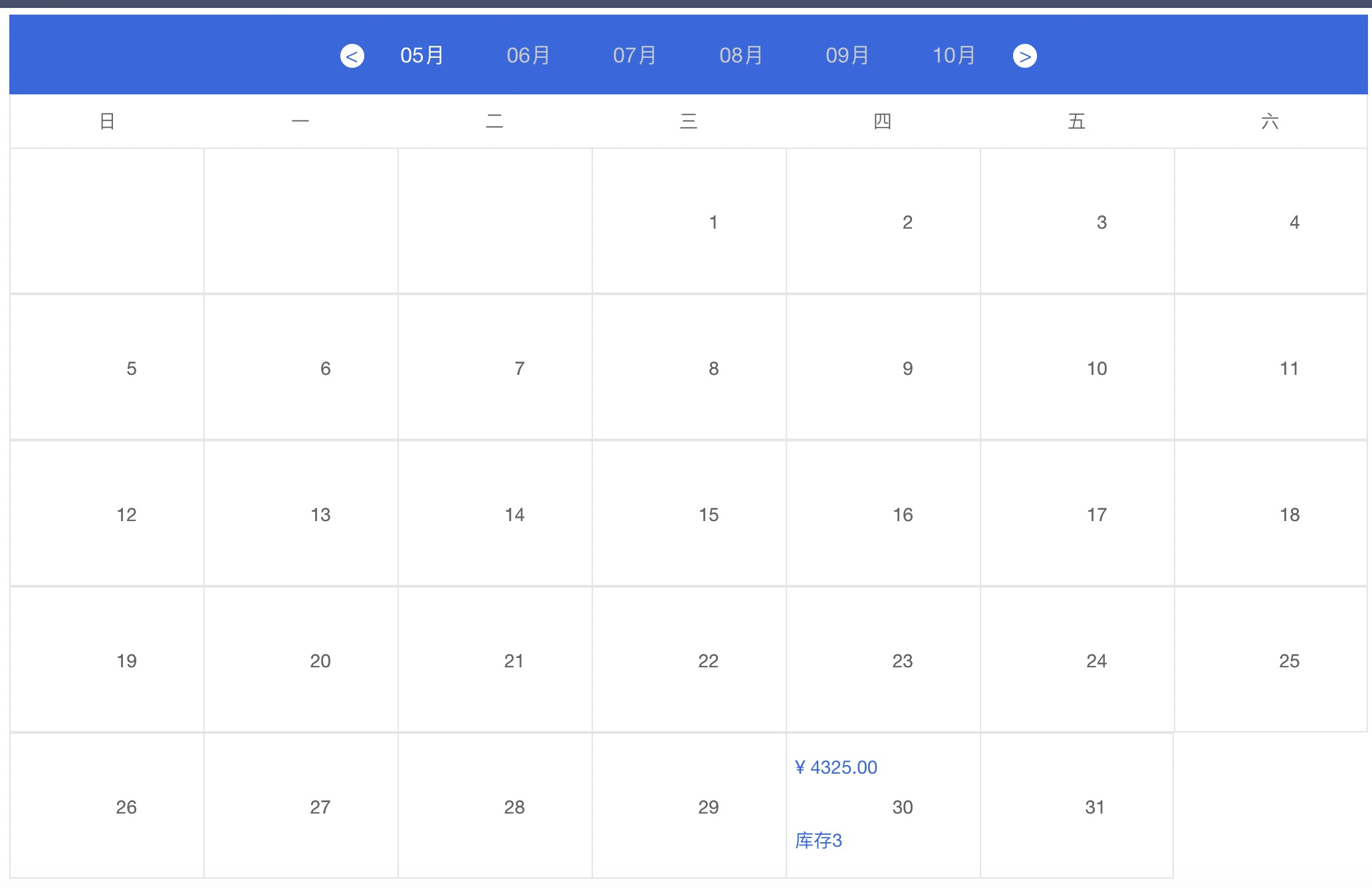
//quanbu全部代码
<template>
<div class="priceListContent clearfix">
<!-- 顶部 批量设置 -->
<div v-if="wylFlag"></div>
<div class="btnContent" >
<span class="btn" @click="setMorePrice" >批量设置</span>
<!-- <span class="btn">重置</span> -->
</div>
<div class="dataContent" >
<div class="dataMonthContent clearfix">
<div> <span class="prev" @click="clickLeft"> {{ left }} </span> </div>
<div class="monthList clearfix">
<ul>
<li v-for="(item,index) in newDate" :key="index" :class="{'active':item.type}" @click="changeMonth(newDate,index)">{{ item.month }}月</li>
</ul>
</div>
<div> <span class="next" @click="clickRight">></span> </div>
</div>
<div class="dataTypeContent clearfix">
<ul>
<li v-for="(item,index) in newDateType" :key="index">{{ item }}</li>
</ul>
</div>
<div class="dataListContent clearfix">
<ul class="clearfix">
<li v-for="(item,indexq) in todayNum" :key="indexq" class="dataListContent_list_item">
<div class="list_item_msg">
<div></div>
<div></div>
<div></div>
</div>
<div class="list_item_date"></div>
</li>
<li v-for="(item,keys,indexs) in dateMsgNew" :key="indexs+ '-label'" class="dataListContent_list_item" @click="setSinglePrice(item)">
<!-- <div v-if="item.msg.setPrice" @click="setSinglePrice(item)" > -->
<div class="list_item_msg" >
<div v-if="item.msg.price">¥ {{ item.msg.price }}</div>
<div style="height:25px;"></div>
<div v-if="item.msg.num">库存{{ item.msg.num }}</div>
</div>
<div class="list_item_date">{{ Number(keys)+1 }}</div>
<!-- </div> -->
<!-- <div v-else >
<div class="list_item_msg">
<div v-if="item.msg.price">¥ {{ item.msg.price }}</div>
<div style="height:25px;"></div>
<div v-if="item.msg.num">余{{ item.msg.num }}</div>
</div>
</div> -->
<div class="list_item_date">{{ Number(keys)+1 }}</div>
</li>
</ul>
</div>
</div>
<!-- 设置当天价格信息 -->
<div v-if="closedFlag" class="alertCont">
<div class="alertBody">
<div class="alertTitle">
<span>设置价格</span>
<span class="closed" @click="closed">x</span>
</div>
<div class="nowDate">
<span style="width:100px;margin-right:10px;">设置日期</span>
<span>{{singleDateMsg.msg.year}}</span> -
<span>{{singleDateMsg.msg.month}}</span> -
<span>{{singleDateMsg.msg.data}}</span>
</div>
<div class="alertWarper" style="padding: 20px 30px;">
<el-form :model="ruleForm" status-icon :rules="rules" ref="ruleForm" label-width="80px" class="demo-ruleForm">
<el-form-item label="市场价" prop="market_price">
<el-input type="text" v-model="ruleForm.market_price" autocomplete="off"></el-input>
</el-form-item>
<el-form-item label="建议价" prop="sell_price">
<el-input type="text" v-model="ruleForm.sell_price" autocomplete="off"></el-input>
<!-- <span class="fz12 color999">密码由8-20位字母、数字组合,区分大小写</span> -->
</el-form-item>
<el-form-item label="结算价" prop="price">
<el-input type="text" v-model="ruleForm.price" autocomplete="off"></el-input>
</el-form-item>
<el-form-item label="库存" prop="stock">
<el-input type="text" v-model="ruleForm.stock" autocomplete="off"></el-input>
</el-form-item>
<!-- <el-form-item> -->
<div style="height: 40px;line-height: 40px;text-align: center;">
<el-button style="padding:6px 15px;background-color: #3067e3;border: 1px solid #3067e3;" type="primary" @click="submitForm('ruleForm')">保存</el-button>
<!-- <el-button @click="resetForm('ruleForm')">重置</el-button> -->
</div>
<!-- </el-form-item> -->
</el-form>
</div>
</div>
</div>
<!-- piliang批量设置价格信息 -->
<div v-if="closedAllFlag" class="alertContAll">
<div class="alertBodyAll">
<div class="alertTitleAll">
<span>批量设置</span>
<span class="closed" @click="closedAll">x</span>
</div>
<!-- <div class="nowDate">
<span style="width:100px;margin-right:10px;">设置日期</span>
<span>{{singleDateMsg.msg.year}}</span> -
<span>{{singleDateMsg.msg.month}}</span> -
<span>{{singleDateMsg.msg.data}}</span>
</div> -->
<div class="alertWarperAll" style="padding: 20px 30px;">
<el-form :model="ruleFormAll" status-icon :rules="rulesAll" ref="ruleFormAll" label-width="80px" class="demo-ruleForm">
<el-form-item label="日期范围" required>
<el-col :span="11">
<el-form-item prop="sdate">
<el-date-picker type="date" placeholder="开始时间" v-model="ruleFormAll.sdate" :picker-options="pickerOptionsStart" style="width: 100%;"></el-date-picker>
</el-form-item>
</el-col>
<el-col class="line" :span="2" style="text-aline:center;">至</el-col>
<el-col :span="11">
<el-form-item prop="edate">
<el-date-picker type="date" placeholder="结束时间" v-model="ruleFormAll.edate" :picker-options="pickerOptionsEnd" style="width: 100%;"></el-date-picker>
<!-- <el-time-picker placeholder="选择时间" v-model="ruleForm.date2" style="width: 100%;"></el-time-picker> -->
</el-form-item>
</el-col>
</el-form-item>
<el-form-item label="设置星期" prop="selectWeeks" >
<el-checkbox :indeterminate="isIndeterminate" v-model="checkAll" @change="handleCheckAllChange">全选</el-checkbox>
<el-checkbox-group v-model="ruleFormAll.selectWeeks" @change="handleCheckedCitiesChange">
<el-checkbox style=" padding-left: 20px;" v-for="city in allWeeks" :label="city" :key="city">{{city}}</el-checkbox>
</el-checkbox-group>
</el-form-item>
<el-form-item label="市场价" prop="market_price">
<el-input type="text" v-model="ruleFormAll.market_price" autocomplete="off"></el-input>
</el-form-item>
<el-form-item label="建议价" prop="sell_price">
<el-input type="text" v-model="ruleFormAll.sell_price" autocomplete="off"></el-input>
<!-- <span class="fz12 color999">密码由8-20位字母、数字组合,区分大小写</span> -->
</el-form-item>
<el-form-item label="结算价" prop="price">
<el-input type="text" v-model="ruleFormAll.price" autocomplete="off"></el-input>
</el-form-item>
<el-form-item label="库存" prop="stock">
<el-input type="text" v-model="ruleFormAll.stock" autocomplete="off"></el-input>
</el-form-item>
<!-- <el-form-item> -->
<div style="height: 40px;line-height: 40px;text-align: center;">
<el-button style="padding:6px 15px;background-color: #3067e3;border: 1px solid #3067e3;" type="primary" @click="submitFormAll('ruleFormAll')">保存</el-button>
<!-- <el-button @click="resetForm('ruleForm')">重置</el-button> -->
</div>
<!-- </el-form-item> -->
</el-form>
</div>
</div>
</div>
<alert-msg v-if="alertMsgFlag" :msg="alertMsg" />
</div>
</template>
<script>
import alertMsg from '@/components/alertMsg/alertMsg'
import { getToken } from '@/utils/auth'
import { getTimeNow, pricelist, setsku, batch } from '@/api/management/scenicManagementList/underwriter'
// const cityOptions = ['上海', '北京', '广州', '深圳'];
export default {
components:{
alertMsg
},
data() {
return {
checkAll: false,
// checkedCities: ['上海', '北京'],
allWeeks: ['周一', '周二', '周三', '周四', '周五', '周六', '周日'],
isIndeterminate: false,
wylFlag:false,
newMsg: {},
alertMsgFlag: false,
alertMsg: '',
singleDateMsg:{},
closedFlag:false,
closedAllFlag:false,
left: '<',
nowTime: '',
newDate: [],
todayNum: 0,
Numl:0,
Numr:0,
dataNum: 0,
newDateType: ['日', '一', '二', '三', '四', '五', '六'],
dateMsg: [
[
{
date: '',
msg: {
price: '100',
num: '10',
hasRoom: true
}
},
{
date: '',
msg: {
price: '100',
num: '10',
hasRoom: true
}
},
{
date: '',
msg: {
price: '100',
num: '10',
hasRoom: true
}
},
{
date: '',
msg: {
price: '100',
num: '10',
hasRoom: true
}
},
{
date: '',
msg: {
price: '100',
num: '10',
hasRoom: true
}
},
{
date: '',
msg: {
price: '100',
num: '10',
hasRoom: true
}
},
{
date: '1',
msg: {
price: '100',
num: '10',
hasRoom: true
}
}
],
[
{
date: '2',
msg: {
price: '100',
num: '10',
hasRoom: true
}
},
{
date: '3',
msg: {
price: '100',
num: '10',
hasRoom: true
}
},
{
date: '4',
msg: {
price: '100',
num: '10',
hasRoom: true
}
},
{
date: '5',
msg: {
price: '100',
num: '10',
hasRoom: true
}
},
{
date: '6',
msg: {
price: '',
num: '',
hasRoom: false
}
},
{
date: '7',
msg: {
price: '100',
num: '10',
hasRoom: true
}
},
{
date: '8',
msg: {
price: '100',
num: '10',
hasRoom: true
}
}
]
],
dateMsgNew:{
},
ruleForm: {
token: '',
id: '',
stock: '',
price: '',
sell_price: '',
market_price: '',
date: '',
},
rules: {
stock: [
{ required: true, message: '必填项不能为空', trigger: 'blur' }
],
price: [
{ required: true, message: '必填项不能为空', trigger: 'blur' }
],
sell_price: [
{ required: true, message: '必填项不能为空', trigger: 'blur' }
],
market_price: [
{ required: true, message: '必填项不能为空', trigger: 'blur' }
]
},
pickerOptionsStart: {
disabledDate: (time) => {
// console.log('time')
// console.log(time)
// console.log(this.ruleFormAll.edate)
// if (this.ruleFormAll && this.ruleFormAll.edate !== '') {
// return time.getTime() < Date.now() - 8.64e7 || time.getTime() > this.endTime
// return time.getTime() > this.endTime
// } else {
// console.log(this.nowTime)
// return time.getTime() < Date.now() - 1111118.64e7
return time.getTime() < Date.now() - 8.64e7
// }
}
},
pickerOptionsEnd: {
disabledDate: (time) => {
// if (this.ruleFormAll && this.ruleFormAll.sdate && this.ruleFormAll.sdate !== '') {
// return time.getTime() < this.param.sdate
// } else {
// return time.getTime() < Date.now()
return time.getTime() < Date.now() - 8.64e7
// }
}
},
selectYear:'',
selectMounth:'',
ruleFormAll: {
token: '',
id: this.$route.query.id,
stock: '',
price: '',
sell_price: '',
market_price: '',
edate: '',
sdate:'',
weeks:'',
selectWeeks:[]
},
rulesAll: {
stock: [
{ required: true, message: '必填项不能为空', trigger: 'blur' }
],
price: [
{ required: true, message: '必填项不能为空', trigger: 'blur' }
],
sell_price: [
{ required: true, message: '必填项不能为空', trigger: 'blur' }
],
market_price: [
{ required: true, message: '必填项不能为空', trigger: 'blur' }
],
sdate: [
{ type: 'date', required: true, message: '请选择日期', trigger: 'change' }
],
edate: [
{ type: 'date', required: true, message: '请选择日期', trigger: 'change' }
],
selectWeeks: [
{ type: 'array', required: true, message: '请至少选择一个星期', trigger: 'change' }
]
}
}
},
mounted() {
this.init()
},
// watch: {
// dateMsgNew (val) {
// console.log(val)
// this.$nextTick(() => {
// this.dateMsgNew = val
// })
// }
// },
methods: {
init() {
getTimeNow().then((res) => {
// console.log(res.data)
this.nowTime = res.data.now.replace(/-/g, '/');
this.initDate(this.nowTime,0,0)
})
},
initDate(dateNow,num,index) {
// this.nowTime = dateNow
this.newDate = [];
var nowdate = new Date(this.nowTime)
const dataTimeNow = nowdate.setMonth(nowdate.getMonth()+num)
const nowMonth = new Date(dataTimeNow).getMonth() +1
const nowYear = new Date(dataTimeNow).getFullYear()
// console.log(nowMonth)
// console.log(nowYear)
const leng = 12 - nowMonth < 7 ? 12 - nowMonth : 5
// console.log(leng)
// console.log(nowMonth)
for (let i = 0; i <= leng; i++) {
const params = {}
params.month = nowMonth + i < 10 ? '0' + Number(nowMonth + i) : nowMonth + i
params.year = nowYear
if (i === 0) {
params.type = true
} else {
params.type = false
}
this.newDate.push(params)
}
for (let i = 1; i < 6 - leng; i++) {
const params = {}
params.month = i < 10 ? '0' + i : i
params.type = false
params.year = nowYear+1
this.newDate.push(params)
}
this.selectYear = this.newDate[0].year
this.selectMounth = this.newDate[0].month
this.getNowMounthDates(this.newDate[0].year,this.newDate[0].month)
// console.log(this.newDate)
},
// 获取到当前月份有多少天
getNowMounthDates(year,month){
const dates = new Date(year,month,0)
let nowdate = dates.getDate();
const startTime = year + '-' + month + '-' + '01'
const endTime = year + '-' + month + '-' + nowdate
//获取到当前月份第一天是星期几
var myDate=new Date();
myDate.setFullYear(year,month-1,1);
var week = myDate.getDay()
this.todayNum = week
const obj = {
token: getToken(),
page: 1,
size: 100,
id: this.$route.query.id,
sdate: startTime,
edate: endTime,
}
pricelist(obj).then((res) => {
// console.log(res.data.data.list)
this.dateMsgNew = {};
for(let i = 0 ; i < nowdate ; i++ ){
let flag = false;
console.log(year)
console.log(month)
console.log(Number(i)+1)
let days = i+1
days = days < 10? '0'+days:days
const nowNewSetData = year + '-' + month + '-' + days
if(new Date(nowNewSetData).getTime() < new Date(this.nowTime).getTime()){
flag = false;
}else{
flag = true;
}
this.dateMsgNew[i] = {
msg: {
price: '',
num: '',
year: year,
month: month,
data: i+1,
hasRoom: false,
setPrice: flag,
}
}
}
this.$nextTick(() => {
console.log(this.nowTime)
res.data.data.list.forEach(element => {
let key = element.date.split('-');
let flag = false;
if(new Date(element.date).getTime() < new Date(this.nowTime).getTime()){
flag = false;
}else{
flag = true;
}
// console.log('---------')
// console.log(this.selectYear === Number(key[0]))
// console.log(this.selectMounth === key[1])
// console.log(key)
// console.log(this.selectYear)
// console.log(this.selectMounth)
if(Number(this.selectYear) === Number(key[0]) && Number(this.selectMounth) === Number(key[1])){
// const obj ={
// msg: {
// sell_price: element.sell_price,
// market_price: element.market_price,
// price: element.price,
// num: element.stock,
// year: key[0],
// month: key[1],
// data: key[2],
// hasRoom: false,
// setPrice: flag,
// }
// }
// this.$set(this.dateMsgNew,key[2]-1,obj)
this.dateMsgNew[key[2]-1] = {
msg: {
sell_price: element.sell_price,
market_price: element.market_price,
price: element.price,
num: element.stock,
year: key[0],
month: key[1],
data: key[2],
hasRoom: false,
setPrice: flag,
}
}
} })
})
})
this.wylFlag = false;
let _this = this
window.setTimeout(function() {
_this.wylFlag = true;
},100)
console.log(this.dateMsgNew)
},
changeMonth(val,index){
// console.log(val)
val.forEach(element => {
element.type = false;
});
val[index].type = true;
this.selectYear = val[index].year
this.selectMounth = val[index].month
this.getNowMounthDates(val[index].year,val[index].month)
},
clickLeft() {
this.dataNum = this.dataNum - 6
this.initDate(this.nowTime,this.dataNum)
},
clickRight() {
this.dataNum = this.dataNum + 6
this.initDate(this.nowTime,this.dataNum)
},
// setSinglePrice(val) {
// this.$emit('setSinglePrice', val)
// },
setMorePrice() {
// console.log('asdsdfa')
this.isIndeterminate = false,
this.ruleFormAll= {
token: '',
id: this.$route.query.id,
stock: '',
price: '',
sell_price: '',
market_price: '',
edate: '',
sdate:'',
weeks:'',
selectWeeks:[]
}
this.closedAllFlag = true
},
setSinglePrice(val) {
if(!val.msg.setPrice){
this.$message({
message: this.nowTime+'日期之前不能设置价格',
type: 'warning'
})
return false;
}
this.singleDateMsg = { ...val }
console.log(this.singleDateMsg) let dateT = this.singleDateMsg.msg.year + '-' + this.singleDateMsg.msg.month + '-' + this.singleDateMsg.msg.data
this.ruleForm = {
token: '',
id: this.$route.query.id,
stock: this.singleDateMsg.msg.num,
price: this.singleDateMsg.msg.price,
sell_price: this.singleDateMsg.msg.sell_price,
market_price: this.singleDateMsg.msg.market_price,
date: dateT,
}
this.closedFlag = true
},
closed() {
this.closedFlag = false
},
closedAll() {
this.closedAllFlag = false
},
submitForm(formName) {
this.$refs[formName].validate((valid) => {
if (valid) { setsku(this.ruleForm).then((res) => {
// console.log(res.data)
if(res.data.code === 0) {
this.alertMsg = res.data.msg
this.alertMsgFlag = true;
this.closedFlag = false
// this.wylFlag = false;
let _this = this
this.getNowMounthDates(this.singleDateMsg.msg.year,this.singleDateMsg.msg.month)
window.setTimeout(function() {
// _this.wylFlag = true;
_this.alertMsgFlag = false;
},2000)
}else{
this.alertMsg = res.data.msg
this.alertMsgFlag = true;
let _this = this
window.setTimeout(function() {
_this.alertMsgFlag = false;
},2000)
}
})
} else {
// console.log('error submit!!');
return false;
}
});
},
submitFormAll(formName){
this.$refs[formName].validate((valid) => {
if (valid) {
let weeksNew = []
this.ruleFormAll.selectWeeks.forEach(element =>{
switch(element){
case '周日':
weeksNew.push(0)
break;
case '周一':
weeksNew.push(1)
break;
case '周二':
weeksNew.push(2)
break;
case '周三':
weeksNew.push(3)
break;
case '周四':
weeksNew.push(4)
break;
case '周五':
weeksNew.push(5)
break;
case '周六':
weeksNew.push(6)
break;
}
})
this.ruleFormAll.weeks = weeksNew.join(',')
let sdate = new Date(this.ruleFormAll.sdate)
let edate = new Date(this.ruleFormAll.edate)
//
let sDays = sdate.getFullYear() + '-' + Number(sdate.getMonth()+1) + '-' + sdate.getDate()
//
let edates = edate.getFullYear() + '-' +Number( edate.getMonth()+1) + '-' + edate.getDate()
// console.log(sdate.getFullYear())
// console.log(sDays)
// console.log(edates)
const obj = {
token: '',
id: this.$route.query.id,
stock: this.ruleFormAll.stock,
price: this.ruleFormAll.price,
sell_price: this.ruleFormAll.sell_price,
market_price: this.ruleFormAll.market_price,
edate: edates,
sdate:sDays,
weeks:this.ruleFormAll.weeks,
}
batch(obj).then((res) => {
console.log(res.data)
if(res.data.code === 0) {
this.alertMsg = res.data.msg
this.alertMsgFlag = true;
this.closedAllFlag = false
// this.wylFlag = false;
let _this = this
console.log(this.ruleFormAll.sdate)
const dates = new Date(this.ruleFormAll.sdate);
const year = dates.getFullYear()
const mounth = dates.getMonth()+1
console.log(this.newDate)
let indexNum = 0;
this.newDate.forEach((element,index) => {
if(Number(element.month) === Number(mounth)){
indexNum = index;
}
})
this.changeMonth(this.newDate,indexNum)
// this.getNowMounthDates(year,mounth)
window.setTimeout(function() {
// _this.wylFlag = true;
_this.alertMsgFlag = false;
},2000)
}else{
this.alertMsg = res.data.msg
this.alertMsgFlag = true;
let _this = this
window.setTimeout(function() {
_this.alertMsgFlag = false;
},2000)
}
})
} else {
// console.log('error submit!!');
return false;
}
});
},
resetForm(formName) {
this.$refs[formName].resetFields();
},
changePasswordClick(param) {
changePassword(param).then((res) => {
// console.log('changePassword')
// console.log(res)
if(res.data.code === 0){
this.alertMsg = res.data.msg
this.alertMsgFlag = true;
this.closedFlag = false;
this.wylFlag = false;
let _this = this
window.setTimeout(function() {
_this.alertMsgFlag = false;
_this.wylFlag = true;
},2000)
}else{
this.alertMsg = res.data.msg
this.alertMsgFlag = true;
// this.closedFlag = false;
let _this = this
window.setTimeout(function() {
_this.alertMsgFlag = false;
},2000)
} })
},
handleCheckAllChange(val) {
console.log(val)
console.log(this.ruleFormAll.selectWeeks)
this.ruleFormAll.selectWeeks = val ? this.allWeeks : [];
this.isIndeterminate = false;
},
handleCheckedCitiesChange(value) {
console.log(value)
let checkedCount = value.length;
this.checkAll = checkedCount === this.allWeeks.length;
this.isIndeterminate = checkedCount > 0 && checkedCount < this.allWeeks.length;
}
}
}
</script>
<style scoped> .priceListContent{
padding: 24px 0px 50px 34px;
background-color: #ffffff;
width: 100%;
/* min-width: 1200px; */
}
.btnContent{
text-align: right;
width: 91%;
}
.btn{
display: inline-block;
border-radius: 4px;
border: solid 1px #3067e3;
height: 34px;
line-height: 34px;
color: #3067e3;
padding: 0px 12px;
cursor: pointer;
}
.dataContent{
background-color: #ffffff;
padding-top: 20px;
}
.dataTypeContent ul li:first-child{
border-left: solid 1px #e5e5e5;
}
.dataTypeContent ul li:last-child{
border-right: solid 1px #e5e5e5;
}
.dataMonthContent{
width: 91%;
height: 60px;
line-height: 60px;
background-color: #3067e3;
text-align: center;
}
.dataMonthContent>div{
display: inline-block;
/* margin-right: 10px; */
cursor: pointer;
height: 60px;
line-height: 60px;
vertical-align: text-bottom;
}
.monthList ul li{
float: left;
color: #cacaca;
font-size: 16px;
width: 80px;
text-align: center;
cursor: pointer;
}
.monthList ul li.active{
color: #ffffff;
}
.prev , .next{
display: inline-block;
width: 18px;
height: 18px;
line-height: 16px;
text-align: center;
border-radius: 9px;
background-color: #ffffff;
color: #3067e3;
}
.dataTypeContent{
width: 100%;
}
.dataTypeContent ul li{
float: left;
width: 13%;
color: #666666;
text-align: center;
font-size: 14px;
height: 40px;
line-height: 40px;
background-color: #ffffff;
} /* .dataListContent_list */
.dataListContent {
float: left;
width: 100%;
}
/* .dataListContent_list */
.dataListContent .dataListContent_list_item {
float: left;
position: relative;
width: 13%;
color: #666666;
text-align: center;
font-size: 14px;
height: 110px;
line-height: 110px;
background-color: #ffffff;
border: solid 1px #e5e5e5;
border-right: 0px;
border-bottom: 0px;
}
/* .dataListContent_list */
.dataListContent .dataListContent_list_item:last-child {
border-right: solid 1px #e5e5e5;
/* border-bottom: solid 1px #e5e5e5; */
}
.dataListContent ul li:nth-child(7n){
border-right: solid 1px #e5e5e5;
}
/* .dataListContent_list */
.dataListContent:last-child .dataListContent_list_item{
border-bottom: solid 1px #e5e5e5;
}
.list_item_msg{
width: 100%;
position: absolute;
left: 0px;
top: 10px;
}
.list_item_msg{
width: 100%;
height: 30px;
line-height: 30px;
text-align: left;
padding-left:6px;
color: #3067e3;
font-size: 14px;
}
.list_item_date{
position: absolute;
right: 50px;
}
.alertCont{position: fixed;top: 0px;left: 0px;width:100%;height: 100%;background-color: rgba(0, 0, 0,0.4);z-index: 1111;}
.alertBody{width: 380px;position: absolute;top: 50%;left: 50%;transform: translateX(-50%) translateY(-50%);border-radius: 10px;overflow: hidden;}
.alertTitle{text-align: center;height: 50px;line-height: 80px;background-color: #ffffff; color: #333333;font-size: 16px;position: relative;padding-left: 10px;}
.closed{width: 40px;height: 40px;line-height: 40px;position: absolute;top: 0px;right: 0px;text-align: center;cursor: pointer;}
.alertWarper{background-color: #ffffff;}
.nowDate{
background-color: #ffffff;
height: 30px;
line-height: 30px;
font-size: 15px;
font-weight: 600;
color: #666666;
padding: 0px 40px;
padding-bottom: 40px;
padding-top: 10px;
margin-bottom: -20px;
}
.alertContAll{position: fixed;top: 0px;left: 0px;width:100%;height: 100%;background-color: rgba(0, 0, 0,0.4);z-index: 1111;}
.alertBodyAll{width: 480px;position: absolute;top: 50%;left: 50%;transform: translateX(-50%) translateY(-50%);border-radius: 10px;overflow: hidden;}
.alertTitleAll{text-align: center;height: 50px;line-height: 80px;background-color: #ffffff; color: #333333;font-size: 16px;position: relative;padding-left: 10px;}
.closedAll{width: 40px;height: 40px;line-height: 40px;position: absolute;top: 0px;right: 0px;text-align: center;cursor: pointer;}
.alertWarperAll{background-color: #ffffff;}
</style>
<style>
.el-form-item--medium .el-form-item__content {
line-height: 36px;
display: flex;
}
.el-checkbox__input.is-checked .el-checkbox__inner, .el-checkbox__input.is-indeterminate .el-checkbox__inner {
background-color: #3067e3;
border-color: #3067e3;
}
.el-checkbox__input.is-checked + .el-checkbox__label {
color: #333333;
}
</style>
//分部
1:获取服务器时间
    init() {

      getTimeNow().then((res) => {

        // console.log(res.data)

        this.nowTime = res.data.now.replace(/-/g, '/');

        this.initDate(this.nowTime,0,0)

      })

    }
2:初始化当前导航月份
    initDate(dateNow,num,index) {

      // this.nowTime = dateNow

      this.newDate = [];

        var nowdate = new Date(this.nowTime)

        const dataTimeNow = nowdate.setMonth(nowdate.getMonth()+num)

        const nowMonth = new Date(dataTimeNow).getMonth() +1

        const nowYear = new Date(dataTimeNow).getFullYear()

        // console.log(nowMonth)

        // console.log(nowYear)

        const leng = 12 - nowMonth < 6 ? 12 - nowMonth : 5

        // console.log(leng)

        // console.log(nowMonth)

        for (let i = 0; i <= leng; i++) {

          const params = {}

          params.month = nowMonth + i < 10 ? '0' + Number(nowMonth + i) : nowMonth + i

          params.year = nowYear

          if (i === 0) {

            params.type = true

          } else {

            params.type = false

          }

          this.newDate.push(params)

        }

        for (let i = 1; i < 6 - leng; i++) {

          const params = {}

          params.month = i < 10 ? '0' + i : i

          params.type = false

          params.year = nowYear+1

          this.newDate.push(params)

        }

        this.selectYear = this.newDate[0].year

        this.selectMounth = this.newDate[0].month

        this.getNowMounthDates(this.newDate[0].year,this.newDate[0].month)

      // console.log(this.newDate)

    },
3:获取到当前月有多少天
   getNowMounthDates(year,month){

      const dates = new Date(year,month,0)

      let nowdate = dates.getDate();

      const startTime = year + '-' + month + '-' + '01'

      const endTime = year + '-' + month + '-' + nowdate

      //获取到当前月份第一天是星期几

      var myDate=new Date();

      myDate.setFullYear(year,month-1,1);

      var week = myDate.getDay()

      this.todayNum = week

      const obj = {

        token: getToken(),

        page: 1,

        size: 100,

        id: this.$route.query.id,

        sdate: startTime,

        edate: endTime,

      }

      pricelist(obj).then((res) => {

        // console.log(res.data.data.list)

        this.dateMsgNew = {};

          for(let i = 0 ; i < nowdate ; i++ ){

            let flag = false;

            console.log(year)

            console.log(month)

            console.log(Number(i)+1)

            let days = i+1

            days = days < 10? '0'+days:days

            const nowNewSetData = year + '-' + month + '-' + days

            if(new Date(nowNewSetData).getTime() < new Date(this.nowTime).getTime()){

              flag = false;

            }else{

              flag = true;

            }

            this.dateMsgNew[i] = {

              msg: {

                  price: '',

                  num: '',

                  year: year,

                  month: month,

                  data: i+1,

                  hasRoom: false,

                  setPrice: flag,

                }

            }

          }

        this.$nextTick(() => {

          console.log(this.nowTime)

          res.data.data.list.forEach(element => {

          let key = element.date.split('-');

          let flag = false;

          if(new Date(element.date).getTime() < new Date(this.nowTime).getTime()){

            flag = false;

          }else{

            flag = true;

          }

          // console.log('---------')

          // console.log(this.selectYear === Number(key[0]))

          // console.log(this.selectMounth === key[1])

          // console.log(key)

          // console.log(this.selectYear)

          // console.log(this.selectMounth)

          if(Number(this.selectYear) === Number(key[0]) && Number(this.selectMounth) === Number(key[1])){

            // const obj ={

            //   msg: {

            //       sell_price: element.sell_price,

            //       market_price: element.market_price,

            //       price: element.price,

            //       num: element.stock,

            //       year: key[0],

            //       month: key[1],

            //       data: key[2],

            //       hasRoom: false,

            //       setPrice: flag,

            //     }

            // }

            // this.$set(this.dateMsgNew,key[2]-1,obj)

            this.dateMsgNew[key[2]-1] = {

              msg: {

                  sell_price: element.sell_price,

                  market_price: element.market_price,

                  price: element.price,

                  num: element.stock,

                  year: key[0],

                  month: key[1],

                  data: key[2],

                  hasRoom: false,

                  setPrice: flag,

                }

            }

          }

        })

        })

      })

      this.wylFlag = false;

      let _this = this

      window.setTimeout(function() {

      _this.wylFlag = true;

      },100)

      console.log(this.dateMsgNew)

    },
4:点击导航切换月份
    changeMonth(val,index){

      // console.log(val)

      val.forEach(element => {

        element.type = false;

      });

      val[index].type = true;

      this.selectYear = val[index].year

      this.selectMounth = val[index].month

      this.getNowMounthDates(val[index].year,val[index].month)

    },

    clickLeft() {

      this.dataNum = this.dataNum - 6

      this.initDate(this.nowTime,this.dataNum)

    },

    clickRight() {

      this.dataNum = this.dataNum + 6

      this.initDate(this.nowTime,this.dataNum)

    },
vue 自己写的一个日历的更多相关文章
- 用vue.js写的一个瀑布流的组件
用vue.js写的一个瀑布流的组件:https://segmentfault.com/a/1190000010741319 https://www.jianshu.com/p/db3cadc03402
- 使用 vue 仿写的一个购物商城
在学习了 vue 之后,决定做一个小练习,仿写了一个有关购物商城的小项目.下面就对项目做一个简单的介绍. 项目源码: github 项目的目录结构 -assets 与项目有关的静态资源,包括 css, ...
- vue自己写了一个div菜单,点击按钮展开,点击其他地方关闭这个div菜单
需求是通过点击body页面,在其他地方就关闭这个<div>菜单,给这个div一个id:problemList,但是点击我打开的按钮,不关闭. created () { document.o ...
- vue elementui 写的一个后台管理页面模板
https://github.com/PanJiaChen/vue-element-admin
- vue element-ui怎样提炼一个自己写的js当作公共js
vue element-ui怎样提炼一个自己写的js当作公共js请教一下各位大神,我刚刚触摸vue element-ui几天,写的一个清晰检索的input框,现在需当作项目公共的部分,可遭需的html ...
- 自己写的一个Vue
下面这里是我自己写的一个小型的vue,原理就是proxy: //Proxy天生没有prototype,因此要加上,不然extends会报错 Proxy.prototype = Proxy.protot ...
- Vue.js写一个SPA登录页面的过程
技术栈 vue.js 主框架 vuex 状态管理 vue-router 路由管理 一般过程 在一般的登录过程中,一种前端方案是: 检查状态:进入页面时或者路由变化时检查是否有登录状态(保存在cooki ...
- vue validate多表单验证思考 之前写过一个里外层,现在觉得不合适,应该平行的写,然后都给ret,最后判断ret 再做出反应,这样整体表单的所有验证就都报验证,然后最后提交的时候把组件内的对象合并到总的对象,再提交
vue validate多表单验证思考 之前写过一个里外层,现在觉得不合适,应该平行的写,然后都给ret,最后判断ret 再做出反应,这样整体表单的所有验证就都报验证,然后最后提交的时候把组件内的对象 ...
- 如何写好一个vue组件,老夫的一年经验全在这了【转】 v-bind="$attrs" 和 v-on="$listeners"
如何写好一个vue组件,老夫的一年经验全在这了 一个适用性良好的组件,一种是可配置项很多,另一种就是容易覆写,从而扩展功能 Vue 组件的 API 来自三部分——prop.事件和插槽: prop 允许 ...
随机推荐
- poj2186--tarjan+缩点(有向图的强连通分量中点的个数)
题目大意: 每一头牛的愿望就是变成一头最受欢迎的牛.现在有N头牛,给你M对整数(A,B),表示牛A认为牛B受欢迎. 这 种关系是具有传递性的,如果A认为B受欢迎,B认为C受欢迎,那么牛A也 ...
- form表单提交被拦截
最近做的一个项目,利用form表单(可以避免跨域问题)提交,在chrome可以正常进行跳转,但是在手机端,以及一些pc端浏览器却无法正常跳转.通过检查后台日志,没有正常跳转的都是因为后天直接没有收到该 ...
- javaScript运动框架之缓冲运动
缓冲运动 逐渐变慢,最后停止 距离越远速度越大 速度由距离决定 速度=(目标值-当前值)/缩放系数 存在Bug 速度取整 跟随页面滚动的缓冲侧边栏 潜在问题:目标值不是整数时 缓冲运动的停止条件 ...
- XXE漏洞攻击与防御
转自https://www.jianshu.com/p/7325b2ef8fc9 0x01 XML基础 在聊XXE之前,先说说相关的XML知识吧. 定义 XML用于标记电子文件使其具有结构性的标记语言 ...
- Java RMI 最简单实例
IHello.java import java.rmi.Remote; import java.rmi.RemoteException; public interface IHello extends ...
- python-文件操作3(读写文件的详细操作)
f=open('my-heart','r') print(f.encoding)#返回字符编码 print(f.fileno())#返回操作系统的端口编号 print(f.seekable())#是否 ...
- js 判断确切判断Array和Object
js的数组其实是特殊的对象. 这就导致: typeof [1,2,3] === 'object' [1,2,3] instanceof Object 和 [1,2,3] instanceof Arr ...
- java选做猜数字
程序设计思想 第一步:使用随机数生成1-100的数字 第二步:让用户输入数字 第三步:输入的数字与生成数字不同执行下一步,相同执行第五步 第四步:比较两数大小并输出结果,并返回第二步 第五步:输出猜对 ...
- java课堂作业,求多参数的和
设计思想 第一步:用户输入他想要计算的数字个数 第二步:声明字符串数组,保存用户的输入,同时每次输入后强制转换类型并求和 第三步:将声明的数组赋值给args 第四步:输出结果 程序流程图 程序源代码 ...
- html中自定义上传文件的样式
<script> $(function(){ $("#avatsel1").click(function(){ $("input[type='file']&q ...