
Step-by-step from Markov Process to Markov Decision Process
In this post, I will illustrate Markov Property, Markov Reward Process and finally Markov Decision Process, which are fundamental concepts in Reinforcement Learning.
Markov Property
'The state is independent of the past given the present'

Markov Process (Markov Chain)
Keywords: state, transition matrix
A Markov Process is defined by a Tuple(S,P), in which S is the state space, and P is the transition matrix. The following chart is an example.
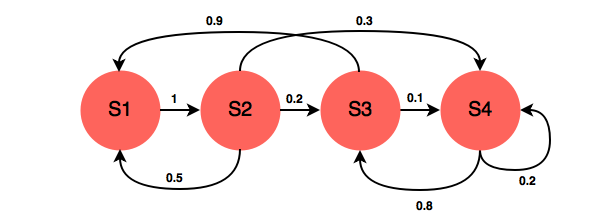
A transition matrix demonstrates the probabilities of transitioning from one state to another.


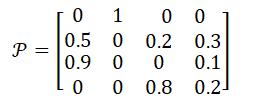
In the example above, the transition matrix is:
Markov Reward Process: Markov Process with Value Judgement
Keywords: Reward, Return, Discount Factor, Value Function
MRP add two additional properties into Markov Chain: one is Reward, who represents the immediate feedback an agent can receive at time t+1 if he is in state s at time t; another property is Discount Factor γ∈[0,1]. So the representation tuple is [S,P,R,γ].
Formally, Reward is the immediate feedback, which means when agent gets to state s at time t, it can definetly receive this reward at time t+1. It is defined by:

Given reward and discount factor, we can calculate the Return for a given senario by this equation:

Example for Return calculation:
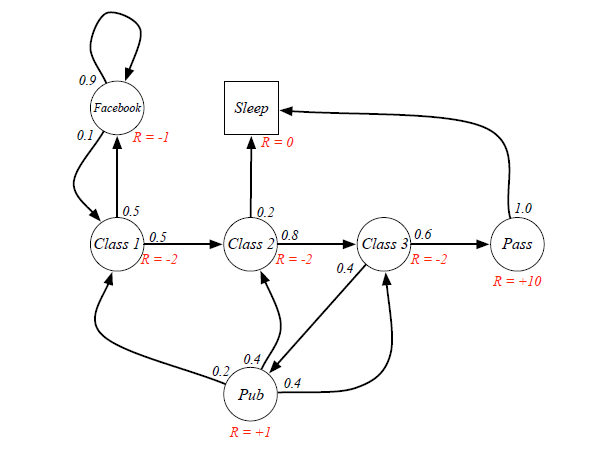
Senario: Class1->Class2->Class3->Pass->Sleep, and the agent is at state=Class1.
Case 1: when gamma=0, g=-2+(-2)*0+(-2)*0+10*0=-2
Case 2: when gamma=1, g=-2+(-2)*1+(-2)*1+10*1=4
Case 3: when gamma=0.8, g=-2+(-2)*0.8+(-2)*0.64+10*=-4-1.6+5.12=-0.48
From different γ, we know our agent can be exetremely short-sighted (far-sighted) only for immediate reward, or trying to seek balance between short and long term reward.
When an agent is in a certain state, the way to measure the total reward from this state over time is calculating expected Returns for all possible senarios. The function to calculate it is called Value Function:

Ex. If the agent is at Class3 state, it has 0.6 and 0.4 probabilities to transite to Pass and Pub respectively. Because there are loops inside the graph, it's difficult to directly derive expected return from value function. (Forget the red labeled value, they are result...)
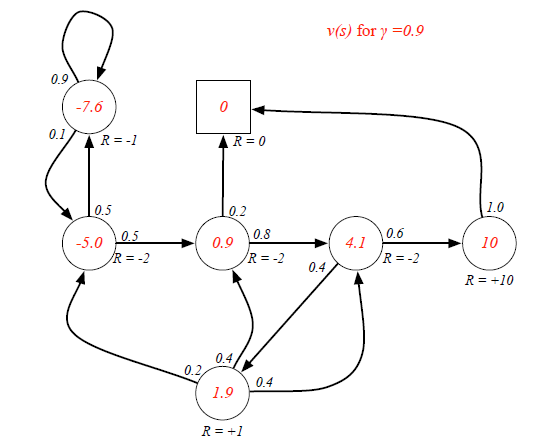
Bellman Equation helps to solve this complexity:
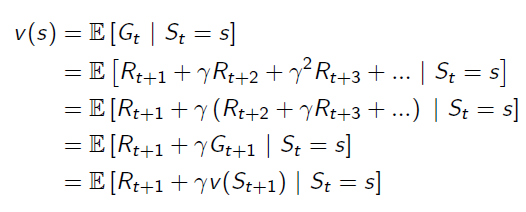
It breaks the value function into two parts: Immediate Reward and Future Reward: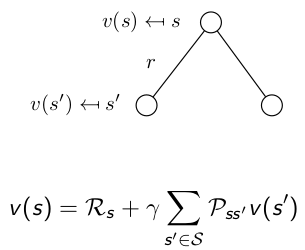 The future reward is discounted by γ, and it has probabilities on different states, so actually the future reward is an expectation.
Now we can use Bellman Equation to solve value function: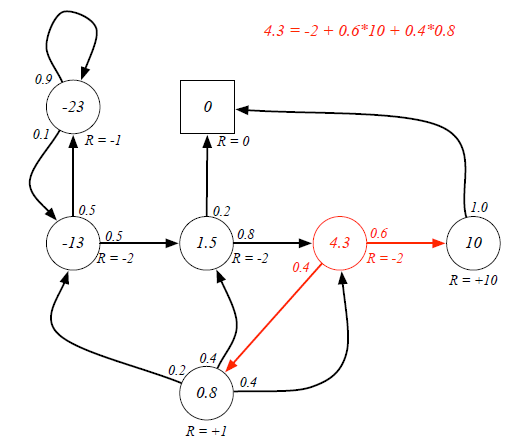
Markov Decision Process: MRP with Actions
Keywords: Action
Markov Decision Process adds more complexity onto MRP, it is defined by a tuple(S,A,P,R,γ), in which:
S is state space, and γ is discount factor, they are same as MRP.
A is a finite set of Actions, which is new. Then because of the existense of Action, Transition Matrix and Reward Function are all conditional on both State and Action.
P is State Transition Matrix: it is conditional on state and action at time t, which means different actions would result in different distribution of state at time t+1.

R is Reward Function conditional upon state and action: also, different actions lead to different reward, despite of the same state s.

A graph(from Wikipedia) helps understanding the role of actions:
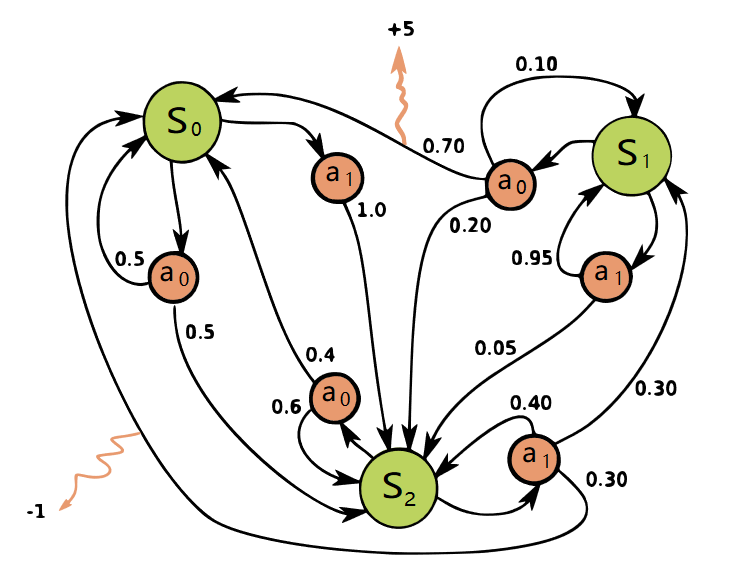
So by now, we have already had the model of the environment: all states, all possible actions and transition matrix conditional on state and actions.
Step-by-step from Markov Process to Markov Decision Process的更多相关文章
- Step by step Process of creating APD
Step by step Process of creating APD: Business Scenario: Here we are going to create an APD on top o ...
- Step by Step Process of Migrating non-CDBs and PDBs Using ASM for File Storage (Doc ID 1576755.1)
Step by Step Process of Migrating non-CDBs and PDBs Using ASM for File Storage (Doc ID 1576755.1) AP ...
- Tomcat Clustering - A Step By Step Guide --转载
Tomcat Clustering - A Step By Step Guide Apache Tomcat is a great performer on its own, but if you'r ...
- [ZZ] Understanding 3D rendering step by step with 3DMark11 - BeHardware >> Graphics cards
http://www.behardware.com/art/lire/845/ --> Understanding 3D rendering step by step with 3DMark11 ...
- e2e 自动化集成测试 架构 实例 WebStorm Node.js Mocha WebDriverIO Selenium Step by step (二) 图片验证码的识别
上一篇文章讲了“e2e 自动化集成测试 架构 京东 商品搜索 实例 WebStorm Node.js Mocha WebDriverIO Selenium Step by step 一 京东 商品搜索 ...
- Code Understanding Step by Step - We Need a Task
Code understanding is a task we are always doing, though we are not even aware that we're doing it ...
- enode框架step by step之saga的思想与实现
enode框架step by step之saga的思想与实现 enode框架系列step by step文章系列索引: 分享一个基于DDD以及事件驱动架构(EDA)的应用开发框架enode enode ...
- 课程五(Sequence Models),第一 周(Recurrent Neural Networks) —— 1.Programming assignments:Building a recurrent neural network - step by step
Building your Recurrent Neural Network - Step by Step Welcome to Course 5's first assignment! In thi ...
- 精通initramfs构建step by step
(一)hello world 一.initramfs是什么 在2.6版本的linux内核中,都包含一个压缩过的cpio格式 的打包文件.当内核启动时,会从这个打包文件中导出文件到内核的rootfs ...
随机推荐
- BZOJ 1179 (Tarjan缩点+DP)
题面 传送门 分析 由于一个点可以经过多次,显然每个环都会被走一遍. 考虑缩点,将每个强连通分量缩成一个点,点权为联通分量上的所有点之和 缩点后的图是一个有向无环图(DAG) 可拓扑排序,按照拓扑序进 ...
- js Array 数组方法扩展
//去重复 Array.prototype.unique = function() { this.sort(); var re=[this[0]]; for(var i ...
- python基础面试题:(1)
1.以下用C语言开发的Python解释器是( ) A:python是Java语言开发的Python解析器,B:PyPy是使用Python语言开发的Python解析,C:IronPython是.net平 ...
- weblogic+idea
1.首先是weblogic的安装,去官网下载,下载完成后,安装,然后还需要创建域,参考链接: https://www.cnblogs.com/xdp-gacl/p/4140683.html,创建域的h ...
- 基于双TMS320C6678+双XC6VSX315T的6U VPX高速数据处理平台
基于双TMS320C6678+双XC6VSX315T的6U VPX高速数据处理平台 一.板卡概述 板卡由我公司自主研发,基于VPX架构,主体芯片为两片 TI DSP TMS320C6678,两片V ...
- Taro -- 上传图片公用组件
Taro上传图片公用组件 子组件chooseImage //component/chooseImage/index.js import Taro, { Component } from '@taroj ...
- 输vim /etc/rc.d/init.d/mysqld 报错 …..localdomain.pid
在安装MySQL的过程中出现以下错误: 本人解决方法是: ps aux | grep mysqld 罗列出所有关于mysqld的进程,然后把关于mysqld的进程都kill了.
- 04Dropout
不加Dropout,训练数据的准确率高,基本上可以接近100%,但是,对于测试集来说,效果并不好: 加上Dropout,训练数据的准确率可能变低,但是,对于测试集来说,效果更好了,所以说Dropout ...
- [AHOI2008]紧急集合 / 聚会(LCA)
[AHOI2008]紧急集合 / 聚会 题目描述 欢乐岛上有个非常好玩的游戏,叫做"紧急集合".在岛上分散有N个等待点,有N-1条道路连接着它们,每一条道路都连接某两个等待点,且通 ...
- 线程数设置和CPU数的关系
一般说来,大家认为线程池的大小经验值应该这样设置:(其中N为CPU的个数) 如果是CPU密集型应用,则线程池大小设置为N+1 如果是IO密集型应用,则线程池大小设置为2N+1(因为io读数据或者缓存的 ...