
华视身份证读卡器获取uid号vue单文件组件版本
<template>
  <div id="app" ref="app">
    <object  ref="CertCtl" classid="clsid:F48AE9BC-809E-423c-81E8-FE27F1C1A981"
        id="CertCtl" name="CVR_IDCard" width="0" height="0" >
    </object>
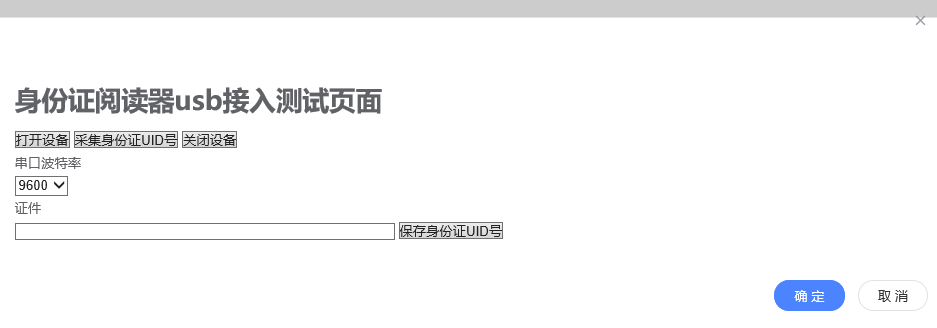
    <h1>身份证阅读器usb接入测试页面</h1>
    <button @click="connect">打开设备</button>
    <button @click="readCert">采集身份证UID号</button>
    <button @click="disconnect">关闭设备</button>
    <div id="box">
        <p>串口波特率</p>
            <select id="SelectBaudrate" ref="SelectBaudrate">
            <!-- <option value ="115200">115200</option> -->
            <option value ="9600">9600</option>
            </select>
    </div>
    <div id="box">
        <p>证件</p>
        <form id="formId" method="post" >
            <input type="text" id="certUID" size="49" style="width:400px;" ref="certUID">
            <button type="button"  id="sendMessage" @click="sendMessage">保存身份证UID号</button>
        </form>
    </div>
    <div id="box" style="display:none;">
        <p>结果</p>
        <textarea id="result" ref="result" rows="8" cols="47" style="width:400px;" readonly="readonly"></textarea>
    </div>

</div>
</template>

<script>
export default{
  name: 'UidCard',
  // el: '#app',
  // data() {
  //   return {}
  // },
  methods: {
    // 方法函数
    toJson(str) {
      var obj = JSON.parse(str)
        return obj
    },
    // 清空身份证uid框框
    clearForm() {
      // console.log()
      this.$refs.certUID.value = ''
    },
    connect() { // 连接设备
      console.log('我连接了')
      this.clearForm()// 清空uid框
      var CertCtl = this.$refs.CertCtl // 获取CertCtl控件
      try {
        var nBaudrate = this.$refs.SelectBaudrate.value
        var result = CertCtl.connectDevice(nBaudrate)
        this.$refs.result.value = result // textarea框的值
      } catch (e) {
        alert(e)
      }
    },
    readCert() {
      console.log('读身份证uid号')
      var CertCtl = this.$refs.CertCtl // 获取CertCtl控件
      var result = CertCtl.GetCardUid()// 获取控件方法
      this.$refs.result.value = result // textarea框的值
      var resultObj = this.toJson(result)
      // Console.log('.............resultObj',resultObj)
      if (resultObj.resultFlag == 0) {
        this.$refs.certUID.value = resultObj.cardUid
      }
      try {
      } catch (e) {
        alert(e)
      }
    },
    disconnect() {
      console.log('断开连接')
      this.clearForm()// 断开清空
      var CertCtl = this.$refs.CertCtl // 获取CertCtl控件
      try {
        var result = CertCtl.disconnect()
        this.$refs.result.value = result
      } catch (e) {
        alert(e)
      }
    },

    sendMessage() {
      console.log('保存身份证uid号')
      if (this.$refs.certUID.value !== '') {
        this.$emit('closeModule', this.$refs.certUID.value)
      }
    }
    // sendMessage() {
    //   // var certUidValue=this.$refs.certUID.value//身份证uid号
    //   console.log('....this.$refs.certUID.value', this.$refs.certUID.value)
    // }
  },
  mounted() {
    this.$nextTick(
      function() {
        console.log('............uid', this.$refs.certUID.value)
        console.log('获取CertCtl', this.$refs.CertCtl.classid)
      }
    )
  }

}
</script>
使用的时候,把单文件组件当做子组件在父组件引用,通过子组件将获取的值传给父组件
华视身份证读卡器获取uid号vue单文件组件版本的更多相关文章
- webpack入坑之旅(五)加载vue单文件组件
这是一系列文章,此系列所有的练习都存在了我的github仓库中vue-webpack,在本人有了新的理解与认识之后,会对文章有不定时的更正与更新.下面是目前完成的列表: webpack入坑之旅(一)不 ...
- Vue单文件组件
前面的话 本文将详细介绍Vue单文件组件 概述 在很多 Vue 项目中,使用 Vue.component 来定义全局组件,紧接着用 new Vue({ el: '#container '}) 在每个页 ...
- vue 单文件组件
在很多vue项目中,我们使用vue.component来定义全局组件,紧接着用new Vue({el:'#container'})在每个页面内指定一个容器元素 这种方式在很多中小规模的项目中运作的很好 ...
- webpack打包vue单文件组件
一.vue单文件组件 ①文件扩展名为 .vue 的 就是single-file components(单文件组件) ②参考文档:单文件组件 二.webpack加载第三方包 ①项目中,如果需要用到一些第 ...
- ts-loader如何与vue单文件组件衔接
.ts-loader是如何与vue单文件组件衔接作用的 https://github.com/microsoft/TypeScript-Vue-Starter https://www.npmjs.co ...
- 基于VSCode的vue单文件组件模板设置---一次设置,可爽终生
第一步: 第二步: 第三步: 打开vue.json文件后,如果是初次设置,应该如下图所示,绿色注释部分不用管,注意那两个白色大括号 第四步:在大括号内全部粘贴如下代码,保存即可完成vue模板的设置 & ...
- vue 单文件组件最佳实践
vue 单文件组件最佳实践 生命周期 template <template> <section> <h1>vue single file components te ...
- vue单文件组件的构建
在很多Vue项目中,我们使用 Vue.component 来定义全局组件,这种方式在很多中小规模的项目中运作的很好. 但当在更复杂的项目中,就有了很大的弊端. 我们就可以用文件扩展名 .vue的单文件 ...
- Vue单文件组件基础模板
背景 相信大家在使用Vue开发项目时,基本都是以单文件组件的形式开发组件的,这种方式好处多多: 1.代码集中,便于开发.管理和维护 2.可复用性高,直接将vue文件拷贝到新项目中 我暂时就想到这两点, ...
随机推荐
- div标准布局示例
<!DOCTYPE html> <html> <head> <meta charset="UTF-8"> <title> ...
- Future模式的简单实现
/** * 数据接口 */ public interface Data { public String getResult(); } /** * 最终需要使用的数据模型 */ public class ...
- python 数组元素个数
list=[1,2,3,{1,4,5,6,7}] print(len(list)) 输出4
- java解决高并发问题
对于我们开发的网站,如果网站的访问量非常大的话,那么我们就需要考虑相关的并发访问问题了.而并发问题是绝大部分的程序员头疼的问题, 但话又说回来了,既然逃避不掉,那我们就坦然面对吧~今天就让我们一起来研 ...
- 【leetcode】756. Pyramid Transition Matrix
题目如下: We are stacking blocks to form a pyramid. Each block has a color which is a one letter string, ...
- leetcode-第14周双周赛-1274-矩形内船只的数目
题目描述: 自己的提交: # """ # This is Sea's API interface. # You should not implement it, or s ...
- c# 6.0 语法特性
namespace _6._0新特性 { using static _6._0新特性.Statics.StaticClass; class Program { static void Main(str ...
- hdu 4336 Card Collector(状压dp/Min-Max反演)
传送门 解题思路 第一种方法是状压\(dp\),设\(f(S)\)为状态\(S\)到取完的期望步数,那么\(f(S)\)可以被自己转移到,还可以被\(f(S|(1<<i))\)转移到,\( ...
- oracle 批处理 bulk collect 带来的性能优势
create table -- drop table tmp_20190706_220000-- truncate table tmp_20190706_220000 create table tmp ...
- (转)深入剖析Java中的装箱和拆箱
转:https://www.cnblogs.com/dolphin0520/p/3780005.html 深入剖析Java中的装箱和拆箱 自动装箱和拆箱问题是Java中一个老生常谈的问题了,今天我们就 ...