
解决 UIAlterController 不居中问题
最后更新:2017-06-30
现象描述
新公司做的解决的第一个bug 就是 UIAlterController 不居中,莫名其妙的飞出屏幕之外
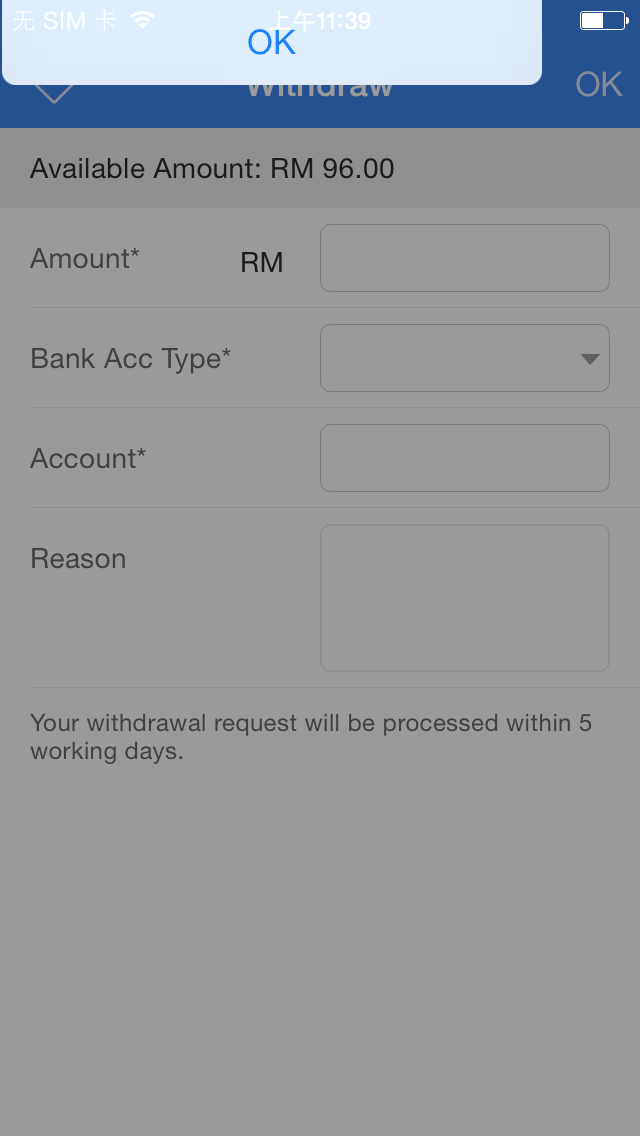
找了很久的答案,最终在苹果论坛看到了相关的描述
We have noticed this in an app when we attempt to present a view from the current "top-most" view. If a UIAlertController happens to be the top-most view we get this behavior. We have changed our code to simply ignore UIAlertControllers, but I'm posting this in case others hit the same issue (as I couldn't find anything).
我们注意到,当我们试图从“top-most”的view present 一个view 时候,当 UIAlertController 刚还是 ““top-most”” 的视图,就会出现这个情况
解决方案:
OC:
在 UIAlertControllers分类里面写
/*

 * UIAlertControllers (of alert type, and action sheet type on iPhones/iPods) get placed in crazy

 * locations when you present a view controller over them.  This attempts to restore their original placement.

 */

- (void)_my_fixupLayout

{

    if (self.preferredStyle == UIAlertControllerStyleAlert && self.view.window)

    {

        CGRect myRect = self.view.bounds;

        CGRect windowRect = [self.view convertRect:myRect toView:nil];

        if (!CGRectContainsRect(self.view.window.bounds, windowRect) || CGPointEqualToPoint(windowRect.origin, CGPointZero))

        {

            CGPoint center = self.view.window.center;

            CGPoint myCenter = [self.view.superview convertPoint:center fromView:nil];

            self.view.center = myCenter;

        }

    }

    else if (self.preferredStyle == UIAlertControllerStyleActionSheet && self.traitCollection.userInterfaceIdiom == UIUserInterfaceIdiomPhone && self.view.window)

    {

        CGRect myRect = self.view.bounds;

        CGRect windowRect = [self.view convertRect:myRect toView:nil];

        if (!CGRectContainsRect(self.view.window.bounds, windowRect) || CGPointEqualToPoint(windowRect.origin, CGPointZero))

        {

            UIScreen *screen = self.view.window.screen;

            CGFloat borderPadding = ((screen.nativeBounds.size.width / screen.nativeScale) - myRect.size.width) / 2.0f;

            CGRect myFrame = self.view.frame;

            CGRect superBounds = self.view.superview.bounds;

            myFrame.origin.x = CGRectGetMidX(superBounds) - myFrame.size.width / 2;

            myFrame.origin.y = superBounds.size.height - myFrame.size.height - borderPadding;

            self.view.frame = myFrame;

        }

    }

}

- (void)viewWillLayoutSubviews

{

    [super viewWillLayoutSubviews];

    [self _my_fixupLayout];

}
SWIFT
extension UIAlertController {

    open override func viewWillLayoutSubviews() {

        super.viewWillLayoutSubviews()

        fixupLayout()

    }

    private func fixupLayout() {

        if preferredStyle == .alert && view.window != nil {

            let myRect = view.bounds

            let windowRect = view.convert(myRect, to: nil)

            guard let window = view.window else {

                return

            }

            guard let superview = view.superview else {

                return

            }

            if !window.bounds.contains(windowRect) || windowRect.origin.equalTo(CGPoint.zero) {

                let myCenter = superview.convert(window.center, from: nil)

                view.center = myCenter

            }

        } else if preferredStyle == .actionSheet && self.traitCollection.userInterfaceIdiom == .phone && view.window != nil {

            let myRect = view.bounds

            let windowRect = view.convert(myRect, to: nil)

            guard let window = view.window else {

                return

            }

            guard let superview = view.superview else {

                return

            }

            if !(window.bounds.contains(windowRect)) || windowRect.origin.equalTo(CGPoint.zero) {

                let screen = window.screen

                let borderPadding = ((screen.nativeBounds.width / screen.nativeScale) - myRect.size.width) / 2.0

                var myFrame = view.frame

                let superBounds = superview.bounds

                myFrame.origin.x = superBounds.maxX - myFrame.width / 2

                myFrame.origin.y = superBounds.height - myFrame.height - borderPadding

                self.view.frame = myFrame

            }

        }

    }

}
参考
Apple Solution: http://openradar.appspot.com/19037589
解决 UIAlterController 不居中问题的更多相关文章
- 解决bootstrap模态框居中问题
完美解决办法: 在bootstrap.js或bootstrap.min.js文件中找到Modal.prototype.show方法. 在that.$element.addClass('in').att ...
- 温故而知新 css + html 超级牛逼的居中策略
该方法甚至可以解决img内容居中的问题 套路:最外层div宽度为居中内容所占的宽度(通常是1170px),并且使其居中(margin:auto) 里层的div宽度为全屏(通常是1920px;)再mar ...
- 单独一个img标签的居中显示
针对页面当中通过img插入图片的时候,要保证这个图片在页面内容当中居中,一般的做法是在外面套一个div,通过给div加入 {margin:0 auto;} 来控制图片的居中. 那么如果针对后台上传的图 ...
- Android权限禁止及友好提示用户开通必要权限
Android权限 Android安全架构规定:默认情况下,任何应用都没有权限执行对其他应用.操作系统或用户有不利影响的任何操作.这包括读写用户的私有数据(联系人,短信,相册,位置).读写其他应用的文 ...
- css的小知识3
1.补充 margin的margin:0 auto:会解决元素的居中,前提是给这个元素设置width 2.css的层叠问题 css有两个性质 1.继承性 2.层叠性 选择器的一种选择能力,谁的权重大 ...
- CSS的再深入2(更新中···)
在上一章中,我们又引出了一个知识点: margin的问题 margin:0 auto:(上下为0,左右自适应)会解决元素的居中问题(auto 自适应)前提是给这个元素设置width 同时,我们又要学习 ...
- 从零开始的全栈工程师——html篇1.6
浮动与伪类选择器 一.浮动(float) 1.标准文档流 标准文档流是一种默认的状态 浏览器的排版是根据元素的特征(块和行级) 从上往下 从左往右排版 这就是标准文档流 2.浮动(float)floa ...
- 浏览器CSS兼容
一.<important 在IE6及FF中的使用>.box1 {width:150px !important;} .box1 {width:250px;} !important是说这个设置 ...
- UICollectionView 图片横向滑动居中偏移量的解决
1.在使用UICollectionView 来显示横向滑动图片的时候,cell与cell之间有间隙,每次滑动后cell都会向左偏移,在使用过这两个方法才解决每次向左偏移的部分. 2.使用方法前不要开启 ...
随机推荐
- [转帖]解决K8S 安装只有 一直提示:kernel:unregister_netdevice: waiting for eth0 to become free. Usage count = 1 的方法
Centos7 终端报Message from syslogd :kernel:unregister_netdevice https://www.jianshu.com/p/96d7e2cd9e99 ...
- [19/06/09-星期日] CSS基础_示例
一.图片格式&Hack(尽量不要使用) IE6对图片png-24的透明效果不支持,IE6中背景会发灰,可以使用png-8来代替.但是使用png-8代替之后清晰度会有所下降. 使用js来解决该问 ...
- 时间处理插件moment.js
monment.js插件 处理时间:http://momentjs.cn/
- 分布式事务解决方案汇总:2PC、3PC、消息中间件、TCC、状态机+重试+幂等(转)
数据一致性问题非常多样,下面举一些常见例子.比如在更新数据的时候,先更新了数据库,后更新了缓存,一旦缓存更新失败,此时数据库和缓存数据会不一致.反过来,如果先更新缓存,再更新数据库,一旦缓存更新成功, ...
- python学习第五十四天hashlib模块的使用
hash算法 hash也做散列,也称为哈希,主要用于信息安全领域中加密算法,hash就是找一种数据内容和数据存放地址直接的映射关系. md5算法 md5讯息算法,广泛使用密码函数 md5算法的特点 1 ...
- 能够打开国内网络,比如百度微信,但是打不开外国网站,该怎么解决(主要是DNS的问题)
(1)公司设置局域网外网打不开解决方法一: 如果是代理服务器上网,是因为服务上没有映射好外网访问网页的!解决方法是在服务器上开一个端口映射软件! 如果是路由器上网,就是路由器上没有映射外网访问的端口, ...
- IDEA--错误:找不到或无法加载XXXXX--解决方法--创建javafx或其他项目出现的问题
今天一上午超厂长在学习javafx的时候,总是创建一个然后运行就会出现 出现错误:找不到或无法加载主类 找了二个小时,都说是jdk或者其他环境配置问题 按照那些改了也没用重新创建一个也提示出现错误:找 ...
- kafka复习(2)
一.简介 --------------------------------------- 1.kafka是一个分布式的.可分区的.可复制的消息系统.它提供了消息系统的功能,但是有自己独特的设计. 2. ...
- 【问题解决方案】CentOS7替换yum的问题:使用yum makecache出现File contains no section headers
参考链接 CentOS7替换yum的问题:使用yum时出现File contains no section headers centos安装网络repo源及错误说明 一.centos替换yum的步骤 ...
- There are multiple modules with names that only differ in casing. This can lead to unexpected behavior when compiling on a filesystem with other case-semantic.
There are multiple modules with names that only differ in casing.This can lead to unexpected behavio ...