
Uboot命令U_BOOT_CMD分析
其中U_BOOT_CMD命令格式如下:
U_BOOT_CMD(name,maxargs,repeatable,command,"usage","help")
各个参数的意义如下:
- name:命令名,非字符串,但在U_BOOT_CMD中用“#”符号转化为字符串
- maxargs:命令的最大参数个数
- repeatable:是否自动重复(按Enter键是否会重复执行)
- command:该命令对应的响应函数指针
- usage:简短的使用说明(字符串)
- help:较详细的使用说明(字符串)
U_BOOT_CMD宏在include/command.h中定义:
- #define U_BOOT_CMD(name,maxargs,rep,cmd,usage,help) \
- cmd_tbl_t __u_boot_cmd_##name Struct_Section = {#name, maxargs, rep, cmd, usage, help}
“##”与“#”都是预编译操作符,“##”有字符串连接的功能,“#”表示后面紧接着的是一个字符串。
其中Struct_Section在include/command.h中定义如下:
#define Struct_Section __attribute__ ((unused,section (".u_boot_cmd")))凡是带有attribute ((unused,section (“.u_boot_cmd”))属性声明的变量都将被存放在”.u_boot_cmd”段中,并且即使该变量没有在代码中显式的使用编译器也不产生警告信息。
在u-Boot连接脚本 u-boot.lds中定义了”.u_boot_cmd”段:
- . = .;
- __u_boot_cmd_start = .; /*将 __u_boot_cmd_start指定为当前地址 */
- .u_boot_cmd : { *(.u_boot_cmd) }
- __u_boot_cmd_end = .; /* 将__u_boot_cmd_end指定为当前地址 */
这表明带有“.u_boot_cmd”声明的函数或变量将存储在“u_boot_cmd”段。
这样只要将u-boot所有命令对应的cmd_tbl_t变量加上“.u_boot_cmd”声明,编译器就会自动将其放在“u_boot_cmd”段,查找cmd_tbl_t变量时只要在 __u_boot_cmd_start 与 __u_boot_cmd_end 之间查找就可以了。
cmd_tbl_t在include/command.h中定义如下:
- struct cmd_tbl_s {
- char *name; /* Command Name */
- int maxargs; /* maximum number of arguments */
- int repeatable; /* autorepeat allowed? */
- /* Implementation function */
- int (*cmd)(struct cmd_tbl_s *, int, int, char * const []);
- char *usage; /* Usage message (short) */
- #ifdef CONFIG_SYS_LONGHELP
- char *help; /* Help message (long) */
- #endif
- #ifdef CONFIG_AUTO_COMPLETE
- /* do auto completion on the arguments */
- int (*complete)(int argc, char * const argv[], char last_char, int maxv, char *cmdv[]);
- #endif
- };
- typedef struct cmd_tbl_s cmd_tbl_t;
一个cmd_tbl_t结构体变量包含了调用一条命令的所需要的信息。
以“boot”命令的定义经过宏展开后如下:
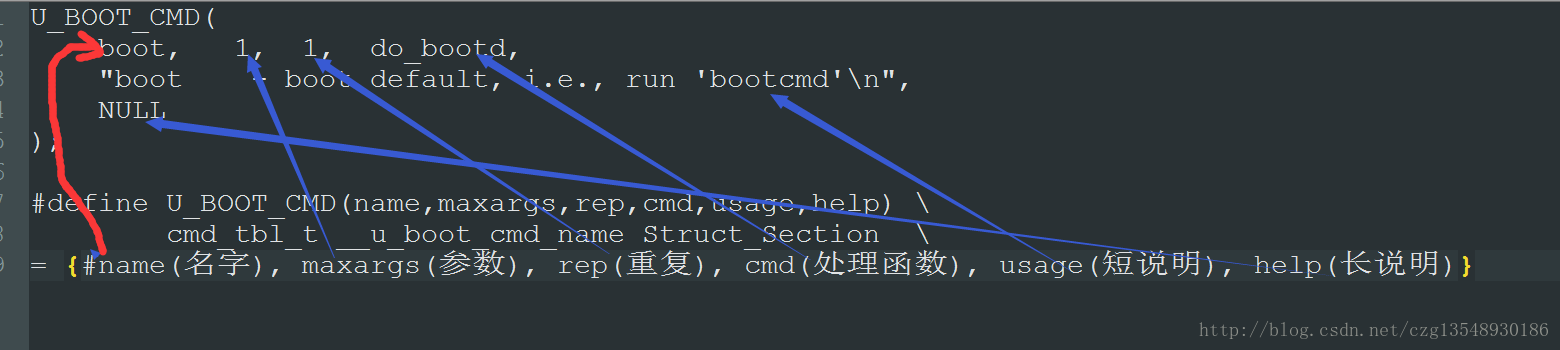
cmd_tbl_t __u_boot_cmd_boot __attribute__ ((unused,section (".u_boot_cmd"))) = {boot, 1, 1, do_bootd, "boot - boot default, i.e., run 'bootcmd'\n", " NULL"}- int do_bootd (cmd_tbl_t *cmdtp, int flag, int argc, char *argv[])
- {
- int rcode = 0;
- if (run_command(getenv("bootcmd"), flag) < 0)
- rcode = 1;
- return rcode;
- }
在2013-10-rc3的最新u-boot版本中,对此有改动,我们先看定义(include/command.h)
#define U_BOOT_CMD_MKENT_COMPLETE(_name, _maxargs, _rep, _cmd,     _usage, _help, _comp)     { #_name, _maxargs, _rep, _cmd, _usage,     _CMD_HELP(_help) _CMD_COMPLETE(_comp) }


#define U_BOOT_CMD_COMPLETE(_name, _maxargs, _rep, _cmd, _usage, _help, _comp)     ll_entry_declare(cmd_tbl_t, _name, cmd) =     U_BOOT_CMD_MKENT_COMPLETE(_name, _maxargs, _rep, _cmd,     _usage, _help, _comp);


#define U_BOOT_CMD(_name, _maxargs, _rep, _cmd, _usage, _help)     U_BOOT_CMD_COMPLETE(_name, _maxargs, _rep, _cmd, _usage, _help, NULL)
#define ll_entry_declare(_type, _name, _list) _type _u_boot_list_2_##_list##_2_##_name __aligned(4) __attribute__((unused, section(".u_boot_list_2_"#_list"_2_"#_name)))看上去挺复杂的,其实就是将cmd放在了u_boot_list这类开头的section里,所以我们只需在u-boot.lds里添加:
. = ALIGN(4);

.u_boot_list : {

 KEEP(*(SORT(.u_boot_list*)));

}
run_command 命令分析:
u-boot启动第二阶段最后跳到main_loop函数中循环
- s = getenv ("bootcmd");
- if (bootdelay >= 0 && s && !abortboot (bootdelay)) {
- ......
- run_command (s, 0);
- ......
- }
从main_loop中我们知道,如果bootdelay时间内未按下按键则启动Linux内核,按下按键则进入uboot命令行等待用户输入命令。
用户输入命令则调取run_command函数,在该函数中有下面几个比较重要的点:
1. 从注释我们很容易知道这段代码是在对命令进行分离,并且u-boot支持’;’分离命令。
- /*
- * Find separator, or string end
- * Allow simple escape of ';' by writing "\;"
- */
- for (inquotes = 0, sep = str; *sep; sep++) {
- if ((*sep=='\'') &&
- (*(sep-1) != '\\'))
- inquotes=!inquotes;
- if (!inquotes &&
- (*sep == ';') && /* separator */
- ( sep != str) && /* past string start */
- (*(sep-1) != '\\')) /* and NOT escaped */
- break;
- }
2. 分离参数
- /* Extract arguments */
- if ((argc = parse_line (finaltoken, argv)) == 0) {
- rc = -1; /* no command at all */
- continue;
- }
3. 用第一个参数argv[0]在命令列表中寻找对应的命令,并返回一个cmd_tbl_t类型的实例。我们可以猜到这个结构体应该保函了有关命令的一系列内容。
- /* Look up command in command table */
- if ((cmdtp = find_cmd(argv[0])) == NULL) {
- printf ("Unknown command '%s' - try 'help'\n", argv[0]);
- rc = -1; /* give up after bad command */
- continue;
- }
在common/command.c 中查看find_cmd函数
- /*__u_boot_cmd_start与__u_boot_cmd_end间查找命令,并返回cmdtp->name命令的cmd_tbl_t结构。*/
- cmd_tbl_t *cmdtp;
- cmd_tbl_t *cmdtp_temp = &__u_boot_cmd_start; /*Init value */
- const char *p;
- int len;
- int n_found = 0;
- /*
- * Some commands allow length modifiers (like "cp.b");
- * compare command name only until first dot.
- */
- len = ((p = strchr(cmd, '.')) == NULL) ? strlen (cmd) : (p - cmd);
- for (cmdtp = &__u_boot_cmd_start;
- cmdtp != &__u_boot_cmd_end;
- cmdtp++) {
- if (strncmp (cmd, cmdtp->name, len) == 0) {
- if (len == strlen (cmdtp->name))
- return cmdtp; /* full match */
- cmdtp_temp = cmdtp; /* abbreviated command ? */
- n_found++;
- }
- }
五、总结命令执行过程
① 在u-boot控制台中输入“boot”命令执行时,u-boot控制台接收输入的字符串“boot”,传递给run_command函数。
② run_command函数调用common/command.c中实现的find_cmd函数在__u_boot_cmd_start与__u_boot_cmd_end间查找命令,并返回boot命令的cmd_tbl_t结构。
③ 然后run_command函数使用返回的cmd_tbl_t结构中的函数指针调用boot命令的响应函数do_bootd,从而完成了命令的执行。
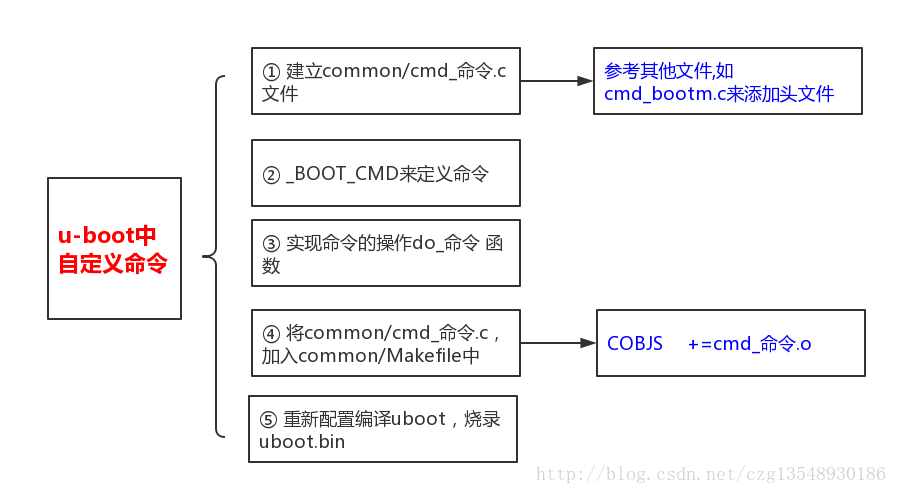
六、自制u-boot命令
__attribute__这个关键词是GNU编译器中的编译属性,ARM编译器也支持这个用法。__attribute__主要用于改变所声明或定义的函数或 数据的特性,它有很多子项,用于改变作用对象的特性。比如对函数,noline将禁止进行内联扩展、noreturn表示没有返回值、pure表明函数除 返回值外,不会通过其它(如全局变量、指针)对函数外部产生任何影响。当然,__attribute__肯定有很多的用法,今天就用到了section部分,所以就只针对这个做一些记录。
提到section,就得说RO
RI ZI了,在ARM编译器编译之后,代码被划分为不同的段,RO Section(ReadOnly)中存放代码段和常量,RW
Section(ReadWrite)中存放可读写静态变量和全局变量,ZI Section(ZeroInit)是存放在RW段中初始化为0的变量。
于是本文的大体意思就清晰了,__attribute__((section("section_name"))),其作用是将作用的函数或数据放入指定名为"section_name"对应的段中。
MDK给出的帮助文档如下,他将__attribute__的用法归类到编译器特性里,以变量和函数的两种用法做区分。
1.编译时为变量指定段
- __attribute__((section("name")))
- RealView Compilation Tools for µVision Compiler Reference Guide Version 4.0
- Home > Compiler-specific Features > Variable attributes > __attribute__((section("name")))
- 4.5.6. __attribute__((section("name")))
- Normally, the ARM compiler places the objects it generates in sections like data and bss. However, you might require additional data sections or you might want a variable to appear in a special section, for example, to map to special hardware. The section attribute specifies that a variable must be placed in a particular data section. If you use the section attribute, read-only variables are placed in RO data sections, read-write variables are placed in RW data sections unless you use the zero_init attribute. In this case, the variable is placed in a ZI section.
- Note
- This variable attribute is a GNU compiler extension supported by the ARM compiler.
- Example
- /* in RO section */
- const int descriptor[3] __attribute__ ((section ("descr"))) = { 1,2,3 };
- /* in RW section */
- long long rw[10] __attribute__ ((section ("RW")));
- /* in ZI section *
- long long altstack[10] __attribute__ ((section ("STACK"), zero_init));/
2.编译时为函数指定段
- __attribute__((section("name")))
- RealView Compilation Tools for µVision Compiler Reference Guide Version 4.0
- Home > Compiler-specific Features > Function attributes > __attribute__((section("name")))
- 4.3.13. __attribute__((section("name")))
- The section function attribute enables you to place code in different sections of the image.
- Note
- This function attribute is a GNU compiler extension that is supported by the ARM compiler.
- Example
- In the following example, Function_Attributes_section_0 is placed into the RO section new_section rather than .text.
- void Function_Attributes_section_0 (void)
- __attribute__ ((section ("new_section")));
- void Function_Attributes_section_0 (void)
- {
- static int aStatic =0;
- aStatic++;
- }
- In the following example, section function attribute overrides the #pragma arm section setting.
- #pragma arm section code="foo"
- int f2()
- {
- return 1;
- } // into the 'foo' area
- __attribute__ ((section ("bar"))) int f3()
- {
- return 1;
- } // into the 'bar' area
- int f4()
- {
- return 1;
- } // into the 'foo' area
- #pragma arm section
Uboot命令U_BOOT_CMD分析的更多相关文章
- Uboot命令U_BOOT_CMD
转载:http://blog.csdn.net/shengzhadon/article/details/52766263 U_BOOT_CMD是一个宏定义,具体功能是定义一个struct cmd_tb ...
- 多版本uboot命令行分析
1.1.6 经典版本: 1.uboot第二阶段第一个函数void start_armboot (void),一路gd参数设置.设备初始化.控制台初始化.端口初始化,最后到main_loop ()命令行 ...
- uboot命令分析+实现【转】
转自:http://xouou.iteye.com/blog/2150061 先贴一个重要结构,位于uboot/include/command.h,这个结构代表每个uboot命令 struct cmd ...
- u-boot源码分析之C语言段
题外话: 最近一直在学习u-boot的源代码,从代码量到代码风格,都让我认识到什么才是真正的程序.以往我所学到的C语言知识和u-boot的源代码相比,实在不值一提.说到底,机器都是0和1控制的.感觉这 ...
- U-Boot GOT表分析和u-boot.lds解读
转自:http://blog.sina.com.cn/s/blog_70dd16910100zab6.html u-boot-2010.09/arch/powerpc/cpu/mpc86xx/star ...
- (转载)U-boot启动完全分析
1.1 U-Boot工作过程 U-Boot启动内核的过程可以分为两个阶段,两个阶段的功能如下: (1)第一阶段的功能 Ø 硬件设备初始化 Ø 加载U-Boot第二阶段代码到RAM空间 Ø 设置好栈 Ø ...
- uboot主Makefile分析(t配置和编译过程详解)
1.编译uboot前需要三次make make distcleanmake x210_sd_configmake -j4 make distclean为清楚dist文件. make x210_sd_c ...
- u-boot链接脚本分析
eclipse 64位下载地址:http://www.eclipse.org/downloads/download.php?file=/technology/epp/downloads/release ...
- u-boot启动流程分析(2)_板级(board)部分
转自:http://www.wowotech.net/u-boot/boot_flow_2.html 目录: 1. 前言 2. Generic Board 3. _main 4. global dat ...
随机推荐
- 170816-关于Java基础的习题
1. switch 括号里的可以是 int .char. byte.short.String,还有枚举类型,应用举例 不可以是long.double 2. 调用ma()方法之后,ma()方法将错误类型 ...
- php正则匹配汉字提取其它信息剔除和验证邮箱
正则匹配汉字提取其它信息剔除demo <?php //提取字符串中的汉字其余信息剔除 $str='te,st 测 .试,.,.?!::·…~&@#,.?!:;.……-&@#“” ...
- MVP 实战
那么我们下面就要将这个类中的代码改写为 MVP 的写法,回顾上面提及的 MVP 架构的思想,它是将 View 层与 Model 层彻底隔离,意味着 View 和 Model 都不再持对方的引用,它们通 ...
- RabbitMQ + Springboot +“Hello Word”
https://www.rabbitmq.com/getstarted.html 官网文档 我们将呼叫我们的消息发布者(发送者)发送和我们的消息消费者(接收者) Recv.发布者将连接到RabbitM ...
- 查看在linux中下载的图片
1.安装 yum install lrzsz -y 2.找到文件所在的位置选中之后 3.点击那个蓝色的框框里面有一个 用ZMODEM下载 4.选择要保存的位置就可以查看了
- HashSet 源码分析
HashSet 1)HashSet 是基于 HashMap 的 Set 接口实现,元素的迭代是无序的,可以使用 null 元素. 创建实例 /** * HashSet基于HashMap实现 */ pr ...
- AtomicIntegerArray 源码分析
AtomicIntegerArray AtomicIntegerArray 能解决什么问题?什么时候使用 AtomicIntegerArray? 可以用原子方式更新其元素的 int 数组 如何使用 A ...
- 【SVN】 一次SVN 修复笔记
同事乱提交了一个版本之后,SVN上最新版本出现了问题. 原本按照网上其他人的说法,可以手动到服务器端干掉最新版的存档,并修改版本记录到前一个版本号即可,但是这应该是个坑. 掉进这个坑后,需要解决,又不 ...
- spring自动注入的三种方式
所谓spring自动注入,是指容器中的一个组件中需要用到另一个组件(例如聚合关系)时,依靠spring容器创建对象,而不是手动创建,主要有三种方式: 1. @Autowired注解——由spring提 ...
- 使用spring配置类代替xml配置文件注册bean类
spring配置类,即在类上加@Configuration注解,使用这种配置类来注册bean,效果与xml文件是完全一样的,只是创建springIOC容器的方式不同: //通过xml文件创建sprin ...