
springboot+thymeleaf打war包在外部tomcat运行
工程目录
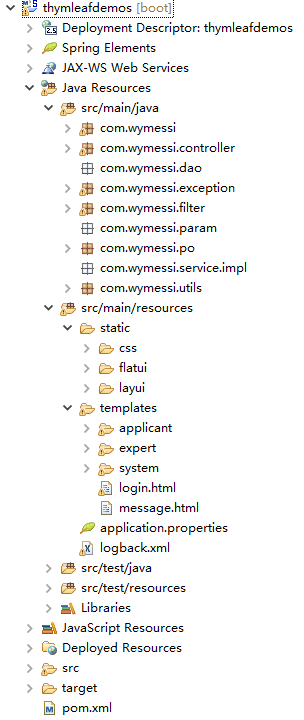
pom文件注意点
<packaging>war</packaging>
<dependency>

          <groupId>org.springframework.boot</groupId>

          <artifactId>spring-boot-starter-tomcat</artifactId>

          <scope>provided</scope>

        </dependency>
<build>

        <finalName>prs</finalName>

        <plugins>

          <plugin>

            <groupId>org.apache.maven.plugins</groupId>

            <artifactId>maven-compiler-plugin</artifactId>

          </plugin>

        </plugins>

    </build>
配置文件application.properties
server.port=

server.session.timeout=

server.context-path=/prs

#thymelea模板配置

spring.thymeleaf.prefix=classpath:/templates/

spring.thymeleaf.suffix=.html

spring.thymeleaf.mode=HTML5

spring.thymeleaf.encoding=UTF-

spring.thymeleaf.content-type=text/html

spring.thymeleaf.cache=false

#spring.resources.chain.strategy.content.enabled=true

#spring.resources.chain.strategy.content.paths=/**

# 上传文件大小配置

spring.http.multipart.maxFileSize=10MB

spring.http.multipart.maxRequestSize=10MB

#spring.mvc.async.request-timeout=600000

#spring.http.multipart.max-request-size=200MB

#spring.aop.auto=true

#spring.aop.proxy-target-class=false

#server.tomcat.uri-encoding=UTF-8

#server.tomcat.max-threads=100

logging.config=classpath:logback.xml

#mybatis.configLocation=classpath:mybatis/mybatis-config.xml

#mybatis.mapperLocations=classpath:mybatis/mapper/*.xml

#spring.datasource.driverClassName = com.mysql.jdbc.Driver

#com.microsoft.sqlserver.jdbc.SQLServerDriver

#spring.datasource.url = jdbc:mysql://127.0.0.1:3306/test

#jdbc:sqlserver://104.15.202.101:1105;DatabaseName=tt

#spring.datasource.username = root

#spring.datasource.password = 123456

#spring.datasource.initialSize=2

#spring.datasource.minIdle=0

#spring.datasource.maxActive=5

#spring.datasource.maxWait=60000

#spring.datasource.validationQuery=select 1

#spring.datasource.timeBetweenEvictionRunsMillis=60000

#spring.datasource.testWhileIdle=true

#spring.datasource.testOnBorrow=true

#spring.datasource.testOnReturn=false

#spring.datasource.poolPreparedStatements=true

#spring.datasource.maxPoolPreparedStatementPerConnectionSize=20
server.context-path=/prs这里的路径名最好和上面pom里的finalName最好是一致的,因为当我们把打包好的war包放到tomcat的webapp里时,访问路径前缀就是这个finalName
启动类
@ComponentScan(basePackages= {"com.wymessi"})//扫描组件

@SpringBootApplication

@EnableAspectJAutoProxy

@EnableTransactionManagement(proxyTargetClass = true)

@EnableAutoConfiguration(exclude = { DataSourceAutoConfiguration.class})

public class SpringbootApplication extends SpringBootServletInitializer {

    public static void main(String[] args) {

        SpringApplication.run(SpringbootApplication.class, args);

    }

    @Override

    protected SpringApplicationBuilder configure(SpringApplicationBuilder builder) {

        // 注意这里要指向原先用main方法执行的Application启动类

        return builder.sources(SpringbootApplication.class);

    }

//    @Bean

//    public HttpMessageConverters fastJsonHttpMessageConverters() {

//        FastJsonHttpMessageConverter fastConverter = new FastJsonHttpMessageConverter();

//        FastJsonConfig fastJsonConfig = new FastJsonConfig();

//        // fastJsonConfig.setSerializerFeatures(SerializerFeature.BrowserCompatible);

//        // fastJsonConfig.setSerializerFeatures(SerializerFeature.BrowserSecure);

//        fastJsonConfig.setSerializerFeatures(SerializerFeature.DisableCircularReferenceDetect);

//        // fastJsonConfig.setSerializerFeatures(SerializerFeature.WriteMapNullValue);

//        SerializeConfig config = new SerializeConfig();

//        config.put(Date.class, new SimpleDateFormatSerializer("yyyy-MM-dd HH:mm:ss"));

//        fastJsonConfig.setSerializeConfig(config);

//        fastConverter.setFastJsonConfig(fastJsonConfig);

//        HttpMessageConverter<?> converter = fastConverter;

//        return new HttpMessageConverters(converter);

//    }

}
和打jar包的区别是继承了SpringBootServletInitializer这个类,然后重写了configure方法。
运行程序
eclipse里运行
右击项目名,run as - spring boot app。
浏览器里输入http://127.0.0.1:8013/prs
打包成war包在tomcat里运行
右击项目名,run as - maven - build,看到success就代表打包成功了。

把打包好的prs放到tomcat的webapp里,然后启动tomcat。
这里要注意,tomcat的访问端口要设置成和配置文件里的一样,不然用配置文件里的port是访问不到的。
打包的名称要和server.context-path=/prs的名称一致,不然也是访问不到的,这个上面已经说过了。
浏览器里输入http://127.0.0.1:8013/prs
springboot+thymeleaf打war包在外部tomcat运行的更多相关文章
- SpringBoot之打成war包部署到Tomcat
正常情况下SpringBoot项目是以jar包的形式,正常情况下SpringBoot项目是以jar包的形式,并且SpringBoot是内嵌Tomcat服务器,所以每次重新启动都是用的新的Tomcat服 ...
- springBoot项目打war包部署到tomcat上
1 首先得在本地跑通. 2 处理启动类Application @SpringBootApplication public class Application extends SpringBootSer ...
- IDEA下spring boot项目打包war包部署外部tomcat问题
第一步,修改配置pom.xml文件 <packaging>war</packaging> <dependency> <groupId>org.sprin ...
- SpringBoot webmvc项目导出war包并在外部tomcat运行产生的诸多问题以及解决方案
背景: 有需求要将原来的Spring(3.2.6) + Springmvc + Hibernate项目重构为Springboot(1.5.2)项目 描述: 记录重构过程,以及期间遇到的种种问题和对应的 ...
- Springboot项目打成jar包运行 和 打成war包 外部tomcat运行
Jar打包方式运行 类型为jar时 <packaging>jar</packaging> 1.使用命令mvn clean package 打包 2.使用java –jar 包 ...
- 基于springboot多模块项目使用maven命令打成war包放到服务器上运行的问题
首先,大家看到这个问题,可能并不陌生,而且脑子里第一映像就是使用mava中的clear package 或者 clear install进行打包,然后在项目中的target文件夹下面找到xxx.war ...
- SpringBoot打war包并部署到外部tomcat运行(jar工程改造为正war工程)
如果你的SpringBoot工程是一个jar工程,而想把它改造成war工程,并打成war包放到外部的tomcat下运行,该怎么修改配置呢?这里以Maven工程为例进行介绍. (1)将pom.xml中的 ...
- SpringBoot 项目打war包 tomcat部署
今天看了一下springboot的项目,个人习惯是接触新的语言或框架,首先要做的就是程序员届最常用的“Hello World”,然后进行项目部署,然今天部署却发现一直都是404,查看tomcat的we ...
- Springboot项目打成war包,部署到tomcat上,正常启动访问报错404
前言: 项目介绍,此项目是一个Maven多模块项目,模块项目:all(父模块):util (公用的工具类):dao(实体类.业务类.mapper.mapper.xml):business(业务serv ...
随机推荐
- jmeter 请求发送加密参数
最近在做http加密接口,请求头的uid参数及body的请求json参数都经过加密再发送请求,加密方式为:ase256.所以,jmeter发送请求前也需要对uid及json参数进行加密.我这里是让开发 ...
- luogu P1095 守望者的逃离
题目描述 恶魔猎手尤迪安野心勃勃,他背叛了暗夜精灵,率领深藏在海底的娜迦族企图叛变.守望者在与尤迪安的交锋中遭遇了围杀,被困在一个荒芜的大岛上.为了杀死守望者,尤迪安开始对这个荒岛施咒,这座岛很快就会 ...
- HDU 2874 Connections between cities(LCA+并查集)
[题目链接] http://acm.hdu.edu.cn/showproblem.php?pid=2874 [题目大意] 有n个村庄,m条路,不存在环,有q个询问,问两个村庄是否可达, 如果可达则输出 ...
- 【AC自动机】【动态规划】hdu2296 Ring
题解:http://www.cnblogs.com/swm8023/archive/2012/08/08/2627535.html 要输出路径,价值最大优先,价值相同的取长度较小者,仍相同取字典序较小 ...
- 【块状树】【LCA】bzoj1787 [Ahoi2008]Meet 紧急集合
分块LCA什么的,意外地快呢…… 就是对询问的3个点两两求LCA,若其中两组LCA相等,则答案为第三者. 然后用深度减一减什么的就求出距离了. #include<cstdio> #incl ...
- 动态OSPF配置路由表
动态ospf设置路由表 以Rourer1为例子 (1)首先设置路由器端口ip Router(config)#inter f0/0 Router(config-if)#ip add 192.168.1. ...
- JavaScript跳转到页面某个锚点#
JavaScript跳转到页面某个锚点: scroll(0, document.getElementById('锚点ID').offsetTop);
- spring融合activitymq-all启动报错的解决办法
报错信息: nested exception is java.lang.NoSuchMethodError: org.springframework.core.annotation.Annotated ...
- 精通JavaScript攻击框架:AttackAPI
多年来客户端安全一直未引起人们的足够重视,但是如今情况发生了急剧转变,客户端安全已经成为信息安全领域的焦点之一.Web恶意软件.AJAX蠕虫.浏览历史暴破.登录检测.傀儡控制技术网络端口扫描以及浏览器 ...
- RenderMonkey基本使用方法【转】
RenderMonkey基本使用方法 楔子: 差不多从年中开始由于工作需要,开始研究Direct3D,这是继大二开始自学DX开始,睽违了6年后再重新学习DX.虽然时间很久了,但是幸亏还是有点基础,所以 ...