
分享一个PC端六格密码输入框写法
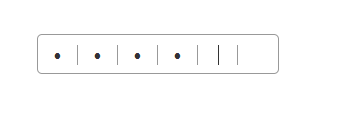
如图。我们一般做商城类的项目不免会用到支付密码输入框,我研究了下并决定发上来,也当作是自己成长路上的一点小小的记录。本次介绍的是基于vue的项目
html:
<template>

  <div class='am_payPwd' :id="`ids_${id}`">

    <input type="password"

      maxlength="1"

      @input="changeInput"

      @click="changePwd"

      v-model="pwdList[i]"

      @keyup="keyUp($event)"

      @keydown="oldPwdList = pwdList.length"

      class="shortInput"

      v-for="(v, i) in 6" :key="i">

  </div>

</template>
css:
.am_payPwd {

  display: inline-block;

  width: 242px;

  height: 40px;

  border: 1px solid #999;

  border-radius: 5px;

  padding: 10px 0;

  position: relative;

  margin-left: 1px;

  .shortInput {

    text-align: center;

    font-size: 20px;

    float: left;

    width: 40px;

    height: 20px;

    color: #333;

    outline: #ff0067;

    &:not(:last-child) {

      border-right: 1px solid #999;

    }

  }

}
js:
  data () {

    return {

      pwdList: [],

      oldPwdList: [],

      isDelete: false,

      ipt: ''

    }

  },

  props: {

    id: String, // 当一个页面有多个密码输入框时,用id来区分

    default: '1'

  },

  mounted () {

    this.ipt = document.querySelectorAll(`#ids_${this.id} .shortInput`)

  },

  methods: {

    keyUp (ev) {

      let index = this.pwdList.length

      if (!index) return

      if (ev.keyCode === 8) {

        this.isDelete = true

        if (this.oldPwdList === this.pwdList.length) {

          if (index === this.pwdList.length) {

            this.pwdList.pop()

          }

          index--

        } else {

          index > 0 && index--

        }

        this.ipt[index].focus()

      } else if (this.isDelete && index === this.pwdList.length && /^\d$/.test(ev.key)) {

        this.isDelete = false

        this.pwdList.pop()

        this.pwdList.push(ev.key)

        this.ipt[this.pwdList.length] && this.ipt[this.pwdList.length].focus()

      }

      this.$emit('getPwd', this.pwdList.join(''))

    },

    changePwd () {

      let index = this.pwdList.length

      index === 6 && index--

      this.ipt[index].focus()

    },

    changeInput () {

      let index = this.pwdList.length

      let val = this.pwdList[index - 1]

     if (!/[0-9]/.test(val)) {

        this.pwdList.pop()

        return

      }

      if (!val) {

        this.pwdList.pop()

        index--

        if (index > 0) this.ipt[index - 1].focus()

      } else {

        if (index <) this.ipt[index].focus()

      }

    }

  }
如有考虑不周的,请指出
分享一个PC端六格密码输入框写法的更多相关文章
- 怎样写一个PC端使用的操盘手软件(用来买卖股票,查看报表,行情)
我们想写一个操盘手软件,对于操盘而言,首先是快,然后是资料尽可能丰富,最好能看到行情,报表什么的.只是windows上写软件看似基础,实际上都不怎么好弄,用C++开发确实可以实现所有功能,估计光研发费 ...
- Supalle-Admin-Layout,一个PC端和手机端都合适用的后台页面模板
Supalle-Admin-Layout主要使用有Vue.Element-UI.layui-icon,Ajax实现采用Fetch(是有这个打算,不过目前是jQuery.). 源码地址:https:// ...
- 分享一个移动端rem布局的适配mixin
/*================================================================ 以下为基于ip5 宽度320做的适配,标准html{font-si ...
- PC端页面适应不同的分辨率的方法 (转载)
原文地址:https://blog.csdn.net/fengzhen8023/article/details/81281117 上周完成一个PC端的项目,对于我这样的小白来说,这个项目里面最大的问题 ...
- JavaScript判断移动端及pc端访问不同的网站
JavaScript判断移动端及pc端访问不同的网站 现在很多网站都是分为两个版本,一个pc端的一个移动端的(响应式除外),针对这两个版本,就需要对访问的设备进行判断,如果是pc,就直接访问pc网站, ...
- 自动识别移动端还是PC端
平时在开发中经常会遇到这样的需求,除了开发PC端之外,还会同时开发移动端.对于简单的页面,可以使用bootstrap之类的框架实现响应式页面,可是当页面很复杂的时候,就需要开发一个移动端页面,一个PC ...
- CoCos2dx开发:PC端调试运行正常但打包apk文件后在手机上点击闪退
记:今天调试时出现的一个PC端调试运行正常,但打包apk文件后在手机上点击闪退的问题. 可能在不同的情况条件下,会有不同的原因导致apk安装后闪退问题.拿android studio等软件来说,开发安 ...
- 自适应PC端网页制作使用REM
做一个PC端的网页,设计图是1920X1080的. 要在常见屏上显示正常(比例正确可) 1280X720 1366X768 1440X900 1920X1080 使用了几种办法 1.内容在一屏内显示的 ...
- Unity输出PC端(Windows) 拖拽文件到app中
需求:给策划们写一个PC端(Window)的Excel导表工具.本来用OpenFile打开FileExplorerDialog后让他们自己选择想要添加的Excel文件就行了,结果有个需求是希望能拖拽E ...
随机推荐
- 【转】SNR , Eb/N0 , Es/N0区别与联系
原文地址:http://www.360doc.com/content/16/0505/23/532901_556620735.shtml 通信方向在做仿真时经常用到信噪比这个参数,而对于不同形式的信号 ...
- HCNA调整RIP的运行版本
1.拓扑图 2.实验配置 R1配置RIPv1 md5加密认证 Please press enter to start cmd line! ############################### ...
- KVM虚拟化学习记录
请查看我的有道云笔记: http://note.youdao.com/noteshare?id=ed7308eeb1ee675b406494f4ba042ba4&sub=047FD8C61BA ...
- May 10th 2017 Week 19th Wednesday
Imagination is the source of creation. 想象是创作之源. Sometimes, creation and innovation are very simple, ...
- Jerry的Fiori原创文章合集
我曾经于2014年10月到2016年5月工作于SAP CRM Fiori应用的开发团队, 我所在的团队负责下列这8个Fiori应用的维护和持续开发: My Opportunities My Tasks ...
- [转]Ubuntu 小企鹅输入法fcitx 支持 五笔拼音
之前在Ubuntu下使用ibus五笔输入法,用了一段时间发现五笔输入法不能输入词组,并且五笔不支持拼音的功能,从网上找到可以使用fcitx替换掉ibus,因此自已尝试了一把,安装步骤如下: 1. 安装 ...
- 动态规划(DP),最大矩阵和
题目链接:http://acm.zju.edu.cn/onlinejudge/showProblem.do?problemId=74 http://poj.org/problem?id=1050 解题 ...
- Hibernate多表查询连接操作
SQL多表操作分类; 1.交叉连接:select*from t_customer cross Join t_order; 2.显示内连接: select*from t_customer c inner ...
- 一个简单示例看懂.Net 并行编程
此示例尽量以最简洁的代码演示并行处理的功能,此示例代码中分别用单线程和多线程分别执行5次耗时1秒的操作.打印出执行过程及耗时. 以下为示例代码,.net framework要求4.0以上. using ...
- 【luogu P1137 旅行计划】 题解
题目链接:https://www.luogu.org/problemnew/show/P1137 topsort + DP #include <queue> #include <cs ...