
scrapy模块之分页处理,post请求,cookies处理,请求传参
一.scrapy分页处理
1.分页处理
  如上篇博客,初步使用了scrapy框架了,但是只能爬取一页,或者手动的把要爬取的网址手动添加到start_url中,太麻烦
接下来介绍该如何去处理分页,手动发起分页请求

爬虫文件.py
# -*- coding: utf-8 -*-
import scrapy
from qiubaiPage.items import QiubaiproItem

class QiubaiSpider(scrapy.Spider):
    name = 'qiubai'
    # allowed_domains = ['www.xxx.com']
    start_urls = ['https://www.qiushibaike.com/text/']
    url='https://www.qiushibaike.com/text/page/%d/'
    page_num=1

    # 2.基于管道的持久化存储(基于管道的持久化存储必须写下管道文件当中)
    def parse(self,response):
        div_list=response.xpath('//div[@id="content-left"]/div')
        for div in  div_list:
            try :
                author = div.xpath('./div[1]/a[2]/h2/text()')[0].extract()

            except Exception as e:
                print(e)
                continue
            content = div.xpath('./a[1]/div/span//text()').extract()
            content = ''.join(content)

            # 实例话一个item对象(容器)
            item = QiubaiproItem()
            item['author'] = author
            item['content'] = content
            # 返回给pipline去持久化存储
            yield item

        if self.page_num<10:  #发起请求的条件
            self.page_num+=1
            url=(self.url%self.page_num)
            #手动发起请求,调用parse再去解析
            yield scrapy.Request(url=url,callback=self.parse)

items.py
import scrapy
class QiubaiproItem(scrapy.Item):
    # define the fields for your item here like:
    # name = scrapy.Field()
    author=scrapy.Field()
    content=scrapy.Field()
pipline.py
class QiubaipagePipeline(object):
    f = None

    # 开启爬虫时执行程序执行一次,重写父类的方法,可以开启数据库等,要记得参数有一个spider不要忘记了
    def open_spider(self, spider):
        self.f = open('./qiushibaike.txt', 'w', encoding='utf-8')

    # 提取处理数据(保存数据)
    def process_item(self, item, spider):
        self.f.write(item['author'] + ':' + item['content'] + '\n')
        return item

    # .关闭爬虫时执行也是只执行一次,重写父类方法,可以关闭数据库等,重写父类要要有参数spider,不要忘记了
    def colse_spider(self, spider):
        self.f.close()

注意:要基于管道存储要记得去settings.py把注释放开
2.post请求
- 问题:在之前代码中,我们从来没有手动的对start_urls列表中存储的起始url进行过请求的发送,但是起始url的确是进行了请求的发送,那这是如何实现的呢?
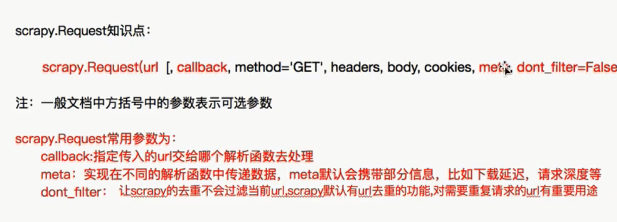
- 解答:其实是因为爬虫文件中的爬虫类继承到了Spider父类中的start_requests(self)这个方法,该方法就可以对start_urls列表中的url发起请求:
  def start_requests(self):

        for u in self.start_urls:

           yield scrapy.Request(url=u,callback=self.parse)
【注意】该方法默认的实现,是对起始的url发起get请求,如果想发起post请求,则需要子类重写该方法
def start_requests(self):

        #请求的url

        post_url = 'http://fanyi.baidu.com/sug'

        # post请求参数

        formdata = {

            'kw': 'wolf',

        }

        # 发送post请求

        yield scrapy.FormRequest(url=post_url, formdata=formdata, callback=self.parse)
3.cookies处理
对于cookies的处理就是不用处理,直接去settings.py把cookies的相关配置放开就行
4.请求传参之中间件代理池使用
一.下载中间件(Downloader Middlewares) 位于scrapy引擎和下载器之间的一层组件。
- 作用:
(1)引擎将请求传递给下载器过程中, 下载中间件可以对请求进行一系列处理。比如设置请求的 User-Agent,设置代理等
(2)在下载器完成将Response传递给引擎中,下载中间件可以对响应进行一系列处理。比如进行gzip解压等。
我们主要使用下载中间件处理请求,一般会对请求设置随机的User-Agent ,设置随机的代理。目的在于防止爬取网站的反爬虫策略。
二.UA池:User-Agent池
- 作用:尽可能多的将scrapy工程中的请求伪装成不同类型的浏览器身份。
- 操作流程:
1.在下载中间件中拦截请求
2.将拦截到的请求的请求头信息中的UA进行篡改伪装
3.在配置文件中开启下载中间件
 请求传参的使用:首先要你要明白整个scrapy模块的使用流程:在下载器和引擎之间有个下载中间件,他可以拦截到所有的请求对象和所有的响应对象,包括异常的请求和异常的响应.
这就我们提供了便利-------->使用袋里池--------->把请求对象兰拦截下来,给他换一个ip地址,再把请求对象向网络发布出去!
  还有一个要注意的是要去settings.py文件中把中间件相关的配置放开

middleware.py
#下载中间件class QiubaipageDownloaderMiddleware(object):    # Not all methods need to be defined. If a method is not defined,
    # scrapy acts as if the downloader middleware does not modify the
    # passed objects.

    @classmethod
    def from_crawler(cls, crawler):
        # This method is used by Scrapy to create your spiders.
        s = cls()
        crawler.signals.connect(s.spider_opened, signal=signals.spider_opened)
        return s
  #拦截请求
    def process_request(self, request, spider):
request.meta['proxy'] = 'https://60.251.156.116:8080'
print('this is process_request!!!')
        # Called for each request that goes through the downloader
        # middleware.

        # Must either:
        # - return None: continue processing this request
        # - or return a Response object
        # - or return a Request object
        # - or raise IgnoreRequest: process_exception() methods of
        #   installed downloader middleware will be called
        return None
  #拦截响应
    def process_response(self, request, response, spider):
        # Called with the response returned from the downloader.

        # Must either;
        # - return a Response object
        # - return a Request object
        # - or raise IgnoreRequest
        return response
  #拦截异常
    def process_exception(self, request, exception, spider):
        # Called when a download handler or a process_request()
        # (from other downloader middleware) raises an exception.

        # Must either:
        # - return None: continue processing this exception
        # - return a Response object: stops process_exception() chain
        # - return a Request object: stops process_exception() chain
request.meta['proxy'] = 'https://60.251.156.116:8080' #可以把多个代理封装成列表对象,请求时随机抽出一个来形成一个代理池
print('this is process_exception!!!')
5.请求传参之递归请求网页数据
在某些情况下,我们爬取的数据不在同一个页面中,例如,我们爬取一个电影网站,电影的名称,评分在一级页面,而要爬取的其他电影详情在其二级子页面中。
这时我们就需要用到请求传参。
爬虫文件.py

# -*- coding: utf-8 -*-

import scrapy

from bossPro.items import BossproItem

class BossSpider(scrapy.Spider):

    name = 'boss'

    # allowed_domains = ['www.xxx.com']

    start_urls = [

        'https://www.zhipin.com/job_detail/?query=python%E7%88%AC%E8%99%AB&scity=101280600&industry=&position=']

    def parse(self, response):

        li_list = response.xpath('//div[@class="job-list"]/ul/li')

        for li in li_list:

            job_title = li.xpath('.//div[@class="job-title"]/text()').extract_first()

            company = li.xpath('.//div[@class="company-text"]/h3/a/text()').extract_first()

            #那子网页url

            detail_url = 'https://www.zhipin.com' + li.xpath('.//div[@class="info-primary"]/h3/a/@href').extract_first()

            # detail_url = 'https://www.zhipin.com' + li.xpath('.//div[@class="info-primary"]/h3/a/@href').extract_first()

            # 实例化一个item对象

            item = BossproItem()

            item["job_title"] = job_title

            item['company'] = company

            # 把item传给下一个解析函数,请求传参

            yield scrapy.Request(url=detail_url, callback=self.detail_parse, meta={'item': item})

    #二级网页解析

    #要通过以及解析把item传过来我才能把数据装到容器里面

    def detail_parse(self, response):

        item = response.meta["item"]

        job_detail= response.xpath('//*[@id="main"]/div[3]/div/div[2]/div[2]/div[1]/div//text()').extract()

        job_detail=''.join(job_detail)

        item['job_detail']=job_detail

        #记得要返回,要不然pipline拿不到东西

        yield item

settings.py

#robts协议
#pipiline
#ua
都要设置好

items.py
import scrapy
class BossproItem(scrapy.Item):
    # define the fields for your item here like:
    # name = scrapy.Field()
    job_title=scrapy.Field()
    company= scrapy.Field()
    job_detail = scrapy.Field()
scrapy模块之分页处理,post请求,cookies处理,请求传参的更多相关文章
- vue.js学习之 跨域请求代理与axios传参
vue.js学习之 跨域请求代理与axios传参 一:跨域请求代理 1:打开config/index.js module.exports{ dev: { } } 在这里面找到proxyTable{}, ...
- 使用Fiddler工具发送post请求(带有json数据)以及get请求(Header方式传参)
Fiddler工具是一个http协议调试代理工具,它可以帮助程序员测试或调试程序,辅助web开发. Fiddler工具可以发送向服务端发送特定的HTTP请求以及接受服务器回应的请求和数据,是web调试 ...
- Laravel请求/Cookies/文件上传
一.HTTP请求 1.基本示例:通过依赖注入获取当前 HTTP 请求实例,应该在控制器的构造函数或方法中对Illuminate\Http\Request 类进行类型提示,当前请求实例会被服务容器自动注 ...
- SpringMVC——接收请求参数和页面传参
Spring接收请求参数: 1.使用HttpServletRequest获取 @RequestMapping("/login.do") public String login(Ht ...
- SpringMVC之接收请求参数和页面传参
1.Spring接收请求参数 1>.使用HttpServletRequest获取 @RequestMapping("/login.do") public String log ...
- .NET CORE API 使用Postman中Post请求获取不到传参问题
开发中遇到个坑 记录下. 使用Postman请求core api 接口时,按之前的使用方法(form-data , x-www-form-urlencoded)怎么设置都无法访问. 最后采用raw写入 ...
- SpringMVC接收请求参数和页面传参
接收请求参数: 1,使用HttpServletRequest获取 @RequestMapping("/login.do") public String login(HttpServ ...
- jmeter处理http请求Content-Type类型和传参方式
引言 我们在做接口测试的时候经常会忽略数据类型content-type的格式,以及参数Parameters和Body Data的区别和用途. 对于初次接触接口的同学来说,自己在发送一个http请求时, ...
- Spring Cloud feign GET请求无法用实体传参的解决方法
代码如下: @FeignClient(name = "eureka-client", fallbackFactory = FallBack.class, decode404 = t ...
随机推荐
- Luogu 3265 [JLOI2015]装备购买
BZOJ 4004 把所有不能相互表示出来的向量都买下,一定能得到最大能买的方案数. 求解线性无关向量可以高斯消元,最后没有变成$0$向量的就是基底. 本题还要求代价最小怎么办?我们只要先把所有向量按 ...
- Luogu 2403 [SDOI2010]所驼门王的宝藏
BZOJ 1924 内存要算准,我MLE了两次. 建立$n + r + c$个点,对于一个点$i$的坐标为$(x, y)$,连边$(n + x, i)$和$(n + r + y, i)$,代表这一列和 ...
- 正确设置-Dfile.encoding参数
正确设置-Dfile.encoding参数 摘自:https://blog.csdn.net/youge/article/details/6178265 2011年02月11日 10:18:00 阅读 ...
- 一、office web apps 部署
原文出处:http://www.cnblogs.com/yanweidie/p/4516164.html 原文出处:https://www.cnblogs.com/poissonnotes/p/323 ...
- HttpClient connectionTimeout
转自:http://www.cnblogs.com/carlosk/archive/2013/03/12/2956502.html 前几天服务器端的产品经理跑来问我是否有做请求超时和响应超时的处理.我 ...
- div高度自适应窗口高度布局
给body和html都设置height:100%:然后子元素用百分比设置高度
- 自己总结的,输出到前端JSON的几种方法
第一种:利用MODEL拼成要输出JSON的对象.再用JSON.NET转成JSON输出到前端(这种常用,就不举例了.) 第二种:利用table拼成JSON数据格式,再用JSON.NET转成JSON输出到 ...
- 关于PHP中的Trait
今天看PHP框架,看到Trait部分.没见过,好奇查了一下. PHP手册说的是解决多继承的问题.但是一般面向对象的语言中,解决多继承都是通过接口,PHP也有接口.貌似看上去Trait和Interfac ...
- Regex 常用的正则表达式
.校验数字的表达式 数字:^[0-9]*$ n位的数字:^\d{n}$ 至少n位的数字:^\d{n,}$ m-n位的数字:^\d{m,n}$ 零和非零开头的数字:^(0|[1-9][0-9]*)$ 非 ...
- flink学习笔记-数据源(DataSource)
说明:本文为<Flink大数据项目实战>学习笔记,想通过视频系统学习Flink这个最火爆的大数据计算框架的同学,推荐学习课程: Flink大数据项目实战:http://t.cn/EJtKh ...